

Cisco
Cisco 200-901: Automating Networks Using Cisco Platforms (CCNAAUTO)
505+ preguntas de práctica con respuestas verificadas por IA
 Preguntas reales
de examen
Preguntas reales
de examen Explicación
detallada
Explicación
detallada Lo más cercano
al examen real
Lo más cercano
al examen realImpulsado por IA
Respuestas y explicaciones verificadas por triple IA
Cada respuesta de Cisco 200-901: Automating Networks Using Cisco Platforms (CCNAAUTO) es verificada de forma cruzada por 3 modelos de IA líderes para garantizar la máxima precisión. Obtén explicaciones detalladas por opción y análisis profundo de cada pregunta.
Dominios del examen
Preguntas de práctica
Which two statements describe the advantages of using a version control system? (Choose two.)
Correct. Branching and merging are fundamental VCS features. Branches allow isolated development for features, fixes, or experiments without impacting the main code line. Merging integrates changes back after validation, often via pull requests and reviews. This supports safer development and structured release workflows, which is especially valuable when managing automation code and network configuration changes.
Incorrect. Automating builds and infrastructure provisioning is typically handled by CI/CD tools (e.g., Jenkins, GitHub Actions, GitLab CI) and automation/provisioning tools (e.g., Ansible, Terraform). A VCS can trigger these tools via webhooks or pipeline integrations, but the automation capability is not provided by the VCS itself; it primarily stores and versions the source artifacts.
Correct. A VCS enables concurrent collaboration by multiple engineers on the same repository. It tracks changes through commits, supports comparing versions (diff), and provides mechanisms to detect and resolve conflicts when changes overlap. This is a key advantage for teams managing shared automation scripts, templates, and configuration files while maintaining traceability and accountability.
Incorrect. Tracking user stories, managing backlogs, and sprint planning are functions of Agile project management/issue tracking tools such as Jira, Azure Boards, or Trello. While these tools often integrate with VCS (linking commits to tickets), they are not inherent features or advantages of a version control system.
Incorrect. Unit testing is enabled by testing frameworks and good development practices (e.g., pytest, unittest, JUnit). A VCS can store test code and track changes to tests over time, but it does not help developers write effective unit tests by itself. Testing and version control are complementary but distinct capabilities.
Análisis de la pregunta
Core Concept: This question tests understanding of Version Control Systems (VCS) such as Git, which are foundational tools in software development and network automation. In CCNAAUTO contexts, VCS is used to manage source code (Python/Ansible), templates, and even network configuration files using Infrastructure as Code (IaC) practices. Why the Answer is Correct: A is correct because branching and merging are core VCS capabilities. Branching lets engineers isolate work (new features, bug fixes, experiments) without destabilizing the main line of development (often called main/master). Merging then integrates validated changes back into the main branch, enabling controlled collaboration and release management. C is correct because VCS enables multiple engineers to work on the same files concurrently while tracking changes and handling conflicts. VCS records who changed what and when, supports diff/compare, and provides conflict detection/resolution during merges—critical when teams collaborate on automation scripts or device configuration snippets. Key Features / Best Practices: Key VCS features include commit history (audit trail), diffs, tags/releases, branching strategies (feature branches, GitFlow, trunk-based development), and pull requests/code reviews (often via platforms like GitHub/GitLab/Bitbucket). In network automation, storing configurations and automation code in Git supports repeatability, peer review, and rollback (reverting to a known-good commit). This aligns with DevOps practices and improves change control. Common Misconceptions: B may sound plausible because VCS is often used alongside CI/CD tools, but VCS itself does not automate builds or provisioning; that is the role of CI/CD systems (Jenkins, GitHub Actions, GitLab CI) and IaC/provisioning tools (Terraform, Ansible). D describes Agile project management tooling (Jira/Azure Boards), not VCS. E relates to testing practices; while tests can be stored in VCS, the VCS does not inherently enable writing unit tests. Exam Tips: For exam questions, separate “source control” capabilities (history, collaboration, branching/merging, rollback, auditability) from adjacent ecosystem tools (CI/CD pipelines, issue tracking, testing frameworks). If an option describes workflow automation, backlog management, or test authoring, it is usually not a direct VCS advantage. Focus on collaboration and change tracking as the primary VCS value.
Refer to the exhibit.
json_string = """
{
    "researcher": {
        "name": "Ford Perfect",
        "species": "Betelgeusian",
        "relatives": [
            {
                "name": "Zaphod Beeblebrox",
                "species": "Betelgeusian"
            }
        ]
    }
}
"""

my_json = json.loads(json_string)
Which Python data structure does my_json contain?
Incorrect. A map in Python typically refers to the built-in map() function returning a map iterator, used to apply a function over an iterable. json.loads() does not produce a map object. Although JSON parsing often involves iterating over items, the resulting structure is composed of dict, list, str, int/float, bool, and None—not map.
Incorrect. A list is produced when the JSON top-level element is an array (starts with [ and ends with ]). In this example, the top-level JSON element is an object (starts with { and ends with }), so the overall result is not a list. However, the nested "relatives" field is a list inside the dict.
Incorrect. “json” is not a native Python container type returned by json.loads(); it is the name of the data interchange format and the Python standard library module used for encoding/decoding. After decoding, Python represents the data using standard types like dict and list, not a special “json” type.
Correct. The outermost JSON structure is an object (curly braces), which json.loads() converts into a Python dict. The resulting my_json is a dictionary containing a key "researcher" whose value is another dict, and within that, "relatives" is a list of dicts. This dict-first mapping is fundamental for parsing API responses.
Análisis de la pregunta
Core Concept: This question tests how Python’s json module converts JSON text into native Python data structures. In automation (including Cisco platform automation), you frequently parse API responses (JSON) into Python objects so you can access fields, iterate over items, and build configuration logic. Why the Answer is Correct: json.loads(json_string) deserializes a JSON-formatted string into Python objects. At the top level, the JSON shown is an object (curly braces { ... }). In Python, a JSON object becomes a dict. Therefore, my_json is a Python dict whose keys include "researcher". Inside that dict, "researcher" maps to another dict with keys "name", "species", and "relatives". The "relatives" key maps to a list (because JSON arrays [ ... ] become Python lists), and each element of that list is a dict. Key Features / Best Practices: - JSON object -> Python dict; JSON array -> Python list; JSON string -> Python str; JSON number -> int/float; JSON true/false/null -> True/False/None. - After parsing, you access values with dictionary indexing, e.g., my_json["researcher"]["name"]. - In network automation, this is essential for working with REST APIs (Cisco DNA Center, Meraki, Webex, etc.), where responses are JSON and you must extract nested fields reliably. Common Misconceptions: - “json” is a data format/module name, not a Python runtime type returned by loads(). - Seeing a list inside the structure ("relatives") can mislead you into thinking the whole result is a list; but only that nested value is a list. - “map” is a Python function/type related to functional iteration, not used by json.loads(). Exam Tips: - Look at the outermost JSON delimiters: { } means dict; [ ] means list. - Remember loads() parses a string; load() parses a file-like object. - For API questions, expect nested dict/list combinations; identify the top-level type first, then the nested types.
Refer to the exhibit.
def process_devices(dnac, token):
    url = "https://{}/api/v1/network-device".format(dnac['host'])
    headers["x-auth-token"] = token
    response = requests.get(url, headers=headers, verify=False)
    data = response.json()
    for item in data['response']:
        print(item["hostname"]," , ", item["managementIpAddress"])
What is the function of the Python script?
Correct. The script calls the DNAC /api/v1/network-device endpoint, parses the JSON, iterates through the list under data['response'], and prints two fields for each device: hostname and managementIpAddress. This exactly matches the loop and print statement shown, with no additional processing beyond per-device output.
Incorrect. Although the script retrieves a list of devices, it never calculates len(data['response']) or maintains a counter variable. The only output is produced inside the loop, printing per-device details rather than a single total count of devices.
Incorrect. Displaying device type would require printing a field such as 'type', 'platformId', or similar. The script explicitly prints item['hostname'] and item['managementIpAddress'], so it outputs the device name (hostname), not the device type.
Incorrect. Writing to an output file would require file handling (for example, open('file','w') and write()). The script uses print(), which writes to standard output only. There is no file path, file open, or write operation present.
Análisis de la pregunta
Core Concept: This question tests understanding of how a Python script consumes a Cisco DNA Center (DNAC) REST API, parses the JSON payload, and iterates through a list of returned resources. Specifically, it uses the DNAC “network-device” endpoint to retrieve an inventory list and then prints selected fields. Why the Answer is Correct: The function builds a URL to the DNAC endpoint https://<dnac-host>/api/v1/network-device, sets the authentication header (x-auth-token), and performs an HTTP GET using requests.get(). The response is converted to a Python dictionary via response.json(). DNAC commonly returns a top-level key named 'response' containing a list of device objects. The for loop iterates over data['response'], and for each device object (item), it prints item["hostname"] and item["managementIpAddress"]. There is no counting, filtering, or file writing—only looping and printing two attributes. Key Features / Best Practices: - API usage: GET request to retrieve resources from DNAC inventory. - Authentication: x-auth-token header indicates token-based auth typical of DNAC. - JSON parsing: response.json() and indexing into data['response'] is a common DNAC pattern. - Field selection: hostname and managementIpAddress are standard inventory fields. - Note: verify=False disables TLS certificate verification; acceptable in labs but not recommended in production. Also, headers must exist (not shown), and robust scripts should check response.status_code and handle missing keys. Common Misconceptions: Option B may seem plausible because iterating could be used to count devices, but the script never increments a counter or prints a length. Option C is tempting because device “type” is a common inventory attribute, but the script prints hostname, not type. Option D is incorrect because there is no file I/O (no open(), write(), or path handling). Exam Tips: For CCNAAUTO, focus on recognizing DNAC API response structures (often {'response': [...]}) and mapping code actions to outcomes: GET retrieves data, json() parses it, a for loop iterates list items, and print outputs to stdout. Also watch for what is not present (no counting, no filtering, no persistence) to eliminate distractors.
What are two advantages of version control software? (Choose two.)
Incorrect. Version control can store binary files, but tracking and comparison are not strong advantages for binaries because traditional diff/merge is line-based and optimized for text. Many VCS workflows struggle with binary merges and meaningful comparisons. Teams often use Git LFS or separate artifact repositories for large/binary assets rather than relying on VCS as the primary binary comparison tool.
Correct. A key advantage of version control is that it centralizes the current codebase and its full change history. New team members can clone the repository to get the latest version and review commits, branches, and tags to understand evolution and rationale. This accelerates onboarding, improves transparency, and reduces dependency on undocumented knowledge about past changes.
Correct. Version control systems provide diff/compare functionality between revisions, commits, branches, or tags, especially for text-based source code and configuration files. This enables code reviews, auditing, troubleshooting regressions, and validating intended changes before deployment. In automation, being able to compare config templates or scripts across versions is a core operational benefit.
Incorrect. Wiki collaboration is not an inherent advantage of version control software itself. Some repository hosting platforms (for example, GitHub or GitLab) provide integrated wikis, but that is a separate feature of the hosting/collaboration platform, not a fundamental capability of VCS. The exam typically tests core VCS functions like history, diff, branching, and collaboration via merges.
Incorrect. Hosting old versions of packaged applications on the Internet is the role of artifact/package repositories (for example, Nexus, Artifactory, or package registries), not a core advantage of version control. While you can tag releases in VCS, distributing packaged binaries is usually handled by a dedicated artifact management system integrated with CI/CD.
Análisis de la pregunta
Core concept: Version control systems (VCS) such as Git track changes to files over time, maintain a history of revisions, and enable collaboration. In network automation (CCNAAUTO context), VCS is foundational for Infrastructure as Code (IaC): storing Ansible playbooks, Python scripts, templates, and device configuration snippets in a controlled, auditable way. Why the answers are correct: B is correct because a VCS repository contains both the current state of the code (the latest commit on a branch) and the full history of changes. New team members can clone the repository, review commit history, understand why changes were made, and quickly become productive. This supports onboarding, knowledge transfer, and reduces “tribal knowledge.” C is correct because VCS tools are designed to compare revisions (diff) of source code and other text-based files. Diffs show exactly what changed between commits, branches, or tags, enabling code review, troubleshooting regressions, and validating intended changes before deployment. Key features and best practices: Common VCS capabilities include commit history, branching/merging for parallel work, tagging releases, pull/merge requests for peer review, and blame/annotate to identify when and by whom a line changed. Best practice in automation is to treat configs and scripts as text, use meaningful commit messages, and integrate VCS with CI pipelines (linting, unit tests, and automated deployment checks). Common misconceptions: Some assume VCS is equally strong for binary file comparison (A). While binaries can be stored, meaningful line-by-line diffs and merges are typically limited; many teams use Git LFS or artifact repositories for large/binary assets. Others confuse VCS with collaboration platforms that may include wikis (D) or package hosting (E). Those are features of platforms like GitHub/GitLab or artifact registries, not core advantages of version control itself. Exam tips: For exam questions, focus on core VCS benefits: history, collaboration, branching/merging, and diff/compare for text-based source. Separate “VCS” from adjacent tooling (wiki, package registries, artifact hosting). If an option describes a platform add-on rather than version control behavior, it’s likely incorrect.
Which two use cases are supported by Meraki APIs? (Choose two.)
This option is misleading because it combines location-aware applications with Wi-Fi and LoRaWAN devices in a way that is broader than the standard Meraki API use cases typically tested. Meraki does have location and scanning-related capabilities, but the phrasing here overextends that into a generalized cross-device application-building claim. In exam terms, this is less directly supported than the clearly documented Dashboard management and camera API use cases. Because the question asks for the best two supported use cases, this option is not the strongest correct choice.
Meraki supports splash pages and captive portal configuration, but building a custom captive portal specifically for mobile apps is not a standard Meraki API use case. The platform allows configuration of authentication and splash page behavior, yet it does not present this as a general-purpose API framework for custom mobile captive portal development. The wording suggests a deeper application platform capability than Meraki APIs actually provide. For that reason, this option should be rejected.
This is a core and well-known Meraki API use case. The Dashboard API is specifically designed to configure and manage Meraki organizations, networks, and devices programmatically. Administrators can automate tasks such as claiming devices, creating networks, updating SSIDs, applying firewall rules, and retrieving operational state. That makes configuring network devices via the Dashboard API an unambiguously supported use case.
Meraki devices are managed appliances, not general-purpose compute platforms. The APIs are intended for configuration, monitoring, analytics, and integration with Meraki-managed services rather than deploying arbitrary applications onto the devices themselves. There is no standard Meraki API workflow for pushing custom applications to run on switches, access points, cameras, or security appliances. This makes the option clearly incorrect.
Meraki MV cameras support API-based integrations that allow developers to work with camera video resources, including obtaining links or access related to video/live viewing workflows. Camera APIs are a recognized Meraki integration area and are distinct from general network device management. While the exact mechanism may not be a raw generic stream endpoint in every context, retrieving live camera video access is a supported Meraki API use case. Therefore this option best matches Meraki camera API capabilities.
Análisis de la pregunta
Core concept: This question tests recognition of practical use cases supported by Cisco Meraki APIs. Meraki provides APIs for cloud-based network management through the Dashboard API and also exposes camera-related capabilities for Meraki MV devices, including access to video resources and integrations. The correct choices are the ones that align with documented Meraki API families rather than capabilities Meraki appliances do not provide. A common misconception is to overgeneralize location analytics wording or assume Meraki devices can host arbitrary applications. Exam tip: when evaluating Meraki API questions, think in terms of management/configuration, telemetry/analytics, and camera integrations—not app deployment or unsupported custom platform behavior.
¿Quieres practicar todas las preguntas en cualquier lugar?
Descarga Cloud Pass — incluye exámenes de práctica, seguimiento de progreso y más.
Which two elements are foundational principles of DevOps? (Choose two.)
Correct. DevOps is strongly associated with removing organizational silos by creating cross-functional teams and shared ownership across development and operations (often including security). This improves collaboration, shortens feedback loops, and reduces handoff friction. On exams, “cross-functional teams” and “shared responsibility” are classic DevOps cultural principles.
Incorrect. Microservices can complement DevOps by enabling independent deployments and smaller change sets, but they are an architectural style, not a foundational DevOps principle. DevOps can be implemented with monoliths or microservices. Treat microservices as a possible outcome/choice, not a definition of DevOps.
Incorrect. Containers are a deployment technology that often supports DevOps goals (portability, consistency, faster deployments), but DevOps does not require containers. Many DevOps implementations use VMs, bare metal, or platform services without containers. Exams typically classify containers as tooling, not foundational principles.
Correct. Automation is central to DevOps because it enables repeatable, reliable, and fast delivery (CI/CD, automated testing, IaC). The phrasing “automating over documenting” is a bit absolute, but it reflects the DevOps preference to automate repeatable processes rather than rely on manual runbooks. Documentation still matters, but automation is foundational.
Incorrect. Optimizing infrastructure cost is a valid business goal and may be improved through DevOps/FinOps practices, but it is not a foundational DevOps principle. DevOps primarily focuses on delivery speed, stability, collaboration, and continuous improvement; cost optimization is secondary and context-dependent.
Análisis de la pregunta
Core concept: DevOps is a cultural and operational approach that improves the speed, quality, and reliability of delivering software/services by aligning people, process, and technology. Foundational principles commonly emphasized in DevOps literature (e.g., CALMS: Culture, Automation, Lean, Measurement, Sharing) include breaking down silos via cross-functional collaboration and increasing automation to enable repeatable, fast, low-risk delivery. Why the answers are correct: A is correct because DevOps explicitly targets the traditional separation between Development and Operations (and often Security) by forming cross-functional teams and shared ownership. This reduces handoff delays, misaligned incentives, and “throw it over the wall” behaviors. Cross-functional teams enable faster feedback loops, better incident response, and continuous improvement. D is correct because automation is a core DevOps enabler. Automating builds, tests, deployments, and infrastructure provisioning (CI/CD and Infrastructure as Code) reduces human error, increases consistency, and makes frequent releases feasible. While documentation remains important, DevOps prioritizes automating repeatable work so teams can focus on design, reliability, and learning. Key features/best practices: DevOps practices include CI/CD pipelines, automated testing, configuration management, IaC (e.g., Ansible/Terraform), monitoring/observability, and blameless postmortems. Organizationally, it includes shared metrics (lead time, deployment frequency, change failure rate, MTTR) and shared responsibility for uptime and customer outcomes. Common misconceptions: Microservices (B) and containers (C) are popular with DevOps but are not foundational principles; they are architectural/deployment choices that can support DevOps goals but are not required. Cost optimization (E) is a business objective and may be improved by DevOps, but it is not a defining principle. Exam tips: When asked for “foundational principles,” choose culture/organizational alignment and automation/continuous delivery concepts rather than specific technologies (containers) or architectures (microservices). Look for keywords like “breaking silos,” “shared ownership,” “automation,” “continuous integration,” and “continuous delivery.”
Which statement describes the benefit of using functions in programming?
Incorrect. Functions provide abstraction, meaning a developer can call a function without fully understanding its internal implementation (for example, using a library function). While reading a function can help understanding, there is no guarantee or enforcement that a developer understands the inner logic before using it. The key benefit is encapsulation and reuse, not ensuring comprehension.
Incorrect. Functions are a general programming construct used to organize and reuse code. They can be used to implement cryptographic algorithms, but that is a specific application, not an inherent benefit of functions. The statement also implies secrecy/encryption as a primary purpose, which is unrelated to why functions exist in programming.
Correct. Functions enable decomposition (splitting a complex problem into smaller, manageable parts) and reuse (calling the same logic multiple times). This reduces duplicated code, improves readability, and makes maintenance easier—changes are made in one place. In network automation, this is crucial for repeatable tasks like API calls, parsing outputs, and validation steps.
Incorrect. Storing mutable values is the role of variables, data structures, or objects. Functions may create local variables or modify external state, but their purpose is to encapsulate behavior/logic. Confusing functions with storage is a common beginner mistake; functions define actions, while variables hold data.
Análisis de la pregunta
Core Concept: This question tests understanding of why functions (procedures/methods) are used in programming. A function encapsulates a reusable block of logic behind a name and interface (parameters and return values). This supports modular design, readability, maintainability, and testability—key software engineering principles that show up frequently in network automation scripts. Why the Answer is Correct: Option C correctly states two primary benefits: decomposition and reuse. Functions let you break a large automation task (for example, “collect device facts, validate config, push changes, verify state”) into smaller, simpler units. Each unit can be implemented, tested, and reasoned about independently. Functions also reduce code repetition (DRY principle). Instead of copying the same REST call, error handling, or parsing logic throughout a script, you write it once and call it many times, improving consistency and reducing bugs. Key Features / Best Practices: Functions provide abstraction (callers don’t need to know internal steps), clear interfaces (inputs/outputs), and easier unit testing (test a function with known inputs). In Cisco automation contexts, you might create functions like get_token(), get_interfaces(), push_config(), or validate_response(). This aligns with common best practices in Python and general software design: modularity, separation of concerns, and reuse. Common Misconceptions: A may sound plausible because functions can hide complexity, but they do not “ensure” the developer understands the inner logic; in fact, abstraction allows use without full internal knowledge. B confuses functions with cryptography; functions can implement encryption, but that is not their general benefit. D describes variables/state, not functions; functions may use local variables, but they are not primarily for storing mutable values. Exam Tips: When asked about functions, look for keywords like “modularity,” “reuse,” “reduce repetition,” “readability,” “maintainability,” and “abstraction.” If an option talks about storage (variables), security/crypto, or guarantees about understanding, it’s usually incorrect. For CCNAAUTO-style questions, connect functions to automation workflows: reusable API calls, standardized error handling, and repeatable verification steps.
What is the purpose of a MAC address?
Incorrect. A switch is not uniquely identified by a single MAC address in the general sense. Switches have multiple MAC addresses (per port) and may also have a separate management/interface MAC. While a switch learns and uses MAC addresses to forward frames, the purpose of a MAC address is to identify a Layer 2 interface, not specifically “a switch.”
Incorrect. Routers operate primarily at Layer 3 and are identified for routing purposes by IP addresses. Routers do have MAC addresses on their Ethernet interfaces, but those MACs identify the router’s interfaces on the local LAN, not the router as a whole. The router rewrites Layer 2 headers at each hop, reinforcing the local scope of MAC addresses.
Correct. A MAC address is intended to uniquely identify a network interface (NIC or Layer 2 interface) within a LAN/broadcast domain so Ethernet frames can be delivered to the correct destination. Switches learn MAC addresses and map them to ports, enabling efficient unicast forwarding. This is the fundamental role of MAC addressing in Ethernet networks.
Incorrect. Devices on the Internet are not uniquely identified by MAC addresses because MAC addresses are not routable and are only relevant within the local Layer 2 segment. Across routed networks, the Layer 2 header changes at every hop. End-to-end identification and routing on the Internet rely on IP addresses (and higher-layer identifiers like DNS names).
Análisis de la pregunta
Core Concept: A MAC (Media Access Control) address is a Layer 2 identifier used on Ethernet and similar LAN technologies. It is typically a 48-bit value (EUI-48) assigned to a network interface (NIC) and is used for local frame delivery within the same broadcast domain/VLAN. Why the Answer is Correct: Option C is correct because the MAC address uniquely identifies a network interface on a LAN segment. Switches build a MAC address table (CAM table) by learning source MAC addresses on ingress ports, then forward frames based on the destination MAC address. This is how Layer 2 forwarding works: frames are delivered to the correct interface within the local network without needing IP routing. Key Features / How It’s Used: - Layer 2 forwarding: Ethernet frames contain source and destination MAC addresses. - Switch learning and forwarding: switches learn MAC-to-port mappings and use them to make forwarding decisions. - Scope: MAC addressing is local to the Layer 2 domain; when traffic crosses a router, the Layer 2 header (and thus MAC addresses) is rewritten for the next hop. - Address types: unicast (one interface), multicast (group), broadcast (FF:FF:FF:FF:FF:FF). Common Misconceptions: - People often think MAC addresses identify a “device” (like a switch or router). In reality, they identify an interface. A single device can have multiple MAC addresses (one per Ethernet interface, plus virtual interfaces such as SVIs, subinterfaces, or virtual MACs for HSRP/VRRP). - MAC addresses do not identify devices on the Internet. Internet-scale uniqueness and routing are handled by Layer 3 (IP addresses). MAC addresses are not routable across the Internet. Exam Tips: - Remember: MAC = Layer 2, local delivery; IP = Layer 3, end-to-end routing. - If the question says “in a LAN” and refers to switching/frames, think MAC. If it says “on the Internet” or “across networks,” think IP. - Watch wording: “network interface” is the precise term and is commonly the correct choice in exam questions.
Refer to the exhibit.
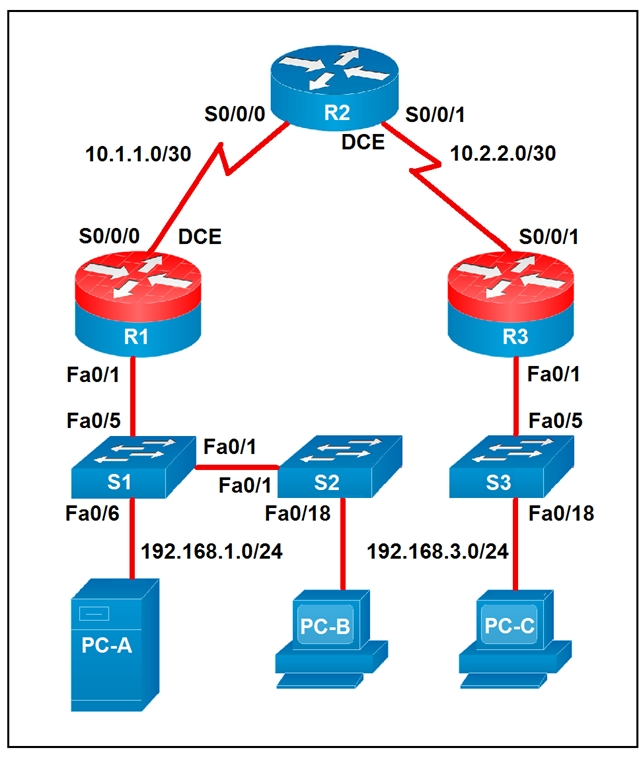
Which two statements about the network diagram are true? (Choose two.)
False. PC-B is connected to the LAN labeled 192.168.1.0/24, which means the subnet uses a 24-bit network prefix. A statement claiming 18 bits are dedicated to the network portion would correspond to a /18 mask, not /24. Therefore the diagram contradicts this option directly.
This statement is true because router R2 has two separate serial interfaces shown in the diagram: S0/0/0 toward R1 and S0/0/1 toward R3. Each interface is connected to a different /30 WAN subnet, 10.1.1.0/30 and 10.2.2.0/30 respectively. The topology explicitly labels both serial connections, so at least one router indeed has two connected serial interfaces. In fact, R2 is the router that satisfies this condition.
False. R1 and R3 do not share a common subnet with each other. R1 connects to R2 using 10.1.1.0/30, while R3 connects to R2 using 10.2.2.0/30, and those are distinct Layer 3 networks. Since each router interface belongs to its own labeled /30 subnet, R1 and R3 are not in the same subnet.
This statement is true because both PC-A and PC-B are shown on the 192.168.1.0/24 network. PC-A connects through S1 and PC-B connects through S2, and S1 and S2 are linked together at Layer 2, extending the same LAN segment. Since no router separates those two hosts, they remain in the same IP subnet. Therefore PC-A and PC-B share the same subnet.
False. PC-C is on subnet 192.168.3.0/24, and a /24 contains 256 total IP addresses. However, two of those addresses are reserved for the network and broadcast addresses, leaving only 254 usable host addresses in traditional IPv4 subnetting. So the subnet cannot contain 256 hosts.
Análisis de la pregunta
Core concept: Determine subnet membership and interface connectivity from the topology labels and masks shown in the diagram. Why correct: R2 clearly has two active serial links, and PC-A plus PC-B are both attached to the same 192.168.1.0/24 Layer 2 domain through interconnected switches, so those two statements are true. Key features: The WAN links are separate /30 point-to-point subnets, while the left-side LAN is a shared /24 subnet extended across S1 and S2. Common misconceptions: Confusing total addresses with usable hosts in a /24, or assuming routers connected through another router share a subnet. Exam tips: Read the subnet labels carefully, distinguish Layer 2 switch extension from Layer 3 routing boundaries, and remember that a /24 provides 254 usable host addresses in standard IPv4 subnetting.
A developer is reviewing a code that was written by a colleague. It runs fine, but there are many lines of code to do a seemingly simple task repeatedly. Which action organizes the code?
Removing “unnecessary tests” is not a standard approach to organizing code and can reduce reliability. Tests (unit/integration) are typically kept or improved during refactoring to ensure behavior doesn’t change. The problem described is duplicated implementation, not excessive validation logic. Eliminating tests may make the code shorter, but it does not improve structure, reuse, or maintainability and is generally a poor practice.
Reverse engineering and rewriting the logic is excessive and risky, especially since the code “runs fine.” Good refactoring is behavior-preserving and incremental: you improve structure without changing what the program does. A full rewrite increases the chance of introducing defects and is not the typical answer for organizing repeated code. Exam-wise, rewrites are rarely the best first step when a targeted refactor solves the issue.
Extracting repeated code into functions is the classic refactoring technique for duplication. A well-named function encapsulates the repeated steps, accepts parameters for the parts that vary, and returns results consistently. This improves readability, reduces maintenance effort, and supports reuse across scripts and modules—common in network automation where the same API call patterns or parsing logic recur in multiple places.
Loops reduce repetition when the same operation is performed over a list (for example, configuring many devices or interfaces). However, loops alone don’t necessarily “organize” code when the repetition occurs in multiple places or represents a reusable procedure. Often, the best design is a function that performs the task and a loop that calls it for each item. Since the question emphasizes organizing repeated pieces, functions are the more direct answer.
Análisis de la pregunta
Core Concept: This question tests code organization and maintainability concepts: identifying duplicated logic (“repeated code”) and applying abstraction to improve readability, reuse, and long-term support. In software development (including network automation scripts), repeated blocks are a classic “code smell” that should be addressed with refactoring. Why the Answer is Correct: Option C is correct because creating functions (or methods) is a primary way to organize repeated logic. When the same sequence of steps appears multiple times, extracting it into a function centralizes that behavior behind a clear name and interface (parameters/return values). This reduces duplication, makes the intent clearer, and ensures that future changes are made in one place rather than many—critical in automation where small changes (API endpoints, payload formats, authentication) can otherwise require editing dozens of lines. Key Features / Best Practices: - DRY principle (Don’t Repeat Yourself): minimize duplication by encapsulating repeated behavior. - Abstraction and modularity: functions provide a reusable unit with inputs/outputs. - Testability: functions are easier to unit test than scattered repeated blocks. - Maintainability: updates (e.g., changing a REST call header or error handling) are applied once. In Cisco automation contexts, this often means wrapping repeated API calls, device connection logic, parsing routines, or configuration templates into functions (or classes/modules) and reusing them across workflows. Common Misconceptions: - Loops (Option D) can reduce repetition only when the repeated code differs mainly by iterating over a list of items. If the repetition is the same “procedure” used in multiple places, functions are the more general organizing tool. Often the best solution is both: a function that performs the task, called inside a loop. - Removing tests (Option A) is not “organizing” code; it risks reducing correctness and is unrelated to duplication. - Reverse engineering and rewriting logic (Option B) is unnecessary and risky when the code already works; refactoring should be incremental and behavior-preserving. Exam Tips: For CCNAAUTO-style questions, map keywords to concepts: “repeated code” strongly points to refactoring via functions/modules (DRY). Choose loops when the question emphasizes iterating over a collection (devices, interfaces, VLANs). Choose functions when the emphasis is organizing repeated procedures and improving maintainability.
¿Quieres practicar todas las preguntas en cualquier lugar?
Descarga Cloud Pass — incluye exámenes de práctica, seguimiento de progreso y más.
Refer to the exhibit.
---
- hosts: switch2960cx
  gather_facts: no

  tasks:
    - ios_l2_interface:
        name: GigabitEthernet0/1
        state: unconfigured

    - ios_l2_interface:
        name: GigabitEthernet0/1
        mode: trunk
        native_vlan: 1
        trunk_allowed_vlans: 6-8
        state: present

    - ios_vlan:
        vlan_id: 6
        name: guest-vlan
        interfaces:
          - GigabitEthernet0/2
          - GigabitEthernet0/3

    - ios_vlan:
        vlan_id: 7
        name: corporate-vlan
        interfaces:
          - GigabitEthernet0/4
Which two statements describe the configuration of the switch after the Ansible script is run? (Choose two.)
Correct. Gi0/1 is configured as a trunk with trunk_allowed_vlans: 6-8, so VLAN 6 and VLAN 7 traffic from access ports assigned to those VLANs can be carried over Gi0/1 to another device. The trunk provides a path for those VLANs off-switch (or to another switch), assuming the far end is also trunking and permits the same VLANs.
Incorrect. Although the first task sets Gi0/1 to state: unconfigured, the very next task configures Gi0/1 with mode: trunk and state: present. In Ansible, tasks are applied in order, so the final configuration is the trunk configuration, not an unconfigured interface.
Correct. The ios_vlan task for vlan_id: 6 includes interfaces Gi0/2 and Gi0/3. This results in those interfaces being placed into VLAN 6 as access ports (typical IOS behavior when assigning a switchport to a VLAN without specifying trunking). Therefore Gi0/2 and Gi0/3 are access ports in VLAN 6.
Incorrect. A trunk on Gi0/1 does not enable traffic to flow between ports 0/2 to 0/5 by itself. Ports communicate at Layer 2 only if they are in the same VLAN. Here, Gi0/2 and Gi0/3 are in VLAN 6, Gi0/4 is in VLAN 7, and nothing is stated about Gi0/5. Inter-VLAN traffic would require routing, not just a trunk.
Incorrect. The playbook does not reference GigabitEthernet0/6 at all, and there is no configuration that would connect traffic from Gi0/2 and Gi0/3 specifically to Gi0/6. The only uplink-like configuration shown is the trunk on Gi0/1, which carries VLANs 6-8, not a mapping to Gi0/6.
Análisis de la pregunta
Core concept: This question tests Ansible network automation behavior (idempotent configuration) using Cisco IOS modules, specifically how ios_l2_interface and ios_vlan affect switchport mode/VLAN membership and what a trunk’s allowed VLAN list implies for traffic forwarding. Why the answer is correct: Task 1 sets GigabitEthernet0/1 to state: unconfigured, which removes L2 switchport configuration (effectively a clean baseline). Task 2 then explicitly configures Gi0/1 as a trunk with native VLAN 1 and allowed VLANs 6-8. That means VLANs 6, 7, and 8 are permitted to traverse Gi0/1 (tagged, except native VLAN 1 untagged). Therefore, any access ports placed into VLANs 6 or 7 can have their VLAN traffic carried out Gi0/1 toward another switch/router-on-a-stick, etc. This supports statement A. Task 3 creates VLAN 6 named guest-vlan and assigns interfaces Gi0/2 and Gi0/3 under the VLAN’s interface list. On Cisco IOS, assigning an interface to a VLAN via these automation modules results in those ports being configured as access ports in that VLAN (unless otherwise specified as trunk). Thus Gi0/2 and Gi0/3 become access ports for VLAN 6, supporting statement C. Key features / best practices: - The playbook is sequential: later tasks override earlier ones (unconfigured then present trunk). - Trunk allowed VLAN list controls which VLANs can be forwarded on the trunk; it does not magically bridge all ports together. - VLAN membership is per-VLAN broadcast domain; inter-VLAN traffic still requires L3 routing. Common misconceptions: - Confusing “trunk exists” with “all ports can talk to each other.” A trunk only carries VLANs between devices; it does not provide inter-VLAN connectivity. - Misreading “unconfigured” as the final state for Gi0/1; it is immediately reconfigured as a trunk in the next task. Exam tips: - Always evaluate Ansible tasks in order and determine the final intended state. - Remember: access ports in the same VLAN can communicate at Layer 2; different VLANs require Layer 3. - For trunk questions, focus on native VLAN and allowed VLANs to infer what traffic can traverse the link.
Refer to the exhibit.
def get_result()

        url =”https://sandboxdnac.cisco.com/dna/system/api/v1/auth/token”

        resp = requests.post(url, auth=HTTPBasicAuth(DNAC_USER, DNAC_PASSWORD))

        result = resp.json()[‘Token’]

        return result
What does the Python function do?
Incorrect. The function uses HTTPBasicAuth(DNAC_USER, DNAC_PASSWORD) to authenticate the POST request to the DNAC token endpoint, but it does not return the Basic Auth object or credentials. Basic authentication is only the method used to obtain the token; the returned value is taken from the JSON response body, not from the Basic Auth mechanism itself.
Incorrect. DNAC_USER and DNAC_PASSWORD are variables supplied to HTTPBasicAuth as inputs to the request. The function never returns these values. Instead, it parses the HTTP response JSON and returns the value of the 'Token' field, which is generated by DNAC after validating the provided username and password.
Incorrect. There is no file I/O in the function—no open(), no reading of a JSON file, and no posting of a locally stored token. The token is obtained directly from the DNAC API response to the POST request. The only POST is to the DNAC URL to request a new token using Basic Auth.
Correct. The function posts to the Cisco DNA Center authentication endpoint and extracts resp.json()['Token'], then returns it. This returned value is an authorization/access token used to authenticate subsequent DNAC API calls (commonly by placing it in an HTTP header such as X-Auth-Token). This is a standard first step in DNAC API automation.
Análisis de la pregunta
Core Concept: This function demonstrates the common API authentication pattern used by Cisco DNA Center (DNAC): obtain an access/authorization token by calling the DNAC authentication endpoint. In many Cisco platform APIs, you first authenticate (often with HTTP Basic Auth) to receive a token, then you include that token in subsequent API calls (typically in an HTTP header such as X-Auth-Token). Why the Answer is Correct: The function builds the DNAC token URL ("/dna/system/api/v1/auth/token") and sends an HTTP POST request using requests.post() with HTTPBasicAuth(DNAC_USER, DNAC_PASSWORD). DNAC validates those credentials and returns a JSON response containing a token. The code then parses the JSON body (resp.json()) and extracts the value associated with the 'Token' key, stores it in result, and returns it. Therefore, the function’s purpose is to return an authorization token that can be used to authenticate future API requests to DNAC. Key Features / Best Practices: - Token-based authentication: After retrieving the token, clients typically send it on later requests (for DNAC, commonly as the X-Auth-Token header). - Separation of concerns: A dedicated function to fetch tokens is a standard automation practice. - Error handling is missing: In production code, you should check resp.status_code, handle exceptions (timeouts, connection errors), and validate that 'Token' exists in the JSON. - Secure handling: DNAC_USER/DNAC_PASSWORD should be stored securely (environment variables, vault) rather than hard-coded. Common Misconceptions: Option A can look tempting because HTTPBasicAuth is used, but the function does not “return HTTP Basic Authentication”; it uses Basic Auth only as a mechanism to obtain a token. Option B is incorrect because credentials are inputs, not outputs. Option C is incorrect because there is no local file read; the token is retrieved from the HTTP response. Exam Tips: For CCNAAUTO, recognize the workflow: (1) authenticate to get a token, (2) store/return token, (3) use token in headers for subsequent REST calls. Also note the DNAC token endpoint path and that the response JSON includes a token field that scripts commonly extract and reuse.
Before which process is code review performed when version control is used?
Checkout is the act of retrieving a branch/commit into a working directory to view or modify files. Code review is not typically performed before checkout; reviewers must usually access the code (via a PR diff or by checking out the branch) to review it. Checkout is a prerequisite to making changes, not a gate that review controls.
Merge is the integration of changes from one branch into another (often into a protected shared branch like main). Code review is commonly a required step before this integration, implemented through Pull Requests/Merge Requests with approval rules and CI checks. This prevents unreviewed or failing changes from entering the shared codebase.
Committing records changes into version control history, often locally and frequently during development. While developers may self-review before committing, formal team code review is generally not required before each commit. The formal review process is usually tied to a PR/MR and enforced before merging into a shared branch.
Branching creates an isolated line of development (feature branch, bugfix branch, etc.). Code review is not performed before branching; branching is a workflow step to enable parallel work. Review occurs after changes are made on the branch and proposed for integration, typically right before merge.
Análisis de la pregunta
Core Concept: This question tests understanding of where code review fits in a version control workflow (Git-style), especially in team-based development and automation projects. Code review is a quality gate used to validate changes for correctness, security, style, and maintainability before those changes become part of a shared code line. Why the Answer is Correct: Code review is typically performed before the merge of code into a shared branch (for example, merging a feature branch into main/master or a release branch). In modern workflows, developers commit changes to a local/feature branch, push them to a remote repository, and then open a Pull Request (PR) / Merge Request (MR). The review happens on that PR/MR, and only after approval (and often passing CI tests) is the code merged. Therefore, the process that code review is performed before is the merge. Key Features / Best Practices: Common mechanisms include PR/MR approvals, required reviewers, branch protection rules, and CI checks (linting, unit tests, security scans) that must pass before merge. In network automation (CCNAAUTO context), this helps prevent pushing broken templates, incorrect API calls, or unsafe configuration changes into production pipelines. Tools like GitHub, GitLab, and Bitbucket implement these gates, and many organizations require at least one approval plus successful CI before allowing merges. Common Misconceptions: Some may think review happens before committing, but commits are often made locally and frequently; reviewing every local commit would be impractical. Others may think review happens before checkout or branching, but those are preparatory steps and not quality gates. Review is most valuable when comparing a set of proposed changes against the target branch right before integration. Exam Tips: Associate “code review” with PR/MR workflows and “merge gates.” If you see terms like branch protection, required approvals, or CI status checks, they almost always apply to controlling merges into protected branches (main/master). Remember: commit early/often locally; review before integrating into shared code via merge.
Which two concepts describe test-driven development? (Choose two.)
Incorrect. In TDD, developers write automated tests (typically unit tests) as part of the development process. User acceptance testers may define acceptance criteria or run UAT, but they do not typically develop the test requirements that drive TDD’s test-first cycle. This option describes a QA/UAT process rather than developer-led test-first development.
Correct. TDD provides a strong safety net for refactoring because the automated tests verify that behavior remains unchanged after internal code improvements. In the “Red-Green-Refactor” loop, refactoring is an explicit step: once tests pass, developers clean up design, remove duplication, and improve maintainability while relying on tests to catch regressions.
Incorrect. Writing tests only when code is ready for release is the opposite of TDD. TDD requires tests to be written before (or at least alongside) implementation, continuously guiding design and catching defects early. Late test creation aligns more with traditional QA phases and increases the risk of discovering issues when changes are more expensive.
Incorrect. Incremental testing of release candidates describes iterative validation during packaging/release management, not TDD. TDD drives implementation at the code level with small unit tests written first, not by testing “release candidates.” While CI/CD may test builds frequently, TDD’s defining trait is test-first development guiding code design.
Correct. Writing a test before writing the production code is the hallmark of TDD. The test defines the expected behavior, initially fails (red), and then the developer writes the minimal code to make it pass (green). This approach clarifies requirements, improves design, and encourages small, verifiable increments.
Análisis de la pregunta
Core Concept: Test-driven development (TDD) is a software development practice where automated tests are written first, then the minimal code is implemented to make those tests pass, followed by refactoring. The classic cycle is “Red-Green-Refactor”: write a failing test (red), write code to pass it (green), then improve the design without changing behavior (refactor). Why the Answer is Correct: Option E is correct because writing the test before writing the production code is the defining characteristic of TDD. The test expresses the intended behavior (requirements as executable specifications) and guides implementation. Option B is correct because TDD strongly enables safe refactoring. With a reliable automated test suite, developers can restructure code (improve readability, reduce duplication, change internal design) while quickly verifying that external behavior remains correct. Key Features / Best Practices: TDD emphasizes small, incremental steps: add one test, implement the simplest code to pass, then refactor. Tests are typically unit tests (fast, isolated) and are run frequently in CI pipelines. In network automation contexts (CCNAAUTO), TDD might validate parsing logic, API client behavior, idempotency of configuration generation, and expected device state changes using mocks/sandboxes. Common Misconceptions: A common confusion is mixing TDD with user acceptance testing (UAT). UAT is usually performed by business stakeholders or QA near the end of a release, whereas TDD is a developer-centric practice performed continuously during coding. Another misconception is that tests are written “when code is ready for release” (that aligns more with late-stage QA) or that development is driven by “incremental testing of release candidates” (more like iterative release validation, not test-first development). Exam Tips: Look for keywords: “write tests first,” “Red-Green-Refactor,” “small increments,” and “refactoring safety net.” If an option describes tests being created late (release time) or by acceptance testers, it is not TDD. For CCNAAUTO, connect TDD to automation reliability: tests protect against regressions when changing scripts, templates, or API integrations.
Refer to the exhibit.
#!/bin/bash
read ndir
while [ -d "$ndir" ]
do
cd $ndir
done
mkdir $ndir
What is the action of the Bash script that is shown?
Incorrect. The script does not iterate over all directories in the current folder (there is no `for` loop, no glob like `*`, and no directory listing). It only uses a single user-provided directory name (`ndir`) and repeatedly checks for that specific directory name as it changes into it.
Correct. The script waits for input (`read ndir`). If a directory with that name exists, it `cd`s into it and repeats the check from the new location, effectively walking down a chain of nested directories with the same name. When it finds a level where that directory does not exist, it exits the loop and creates it with `mkdir $ndir`.
Incorrect. It does not always “go into the directory entered and create a new directory with the same name” at that same level. If the directory exists, it goes into it and keeps going deeper as long as another directory with the same name exists. The `mkdir` occurs only after the loop ends, at the deepest level reached.
Incorrect. `$ndir` is a variable expanded by the shell; it is not a literal directory name “$ndir”. Also, the script does not necessarily go into a directory called `$ndir` once and then create another `$ndir` alongside it; it may traverse multiple nested levels before creating the missing directory.
Análisis de la pregunta
Core concept: This question tests basic Bash control flow and filesystem tests used in automation scripts. Specifically: reading user input (`read`), testing whether a directory exists (`-d`), looping (`while`), changing directories (`cd`), and creating directories (`mkdir`). Why correct: The script first waits for user input with `read ndir`, storing the entered string in the variable `ndir`. Then it evaluates `while [ -d "$ndir" ]`: as long as a directory with that name exists relative to the current working directory, it executes the loop body. Inside the loop, `cd $ndir` changes into that directory, so the next test is performed one level deeper. When it reaches a location where no subdirectory with that same name exists, the loop stops and `mkdir $ndir` creates that missing directory there. Key features: The script follows a single user-supplied directory name, not all directories. Because `cd` changes the working directory, each subsequent `-d "$ndir"` test is relative to the new location. The final `mkdir` therefore occurs at the deepest reachable level in a chain of nested directories with the same name. Common misconceptions: A common mistake is to think the script creates the directory in the original starting folder, but the repeated `cd` changes where the final `mkdir` runs. Another misconception is that it loops through every directory in the current folder; it does not, because there is no iteration over a list of directory names. Exam tips: Remember that `read` pauses for user input, `-d` checks whether a path is an existing directory, and `cd` changes the context for all later relative path operations. On exam questions, always track the current working directory after each loop iteration before deciding where a file or directory will be created.
¿Quieres practicar todas las preguntas en cualquier lugar?
Descarga Cloud Pass — incluye exámenes de práctica, seguimiento de progreso y más.
A developer is writing an application that uses a REST API and the application requires a valid response from the API. Which element of the response is used in the conditional check?
The response body contains the resource representation (often JSON/XML) or error details. While some APIs include a "success" flag or error message in the body, this is not standardized and may be absent (for example, 204 No Content). Best practice is to check the HTTP status code first, then parse the body only when appropriate.
Headers carry metadata such as Content-Type, Location (for newly created resources), authentication challenges (WWW-Authenticate), and rate-limit information. They can influence behavior (e.g., follow a Location URL after 201), but they are not the primary element used to determine whether the request succeeded. That determination is standardized via the status code.
A link is typically a URL reference provided either in the body (HATEOAS-style) or via headers like Link. Links help clients discover related resources or pagination, but they do not indicate whether the API call was valid or successful. Success/failure is still communicated through the HTTP status code.
The URL is part of the request, identifying the endpoint and resource path. It is not an element of the response used to validate success. A correct URL can still produce failures (401, 403, 500), and an incorrect URL often yields 404. The client should evaluate the response status code to determine outcome.
The HTTP status code is the standard mechanism for conditional checks in REST clients. It tells the client whether the request succeeded (2xx), requires redirection (3xx), failed due to client issues (4xx), or failed due to server issues (5xx). Automation scripts and applications typically branch logic based on these codes before processing any response body.
Análisis de la pregunta
Core Concept: This question tests understanding of how REST clients determine whether an API call succeeded. In HTTP-based REST APIs, the primary, standardized indicator of success or failure is the HTTP status code returned in the response start line (e.g., 200, 201, 204, 400, 401, 404, 500). Why the Answer is Correct: Applications commonly perform a conditional check against the response status code to decide the next action: parse the body, retry, refresh authentication, or raise an error. For example, a client may proceed only if status is 200 OK (successful GET) or 201 Created (successful POST). If the status is 401 Unauthorized, the client may obtain a new token; if 429 Too Many Requests, it may back off and retry. This is the most reliable and consistent mechanism because status codes are part of the HTTP specification and are intended specifically for this purpose. Key Features / Best Practices: - Use status codes as the first gate: check for 2xx success before parsing the body. - Handle common classes: 2xx success, 3xx redirects, 4xx client errors, 5xx server errors. - Combine with error payloads when present: many APIs include details in the body (e.g., JSON error object), but the decision point is still typically the status code. - In automation (Cisco platforms, controllers, and network APIs), scripts often branch on status codes to determine whether to continue workflows, log failures, or trigger remediation. Common Misconceptions: - Body: developers sometimes check for a field like "success": true, but bodies are not standardized across APIs and may be empty (e.g., 204 No Content). - Headers: useful for metadata (rate limits, auth challenges), but not the primary success indicator. - URL/link: these are request-side or hypermedia navigation elements, not response validity indicators. Exam Tips: For REST/HTTP questions, default to the HTTP status code for conditional success/failure checks. Remember typical mappings: 200 OK, 201 Created, 202 Accepted, 204 No Content; 400 Bad Request, 401 Unauthorized, 403 Forbidden, 404 Not Found, 409 Conflict, 429 Too Many Requests; 500 Internal Server Error. Many Cisco API examples in documentation and labs explicitly branch logic on these codes.
Which action resolves a 401 error in response to an HTTP GET that is issued to retrieve a configuration statement using RESTCONF on a CSR 1000V?
Changing GET to PUT does not resolve a 401 error. GET is the correct RESTCONF method for retrieving configuration/state data. PUT is used to create or replace a resource (write operation) and would likely introduce different errors (such as 405 Method Not Allowed or 403/409) if the server rejects the write. A 401 specifically points to authentication, not the HTTP verb.
MIME type issues relate to RESTCONF content negotiation using the Accept and Content-Type headers (e.g., application/yang-data+json or application/yang-data+xml). If these are wrong, the server typically returns 406 (Not Acceptable) or 415 (Unsupported Media Type), not 401. While headers are important in RESTCONF, they are not the primary fix for an Unauthorized response.
Switching from HTTP to HTTPS may be required by a security policy, but it does not inherently fix a 401 Unauthorized response. If the device only allows HTTPS, using HTTP would more commonly fail with connection issues or redirects, not an authentication failure. Even over HTTPS, the client must still provide valid credentials; otherwise, the server will continue to return 401.
A 401 Unauthorized response indicates missing or invalid authentication. The correct action is to verify that the RESTCONF client is sending the proper Authorization credentials (commonly HTTP Basic) and that the username/password is correct and permitted by the device’s AAA configuration. Also confirm the user has sufficient privilege/role to access the requested RESTCONF resource.
Análisis de la pregunta
Core Concept: A 401 Unauthorized response in RESTCONF indicates an authentication problem: the client request did not include valid credentials for the RESTCONF service. RESTCONF on IOS XE (CSR 1000V) typically uses HTTP Basic authentication (or other configured AAA methods) and requires a valid username/password with sufficient privilege/role to access the requested YANG-modeled resource. Why the Answer is Correct: An HTTP GET used to retrieve a configuration statement is a read operation and is valid in RESTCONF. If the device returns 401, the RESTCONF endpoint is reachable, but the server is refusing the request because it cannot authenticate the client (missing Authorization header, wrong username/password, wrong realm, or AAA rejecting the login). Therefore, the corrective action is to verify and fix the authentication credentials and how they are being sent (for example, include the correct Basic auth header or configure the REST client with the correct username/password). Key Features / Best Practices: On CSR 1000V/IOS XE, RESTCONF requires enabling RESTCONF and HTTP/HTTPS services (for example, ip http secure-server for HTTPS) and having a local user or AAA method that permits access. The user must have appropriate privilege (often privilege 15 for broad access) or the correct role-based access control if configured. In clients like curl or Postman, ensure the Authorization header is present and correct (e.g., curl -u user:pass ...). Also confirm you are targeting the correct RESTCONF base path (commonly /restconf/data or /restconf/operations) and that the device is not challenging for a different auth method than the client provides. Common Misconceptions: Learners often confuse 401 with content negotiation issues (which more commonly yield 406 Not Acceptable or 415 Unsupported Media Type) or with authorization/permissions issues (often 403 Forbidden). Another misconception is thinking GET must be changed to PUT; however, PUT is for creating/replacing configuration, not retrieving it. Exam Tips: Memorize HTTP status code meanings for API troubleshooting: 401 = authentication required/failed, 403 = authenticated but not allowed, 404 = wrong resource path, 415/406 = MIME type/Accept/Content-Type mismatch. When you see 401 in RESTCONF, first check the Authorization header and AAA/user configuration before changing methods or transport.
An application calls a REST API and expects a result set of more than 550 records, but each time the call is made, only 25 are returned. Which feature limits the amount of data that is returned by the API?
Pagination limits the number of records returned in a single API response by splitting results into pages (for example, 25 items per page). The client must request additional pages using parameters like page/limit, offset/limit, or by following a next-page link/token. A consistent return of exactly 25 records is a classic sign of a default page size.
A payload limit refers to a maximum message size, typically measured in bytes, and it can apply to requests, responses, or both depending on the API or gateway implementation. If a payload-size threshold were the issue, the behavior would usually depend on the total serialized size of the returned data rather than always stopping at exactly 25 records. APIs also more commonly signal payload-size problems with an error or require filtering, compression, or smaller queries. A fixed and repeatable record count is much more characteristic of pagination than of a payload-size control.
Service timeouts occur when the server or an intermediary cannot complete processing within a time threshold, often resulting in errors such as 408 Request Timeout or 504 Gateway Timeout. Timeouts do not normally produce a successful response with a predictable, fixed number of records; they more commonly cause failures or incomplete operations.
Rate limiting controls how many API calls a client can make in a given time window to protect the service. When exceeded, the API usually responds with 429 Too Many Requests and may include retry-after guidance. Rate limiting affects request frequency, not the number of records returned per successful request.
Análisis de la pregunta
Core concept: This question tests REST API response sizing controls, specifically pagination. Many APIs intentionally return results in “pages” (chunks) to protect the server, reduce response size, and improve client performance. Instead of returning all matching records in one response, the API returns a limited number per request and provides a mechanism to retrieve subsequent pages. Why the answer is correct: Getting exactly 25 records every time strongly indicates a default page size (often called limit/pageSize/per_page). When an application expects 550+ records but only receives 25, the API is likely paginating the collection endpoint and returning only the first page. To retrieve all records, the client must follow pagination controls: increment a page parameter (page=2, page=3), use an offset (offset=25, offset=50), or follow a “next” link provided in the response (HATEOAS-style). Cisco platform APIs commonly implement this pattern and may include metadata such as totalCount, hasMore, nextPage, or links.next. Key features / best practices: Pagination is typically implemented with: - Page number + page size (page, limit/pageSize) - Offset + limit - Cursor-based pagination (cursor/after token) for stable traversal Best practice is to read the API documentation for supported query parameters and to programmatically iterate until no “next” page exists. Also handle sorting/filtering consistently to avoid missing/duplicating items. Common misconceptions: - “Payload limit” sounds plausible, but payload limits usually relate to maximum request/response size in bytes, not a consistent record count like 25. - “Service timeouts” would more likely cause errors (408/504) or truncated/failed responses, not a clean, repeatable 25-item result. - “Rate limiting” restricts how many requests you can make per time window (429 Too Many Requests), not how many records are returned per request. Exam tips: When you see a fixed small number of returned items (10/20/25/100) from a list endpoint, think pagination first. Look for parameters like limit, offset, page, per_page, or response fields/headers indicating next links and total counts. In automation scripts, implement loops to fetch all pages and respect any rate-limit headers while doing so.
A company has written a script that creates a log bundle from the Cisco DNA Center every day. The script runs without error and the log bundles are produced. However, when the script is run during business hours, people report poor voice quality of phone calls. What explains this behavior?
A buffer overflow due to a low-level language is an application security/stability issue, but it doesn’t fit the scenario well. The script runs successfully and consistently produces log bundles, indicating it is not crashing or corrupting memory. Also, a buffer overflow in a client script would not typically disrupt enterprise-wide voice quality unless it compromised critical infrastructure, which would likely show broader symptoms than only call quality during execution.
Incorrect speed/duplex settings would cause persistent link issues (errors, collisions, retransmissions) and would impact traffic continuously, not only when the log bundle script runs. Additionally, Cisco DNA Center speed/duplex settings are not typically the bottleneck for generating a log bundle; the heavy work is local CPU/disk processing on the controller, not a slow Ethernet transfer caused by duplex mismatch.
The script “running in the Voice VLAN” is a misunderstanding. VLANs segment Layer 2 broadcast domains; they don’t inherently cause jitter unless the network is congested or QoS is misconfigured. A log bundle generation task is executed on Cisco DNA Center (controller-side), not as a host generating significant traffic inside the voice VLAN. Even if the script downloads the bundle, that traffic would usually be best-effort and should be handled by QoS, not automatically disrupt voice.
Generating a log bundle can be resource-intensive on Cisco DNA Center (CPU, disk I/O, compression). During business hours, the controller is already processing telemetry, assurance, and device communications; adding a heavy job can increase latency in controller operations and related workflows. VoIP is sensitive to delay and jitter, so any additional contention that affects network operations/processing can manifest as poor call quality, making this the best explanation.
Análisis de la pregunta
Core Concept: This question tests understanding of how automation tasks can impact platform performance and, indirectly, user experience—especially latency/jitter-sensitive applications like VoIP. In Cisco DNA Center, generating a log bundle is a controller-side operation that can be CPU-, disk-, and I/O-intensive. Why the Answer is Correct: Creating a log bundle typically triggers collection of multiple service logs, database/system state, compression/archiving, and sometimes additional diagnostics. Even if the script “runs without error,” the workload can temporarily spike CPU and I/O on Cisco DNA Center. When the controller is under heavy load, its responsiveness to API requests, telemetry processing, assurance calculations, and control-plane interactions can degrade. In environments where Cisco DNA Center is actively managing/monitoring the network, this can contribute to delayed processing of events and slower controller responses that may affect time-sensitive operations (for example, policy/assurance workflows, device communications, or integrations). During business hours, the network is already busy; adding a heavy controller task can exacerbate delays and contribute to symptoms perceived as poor voice quality (jitter/latency-related issues). Key Features / Best Practices: - Schedule heavy operational tasks (log bundle generation, backups, upgrades, large reports) during off-hours. - Monitor controller health (CPU, memory, disk I/O) and use platform health dashboards/telemetry. - Use rate limiting/backoff in scripts and avoid running multiple heavy jobs concurrently. - If frequent bundles are required, consider scoping what is collected (when possible) and ensure the appliance is sized appropriately. Common Misconceptions: It’s tempting to blame VLAN placement, duplex mismatches, or coding language issues. However, the script’s success and the consistent correlation with “during business hours” points to resource contention rather than a functional bug or L2 misconfiguration. Exam Tips: For CCNAAUTO-style questions, look for “automation task succeeds but causes performance issues.” The likely root cause is platform resource utilization (CPU/disk) or excessive API polling, not programming-language memory safety or VLAN placement. Also remember VoIP is highly sensitive to jitter/latency, so any added processing delays in critical systems can surface as call-quality complaints.
Which API is used to obtain data about voicemail ports?
Webex Teams (now generally referred to as Webex messaging APIs) is used to manage spaces, messages, memberships, and some user-related collaboration functions in the Webex cloud. It does not provide inventory/configuration data for CUCM voicemail ports, which are on-prem telephony objects tied to call routing and Unity Connection integration. Choosing this option is a common confusion between “voicemail” as a concept and Webex messaging services.
Cisco Unified Communications Manager is the correct choice because voicemail ports are telephony configuration objects represented in CUCM (often as voicemail port devices and associated directory numbers). CUCM exposes these details through administrative APIs such as AXL (SOAP), which is specifically intended for retrieving and provisioning CUCM configuration data. Therefore, to obtain data about voicemail ports, you query CUCM via its API.
Finesse Gadgets relate to Cisco Finesse, a contact center desktop platform (commonly used with UCCX/UCCE). Finesse APIs and gadgets focus on agent state, dialogs, call control, and desktop UI integrations. They do not provide authoritative configuration data for CUCM voicemail ports. This option may seem plausible if you associate “ports” with call handling, but it’s the wrong platform for voicemail port inventory.
Webex Devices APIs are used to manage and monitor Webex Room/Desk devices and related cloud-managed endpoints (status, configuration, xAPI commands). Voicemail ports are not Webex devices; they are CUCM telephony constructs used for voicemail integration. As a result, Webex Devices APIs cannot be used to obtain voicemail port configuration data in CUCM.
Análisis de la pregunta
Core Concept: This question tests knowledge of which Cisco platform/API exposes telephony infrastructure inventory and configuration details—specifically voicemail ports. In Cisco collaboration environments, voicemail ports are typically associated with Cisco Unity Connection integration and are represented/managed as voice mail ports (directory numbers/devices) on Cisco Unified Communications Manager (CUCM). Why the Answer is Correct: Cisco Unified Communications Manager provides APIs that allow you to query device and line configuration data, including voice mail ports. In automation contexts, this is commonly done via the AXL (Administrative XML) SOAP API, which is designed for provisioning and retrieving CUCM configuration objects (phones, gateways, route patterns, DNs, and voicemail port devices). Voicemail ports are CUCM-managed endpoints used for voicemail integration and call routing to Unity Connection; therefore, CUCM is the authoritative source for obtaining their configuration data. Key Features / Best Practices: - Use CUCM AXL to read objects such as devices (e.g., voicemail port device types) and directory numbers associated with voicemail ports. - AXL is SOAP/XML and typically requires an application user with the Standard AXL API Access role (or equivalent) and appropriate permissions. - For operational/state data (registrations, active calls), CUCM also has other interfaces (e.g., RIS/Serviceability), but “ports” as configuration objects are most directly retrieved via AXL. - In exam scenarios, “obtain data about ports/devices/lines in CUCM” usually maps to CUCM APIs, not Webex or contact-center UI APIs. Common Misconceptions: Candidates may confuse voicemail with messaging platforms (Webex Teams) or assume Webex cloud APIs manage voicemail ports. However, voicemail ports are a CUCM/Unity Connection telephony construct, not a Webex messaging construct. Similarly, Finesse is contact-center focused and does not manage CUCM voicemail port inventory. Exam Tips: When you see terms like “ports,” “directory numbers,” “devices,” “route patterns,” or “CUCM configuration,” think CUCM AXL (administrative/provisioning) rather than Webex APIs. Webex APIs are typically for cloud messaging, meetings, devices, and user/space management—not CUCM telephony port objects.
Otras certificaciones de Cisco
Cisco 300-710: Securing Networks with Cisco Firewalls (SNCF)

Cisco 300-715: Implementing and Configuring Cisco Identity Services Engine (SISE)
Cisco 350-401: Implementing and Operating Cisco Enterprise Network Core Technologies (ENCOR)
Cisco 200-301: Cisco Certified Network Associate (CCNA)
Cisco 350-701: Implementing and Operating Cisco Security Core Technologies (SCOR)

Comienza a practicar ahora
Descarga Cloud Pass y comienza a practicar todas las preguntas de Cisco 200-901: Automating Networks Using Cisco Platforms (CCNAAUTO).


¿Quieres practicar todas las preguntas en cualquier lugar?
Obtén la app
Descarga Cloud Pass — incluye exámenes de práctica, seguimiento de progreso y más.