
Implement and manage user identitiesPeso 23%
Microsoft
Microsoft · Associate
Microsoft SC-300
Microsoft Identity and Access Administrator
Preguntas de práctica
Explorar 381+ preguntas
Cada respuesta es verificada de forma cruzada por 3 modelos de IA líderes para garantizar la máxima precisión. Obtén explicaciones detalladas por opción y análisis profundo de cada pregunta.
1
Pregunta 1
(Selecciona 2)You have an Azure Active Directory (Azure AD) tenant named contoso.com. You plan to bulk invite Azure AD business-to-business (B2B) collaboration users. Which two parameters must you include when you create the bulk invite? Each correct answer presents part of the solution. NOTE: Each correct selection is worth one point.
2
Pregunta 2
You have an Azure Active Directory (Azure AD) tenant that contains a user named SecAdmin1. SecAdmin1 is assigned the Security administrator role. SecAdmin1 reports that she cannot reset passwords from the Azure AD Identity Protection portal. You need to ensure that SecAdmin1 can manage passwords and invalidate sessions on behalf of non-administrative users. The solution must use the principle of least privilege. Which role should you assign to SecAdmin1?
3
Pregunta 3
You have an Azure Active Directory (Azure AD) tenant that contains the following objects: ✑ A device named Device1 ✑ Users named User1, User2, User3, User4, and User5 ✑ Groups named Group1, Group2, Group3, Group4, and Group5
The groups are configured as shown in the following table.
| Name | Type | Membership type | Members |
|---|---|---|---|
| Group1 | Security | Assigned | User1, User3, Group2, Group3 |
| Group2 | Security | Dynamic User | User2 |
| Group3 | Security | Dynamic Device | Device1 |
| Group4 | Microsoft 365 | Assigned | User4 |
| Group5 | Microsoft 365 | Dynamic User | User5 |
To which groups can you assign a Microsoft Office 365 Enterprise E5 license directly?
4
Pregunta 4
You have a Microsoft 365 tenant. All users have mobile phones and laptops. The users frequently work from remote locations that do not have Wi-Fi access or mobile phone connectivity. While working from the remote locations, the users connect their laptop to a wired network that has internet access. You plan to implement multi-factor authentication (MFA). Which MFA authentication method can the users use from the remote location?
5
Pregunta 5
You have a Microsoft Exchange organization that uses an SMTP address space of contoso.com. Several users use their contoso.com email address for self-service sign-up to Azure Active Directory (Azure AD). You gain global administrator privileges to the Azure AD tenant that contains the self-signed users. You need to prevent the users from creating user accounts in the contoso.com Azure AD tenant for self-service sign-up to Microsoft 365 services. Which PowerShell cmdlet should you run?
¿Quieres practicar todas las preguntas en cualquier lugar?
Descarga Cloud Pass — incluye exámenes de práctica, seguimiento de progreso y más.
6
Pregunta 6
You have a Microsoft 365 tenant that uses the domain named fabrikam.com. The Guest invite settings for Azure Active Directory (Azure AD) are configured as shown in the exhibit. (Click the Exhibit tab.)
A user named [email protected] shares a Microsoft SharePoint Online document library to the users shown in the following table. Name Email Description User1 User1@contoso.com A guest user in fabrikam.com User2 User2@outlook.com A user who has never accessed resources in fabrikam.com User3 User3@fabrikam.com A user in fabrikam.com Which users will be emailed a passcode?
Parte 1:
Admins and users in the guest inviter role can invite
Parte 2:
Members can invite
Parte 3:
Guests can invite
Parte 4:
Email One-Time Passcode for guests
Parte 5:
Enable guest self-service sign up via user flows (Preview)
7
Pregunta 7
You have 2,500 users who are assigned Microsoft Office 365 Enterprise E3 licenses. The licenses are assigned to individual users. From the Groups blade in the Azure Active Directory admin center, you assign Microsoft 365 Enterprise E5 licenses to the users. You need to remove the Office 365 Enterprise E3 licenses from the users by using the least amount of administrative effort. What should you use?
8
Pregunta 8
HOTSPOT - You have a Microsoft 365 tenant named contoso.com. Guest user access is enabled. Users are invited to collaborate with contoso.com as shown in the following table.
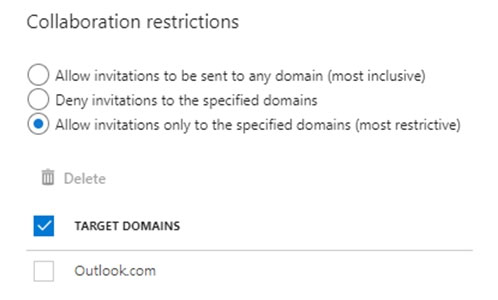
From the External collaboration settings in the Azure Active Directory admin center, you configure the Collaboration restrictions settings as shown in the following exhibit.
From a Microsoft SharePoint Online site, a user invites [email protected] to the site. For each of the following statements, select Yes if the statement is true. Otherwise, select No. NOTE: Each correct selection is worth one point. Hot Area:
Exhibit:
Parte 1:
User with email User1@outlook.com has the user type Guest and has not accepted the invitation to the Enterprise application.
Parte 2:
User with email User2@fabrikam.com has the user type Guest and has accepted the invitation to the Enterprise application.
Parte 3:
User1 can accept the invitation and gain access to the enterprise application.
Parte 4:
User2 can access the enterprise application.
Parte 5:
User3 can accept the invitation and gain access to the SharePoint site.
9
Pregunta 9
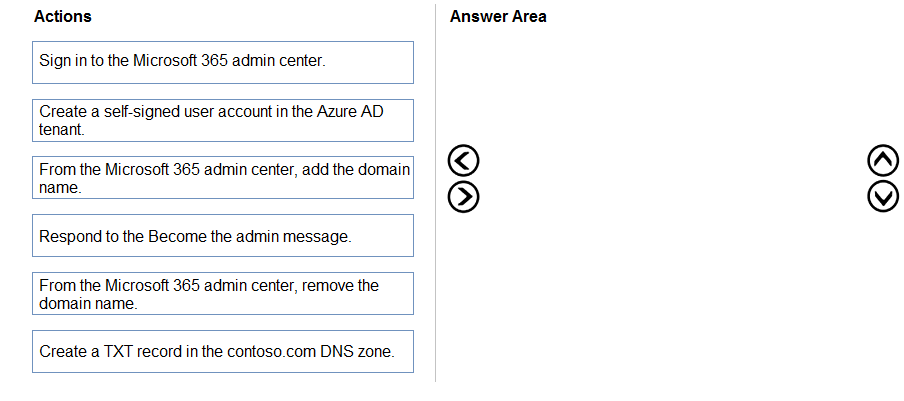
DRAG DROP - You have an on-premises Microsoft Exchange organization that uses an SMTP address space of contoso.com. You discover that users use their email address for self-service sign-up to Microsoft 365 services. You need to gain global administrator privileges to the Azure Active Directory (Azure AD) tenant that contains the self-signed users. Which four actions should you perform in sequence? To answer, move the appropriate actions from the list of actions to the answer area and arrange them in the correct order. Select and Place:
Exhibit:
Parte 1:
Which sequence should you perform to complete the admin takeover?
10
Pregunta 10
HOTSPOT - You have an Azure Active Directory (Azure AD) tenant that contains a group named Group3 and an administrative unit named Department1. Department1 has the users shown in the Users exhibit. (Click the Users tab.)
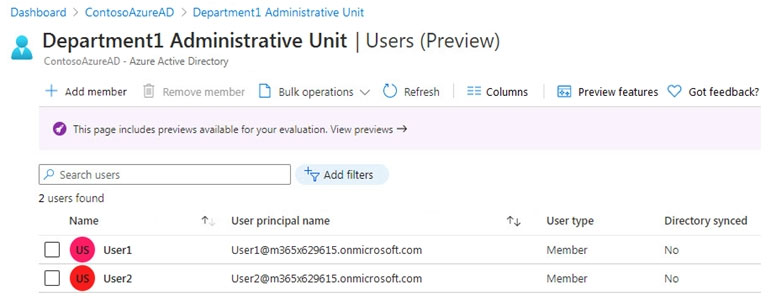
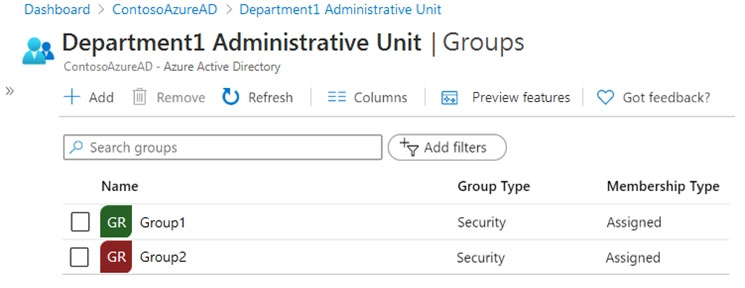
Department1 has the groups shown in the Groups exhibit. (Click the Groups tab.)
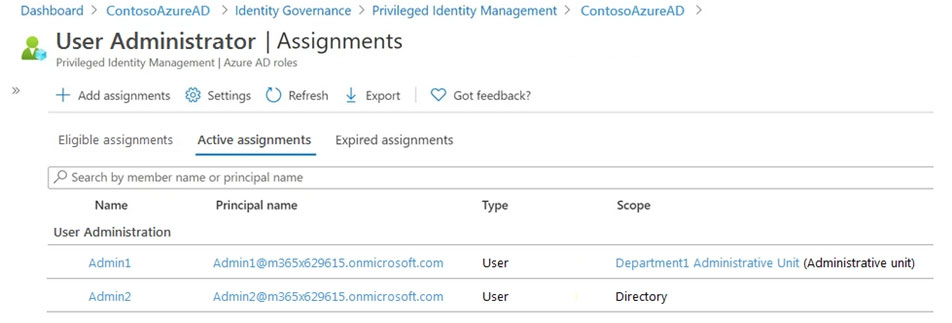
Department1 has the user administrator assignments shown in the Assignments exhibit. (Click the Assignments tab.)
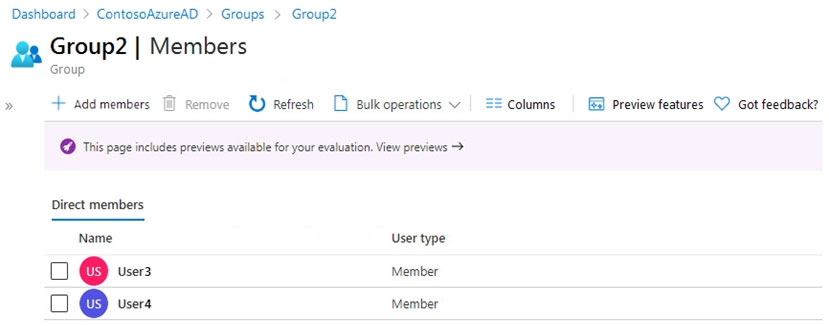
The members of Group2 are shown in the Group2 exhibit. (Click the Group2 tab.)
For each of the following statements, select Yes if the statement is true. Otherwise, select No. NOTE: Each correct selection is worth one point. Hot Area:
Exhibit:
Parte 1:
Admin1 can reset the passwords of User3 and User4.
Parte 2:
Admin1 can add User1 to Group 2.
Parte 3:
Admin 2 can reset the password of User1.
11
Pregunta 11
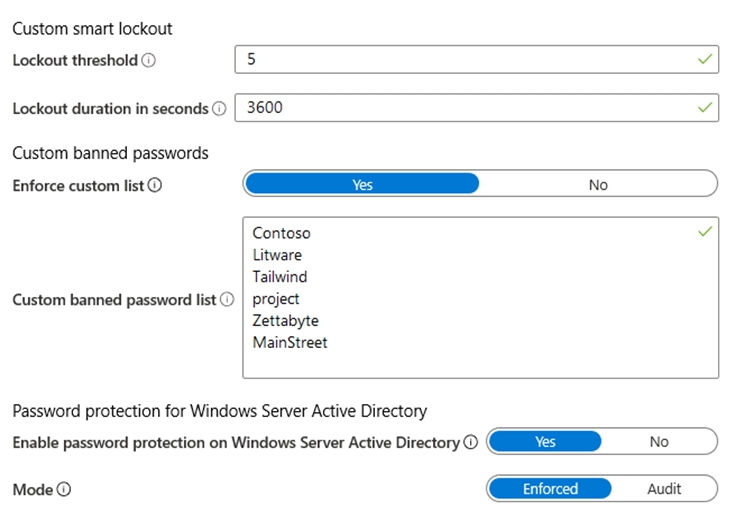
You configure Azure Active Directory (Azure AD) Password Protection as shown in the exhibit. (Click the Exhibit tab.)
You are evaluating the following passwords: ✑ Pr0jectlitw@re ✑ T@ilw1nd ✑ C0nt0s0 Which passwords will be blocked?
Exhibit:
Parte 1:
Which passwords will be blocked by the configured password protection policy?
12
Pregunta 12
Your company has a Microsoft 365 tenant. The company has a call center that contains 300 users. In the call center, the users share desktop computers and might use a different computer every day. The call center computers are NOT configured for biometric identification. The users are prohibited from having a mobile phone in the call center. You need to require multi-factor authentication (MFA) for the call center users when they access Microsoft 365 services. What should you include in the solution?
13
Pregunta 13
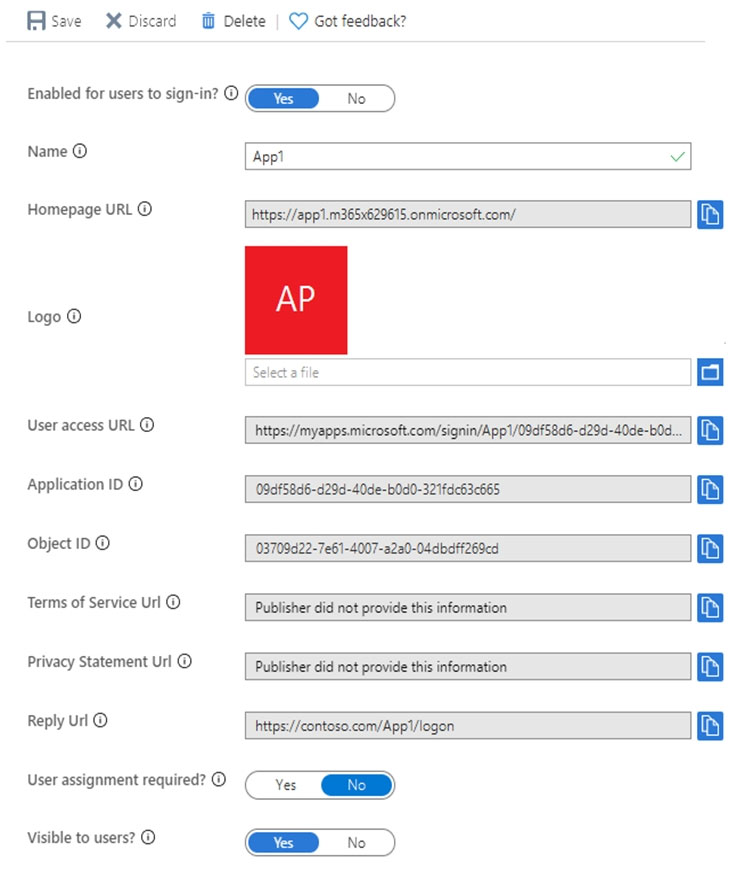
HOTSPOT - You have a custom cloud app named App1 that is registered in Azure Active Directory (Azure AD). App1 is configured as shown in the following exhibit.
Use the drop-down menus to select the answer choice that completes each statement based on the information presented in the graphic. NOTE: Each correct selection is worth one point. Hot Area:
Exhibit:
Parte 1:
[answer choice] can access App1 from the homepage URL.
Parte 2:
App1 will appear in the Microsoft Office 365 app launcher for [answer choice].
14
Pregunta 14
HOTSPOT - You have an Azure Active Directory (Azure AD) tenant that contains a user named User1 and the groups shown in the following table.
In the tenant, you create the groups shown in the following table.

Which members can you add to GroupA and GroupB? To answer, select the appropriate options in the answer area. NOTE: Each correct selection is worth one point. Hot Area:
Parte 1:
Group1 has Membership type Assigned.
Parte 2:
Group2 has Membership type Dynamic User.
Parte 3:
Group3 has Membership type Dynamic Device.
Parte 4:
Group4 has Membership type Assigned.
Parte 5:
GroupA: ______
Parte 6:
GroupB: ______
15
Pregunta 15
You have a Microsoft 365 tenant. All users have computers that run Windows 10. Most computers are company-owned and joined to Azure Active Directory (Azure AD). Some computers are user- owned and are only registered in Azure AD. You need to prevent users who connect to Microsoft SharePoint Online on their user-owned computer from downloading or syncing files. Other users must NOT be restricted. Which policy type should you create?
16
Pregunta 16
You have an Azure Active Directory (Azure AD) tenant named contoso.com. All users who run applications registered in Azure AD are subject to conditional access policies. You need to prevent the users from using legacy authentication. What should you include in the conditional access policies to filter out legacy authentication attempts?
17
Pregunta 17
HOTSPOT - You have an Azure Active Directory (Azure AD) tenant that contains Azure AD Privileged Identity Management (PIM) role settings for the User administrator role as shown in the following exhibit.
Use the drop-down menus to select the answer choice that completes each statement based on the information presented in the graphic. NOTE: Each correct selection is worth one point. Hot Area:
Parte 1:
Activation maximum duration (hours) is 8 hour(s).
Parte 2:
Require justification on activation is Yes.
Parte 3:
Require ticket information on activation is No.
Parte 4:
On activation, require Azure MFA is Yes.
Parte 5:
Require approval to activate is Yes.
Parte 6:
Approvers is None.
Parte 7:
Allow permanent eligible assignment is No.
Parte 8:
Expire eligible assignments after is 15 day(s).
Parte 9:
Allow permanent active assignment is No.
Parte 10:
Expire active assignments after is 1 month(s).
Parte 11:
Require Azure Multi-Factor Authentication on active assignment is No.
Parte 12:
Require justification on active assignment is No.
Parte 13:
A user who requires access to the User administration role must perform multi-factor authentication (MFA) every ______.
Parte 14:
Before an eligible user can perform a task that requires the User administrator role, the activation must be approved by a ______.
18
Pregunta 18
You need to meet the authentication requirements for leaked credentials. What should you do?
19
Pregunta 19
HOTSPOT - You need to configure the assignment of Azure AD licenses to the Litware users. The solution must meet the licensing requirements. What should you do? To answer, select the appropriate options in the answer area. NOTE: Each correct selection is worth one point. Hot Area:
Parte 1:
Azure AD Connect settings to modify: ______
Parte 2:
Assign Azure AD licenses to: ______
20
Pregunta 20
HOTSPOT - You have an Azure Active Directory (Azure AD) tenant that has the default App registrations settings. The tenant contains the users shown in the following table. Name Role Admin1 Application administrator Admin2 Application developer Admin3 Cloud application administrator User1 User You purchase two cloud apps named App1 and App2. The global administrator registers App1 in Azure AD. You need to identify who can assign users to App1, and who can register App2 in Azure AD. What should you identify? To answer, select the appropriate options in the answer area. NOTE: Each correct selection is worth one point. Hot Area:
Parte 1:
Can assign users to App1: ______
Parte 2:
Can register App2 in Azure AD: ______
Dominios del examen
Practica preguntas de exámenes de certificación Microsoft con respuestas verificadas por IA y explicaciones detalladas. 4 certificaciones disponibles.
Implement authentication and access managementPeso 28%
Plan and implement workload identitiesPeso 25%
Plan and automate identity governancePeso 24%
Exámenes de práctica
3 Exámenes de práctica · 50 Preguntas · 100 Minutos
Otras certificaciones de Microsoft


Comienza a practicar ahora
Descarga Cloud Pass y comienza a practicar todas las preguntas de Microsoft SC-300.

