
Describe Core Data ConceptsPeso 28%
Questões de Prática
Ver 306+ Questões
Cada resposta é verificada por 3 modelos de IA líderes para garantir máxima precisão. Receba explicações detalhadas por alternativa e análise aprofundada das questões.
1
Questão 1
Your company is designing a data store that will contain student data. The data has the following format.
StudentNumber | StudentInformation
7634634
  First name: Ben
  Last: Smith
  Preferred Name: Benjamin
7634634
  First Name: Dominik
  Last Name: Paiha
  Email Address: dpaiha@contoso.com
  MCP ID: 931817
7634636
  First Name: Reshma
  Last Name: Patel
  Phone number: 514-555-1101
7634637
  First Name: Yun-Feng
  Last Name: Peng
Which type of data store should you use?
Graph databases are designed for highly connected data and relationship traversal (e.g., students enrolled in courses, friendships, prerequisites). The prompt shows no relationships—only a student identifier with varying attributes. Using a graph model would add complexity without benefit unless the workload requires queries like “find students connected through shared classes” or multi-hop relationship exploration.
Key/value fits because StudentNumber is a natural unique key and StudentInformation can be stored as a flexible value (commonly JSON). Each student can have different fields without schema changes, and the primary access pattern is efficient point lookup by key. This aligns with services like Azure Cosmos DB (NoSQL) or Azure Table Storage for simple, scalable, low-latency retrieval by identifier.
Object storage (e.g., Azure Blob Storage) is optimized for storing and serving unstructured files such as documents, images, backups, and logs. While you could store each student profile as a separate blob, object stores are not ideal for frequent record-level updates and key-based queries with low-latency transactional access patterns compared to a key/value or document database.
Columnar stores (e.g., data warehouses/columnstore formats like Parquet) are optimized for analytical workloads that scan large datasets and aggregate across columns (reporting, BI). The student data shown is operational/profile-style data with variable attributes and likely point reads by StudentNumber. Columnar storage would be inefficient and overly complex for this transactional, semi-structured use case.
Análise da Questão
Core concept: This question tests selecting an appropriate non-relational (NoSQL) data model based on the shape of the data. The sample shows a StudentNumber paired with a set of attributes that vary per student (some have Email and MCP ID, others have Phone, others only names). This is semi-structured data with a natural unique identifier. Why the answer is correct: A key/value data store is the best fit because each record can be stored and retrieved by a single key (StudentNumber), and the value can be an opaque blob (often JSON) containing the student’s attributes. The schema can vary per student without requiring table alterations or fixed columns. This aligns with common NoSQL patterns: fast point reads/writes by key, flexible schema, and simple access patterns. Key features / Azure context: In Azure, this pattern maps well to Azure Cosmos DB (NoSQL API) or Azure Table Storage, where the StudentNumber can be the partition key and/or row key (or the Cosmos DB item id plus a partition key). Best practices include choosing a partition key that supports even distribution and your query patterns (e.g., StudentNumber if access is primarily by student). From an Azure Well-Architected Framework perspective, key/value supports performance efficiency (low-latency point reads), operational excellence (no schema migrations for new optional fields), and reliability (managed, replicated services). Common misconceptions: Graph may seem plausible because “student information” could relate to courses, teachers, etc., but the provided data shows no relationships—just per-student attributes. Object storage is for files/blobs (documents, images) rather than queryable records keyed for frequent lookups. Columnar storage is optimized for analytics scans and aggregations across many rows/columns, not transactional lookups of individual student profiles. Exam tips: When you see “ID -> varying attributes” and the main operation is retrieve/update by that ID, think key/value (or document). If the question offered “document,” that would also be a strong candidate; with the given options, key/value is the closest match. Choose graph only when relationships and traversals are central, and choose columnar for large-scale analytical workloads (BI, reporting) rather than operational profile storage.
2
Questão 2
HOTSPOT - To complete the sentence, select the appropriate option in the answer area. Hot Area:
Parte 1:
You can query a graph database in Azure Cosmos DB ______
Correct answer: D. A graph database in Azure Cosmos DB is queried as nodes and edges by using the Gremlin language. Cosmos DB’s graph capability is provided through the Gremlin API, which implements the Apache TinkerPop Gremlin traversal language. Gremlin is designed for graph traversals (e.g., navigating relationships, multi-hop queries), which is the core value of graph databases. Why the others are wrong: A describes the Cosmos DB Core (SQL) API, which stores JSON documents and queries them with a SQL-like syntax; that is document, not graph. B describes the Cosmos DB Cassandra API, which exposes a wide-column/partitioned row store model queried with Cassandra Query Language (CQL), not graph. C is incorrect because LINQ is a client-side language integration option typically used with the Core (SQL) API SDKs to query documents; it is not the primary graph query mechanism, and it does not represent graph traversals as nodes/edges like Gremlin does.
3
Questão 3
You have a quality assurance application that reads data from a data warehouse. Which type of processing does the application use?
OLTP supports day-to-day operational transactions (many small reads/writes, inserts/updates/deletes, strict concurrency, ACID transactions). Examples include order entry or banking systems. A data warehouse is not optimized for OLTP; it is optimized for analytics. If the application were writing transactional records to a relational operational database, OLTP would fit, but “reads from a data warehouse” points away from OLTP.
Batch processing refers to executing work in scheduled chunks (e.g., nightly ETL/ELT loads, periodic data cleansing, large file processing). Data warehouses are often populated using batch jobs, so this option can seem plausible. However, the question asks what type of processing the application uses when it reads from the data warehouse. Reading for analysis is OLAP; batch is more about how data is processed/loaded, not the query pattern.
OLAP is designed for analytical querying over large, historical datasets—exactly what a data warehouse provides. It emphasizes complex queries, aggregations, and scanning large volumes of data to produce insights (trends, anomalies, quality metrics). A quality assurance application reading from a data warehouse typically runs analytical queries and reports, which aligns directly with OLAP characteristics and the analytics workload category in DP-900.
Stream processing handles continuous, near-real-time data (events/telemetry) using tools like Azure Stream Analytics, Event Hubs, or Spark Structured Streaming. It’s used when you need immediate processing as data arrives (seconds/minutes latency). A data warehouse is generally queried for historical analysis and reporting rather than continuous event-by-event processing. Unless the question described real-time event ingestion and continuous computations, streaming is not the best fit.
Análise da Questão
Core concept: This question tests your ability to classify workloads by how data is stored and consumed. A data warehouse is designed for analytics: it stores large volumes of historical, integrated data modeled for querying and reporting (facts/dimensions, star/snowflake schemas). The processing pattern typically associated with querying a data warehouse is Online Analytical Processing (OLAP). Why the answer is correct: A quality assurance (QA) application that reads data from a data warehouse is performing analytical queries over curated historical data to find trends, anomalies, defects, or compliance issues. That is OLAP: read-heavy, complex queries (aggregations, group-bys, joins across large tables) optimized for insight rather than for capturing individual transactions. In DP-900 terms, “data warehouse” and “analytics workload” are strong cues for OLAP. Key features and best practices: OLAP workloads prioritize high-throughput scans, columnar storage, partitioning, and query optimization. In Azure, services commonly used for OLAP/data warehousing include Azure Synapse Analytics (dedicated SQL pools), serverless SQL over data lake, and Azure Databricks with Delta Lake. Best practices align with the Azure Well-Architected Framework (Performance Efficiency and Cost Optimization): use partitioning to reduce scanned data, leverage columnstore/columnar formats (e.g., Parquet), cache where appropriate, and scale compute independently (e.g., Synapse DWUs) to meet reporting windows. Common misconceptions: “Batch processing” is often involved in loading a data warehouse (ETL/ELT), but the question says the application reads from the warehouse, not that it loads it. “OLTP” is for operational systems (orders, payments, inventory) with frequent inserts/updates and short transactions. “Stream processing” is for near-real-time event ingestion and continuous processing, not typical for querying a warehouse for historical analysis. Exam tips: On DP-900, map keywords: “data warehouse, reporting, dashboards, aggregations” => OLAP. “Point-in-time transactions, CRUD, low-latency writes” => OLTP. “Scheduled jobs, nightly loads” => batch. “Telemetry, events, real-time” => streaming. When the prompt emphasizes reading from a warehouse for analysis, choose OLAP.
4
Questão 4
You have a transactional application that stores data in an Azure SQL managed instance. When should you implement a read-only database replica?
Correct. A read-only replica is designed to offload read-heavy workloads such as reporting, dashboards, and ad-hoc queries from the primary transactional database. This reduces contention for CPU/IO and minimizes the risk that long-running SELECT queries will degrade OLTP performance. It’s a classic read scale pattern: keep writes on the primary and direct reads to the replica.
Incorrect. Auditing focuses on tracking events such as logins, schema changes, and data access, typically using Azure SQL Auditing, diagnostic logs, or security tooling. A read-only replica does not provide an auditing trail by itself; it only provides another copy for read queries. You might query a replica for analysis, but it doesn’t replace proper auditing controls.
Incorrect. High availability for a regional outage requires cross-region disaster recovery, such as auto-failover groups or geo-replication to a paired region. A read-only replica is usually within the same region and is intended for read scale and local HA architecture, not for surviving a full regional outage scenario.
Incorrect. Recovery Point Objective (RPO) is about how much data loss is acceptable and is primarily influenced by backup frequency, transaction log backups, and DR replication to another region. A read-only replica used for read scale does not inherently improve RPO; it’s not a substitute for geo-DR or backup strategy.
Análise da Questão
Core concept: A read-only database replica in Azure SQL Managed Instance is used to offload read workloads (queries) from the primary read-write instance. This aligns with the common pattern of separating OLTP (transactional) workloads from heavy read/reporting workloads to protect latency and throughput for transactions. Why the answer is correct: Transactional applications are sensitive to contention (CPU, memory, IO, locks/latches) caused by long-running SELECT queries, reporting, and ad-hoc analytics. Implementing a read-only replica lets you direct reporting queries to a secondary that is continuously synchronized from the primary, so report generation does not compete with the transactional workload. This improves performance predictability and supports the Azure Well-Architected Framework pillars of Performance Efficiency and Reliability by reducing resource contention and stabilizing the primary workload. Key features / how it’s used: In SQL Managed Instance, read scale/read-only replicas are commonly associated with Business Critical architecture (Always On availability groups under the hood). You typically connect to the read-only endpoint (or use application intent=ReadOnly where supported) for reporting/BI queries. The replica is not for writes; it is intended for read-only operations and can be used for near-real-time reporting. It’s also a common best practice to ensure reporting queries are optimized and to use appropriate isolation levels, but the main benefit is workload isolation. Common misconceptions: A read-only replica is not primarily an auditing feature. Auditing is handled by SQL Auditing, Microsoft Purview, or log-based approaches. It’s also not the main mechanism for regional outage protection; that’s addressed with geo-replication, auto-failover groups, or cross-region DR strategies. Finally, a read-only replica does not inherently improve RPO; RPO is driven by backup/restore strategy, log shipping/replication to another region, and DR configuration. Exam tips: For DP-900, map “read-only replica/read scale” to “offload reads/reporting from OLTP.” Map “regional outage/high availability” to geo-redundant designs (failover groups/geo-replication), and map “RPO/RTO” to backup/restore and DR features. If the question mentions reporting without impacting transactions, the read-only replica choice is the best fit.
5
Questão 5
You manage an application that stores data in a shared folder on a Windows server. You need to move the shared folder to Azure Storage. Which type of Azure Storage should you use?
Azure Queue Storage is a messaging service for storing and retrieving messages between application components. It’s used to decouple services and handle asynchronous processing (e.g., background jobs). It does not provide a hierarchical file system, folders, or SMB/NFS access, so it cannot replace a Windows shared folder.
Azure Blob Storage is object storage for unstructured data such as images, videos, backups, and logs. Although you can store “files” as blobs, access is typically via HTTP/HTTPS and APIs/SDKs, not as an SMB-mapped drive. Using blobs would usually require application changes or an additional layer to emulate file share behavior.
Azure Files provides managed file shares in Azure that can be accessed using standard file protocols (SMB, and NFS in supported premium scenarios). It supports directory structures, file locking semantics, and can be mounted from Windows like a traditional network share. This makes it the correct choice to move a Windows server shared folder to Azure Storage with minimal application changes.
Azure Table Storage is a NoSQL key-value/column-family style store for semi-structured data, optimized for large scale and simple queries by partition and row key. It is not designed for file storage, does not provide folders or file share access, and cannot be used as a replacement for a Windows shared folder.
Análise da Questão
Core concept: This question tests which Azure Storage service best replaces a Windows server shared folder. A shared folder implies SMB/NFS access, directory/file semantics, and compatibility with existing applications that expect a file share rather than object storage. Why the answer is correct: Azure Files (Azure Storage file service) is designed to provide fully managed file shares in the cloud that can be accessed via the SMB protocol (and NFS for premium file shares in supported scenarios). This makes it the closest cloud equivalent to a Windows file share. You can lift-and-shift applications that read/write files using standard file APIs, map a drive letter from Windows, and preserve folder structures without rewriting the application to use object APIs. Key features and best practices: Azure Files supports SMB 3.x with encryption in transit, integrates with identity for access control (storage account keys/SAS, and for enterprise scenarios, identity-based auth via Active Directory Domain Services or Azure AD DS for SMB access). It also supports snapshots for point-in-time recovery, soft delete, and backup integration. For performance-sensitive workloads, consider Premium file shares (SSD-backed) and choose appropriate provisioned capacity/IOPS. From an Azure Well-Architected perspective, Azure Files improves operational excellence (managed service), reliability (redundant storage options like LRS/ZRS/GRS), and security (network restrictions, private endpoints, encryption). Common misconceptions: Blob storage is often chosen because it stores “files,” but it is object storage accessed via HTTP/SDKs and doesn’t behave like an SMB share without additional tooling. Queues and tables are non-file services used for messaging and NoSQL key-value storage, respectively. Exam tips: When you see “shared folder,” “SMB,” “lift-and-shift file server,” or “map a network drive,” think Azure Files. When you see “unstructured objects,” “HTTP access,” “data lake,” or “static content,” think Blob. Match the access pattern (file share vs object vs message vs NoSQL) to the storage type.
Quer praticar todas as questões em qualquer lugar?
Baixe o Cloud Pass — inclui simulados, acompanhamento de progresso e mais.
6
Questão 6
HOTSPOT - For each of the following statements, select Yes if the statement is true. Otherwise, select No. NOTE: Each correct selection is worth one point. Hot Area:
Parte 1:
A Microsoft Power BI dashboard is associated with a single workspace.
Yes. In the Power BI service, a dashboard is created within (and owned by) a specific workspace. The workspace acts as the organizational and security boundary for the dashboard, including who can view or edit it. While dashboards can be shared with users outside the workspace (depending on tenant settings, permissions, and sharing method), the dashboard itself still resides in exactly one workspace. Why “No” is wrong: there isn’t a concept of a single dashboard being simultaneously associated with multiple workspaces. If you need the same dashboard-like experience in another workspace, you typically recreate it, use an app to distribute content, or rely on shared datasets/semantic models and separate dashboards per workspace. This workspace association is important for governance and access control, which is why DP-900 expects you to recognize the workspace as the container for dashboards.
Parte 2:
A Microsoft Power BI dashboard can only display visualizations from a single dataset.
No. A Power BI dashboard can include tiles pinned from multiple reports, and those reports can be based on different datasets (semantic models). This is one of the key purposes of dashboards: to provide a consolidated view across different subject areas (for example, sales KPIs from one dataset and support ticket KPIs from another). Why “Yes” is wrong: the “single dataset” limitation applies more to certain report behaviors (a report is typically built on one dataset at a time, though it can use composite models and DirectQuery to multiple sources). Dashboards, however, are an aggregation layer of pinned visuals/tiles and are not restricted to a single dataset. On the exam, remember: dashboards = one page, many tiles, potentially many datasets.
Parte 3:
A Microsoft Power BI dashboard can display visualizations from a Microsoft Excel workbook.
Yes. Power BI can use Excel workbooks as a data source, and visuals built from that Excel data can be shown on a dashboard. In the Power BI service, dashboard tiles are typically pinned from reports, and those reports can be created from imported Excel data or supported workbook content. "No" is incorrect because Excel is a supported source for Power BI analytics, but the dashboard does not directly render arbitrary Excel content unless it has been brought into Power BI in a supported way.
7
Questão 7
Which command-line tool can you use to query Azure SQL databases?
sqlcmd is the command-line utility designed to connect to SQL Server and Azure SQL Database and execute T-SQL queries or scripts. It supports interactive querying, running .sql files, and returning exit codes for automation. Because Azure SQL Database is T-SQL compatible, sqlcmd is a standard, exam-friendly choice for “querying” from the command line.
bcp (Bulk Copy Program) is a command-line tool for high-performance bulk data import/export between SQL Server/Azure SQL Database and data files. While it can execute a query to define exported rows, its primary purpose is bulk movement of data, not interactive or general-purpose querying. In exam terms, bcp aligns with data loading/unloading rather than querying.
azdata is a command-line tool associated with Azure data services administration scenarios (for example, SQL Managed Instance and Azure Arc-enabled data services) and integrates with some operational workflows. It is not the most common or canonical tool for simply querying Azure SQL Database with T-SQL in DP-900 context, making it a distractor here.
Azure CLI is used to manage Azure resources (provisioning, configuration, networking, identities), such as creating an Azure SQL logical server, configuring firewall rules, or setting policies. It is not a native T-SQL query client for Azure SQL Database. For running SQL queries, you would use tools like sqlcmd or client libraries rather than Azure CLI.
Análise da Questão
Core concept: This question tests how to interact with Azure SQL Database (a PaaS relational database) from the command line. In DP-900, you’re expected to recognize common tools used to connect to and run T-SQL queries against relational databases on Azure. Why the answer is correct: sqlcmd is the classic Microsoft command-line query utility for SQL Server and Azure SQL Database. It connects using a connection string (server name, database, authentication) and allows you to execute ad-hoc T-SQL statements or run scripts from files. Because Azure SQL Database is SQL Server–compatible at the T-SQL layer, sqlcmd is a direct and widely supported way to query it from terminals and automation pipelines. Key features and best practices: sqlcmd supports interactive sessions, executing .sql files, variable substitution, error handling/exit codes for automation, and output formatting. It works well in CI/CD and operational runbooks (for example, running schema checks or post-deployment validation). For Azure SQL Database, you typically connect to <servername>.database.windows.net and use Azure AD authentication or SQL authentication depending on your security posture. From an Azure Well-Architected Framework perspective (Security and Operational Excellence), prefer Azure AD auth where possible, avoid embedding passwords in scripts, and use managed identities or secure secret stores (for example, Key Vault) when automating. Common misconceptions: bcp is also a SQL Server tool, but it’s primarily for bulk import/export of data, not general querying. azdata is a newer CLI focused on data services scenarios (notably SQL Managed Instance and Azure Arc-enabled data services) and is not the standard “query tool” for Azure SQL Database in fundamentals questions. Azure CLI can manage Azure resources (create servers, set firewall rules), but it is not a T-SQL query client. Exam tips: For DP-900, map tools to their primary purpose: sqlcmd = run T-SQL queries/scripts; bcp = bulk copy data; Azure CLI = manage Azure resources; azdata = data platform administration scenarios. If the verb is “query” a SQL database, sqlcmd is the most direct and expected answer.
8
Questão 8
HOTSPOT - For each of the following statements, select Yes if the statement is true. Otherwise, select No. NOTE: Each correct selection is worth one point. Hot Area:
Parte 1:
You can use Azure Data Studio to query a Microsoft SQL Server big data cluster.
Yes. Azure Data Studio can be used to query a Microsoft SQL Server big data cluster (BDC). A BDC is built on SQL Server and exposes SQL Server endpoints that can be queried using standard SQL Server connectivity. Azure Data Studio supports connecting to SQL Server instances and, historically, provided additional experiences for BDC through extensions (for example, managing and querying components of the cluster). Why “No” is incorrect: ADS is not limited to Azure-only databases; it is a general SQL client for SQL Server-family workloads. As long as you can reach the SQL endpoint (network access, firewall rules, authentication), ADS can run queries against it. In practice, you would configure the connection to the appropriate SQL Server endpoint for the cluster and then run T-SQL queries as you would for SQL Server.
Parte 2:
You can use Microsoft SQL Server Management Studio (SSMS) to query an Azure Synapse Analytics data warehouse.
Yes. SQL Server Management Studio (SSMS) can query an Azure Synapse Analytics data warehouse (dedicated SQL pool). Synapse dedicated SQL pools expose a SQL endpoint that uses the Tabular Data Stream (TDS) protocol, which is the same core protocol used by SQL Server. Because of that compatibility, SSMS can connect, authenticate (SQL auth/Azure AD depending on configuration), and execute T-SQL queries. Why “No” is incorrect: While Synapse is not the same product as SQL Server, the dedicated SQL pool is intentionally SQL Server–compatible for many administrative and query operations. The exam expects you to recognize SSMS as a valid client tool for SQL-based Azure services (Azure SQL Database, SQL Managed Instance, and Synapse dedicated SQL pools), assuming networking and permissions are correctly configured.
Parte 3:
You can use MySQL Workbench to query Azure Database for MariaDB databases.
Yes. MySQL Workbench can query Azure Database for MariaDB because MariaDB is MySQL-compatible and Azure Database for MariaDB supports standard MySQL client connections. MySQL Workbench uses the MySQL protocol and can connect to MariaDB servers for running queries, managing schemas, and performing basic administration. Why “No” is incorrect: Although MariaDB is a distinct fork of MySQL, it is designed for compatibility with MySQL clients and tools. In Azure, you must still ensure connectivity prerequisites: the server firewall rules allow your client IP, SSL/TLS settings match the server requirements, and you use the correct hostname/port (typically 3306) and credentials. With those in place, Workbench is an appropriate query tool.
9
Questão 9
HOTSPOT - To complete the sentence, select the appropriate option in the answer area. Hot Area:
Parte 1:
By default, each Azure SQL database is protected by ______.
Correct answer: B (a server-level firewall). Azure SQL Database is hosted on a logical SQL server. By default, access to databases on that server is governed by the Azure SQL server firewall. The firewall uses allow rules (server-level and optionally database-level) to permit connections from specific public IP ranges and/or from other Azure services (when that setting is enabled). This is the default protection mechanism you configure first when enabling connectivity. Why the others are wrong: - A (NSG): Network Security Groups apply to subnets and network interfaces in VNets. Azure SQL Database is a PaaS service and is not directly protected by an NSG by default (though private endpoints place a NIC in your subnet that can be governed by NSG rules). - C (Azure Firewall): This is an optional, customer-managed network firewall for VNets; it is not automatically placed in front of Azure SQL Database. - D (Azure Front Door): This is for HTTP/HTTPS web traffic and cannot front SQL/TDS connections.
10
Questão 10
You need to design and model a database by using a graphical tool that supports project-oriented offline database development. What should you use?
SSDT is designed for project-oriented database development. It lets you model and develop a database schema offline in a SQL Server Database Project, validate/build the schema, and produce deployment artifacts like DACPACs. It integrates well with source control and CI/CD pipelines, making it the best match for “graphical tool” plus “offline, project-based” database development for SQL Server and Azure SQL.
SSMS is primarily an administrative and query tool for SQL Server and Azure SQL. It excels at connected tasks such as running T-SQL queries, configuring security, monitoring, backups, and troubleshooting. While you can script objects and do some design work, it is not centered on offline, project-based development with build validation and DACPAC-based deployments.
Azure Databricks is a managed Apache Spark platform used for analytics workloads, data engineering, and machine learning with notebooks and distributed processing. It is not intended for relational database schema modeling or offline database project development. Databricks may interact with databases, but it doesn’t provide a database-project modeling experience like SSDT.
Azure Data Studio is a cross-platform SQL editor and management tool with extensions (including some schema and database tooling). However, it is mainly used for querying and managing databases in a connected manner and does not provide the classic SSDT-style database project workflow (offline schema build/validation and DACPAC-centric deployment) as its primary capability.
Análise da Questão
Core concept: The question is about designing and modeling a relational database using a graphical tool that supports project-oriented, offline database development. This points to a “database project” workflow where schema objects (tables, views, stored procedures) are treated as source-controlled artifacts and can be developed/validated without being continuously connected to a live database. Why the answer is correct: Microsoft SQL Server Data Tools (SSDT) is the Microsoft tooling specifically built for project-based database development. In SSDT, you create a SQL Server Database Project where the database schema is represented as files in a project. You can design schema using designers and T-SQL scripts, validate builds (schema compilation), and generate deployment artifacts (e.g., DACPAC) for consistent deployments to SQL Server or Azure SQL Database. This aligns exactly with “project-oriented offline database development.” Key features and best practices: SSDT supports schema compare, data-tier application (DACPAC) creation, and deployment/publish profiles. This enables DevOps practices: version control, repeatable builds, and automated deployments (CI/CD). From an Azure Well-Architected Framework perspective, this improves operational excellence and reliability by reducing configuration drift and enabling controlled releases. It also supports pre-deployment validation to catch errors early (shift-left). Common misconceptions: SSMS and Azure Data Studio are excellent interactive management/query tools, but they are primarily connected, live-database tools and are not centered on offline, project-based modeling with build validation and DACPAC outputs. Azure Databricks is an analytics and data engineering platform (Spark-based) and not a relational database modeling tool. Exam tips: When you see keywords like “database project,” “offline development,” “schema as code,” “DACPAC,” or “project-oriented,” think SSDT. When you see “manage server,” “run queries,” “backup/restore,” think SSMS. When you see “cross-platform editor,” “extensions,” “lightweight management,” think Azure Data Studio. When you see “Spark notebooks,” “big data processing,” think Databricks.
Quer praticar todas as questões em qualquer lugar?
Baixe o Cloud Pass — inclui simulados, acompanhamento de progresso e mais.
11
Questão 11
DRAG DROP - Match the security components to the appropriate scenarios. To answer, drag the appropriate component from the column on the left to its scenario on the right. Each component may be used once, more than once, or not at all. NOTE: Each correct match is worth one point. Select and Place:
Parte 1:
______ Prevent access to an Azure SQL database from another network.
Correct answer: B. Firewall. To prevent access to an Azure SQL database from another network, you use network access controls such as the Azure SQL server-level firewall rules (allow/deny public IP ranges) and/or virtual network rules with Private Link/Private Endpoint to restrict connectivity to a specific VNet. These controls operate at the network perimeter and determine whether traffic from a given source network can reach the database endpoint. Why not A (Authentication): Authentication controls who can log in after a connection is established. It does not stop a network from reaching the service endpoint; it only rejects invalid identities. Why not C (Encryption): Encryption protects confidentiality of data at rest or in transit, but it does not block network connectivity. An encrypted database can still be reachable from other networks unless firewall/VNet restrictions are configured.
Parte 2:
______ Support Azure Active Directory (Azure AD) sign-ins to an Azure SQL database.
Correct answer: A. Authentication. Supporting Azure Active Directory (Azure AD) sign-ins to Azure SQL Database is an authentication capability. Azure AD authentication enables users and applications to authenticate using Azure AD identities (users, groups, managed identities, service principals) instead of (or in addition to) SQL logins. This is commonly paired with modern security features like MFA and Conditional Access, improving identity security and aligning with best practices. Why not B (Firewall): A firewall can restrict where connections come from, but it does not provide Azure AD sign-in capability. You could allow traffic through the firewall and still not support Azure AD authentication if it’s not configured. Why not C (Encryption): Encryption secures data, but it does not determine how users authenticate. Azure AD sign-in is about identity verification and token-based authentication, not data confidentiality.
Parte 3:
______ Ensure that sensitive data never appears as plain text in an Azure SQL database.
Correct answer: C. Encryption. Ensuring sensitive data never appears as plain text in an Azure SQL database points to encryption. In Azure SQL, this is most strongly associated with technologies like Always Encrypted, which keeps sensitive column data encrypted end-to-end so that the SQL engine never sees plaintext values (encryption/decryption occurs in the client driver). More generally, encryption mechanisms (TDE, TLS) protect data at rest and in transit, but the “never appears as plain text” wording aligns best with Always Encrypted-style protection. Why not A (Authentication): Authentication controls access by identity, but authenticated users (or admins) could still view plaintext data if it is stored unencrypted. Why not B (Firewall): Firewalls restrict network access but do not prevent plaintext storage or exposure once access is granted.
12
Questão 12
HOTSPOT - For each of the following statements, select Yes if the statement is true. Otherwise, select No. NOTE: Each correct selection is worth one point. Hot Area:
Parte 1:
Azure Table storage supports multiple read replicas.
No. Azure Table storage does not support multiple read replicas. With RA-GRS or RA-GZRS, it can expose one read-only secondary region in addition to the primary, but that is not the same as supporting multiple readable replicas across several regions. Multiple-region read distribution is a Cosmos DB capability, whereas Azure Table storage replication is limited to the storage account's primary/secondary replication model.
Parte 2:
Azure Table storage supports multiple write regions.
No. Azure Table storage does not support multiple write regions. Regardless of whether you choose LRS, ZRS, GRS, or GZRS, writes are accepted only in the primary region. With GRS/GZRS, data is replicated asynchronously to the secondary region for disaster recovery, but the secondary region is not writable. Even when you enable RA-GRS/RA-GZRS (read access to the secondary), that secondary endpoint remains read-only. This design aligns with Azure Storage’s replication model: it focuses on durability and availability rather than active-active multi-master writes. Therefore, the statement is false because Table storage cannot accept writes in more than one region at the same time; it is single-primary for writes.
Parte 3:
The Azure Cosmos DB Table API supports multiple read replicas.
Yes. Azure Cosmos DB Table API supports multiple read replicas through Cosmos DB’s global distribution. You can add multiple Azure regions to a Cosmos DB account, and Cosmos DB will replicate data to those regions. Applications can then read from the nearest region to reduce latency. In Cosmos DB, read scaling and geo-distribution are first-class capabilities: you can configure multiple regions and use features like automatic failover and region-based routing. This is different from Azure Table storage, where the secondary is primarily for DR and may be read-only depending on configuration. Because Cosmos DB can serve reads from multiple regions (replicas) simultaneously, the statement is true for the Table API as it inherits Cosmos DB’s multi-region read capabilities.
Parte 4:
The Azure Cosmos DB Table API supports multiple write regions.
Yes. Azure Cosmos DB Table API supports multiple write regions when you enable multi-region writes (also known as multi-master). With this feature, Cosmos DB can accept writes in more than one region, improving write availability and reducing write latency for globally distributed applications. This capability is unique compared to Azure Table storage and is a key exam differentiator: Cosmos DB is built for active-active scenarios. When multi-region writes are enabled, Cosmos DB handles replication and conflict resolution according to its internal mechanisms and the chosen consistency model. So the statement is true: Cosmos DB Table API can be configured for multi-region writes, whereas Azure Table storage cannot.
13
Questão 13
HOTSPOT - To complete the sentence, select the appropriate option in the answer area. Hot Area:
Parte 1:
A relational database must be used when ______
Correct answer: D (strong consistency guarantees are required). Relational databases are the default choice when you require strong consistency and ACID transactions (Atomicity, Consistency, Isolation, Durability). These capabilities help ensure data integrity across multiple related tables and rows, enforce constraints (primary/foreign keys), and support transactional workloads where reads must reflect the latest committed writes. In Azure, services like Azure SQL Database provide strong consistency and robust transactional semantics. Why the others are wrong: A (a dynamic schema is required) typically points to non-relational/document databases (for example, Azure Cosmos DB for NoSQL) where schema can evolve without rigid table definitions. B (data will be stored as key/value pairs) is a classic key/value workload, better suited to key/value stores (for example, Cosmos DB key/value patterns, Azure Cache for Redis) rather than a relational engine. C (storing large images and videos) is best handled by object storage such as Azure Blob Storage, which is optimized for unstructured binary data and cost-effective large-scale storage.
14
Questão 14
You are writing a set of SQL queries that administrators will use to troubleshoot an Azure SQL database. You need to embed documents and query results into a SQL notebook. What should you use?
Microsoft SQL Server Management Studio (SSMS) is a primary administration tool for SQL Server and Azure SQL Database, offering query windows, Object Explorer, and management features. However, SSMS does not provide a native SQL notebook interface that combines Markdown documentation with executable cells and embedded results in a single notebook artifact. It’s great for interactive troubleshooting, but not for notebook-style documentation.
Azure Data Studio is the correct choice because it supports SQL notebooks that mix Markdown documentation with executable T-SQL cells and saved outputs. Administrators can embed query results directly in the notebook, creating repeatable troubleshooting runbooks. It is cross-platform and commonly used for modern data workflows, making it the go-to Microsoft tool when the question explicitly mentions “SQL notebook.”
Azure CLI is primarily used for provisioning and managing Azure resources (e.g., creating servers, configuring firewall rules, managing identities). While it can execute some database-related commands and automate tasks, it is not designed to author SQL notebooks or embed documentation and query results together. It lacks the integrated notebook UI and rich document experience required by the question.
Azure PowerShell is also focused on automation and management of Azure resources through cmdlets. It can help with operational tasks (e.g., configuring Azure SQL settings, exporting data, managing resource properties), but it is not a notebook authoring tool for embedding documents and query results. Although PowerShell can be used in some notebook platforms, the Microsoft SQL notebook feature referenced here is Azure Data Studio.
Análise da Questão
Core concept: This question tests knowledge of tooling for working with Azure SQL Database, specifically the ability to create and use SQL notebooks that combine narrative documentation (Markdown) with executable query cells and embedded results. In the Azure ecosystem, this capability is associated with notebook-style experiences used for troubleshooting, operational runbooks, and repeatable investigations. Why the answer is correct: Azure Data Studio is the Microsoft tool that provides built-in SQL notebooks. In Azure Data Studio, administrators can create notebooks that include text, images, and code cells (T-SQL, and in some contexts other kernels) and then execute queries against Azure SQL Database to capture and persist results directly in the notebook. This is ideal for troubleshooting because it creates a single, shareable artifact that documents the steps taken, the queries executed, and the outputs observed. Key features and best practices: Azure Data Studio notebooks support Markdown for documentation, parameterized and repeatable query execution, and saving outputs with the notebook. This aligns with operational excellence (Azure Well-Architected Framework) by enabling standardized runbooks, consistent troubleshooting procedures, and easier knowledge transfer. Notebooks can be stored in source control (e.g., Git) to version troubleshooting scripts and evidence. Azure Data Studio also integrates with extensions and supports connecting to Azure SQL Database securely. Common misconceptions: SSMS is a common choice for SQL administration, but it does not provide a native notebook experience for embedding documentation and results in a single notebook file. Azure CLI and Azure PowerShell are excellent for automation and resource management, but they are not notebook authoring tools for embedding query results alongside rich documentation. Exam tips: For DP-900, remember the mapping: SSMS is the traditional GUI for SQL Server/Azure SQL management; Azure Data Studio is the cross-platform tool with notebooks and modern workflows. When you see “SQL notebook,” “Markdown + query cells,” or “embed results,” the expected answer is Azure Data Studio.
15
Questão 15
What is a benefit of hosting a database on Azure SQL managed instance as compared to an Azure SQL database?
Built-in high availability is not unique to Azure SQL Managed Instance. Both Azure SQL Database and Managed Instance include built-in HA as part of the PaaS service (replication within a region, automatic failover handling, and service-managed patching). While the implementation details can differ, HA is a shared benefit and therefore not the best comparative advantage for MI in this question.
Azure SQL Managed Instance supports multiple databases within the same instance and provides more native SQL Server-like behavior for cross-database queries (for example, using three-part names) and related transactional patterns. Azure SQL Database is primarily scoped to a single database, and cross-database querying is not natively available in the same way. This instance-level, multi-database capability is a classic differentiator for MI.
System-initiated automatic backups are provided by both Azure SQL Database and Azure SQL Managed Instance. In both services, backups are managed by the platform with configurable retention (including long-term retention options). Because this is a standard PaaS feature across the Azure SQL family, it is not a specific benefit of Managed Instance compared to Azure SQL Database.
Encryption at rest is supported by both Azure SQL Database and Azure SQL Managed Instance, typically through Transparent Data Encryption (TDE) enabled by default. Both services also integrate with Azure Key Vault for customer-managed keys in many scenarios. Since encryption at rest is a baseline security capability for both offerings, it is not a differentiator favoring Managed Instance.
Análise da Questão
Core concept: This question tests the difference between Azure SQL Database (single database / elastic pool) and Azure SQL Managed Instance (MI). Both are PaaS offerings based on the SQL Server engine, but MI is designed for near-100% SQL Server instance compatibility to simplify “lift-and-shift” migrations from on-premises SQL Server. Why the answer is correct: A key benefit of Azure SQL Managed Instance over Azure SQL Database is native support for cross-database queries and transactions within the same managed instance. In SQL Server and Managed Instance, you can have multiple user databases in one instance and use three-part naming (database.schema.object) and certain cross-database transactional patterns more naturally. Azure SQL Database is scoped to a single database (or an elastic pool of isolated databases) and does not provide the same instance-level, multi-database behavior; cross-database querying is not natively supported in the same way (you typically use external data sources, elastic query patterns, or application-level joins). Key features and best practices: Managed Instance provides instance-scoped features such as SQL Agent, Database Mail, linked servers (with limitations), and easier migration of apps that assume an “instance” with multiple databases. This aligns with Azure Well-Architected Framework principles: it can improve operational efficiency and reduce migration risk (Reliability and Operational Excellence) when an application depends on instance-level capabilities. Common misconceptions: Built-in high availability, automatic backups, and encryption at rest are benefits of both Azure SQL Database and Managed Instance. These are core PaaS capabilities across the Azure SQL family, so they are not differentiators. Exam tips: For DP-900, remember: Azure SQL Database is best when you want a fully managed single database with simple scaling; Azure SQL Managed Instance is best when you need high SQL Server compatibility and instance-level features (especially multiple databases with cross-database capabilities). When you see “cross-database queries/transactions” or “SQL Agent,” think Managed Instance.
Quer praticar todas as questões em qualquer lugar?
Baixe o Cloud Pass — inclui simulados, acompanhamento de progresso e mais.
16
Questão 16
Your company is designing a database that will contain session data for a website. The data will include notifications, personalization attributes, and products that are added to a shopping cart. Which type of data store will provide the lowest latency to retrieve the data?
Key/value stores are optimized for extremely fast point lookups using a single key (for example, sessionId). This matches session-state access patterns where the application retrieves and updates one session record frequently. They commonly support TTL/expiration (ideal for sessions) and can be implemented in-memory (e.g., Redis) for ultra-low latency, making this the best choice for lowest-latency retrieval.
Graph databases are designed to store entities and relationships and to efficiently traverse connections (e.g., social networks, recommendation engines). Session data retrieval is typically not relationship-traversal heavy; it is a direct lookup by sessionId/userId. Graph queries add overhead and do not provide the lowest latency for simple session reads compared to key/value stores.
Columnar (column-family/columnar analytics) stores are optimized for reading large volumes of data across columns and performing aggregations, which is ideal for analytics/OLAP workloads. Session data is transactional and accessed by key with frequent small updates. Columnar designs generally introduce unnecessary complexity and are not optimized for the lowest-latency point retrieval of individual session records.
Document stores (JSON documents) are a good fit for semi-structured data like shopping carts and personalization attributes and can provide low latency. However, they are optimized for flexible querying and indexing over document fields. For pure session retrieval by a known key with the lowest possible latency (often in-memory plus TTL), a key/value store is typically faster and more directly aligned to the access pattern.
Análise da Questão
Core concept: This question tests selecting the most appropriate non-relational (NoSQL) data model for a session-state workload where the primary requirement is extremely fast reads/writes (lowest latency). Session data typically includes per-user/per-session attributes such as notifications, personalization settings, and shopping cart contents. Why the answer is correct: A key/value store provides the lowest latency retrieval pattern for session data because access is typically done by a single known key (for example, sessionId or userId). Key/value databases are optimized for O(1)-style lookups, minimal query parsing, and simple data access paths. They are commonly implemented with in-memory or memory-optimized architectures and support very fast point reads and updates—ideal for session state and shopping carts where you frequently read/modify a single session record. Key features and best practices: Key/value stores excel at: - Point reads/writes by key (sessionId) with predictable performance - Simple scaling (partitioning/sharding by key) - TTL/expiration policies (critical for session cleanup) - High throughput and low operational overhead In Azure, this pattern is commonly implemented using Azure Cache for Redis (in-memory key/value) for ultra-low latency, or a key/value-like NoSQL approach in Azure Cosmos DB when durability and global distribution are needed. From an Azure Well-Architected Framework perspective, key/value supports Performance Efficiency (low latency), Reliability (replication options), and Cost Optimization (store only what you need, expire automatically). Common misconceptions: Document stores can also store session objects (JSON) and are flexible, so they may seem like the best fit for “notifications and cart items.” However, document databases are optimized for richer queries and indexing; they can be low-latency, but the simplest and typically lowest-latency retrieval for session state is key/value, especially when backed by memory and TTL. Graph stores are for relationship traversal (friends-of-friends, recommendations). Columnar stores are for analytics and aggregations, not transactional session lookups. Exam tips: For DP-900, map workload to data model: - Session state, caching, shopping cart by sessionId => key/value - Complex JSON with querying/filtering => document - Relationship-heavy queries => graph - Large-scale analytics/OLAP => columnar When the question emphasizes “lowest latency to retrieve” and the access pattern is by a single identifier, choose key/value.
17
Questão 17
Which storage solution supports role-based access control (RBAC) at the file and folder level?
Azure Disk Storage provides block-level storage for Azure VMs (managed disks). It does not expose a filesystem service where Azure can apply RBAC at the file and folder level. Access is controlled through VM access and disk-level permissions (management plane) rather than data-plane file/folder authorization. You can format a disk with NTFS/ext4 inside a VM, but that’s OS-level permissions, not Azure Storage RBAC on files/folders.
Azure Data Lake Storage Gen2 is the Azure storage service that supports real directories and files through its hierarchical namespace. That structure allows permissions to be applied at the directory and file level, which is not possible in the same way with flat object storage. In practice, Azure RBAC is used for broader authorization and POSIX-style ACLs are used for fine-grained control on folders and files. This makes ADLS Gen2 the best and expected answer for storage scenarios requiring granular filesystem-style security.
Azure Blob storage is primarily an object store with a flat namespace, even though blob names can include slash-delimited prefixes that look like folders. Those prefixes are virtual and do not provide true directory objects with independent file/folder permissions. Azure RBAC can grant access to blob data, but not true folder-level authorization in the same filesystem sense tested here. The granular file and directory permission model is associated with ADLS Gen2, not standard Blob storage.
Azure Queue storage is a messaging service for storing and retrieving messages. It does not have a concept of files and folders, so file/folder-level RBAC is not applicable. Authorization is typically via storage account keys, SAS tokens, or Azure AD with appropriate roles for queue operations, but it’s still at the queue/message operation level rather than filesystem-style permissions.
Análise da Questão
Core concept: This question tests which Azure storage service supports granular authorization for directories and files. In Azure, true file- and folder-level permissions require a hierarchical filesystem model rather than flat object storage or block storage. Why the answer is correct: Azure Data Lake Storage Gen2 supports a hierarchical namespace, which introduces real directories and files. This enables POSIX-style access control lists (ACLs) that can be applied directly to folders and files. Azure RBAC can be used to grant broader data access roles, but the file- and folder-level granularity itself is provided by ACLs in ADLS Gen2. Key features / configurations / best practices: - Use Azure Data Lake Storage Gen2 with hierarchical namespace enabled for directory-aware storage. - Use Microsoft Entra ID identities together with Azure RBAC for coarse-grained access and ACLs for fine-grained file/folder permissions. - Apply least-privilege principles by assigning only the required storage roles and then narrowing access with ACLs. Common misconceptions: - Azure Blob storage supports Azure RBAC for blob data access, but it does not provide true folder-level security in the same way unless using ADLS Gen2 hierarchical namespace features. - Azure Disk Storage is attached block storage for virtual machines, not a managed filesystem service with Azure-enforced file/folder permissions. - Queue storage is for messages and has no file or folder structure. Exam tips: When a question mentions file- or folder-level access control in Azure storage, think of Azure Data Lake Storage Gen2 and its hierarchical namespace with ACLs. If the wording says RBAC, remember that exams sometimes simplify the distinction, but the granular enforcement in ADLS Gen2 is done through ACLs.
18
Questão 18
You need to store data in Azure Blob storage for seven years to meet your company's compliance requirements. The retrieval time of the data is unimportant. The solution must minimize storage costs. Which storage tier should you use?
Archive is the best choice for long-term retention with minimal storage cost when data is rarely accessed and retrieval latency can be hours. It has the lowest per-GB storage price, but reading data requires rehydration to Hot/Cool and incurs higher access and rehydration costs. This matches compliance archiving scenarios where data is kept for years and retrieved only during audits or investigations.
Hot tier is optimized for frequently accessed data and provides the lowest latency and lowest read/access costs, but it has the highest ongoing storage cost. For seven-year retention where retrieval time is unimportant, paying Hot-tier storage rates would not minimize cost. Hot is appropriate for active datasets, content served to users, or data used regularly by applications.
Cool tier is designed for infrequently accessed data that still needs relatively quick access (typically milliseconds) and is cheaper to store than Hot. However, it is generally more expensive than Archive for multi-year retention and still assumes occasional reads. For a seven-year compliance archive where retrieval time is unimportant, Cool is not the lowest-cost option overall.
Análise da Questão
Core concept: This question tests Azure Blob Storage access tiers (Hot, Cool, Archive) and how to choose a tier based on access frequency, retrieval latency, and cost. Blob access tiers are designed to optimize the trade-off between storage cost and access (read) cost/latency. Why the answer is correct: You must retain data for seven years for compliance, retrieval time is unimportant, and you must minimize storage costs. The Archive tier is specifically intended for long-term retention of rarely accessed data where you can tolerate hours-long retrieval times. Archive provides the lowest storage cost per GB among the tiers, which is the dominant factor for multi-year retention. Because access is rare and latency is not important, the higher rehydration (restore) time and higher access costs of Archive are acceptable. Key features and best practices: - Archive tier stores blobs offline; to read them you must rehydrate to Hot or Cool, which can take hours. This aligns with “retrieval time unimportant.” - Cost model: Archive minimizes ongoing storage cost but increases retrieval and early deletion costs. For compliance archives, retrieval is typically infrequent, so total cost is usually lowest. - Plan for lifecycle management: use Azure Blob Lifecycle Management rules to automatically move blobs from Hot/Cool to Archive after a period, and to enforce retention patterns. - Consider governance: use immutability policies (WORM) and legal holds if compliance requires tamper resistance; these work with Blob Storage and are commonly paired with long retention. - From an Azure Well-Architected Framework cost optimization perspective, selecting Archive for infrequently accessed long-lived data is a primary lever to reduce ongoing spend. Common misconceptions: Many assume Cool is best for “long-term” storage. Cool is cheaper than Hot but is still intended for data accessed occasionally (e.g., monthly) and has lower latency than Archive. For seven-year retention with unimportant retrieval time, Cool typically costs more over time than Archive. Exam tips: - Hot: frequent access, lowest access cost, highest storage cost. - Cool: infrequent access (days/weeks), lower storage cost than Hot, higher access cost, minimum retention period. - Archive: rare access (months/years), lowest storage cost, highest access cost, and hours-long rehydration. If the question says “retrieval time unimportant” and “minimize storage cost,” think Archive.
19
Questão 19
DRAG DROP - Match the Azure Cosmos DB APIs to the appropriate data structures.
Which option shows the correct matching for the image below?
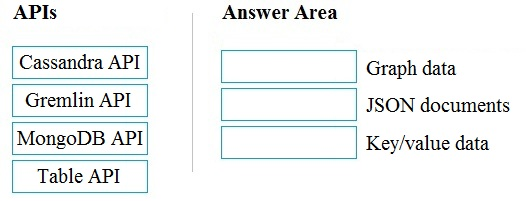
Correct. Gremlin API maps to graph data because Gremlin is a graph traversal language. MongoDB API maps to JSON documents because MongoDB is a document database. Table API maps to key/value data because it follows the Azure Table Storage model using keys such as PartitionKey and RowKey.
Cassandra API is not the graph API. Cassandra is associated with a wide-column data model, not graph traversal.
This swaps graph and document models. Gremlin is for graph data, while MongoDB API is for JSON document data.
Table API is not the JSON document API, and MongoDB API is not the key/value match expected in this question.
Análise da Questão
This question tests whether you can map Azure Cosmos DB APIs to the data model each API is designed for. Gremlin API is used for graph data, MongoDB API is used for JSON document-style data, and Table API fits key/value or key/attribute data. The image is a drag-and-drop exam style question, but the same knowledge can be checked by choosing the correct matching set.
Pontos-Chave de Aprendizado
- Gremlin API -> graph data
- MongoDB API -> JSON documents
- Table API -> key/value or key/attribute data
- Cassandra API -> wide-column data
20
Questão 20
HOTSPOT - To complete the sentence, select the appropriate option in the answer area. Hot Area:
Parte 1:
Batch workloads ______
Correct answer: D. Batch workloads collect data over time and then process it later, typically on a schedule (hourly/nightly) or when a triggering condition is met (for example, a file landing in a storage location, a time window closing, or a pipeline trigger firing). This is the defining characteristic of batch: higher latency is acceptable, and processing happens in discrete runs. Why the others are wrong: - A is not a defining description of batch analytics. “Process data in memory, row-by-row” is more aligned with certain procedural processing approaches and is not what distinguishes batch from streaming. - B is too specific and restrictive. Batch can run more frequently than once per day (every minute/hour) or less frequently; “at most once a day” is not generally true. - C describes streaming/real-time processing, where data is processed as it arrives with minimal delay, which is the opposite of batch.
Domínios do Exame
Pratique questões de certificação Microsoft com respostas verificadas por IA e explicações detalhadas. 4 certificações disponíveis.
Identify Considerations for Relational Data on AzurePeso 24%
Describe Considerations for Working with Non-relational Data on AzurePeso 19%
Describe an Analytics Workload on AzurePeso 29%
Outras Certificações Microsoft






Comece a Praticar Agora
Baixe o Cloud Pass e comece a praticar todas as questões de Microsoft DP-900.

