CloudPass LogoCloud Pass
AWSGoogle CloudMicrosoftCiscoCompTIADatabricks
Certifications
AWSGoogle CloudMicrosoftCiscoCompTIADatabricks
Microsoft AZ-204
Microsoft AZ-204

Practice Test #1

Simuliere die echte Prüfungserfahrung mit 50 Fragen und einem Zeitlimit von 100 Minuten. Übe mit KI-verifizierten Antworten und detaillierten Erklärungen.

50Fragen100Minuten700/1000Bestehensgrenze
Übungsfragen durchsuchen

KI-gestützt

Dreifach KI-verifizierte Antworten & Erklärungen

Jede Antwort wird von 3 führenden KI-Modellen kreuzverifiziert, um maximale Genauigkeit zu gewährleisten. Erhalte detaillierte Erklärungen zu jeder Option und tiefgehende Fragenanalysen.

GPT Pro
Claude Opus
Gemini Pro
Erklärungen zu jeder Option
Tiefgehende Fragenanalyse
Konsensgenauigkeit durch 3 Modelle

Übungsfragen

1
Frage 1

Note: This question is part of a series of questions that present the same scenario. Each question in the series contains a unique solution that might meet the stated goals. Some question sets might have more than one correct solution, while others might not have a correct solution. After you answer a question in this section, you will NOT be able to return to it. As a result, these questions will not appear in the review screen. You develop an HTTP triggered Azure Function app to process Azure Storage blob data. The app is triggered using an output binding on the blob. The app continues to time out after four minutes. The app must process the blob data. You need to ensure the app does not time out and processes the blob data. Solution: Use the Durable Function async pattern to process the blob data. Does the solution meet the goal?

Yes. Durable Functions is an appropriate solution for long-running processing that exceeds the normal execution window of an HTTP-triggered Azure Function. The async pattern allows the function to return immediately with a status URL while the orchestration continues processing the blob data in the background. This avoids the four-minute timeout problem and still ensures the blob-processing task completes reliably.

No would be incorrect because the proposed solution does meet the stated goal. Durable Functions is designed for exactly this type of long-running, asynchronous workflow where a normal HTTP-triggered function would time out. By decoupling the HTTP request from the actual processing, it prevents timeout while allowing the blob data to be processed to completion.

Fragenanalyse

Core concept: This question is about avoiding Azure Function execution timeouts for long-running blob processing. In a standard HTTP-triggered function, long work can exceed the execution limit, especially on the Consumption plan, causing the request to time out before processing completes. Durable Functions provides an async pattern that lets an HTTP-triggered function start an orchestration and return immediately, while the actual blob processing continues reliably in the background. Why correct: The Durable Functions async pattern is specifically intended for long-running operations that cannot complete within a normal HTTP request/response window. The HTTP starter function returns a status endpoint to the caller, and the orchestration coordinates the blob-processing work without requiring the original HTTP connection to remain open. This prevents the app from timing out after four minutes while still ensuring the blob data is processed. Key features: - Separates the HTTP request from the long-running processing work. - Uses orchestration and activity functions to manage durable state and progress. - Supports reliable execution, checkpointing, and status tracking. - Commonly used when work exceeds normal Azure Functions timeout limits. Common misconceptions: A common mistake is assuming increasing the function timeout is always the best fix. For HTTP-triggered functions, the client connection and platform limits still make long synchronous processing a poor design. Durable Functions does not make the HTTP request itself run longer; instead, it changes the pattern so the long-running work happens asynchronously. Exam tips: When a question mentions an HTTP-triggered Azure Function timing out during long processing, look for Durable Functions async pattern as a strong solution. It is especially appropriate when the goal is to complete the work reliably without keeping the HTTP request open. Distinguish this from simply changing hosting plans or timeout settings, which may not fully solve HTTP timeout constraints.

2
Frage 2

HOTSPOT - You have a web service that is used to pay for food deliveries. The web service uses Azure Cosmos DB as the data store. You plan to add a new feature that allows users to set a tip amount. The new feature requires that a property named tip on the document in Cosmos DB must be present and contain a numeric value. There are many existing websites and mobile apps that use the web service that will not be updated to set the tip property for some time. How should you complete the trigger? NOTE: Each correct selection is worth one point. Hot Area:

Teil 1:

var r = ______

Correct: C (getContext().getRequest();). In a Cosmos DB JavaScript trigger, you access the current operation (create/replace) through the request object. For a pre-trigger, you read and modify the document being written via request.getBody() and request.setBody(). That is exactly what you need to ensure the tip property exists and is numeric before the write is committed. Why others are wrong: - A (__.value();) is not a Cosmos DB trigger API call. - B (__.readDocument('item');) is not the right pattern for a trigger that modifies the incoming document; reading an existing document is more typical in stored procedures or when you need to fetch related data, and the option shown is not the standard trigger call signature. - D (getContext().getResponse();) is used mainly in post-triggers to shape the response after the operation, not to enforce required properties before persistence.

Teil 2:

if (______) {

The trigger must ensure that the tip property is present and contains a numeric value. Option C correctly checks whether tip is not a number or is null, which covers invalid values and allows the trigger to assign a default numeric value such as 0. Option A only checks whether the property is missing and does not handle cases where tip exists but is non-numeric, which violates the requirement. Options B and D use APIs or patterns that are not valid for Cosmos DB JavaScript triggers in this scenario.

Teil 3:

r.______

Correct: A (setBody(i);). In a pre-trigger, after you modify the incoming document (for example, adding i.tip = 0 when missing), you must write the updated document back into the request pipeline using request.setBody(i). This ensures Cosmos DB persists the modified version of the document. Why others are wrong: - B (setValue(i);) is not the Cosmos DB trigger method for updating the request body. - C (upsertDocument(i);) and D (replaceDocument(i);) are document write operations typically used in stored procedures (and sometimes in triggers for side effects), but they are not the correct mechanism to modify the document currently being created/replaced. Using them could also cause unintended extra writes, RU consumption, and potential recursion/complexity. The exam-expected pattern for enforcing/normalizing fields on the incoming document is request.setBody().

3
Frage 3

DRAG DROP - You are a developer for a software as a service (SaaS) company that uses an Azure Function to process orders. The Azure Function currently runs on an Azure Function app that is triggered by an Azure Storage queue. You are preparing to migrate the Azure Function to Kubernetes using Kubernetes-based Event Driven Autoscaling (KEDA). You need to configure Kubernetes Custom Resource Definitions (CRD) for the Azure Function. Which CRDs should you configure? To answer, drag the appropriate CRD types to the correct locations. Each CRD type may be used once, more than once, or not at all. You may need to drag the split bar between panes or scroll to view content. NOTE: Each correct selection is worth one point. Select and Place:

Teil 1:

Azure Function code belongs to which CRD type?

Azure Function code does not belong to a KEDA CRD. KEDA CRDs (such as ScaledObject, ScaledJob, TriggerAuthentication, ClusterTriggerAuthentication) describe autoscaling rules and authentication mechanisms, not application code. When you migrate an Azure Function to Kubernetes, the function code is packaged into a container image (including the Functions runtime and your function binaries) and deployed using standard Kubernetes resources like a Deployment (or potentially a Job/CronJob depending on the pattern). KEDA then targets that Deployment to scale it. So, if the prompt is asking whether “Azure Function code belongs to which CRD type,” the correct interpretation is that it does not belong to a KEDA CRD at all. It belongs to the container image and Kubernetes workload resources. This is a common exam trap: KEDA is an autoscaler, not an application packaging mechanism.

Teil 2:

Polling interval belongs to which CRD type?

Polling interval is configured in the KEDA ScaledObject (or ScaledJob) CRD. For event sources like Azure Storage Queues, KEDA uses a polling loop to query the external system for the metric (for example, queue length). The pollingInterval setting controls how frequently KEDA checks the trigger source. This directly affects responsiveness and cost/load on the external system. In KEDA, ScaledObject is the CRD that binds a scale target (e.g., a Deployment) to one or more triggers and includes scaling-related parameters such as pollingInterval, cooldownPeriod, minReplicaCount, and maxReplicaCount. TriggerAuthentication is only for providing credentials/auth configuration and does not define polling behavior. Therefore, polling interval belongs with ScaledObject configuration.

Teil 3:

Azure Storage connection string belongs to which CRD type?

The Azure Storage connection string is handled via KEDA authentication configuration, typically using TriggerAuthentication (or ClusterTriggerAuthentication) referencing a Kubernetes Secret. While KEDA triggers require connection information to access Azure Storage, best practice is not to embed secrets directly in the ScaledObject manifest. Instead, you store the connection string in a Kubernetes Secret and then configure TriggerAuthentication to reference that secret (for example, secretTargetRef). The ScaledObject trigger then references the authentication object. This approach aligns with security best practices and the Azure Well-Architected Framework (protect secrets, rotate credentials, least exposure). In many KEDA examples for Azure Storage Queue, the trigger metadata includes queueName, and the credentials are supplied via TriggerAuthentication. Hence, the connection string belongs to the authentication CRD path rather than the scaling rule itself.

4
Frage 4

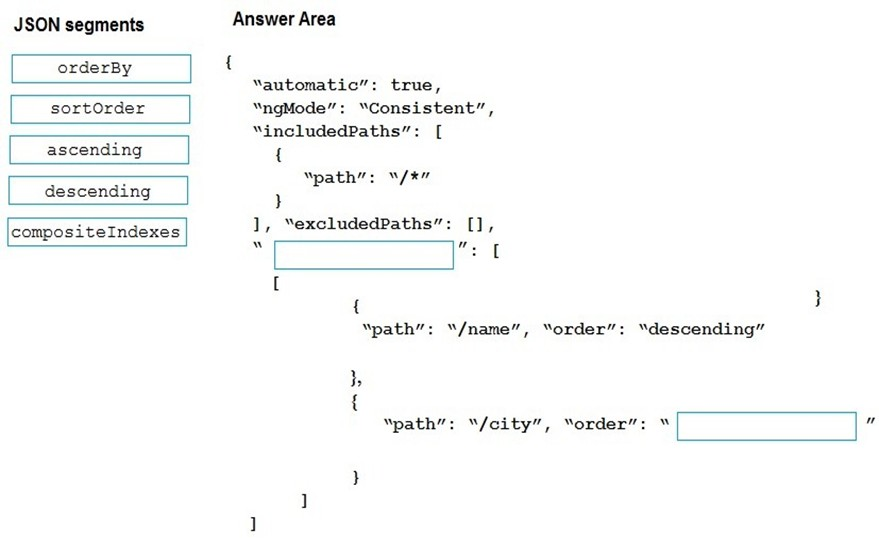
DRAG DROP - You are developing a new page for a website that uses Azure Cosmos DB for data storage. The feature uses documents that have the following format:

{
  "name": "John",
  "city": "Seattle"
}

You must display data for the new page in a specific order. You create the following query for the page:

SELECT*
FROM People p
ORDER BY p.name, p.city DESC

You need to configure a Cosmos DB policy to support the query. How should you configure the policy? To answer, drag the appropriate JSON segments to the correct locations. Each JSON segment may be used once, more than once, or not at all. You may need to drag the split bar between panes or scroll to view content. NOTE: Each correct selection is worth one point. Select and Place:

Teil 1:

Select the correct answer(s) in the image below.

question-image

The correct indexing policy uses the "compositeIndexes" property because Cosmos DB requires a composite index for an ORDER BY on multiple fields. The query orders by p.name ascending by default and p.city descending explicitly, so the composite index must be [{"path":"/name","order":"ascending"},{"path":"/city","order":"descending"}] in that exact sequence. The image currently shows /name as descending, which would not support the query as written. Options like "orderBy" and "sortOrder" are not valid indexing policy property names in Cosmos DB.

5
Frage 5

HOTSPOT - You are developing a ticket reservation system for an airline. The storage solution for the application must meet the following requirements: ✑ Ensure at least 99.99% availability and provide low latency. ✑ Accept reservations even when localized network outages or other unforeseen failures occur. ✑ Process reservations in the exact sequence as reservations are submitted to minimize overbooking or selling the same seat to multiple travelers. ✑ Allow simultaneous and out-of-order reservations with a maximum five-second tolerance window. You provision a resource group named airlineResourceGroup in the Azure South-Central US region. You need to provision a SQL API Cosmos DB account to support the app. How should you complete the Azure CLI commands? To answer, select the appropriate options in the answer area. NOTE: Each correct selection is worth one point. Hot Area:

Teil 1:

consistencyLevel = ______

Bounded staleness is the only option that explicitly supports a time-based tolerance window while still preserving ordering guarantees. With bounded staleness, reads can lag behind writes by at most K versions or T time (here, 5 seconds), but clients will never see out-of-order updates (it provides consistent prefix plus bounded lag). This matches the requirement to process reservations in sequence while allowing a maximum five-second tolerance window. Strong consistency (A) would provide the strictest ordering/linearizability, but it typically increases latency and can reduce availability in multi-region scenarios because it requires coordination/quorum across replicas; it also doesn’t align with the stated tolerance window (it’s stricter than needed). Consistent prefix (C) preserves order but does not bound staleness, so it cannot guarantee the “maximum five-second” requirement. Eventual consistency (B) provides the weakest guarantees and can return out-of-order results, which risks overbooking and violates the sequencing requirement.

Teil 2:

az cosmosdb create \ --name $name \ ______ \ --resource-group $resourceGroupName \ --max-interval 5 \

The requirement explicitly says to provision a SQL API Cosmos DB account, which in Azure CLI is created with --kind 'GlobalDocumentDB'. This option selects the Core (SQL) API account type. --enable-automatic-failover true improves resiliency, but it does not specify the API kind and therefore does not fit this blank. --kind 'MongoDB' is the wrong API, and virtual network enablement is unrelated to the account type requirement.

Teil 3:

--locations ______ \ --default-consistency-level = $consistencylevel

To achieve 99.99% availability and tolerate localized outages, you should deploy the Cosmos DB account to multiple regions. The --locations ‘southcentralus=0 eastus=1 westus=2’ option configures multi-region replication with explicit failover priorities (0 is highest priority). This supports low latency (clients can read from nearer regions depending on configuration) and high availability (service can fail over if a region is unavailable). Option D (--locations ‘southcentralus=0’) is single-region and generally won’t meet the 99.99% availability expectation tied to multi-region configurations, nor does it satisfy the “accept reservations even when localized network outages occur” as robustly. Options A and B specify only one region without failover priorities and don’t establish a multi-region footprint. In combination with bounded staleness (max interval 5) and automatic failover, multi-region locations best satisfy the reliability and availability requirements while keeping latency low.

Möchtest du alle Fragen unterwegs üben?

Lade Cloud Pass herunter – mit Übungstests, Fortschrittsverfolgung und mehr.

6
Frage 6

HOTSPOT - You are developing an application that uses Azure Storage Queues. You have the following code:

CloudStorageAccount storageAccount = CloudStorageAccount.Parse
    (CloudConfigurationManager.GetSetting("StorageConnectionString"));
CloudQueueClient queueClient = storageAccount.CreateCloudQueueClient();

CloudQueue queue = queueClient.GetQueueReference("appqueue");
await queue.CreateIfNotExistsAsync();

CloudQueueMessage peekedMessage = await queue.PeekMessageAsync();
if (peekedMessage != null)
{
    Console.WriteLine("The peeked message is: {0}", peekedMessage.AsString);
}
CloudQueueMessage message = await queue.GetMessageAsync();

For each of the following statements, select Yes if the statement is true. Otherwise, select No. NOTE: Each correct selection is worth one point. Hot Area:

Teil 1:

The code configures the lock duration for the queue.

No. The code does not configure the queue message lock/visibility duration. In Azure Storage Queues, the “lock” concept is implemented as a visibility timeout: when you call GetMessageAsync(), the message becomes invisible for a period so other consumers don’t process it concurrently. However, this duration is not configured in the shown code. GetMessageAsync() has overloads that allow specifying a visibilityTimeout (and sometimes a server timeout), but the parameterless call uses the service default visibility timeout for that receive operation. Also, there is no queue-level property being set here; Storage Queues don’t support a permanent per-queue lock duration configuration in this code path. Therefore, nothing in the snippet explicitly sets or configures the lock duration.

Teil 2:

The last message read remains in the queue after the code runs.

Yes. The last message read remains in the queue after the code runs. PeekMessageAsync() never removes a message; it only returns a copy of the message content and metadata without changing visibility or dequeue count. Then GetMessageAsync() retrieves a message and makes it temporarily invisible (for the visibility timeout). This is not the same as deleting it. A message is only removed from an Azure Storage Queue when DeleteMessageAsync() is called with the message’s Id and PopReceipt returned by GetMessageAsync(). Since the code does not call DeleteMessageAsync(), the message remains in the queue and will become visible again after the visibility timeout expires. This behavior supports at-least-once delivery and requires idempotent processing to handle potential reprocessing.

Teil 3:

The storage queue remains in the storage account after the code runs.

Yes. The storage queue remains in the storage account after the code runs. The code calls GetQueueReference("appqueue") and then CreateIfNotExistsAsync(). This ensures the queue exists; if it already exists, nothing changes; if it does not exist, it is created. There is no call to delete the queue (such as DeleteAsync() or DeleteIfExistsAsync()). In Azure Storage, queues are durable resources and persist in the storage account until explicitly deleted. Reading, peeking, or receiving messages does not remove the queue itself. Therefore, after the code completes, the queue resource will still exist in the storage account.

7
Frage 7

You are building a website that uses Azure Blob storage for data storage. You configure Azure Blob storage lifecycle to move all blobs to the archive tier after 30 days. Customers have requested a service-level agreement (SLA) for viewing data older than 30 days. You need to document the minimum SLA for data recovery. Which SLA should you use?

At least two days is too long and does not reflect the normal documented behavior of Azure Archive rehydration. Archive retrieval is slow compared to Hot or Cool access, but it is generally measured in hours rather than multiple days. Choosing this option would overstate the recovery time and is not the best match for the service characteristics tested on the exam. It may sound conservative, but certification questions typically expect the documented platform range rather than an arbitrary extra buffer.

Between one and 15 hours is the best answer because Azure Blob Archive tier retrieval requires rehydration, and that process is measured in hours. Microsoft documentation and exam guidance commonly describe archive rehydration as taking up to around 15 hours, depending on whether standard or high priority is used and on blob size and workload conditions. This option directly matches the expected recovery characteristics of archived blobs. Since the question asks for the minimum SLA to document for viewing data older than 30 days, this is the closest platform-based retrieval window among the choices.

At least one day is incorrect because the expected archive recovery window is generally shorter than 24 hours. Azure Archive rehydration is commonly described as taking between about 1 and 15 hours, so a full-day minimum is not the most accurate answer. The explanation's use of additional operational buffer is not supported by the question, which asks for the SLA based on storage behavior rather than custom business padding. On Microsoft exams, the best answer is usually the option that most closely matches the documented service capability.

Between zero and 60 minutes is far too short for Archive tier data access. Archive blobs are offline and cannot be read immediately, unlike Hot or Cool tier blobs. Before viewing the data, the blob must be rehydrated to an online tier, and that process takes hours rather than minutes. This option confuses online-access tiers with the Archive tier.

Fragenanalyse

Core concept: This question tests knowledge of Azure Blob Storage access tiers, especially the Archive tier and the time required to make archived data readable again. Why correct: Blobs in the Archive tier are offline and must be rehydrated before they can be accessed, and Microsoft documentation commonly describes this process as taking hours rather than minutes or days. Key features: Hot and Cool tiers are online and support immediate reads, while Archive is an offline tier optimized for low-cost long-term retention and requires rehydration to an online tier. Common misconceptions: A frequent mistake is assuming Archive behaves like Cool storage or adding arbitrary business buffer time that is not stated in the platform behavior. Exam tips: For AZ-204, when asked about Archive retrieval timing, remember that access is not immediate and the expected recovery window is measured in roughly 1 to 15 hours, making that range the best exam answer when offered.

8
Frage 8
(2 auswählen)

You develop and deploy an ASP.NET web app to Azure App Service. You use Application Insights telemetry to monitor the app. You must test the app to ensure that the app is available and responsive from various points around the world and at regular intervals. If the app is not responding, you must send an alert to support staff. You need to configure a test for the web app. Which two test types can you use? Each correct answer presents a complete solution. NOTE: Each correct selection is worth one point.

Integration tests validate how components work together (often run in CI/CD pipelines using test frameworks). They are not an Application Insights availability test type and do not inherently run from global Azure test locations on a schedule. While valuable for quality, they don’t directly satisfy the requirement for worldwide, periodic availability checks with built-in alerting.

Multi-step web tests in Application Insights validate a sequence of HTTP interactions (for example, multiple pages or a basic transaction flow). They can run at regular intervals from multiple geographic test locations and measure availability and responsiveness across steps. Failures can trigger Azure Monitor alert rules to notify support staff via Action Groups.

URL ping tests (standard availability tests) in Application Insights periodically send requests to a specified URL from multiple Azure regions. They measure response time and success/failure (status code, timeouts, optional content checks). They are designed specifically for global availability and responsiveness monitoring and integrate with Azure Monitor alerts for notifications.

Unit tests validate individual methods/classes in isolation and are executed during development or CI builds. They are not an Application Insights availability test type and do not provide global, scheduled probing from multiple regions. They also don’t directly integrate with Application Insights availability alerting in the way URL ping and multi-step tests do.

Load tests focus on performance and scalability under concurrent traffic (throughput, latency under load, resource saturation). They are not the primary mechanism for simple worldwide uptime checks at intervals. While load testing can be part of performance engineering, it doesn’t match the Application Insights availability test requirement described.

Fragenanalyse

Core concept: This question is about Azure Application Insights availability monitoring. Availability tests run from multiple Azure “test locations” worldwide on a schedule to validate that an HTTP endpoint is reachable and responsive. When failures occur (for example, consecutive test failures), you configure Azure Monitor alert rules to notify support staff (email, SMS, webhook, ITSM, Logic Apps, etc.). This aligns with the Azure Well-Architected Framework Reliability pillar: proactively detect outages and reduce MTTR through monitoring and alerting. Why the answer is correct: Application Insights supports two relevant availability test types for this requirement: 1) URL ping test: a simple, lightweight test that repeatedly calls a URL from multiple regions and measures response time and success criteria. It’s ideal for “is the site up and responding?” checks. 2) Multi-step web test: a scripted test (Visual Studio web test format) that can validate a sequence of requests (for example, landing page -> login -> browse -> checkout) to ensure not only availability but also basic end-to-end responsiveness across steps. Both can run at regular intervals from various global locations and can trigger alerts when the app is not responding. Key features / configuration points: - Configure test frequency, number of test locations, and success criteria (HTTP status, response time threshold, content match). - Create an alert rule based on the availability test metric/results (often “failed locations” or “availability results”) and route notifications via an Action Group. - Consider SSL/TLS validation, redirects, and authentication needs (multi-step is better for authenticated flows). Common misconceptions: - “Load” tests are for performance under concurrent users, not global availability checks. - “Unit” and “integration” tests are development/testing practices and are not Application Insights availability test types. Exam tips: For AZ-204, remember: Application Insights availability monitoring = URL ping and multi-step web tests, combined with Azure Monitor alerts + Action Groups for notifications. If the scenario mentions “from various points around the world” and “regular intervals,” think Availability tests, not load testing.

9
Frage 9

HOTSPOT - You are implementing a software as a service (SaaS) ASP.NET Core web service that will run as an Azure Web App. The web service will use an on-premises SQL Server database for storage. The web service also includes a WebJob that processes data updates. Four customers will use the web service. ✑ Each instance of the WebJob processes data for a single customer and must run as a singleton instance. ✑ Each deployment must be tested by using deployment slots prior to serving production data. ✑ Azure costs must be minimized. ✑ Azure resources must be located in an isolated network. You need to configure the App Service plan for the Web App. How should you configure the App Service plan? To answer, select the appropriate settings in the answer area. NOTE: Each correct selection is worth one point. Hot Area:

Teil 1:

Number of VM instances ______

Correct answer: B (4). You have four customers and the requirement states: “Each instance of the WebJob processes data for a single customer and must run as a singleton instance.” In App Service, if you scale out to multiple instances, a continuous WebJob will normally run on each instance, which can cause duplicate processing unless you design for singleton behavior. The question implies you will map one WebJob instance to one customer, so you need four worker instances available to host four singleton WebJob executions (one per customer). Why not 2? With only two instances, you cannot have four distinct singleton WebJob instances concurrently (you would have to multiplex customers per instance, which contradicts the stated requirement). Why not 8 or 16? Those exceed the requirement and increase cost. Since “Azure costs must be minimized,” you choose the smallest instance count that satisfies the singleton-per-customer requirement, which is 4.

Teil 2:

Pricing tier ______

Correct answer: A (Isolated). The decisive requirement is: “Azure resources must be located in an isolated network.” For Azure App Service, true network isolation is provided by App Service Environment (ASE), which deploys App Service into a dedicated, isolated environment associated with a virtual network. ASE runs only on the Isolated pricing tier. Standard and Premium tiers can use VNet Integration for outbound access and can restrict inbound via Private Endpoint (for some scenarios), but they are not the same as hosting the App Service in an isolated network boundary with dedicated infrastructure. The exam typically maps “isolated network” for App Service to ASE/Isolated. Consumption is for Azure Functions (serverless) and does not apply to App Service plans for Web Apps/WebJobs, and it also wouldn’t meet the isolation requirement. Isolated also supports deployment slots, satisfying the pre-production testing requirement.

10
Frage 10

You are developing an ASP.NET Core website that uses Azure FrontDoor. The website is used to build custom weather data sets for researchers. Data sets are downloaded by users as Comma Separated Value (CSV) files. The data is refreshed every 10 hours. Specific files must be purged from the FrontDoor cache based upon Response Header values. You need to purge individual assets from the Front Door cache. Which type of cache purge should you use?

Single path is the correct choice because Azure Front Door purge operations are scoped by path, and this option targets one exact asset. That makes it the best fit for invalidating an individual CSV file while leaving unrelated cached files untouched. Using the most specific purge scope preserves cache hit ratio and avoids unnecessary requests back to the origin. This is the standard choice whenever the requirement is to purge a specific asset rather than a group of assets.

Wildcard is broader than necessary because it purges multiple cached objects that match a path pattern. That is useful when many related files under a folder or naming convention must be invalidated together, but it does not align with a requirement to purge individual assets. Choosing wildcard would evict more content than needed and temporarily increase origin load while the cache repopulates. It is not the most precise or efficient option here.

Root domain is the broadest purge scope and is intended for large-scale invalidation across a domain or endpoint. It would remove far more cached content than required when only a specific CSV asset needs to be purged. This unnecessarily harms cache efficiency and can create avoidable traffic spikes to the origin. Therefore it is not appropriate for targeted invalidation of individual assets.

Fragenanalyse

Core concept: Azure Front Door cache invalidation is performed by specifying the content path scope to purge. When you need to remove a specific cached file without affecting other content, you choose the narrowest purge scope available. Why correct: Because the requirement is to purge individual assets, the correct purge type is Single path. This targets one exact asset path in the Front Door cache, which is the least disruptive and most precise option for invalidating a specific CSV file. Key features: - Single path purges invalidate one exact cached object path. - Wildcard purges invalidate multiple objects that match a path pattern. - Root domain purges broadly invalidate cached content for the domain or endpoint. - Purge operations are path-based; cache-related response headers such as Cache-Control or ETag affect caching behavior, not the purge selection mechanism. Common misconceptions: A common mistake is assuming response headers determine which purge type to use. In practice, headers help control freshness and revalidation, but the purge request itself is still based on the path scope you want to invalidate. Another misconception is choosing a broader purge for convenience, which unnecessarily reduces cache efficiency. Exam tips: - If the question says 'individual asset' or 'specific file,' think Single path. - If it says 'all files in a folder' or 'matching pattern,' think Wildcard. - If it implies clearing nearly everything for a site or endpoint, think Root domain. - Prefer the narrowest purge scope that satisfies the requirement.

Weitere Übungstests

Practice Test #2

50 Fragen·100 Min.·Bestehen 700/1000

Practice Test #3

50 Fragen·100 Min.·Bestehen 700/1000

Practice Test #4

50 Fragen·100 Min.·Bestehen 700/1000

Practice Test #5

50 Fragen·100 Min.·Bestehen 700/1000
← Alle Microsoft AZ-204-Fragen anzeigen

Jetzt mit dem Üben beginnen

Lade Cloud Pass herunter und beginne alle Microsoft AZ-204-Übungsfragen zu üben.

Get it on Google PlayDownload on the App Store
Cloud PassCloud Pass

IT-Zertifizierungs-Übungs-App

Get it on Google PlayDownload on the App Store

Zertifizierungen

AWSGCPMicrosoftCiscoCompTIADatabricks

Rechtliches

FAQDatenschutzrichtlinieNutzungsbedingungen

Unternehmen

KontaktKonto löschen

© Copyright 2026 Cloud Pass, Alle Rechte vorbehalten.

Möchtest du alle Fragen unterwegs üben?

App holen

Lade Cloud Pass herunter – mit Übungstests, Fortschrittsverfolgung und mehr.