CloudPass LogoCloud Pass
AWSGoogle CloudMicrosoftCiscoCompTIADatabricks
Certifications
AWSGoogle CloudMicrosoftCiscoCompTIADatabricks
Microsoft AZ-500
Microsoft AZ-500

Practice Test #3

Simulez l'expérience réelle de l'examen avec 50 questions et une limite de temps de 100 minutes. Entraînez-vous avec des réponses vérifiées par IA et des explications détaillées.

50Questions100Minutes700/1000Score de réussite
Parcourir les questions d'entraînement

Propulsé par l'IA

Réponses et explications vérifiées par triple IA

Chaque réponse est vérifiée par 3 modèles d'IA de pointe pour garantir une précision maximale. Obtenez des explications détaillées par option et une analyse approfondie des questions.

GPT Pro
Claude Opus
Gemini Pro
Explications par option
Analyse approfondie des questions
Précision par consensus de 3 modèles

Questions d'entraînement

1
Question 1

You plan to use Azure Resource Manager templates to perform multiple deployments of identically configured Azure virtual machines. The password for the administrator account of each deployment is stored as a secret in different Azure key vaults. You need to identify a method to dynamically construct a resource ID that will designate the key vault containing the appropriate secret during each deployment. The name of the key vault and the name of the secret will be provided as inline parameters. What should you use to construct the resource ID?

A Key Vault access policy controls whether a user, service principal, or managed identity can read secrets from the vault. It is necessary for authorization, but it does not provide a mechanism to build or pass a resource ID into an ARM deployment. Even with the correct access policy, the deployment still needs a way to specify which vault and secret to use. Therefore, access policy is related to permissions, not dynamic construction or designation of the Key Vault resource ID.

A linked template is used to split deployments into reusable modules or separate template files. Although a linked template can accept parameters and use functions internally, it is not the standard mechanism for supplying a Key Vault secret reference for a secure parameter value. The question asks what should be used to designate the appropriate Key Vault during each deployment when names are provided as parameters, and that is typically handled through deployment parameters rather than by introducing another template. Using a linked template would add unnecessary complexity and does not directly answer the requirement.

A parameters file is the correct choice because ARM templates commonly use deployment parameters to supply environment-specific values, including Azure Key Vault secret references. When a secret is stored in different vaults for different deployments, the parameters file can include a reference object containing the Key Vault resourceId and the secretName. This allows the same ARM template to be reused while dynamically targeting the appropriate vault during each deployment. The template itself remains unchanged, and only the parameter values differ between environments.

An Automation Account can run scripts or orchestrate deployment workflows, but it is not an ARM template construct for passing Key Vault secret references. The requirement is specifically about how to designate the correct Key Vault during ARM deployments, which is handled natively through template parameters and parameter files. Automation may invoke the deployment, but it does not replace the ARM mechanism for secret resolution. As a result, it is outside the scope of the direct solution.

Analyse de la question

Core concept: This question is about how ARM template deployments can retrieve secrets from Azure Key Vault when the vault differs between deployments. In ARM, the resource ID for the Key Vault used in a secure parameter reference is typically supplied in the deployment parameters, and the parameters file supports a reference block that includes the vault's resourceId and the secretName. Why correct: Because the vault name and secret name vary per deployment, a parameters file is the standard mechanism to pass those values and the Key Vault reference into the template at deployment time. Key features: Parameters files externalize environment-specific values, support secure secret references, and allow repeated deployments of the same template without modifying template logic. Common misconceptions: Linked templates help modularize deployments, but they do not inherently solve Key Vault secret parameterization; access policies control authorization only; Automation Accounts orchestrate tasks but do not define ARM secret references. Exam tips: For ARM template questions involving different values per environment, think of parameters files as the place to provide deployment-specific inputs, including Key Vault secret references.

2
Question 2

HOTSPOT - You have two Azure virtual machines in the East US 2 region as shown in the following table. Name Operating system Type Tier VM1 Windows Server 2008 R2 A3 Basic VM2 Ubuntu 16.04-DAILY-LTS L4s Standard You deploy and configure an Azure Key vault. You need to ensure that you can enable Azure Disk Encryption on VM1 and VM2. What should you modify on each virtual machine? To answer, select the appropriate options in the answer area. NOTE: Each correct selection is worth one point. Hot Area:

Partie 1 :

VM1 ______

Azure Disk Encryption for Windows requires a supported Windows Server version, and Windows Server 2008 R2 is not supported for ADE. Therefore, VM1 must be changed to a supported operating system version before disk encryption can be enabled. The tier is not the determining issue here, and the VM size/type itself is not the blocker as long as the VM runs a supported OS and can use the required extension.

Partie 2 :

VM2 ______

Azure Disk Encryption on Linux supports specific endorsed distributions and images, and Ubuntu 16.04-DAILY-LTS is not a supported production image for ADE. To enable encryption, VM2 must be changed to a supported operating system version/image, such as an officially supported Ubuntu LTS marketplace image. The tier is already Standard, so that is not the issue, and the L4s VM type is not the blocker for ADE in this scenario.

3
Question 3

Note: This question is part of a series of questions that present the same scenario. Each question in the series contains a unique solution that might meet the stated goals. Some question sets might have more than one correct solution, while others might not have a correct solution. After you answer a question in this section, you will NOT be able to return to it. As a result, these questions will not appear in the review screen. You have an Azure subscription. The subscription contains 50 virtual machines that run Windows Server 2012 R2 or Windows Server 2016. You need to deploy Microsoft Antimalware to the virtual machines. Solution: You add an extension to each virtual machine. Does this meet the goal?

Yes. Microsoft Antimalware for Azure virtual machines is delivered through a VM extension that is installed on the target VM. Adding the Microsoft Antimalware extension to each Windows Server 2012 R2/2016 VM deploys the antimalware agent and enables configuration such as real-time protection and scheduled scans. Therefore, installing the extension on each VM meets the goal of deploying Microsoft Antimalware to the 50 virtual machines.

No. This is incorrect because adding the Microsoft Antimalware VM extension is a supported and intended method to deploy antimalware to Azure IaaS virtual machines. VM extensions are specifically designed to install and configure software inside VMs post-deployment, including security tooling like antimalware. While doing it manually per VM may be operationally tedious without automation, it still achieves the stated requirement of deploying Microsoft Antimalware.

Analyse de la question

Core concept: This question tests how to deploy Microsoft Antimalware (the Microsoft Antimalware extension) to Azure virtual machines and whether using VM extensions is an appropriate deployment method. Why the answer is correct: Microsoft Antimalware for Azure VMs is deployed by installing the Microsoft Antimalware VM extension (also known as the IaaS Antimalware extension) on each virtual machine. VM extensions are the native Azure mechanism to install and configure post-deployment agents and software inside a VM, including security agents. Since the environment consists of Azure IaaS VMs running supported Windows Server versions (2012 R2/2016), adding the antimalware extension to each VM directly satisfies the requirement to deploy Microsoft Antimalware to those VMs. Key features / configurations: - Azure VM Extensions: Used to install/configure software on VMs after provisioning. - Microsoft Antimalware extension: Enables real-time protection, scheduled scans, and exclusion configuration. - Deployment methods: Azure portal, ARM templates, PowerShell, Azure CLI, or Azure Policy/automation to apply at scale. - Per-VM installation: The extension is applied to each VM (manually or via automation) to ensure coverage. Common misconceptions: - Assuming Microsoft Antimalware is enabled automatically for all Azure VMs by default; it is not unless explicitly installed/configured. - Confusing Microsoft Antimalware extension with Microsoft Defender for Cloud plans; Defender for Cloud can recommend/assist, but the extension is still a VM-level deployment mechanism. - Thinking a single subscription-level setting deploys antimalware to all VMs without using extensions or automation. Exam tips: - VM extensions are the standard way to deploy agents (antimalware, monitoring, DSC, etc.) to Azure IaaS VMs. - If the requirement is “deploy to VMs,” expect an answer involving the Microsoft Antimalware extension. - For many VMs, consider automation (Policy/ARM/PowerShell), but the core mechanism remains the extension.

4
Question 4

You are configuring an Azure Kubernetes Service (AKS) cluster that will connect to an Azure Container Registry. You need to use the auto-generated service principal to authenticate to the Azure Container Registry. What should you create?

An Azure AD group is used to manage permissions for multiple users or service principals collectively. While you could add the AKS service principal to a group and then assign the group a role, the question asks what you should create to enable the auto-generated service principal to authenticate/authorize to ACR. The direct and required control is the RBAC role assignment, not the group.

An Azure AD role assignment (Azure RBAC) is how you grant the AKS auto-generated service principal permissions on the ACR resource. Assign the built-in AcrPull role at the ACR scope so AKS can pull container images. This is the standard, least-privilege approach and is commonly automated by the AKS “attach ACR” operation.

An Azure AD user is a human identity and is not appropriate for AKS cluster-to-registry authentication. AKS uses a service principal (application identity) or managed identity, not a user account, to access Azure resources. Creating a user would introduce poor security practices (shared credentials) and would not align with least privilege or automation needs.

A secret in Azure Key Vault is used to store sensitive values (passwords, keys, certificates). For AKS pulling from ACR using the auto-generated service principal, the recommended approach is Azure RBAC (AcrPull) rather than storing and injecting registry credentials. Using Key Vault would be unnecessary complexity and could encourage static credential usage instead of identity-based access.

Analyse de la question

Core concept: This question tests how AKS authenticates to Azure Container Registry (ACR) using the cluster’s auto-generated service principal (or managed identity in newer clusters) and how Azure RBAC grants that identity permission to pull images. ACR access is controlled through Azure role assignments (for example, AcrPull) scoped to the registry. Why the answer is correct: When AKS is created with a service principal, Azure creates (or you provide) an app registration/service principal in Azure AD. That identity must be authorized to access ACR. The correct way is to create an Azure AD role assignment that grants the service principal the required permissions on the ACR resource. Typically, you assign the built-in role AcrPull at the ACR scope so AKS nodes can pull images. Without this RBAC assignment, authentication may succeed but authorization will fail (image pull errors such as 401/403). Key features / best practices: - Use least privilege: AcrPull is sufficient for pulling images; AcrPush is only for build pipelines. - Scope the assignment narrowly to the specific registry (or resource group) rather than subscription-wide. - This aligns with Azure Well-Architected Framework security pillar: enforce least privilege and centralized access control. - In practice, you can do this via Azure CLI (az role assignment create) or by attaching ACR to AKS (az aks update --attach-acr), which effectively creates the role assignment for the cluster identity. Common misconceptions: - Creating an Azure AD user/group doesn’t help because AKS uses a non-human identity (service principal) to access ACR. - Storing credentials in Key Vault is unnecessary and less secure for this scenario because the goal is to use the auto-generated service principal and Azure RBAC, not static secrets. Exam tips: For AKS-to-ACR, think: “identity + RBAC role assignment.” If the question mentions service principal/managed identity and ACR, the expected action is almost always assigning AcrPull (or AcrPush) via an Azure role assignment at the registry scope.

5
Question 5

You have an Azure subscription named Subscription1. You deploy a Linux virtual machine named VM1 to Subscription1. You need to monitor the metrics and the logs of VM1. What should you use?

AzurePerformanceDiagnostics is aimed at performance troubleshooting and diagnostics (often used to investigate VM slowness, gather traces, and analyze performance issues). It is not the standard extension used to continuously collect and route Linux guest metrics and logs for ongoing monitoring. For exam scenarios asking specifically for monitoring VM metrics and logs, this is typically not the best fit.

Azure HDInsight is a managed big data analytics service (Hadoop, Spark, Kafka, etc.). It is used to process and analyze large datasets, not to collect VM guest metrics and logs. While logs could be ingested into a big data platform, HDInsight is not the correct or direct Azure service/extension for monitoring a single Linux VM’s metrics and logs.

Linux Diagnostic Extension (LAD) 3.0 is the Azure VM extension designed for collecting guest-level diagnostic data from Linux virtual machines. It can capture performance-related metrics and Linux logs such as syslog, which directly matches the requirement to monitor both metrics and logs for VM1. Because it runs inside the guest context as an extension, it is appropriate for collecting operating system telemetry rather than only platform-level signals. Among the provided options, it is the only service or extension purpose-built for Linux VM diagnostics.

Azure Analysis Services is a PaaS analytics service for semantic modeling (tabular models) and business intelligence workloads. It does not provide VM monitoring, metrics collection, or log collection capabilities. It might consume data that originated from monitoring systems, but it is not used to monitor a Linux VM.

Analyse de la question

Core concept: This question tests how to collect and monitor a Linux VM’s platform/guest metrics and logs in Azure. For IaaS VMs, Azure Monitor is the overarching service, and VM guest telemetry (syslog, performance counters, custom logs) is typically collected via an agent/extension. Historically for Linux, that agent is the Linux Diagnostic Extension (LAD). In exam terms, “monitor the metrics and the logs of a Linux VM” maps directly to LAD. Why the answer is correct: Linux Diagnostic Extension (LAD) 3.0 is designed specifically to collect guest-level diagnostics from Linux VMs: performance metrics (CPU, memory, disk, network counters) and logs (notably syslog), and to route them to a storage account and/or Azure Monitor backends depending on configuration. It is the purpose-built extension for Linux VM diagnostics and is the only option in the list that directly addresses both metrics and logs collection from a Linux VM. Key features / configuration points: - Collects performance counters and syslog from the Linux guest. - Configured via a JSON settings file (public/protected settings) defining what to collect and where to send it. - Commonly used with Azure Monitor/Log Analytics scenarios (newer guidance often uses the Azure Monitor Agent, but that is not an option here). - Supports secure handling of secrets (protected settings) and aligns with Azure Well-Architected Framework operational excellence by enabling observability and alerting. Common misconceptions: - AzurePerformanceDiagnostics is often confused with general monitoring. It is primarily a troubleshooting/diagnostics toolset and not the standard, continuous pipeline for Linux metrics + logs collection. - HDInsight and Analysis Services are analytics platforms, not VM telemetry collectors. Exam tips: When you see “Linux VM” + “metrics and logs” and the choices include LAD, pick LAD. If the Azure Monitor Agent (AMA) or Log Analytics agent were options, you’d evaluate those; but with these options, LAD 3.0 is the correct telemetry collection mechanism for Linux guest diagnostics.

Envie de vous entraîner partout ?

Téléchargez Cloud Pass — inclut des tests d'entraînement, le suivi de progression et plus encore.

6
Question 6

You have an Azure resource group that contains 100 virtual machines. You have an initiative named Initiative1 that contains multiple policy definitions. Initiative1 is assigned to the resource group. You need to identify which resources do NOT match the policy definitions. What should you do?

Regulatory compliance in Defender for Cloud is intended to show alignment with compliance standards and frameworks, such as regulatory benchmarks and security controls. Although it can surface policy-backed assessments, it is not the most direct tool for checking which resources are non-compliant with a specific initiative assignment in a resource group. The question is specifically about Azure Policy initiative compliance, so the Azure Policy Compliance view is the better and expected answer. Choosing this option mixes standards reporting with policy assignment evaluation.

The Compliance view under Azure Policy is the correct place to determine which resources are non-compliant with an assigned initiative. It shows evaluation results for the initiative and allows you to drill down into the assignment to see exactly which virtual machines failed which policy definitions. This directly answers the requirement to identify resources that do not match the policy definitions. It is the native governance interface for Azure Policy compliance tracking at resource group scope.

Secure Score provides an overall measurement of security posture and prioritizes recommendations that improve that score. It does not focus on listing which resources violate a particular Azure Policy initiative assignment. Even when some recommendations are related to policy findings, Secure Score is not the correct interface for reviewing initiative compliance results. Therefore it does not directly satisfy the requirement in the question.

Assignments shows where policies and initiatives are assigned, but it does not by itself provide the compliance results needed to identify non-compliant resources. To find which virtual machines do not match the policy definitions, you must review the compliance state rather than just the existence of the assignment. This option points to the management of assignments, not the evaluation output. It therefore does not answer the question's requirement.

Analyse de la question

Core concept: This question is about Azure Policy initiative compliance, not general security posture. When an initiative is assigned to a resource group, Azure Policy evaluates resources in that scope and records whether each resource is compliant or non-compliant with the included policy definitions. To identify which virtual machines do not match the policy definitions, you use the compliance results for the policy assignment. Why correct: The correct action is to open the Policy area and review Compliance, because that view shows compliance state for policy assignments and initiatives, including which resources are non-compliant. It lets you drill into the initiative assignment and see the affected resources and the specific policy definitions they violate. This is the native Azure Policy workflow for checking initiative compliance. Key features: Azure Policy initiatives group multiple policy definitions into a single assignment. The Compliance view aggregates evaluation results and shows compliant, non-compliant, and exempt resources at the selected scope. You can filter by assignment, resource type, resource group, and compliance state to find the exact VMs that failed evaluation. Common misconceptions: Defender for Cloud Regulatory compliance is standards-focused and maps controls to compliance frameworks, but it is not the primary place to inspect a specific initiative assignment for resource-level non-compliance. Secure Score measures security posture and prioritizes improvements, not detailed initiative compliance. Another common trap is confusing Azure AD policy experiences with Azure Resource Manager policy governance. Exam tips: If the question mentions an initiative, policy definitions, assignment scope, and identifying non-compliant resources, think Azure Policy Compliance first. Use Defender for Cloud for broader security and regulatory posture, but use Azure Policy compliance results for direct initiative-assignment evaluation. On exams, distinguish between governance tooling and posture dashboards.

7
Question 7

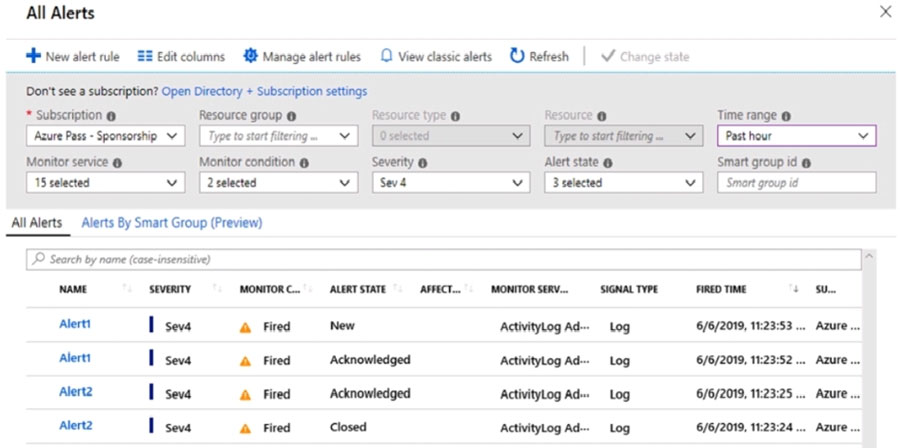
HOTSPOT - You have an Azure subscription that contains the alerts shown in the following exhibit.

Use the drop-down menus to select the answer choice that completes each statement based on the information presented in the graphic. NOTE: Each correct selection is worth one point. Hot Area:

Partie 1 :

Select the correct answer(s) in the image below.

question-image

Answer: A (Pass). From the exhibit, we can read the relevant details needed to determine allowed state transitions: the Alerts list shows Alert state values (New, Acknowledged, Closed) and the toolbar includes the “Change state” action. That is enough information to answer the sub-questions about whether a given alert instance’s state can be changed and to what. This is a standard Azure Monitor alerts management scenario (not a trick about classic alerts vs. new alerts). The presence of multiple states in the grid and the explicit “Change state” control indicates the portal supports modifying alert state for selected alerts. Therefore, it’s reasonable to proceed and answer rather than fail. Why not B: Choosing Fail would mean you cannot determine the answer, but the screenshot provides the key fields (Alert state and Fired time) required by the prompts.

Partie 2 :

The state of Alert1 that was fired at 11:23:52 ______

The Alert1 instance fired at 11:23:52 is currently in the Acknowledged state. In Azure Monitor, alert processing states are workflow states, and an acknowledged alert can be moved either back to New (to reopen/reset handling) or forward to Closed. Therefore, the correct choice is that it can be changed to New or Closed. The other options are incorrect because the alert state is editable, and Acknowledged is not limited to only one next state.

Partie 3 :

The state of Alert2 that was fired at 11:23:24 ______

The Alert2 instance fired at 11:23:24 is currently in the Closed state. In Azure Monitor, a closed alert is not terminal; it can be reopened by changing it to New or moved to Acknowledged if someone is taking ownership again. Therefore, the correct answer is New or Acknowledged. The other options are too restrictive because Closed alerts can still have their workflow state updated from the portal.

8
Question 8

You have the Azure virtual machines shown in the following table.

For which virtual machines can you enable Update Management?

Partie 1 :

VM1 is running.

Yes. VM1 can have Update Management enabled because it is running a supported general-purpose OS (Windows or a supported Linux distribution) as indicated in the table. Enabling Update Management is primarily an onboarding/configuration step: the VM is connected to an Automation account and Log Analytics workspace and the required agent/extension is installed/configured. Since VM1 is running, it can also immediately complete agent installation and begin reporting update compliance. The alternative (No) would only be correct if VM1 were an unsupported OS/image type (for example, a network appliance or an image that cannot run the required agent/extension) or if the scenario explicitly stated blocked outbound connectivity to required Azure endpoints. Neither condition applies here for VM1.

Partie 2 :

VM2 is running.

No. VM2 cannot have Update Management enabled because the OS/image type shown for VM2 in the table is not supported by Azure Update Management (classic). Update Management requires a supported Windows/Linux OS that can run the Microsoft Monitoring Agent/Log Analytics agent (or the required VM extension path used by the solution) and can communicate with Azure Automation/Log Analytics. If VM2 is a specialized appliance/locked-down marketplace image (common in these questions), it won’t support the agent/extension model needed for assessment and patch orchestration. Even though VM2 is running, power state does not override OS support requirements. Therefore, “Yes” would be incorrect because the platform cannot onboard an unsupported OS to Update Management.

Partie 3 :

VM3 is stopped.

Yes. VM3 can have Update Management enabled even though it is stopped. This is a frequent exam nuance: enabling/onboarding Update Management is a control-plane configuration that can be applied to an Azure VM regardless of whether it is currently running. What you cannot do while it is stopped is complete real-time assessment, install the agent/extension (if not already present), or execute update deployments—those require the VM to be powered on and able to communicate outbound to Azure endpoints. As long as VM3’s OS in the table is a supported Windows/Linux OS, the correct answer is Yes for enablement. “No” would only be correct if the OS were unsupported or if the question asked whether updates can be deployed while stopped.

Partie 4 :

VM4 is running.

Yes. VM4 can have Update Management enabled because it is running a supported OS per the table. With the VM running, onboarding can install/configure the required agent/extension and start collecting update compliance data immediately. Update Management is designed for ongoing patch governance and reporting, which supports the Secure Compute pillar: maintaining OS patch levels, reducing vulnerability exposure, and providing auditability. The “No” option would only apply if VM4 were an unsupported OS/appliance image or if prerequisites were explicitly missing (for example, no connectivity to Azure Automation/Log Analytics endpoints, or policy restrictions preventing extension installation). Given the table indicates a supported VM OS, enabling Update Management is valid.

9
Question 9

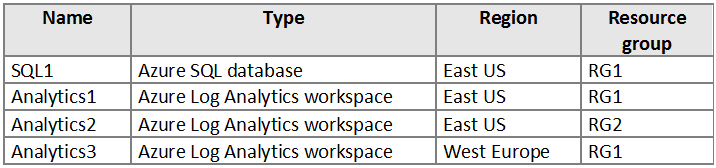
HOTSPOT - You have an Azure subscription that contains the resources shown in the following table.
diagram

You create the Azure Storage accounts shown in the following table.

You need to configure auditing for SQL1. Which storage accounts and Log Analytics workspaces can you use as the audit log destination? To answer, select the appropriate options in the answer area. NOTE: Each correct selection is worth one point. Hot Area:

Partie 1 :

Name: Storage1, Region: East US, Resource group: RG1, Storage account type: Blob, Access tier (default): Cool

Storage1 cannot be used. Although Storage1 is in the correct region (East US), its storage account type is listed as “Blob”. In Azure, a BlobStorage account (legacy “Blob” type) is not a supported destination type for Azure SQL Database auditing. SQL auditing requires a supported Azure Storage account type such as General-purpose v1 (Storage) or General-purpose v2 (StorageV2) with standard performance. The access tier (Cool) is not the deciding factor here; tiering applies to blob data lifecycle/cost and does not by itself block auditing. The key issue is the account kind/type. Therefore, even with correct region and resource group, Storage1 is not eligible as an audit log destination.

Partie 2 :

Name: Storage2, Region: East US, Resource group: RG2, Storage account type: General purpose V1, Access tier (default): Not applicable

Storage2 can be used. Storage2 is in East US, which matches SQL1’s region (East US). Region alignment is required for Azure SQL Database auditing to Storage. Additionally, Storage2 is a General purpose v1 account, which is a supported storage account type for SQL auditing. The fact that Storage2 is in a different resource group (RG2) does not prevent its use as an auditing destination. Auditing configuration is based on permissions and supported destination characteristics (region/type), not resource group co-location. Also, the “Access tier (default): Not applicable” is expected for GPv1 accounts and does not affect auditing eligibility. Therefore, Storage2 is a valid audit log destination.

Partie 3 :

Name: Storage3, Region: West Europe, Resource group: RG1, Storage account type: General purpose V2, Access tier (default): Hot

Storage3 cannot be used. Storage3 is a General purpose v2 account (supported type), but it is located in West Europe. SQL1 is in East US. Azure SQL Database auditing to a Storage account requires the storage account to be in the same region as the SQL resource being audited. Even though Storage3 is in the same resource group as SQL1 (RG1), resource group alignment does not override the regional requirement. Cross-region storage destinations are not supported for SQL auditing, and attempting to configure this would fail or be blocked. The access tier (Hot) is not the issue; the region mismatch is. Therefore, Storage3 is not eligible.

Partie 4 :

Storage accounts that can be used as the audit log destination: ______

Only Storage2 can be used as the audit log destination. Evaluate each storage account against the two main requirements: supported storage account type and same-region placement. - Storage1 (East US) fails because its account type is “Blob” (BlobStorage), which is not supported for Azure SQL auditing destinations. - Storage2 (East US) passes: it is General purpose v1 (supported) and in the same region as SQL1. - Storage3 fails due to region mismatch (West Europe vs East US), even though it is GPv2. Therefore, the correct selection is “Storage2 only.”

Partie 5 :

Log Analytics workspaces that can be used as the audit log destination: ______

Only Analytics1 can be used. Analytics1 is the Log Analytics workspace that matches SQL1 for this auditing configuration scenario. Analytics3 is in West Europe, so it does not match SQL1’s East US region. Analytics2 is not selected as a valid destination in this question, so the correct answer is Analytics1 only.

10
Question 10

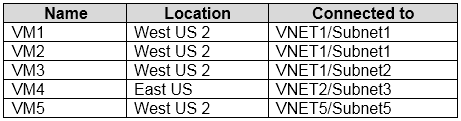
You have the Azure virtual machines shown in the following table.
diagram

Each virtual machine has a single network interface. You add the network interface of VM1 to an application security group named ASG1. You need to identify the network interfaces of which virtual machines you can add to ASG1. What should you identify?

This option includes only VM2, but it omits other valid candidates. VM3 is also in West US 2 and can be added even though it is in a different subnet. VM5 is also in West US 2 and can be added even though it is in a different virtual network. Because A leaves out valid NICs, it is incorrect.

This option correctly includes VM2 and VM3, but it incorrectly excludes VM5. The explanation behind this distractor is the common but incorrect assumption that ASGs are limited to a single VNet. In reality, ASG membership is constrained by region, not by virtual network. Since VM5 is also in West US 2, its NIC can be added to ASG1.

This option incorrectly includes VM4. VM4 is located in East US, while ASG1 is in West US 2 because it contains VM1's NIC from that region. Application Security Groups cannot contain NICs from different regions. Although VM2, VM3, and VM5 are valid, the inclusion of VM4 makes the entire option incorrect.

VM2, VM3, and VM5 are all in West US 2, which matches the region of ASG1 because VM1's NIC is already a member. Application Security Groups are regional resources, so NICs from the same region can be added even if they belong to different subnets or different virtual networks. VM2 and VM3 are in VNET1, and VM5 is in VNET5, but that VNet difference does not prevent ASG membership. Therefore D is the correct choice because it includes all eligible VMs in the same region and excludes the one in a different region.

Analyse de la question

Core concept: This question tests the scope and membership rules of Azure Application Security Groups (ASGs). ASGs are logical groupings of virtual machine network interfaces that you reference in Network Security Group (NSG) rules to simplify traffic filtering. Why correct: ASG1 already contains the NIC of VM1, which is in West US 2. Application Security Groups are regional resources, so you can add NICs only from the same region, but they do not have to be in the same virtual network or subnet. That means VM2, VM3, and VM5 can be added because they are all in West US 2, while VM4 cannot because it is in East US. Key features: ASGs are used with NSG rules to define source and destination groups based on NIC membership rather than IP addresses. They are associated with NICs, not directly with subnets or VNets. Their important scope boundary is region, which is a common exam point. Common misconceptions: A frequent mistake is confusing ASG scope with VNet scope and assuming all NICs must belong to the same virtual network. Another misconception is that ASGs are subnet-specific, which is also incorrect. The actual restriction is that the NICs and the ASG must be in the same region. Exam tips: For AZ-500, remember the distinction between NSGs, ASGs, subnets, and VNets. If a question asks whether a NIC can join an ASG, first check the region before checking anything else. Do not eliminate a VM just because it is in a different subnet or VNet if it is still in the same Azure region.

Autres tests d'entraînement

Practice Test #1

50 Questions·100 min·Réussite 700/1000

Practice Test #2

50 Questions·100 min·Réussite 700/1000

Practice Test #4

50 Questions·100 min·Réussite 700/1000

Practice Test #5

50 Questions·100 min·Réussite 700/1000
← Voir toutes les questions Microsoft AZ-500

Commencer à s'entraîner

Téléchargez Cloud Pass et commencez à vous entraîner sur toutes les questions Microsoft AZ-500.

Get it on Google PlayDownload on the App Store
Cloud PassCloud Pass

Application d'entraînement aux certifications IT

Get it on Google PlayDownload on the App Store

Certifications

AWSGCPMicrosoftCiscoCompTIADatabricks

Mentions légales

FAQPolitique de confidentialitéConditions d'utilisation

Entreprise

ContactSupprimer le compte

© Copyright 2026 Cloud Pass, Tous droits réservés.

Envie de vous entraîner partout ?

Obtenir l'application

Téléchargez Cloud Pass — inclut des tests d'entraînement, le suivi de progression et plus encore.