
CloudPass LogoCloud Pass
AWSGoogle CloudMicrosoftCiscoCompTIADatabricks
Certifications
AWSGoogle CloudMicrosoftCiscoCompTIADatabricks
PL-300: Microsoft Power BI Data Analyst

Practice Test #2

Simulez l'expérience réelle de l'examen avec 50 questions et une limite de temps de 100 minutes. Entraînez-vous avec des réponses vérifiées par IA et des explications détaillées.

50Questions100Minutes700/1000Score de réussite
Parcourir les questions d'entraînement

Propulsé par l'IA

Réponses et explications vérifiées par triple IA

Chaque réponse est vérifiée par 3 modèles d'IA de pointe pour garantir une précision maximale. Obtenez des explications détaillées par option et une analyse approfondie des questions.

GPT Pro
Claude Opus
Gemini Pro
Explications par option
Analyse approfondie des questions
Précision par consensus de 3 modèles

Questions d'entraînement

1
Question 1

HOTSPOT - You have a Power BI model that contains a table named Sales and a related date table. Sales contains a measure named Total Sales. You need to create a measure that calculates the total sales from the equivalent month of the previous year. How should you complete the calculation? To answer, select the appropriate options in the answer area. NOTE: Each correct selection is worth one point. Hot Area:

Partie 1 :

Sales Previous Year = ______

The correct function to start this measure is CALCULATE because you need to re-calculate an existing measure ([Total Sales]) under a modified filter context (the prior-year dates). CALCULATE is the core DAX function for context transition and filter manipulation, which is exactly what time intelligence requires. Why the others are wrong: - EVALUATE is used in DAX queries (for example, in DAX Studio or SSMS) to return a table result; it is not used to define measures in Power BI. - SUM aggregates a column directly (for example, SUM(Sales[Amount])). Since you already have a measure [Total Sales], you should reuse it rather than re-summing a column. - SUMX is an iterator that evaluates an expression row-by-row over a table. It’s useful for calculated row logic, but it’s unnecessary and less efficient for a simple prior-year version of an existing measure.

Partie 2 :

[Total Sales], ______(

SAMEPERIODLASTYEAR is the best match for “equivalent month of the previous year.” When the current filter context is a month (for example, March 2025), SAMEPERIODLASTYEAR returns the set of dates for March 2024, preserving the shape of the current period and shifting it back one year. Why the others are wrong: - DATESMTD returns dates from the start of the month to the current date in context (month-to-date), not the same month last year. - PARALLELPERIOD can shift periods (for example, -1 year), but the exam typically expects SAMEPERIODLASTYEAR for standard prior-year comparisons, and it’s more explicit for this scenario. - TOTALMTD is a wrapper that calculates a month-to-date total, which is not requested here (you want total sales for the equivalent month, not MTD).

Partie 3 :

You should pass the date column from the Date table into SAMEPERIODLASTYEAR, which is `Date`[Date]. Time intelligence functions require a column of type Date (or DateTime) from a proper date table to generate the correct set of shifted dates. Why the others are wrong: - [Date] is ambiguous because it doesn’t specify the table. In DAX, especially in models with multiple tables, you should fully qualify columns to avoid ambiguity and ensure the function uses the date dimension. - `Date`[Month] is not appropriate because it is typically a text or numeric month attribute and does not uniquely identify days. SAMEPERIODLASTYEAR operates on a contiguous set of daily dates; using a month column would break the required granularity and can produce incorrect or invalid results. Putting it together, the intended measure pattern is: Sales Previous Year = CALCULATE([Total Sales], SAMEPERIODLASTYEAR(`Date`[Date]))

2
Question 2

Note: This question is part of a series of questions that present the same scenario. Each question in the series contains a unique solution that might meet the stated goals. Some question sets might have more than one correct solution, while others might not have a correct solution. After you answer a question in this section, you will NOT be able to return to it. As a result, these questions will not appear in the review screen. You are modeling data by using Microsoft Power BI. Part of the data model is a large Microsoft SQL Server table named Order that has more than 100 million records. During the development process, you need to import a sample of the data from the Order table. Solution: From Power Query Editor, you import the table and then add a filter step to the query. Does this meet the goal?

Yes is correct because adding a filter step in Power Query Editor can limit the rows imported from the SQL Server Order table. With SQL Server, simple filters usually support query folding, so Power Query sends a reduced query to the source instead of retrieving all 100 million rows. That means only a sample or subset of the data is imported during development. This is a common and valid way to work with large tables while building and testing a model.

No is incorrect because the proposed solution can meet the goal when the filter step folds back to SQL Server. In Power Query, transformations are not necessarily executed after a full table load; instead, they are often translated into source queries for foldable sources. Since SQL Server supports query folding for standard filters, the subset can be retrieved directly from the source. The answer would only be doubtful if the filter could not fold, but that is not the typical assumption for this exam scenario.

Analyse de la question

Core concept: This question tests whether Power Query can be used to limit the amount of data imported from a large SQL Server table during development. Why correct: Adding a filter step in Power Query against a SQL Server source will typically use query folding, meaning the filter is translated into a SQL WHERE or TOP-style restriction and only the filtered subset is retrieved. Key features: SQL Server is a foldable source, and Power Query transformations such as simple row filters are commonly pushed down to the source. Common misconceptions: Some candidates assume that importing the table first always loads the full table before later steps are applied, but in Power Query the applied steps form a single query plan and can be folded to the source. Exam tips: For PL-300, when asked how to reduce imported data during development, think about source-side filtering and query folding rather than loading the full dataset and trimming it afterward in the model.

3
Question 3

DRAG DROP - You are using existing reports to build a dashboard that will be viewed frequently in portrait mode on mobile phones. You need to build the dashboard. Which four actions should you perform in sequence? To answer, move the appropriate actions from the list of actions to the answer area and arrange them in the correct order. Select and Place:
Partie 1 :

Pin items from the reports to the dashboard.

Yes. A dashboard in Power BI is composed of tiles, and those tiles typically come from existing report visuals (or live pages) that you pin in the Power BI service. Since the requirement is to use existing reports to build a dashboard, pinning is the foundational step that actually creates the dashboard content. Without pinning items, there is nothing to arrange in the dashboard (including in the mobile layout). Why not No: If you skip pinning, you would only be editing an empty dashboard or not have a dashboard at all. Even if a dashboard already exists, you still need to pin the specific visuals you want users to see frequently on mobile. Pinning is therefore required to meet the scenario’s goal of building a mobile-consumable dashboard from existing reports.

Partie 2 :

Open the dashboard.

Yes. After pinning items (which creates/populates the dashboard), you must open the dashboard to access its settings and edit experiences, including the Mobile view. The mobile layout editor is accessed from within the dashboard in the Power BI service. Why not No: You cannot edit a dashboard’s mobile view without being in the context of that dashboard. While you can pin directly from a report visual and choose an existing/new dashboard, the step of opening the dashboard is necessary to proceed to mobile-specific layout editing and to validate the final portrait phone experience.

Partie 3 :

Create a phone layout for the existing reports.

No. Creating a phone layout for existing reports is a report-level optimization done in Power BI Desktop (View > Mobile layout). That feature controls how report pages render in the Power BI mobile app, not how a dashboard’s tiles are arranged on a phone. Why not Yes: The question is specifically about building a dashboard from existing reports and having that dashboard viewed frequently on mobile phones in portrait mode. For dashboards, the correct feature is editing the dashboard Mobile view in the Power BI service. Report phone layout could still be useful if users also open the underlying reports on mobile, but it is not required to build and optimize the dashboard itself, so it is not part of the necessary sequence.

Partie 4 :

Edit the Dashboard mobile view.

Yes. To optimize a dashboard for portrait mode on mobile phones, you use the dashboard’s Mobile view editor in the Power BI service. This provides a dedicated canvas representing a phone screen where you choose which pinned tiles appear and how they are arranged for mobile consumption. Why not No: If you only rely on the default dashboard layout, the mobile experience may be suboptimal (tiny tiles, poor ordering, excessive scrolling). The requirement explicitly calls out frequent viewing on mobile in portrait mode, which strongly implies you should tailor the Mobile view to prioritize key KPIs and improve usability.

Partie 5 :

Rearrange, resize, or remove items from the mobile layout.

Yes. After entering the dashboard Mobile view editor, you must rearrange, resize, or remove items to create an effective portrait phone layout. This is the step where you implement the actual mobile-first design: placing the most important KPIs at the top, resizing tiles for readability, and removing nonessential visuals to reduce scrolling. Why not No: Simply opening Mobile view without adjusting the layout does not meet the requirement to build a dashboard that is optimized for frequent mobile viewing. The exam expects you to recognize that mobile optimization is an explicit design activity, not an automatic outcome of pinning tiles.

4
Question 4

You have an Azure SQL database that contains sales transactions. The database is updated frequently. You need to generate reports from the data to detect fraudulent transactions. The data must be visible within five minutes of an update. How should you configure the data connection?

Adding a SQL statement (for example, a native query) can filter or shape the data returned, potentially improving performance by reducing rows/columns. However, it does not change the fundamental freshness behavior. If the dataset uses Import mode, the data is still only as current as the last refresh. If it uses DirectQuery, the data is already queried live; a SQL statement is optional and not the key requirement here.

Command timeout controls how long Power BI will wait for a query to complete before failing. This is a performance/reliability setting for long-running queries, not a data freshness mechanism. Increasing or decreasing the timeout will not make updated transactions appear sooner in reports; it only affects whether slow queries succeed. It may be relevant when DirectQuery queries are complex, but it does not meet the five-minute visibility requirement by itself.

Import mode loads data into the Power BI dataset (in-memory model) and requires refresh to see updates. While Import provides fast report performance and full modeling capabilities, it is not ideal for near-real-time requirements. Scheduled refresh in the Power BI service typically cannot guarantee a five-minute SLA for visibility, and refresh is a batch process that can take time and be limited by service/capacity constraints.

DirectQuery keeps data in Azure SQL Database and queries the source when users interact with the report, enabling near-real-time visibility of updates. This best matches the requirement that changes be visible within five minutes. The trade-off is increased dependency on source performance and potential limitations in DAX/modeling features compared to Import. Proper SQL tuning and capacity planning are important to maintain responsive reports.

Analyse de la question

Core concept: This question tests Power BI data connectivity modes (Import vs DirectQuery) and how they affect data freshness/latency for reporting. It also implicitly tests understanding of near-real-time reporting requirements and the trade-offs between performance, modeling features, and freshness. Why the answer is correct: The requirement states that sales transaction data is updated frequently and must be visible within five minutes of an update. DirectQuery is designed for scenarios where reports must reflect changes in the source system with minimal latency because visuals send queries directly to Azure SQL Database at report interaction time (and can use automatic page refresh in supported capacities). This avoids the need to wait for a dataset refresh cycle to bring new data into the Power BI model. Therefore, configuring the connection as DirectQuery best aligns with the “visible within five minutes” requirement. Key features and best practices: - DirectQuery keeps data in Azure SQL Database and queries it on demand, supporting near-real-time analytics. - For strict freshness targets, combine DirectQuery with appropriate refresh behaviors (for example, Automatic Page Refresh where available) and ensure the Azure SQL Database is sized/indexed to handle interactive query load. - Consider Azure Well-Architected Framework performance efficiency: optimize SQL (indexes, partitioning where appropriate, query tuning) and scale Azure SQL (vCores/DTUs) to meet concurrency. - Consider reliability and cost: DirectQuery can increase load on the database and may require scaling, whereas Import shifts load to Power BI but introduces refresh latency. Common misconceptions: Many assume Import with frequent scheduled refresh can meet a five-minute SLA. In practice, scheduled refresh frequency is limited and can be constrained by capacity, gateway, and service limits; also refresh is a batch operation, not continuous. Another misconception is that adding a SQL statement or changing command timeout affects freshness—those only affect query shape and execution behavior, not how quickly new rows appear in reports. Exam tips: When you see “frequently updated” plus “must be visible within minutes,” default to DirectQuery (or streaming/real-time patterns, if offered). Choose Import when performance and rich modeling are prioritized and data can be slightly stale. Always separate “query performance settings” (like timeouts) from “data freshness architecture” (connectivity mode and refresh strategy).

5
Question 5

In Power BI Desktop, you are creating visualizations in a report based on an imported dataset. You need to allow Power BI users to export the summarized data used to create the visualizations but prevent the users from exporting the underlying data. What should you do?

Dataset permissions in the Power BI service determine access capabilities such as viewing content or building new reports from a semantic model. They do not represent the primary report-authoring setting used to distinguish summarized export from underlying export in this question. While service and tenant settings can affect export behavior in practice, this option is not the best match to the asked action. The exam is targeting a report configuration choice in Power BI Desktop, not dataset permission assignment in the service.

Data Load settings control how data is brought into the model, including behaviors such as auto date/time, background data previews, and whether queries load into the model. These settings are relevant to authoring performance and model behavior, not to what end users can export from report visuals. They cannot be used to allow summarized data export while blocking underlying data export. As a result, this option does not address the requirement.

Data source permissions manage authentication credentials, privacy levels, and access to the underlying source systems used by Power BI Desktop. These settings are important for connecting to and refreshing data, but they do not govern report consumer actions like exporting data from a visual. Modifying source permissions would not selectively permit summarized export and deny underlying export. Therefore, this option is unrelated to the requested control.

Report settings for the current file are the most appropriate place in Power BI Desktop to control report-level behaviors such as data export from visuals. This aligns with the requirement to influence what report consumers can export without changing the imported dataset itself. Among the available choices, it is the only option tied to report interaction settings rather than connectivity or model loading. Therefore, it is the best and expected answer for this exam scenario.

Analyse de la question

Core concept: This question is about controlling what report consumers can export from visuals in Power BI. Power BI distinguishes between summarized data (the aggregated values shown in the visual) and underlying data (the detailed rows behind those aggregates). The relevant configuration is associated with the report’s settings for the current file, which is the closest match among the options. Why correct: In Power BI Desktop, report-level settings are where you configure behaviors related to exporting data from report visuals. This is the only option listed that pertains to report consumer export behavior rather than data connectivity, loading, or dataset access permissions. For exam purposes, this is the expected answer when the requirement is to allow summarized export but restrict underlying export. Key features: - Report settings in Power BI Desktop affect report behavior for the current file. - Export behavior from visuals is a report/consumer interaction setting, not a data source credential or load setting. - In real deployments, export capabilities can also be influenced by Power BI service and tenant-level settings. Common misconceptions: - Dataset permissions control access such as Build or Read, but they are not the primary mechanism for configuring visual export behavior in this scenario. - Data Load settings affect how data is imported and modeled, not what users can export from visuals. - Data source permissions relate to authentication and privacy levels, not report consumer export options. Exam tips: - If the question asks about user actions on a report visual, first think about report settings. - If the question asks about who can access or build from a dataset, think dataset permissions. - If the question asks about credentials or privacy levels, think data source permissions.

Envie de vous entraîner partout ?

Téléchargez Cloud Pass — inclut des tests d'entraînement, le suivi de progression et plus encore.

6
Question 6

You build a report to analyze customer transactions from a database that contains the tables shown in the following table. Table name Column name Customer CustomerID (primary key) Name State Email Transaction TransactionID (primary key) CustomerID (foreign key) Date Amount You import the tables. Which relationship should you use to link the tables?

Incorrect. A one-to-many relationship from Transaction to Customer would imply Transaction[CustomerID] is unique and Customer[CustomerID] has duplicates, which contradicts the schema (CustomerID is the Customer table’s primary key). This would also invert the typical dimension-to-fact modeling pattern and can lead to confusing filter behavior when slicing transaction totals by customer attributes.

Incorrect. One-to-one would require that each customer has exactly one transaction and each transaction belongs to exactly one customer with unique CustomerID values on both sides. In real transaction systems, customers commonly have multiple transactions, and the presence of TransactionID as a primary key strongly suggests multiple rows per customer are expected.

Incorrect. Many-to-many is used when the join column contains duplicates in both tables (e.g., both tables have repeated CustomerID values) or when bridging tables are needed. Here, Customer[CustomerID] is a primary key (unique), so the correct and simplest relationship is one-to-many. Using many-to-many unnecessarily can introduce ambiguity and performance issues.

Correct. Customer has a unique CustomerID (primary key), and Transaction includes CustomerID as a foreign key that can repeat across many transaction rows. This creates a classic dimension (Customer) to fact (Transaction) relationship: one customer can have many transactions. It enables correct filtering from Customer fields (State, Name) to Transaction aggregations (Amount, Date).

Analyse de la question

Core concept: This question tests Power BI data modeling fundamentals: defining correct table relationships based on primary key (PK) and foreign key (FK) structure, and building a star-schema-like model for accurate filtering and aggregation. Why the answer is correct: Customer has CustomerID as a primary key, meaning each CustomerID value is unique in the Customer table. Transaction contains CustomerID as a foreign key, meaning many transaction rows can reference the same customer. Therefore, the correct cardinality is one-to-many from Customer (the “one” side, dimension) to Transaction (the “many” side, fact). In Power BI, this relationship enables filters from Customer attributes (State, Name, Email) to correctly propagate to Transaction rows, allowing measures like total Amount by State or transactions over time by customer. Key features / best practices: - Use a dimension-to-fact relationship: Customer (dimension) -> Transaction (fact). - Ensure the relationship uses Customer[CustomerID] (unique) to Transaction[CustomerID] (repeating). - Typically set cross-filter direction to Single (from Customer to Transaction) to avoid ambiguity and improve performance, aligning with star schema best practices. - This design supports DAX measures that aggregate Transaction[Amount] while slicing by Customer attributes. Common misconceptions: Some may think the relationship should be from Transaction to Customer because “transactions reference customers,” but in Power BI modeling, the direction is conceptually from the lookup/dimension (unique keys) to the data/fact (many rows). Others may choose many-to-many if they misunderstand cardinality; however, many-to-many is only needed when both sides contain duplicates of the join key, which is not the case here. Exam tips: - Identify the table with the unique key: that’s the “one” side. - Fact tables (events like sales/transactions) usually sit on the “many” side. - Prefer star schema with single-direction filtering unless you have a specific need for bidirectional filtering. - Many-to-many is a special-case modeling pattern and is not the default choice when a clean PK/FK relationship exists.

7
Question 7
(Sélectionnez 2)

You are creating a sales report in Power BI for the NorthWest region sales territory of your company. Data will come from a view in a Microsoft SQL Server database. A sample of the data is shown in the following table: ID ProductKey OrderDate ShipDate CustomerKey SalesTerritoryRegion SalesOrderNumber SalesOrderLineNumber OrderQuantity UnitPrice SalesAmount TaxAmount Freight 1 310 2010-12-29 2011-01-05 21768 Canada SO43697 1 1 3578.27 3578.27 286.2616 89.4568 2 346 2010-12-29 2011-01-05 27365 France SO43698 1 1 3399.99 3399.99 271.9992 84.9998 3 346 2010-12-29 2011-01-05 76537 NorthWest SO43699 1 1 3399.99 3399.99 271.9992 84.9998 4 336 2010-12-30 2011-01-06 34256 SouthWest SO43700 1 1 699.0992 699.0982 55.9279 17.4775 5 346 2010-12-30 2011-01-06 34253 Australia SO43701 1 1 3399.99 3399.99 271.9992 84.9998 6 311 2010-12-30 2011-01-06 12543 SouthWest SO43702 1 1 3578.27 3578.27 286.2616 89.4568 7 310 2010-12-30 2011-01-06 76545 Australia SO43703 1 1 3578.27 3578.27 286.2616 89.4568 The report will facilitate the following analysis: ✑ The count of orders and the sum of total sales by Order Date ✑ The count of customers who placed an order ✑ The average quantity per order You need to reduce data refresh times and report query times. Which two actions should you perform? Each correct answer presents part of the solution. NOTE: Each correct selection is worth one point.

Incorrect. SalesOrderNumber is an order identifier, not a value that should be aggregated as a decimal number. Converting it to Decimal Number does not reduce the amount of imported data and may be semantically wrong, especially if the identifier contains nonnumeric patterns or should remain text. Performance improvements in this scenario come from reducing rows and removing unnecessary columns, not from changing this data type.

Incorrect. CustomerKey is required to calculate the count of customers who placed an order, typically by using a distinct count of CustomerKey or by relating to a customer dimension. Therefore, CustomerKey cannot be removed without preventing one of the required analyses. ProductKey may be unnecessary for the stated requirements, but because the option removes both columns together, the option is invalid overall.

Correct. TaxAmount and Freight are not used in any of the required analyses: order counts by date, total sales, distinct customer counts, or average quantity per order. Removing unused columns reduces the amount of data imported from SQL Server, decreases model size in VertiPaq, and lowers the number of columns scanned during report queries. This improves both refresh duration and interactive report performance without affecting the required calculations.

Correct. The report is specifically for the NorthWest sales territory, so filtering the data to only that region reduces the number of rows loaded into the model. When this filter is applied in Power Query and folds to SQL Server, the source system performs the filtering, which minimizes data transfer and processing in Power BI. Reducing row count is one of the most effective ways to improve refresh times and query responsiveness.

Analyse de la question

Core concept: To improve Power BI refresh and query performance, reduce the amount of data imported into the model by eliminating unnecessary rows and columns as early as possible, ideally with query folding back to SQL Server. Why correct: the report only needs fields required for order counts by Order Date, total sales, distinct customer counts, and average quantity per order, so unused columns should be removed and the dataset should be filtered to the NorthWest territory. Key features: filtering rows reduces source I/O, network transfer, and VertiPaq storage, while removing unused columns reduces model width, memory usage, and scan cost. Common misconceptions: changing an identifier like SalesOrderNumber to Decimal Number does not improve performance, and removing CustomerKey would break the distinct customer requirement even though removing truly unused keys can help. Exam tips: on PL-300, prioritize row reduction first, then column reduction, and keep only the columns needed for measures, relationships, and required analysis.

8
Question 8

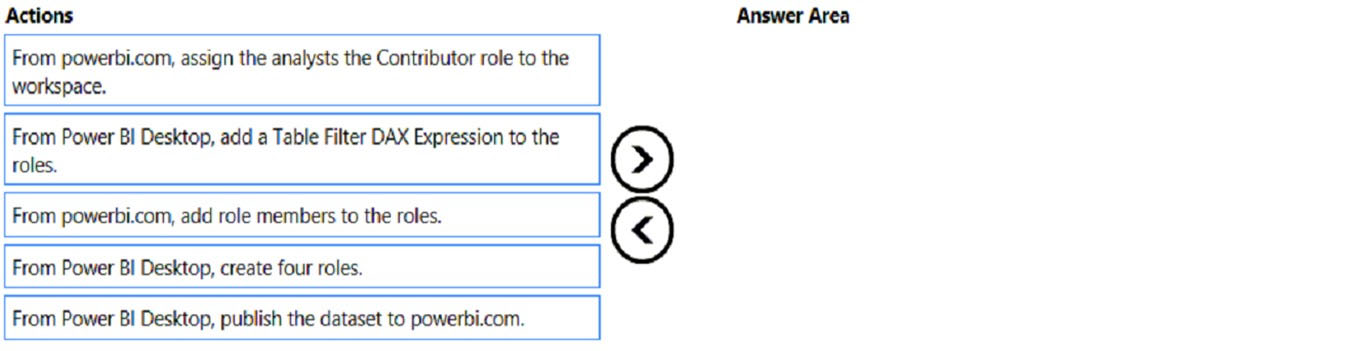
DRAG DROP - Once the profit and loss dataset is created, which four actions should you perform in sequence to ensure that the business unit analysts see the appropriate profit and loss data? To answer, move the appropriate actions from the list of actions to the answer area and arrange them in the correct order. Select and Place:

Partie 1 :

Select the correct answer(s) in the image below.

question-image

Answer: A (Pass). Correct sequence of actions to ensure analysts see appropriate P&L data via RLS is: 1) From Power BI Desktop, create four roles. 2) From Power BI Desktop, add a Table Filter DAX Expression to the roles. 3) From Power BI Desktop, publish the dataset to powerbi.com. 4) From powerbi.com, add role members to the roles. Why this is correct: RLS roles and their DAX filters must be authored in Desktop as part of the dataset definition. Publishing moves the secured dataset to the service. Only after publishing can you assign users/groups to those roles in the Power BI service so enforcement occurs at query time. Why the Contributor workspace role option is wrong: workspace permissions govern authoring/management, not row-level data visibility. Also, Contributors/Members can potentially bypass RLS in the workspace, which is the opposite of “ensure appropriate data visibility.”

9
Question 9

HOTSPOT - You need to design the data model and the relationships for the Customer Details worksheet and the Orders table by using Power BI. The solution must meet the report requirements. For each of the following statements, select Yes if the statement is true. Otherwise, select No. NOTE: Each correct selection is worth one point. Hot Area:

Partie 1 :

A relationship must be created between the CustomerID column in the Customer Details worksheet and the CustomerID column in the Orders table.

Yes. To meet typical report requirements such as showing “Top Customers” based on order metrics, Power BI must be able to filter and aggregate Orders by customer attributes stored in the Customer Details worksheet. The standard approach is a one-to-many relationship: Customer Details[CustomerID] (dimension, unique) -> Orders[CustomerID] (fact, repeating). Without this relationship, customer-level fields (like Customer Name or Region from Customer Details) will not correctly filter the Orders table, leading to incorrect totals or requiring complex DAX (e.g., TREATAS) to simulate relationships. In exam scenarios, when you have a Customer table and an Orders table, the expected modeling step is to relate them on CustomerID to form a star schema. This improves model clarity, reduces ambiguity, and supports efficient filter propagation from dimension to fact.

Partie 2 :

The Data Type of the columns in the relationship between the Customer Details worksheet and the Orders table must be set to Text.

No. The columns used in a relationship must have the same data type, but they do not specifically have to be Text. The correct choice depends on the nature of CustomerID in the source data. If CustomerID is numeric and has no leading zeros, Whole Number is typically preferred for performance and storage efficiency. If CustomerID can contain letters, hyphens, or leading zeros that must be preserved (e.g., “000123”), then Text is appropriate. Power BI will not allow a relationship between mismatched data types (e.g., Text to Whole Number) without conversion, but the requirement is consistency, not Text. Therefore, stating that the data type “must be set to Text” is too prescriptive and not universally true.

Partie 3 :

The Region field used to filter the Top Customers report must come from the Orders table.

No. The Region field used to filter a “Top Customers” report should come from the Customer Details (dimension) table, not from the Orders (fact) table. Region is a descriptive attribute of the customer and is typically stable compared to transactional data. Storing Region in Orders would duplicate the value across many rows, increasing model size and risking inconsistencies (e.g., if a customer’s region changes or if historical orders contain different region values). Using Region from the Customer dimension aligns with star schema best practices: dimensions provide slicers/filters; facts provide measures. With the CustomerID relationship in place, filtering by Customer Details[Region] will correctly filter Orders and produce accurate “Top Customers” results.

10
Question 10

You have a Power BI report hosted on powerbi.com that displays expenses by department for department managers. The report contains a line chart that shows expenses by month. You need to enable users to choose between viewing the report as a line chart or a column chart. The solution must minimize development and maintenance effort. What should you do?

Correct. Enabling “Personalize visuals” lets consumers change the visual type (e.g., line to column) directly in the Power BI service. It requires minimal authoring effort (no extra visuals/pages) and minimal maintenance because the report remains a single artifact; user changes are saved per user and don’t affect the published report for others.

Incorrect. Creating a separate page with a column chart works, but it increases development and ongoing maintenance. You must keep two visuals/pages consistent (titles, formatting, interactions, tooltips, filters), and any future changes to measures or layout may need to be applied in multiple places.

Incorrect. Using a column chart plus bookmarks and buttons can provide a polished toggle experience, but it adds report complexity and maintenance overhead. You must manage multiple visuals, bookmark states, and ensure interactions/filters behave consistently. This does not meet the requirement to minimize development and maintenance effort.

Incorrect. A mobile report is intended for phone-optimized layouts, not for giving desktop/web users a choice between chart types. It also introduces another layout to maintain and does not address the requirement for users viewing the standard report on powerbi.com.

Analyse de la question

Core concept: This question tests Power BI Service capabilities for end-user interactivity with minimal authoring effort. Specifically, it targets the “Personalize visuals” feature in the Power BI service, which allows report consumers to change a visual’s type (for example, line to clustered column) and adjust fields/formatting within governed limits. Why the answer is correct: Enabling report readers to personalize visuals (Option A) is the lowest development and maintenance approach. You keep a single visual and a single report definition, and users can switch the visual type themselves in the Power BI service without you creating duplicate visuals, pages, or navigation logic. This aligns with minimizing ongoing maintenance: any future changes to measures, formatting, or filters are made once, and consumers still have flexibility to view the data as a line or column chart. Key features / configuration notes: - The report author enables “Personalize visuals” in the report settings (in Power BI Desktop and/or in the Service depending on tenant settings). - Admin/tenant settings may control whether personalization is allowed; governance can restrict what users can do. - Users’ personalized changes are saved per user (their own view) and do not alter the base report for others. - This supports self-service analysis while maintaining a single source of truth, aligning with Power BI governance and the “Operational Excellence” and “Performance Efficiency” ideas from the Well-Architected mindset (reduce duplicated artifacts and simplify change management). Common misconceptions: Many assume bookmarks/buttons (Option C) are the standard way to toggle visuals. While valid, it requires building and maintaining additional visuals and navigation elements. Similarly, separate pages (Option B) or mobile layouts (Option D) increase report complexity and maintenance. Exam tips: When you see “users choose how to view a visual” and “minimize development/maintenance,” think of Power BI Service features like Personalize visuals (or field parameters for author-driven toggles, but that still requires model/report work). Also remember personalization is a Service consumption feature and depends on tenant settings and permissions.

Autres tests d'entraînement

Practice Test #1

50 Questions·100 min·Réussite 700/1000

Practice Test #3

50 Questions·100 min·Réussite 700/1000

Practice Test #4

50 Questions·100 min·Réussite 700/1000

Practice Test #5

50 Questions·100 min·Réussite 700/1000
← Voir toutes les questions PL-300: Microsoft Power BI Data Analyst

Commencer à s'entraîner

Téléchargez Cloud Pass et commencez à vous entraîner sur toutes les questions PL-300: Microsoft Power BI Data Analyst.

Get it on Google PlayDownload on the App Store
Cloud PassCloud Pass

Application d'entraînement aux certifications IT

Get it on Google PlayDownload on the App Store

Certifications

AWSGCPMicrosoftCiscoCompTIADatabricks

Mentions légales

FAQPolitique de confidentialitéConditions d'utilisation

Entreprise

ContactSupprimer le compte

© Copyright 2026 Cloud Pass, Tous droits réservés.

Envie de vous entraîner partout ?

Obtenir l'application

Téléchargez Cloud Pass — inclut des tests d'entraînement, le suivi de progression et plus encore.