

CompTIA
N10-009: CompTIA Network+
551+ Soal Latihan dengan Jawaban Terverifikasi AI
 Soal Ujian
Nyata
Soal Ujian
Nyata Penjelasan
Detail
Penjelasan
Detail Paling Mendekati
Ujian Nyata
Paling Mendekati
Ujian NyataDidukung AI
Jawaban & Penjelasan Terverifikasi oleh 3 AI
Setiap jawaban N10-009: CompTIA Network+ diverifikasi silang oleh 3 model AI terkemuka untuk memastikan akurasi maksimum. Dapatkan penjelasan detail per opsi dan analisis soal mendalam.
Domain Ujian
Soal Latihan
While troubleshooting a VoIP handset connection, a technician's laptop is able to successfully connect to network resources using the same port. The technician needs to identify the port on the switch. Which of the following should the technician use to determine the switch and port?
LLDP is a Layer 2 neighbor discovery protocol (IEEE 802.1AB) that allows devices to advertise and learn information about directly connected neighbors. It can reveal the switch’s identity (system name/management IP) and the specific switchport (port ID/description) the endpoint is connected to. This makes it ideal for quickly determining the switch and port associated with a wall jack during troubleshooting.
IKE (Internet Key Exchange) is used to negotiate security associations for IPsec VPNs (Phase 1/Phase 2 concepts). It operates at higher layers and is unrelated to identifying physical switchports or mapping a device to an access switch interface. While important for secure tunnels, it provides no neighbor/port discovery for local Ethernet connections.
A VLAN is a logical segmentation mechanism on switches that separates broadcast domains and can support voice/data separation (e.g., voice VLAN for VoIP). However, VLAN configuration alone does not tell you which physical switch and port a device is connected to. VLANs describe how traffic is handled on ports, not how to discover the port’s physical location or upstream neighbor identity.
netstat is a host-based utility that displays active TCP/UDP sessions, listening ports, and related statistics on the local machine. It can help troubleshoot application connectivity, but it cannot identify the upstream switch, the switchport number, or the physical network path. It provides no Layer 2 neighbor discovery information.
Analisis Soal
Core Concept: This question tests knowledge of Layer 2 discovery protocols used to identify directly connected network devices. When a technician needs to determine which switch and interface a wall jack or endpoint is connected to, discovery protocols such as LLDP provide neighbor and port-identification information between adjacent devices. Why the Answer is Correct: LLDP (Link Layer Discovery Protocol) is the best answer because it is specifically designed to advertise device identity and interface information between directly connected devices. Managed switches commonly use LLDP to share details such as system name, port ID, and capabilities. In a troubleshooting scenario, LLDP is the protocol associated with learning which switch and port are connected to the endpoint. Key Features: LLDP is an open standard defined by IEEE 802.1AB and is vendor-neutral, unlike proprietary alternatives such as CDP. It operates at Layer 2 and is commonly supported on switches, IP phones, and many enterprise network devices. LLDP-MED can also provide additional information relevant to VoIP environments, such as voice VLAN and device capabilities. Common Misconceptions: IKE is for IPsec key negotiation, not switchport discovery. VLANs define logical segmentation but do not identify a physical switch interface by themselves. netstat only shows local host network sessions and listening ports, not upstream switch neighbor details. Exam Tips: On Network+, if the question asks how to identify a directly connected switch or port, think of LLDP or CDP first. Distinguish Layer 2 discovery protocols from security, segmentation, and host-session tools. For VoIP questions, also remember that LLDP-MED is commonly associated with phones and voice deployments.
Which of the following steps of the troubleshooting methodology would most likely include checking through each level of the OSI model after the problem has been identified?
Establishing a theory of probable cause is the troubleshooting step where a technician analyzes the issue and determines what might be wrong. Using the OSI model layer by layer is a classic diagnostic method for narrowing down whether the fault is physical, data link, network, transport, or application related. At this point, the problem has been recognized, but the root cause has not yet been confirmed, so a structured OSI walkthrough helps form a likely explanation. CompTIA commonly associates top-to-bottom and bottom-to-top troubleshooting with this theory-building stage.
Implement the solution happens only after a probable cause has been identified, tested if necessary, and a remediation path has been chosen. This step is about making the change, such as replacing a cable, reconfiguring a switch port, or updating a routing table. Checking each OSI layer is primarily a diagnostic technique used before changes are made, not the implementation itself. While implementation may involve touching a specific layer, it is not the stage where you systematically analyze all layers to find the cause.
Create a plan of action comes after you have a likely cause and are deciding how to resolve it. In this phase, you consider the impact of the fix, required resources, rollback options, and communication or escalation needs. The OSI model can inform the plan, but the actual layer-by-layer checking is done earlier when diagnosing the issue. Planning is about remediation strategy, not root-cause investigation.
Verify functionality is the post-fix step where you confirm the issue is resolved and that full system operation has been restored. This can include testing connectivity, application access, and user experience after the solution is applied. Although verification may touch multiple OSI layers, the question asks about checking through each level after the problem has been identified, which points to diagnosis rather than confirmation. On the exam, verification is associated with validating the fix, not determining the probable cause.
Analisis Soal
Core concept: This question targets the CompTIA Network+ troubleshooting methodology and how performance baselines are used. A baseline is a known-good set of metrics (throughput, latency, error rates, CPU/memory utilization, etc.) captured when the network is healthy. Comparing current test results to that baseline helps determine whether the issue is resolved and whether performance has returned to expected levels. Why the answer is correct: Comparing current throughput tests to a baseline most directly aligns with the step “Verify full system functionality and, if applicable, implement preventive measures.” After you apply a fix, you must confirm the network is operating normally end-to-end. Throughput testing (e.g., iPerf, speed tests, WAN circuit tests, file transfer benchmarks) compared against historical baseline values is a classic verification activity. It validates not just that the symptom is gone, but that performance is back within acceptable thresholds and that no new bottlenecks were introduced. Key features/best practices: Effective verification includes (1) re-running the same tests used to detect the problem, (2) comparing results to baselines and SLAs, (3) checking multiple perspectives (client-to-server, site-to-site, wired vs. wireless), and (4) monitoring for a period to ensure stability. Baselines should be periodically updated and stored in monitoring systems (SNMP/telemetry, NetFlow, NMS dashboards) so comparisons are meaningful. Common misconceptions: “Test the theory” can involve running throughput tests, but that step is about confirming the suspected cause before making changes (e.g., proving congestion or duplex mismatch). The question specifically emphasizes comparing to a baseline, which is more characteristic of post-fix validation. “Implement the solution” is the change itself, not the measurement. “Document findings” may include recording baseline comparisons, but documentation is the final administrative step, not where the comparison is most likely performed. Exam tips: When you see wording like “compare to baseline,” “confirm normal operation,” “ensure performance is restored,” or “validate end-to-end,” think of the verification step. When you see “prove the cause,” “reproduce the issue,” or “validate hypothesis,” think of testing the theory.
A network administrator needs to set up a file server to allow user access. The organization uses DHCP to assign IP addresses. Which of the following is the best solution for the administrator to set up?
A separate DHCP scope with a /32 subnet is not a typical or practical solution for assigning a stable address to a single server. DHCP scopes are normally aligned to real subnets/VLANs. A /32 represents a single host route and does not match how clients communicate on a LAN segment. Reservations within the existing scope are the standard method to give one device a consistent IP via DHCP.
A DHCP reservation maps the server’s MAC address to a specific IP so the server always receives the same address while still using DHCP. This prevents IP conflicts, keeps addressing centrally managed, and simplifies changes, auditing, and documentation. It’s a common best practice for servers in DHCP-managed networks, especially when consistent reachability and stable DNS records are required.
A static IP address within the DHCP IP range is a common mistake because the DHCP server may lease that same address to another client, causing an IP conflict and intermittent connectivity issues. If using static addressing, best practice is to place it outside the DHCP pool and document it carefully. Given the organization uses DHCP, a reservation is safer and more manageable.
SLAAC (Stateless Address Autoconfiguration) is an IPv6 mechanism where hosts self-generate addresses based on router advertisements. While useful for client networks, it is not ideal for a file server that needs a predictable, centrally controlled address. Servers typically use static IPv6 or DHCPv6 reservations/assignments (plus stable DNS), not SLAAC, for consistent access.
Analisis Soal
Core Concept: This question tests DHCP addressing best practices for servers that must be consistently reachable by users. File servers should have a stable IP address so DNS records, mapped drives, ACLs, monitoring, and documentation remain accurate. Why the Answer is Correct: A DHCP reservation (also called a static lease) binds a specific IP address to the server’s MAC address on the DHCP server. The server still uses DHCP, but it always receives the same IP. This provides the operational benefits of centralized IP management (single source of truth, easy changes, auditing, and avoidance of conflicts) while ensuring the file server’s address does not change. In most enterprise environments, this is the preferred approach when the organization “uses DHCP” and wants consistent addressing without manually configuring the host. Key Features / Best Practices: - Create a reservation in the DHCP scope for the server’s NIC MAC address and desired IP. - Ensure the reserved IP is outside the dynamic pool (or excluded from the pool) to prevent accidental assignment to other clients. - Pair with DNS: create/verify A/AAAA and PTR records; many DHCP servers can update DNS dynamically. - Consider redundancy: DHCP failover/split-scope so the reservation remains available during outages. Common Misconceptions: - “Just set a static IP” can work, but if it’s inside the DHCP range it risks IP conflicts. Even outside the range, it reduces centralized control and can be missed during renumbering. - “/32 scope” is not how you provide a single fixed address via DHCP in normal designs. - SLAAC is IPv6-focused and does not provide the same deterministic, centrally managed addressing typically expected for servers. Exam Tips: For Network+ questions: servers and network devices generally need predictable IPs. If the environment uses DHCP, the best answer is usually a DHCP reservation (or static lease). Avoid choices that place static IPs inside the DHCP pool/range, and be cautious of IPv6 autoconfiguration options when the scenario implies managed, stable addressing for a server.
Which of the following technologies are X.509 certificates most commonly associated with?
PKI (Public Key Infrastructure) is the correct association because X.509 defines the standard certificate format used by PKI. PKI provides the trust model (CAs, certificate chains), lifecycle management (issuance, renewal), and validation/revocation methods (CRL/OCSP) that make X.509 certificates usable for TLS, VPNs, and 802.1X authentication.
VLAN tagging refers to IEEE 802.1Q, which inserts VLAN IDs into Ethernet frames to segment Layer 2 networks. It deals with switching, trunk ports, and broadcast domain separation—not identity, encryption, or certificate formats. X.509 certificates operate at higher layers for authentication and encryption (e.g., TLS), so VLAN tagging is unrelated.
LDAP is a directory protocol used to access and manage directory information, such as users, groups, and sometimes certificate-related objects. Although LDAP directories can store X.509 certificates or publish certificate revocation information, LDAP is not the trust model or certificate framework itself. X.509 is most directly tied to PKI, which handles certificate issuance, validation, and chain of trust. Therefore, LDAP may interact with certificates in some environments, but it is not the technology most commonly associated with X.509.
MFA (multi-factor authentication) is an authentication strategy requiring two or more factor types (something you know/have/are). Certificates can be used as “something you have” (smart card/cert-based auth), but MFA is not inherently tied to X.509. X.509 is a certificate standard; PKI is the infrastructure that uses it.
Analisis Soal
Core Concept: X.509 is the standard format for public key certificates used to bind an identity (a person, server, device, or service) to a public key. These certificates are a foundational component of Public Key Infrastructure (PKI), which provides the processes and trust model for issuing, validating, revoking, and managing certificates. Why the Answer is Correct: X.509 certificates are most commonly associated with PKI because PKI is the overarching system that makes certificates useful and trustworthy. PKI includes Certificate Authorities (CAs) that issue X.509 certificates, Registration Authorities (RAs) that validate identity, certificate repositories, and revocation mechanisms (CRL and OCSP). Without PKI, a certificate is just data; PKI provides the chain of trust that allows clients to verify that a certificate is legitimate and unaltered. Key Features / Best Practices: X.509 certificates contain fields such as Subject, Issuer, Validity period, Subject Public Key Info, Key Usage/Extended Key Usage, and Subject Alternative Name (SAN). In real networks, X.509 is used heavily for TLS/HTTPS, VPNs (IPsec/IKE, SSL VPN), 802.1X/EAP-TLS for network access control, S/MIME email encryption, and code signing. Best practices include using strong key sizes/algorithms, ensuring SAN matches hostnames, monitoring expiration, and implementing revocation checking (OCSP stapling where appropriate). Common Misconceptions: LDAP is often mentioned alongside certificates because directories can store certificates or user attributes, but LDAP is not the primary technology X.509 is “associated with”; it’s a directory protocol. MFA can use certificates as one factor (smart cards), but MFA is an authentication approach, not the certificate trust framework. VLAN tagging (802.1Q) is a Layer 2 segmentation method and unrelated to certificate formats. Exam Tips: For Network+ questions, when you see “X.509,” think “digital certificates,” “TLS,” “CA,” “chain of trust,” and “PKI.” If the option “PKI” is present, it is almost always the best match. Also remember CRL/OCSP as PKI validation components and SAN/CN as common troubleshooting points for certificate name mismatch errors.
A network administrator wants to implement an authentication process for temporary access to an organization's network. Which of the following technologies would facilitate this process?
A captive portal forces new clients to a web page for authentication or acceptance of terms before granting broader network/Internet access. It’s commonly used for guest or temporary access because credentials can be time-limited (vouchers) and users don’t need special Wi-Fi supplicant configuration. It’s typically implemented on a wireless controller, firewall, or gateway and paired with guest VLAN isolation and policy controls.
Enterprise authentication usually refers to WPA2/WPA3-Enterprise using 802.1X with a RADIUS/AAA backend (often integrated with AD/LDAP and EAP methods). While secure and scalable for employees, it’s not the typical solution for temporary access because it requires distributing credentials/certificates and configuring client supplicants, which is cumbersome for guests and short-term users.
An ad hoc network is a device-to-device (peer-to-peer) wireless network without a centralized access point and without centralized authentication controls. It’s generally discouraged in enterprise environments because it bypasses standard security monitoring and policy enforcement. It does not provide a managed, temporary authentication process for accessing an organization’s network resources.
WPA3 is a Wi-Fi security standard that improves encryption and authentication (e.g., SAE for Personal, stronger cryptography for Enterprise). However, WPA3 alone doesn’t create a temporary access workflow like vouchers or web-based login. You could run a guest SSID with WPA3-Personal, but that still relies on sharing a PSK rather than providing controlled, expiring, user-specific access.
Analisis Soal
Core Concept: This question is testing guest/temporary network access controls and how users are authenticated before being granted network/Internet access. In Network+ terms, this commonly maps to guest Wi-Fi design and access control mechanisms at the edge (often web-based authentication and policy enforcement). Why the Answer is Correct: A captive portal is specifically designed to provide temporary or guest access by intercepting a user’s initial web traffic and redirecting them to a login/acceptance page. After the user authenticates (voucher, username/password, SMS code, social login, or simply accepting an acceptable use policy), the network device (wireless controller, firewall, or gateway) updates policy to allow that client’s traffic. This is ideal for short-term access because it can be time-limited, user-specific, and does not require distributing a long-lived Wi-Fi password. Key Features / Best Practices: Captive portals are commonly paired with a separate guest SSID/VLAN and firewall rules that restrict lateral movement to internal networks. They can integrate with RADIUS/AAA, directory services, or a guest management system to issue expiring credentials. Best practice is to isolate guests (client isolation), apply bandwidth limits, log authentication events, and enforce TLS for the portal page to reduce credential exposure. Many enterprise Wi-Fi solutions support “sponsored guest” workflows where an employee approves temporary access. Common Misconceptions: “Enterprise authentication” (e.g., WPA2/WPA3-Enterprise with 802.1X) is strong authentication, but it’s typically for managed users/devices and is not the simplest approach for temporary guests because it requires supplicant configuration and certificate/credential management. WPA3 is a security standard for Wi-Fi encryption/authentication, but by itself it doesn’t provide a temporary access workflow. An ad hoc network is a peer-to-peer wireless setup and does not provide controlled, auditable temporary access to an organization’s network. Exam Tips: When you see “temporary access,” “guest access,” “hotel/coffee shop style login,” “accept terms,” or “voucher-based access,” think captive portal. If you see “corporate users,” “RADIUS,” “802.1X,” “EAP,” or “certificates,” think enterprise authentication (WPA-Enterprise).
Ingin berlatih semua soal di mana saja?
Unduh Cloud Pass — termasuk tes latihan, pelacakan progres & lainnya.
Which of the following should be used to obtain remote access to a network appliance that has failed to start up properly?
A crash cart is a portable set of local-access tools (monitor, keyboard, mouse, cables/serial adapter) used to connect directly to a server or appliance in a data center. It’s useful when the device won’t boot or has no network access, but it requires someone physically on-site. Because the question asks for remote access, a crash cart is not the best answer.
A jump box (jump host/bastion host) is a hardened system used as an intermediate point to access internal resources securely. It improves security and auditing, but it still depends on the target appliance being reachable over the network and having working in-band management services. If the appliance failed to start properly, a jump box won’t help you access its console/boot process.
Secure Shell (SSH) is an in-band remote management protocol that requires the device OS/network stack to be running and the SSH service to be available. If the appliance fails during boot, interfaces may not come up and the SSH daemon may never start, making SSH unusable. SSH is excellent for normal remote administration, but not for boot-level recovery access.
Out-of-band management provides a separate management path independent of the device’s production interfaces and often independent of the main OS state. Examples include a dedicated management port, console server/serial-over-IP, or hardware management controllers. This enables remote viewing of boot output and recovery actions even when the appliance fails to start properly, making it the correct choice.
Analisis Soal
Core Concept: This question tests remote troubleshooting access methods when a network appliance fails to boot normally. The key idea is that in-band management (SSH, web GUI, etc.) depends on the device OS and network stack being up, while out-of-band (OOB) management provides an independent path to reach the device even during boot failures. Why the Answer is Correct: Out-of-band management is specifically designed to provide remote access to a device regardless of the operational state of its primary network interfaces or even its main OS. If an appliance fails to start properly, its in-band services (like SSH) may not load, IP interfaces may not come up, and routing may be unavailable. OOB uses a dedicated management plane such as a console server, dedicated management port, or hardware management controller (e.g., iLO/DRAC/IPMI, serial-over-IP). This allows you to view boot messages, enter recovery modes, adjust BIOS/firmware settings (on applicable platforms), and perform low-level remediation remotely. Key Features / Best Practices: OOB commonly includes a dedicated management interface on a separate management VLAN/VRF, strong authentication (AAA, MFA where possible), encryption (SSH to console server, HTTPS to management controller), and strict access controls (ACLs, jump host/VPN). Best practice is to keep OOB isolated from production traffic and monitor/log all administrative sessions. Common Misconceptions: A crash cart can indeed access a broken device, but it is not remote; it requires physical presence. A jump box can facilitate secure admin access, but it still relies on the target device being reachable and responsive over the network. SSH is an in-band protocol and typically won’t work if the device didn’t boot far enough to start the SSH daemon or bring up interfaces. Exam Tips: When you see “failed to start/boot,” “OS down,” “network unreachable,” or “need access during POST/boot,” think out-of-band management (console, IPMI/iLO/DRAC, console server). When the question emphasizes “remote” plus “device not booting properly,” OOB is the most reliable and exam-appropriate choice.
Which of the following attacks utilizes a network packet that contains multiple network tags?
MAC flooding (CAM table flooding) sends many frames with spoofed source MAC addresses to overflow a switch’s MAC address table. When the table is full, the switch may flood traffic out all ports, enabling sniffing. This attack is about exhausting switch memory/resources, not about adding multiple VLAN (802.1Q) tags to a single frame.
VLAN hopping can be performed using double-tagging, where an attacker crafts an Ethernet frame with two 802.1Q VLAN tags. The first switch removes the outer tag (often due to native VLAN handling) and forwards the frame, leaving the inner tag to be processed by the next switch, which then delivers the traffic into the target VLAN. This directly matches “multiple network tags.”
DNS spoofing (DNS cache poisoning) forges DNS responses so a victim resolves a domain name to an attacker-controlled IP address. It operates at the application layer (DNS over UDP/TCP 53) and involves transaction IDs, caching behavior, and sometimes man-in-the-middle positioning. It does not involve Ethernet frames containing multiple VLAN tags.
ARP poisoning (ARP spoofing) sends forged ARP replies to associate the attacker’s MAC address with a legitimate IP address (e.g., the default gateway), enabling man-in-the-middle or denial-of-service on a LAN. This is a Layer 2/Layer 3 adjacency attack using ARP messages, not an attack based on inserting multiple VLAN tags into a frame.
Analisis Soal
Core Concept: This question tests knowledge of VLAN tagging (IEEE 802.1Q) and a specific Layer 2 attack technique: VLAN hopping via double-tagging. VLAN tags are inserted into Ethernet frames to identify the VLAN on trunk links. Normally, an access port sends/receives untagged frames, while trunk ports carry tagged frames. Why the Answer is Correct: VLAN hopping (specifically the double-tagging method) uses a crafted Ethernet frame that contains multiple VLAN tags (two 802.1Q headers). The attacker sends a frame from an access port on a “native VLAN” (or a VLAN that is treated as untagged on a trunk). The first switch strips the outer tag when forwarding onto the trunk (because it matches the native VLAN behavior), exposing the inner tag. The next switch then reads the remaining tag and forwards the frame into the victim VLAN. This is the classic “multiple network tags” clue. Key Features / Best Practices: - Double-tagging relies on trunks using a native VLAN and on the attacker being on the same native VLAN as the trunk’s native VLAN. - Mitigations include: avoid using VLAN 1 as native, set an unused VLAN as the native VLAN, tag the native VLAN (where supported), disable DTP/auto-trunking, explicitly configure access vs trunk ports, and restrict allowed VLANs on trunks. - Also use port security and proper switchport hardening to reduce Layer 2 attack surface. Common Misconceptions: - MAC flooding is also a Layer 2 attack, but it overwhelms the CAM table with many fake MAC addresses; it does not depend on VLAN tags. - ARP poisoning and DNS spoofing involve manipulating address resolution (ARP) or name resolution (DNS), not inserting multiple VLAN tags. Exam Tips: If you see wording like “double tagging,” “two VLAN tags,” “802.1Q tag stacking,” or “native VLAN exploitation,” the answer is VLAN hopping. Remember: multiple VLAN tags in a single frame is the hallmark of the double-tag VLAN hopping technique.
A network administrator is configuring a new switch and wants to connect two ports to the core switch to ensure redundancy. Which of the following configurations would meet this requirement?
Full duplex allows simultaneous send/receive on a single Ethernet link, eliminating collisions compared to half duplex. It improves performance and is a common default on modern switched networks. However, it does not provide redundancy because it still relies on one physical port and one cable. If that link fails, connectivity is lost, so it does not meet the requirement for redundant uplinks.
802.1Q tagging is used on trunk links to carry traffic for multiple VLANs over a single physical connection by adding VLAN tags to frames. This is a VLAN segmentation and trunking feature, not a redundancy mechanism. You could use 802.1Q on an aggregated uplink, but tagging alone does not provide failover if one of the physical links goes down.
A native VLAN is the VLAN used for untagged frames on an 802.1Q trunk. It is important for interoperability and to avoid VLAN mismatch issues, and best practice often recommends changing it from VLAN 1 and ensuring it matches on both ends. However, native VLAN configuration does not create redundant physical paths; it only affects how untagged traffic is handled on a trunk.
Link aggregation bundles two or more physical switch ports into one logical interface (e.g., LACP/port-channel/EtherChannel). This provides redundancy because if one member link fails, the logical link stays up using the remaining member(s). It can also increase bandwidth via load balancing. It is the correct configuration to connect two ports to the core switch for resilient uplink connectivity.
Analisis Soal
Core Concept: This question tests redundancy and resiliency at Layer 2 using multiple physical links between switches. The key technology is link aggregation (often called EtherChannel, LACP, or port-channel), which bundles multiple switch ports into one logical interface. Why the Answer is Correct: To “connect two ports to the core switch to ensure redundancy,” the administrator needs a configuration where either link can fail without losing connectivity. Link aggregation provides this by forming a single logical link made of multiple physical member links. If one physical port/cable fails, traffic continues over the remaining link(s) with minimal disruption. In addition, link aggregation can increase total bandwidth by load-balancing traffic across the member links. Key Features / Configuration Notes: - Standards/protocols: IEEE 802.3ad (historical) and IEEE 802.1AX (current) define link aggregation; LACP (Link Aggregation Control Protocol) negotiates the bundle dynamically. - Operational behavior: The aggregated links appear as one interface to Spanning Tree Protocol (STP), which prevents STP from blocking one of the redundant links (a common issue with two separate parallel links). - Best practices: Configure the same speed/duplex, VLAN/trunk settings, and allowed VLAN lists on all member ports; use LACP active/passive modes for safer negotiation; ensure both ends (new switch and core switch) match. Common Misconceptions: - Two separate uplinks without aggregation may not provide usable “active-active” redundancy because STP will typically block one link to prevent loops. You might still get failover, but only after STP reconverges, and you won’t use both links simultaneously. - VLAN-related options (802.1Q tagging, native VLAN) are about carrying multiple VLANs over a trunk and handling untagged frames, not about physical link redundancy. - Full duplex improves collision handling and throughput on a single link but does not create redundancy. Exam Tips: When you see “two ports,” “redundancy,” “uplink,” “bundle,” “port-channel,” “EtherChannel,” or “increase bandwidth + failover,” think link aggregation/LACP. If the question mentions VLANs/trunks specifically, then 802.1Q/native VLAN may be relevant, but those do not inherently provide redundant physical connectivity.
Which of the following ports is used for secure email?
Port 25 is standard SMTP used primarily for server-to-server email transport (MTA to MTA). While STARTTLS can be enabled on 25, it is commonly used for relaying and may allow opportunistic (not enforced) encryption. Many organizations block outbound 25 from clients to reduce spam. For “secure email submission,” 587 is the better, modern choice.
Port 110 is POP3, used by clients to retrieve email from a mailbox. POP3 on 110 is typically cleartext unless upgraded with STARTTLS (not always enabled). The secure, implicit TLS version is POP3S on port 995. Since 995 is not listed, 110 is not the correct answer for secure email.
Port 143 is IMAP, used for email retrieval and mailbox synchronization. Like POP3, IMAP on 143 is not inherently encrypted, though it can use STARTTLS if configured. The secure, implicit TLS version is IMAPS on port 993. Because 993 is not an option, 143 is not the secure email port here.
Port 587 is SMTP Message Submission, the standard port for clients submitting outgoing email to a mail server. It is commonly configured to require SMTP authentication and to use STARTTLS for encryption, making it the typical “secure email sending” port tested on Network+. When 465/993/995 are not present, 587 is the best secure email-related answer.
Analisis Soal
Core concept: This question tests knowledge of well-known email-related TCP ports and which ones are associated with secure or authenticated email submission. Email commonly involves three protocols: SMTP for sending, and POP3/IMAP for retrieving. “Secure email” in Network+ questions typically refers to using TLS (either implicit TLS or STARTTLS) and/or authenticated submission rather than legacy cleartext services. Why the answer is correct: TCP 587 is the SMTP Message Submission port (per IETF standards such as RFC 6409). It is used by email clients (MUAs) to submit outgoing mail to a mail server (MSA). Port 587 is commonly configured to require authentication (SMTP AUTH) and to use encryption via STARTTLS, making it the modern, recommended “secure” way for clients to send email. In many environments, port 25 is reserved for server-to-server SMTP relay, while clients use 587. Key features/best practices: On port 587, administrators typically enforce SMTP AUTH, require STARTTLS, and apply submission-specific policies (rate limits, anti-abuse controls). This reduces spam/abuse and prevents credential exposure. Note that “secure email” can also mean SMTPS on TCP 465 (implicit TLS), but 465 is not listed here; among the provided options, 587 is the best match for secure sending. Common misconceptions: Port 25 is SMTP but is often unencrypted and intended for mail transfer between servers, not secure client submission. Ports 110 (POP3) and 143 (IMAP) are for retrieving mail and are not inherently secure; their secure counterparts are 995 (POP3S) and 993 (IMAPS), which are not options. Exam tips: Memorize the secure/modern email ports: SMTP submission 587 (STARTTLS), SMTPS 465, IMAPS 993, POP3S 995. If the question says “secure email” and only one secure-ish option is present, 587 is usually the intended answer because it implies authenticated submission with TLS support.
A client wants to increase overall security after a recent breach. Which of the following would be best to implement? (Choose two.)
Least privilege network access is one of the most effective security controls because it restricts users, devices, and applications to only the resources they actually need. This reduces the attack surface and significantly limits lateral movement if an account or endpoint is compromised. In a post-breach scenario, excessive access is often a major weakness, so tightening permissions is a high-priority remediation step. Network+ objectives commonly associate least privilege with segmentation, ACLs, RBAC, and deny-by-default design.
Dynamic inventories help track assets and can improve visibility into what devices and services exist in the environment. That information is useful for operations, patching, and incident response, but it does not itself enforce security restrictions or prevent insecure changes. In other words, inventory is supportive rather than a primary hardening control. Compared with least privilege and drift prevention, it is not one of the best direct security improvements.
Central policy management can improve consistency and simplify administration, but it is not itself as direct a security control as restricting access or preventing insecure configuration changes. A centralized console or policy framework is only effective if the underlying policies are strong and properly enforced. In this question, the better post-breach improvements are the controls that directly reduce permissions and stop baseline deviation. Therefore, central policy management is beneficial but not among the best two choices.
Zero-touch provisioning automates deployment of devices and can reduce manual setup effort. However, automation alone does not guarantee stronger security, and it can even spread poor configurations quickly if the templates are weak. It is primarily an operational efficiency feature rather than a direct post-breach hardening measure. For improving overall security, access restriction and configuration integrity are more impactful.
Configuration drift prevention is a strong security control because it keeps systems from gradually moving away from approved hardened baselines. After a breach, organizations often discover that inconsistent or unauthorized configuration changes created exploitable weaknesses. Preventing drift through monitoring, templating, compliance checks, and automated remediation helps maintain a secure state across the environment. This directly improves overall security by reducing misconfigurations, which are a frequent root cause of compromise.
Subnet range limits mainly affect network sizing and broadcast domain design rather than directly improving security. Smaller subnets can sometimes support segmentation strategies, but simply limiting subnet ranges does not enforce access control or maintain secure configurations. Without ACLs, firewalls, or VLAN-based policy enforcement, this option provides little direct protection. It is therefore not one of the best answers for increasing overall security after a breach.
Analisis Soal
Core concept: The question asks for the best two controls to improve overall security after a breach. The strongest choices are controls that directly reduce unauthorized access and prevent systems from deviating from secure baselines over time. Least privilege network access limits what users and systems can reach, while configuration drift prevention ensures devices remain in a known-good, hardened state. Why correct: A directly reduces attack surface, privilege abuse, and lateral movement by restricting access to only what is necessary. E helps prevent insecure changes, unauthorized modifications, and baseline erosion, which are common contributors to breaches and repeat incidents. Together, they address both access control and ongoing configuration integrity. Key features: Least privilege is implemented with RBAC, ACLs, segmentation, deny-by-default rules, and restricted administrative access. Configuration drift prevention uses baselines, compliance monitoring, automated remediation, and change control to keep systems aligned with approved secure configurations. These are both practical, high-value security controls. Common misconceptions: Central policy management is useful, but it is more of an administrative approach than a direct security control by itself. Zero-touch provisioning and dynamic inventories improve operations and visibility, but they do not inherently harden the environment. Subnet range limits are not a primary security measure unless combined with stronger segmentation and enforcement mechanisms. Exam tips: On Network+ exams, prioritize answers that directly reduce compromise impact and prevent recurrence. Access restriction and maintaining secure configurations are usually stronger security improvements than automation or management convenience features.
Ingin berlatih semua soal di mana saja?
Unduh Cloud Pass — termasuk tes latihan, pelacakan progres & lainnya.
Which of the following is a cost-effective advantage of a split-tunnel VPN?
Web traffic filtered through a web filter is more aligned with a full-tunnel VPN design, where all remote-user internet traffic is forced through the corporate network and inspected by corporate web proxies/secure web gateways. That can improve policy enforcement and visibility, but it is typically not the cost-saving advantage of split tunneling. Split tunneling often bypasses centralized web filtering for non-corporate destinations.
This is the opposite of what split tunneling provides. Full-tunnel VPNs require more bandwidth on the company’s internet connection because all remote-user traffic (including streaming, updates, and SaaS) hairpins through corporate egress. Split tunneling reduces required bandwidth and VPN gateway load by keeping non-corporate traffic off the tunnel and off the corporate internet circuit.
Detecting insecure machines via monitoring is not a defining advantage of split tunneling. In fact, split tunneling can reduce centralized visibility because some traffic does not traverse corporate security monitoring points (firewalls, IDS/IPS, proxies). Endpoint posture checks (NAC-like posture, EDR, MDM compliance) can exist with either split or full tunneling, but they are not a cost-focused advantage specific to split tunneling.
This matches split tunneling’s cost-effective benefit: cloud/SaaS and general internet traffic can go directly to the internet instead of being backhauled through the corporate VPN and internet connection. That reduces corporate bandwidth consumption, lowers VPN concentrator throughput requirements, and can reduce costs for scaling centralized security and egress infrastructure. It’s a common design choice for performance and cost, especially with heavy SaaS usage.
Analisis Soal
Core concept: A split-tunnel VPN allows a remote client to send only traffic destined for the corporate network through the VPN tunnel, while sending other traffic (such as general internet or SaaS/cloud traffic) directly to the internet via the user’s local connection. This contrasts with a full-tunnel VPN, where all client traffic is forced through the corporate VPN and egresses from the company network. Why the answer is correct: A key cost-effective advantage of split tunneling is reduced load on corporate infrastructure—especially internet bandwidth and VPN concentrator capacity—because cloud-based and general internet traffic does not hairpin through the company. Option D describes exactly that: cloud-based traffic flows outside of the company’s network. This reduces bandwidth consumption on the company’s internet circuit, lowers the need for larger VPN gateways, and can reduce costs associated with scaling centralized security stacks (proxies, firewalls, IDS/IPS) for remote-user internet traffic. Key features/configurations/best practices: Split tunneling is typically implemented via route injection (pushing specific internal routes to the VPN client) or policy-based rules (include/exclude lists for domains, IP ranges, or applications). Best practice is to tightly define what must traverse the tunnel (internal subnets, management networks) and ensure endpoint security controls (EDR, host firewall, DNS protection) are strong, since some traffic bypasses corporate inspection. Many organizations use “split-tunnel for SaaS, full-tunnel for unknown internet” via secure web gateway/agent-based controls. Common misconceptions: Some assume split tunneling improves security because it “keeps internet traffic away from the corporate network.” While it can reduce exposure of corporate egress, it also reduces centralized visibility and can increase risk of data exfiltration or malware command-and-control bypassing corporate controls. Cost-effectiveness is primarily about bandwidth and infrastructure scaling, not improved monitoring. Exam tips: On Network+ questions, associate split tunneling with: reduced corporate bandwidth usage, less VPN concentrator load, and direct-to-internet/SaaS access. Associate full tunneling with: centralized inspection/monitoring and consistent policy enforcement, but higher bandwidth and infrastructure requirements.
A network technician is troubleshooting a web application's poor performance. The office has two internet links that share the traffic load. Which of the following tools should the technician use to determine which link is being used for the web application?
netstat displays local TCP/UDP sessions, listening ports, and connection states (and sometimes per-interface statistics depending on flags). It can confirm that a client has an established connection to the web server and which local port is used, but it does not reveal the upstream hop-by-hop path or which ISP/WAN link carried the traffic. It’s more useful for host-level socket troubleshooting than WAN path selection.
nslookup queries DNS to resolve a hostname to an IP address (and can show which DNS server answered). This helps verify name resolution issues or identify the destination IP to test, but it cannot determine which internet link is being used. DNS resolution is separate from routing decisions; the same resolved IP could be reached via either WAN link depending on load balancing/policy routing.
ping tests basic IP connectivity and round-trip time to a destination using ICMP Echo. It can indicate packet loss or latency that might correlate with one WAN link being degraded, but it does not show the route taken. In a dual-WAN environment, ping alone can’t reliably tell which link was used unless combined with other information (e.g., source interface selection or router logs).
tracert maps the route to a destination by listing intermediate hops, which is ideal for identifying which WAN/ISP path is being used. In a dual-internet-link setup, the early hops after the LAN edge typically differ between ISPs, allowing you to determine which link is carrying the web application traffic. It’s a standard first-line tool for path verification and isolating where latency begins.
Analisis Soal
Core Concept: This question tests path/route verification in a dual-WAN (two internet links) environment using load sharing. When performance is poor, you often need to confirm which upstream path (ISP link) a specific application flow is taking. Tools that reveal the Layer 3 path (hops) help you infer which WAN link is in use. Why the Answer is Correct: tracert (Windows) / traceroute (Linux/macOS) shows the sequence of routers (hops) from the client to the destination. In an office with two internet links, each link typically has a different default gateway/edge router and different upstream ISP hop addresses. By running tracert to the web application’s hostname/IP, the first hop(s) beyond the LAN (often the firewall/router and then the ISP’s first router) will indicate which WAN circuit is being used. If the organization uses policy-based routing or per-flow load balancing, repeating tracert (or testing from multiple clients) can also reveal whether traffic is consistently pinned to one link or distributed. Key Features / Best Practices: - tracert uses increasing TTL values and ICMP Time Exceeded responses to map the route. - Compare the first few hops against known ISP next-hop IP ranges to identify the active link. - If ICMP is filtered, traceroute may show timeouts; you may need firewall rules or alternate traceroute modes (TCP/UDP-based tools), but for Network+ the conceptual tool remains traceroute/tracert. - Run tests to the application’s actual endpoint (resolved IP) because CDNs/load balancers can change destinations. Common Misconceptions: - netstat shows local connections and ports, but not which WAN link carried the traffic beyond the local host. - nslookup only resolves DNS names to IPs; it doesn’t show the network path. - ping measures reachability/latency to a target but doesn’t identify the route or which ISP link was used. Exam Tips: When asked “which path/link is being used,” think route/path discovery: tracert/traceroute. When asked “is it reachable/latency,” think ping. When asked “what IP does this name resolve to,” think nslookup. When asked “what connections/ports are open,” think netstat.
Which of the following attacks can cause users who are attempting to access a company website to be directed to an entirely different website?
DNS poisoning corrupts DNS resolution by inserting false domain-to-IP mappings into a DNS cache or by spoofing DNS responses. Users who enter the legitimate company URL can be sent to an attacker-controlled IP hosting a different (often malicious) website. This is the classic technical cause of transparent redirection during normal web browsing.
A denial-of-service attack targets availability by overwhelming a service, host, or network link so legitimate users cannot access the website. While a DoS might cause timeouts or errors (e.g., 503, connection failures), it does not inherently redirect users to an entirely different website; it primarily prevents access.
Social engineering manipulates users into taking actions such as clicking a malicious link, trusting a fake email, or entering credentials on a phishing page. It can lead users to a different website, but it relies on user deception rather than a network-level mechanism that redirects users when they attempt to access the real company site.
ARP spoofing (ARP poisoning) forges ARP replies on a local network to associate the attacker’s MAC address with another IP (often the default gateway), enabling man-in-the-middle or traffic interception. It can influence where traffic flows on a LAN, but it is not the primary mechanism for domain-based redirection across users like DNS poisoning is.
Analisis Soal
Core Concept: This question tests DNS integrity and name resolution security. Users typically access websites by domain name (e.g., www.company.com). DNS translates that name into an IP address. If an attacker can alter DNS responses or cached DNS records, users can be transparently redirected to a different IP/website without changing what the user typed. Why the Answer is Correct: DNS poisoning (also called DNS cache poisoning or DNS spoofing) occurs when a resolver, client, or intermediate DNS cache is tricked into storing a malicious mapping of a legitimate domain to an attacker-controlled IP address. After poisoning, any user who queries that DNS source for the company’s domain will receive the wrong IP and be directed to an entirely different website (often a phishing clone). This matches the scenario precisely: users attempt to access the company website but end up somewhere else. Key Features / Best Practices: Key indicators include users being redirected despite typing the correct URL, inconsistent results across networks, and incorrect DNS records in caches. Mitigations include DNSSEC (cryptographic signing/validation of DNS records), restricting recursion and cache behavior on resolvers, using reputable recursive resolvers, monitoring DNS changes, and hardening authoritative DNS (strong access controls, MFA, change auditing). Also consider endpoint protections like DoH/DoT policies and certificate validation (HTTPS can help users notice mismatches, though it doesn’t prevent DNS poisoning itself). Common Misconceptions: ARP spoofing can redirect traffic, but typically within a local network segment by manipulating Layer 2/Layer 3 pathing (man-in-the-middle), not by changing the destination website for all users via name resolution. Denial-of-service affects availability, not redirection. Social engineering can trick users into clicking a different link, but the question implies a technical redirection when users attempt to access the legitimate site. Exam Tips: When you see “users type the correct domain but reach the wrong site,” think DNS poisoning/spoofing. If the symptom is “site is down/unreachable,” think DoS/DDoS. If it’s “local LAN traffic interception,” think ARP spoofing. If it’s “user tricked into going elsewhere,” think social engineering/phishing.
As part of an attack, a threat actor purposefully overflows the content-addressable memory (CAM) table on a switch. Which of the following types of attacks is this scenario an example of?
ARP spoofing (ARP poisoning) is when an attacker sends forged ARP replies to trick hosts into associating the attacker’s MAC address with a legitimate IP (often the default gateway). This enables man-in-the-middle or traffic redirection. It targets ARP caches and IP-to-MAC resolution, not the switch’s CAM table capacity. Mitigations include Dynamic ARP Inspection (DAI) and DHCP snooping.
An evil twin is a wireless attack where an attacker sets up a rogue access point that mimics a legitimate SSID (often with stronger signal) to lure users into connecting. The goal is credential theft or traffic interception. It is specific to Wi-Fi/802.11 environments and does not involve overflowing a switch’s CAM/MAC address table.
MAC flooding is the deliberate attempt to overflow a switch’s CAM/MAC address table by sending many frames with spoofed source MAC addresses. Once the table is exhausted, the switch may flood unknown unicast traffic out many ports, increasing the attacker’s ability to capture traffic and causing network disruption. Common defenses are port security (MAC limits/sticky MAC), 802.1X, and monitoring.
DNS poisoning (DNS cache poisoning) corrupts DNS resolution so a domain name resolves to an attacker-controlled IP address. This redirects users to malicious sites or enables interception. It operates at the application/name-resolution layer and is unrelated to Layer 2 switching tables like the CAM table. Mitigations include DNSSEC, secure resolvers, and cache-hardening.
Analisis Soal
Core concept: This question tests Layer 2 switch behavior and how switches use the CAM (MAC address) table to make forwarding decisions. A switch learns source MAC addresses per port and stores them in CAM so it can forward unicast frames only out the correct port instead of flooding. Why the answer is correct: Purposefully overflowing the CAM table is the classic definition of a MAC flooding (CAM table overflow) attack. The attacker sends a large number of frames with spoofed, typically random, source MAC addresses. The switch attempts to learn each new source MAC and fill its CAM table. Once the table is full, the switch can no longer reliably map destination MACs to ports. Many switches then fail “open” for unknown unicast traffic, treating frames as unknown destinations and flooding them out multiple ports (similar to a hub). This increases the attacker’s ability to sniff traffic on the same VLAN and can also cause performance degradation. Key features / best practices: Defenses include enabling port security (limit the number of MAC addresses per access port, sticky MAC learning, and violation actions like restrict/shutdown), using 802.1X for authenticated access, disabling unused ports, and applying VLAN segmentation to reduce the blast radius. Monitoring for excessive MAC learning events and unusual CAM churn is also important. Some enterprise switches have additional protections against CAM exhaustion. Common misconceptions: ARP spoofing also targets Layer 2/3 adjacency and can enable man-in-the-middle, but it poisons ARP caches (IP-to-MAC mappings), not the switch’s CAM table. Evil twin is a wireless attack involving rogue APs. DNS poisoning manipulates name resolution, unrelated to switch MAC learning. Exam tips: When you see “CAM table overflow,” “MAC address table overflow,” “switch starts acting like a hub,” or “unknown unicast flooding,” immediately think MAC flooding. Pair it mentally with mitigations like port security and 802.1X, and remember it’s primarily a Layer 2 attack within a VLAN/broadcast domain.
A company's office has publicly accessible meeting rooms equipped with network ports. A recent audit revealed that visitors were able to access the corporate network by plugging personal laptops into open network ports. Which of the following should the company implement to prevent this in the future?
URL filters restrict which web domains/categories users can access (often via proxy or next-gen firewall). They do not prevent a device from connecting to the LAN, getting an IP address, or reaching non-web services (SMB, RDP, DNS, etc.). In this scenario, visitors gained network access at Layer 2/3 by plugging into a port; URL filtering would only limit some HTTP/HTTPS traffic after the fact.
A VPN provides an encrypted tunnel for remote users over untrusted networks (e.g., the internet) into the corporate network. It does not stop someone who is physically connected to an internal switch port from accessing the LAN. While you could require VPN for certain resources, the visitor would still have local network connectivity unless admission control (like NAC/802.1X) is enforced.
ACLs (Access Control Lists) filter traffic based on IP, protocol, and ports at routers, firewalls, or Layer 3 switches. They are useful for segmentation and limiting what a connected host can reach, but they don’t authenticate the endpoint or prevent link-level access. A visitor could still connect, obtain DHCP, and potentially access allowed services; ACLs are not the best control for open wall jacks.
NAC (Network Access Control) enforces who/what can connect to the network, commonly using 802.1X with RADIUS. It can block unknown devices, require user/device authentication, and place unauthenticated systems into a guest or quarantine VLAN. This directly prevents visitors from gaining corporate network access simply by plugging into an open port, making it the best answer.
Analisis Soal
Core Concept: This question tests port-based access control and endpoint authorization at the network edge. The key issue is that physical access to an Ethernet jack is effectively network access unless the switch enforces authentication/authorization. Network Access Control (NAC) solutions (often using IEEE 802.1X) ensure only approved users/devices can gain network connectivity. Why the Answer is Correct: NAC prevents visitors from accessing the corporate network by requiring authentication before a switch port becomes fully active on the production VLAN. With 802.1X, the switch acts as the authenticator, the user/device (supplicant) proves identity (credentials/cert), and a RADIUS server (authentication server) validates it. If authentication fails, NAC can place the device into a guest VLAN, quarantine/remediation network, or block it entirely. This directly addresses the scenario: open wall ports in public meeting rooms. Key Features / Best Practices: 1) 802.1X on wired ports with RADIUS (e.g., NPS/ISE/ClearPass) for centralized policy. 2) Dynamic VLAN assignment: corporate VLAN for managed devices, guest VLAN for visitors. 3) Posture assessment (optional): verify AV, patch level, device compliance. 4) MAC Authentication Bypass (MAB) for non-802.1X devices (printers/VoIP), ideally with tight profiling and restricted VLANs. 5) Complementary controls: disable unused ports, port security (limit MACs), and physical security for jacks—though NAC is the primary control asked here. Common Misconceptions: ACLs can restrict traffic but do not stop a visitor from obtaining link and often an IP address; they also don’t validate the endpoint identity. VPN provides secure remote access, not protection against someone already on-site plugging into a port. URL filtering controls web destinations, not network admission. Exam Tips: When the problem is “unauthorized device plugged into an open switch port,” think NAC/802.1X first. If the question mentions “authenticate devices/users before granting network access,” “quarantine,” or “guest VLAN,” that’s NAC. ACLs are for controlling permitted flows after access is already granted, not for admission control.
Ingin berlatih semua soal di mana saja?
Unduh Cloud Pass — termasuk tes latihan, pelacakan progres & lainnya.
A user notifies a network administrator about losing access to a remote file server. The network administrator is able to ping the server and verifies the current firewall rules do not block access to the network fileshare. Which of the following tools would help identify which ports are open on the remote file server?
dig is a DNS query tool used to retrieve DNS records (A/AAAA, CNAME, MX, TXT, SRV, etc.) from a DNS server. It helps troubleshoot name resolution issues, such as incorrect records or propagation problems. However, dig does not scan a host for open TCP/UDP ports and cannot determine whether a fileshare port like TCP 445 is open or filtered.
nmap (Network Mapper) is specifically designed to discover open ports and services on remote systems. It can perform multiple scan types (SYN, connect, UDP) and report whether ports are open, closed, or filtered. In a file server access issue, nmap can verify whether SMB-related ports (especially TCP 445) are reachable, helping isolate server-side service/firewall issues from network connectivity problems.
tracert (Windows traceroute) maps the network path to a destination by sending packets with increasing TTL values, revealing intermediate hops and round-trip times. It is useful for diagnosing routing problems, asymmetric paths, or where latency/packet loss begins. It does not test or enumerate which application ports are open on the destination host, so it won’t confirm SMB port availability.
nslookup is a DNS troubleshooting utility used to query DNS servers for name-to-IP resolution and record verification. It can confirm whether the server name resolves correctly and whether the client is using the right DNS server. But it does not probe TCP/UDP ports on the target host, so it cannot identify which ports are open on the remote file server.
Analisis Soal
Core Concept: This question tests port discovery and service reachability during troubleshooting. When a user loses access to a remote file server (commonly SMB/CIFS on TCP 445, sometimes legacy NetBIOS ports 137-139), and basic connectivity (ping/ICMP) works and perimeter firewall rules appear permissive, the next step is to verify what the server is actually listening on and what is reachable from the client’s network path. Why the Answer is Correct: nmap is a network scanning tool designed to identify open ports, running services, and sometimes OS fingerprints on a remote host. It can perform TCP SYN scans, TCP connect scans, UDP scans, and service/version detection. In this scenario, nmap can quickly confirm whether TCP 445 is open on the file server, whether it’s filtered, or whether the service is down/misconfigured. This directly answers “which ports are open on the remote file server.” Key Features / Best Practices: nmap can scan specific ports (e.g., 445) or common port sets, and can run from the affected client subnet to reflect real reachability. Typical commands include scanning a host for common ports or targeted SMB ports. Best practice is to scan only systems you are authorized to test, run the scan from the same network segment as the user when possible, and interpret results carefully (open vs closed vs filtered). If 445 is closed, you’d pivot to checking the server’s local firewall, SMB service status, or host-based security software. Common Misconceptions: Ping success does not imply application access; ICMP can be allowed while TCP ports are blocked. Tools like tracert help with routing/path issues but do not enumerate open ports. dig and nslookup are DNS tools; they resolve names to IPs and query DNS records, but they do not test port openness. Exam Tips: For “identify open ports/services on a remote host,” think nmap. For “resolve DNS,” think nslookup/dig. For “path/routing latency,” think tracert/traceroute. Also remember common file-sharing ports (SMB 445) to connect symptoms to likely service ports.
Which of the following technologies is the best choice to listen for requests and distribute user traffic across web servers?
A router primarily connects different networks and forwards packets based on IP routing tables (Layer 3). While routers can use features like policy-based routing or ECMP to choose paths, they are not typically used to distribute client web requests across multiple backend servers with health checks and server pools. In exam context, “distribute user traffic across web servers” points beyond routing to application delivery/load balancing.
A switch primarily operates at Layer 2 (and sometimes Layer 3 for multilayer switches) to forward frames within a LAN using MAC address tables. Switches can provide redundancy (STP), segmentation (VLANs), and high throughput, but they do not natively provide server-pool load distribution, application-aware routing, or health checks for web servers. They move traffic, but they don’t balance web requests across servers.
A firewall enforces security policies by filtering and inspecting traffic (stateful inspection, application control, NAT, etc.). Although some next-generation firewalls can include features resembling load balancing, that is not their primary purpose. For Network+ exam questions, a firewall is chosen when the goal is to block/allow traffic, segment networks, or protect resources—not to distribute user requests across multiple web servers.
A load balancer is designed to listen for incoming client requests and distribute them across multiple web servers (a server pool) to improve performance, scalability, and availability. It commonly uses a virtual IP/hostname, health checks to remove failed servers, and algorithms like round robin or least connections. Many also support SSL/TLS termination and Layer 7 routing, making it the best match for the scenario.
Analisis Soal
Core Concept: This question tests your understanding of traffic distribution and high availability for web applications. The technology designed to listen for client requests (often HTTP/HTTPS) and distribute those requests across multiple backend web servers is a load balancer. Why the Answer is Correct: A load balancer sits in front of a server farm (pool) and presents a single “virtual IP” (VIP) or hostname to users. It accepts incoming connections, evaluates which backend server should handle each request, and forwards traffic accordingly. This improves performance (spreads load), increases availability (removes failed servers from rotation), and enables scalability (add servers without changing the client-facing address). Key Features / Configurations / Best Practices: Load balancers commonly support health checks (HTTP GET, TCP connect, or custom probes) to detect failed or degraded servers and automatically stop sending them traffic. They can use distribution algorithms such as round robin, least connections, weighted methods, or hash-based persistence. Many provide session persistence (“sticky sessions”) via cookies or source IP when applications require it. They may also perform SSL/TLS termination (offloading encryption from web servers), Layer 7 routing (path/host-based routing), and connection draining to gracefully remove servers during maintenance. In enterprise designs, load balancers are often deployed redundantly (active/active or active/passive) to avoid a single point of failure. Common Misconceptions: Routers and switches do forward traffic, but they do not inherently provide application-aware distribution across multiple web servers with health checks and server pools. Firewalls can control and inspect traffic and may include limited load-balancing features in some next-gen platforms, but their primary role is security enforcement, not distributing user sessions across a web server farm. Exam Tips: On Network+ questions, keywords like “distribute user traffic,” “server farm,” “VIP,” “health checks,” “reverse proxy,” and “high availability for web servers” strongly indicate a load balancer. If the question emphasizes security policy enforcement, think firewall; if it emphasizes inter-network routing, think router; if it emphasizes LAN switching and VLANs, think switch.
A user is unable to navigate to a website because the provided URL is not resolving to the correct IP address. Other users are able to navigate to the intended website without issue. Which of the following is most likely causing this issue?
The hosts file is a local, static mapping of hostnames to IP addresses and is checked before DNS queries. If it contains an incorrect entry for the website (accidental, malicious, or leftover from testing), that single user’s machine will resolve the URL to the wrong IP even though DNS is correct for everyone else. This perfectly matches an isolated resolution issue.
A self-signed certificate affects TLS trust, not DNS resolution. The user would typically still reach the correct IP/website but receive a certificate warning or be blocked by policy (HSTS/enterprise inspection). It does not cause the URL to resolve to an incorrect IP address; it occurs after name resolution and TCP/TLS negotiation begin.
A nameserver (NS) record controls DNS delegation for a domain. If NS records were wrong or missing, many or all users would fail to resolve the domain (depending on caching and resolver paths), not just a single user. Since other users can reach the site without issue, domain-level NS delegation is unlikely to be the root cause.
IP helper (often referring to DHCP relay on routers/switches) forwards broadcast DHCP requests to a DHCP server across subnets. It is used for IP address assignment, not for resolving URLs to IP addresses. A misconfigured IP helper might prevent a host from getting an IP, but it would not specifically cause one URL to resolve incorrectly.
Analisis Soal
Core Concept: This question tests DNS name resolution and the local resolution order on an endpoint. When a user types a URL, the system resolves the hostname to an IP address using local sources first (e.g., hosts file and DNS cache) before querying configured DNS servers. Why the Answer is Correct: Because other users can reach the intended website, the authoritative DNS records and general network path are likely fine. The issue is isolated to a single user/device, which strongly indicates a local override or cache problem. The most likely cause is an incorrect entry in the local hosts file mapping the website’s hostname to the wrong IP address. A hosts file entry takes precedence over DNS queries, so even if DNS is correct for everyone else, that one machine will consistently resolve to the wrong IP. Key Features / Best Practices: The hosts file is a static, local name-to-IP mapping used for testing, internal overrides, or blocking. On Windows it’s typically at C:\Windows\System32\drivers\etc\hosts; on Linux/macOS at /etc/hosts. Troubleshooting steps include checking the hosts file for the domain, flushing the DNS cache (e.g., ipconfig /flushdns), and verifying resolution with nslookup/dig (which bypasses hosts in some contexts depending on tool usage) and ping/Resolve-DnsName (which follows OS resolution rules). Best practice is to avoid unnecessary hosts entries in managed environments and control name resolution centrally via DNS. Common Misconceptions: A nameserver record problem (NS) can break resolution, but it would affect many users, not just one. A self-signed certificate causes browser trust/TLS warnings after connecting to the site’s IP, not incorrect DNS resolution. IP helper relates to DHCP relay and is unrelated to web URL resolution. Exam Tips: If “only one user” has a name resolution problem while others are fine, think local causes: hosts file, DNS cache, incorrect DNS server settings, VPN split-DNS, or malware. If “everyone” is affected, think DNS infrastructure: A/AAAA/CNAME records, NS delegation, registrar issues, or upstream DNS outages.
SIMULATION -
A network administrator has been tasked with configuring a network for a new corporate office. The office consists of two buildings, separated by 50 feet with no physical connectivity. The configuration must meet the following requirements:
Devices in both buildings should be able to access the Internet. Security insists that all Internet traffic be inspected before entering the network. Desktops should not see traffic destined for other devices.
INSTRUCTIONS -
Select the appropriate network device for each location. If applicable, click on the magnifying glass next to any device which may require configuration updates and make any necessary changes. Not all devices will be used, but all locations should be filled. If at any time you would like to bring back the initial state of the simulation, please click the Reset All button.
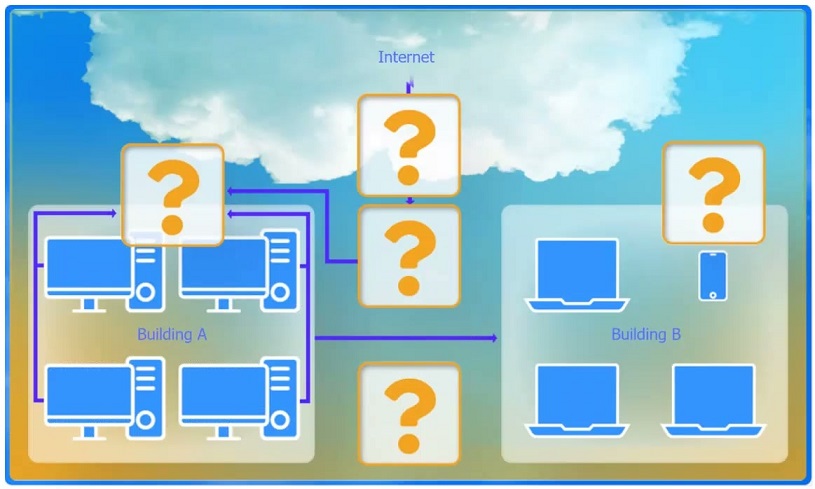
A. Switch is correct because a switch forwards frames intelligently using a MAC address table, sending unicast traffic only out the port where the destination MAC is learned. This means desktops generally do not see other devices’ unicast traffic, meeting the requirement to prevent hosts from seeing traffic not destined for them (as opposed to shared-media behavior). Switches also create separate collision domains per port, improving performance and reducing unnecessary traffic exposure. Why others are wrong: B. WAP provides wireless access/bridging but does not solve wired desktop Layer 2 forwarding behavior by itself. C. Hub repeats all traffic out all ports, exactly violating the requirement (everyone sees everyone’s traffic). D. Wireless range extender only extends Wi-Fi coverage; it’s not an access-layer wired segmentation device. E. Router separates broadcast domains and routes between networks, but it’s not the primary device used to connect multiple desktops within the same LAN while minimizing frame visibility. F. Firewall inspects/filters traffic (especially at the Internet edge) but is not used as the primary device to connect desktops and control Layer 2 frame forwarding.
A company is hosting a secure server that requires all connections to the server to be encrypted. A junior administrator needs to harden the web server. The following ports on the web server are open: 443 80 22 587 Which of the following ports should be disabled?
Port 22 is SSH, which provides encrypted remote administration (secure alternative to Telnet/23). For hardening, you typically keep SSH if you need remote management, but restrict it: limit source IPs, use key-based authentication, disable root login, and enforce strong ciphers. Disabling 22 could hinder secure administration and is not required by the “encrypted connections” requirement.
Port 80 is HTTP, which is unencrypted plaintext web traffic. Leaving it open allows clients to connect without TLS, directly violating the requirement that all connections to the server be encrypted. Hardening commonly includes disabling HTTP or forcing all traffic to HTTPS. Because the question asks which port should be disabled to ensure encryption, 80 is the correct choice.
Port 443 is HTTPS (HTTP over TLS). This is the standard encrypted web service port and is exactly what you would use to meet the requirement that all connections are encrypted. Disabling 443 would prevent secure web access and contradict the goal of hosting a secure web server.
Port 587 is SMTP submission, typically used by clients/applications to submit outbound email to a mail server. It commonly supports STARTTLS to encrypt the session. While it may be unnecessary on a pure web server (and could be disabled if not needed), it is not the primary port that violates the “all connections encrypted” requirement in the way HTTP/80 does.
Analisis Soal
Core Concept: This question tests secure service selection and attack-surface reduction. A “secure web server” requirement that “all connections must be encrypted” implies clients should only be able to use encrypted application protocols (e.g., HTTPS) and not be able to fall back to plaintext equivalents (e.g., HTTP). Hardening commonly includes disabling unnecessary services/ports and enforcing encrypted transport. Why the Answer is Correct: Port 80 is HTTP, which is plaintext. If port 80 remains open, users (or attackers) can connect without encryption, violating the requirement that all connections be encrypted. Disabling port 80 prevents unencrypted web sessions. In many environments, an alternative is to keep 80 open only to redirect to 443, but the question states “requires all connections…to be encrypted” and asks which port should be disabled, making 80 the best choice. Key Features / Best Practices: - Use HTTPS on TCP 443 with a valid certificate and strong TLS configuration (disable old TLS versions/ciphers, enable HSTS where appropriate). - Close unused ports/services to reduce exposure (principle of least privilege). - If business requirements demand usability, implement an HTTP-to-HTTPS redirect; however, for strict interpretations, disable 80 entirely or restrict it via firewall to only allow redirection from trusted sources. - Ensure administrative access uses encrypted management (SSH on 22) and restrict it (allowlist IPs, key-based auth, disable password login). Common Misconceptions: - “Disable 22 because it’s remote access”: SSH is encrypted and often required for secure administration; hardening usually restricts it rather than disabling it outright. - “Disable 587 because email is unrelated”: 587 is submission (SMTP with STARTTLS) and may be needed for application mail; it can be encrypted and is not inherently a violation. - “Disable 443 because it’s open to the internet”: 443 is the secure web service you want to keep. Exam Tips: Memorize common ports and their secure/insecure pairings: HTTP 80 vs HTTPS 443, Telnet 23 vs SSH 22, FTP 21 vs SFTP/FTPS. When a question says “all connections must be encrypted,” look for plaintext services to disable or replace, and remember that hardening focuses on minimizing exposed services while maintaining required functionality.
Sertifikasi CompTIA Lainnya


Mulai Latihan Sekarang
Unduh Cloud Pass dan mulai berlatih semua soal N10-009: CompTIA Network+.


Ingin berlatih semua soal di mana saja?
Dapatkan aplikasi
Unduh Cloud Pass — termasuk tes latihan, pelacakan progres & lainnya.