CloudPass LogoCloud Pass
AWSGoogle CloudMicrosoftCiscoCompTIADatabricks
Certifications
AWSGoogle CloudMicrosoftCiscoCompTIADatabricks
Microsoft AZ-104
Microsoft AZ-104

Practice Test #8

Simulasikan pengalaman ujian sesungguhnya dengan 50 soal dan batas waktu 100 menit. Berlatih dengan jawaban terverifikasi AI dan penjelasan detail.

50Soal100Menit700/1000Skor Kelulusan
Jelajahi Soal Latihan

Didukung AI

Jawaban & Penjelasan Terverifikasi oleh 3 AI

Setiap jawaban diverifikasi silang oleh 3 model AI terkemuka untuk memastikan akurasi maksimum. Dapatkan penjelasan detail per opsi dan analisis soal mendalam.

GPT Pro
Claude Opus
Gemini Pro
Penjelasan per opsi
Analisis soal mendalam
Akurasi konsensus 3 model

Soal Latihan

1
Soal 1

You create an App Service plan named Plan1 and an Azure web app named webapp1. You discover that the option to create a staging slot is unavailable. You need to create a staging slot for Plan1. What should you do first?

Correct. Scaling up the App Service plan changes the pricing tier (SKU). Deployment slots are only available on supported tiers (commonly Standard and above). If the slot creation option is unavailable, upgrading Plan1 is the prerequisite to unlock the feature. This is a plan-level change and applies to all apps in the plan, enabling webapp1 to add a staging slot afterward.

Incorrect. Modifying application settings (app settings/connection strings) affects runtime configuration and can be marked as slot settings, but it does not enable the deployment slots feature. If the portal doesn’t allow slot creation, the limitation is almost certainly at the App Service plan tier level, not due to missing or incorrect application settings.

Incorrect. Adding a custom domain is unrelated to deployment slots. Custom domains and TLS bindings are app-level features and do not control whether slots can be created. You can use custom domains with slots (often for testing), but you must first be on a tier that supports slots; the domain configuration is not a prerequisite to unlock slot creation.

Incorrect. Scaling out increases the number of instances (horizontal scaling) to handle more load and improve availability. It does not change the App Service plan SKU and therefore does not unlock features that are tier-dependent, such as deployment slots. If slots are unavailable, scaling out will not make the option appear.

Analisis Soal

Core concept: Deployment slots are an Azure App Service feature that lets you run multiple versions of a web app (production, staging, etc.) within the same App Service plan. Slots enable safe deployments (swap with warm-up), testing in production-like conditions, and quick rollback. Slot availability depends primarily on the App Service plan pricing tier. Why the answer is correct: If the option to create a staging slot is unavailable, the most common cause is that Plan1 is on a tier that does not support deployment slots (for example, Free (F1) or Shared (D1), and in many exam contexts Basic (B1/B2/B3) is also treated as not supporting slots). To enable slots, you must move the App Service plan to a tier that supports deployment slots (typically Standard (S1+) or higher such as Premium v2/v3). This is done by scaling up (changing the pricing tier) from the App Service plan blade. Therefore, the first action is to scale up Plan1. Key features and best practices: Scaling up changes the plan’s SKU and unlocks features like deployment slots, autoscale capabilities (depending on tier), increased CPU/memory, and other platform features. From an Azure Well-Architected Framework perspective, deployment slots improve Reliability (safe releases/rollback) and Operational Excellence (repeatable deployments, reduced downtime). After scaling up, you can create a staging slot on webapp1 and optionally configure slot settings (settings that “stick” to a slot) and use swap with preview. Common misconceptions: Scaling out (adding instances) improves capacity and availability but does not unlock features like slots. App settings and custom domains are app-level configurations and do not affect whether the platform exposes the deployment slots feature. Exam tips: When a portal feature is “missing” in App Service, first check the App Service plan tier/SKU. Remember: feature availability (slots, backups, VNet integration options, etc.) is often controlled by the plan tier, not by per-app settings. For AZ-104, associate “deployment slots” with Standard or higher and “scale up” as the action to change tiers.

2
Soal 2

DRAG DROP - You have an Azure subscription that contains a storage account. You have an on-premises server named Server1 that runs Windows Server 2016. Server1 has 2 TB of data. You need to transfer the data to the storage account by using the Azure Import/Export service. In which order should you perform the actions? To answer, move all actions from the list of actions to the answer area and arrange them in the correct order. NOTE: More than one order of answer choices is correct. You will receive credit for any of the correct orders you select. Select and Place:

Bagian 1:

Select the correct answer(s) in the image below.

question-image

Pass. The correct action order for Azure Import/Export (import to Azure) is: 1) Attach an external disk to Server1 and run WAImportExport.exe to copy data and generate the journal/metadata while encrypting the disk. 2) From the Azure portal, create an import job (or this can be done before step 1; the question note says multiple orders can be correct). 3) From the Azure portal, update the import job with the drive details (journal file info/drive IDs, BitLocker keys, and typically shipping/tracking details). 4) Detach the external disks from Server1 and ship the disks to the Azure datacenter address provided by the job. Why this works: WAImportExport must be run before shipping because it prepares the disk and produces the information Azure needs. Updating the job is required so Microsoft can unlock and process the drives. Shipping must occur after preparation and after you have the correct datacenter destination from the job.

3
Soal 3

You have five Azure virtual machines that run Windows Server 2016. The virtual machines are configured as web servers. You have an Azure load balancer named LB1 that provides load balancing services for the virtual machines. You need to ensure that visitors are serviced by the same web server for each request. What should you configure?

Enabling Floating IP (Direct Server Return) changes how Azure Load Balancer handles the destination IP in certain configurations and is commonly used for scenarios like SQL Always On Availability Group listeners or specific appliance/DSR designs. It does not provide client-to-backend affinity across requests. Therefore, it won’t ensure a visitor consistently reaches the same web server for each request.

Disabling Floating IP is simply the default/typical configuration for many load-balancing rules. Like enabling it, this setting is unrelated to session affinity. It does not influence whether subsequent requests from the same client are directed to the same backend VM. It only affects specific packet handling behaviors for DSR-related scenarios.

A health probe is required so the load balancer can detect backend VM health and stop sending traffic to unhealthy instances. While critical for reliability, probes do not control how traffic is distributed among healthy instances beyond excluding failed nodes. They do not provide “sticky sessions” or guarantee that a client’s requests go to the same VM.

Session persistence set to Client IP and Protocol enables source affinity based on the client IP address and the transport protocol. This means requests from the same client over the same protocol are consistently hashed to the same backend VM, which satisfies the requirement that a visitor be serviced by the same web server for each request. In Azure Load Balancer, this is the relevant feature for sticky behavior at Layer 4. It is especially appropriate when you want persistence to distinguish traffic by protocol as well as by client source.

Analisis Soal

Core concept: This question is about Azure Load Balancer session persistence, which controls whether requests from the same client are consistently sent to the same backend VM. To keep a visitor on the same web server across requests, you must use a persistence mode rather than settings like Floating IP or health probes. The correct choice here is Session persistence set to Client IP and Protocol, which uses the source IP plus protocol in the load-balancing hash so the same client using the same protocol is directed to the same backend instance while it remains healthy. A common misconception is that health probes or Floating IP create stickiness; probes only determine backend health, and Floating IP is for direct server return scenarios. Exam tip: for Azure Load Balancer, any requirement for 'same server' or 'sticky sessions' points to session persistence, whereas Application Gateway uses cookie-based affinity for HTTP/HTTPS.

4
Soal 4
(Pilih 2)

You have an Azure Kubernetes Service (AKS) cluster named AKS1. You need to configure cluster autoscaler for AKS1. Which two tools should you use? Each correct answer presents a complete solution. NOTE: Each correct selection is worth one point.

kubectl manages Kubernetes API objects inside the cluster (pods, deployments, services, HPA resources). AKS cluster autoscaler enablement is not configured by applying Kubernetes manifests with kubectl; it is an AKS/node pool setting controlled through Azure management plane. You might use kubectl to observe effects (pending pods, node changes), but it is not the tool to configure the autoscaler feature itself.

Azure CLI supports configuring AKS autoscaling through az aks and az aks nodepool commands. You can enable/disable cluster autoscaler and set min/max node counts per node pool (for example, az aks nodepool update --enable-cluster-autoscaler --min-count --max-count). This is a complete, supported solution and commonly tested in AZ-104 for AKS administration tasks.

Set-AzVm is used to manage standalone Azure virtual machines. AKS nodes are typically part of a VM Scale Set managed by AKS, and direct VM management is not the correct approach for enabling cluster autoscaler. Autoscaler is configured at the AKS node pool level via AKS tooling, not by modifying individual VMs.

The Azure portal provides a supported UI workflow to enable cluster autoscaler on an AKS node pool by turning on autoscaling and specifying minimum and maximum node counts. This is a complete solution for configuring autoscaler without scripting. It aligns with typical AZ-104 tasks where portal-based configuration is acceptable and commonly referenced.

Set-AzAks is not the standard PowerShell cmdlet used to configure AKS cluster autoscaler in the way the exam expects. In practice, AKS PowerShell uses cmdlets like Set-AzAksCluster or node pool-related cmdlets (module/version dependent), but AZ-104 commonly tests portal and Azure CLI (az aks) for AKS configuration. As written, this option is not a reliable/recognized complete solution.

Analisis Soal

Core concept: This question tests how to enable and configure the AKS Cluster Autoscaler. Cluster Autoscaler is an AKS feature that automatically increases or decreases the number of nodes in a node pool based on pending pods and node utilization constraints. It is configured at the node pool level (min/max node count) and is managed by the AKS control plane, not by Kubernetes manifests. Why the answer is correct: You can configure cluster autoscaler using (1) Azure CLI with the az aks commands (for example, az aks nodepool update --enable-cluster-autoscaler --min-count X --max-count Y, or during creation), and (2) the Azure portal by editing a node pool and enabling autoscaling with min/max node counts. Both are complete, supported ways to configure autoscaler for AKS1. Key features, configuration, and best practices: Cluster autoscaler works per node pool, so you typically enable it on the system and/or user node pools that host scalable workloads. You must set appropriate min/max bounds to control cost and capacity, aligning with Azure Well-Architected Framework principles (Cost Optimization and Reliability). Consider quotas (vCPU limits), regional capacity, and node pool constraints (VM SKU availability, max nodes per pool, and subnet IP capacity). Autoscaler is different from Horizontal Pod Autoscaler (HPA): HPA scales pods; cluster autoscaler scales nodes to satisfy pod scheduling. Common misconceptions: Many assume kubectl is used because autoscaling relates to Kubernetes. However, cluster autoscaler configuration in AKS is an Azure-managed setting on the node pool, not a Kubernetes object you apply with kubectl. Another trap is choosing generic VM cmdlets (Set-AzVm) because nodes are VMs/VMSS; AKS abstracts node management and you should not manage node instances directly. Exam tips: For AZ-104, remember: AKS operational settings (node pools, autoscaling, upgrades) are typically configured via Azure portal or Azure CLI (az aks / az aks nodepool). Use kubectl for in-cluster Kubernetes resources (deployments, services, HPA), not for enabling AKS-managed features like cluster autoscaler.

5
Soal 5

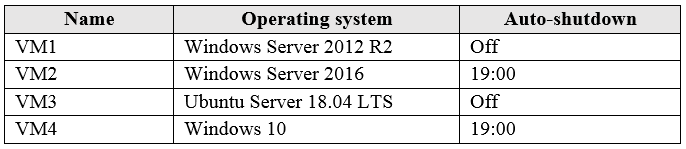
You have an Azure subscription that has a Recovery Services vault named Vault1. The subscription contains the virtual machines shown in the following table:
diagram

You plan to schedule backups to occur every night at 23:00. Which virtual machines can you back up by using Azure Backup?

Correct. VM1 and VM3 are definitely supported because Windows Server 2012 R2 and Ubuntu Server 18.04 LTS are supported operating systems for Azure VM backup. VM2 is also supported because Windows Server 2016 is a supported server OS, and its auto-shutdown setting does not disqualify it from backup. VM4 is excluded because Windows 10 is a client operating system and is not part of the supported Azure VM backup matrix for Azure IaaS VM protection.

Incorrect. This option wrongly includes VM4. Although VM1, VM2, and VM3 are supported for Azure Backup, Windows 10 is a client OS and is not supported for Azure VM backup in the same way as supported Windows Server and Linux workloads. Auto-shutdown at 19:00 does not make VM2 ineligible, but it also does not make VM4 supported.

Incorrect. VM1 and VM2 can be backed up, but VM3 can also be protected because Ubuntu Server 18.04 LTS is a supported Linux distribution for Azure VM backup. The omission of VM3 is therefore incorrect. The only VM that should be excluded is VM4 due to its Windows 10 client OS.

Incorrect. VM1 is supported, but it is not the only eligible VM. VM2 is also supported because Windows Server 2016 is supported, and VM3 is supported because Ubuntu Server 18.04 LTS is in the supported Linux matrix. This option ignores valid supported workloads and incorrectly narrows the answer too much.

Analisis Soal

Core concept: This question tests the support matrix for Azure Backup of Azure IaaS virtual machines in a Recovery Services vault. The key decision point is whether each VM's operating system is supported for Azure VM backup, not whether the VM has auto-shutdown enabled. Why correct: VM1, VM2, and VM3 are supported because Azure Backup supports Azure VMs running Windows Server and supported Linux distributions such as Ubuntu Server 18.04 LTS. Auto-shutdown at 19:00 does not make VM2 ineligible for backup at 23:00, because Azure Backup can back up Azure VMs even if they are stopped/deallocated, though the backup may be crash-consistent rather than application-consistent. VM4 is not supported because Windows 10 is a client OS, and Azure VM backup support is intended for supported server and Linux workloads. Key features: Azure Backup for Azure VMs uses a Recovery Services vault and policy-based scheduling. Supported Azure IaaS VMs include Windows Server editions and supported Linux distributions. Backup consistency can vary depending on whether the VM is running, but eligibility is based primarily on the support matrix. Common misconceptions: A common mistake is assuming that auto-shutdown prevents backups from running later in the evening. Another frequent trap is treating Windows client operating systems such as Windows 10 the same as Windows Server for Azure VM backup support. Exam questions often mix supported server OSs with unsupported client OSs to test knowledge of the support matrix. Exam tips: For AZ-104, always verify workload support against Azure Backup's support matrix rather than assuming all Azure VMs are eligible. Distinguish between server operating systems and client operating systems. Also remember that power state affects backup consistency, but not necessarily whether a backup can be taken at all.

Ingin berlatih semua soal di mana saja?

Unduh Cloud Pass — termasuk tes latihan, pelacakan progres & lainnya.

6
Soal 6

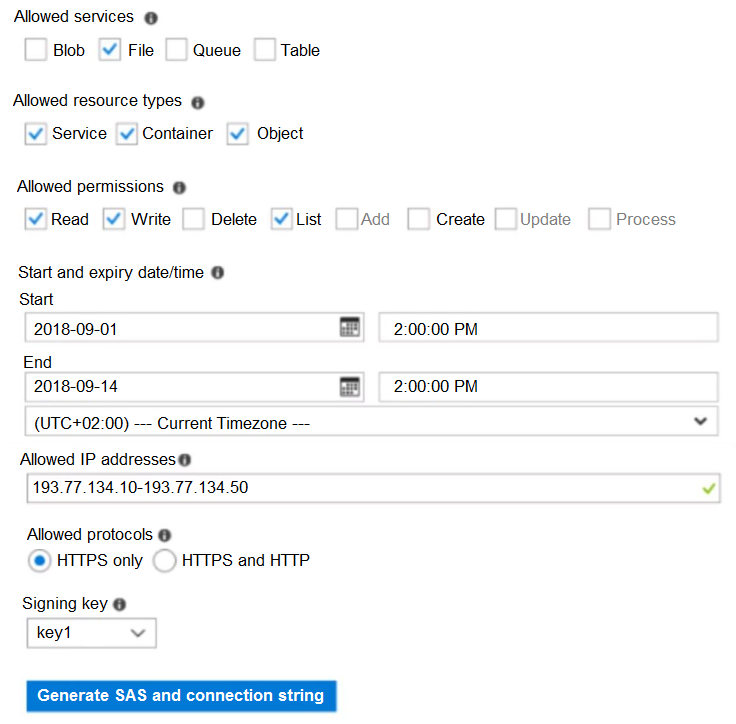
HOTSPOT - You have an Azure subscription named Subscription1. In Subscription1, you create an Azure file share named share1. You create a shared access signature (SAS) named SAS1 as shown in the following exhibit:

To answer, select the appropriate options in the answer area. NOTE: Each correct selection is worth one point. Hot Area:

Bagian 1:

Select the correct answer(s) in the image below.

question-image

Pass is appropriate because the exhibit provides enough information to determine the outcomes deterministically. The SAS settings clearly show: - Allowed services: File (checked) - Allowed resource types: Service, Container, Object (all checked) - Allowed permissions: Read, Write, List (checked) - Start/End: Sep 1, 2018 2:00 PM through Sep 14, 2018 2:00 PM - Allowed IPs: 193.77.134.10–193.77.134.50 - Allowed protocols: HTTPS only With these constraints, you can evaluate each scenario (date/time + client IP + tool/protocol) and decide whether access is granted and, if granted, what permissions apply. Therefore, selecting “Pass” is justified; it’s not ambiguous or missing key details.

Bagian 2:

If on September 2, 2018, you run Microsoft Azure Storage Explorer on a computer that has an IP address of 193.77.134.1, and you use SAS1 to connect to the storage account, you ______.

On September 2, 2018, the SAS time window is valid (it starts Sep 1 and ends Sep 14). However, the computer’s IP address is 193.77.134.1, which is outside the allowed IP range of 193.77.134.10 through 193.77.134.50. Account SAS IP restrictions are enforced by the Storage service; if the request originates from an IP not in the allowed range, the SAS is rejected and the operation is unauthorized. Therefore, using Azure Storage Explorer with SAS1 from 193.77.134.1 results in no access. - A (prompted for credentials) is not the typical behavior for SAS-based access; the SAS is the credential, and if it fails constraints, access is denied. - C/D are incorrect because permissions only matter if the IP restriction is satisfied.

Bagian 3:

If on September 10, 2018, you run the net use command on a computer that has an IP address of 193.77.134.50, and you use SAS1 as the password to connect to share1, you ______.

Although the SAS is within the valid time window, the IP address is allowed, and the SAS includes File service with read, write, and list permissions, Azure Files SMB access via the Windows net use command does not authenticate with a SAS token as the password. SMB access to Azure file shares requires the storage account name and an account key, or identity-based authentication where configured; SAS is used for REST/HTTPS access, not SMB mounting. Therefore, using SAS1 as the password with net use will not authenticate successfully and is best represented by being prompted for credentials. The other options are incorrect because the SAS permissions are not the limiting factor here—the authentication method itself is unsupported for net use.

7
Soal 7

Note: This question is part of a series of questions that present the same scenario. Each question in the series contains a unique solution that might meet the stated goals. Some question sets might have more than one correct solution, while others might not have a correct solution. After you answer a question in this section, you will NOT be able to return to it. As a result, these questions will not appear in the review screen. You have an Azure virtual machine named VM1 that runs Windows Server 2016. You need to create an alert in Azure when more than two error events are logged to the System event log on VM1 within an hour. Solution: You create an event subscription on VM1. You create an alert in Azure Monitor and specify VM1 as the source Does this meet the goal?

Yes is incorrect because the proposed architecture lacks the required guest log collection path for Windows event logs. Simply creating an Azure Monitor alert and specifying VM1 as the source does not make Azure Monitor aware of System event log errors unless those logs are being ingested through Azure Monitor Agent or Log Analytics agent. An event subscription also does not serve as a detector for guest OS event log entries, so the stated solution does not achieve the alerting goal.

No is correct because creating an event subscription on VM1 does not capture Windows System event log entries from inside the guest operating system. Azure event subscriptions are used for Azure resource events, not for monitoring guest OS error events written to Event Viewer. To meet the requirement, VM1's System event log must be collected by Azure Monitor through an agent and evaluated with a log alert that triggers when more than two error events occur within one hour.

Analisis Soal

Core concept: This question tests how to generate Azure alerts from guest OS event logs on an Azure virtual machine. To alert when more than two error events are written to the Windows System log within one hour, Azure Monitor must collect the VM's event logs through an agent and typically send them to a Log Analytics workspace, where a log alert can evaluate the count over time. Why the answer is correct: The proposed solution does not meet the goal because an Event Grid event subscription on a VM is not the mechanism used to monitor Windows guest event logs. Azure event subscriptions handle Azure resource events, not entries written inside the Windows System event log. To satisfy the requirement, you would configure Azure Monitor Agent or Log Analytics agent to collect Windows Event Logs and then create a log alert based on a query that counts error events from VM1 over the last hour. Key features and best practices: - Windows guest event logs are monitored through Azure Monitor agents and data collection rules or legacy Log Analytics agent configurations. - Azure Monitor log alerts can evaluate KQL queries such as counting System log entries with Error level over a rolling one-hour window. - Scoping an alert to VM1 alone is insufficient unless the underlying guest log data is actually being collected into Azure Monitor. Common misconceptions: A common mistake is confusing Azure resource events with guest operating system events. Event Grid subscriptions can react to Azure platform events like resource changes, but they do not read the Windows Event Viewer logs inside a VM. Another misconception is that selecting a VM as an alert source automatically exposes guest event logs, which is not true without agent-based collection. Exam tips: For AZ-104, remember that guest OS metrics and logs usually require an agent or diagnostic configuration. If the requirement mentions Windows Event Logs, think Azure Monitor agent/Log Analytics workspace plus a log alert. If the requirement mentions Azure resource lifecycle events, then Event Grid or Activity Log alerts may be appropriate.

8
Soal 8

You are planning the move of App1 to Azure. You create a network security group (NSG). You need to recommend a solution to provide users with access to App1. What should you recommend?

Correct. Internet users need to initiate HTTPS connections to the web servers, so you must allow inbound TCP 443. Associating the NSG to the subnet containing the web servers applies the rule to that tier without affecting other subnets. Because NSGs are stateful, response traffic is automatically allowed, so only the inbound allow rule is required for access.

Incorrect. An outgoing (outbound) rule for port 443 controls traffic leaving the web servers, not traffic entering from the Internet. Even if outbound 443 is allowed, inbound connections from users would still be blocked by the default inbound deny from Internet unless an inbound allow rule exists.

Incorrect. While an inbound allow for TCP 443 would enable access, associating the NSG to all subnets is overly broad and violates least-privilege. It could unintentionally allow HTTPS traffic to non-web subnets (app/data tiers) if they have endpoints listening on 443, increasing attack surface and complicating segmentation.

Incorrect. This combines two issues: outbound rules do not enable inbound user access, and associating to all subnets is unnecessarily broad. It would not meet the requirement to allow Internet users to initiate HTTPS sessions to the web servers because inbound traffic would still be denied by default.

Analisis Soal

Core concept: This question tests Azure Network Security Groups (NSGs) and how to use NSG security rules (inbound vs outbound) and NSG associations (subnet vs NIC) to publish an application securely. NSGs are stateful packet filters that control traffic to/from Azure resources in a virtual network. Why the answer is correct: To provide users on the Internet access to a web application over HTTPS, you must allow inbound TCP port 443 to the web servers. That is done with an inbound (incoming) NSG rule permitting TCP 443 from source = Internet (or preferably a narrower source range) to destination = the web servers. Associating the NSG to the subnet that contains the web servers ensures the rule applies to all VMs in that tier and is the common design for a web subnet. Because NSGs are stateful, return traffic is automatically allowed, so you do not need a matching outbound rule for the response. Key features / best practices: - Inbound rule: Allow TCP 443, Source = Internet (or specific IP ranges), Destination = web subnet/VMs, set priority appropriately. - Associate NSG to the web subnet (or to NICs for per-VM granularity). Subnet association is simpler and aligns with tiered network design. - Azure Well-Architected Framework (Security): apply least privilege. In real deployments, you often restrict source to known IPs, use Azure Firewall/WAF (Application Gateway WAF) in front, and avoid exposing management ports. - Remember default NSG rules: inbound from Internet is denied by default; VNet traffic is allowed by default. Common misconceptions: - Confusing inbound vs outbound: allowing outbound 443 does not let Internet users initiate connections to your app. - Over-scoping: associating the NSG to all subnets can unintentionally expose non-web tiers if the rule is broad. Exam tips: - For “users access my app,” think inbound rules to the app tier (typically 80/443). - NSGs are stateful: allow inbound request; return traffic is automatically permitted. - Apply rules at the narrowest scope that meets requirements (web subnet, not every subnet).

9
Soal 9

You have an Azure DNS zone named adatum.com. You need to delegate a subdomain named research.adatum.com to a different DNS server in Azure. What should you do?

Correct. Delegation of a subdomain is implemented by creating an NS record set in the parent zone (adatum.com) at the subdomain label (research). The NS record set contains the authoritative name servers for research.adatum.com. This instructs resolvers to query those servers for any records under research.adatum.com, effectively transferring authority for that subtree.

Incorrect. PTR records are used for reverse DNS lookups (mapping an IP address to a hostname) and are stored in reverse lookup zones (in-addr.arpa or ip6.arpa). They do not delegate a forward DNS namespace like research.adatum.com and won’t direct resolvers to different authoritative name servers for a subdomain.

Incorrect. The SOA record contains zone metadata such as the primary name server, responsible party, serial number, and refresh/retry/expire/TTL values. Modifying SOA settings can influence zone transfer behavior and caching characteristics, but it does not create a delegation to another DNS server for a child domain.

Incorrect. An A record named *.research would be a wildcard record that resolves any host under research.adatum.com to a specific IP address, but it keeps authority within the adatum.com zone and does not delegate the subdomain. Delegation requires NS records pointing to the child zone’s authoritative name servers, not host records.

Analisis Soal

Core concept: This question tests DNS delegation in Azure DNS. Delegating a subdomain means telling DNS resolvers that a specific child zone (research.adatum.com) is authoritative on different name servers than the parent zone (adatum.com). In DNS, delegation is implemented using NS (Name Server) records in the parent zone that point to the authoritative name servers for the child zone. Why the answer is correct: To delegate research.adatum.com, you create an NS record set named “research” in the adatum.com zone and populate it with the name server FQDNs of the DNS server/zone hosting research.adatum.com (for example, the Azure DNS name servers assigned to the research.adatum.com zone in another resource group/subscription, or custom DNS servers). This causes queries for research.adatum.com (and its descendants) to be referred to those name servers, which is exactly what delegation requires. Key features and best practices: - In Azure DNS, delegation is done by creating an NS record set at the delegation point (the subdomain label) in the parent zone. - Ensure the target DNS servers are authoritative for the child zone and that the child zone exists and contains required records. - If delegating to Azure DNS, you typically create the child public DNS zone (research.adatum.com) first, note its assigned name servers, then add those as NS records in the parent zone. - From an Azure Well-Architected Framework perspective (Reliability/Operational Excellence), delegation enables separation of responsibilities (different teams manage different zones) and reduces blast radius. Common misconceptions: - PTR records are for reverse DNS (IP-to-name) and do not delegate forward lookup zones. - SOA records define zone authority parameters (serial, refresh, etc.) but do not delegate subdomains. - Wildcard A records affect name resolution within a zone but do not transfer authority to another DNS server. Exam tips: - Remember: “delegate a subdomain” almost always maps to “create NS records in the parent zone.” - Distinguish between NS records used for delegation (in the parent) vs. the NS record set at the zone apex (automatically created for the zone itself). - For Azure DNS delegation scenarios, expect a two-step mental model: create child zone → copy its name servers → create NS record set in parent.

10
Soal 10

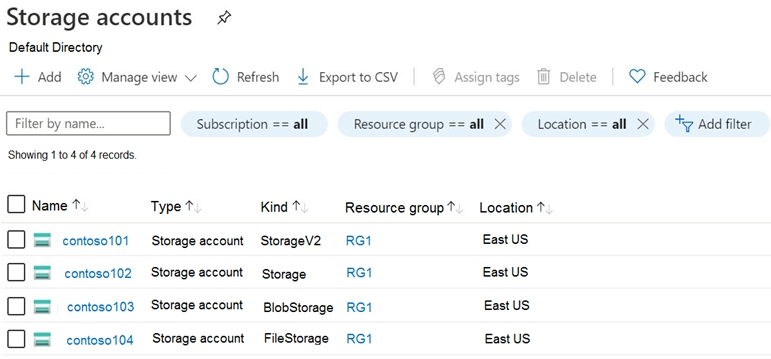
HOTSPOT - You have an Azure subscription that contains the storage accounts shown in the following exhibit.

Use the drop-down menus to select the answer choice that completes each statement based on the information presented in the graphic. NOTE: Each correct selection is worth one point. Hot Area:

Bagian 1:

Select the correct answer(s) in the image below.

question-image

This entry is not a real sub-question about Azure Storage behavior. It only says '[see images below]' and provides artificial options ('Pass'/'Fail') that are unrelated to the certification objective. The actual solvable items are the hotspot statements that follow, which are answered from the exhibit showing the storage account kinds. Because this placeholder does not correspond to a valid exam choice, it should not be treated as a scored sub-question.

Bagian 2:

You can create a premium file share in ______

A premium file share (Azure Files premium) can be created only in a FileStorage account. In the exhibit, contoso104 has Kind = FileStorage, which is the dedicated account type for premium Azure Files (SSD-backed, provisioned IOPS/throughput). Why others are wrong: - contoso101 (StorageV2): supports Azure Files standard shares, but premium file shares require FileStorage. - contoso102 (Storage / GPv1): legacy; does not support the newer premium Azure Files capability. - contoso103 (BlobStorage): blob-only; does not support Azure Files shares at all. Therefore, only contoso104 qualifies.

Bagian 3:

You can use the Archive access tier in ______

The Archive access tier is a blob access tier (Hot/Cool/Archive) supported for blob objects in standard storage accounts that support blob tiering. It is supported in: - StorageV2 (contoso101): GPv2 supports blob access tiers including Archive. - BlobStorage (contoso103): supports blob tiers including Archive (legacy blob-only account). Why others are wrong: - contoso102 (Storage / GPv1): does not support the full blob access tiering model that includes Archive. - contoso104 (FileStorage): used for premium Azure Files; Archive is not an Azure Files tier and doesn’t apply to file shares. Thus, Archive can be used in contoso101 or contoso103 only.

Tes Latihan Lainnya

Practice Test #1

50 Soal·100 mnt·Lulus 700/1000

Practice Test #2

50 Soal·100 mnt·Lulus 700/1000

Practice Test #3

50 Soal·100 mnt·Lulus 700/1000

Practice Test #4

50 Soal·100 mnt·Lulus 700/1000

Practice Test #5

50 Soal·100 mnt·Lulus 700/1000

Practice Test #6

50 Soal·100 mnt·Lulus 700/1000

Practice Test #7

50 Soal·100 mnt·Lulus 700/1000

Practice Test #9

50 Soal·100 mnt·Lulus 700/1000
← Lihat Semua Soal Microsoft AZ-104

Mulai Latihan Sekarang

Unduh Cloud Pass dan mulai berlatih semua soal Microsoft AZ-104.

Get it on Google PlayDownload on the App Store
Cloud PassCloud Pass

Aplikasi Latihan Sertifikasi IT

Get it on Google PlayDownload on the App Store

Sertifikasi

AWSGCPMicrosoftCiscoCompTIADatabricks

Hukum

FAQKebijakan PrivasiSyarat dan Ketentuan

Perusahaan

KontakHapus Akun

© Hak Cipta 2026 Cloud Pass, Semua hak dilindungi.

Ingin berlatih semua soal di mana saja?

Dapatkan aplikasi

Unduh Cloud Pass — termasuk tes latihan, pelacakan progres & lainnya.