CloudPass LogoCloud Pass
AWSGoogle CloudMicrosoftCiscoCompTIADatabricks
Certifications
AWSGoogle CloudMicrosoftCiscoCompTIADatabricks
Microsoft AZ-900
Microsoft AZ-900

Practice Test #5

Simulasikan pengalaman ujian sesungguhnya dengan 50 soal dan batas waktu 45 menit. Berlatih dengan jawaban terverifikasi AI dan penjelasan detail.

50Soal45Menit700/1000Skor Kelulusan
Jelajahi Soal Latihan

Didukung AI

Jawaban & Penjelasan Terverifikasi oleh 3 AI

Setiap jawaban diverifikasi silang oleh 3 model AI terkemuka untuk memastikan akurasi maksimum. Dapatkan penjelasan detail per opsi dan analisis soal mendalam.

GPT Pro
Claude Opus
Gemini Pro
Penjelasan per opsi
Analisis soal mendalam
Akurasi konsensus 3 model

Soal Latihan

1
Soal 1

HOTSPOT - For each of the following statements, select Yes if the statement is true. Otherwise, select No. NOTE: Each correct selection is worth one point. Hot Area:

Bagian 1:

The Service Level Agreement (SLA) guaranteed uptime for paid Azure services is at least 99.9 percent.

No. It is not true that the SLA guaranteed uptime for paid Azure services is at least 99.9% across the board. SLAs vary by service and configuration. Some services have SLAs below 99.9% in certain tiers or scenarios, and some services may have no SLA at all (especially preview features). For example, a single-instance Virtual Machine has historically had a lower SLA than a VM deployed in an Availability Set or across Availability Zones. Conversely, some services offer higher SLAs (e.g., 99.95%, 99.99%) when deployed with redundancy features. The exam expects you to understand that “paid” does not automatically mean “>= 99.9% SLA”; you must check the specific service’s SLA documentation and the required architecture to qualify for that SLA.

Bagian 2:

Companies can increase the Service Level Agreement (SLA) guaranteed uptime by adding Azure resources to multiple regions.

Yes. Deploying resources across multiple regions can increase overall solution availability (and can be part of meeting higher availability targets), because it reduces the impact of a single regional outage. In practice, you use multi-region architectures such as active-active or active-passive, combined with services like Azure Traffic Manager, Azure Front Door, or load balancing plus replicated data stores (e.g., geo-redundant options). While each individual service still has its own SLA, the composite application uptime can be improved by eliminating regional single points of failure, which is a core Reliability principle in the Azure Well-Architected Framework. The key idea: multi-region redundancy improves resiliency and can raise the effective end-to-end uptime compared to a single-region deployment.

Bagian 3:

Companies can increase the Service Level Agreement (SLA) guaranteed uptime by purchasing multiple subscriptions.

No. Purchasing multiple subscriptions does not increase the SLA guaranteed uptime. A subscription is primarily a billing, quota, and management boundary (used for cost management, access control scoping, and governance). It does not automatically create redundancy, failover capability, or higher-availability deployment patterns for a service. If you deploy the same single-instance workload in two different subscriptions but still in the same region and without proper redundancy/failover design, you have not meaningfully improved availability. To increase uptime, you must add resilient architecture elements (multiple instances, Availability Zones, multi-region deployments, replicated data, automated failover), not simply split resources across subscriptions. Subscriptions can help with organizational separation and limits management, but they are not an SLA improvement mechanism.

2
Soal 2

You have an Azure environment that contains 10 virtual networks and 100 virtual machines. You need to limit the amount of inbound traffic to all the Azure virtual networks. What should you create?

An Application Security Group (ASG) is used with Network Security Groups (NSGs) to logically group VMs and simplify NSG rule management (e.g., “allow web tier to app tier”). However, an ASG is not a traffic filtering device by itself and cannot centrally limit inbound traffic to all VNets. You would still need NSGs on subnets/NICs, and it wouldn’t provide a single, centralized enforcement point across 10 VNets.

A virtual network gateway provides VPN connectivity (site-to-site, point-to-site) and is used for connecting VNets to on-premises networks or other VNets via VPN. It is not designed to act as a firewall or to centrally restrict inbound internet traffic to VNets. Deploying 10 gateways would add cost and complexity without meeting the security requirement of limiting inbound traffic across all VNets.

Azure ExpressRoute circuits provide private, dedicated connectivity between on-premises and Azure, bypassing the public internet. ExpressRoute is a connectivity solution, not a security control for limiting inbound traffic to VNets. Creating 10 circuits would be extremely costly and unnecessary, and it would not address inbound traffic from the internet or provide centralized firewall policy enforcement across the VNets.

Azure Firewall is a managed, stateful firewall service that can centrally control inbound and outbound traffic for multiple VNets when deployed in a hub-and-spoke design. It supports DNAT, network/application rules, threat intelligence filtering, and centralized logging. With VNet peering and routing, one Azure Firewall can enforce consistent inbound traffic limitations across all 10 VNets, which directly matches the requirement.

Analisis Soal

Core concept: This question tests how to centrally control and limit inbound traffic across multiple Azure virtual networks (VNets). In Azure, inbound traffic control can be done at different layers: per-VM/per-subnet (NSGs), per-application grouping (ASGs), or centrally at the network edge using a managed firewall service. Why the answer is correct: Azure Firewall is a managed, stateful network firewall that can be deployed to control inbound and outbound traffic for multiple VNets. By placing Azure Firewall in a hub VNet (hub-and-spoke architecture) and routing traffic from the 10 VNets through it (using VNet peering and user-defined routes), you can enforce a consistent inbound policy across the environment. This aligns with the Azure Well-Architected Framework (Security and Reliability pillars) by centralizing security controls, improving visibility, and reducing configuration drift. Key features and best practices: Azure Firewall supports network rules (L3/L4), application rules (L7 FQDN filtering), DNAT for publishing internal services, threat intelligence-based filtering, and centralized logging to Azure Monitor/Log Analytics. For inbound limitation, you typically combine DNAT (only expose required ports/services) with strict rule collections and optionally integrate with Azure DDoS Network Protection for volumetric attack mitigation. In enterprise designs, a hub-and-spoke model with Azure Firewall in the hub is a common pattern. Common misconceptions: An Application Security Group (ASG) helps group VMs for NSG rules, but it does not itself filter traffic and does not provide centralized inbound control across VNets. Virtual network gateways and ExpressRoute circuits are connectivity services (VPN/ER) and do not inherently “limit inbound traffic” as a security control. Exam tips: For AZ-900, remember the role of each service category. If the requirement is to centrally control/inspect traffic across networks, think Azure Firewall (or sometimes NVA/Front Door/WAF depending on context). If it’s per-subnet/VM filtering, think NSG; if it’s grouping VMs for NSG rules, think ASG. Connectivity services (VPN Gateway/ExpressRoute) are not security filtering solutions.

3
Soal 3

HOTSPOT - For each of the following statements, select Yes if the statement is true. Otherwise, select No. NOTE: Each correct selection is worth one point. Hot Area:

Bagian 1:

To achieve a hybrid cloud model, a company must always migrate from a private cloud model.

No. A hybrid cloud model does not require that a company must always migrate from a private cloud model. Hybrid simply means combining private and public cloud environments, typically with integration such as networking (site-to-site VPN or ExpressRoute), identity (Microsoft Entra ID), and unified management/monitoring. A company could start as fully on-premises (not necessarily a “private cloud”), then adopt Azure for specific workloads (backup, DR, dev/test) and become hybrid. Alternatively, a company could start in the public cloud and later add private cloud/on-premises resources for compliance, data residency, or low-latency needs—also hybrid. The incorrect “Yes” implies a mandatory sequence (private → hybrid), which is not part of the definition. For exam purposes, focus on the definition: hybrid = mix of private and public, not a required migration path.

Bagian 2:

A company can extend the capacity of its internal network by using the public cloud.

Yes. A company can extend the capacity of its internal network by using the public cloud. This is a classic hybrid use case: you keep core systems on-premises while using Azure to add capacity for compute, storage, or services when demand spikes or when you want to avoid buying more hardware. Examples include cloud bursting (temporarily running extra application instances in Azure), extending storage for backups/archives, or adding Azure-based virtual networks connected to on-prem via VPN/ExpressRoute to expand address space and host additional workloads. This supports Cost Optimization (pay-as-you-go instead of overprovisioning), Reliability (additional capacity and DR options), and Scalability/Performance Efficiency (elastic resources). The statement is broadly true in AZ-900 terms because public cloud resources can be integrated with on-prem networks to augment capacity.

Bagian 3:

In a public cloud model, only guest users at your company can access the resources in the cloud.

No. In a public cloud model, access to cloud resources is not limited to only “guest users” at your company. Public cloud refers to the ownership and delivery model of the infrastructure (provider-owned, multi-tenant), not a restriction that only guest accounts can access resources. Access to your organization’s Azure resources is controlled by identity and authorization mechanisms such as Microsoft Entra ID tenants, Azure RBAC roles, conditional access, and network controls. Users can be internal employees (member users), external collaborators (guest users via B2B), applications/service principals, managed identities, and automated processes—depending on what the organization allows. The incorrect statement confuses the concept of “public cloud” with “public access.” Your resources are not inherently open to the public; they are private to your subscription/tenant unless you explicitly expose them (e.g., public endpoints) and authorize access.

4
Soal 4

Note: This question is part of a series of questions that present the same scenario. Each question in the series contains a unique solution that might meet the stated goals. Some question sets might have more than one correct solution, while others might not have a correct solution. After you answer a question in this section, you will NOT be able to return to it. As a result, these questions will not appear in the review screen. Your company has an Azure subscription that contains the following unused resources: ✑ 20 user accounts in Azure Active Directory (Azure AD) ✑ Five groups in Azure AD ✑ 10 public IP addresses ✑ 10 network interfaces You need to reduce the Azure costs for the company. Solution: You remove the unused user accounts. Does this meet the goal?

Yes is incorrect because removing Azure AD user accounts does not inherently eliminate a metered charge in Azure. Unless the action also removes paid licenses assigned to those users (which the solution does not state), there is no direct cost reduction. The unused public IP addresses are a more typical source of ongoing charges, and deleting users does nothing to reduce those networking costs. Therefore, this solution does not meet the stated goal.

No. Deleting unused Azure AD user accounts typically does not reduce Azure subscription costs because user and group objects are not billed as consumption resources. Azure AD-related costs are usually driven by paid licenses (e.g., Entra ID P1/P2 or Microsoft 365) assigned to users, not by the mere existence of the accounts. The scenario’s likely cost drivers are the unused infrastructure resources (notably public IP addresses), so removing users does not meet the cost-reduction goal.

Analisis Soal

Core concept: This question tests which Azure resources generate ongoing costs and which are free, focusing on Azure AD objects (users/groups) versus billable infrastructure resources. Why the answer is correct: Removing unused Azure AD user accounts does not reduce Azure costs because Azure AD user objects themselves do not incur per-user charges in the way compute, storage, and networking resources do. In most subscriptions, simply having user accounts and groups in Azure AD is not a metered, billable resource. Costs typically come from paid Azure AD/Entra ID licensing (e.g., P1/P2) assigned to users, not from the existence of the user objects. Therefore, deleting unused users does not address the billable unused resources listed (notably public IP addresses). Key features / configurations: - Azure AD (Microsoft Entra ID) directory objects (users, groups) are not consumption-metered resources. - Charges related to identity usually come from: - Assigned licenses (e.g., Entra ID P1/P2, Microsoft 365) rather than the presence of accounts. - Premium features usage tied to licensing requirements. - Public IP addresses can incur charges when allocated (especially Standard SKU), even if not attached/used. Common misconceptions: - Assuming “unused accounts” cost money by default in Azure: the directory objects are generally free; licensing is what drives identity cost. - Confusing Azure AD object cleanup with cost optimization: cost optimization typically targets metered resources like public IPs, disks, VMs, gateways, and bandwidth. Exam tips: - Identify which resources are billed continuously (e.g., public IPs, disks, gateways) versus administrative objects (e.g., Azure AD users/groups). - For identity-related cost questions, look for licensing assignment/removal rather than deleting user objects. - When asked to reduce Azure costs, prioritize removing/downsizing billable infrastructure resources first.

5
Soal 5

This question requires that you evaluate the underlined text to determine if it is correct. If Microsoft plans to end support for an Azure service that does NOT have a successor service, Microsoft will provide notification at least 12 months before. Instructions: Review the underlined text. If it makes the statement correct, select No change is needed. If the statement is incorrect, select the answer choice that makes the statement correct.

The statement matches Microsoft’s Azure service retirement guidance: if an Azure service is ending support and there is no successor service, Microsoft provides at least 12 months’ notice. This extended timeframe reflects the higher effort required when there is no direct replacement and customers may need to redesign or choose an alternative architecture. Because the underlined text already states “at least 12 months before,” it is correct as written. Therefore, selecting “No change is needed” is the right choice.

A 6-month notice period is shorter than the stated guidance for retiring an Azure service that has no successor. While some changes or transitions in cloud services can have shorter lead times, the scenario explicitly concerns ending support without a replacement, which requires more planning time. Choosing 6 months would make the statement inconsistent with the expected retirement notification window. As a result, it does not correctly reflect the policy described in the question.

A 90-day notice period is commonly associated with certain types of changes or announcements, but it is not the correct minimum for retiring an Azure service with no successor. The question specifically highlights the absence of a successor service, which drives a longer customer migration/re-architecture timeline. Replacing “12 months” with “90 days” would understate the required advance notice. Therefore, this option would make the statement incorrect.

A 30-day notice period is far too short for an Azure service retirement scenario, especially when there is no successor service. Thirty days is more typical of short-term operational communications (where applicable), not end-of-support timelines that require migration planning and execution. Substituting 30 days would contradict the expected minimum retirement notice window. Hence, this option is incorrect.

Analisis Soal

Core concept: This question tests knowledge of Microsoft Azure service lifecycle and retirement (deprecation) notification timelines—specifically how much advance notice Microsoft provides when ending support for an Azure service that has no successor. Why the answer is correct: Microsoft’s published service lifecycle/retirement guidance states that when an Azure service is being retired and there is no successor service, Microsoft will provide at least 12 months’ notice prior to ending support. This longer window is intended to give customers sufficient time to plan and execute migrations, redesigns, or alternative solutions when there is no direct replacement. Therefore, the underlined statement (“at least 12 months before”) is correct as written, so no change is needed. Key features / configurations: - Azure service retirement/deprecation communications are typically delivered via Azure updates, service health notifications, and official documentation. - “No successor service” implies customers may need to re-architect rather than perform a like-for-like migration, which is why the notice period is longer. - Retirement timelines are part of Microsoft’s broader product lifecycle practices for cloud services. Common misconceptions: - Confusing retirement notice periods with shorter operational notifications (for incidents, maintenance windows, or breaking changes). - Assuming a single universal notice period (e.g., 90 days) applies to all Azure service retirements. - Mixing up timelines for services that do have successors (which may have different guidance) versus those that do not. Exam tips: - Remember: for Azure services being retired with no successor, expect a longer notice period (12 months). - Don’t confuse retirement/deprecation notice with outage/maintenance communications. - When a question emphasizes “no successor service,” it’s a clue that Microsoft provides more time for customers to adapt.

Ingin berlatih semua soal di mana saja?

Unduh Cloud Pass — termasuk tes latihan, pelacakan progres & lainnya.

6
Soal 6

This question requires that you evaluate the underlined text to determine if it is correct. One of the benefits of Azure SQL Data Warehouse is that high availability is built into the platform. Instructions: Review the underlined text. If it makes the statement correct, select No change is needed. If the statement is incorrect, select the answer choice that makes the statement correct.

Azure SQL Data Warehouse (Azure Synapse dedicated SQL pool) is a managed PaaS offering where high availability is provided by the platform. Azure manages the underlying infrastructure, including redundancy and recovery from component failures, so customers do not need to deploy or manage their own HA clusters. Data durability is supported through replicated storage, and the service can recover/restart compute components while keeping data intact. Therefore, stating that high availability is built into the platform is correct.

Automatic scaling is primarily a performance and cost management capability, allowing you to adjust compute resources (DWUs) to meet workload demands. While scaling can help handle increased load, it does not inherently provide high availability or protect against outages. HA is about resiliency and continuity during failures, which is handled through redundancy and platform-managed recovery rather than scaling. Therefore, replacing the statement with automatic scaling would not make it correct.

Data compression reduces the amount of storage used and can improve query performance by lowering I/O, but it does not provide availability guarantees. Compression does not address failover, redundancy, or recovery from infrastructure failures. High availability requires replicated components and platform-managed resiliency mechanisms, not just efficient storage formats. Thus, data compression is not the correct replacement for the HA benefit.

Versioning typically refers to keeping historical versions of data or objects (for example, for recovery from accidental changes), which is more aligned with data protection and governance than service availability. It does not ensure that the service remains accessible during infrastructure failures or outages. High availability depends on redundancy, fault tolerance, and managed failover/recovery, not on maintaining versions. Therefore, versioning does not make the statement correct.

Analisis Soal

Core concept: This question tests your understanding of built-in platform capabilities of Azure SQL Data Warehouse (now Azure Synapse Analytics dedicated SQL pool), specifically whether high availability (HA) is provided by the service without requiring you to design and manage HA infrastructure. Why the answer is correct: Azure SQL Data Warehouse is a PaaS analytics service where Microsoft manages the underlying infrastructure, including redundancy and fault handling. The service stores data in Azure Storage with multiple copies and uses a distributed architecture so that failures of individual nodes/components can be tolerated and recovered by the platform. As a result, high availability is considered a built-in benefit of the platform compared to self-managed data warehouse deployments where you must architect HA yourself. Key features / configurations: - PaaS-managed availability: Microsoft manages patching, failover handling, and infrastructure resiliency. - Distributed MPP architecture: compute nodes and control node are managed as a service; failures are handled by the platform. - Storage redundancy (service-managed): data is persisted in Azure Storage with replication to protect against hardware failures. - Separation of compute and storage: compute can be restarted/reprovisioned while data remains durable in storage. Common misconceptions: - Confusing HA with scaling: automatic/manual scaling changes performance/cost characteristics, not availability guarantees. - Assuming “data compression” implies resiliency: compression reduces storage footprint and can improve I/O, but it is not an HA mechanism. - Interpreting “versioning” as HA: versioning relates to retaining historical copies/changes (more aligned with data protection/governance) and does not provide service-level availability. Exam tips: - PaaS database/analytics services typically include built-in HA; IaaS deployments require you to design HA (e.g., clustering, multiple VMs, load balancing). - Don’t mix up availability features with performance features (scaling, compression). - When a question says “built into the platform,” think managed service resiliency and replication/failover handled by Azure.

7
Soal 7

HOTSPOT - You plan to implement several security services for an Azure environment. You need to identify which Azure services must be used to meet the following security requirements: ✑ Monitor threats by using sensors ✑ Enforce Azure Multi-Factor Authentication (MFA) based on a condition Which Azure service should you identify for each requirement? To answer, select the appropriate options in the answer area. NOTE: Each correct selection is worth one point. Hot Area:

Bagian 1:

Monitor threats by using sensors:

Correct answer: D. Azure Advanced Threat Protection (ATP). “Monitor threats by using sensors” aligns with Azure ATP (now Microsoft Defender for Identity). It deploys sensors (typically on domain controllers, or via a standalone sensor) to collect network traffic and security events, then analyzes them to detect identity-related threats such as reconnaissance, credential theft techniques, and suspicious lateral movement. The explicit mention of “sensors” is the giveaway for this product in exam questions. Why the others are wrong: - A. Azure Monitor: collects metrics/logs for resources and apps; it doesn’t provide dedicated identity threat sensors. - B. Azure Security Center (Defender for Cloud): focuses on security posture management and workload protection; it uses agents/extensions for telemetry, but the exam phrasing “using sensors” is classically tied to Azure ATP/Defender for Identity. - C. Azure AD Identity Protection: detects risky users/sign-ins in Azure AD, but it doesn’t rely on “sensors” in the same sense; it uses Azure AD signals and risk analytics.

Bagian 2:

Enforce Azure MFA based on a condition:

Correct answer: C. Azure Active Directory (Azure AD) Identity Protection. Enforcing Azure MFA “based on a condition” maps to risk-based or conditional enforcement. Azure AD Identity Protection evaluates user risk and sign-in risk (based on detected anomalies and leaked credentials signals) and can automatically remediate by requiring password change or requiring MFA when risk thresholds are met. In AZ-900-style questions, this is the service most directly associated with conditional/risk-based MFA enforcement. Why the others are wrong: - A. Azure Monitor: not an identity access control service. - B. Azure Security Center (Defender for Cloud): can recommend enabling MFA and improve security posture, but it doesn’t enforce MFA conditions for sign-ins. - D. Azure Advanced Threat Protection (Defender for Identity): detects and investigates identity attacks using sensors, but it is not the control plane for enforcing MFA conditions; that enforcement is done through Azure AD capabilities (Identity Protection/Conditional Access).

8
Soal 8

This question requires that you evaluate the underlined text to determine if it is correct. From Azure Cloud Shell, you can track your company's regulatory standards and regulations, such as ISO 27001. Instructions: Review the underlined text. If it makes the statement correct, select No change is needed. If the statement is incorrect, select the answer choice that makes the statement correct.

No change is needed is incorrect because Azure Cloud Shell is not a compliance management or regulatory tracking service. Cloud Shell provides an authenticated Bash/PowerShell environment to run Azure CLI/PowerShell commands for resource administration. It does not provide compliance assessments, control mappings, or compliance scoring against standards like ISO 27001. Compliance tracking requires a dedicated compliance solution such as Compliance Manager.

The Microsoft Cloud Partner Portal (and related partner portals) is intended for partners to manage offerings, publishing, and partner-related workflows, not for customers to track internal regulatory compliance. It does not provide compliance assessments, improvement actions, or compliance scoring for standards like ISO 27001. The scenario is about tracking a company’s regulatory standards, which is addressed by Compliance Manager. Therefore, this option does not fit the requirement.

Compliance Manager is designed to help organizations assess and manage compliance requirements by providing assessments aligned to standards like ISO 27001. It offers a compliance score, recommended improvement actions, and the ability to assign tasks and track evidence over time. This directly matches the requirement to “track your company's regulatory standards and regulations,” which Cloud Shell cannot do. Therefore, replacing the underlined text with “Compliance Manager” makes the statement correct.

The Trust Center primarily provides transparency information, documentation, and resources such as compliance reports and descriptions of Microsoft security/privacy practices. While it is useful for learning about Microsoft’s compliance and obtaining audit reports, it is not a tool to track your organization’s compliance posture or manage remediation tasks. It lacks features like compliance scoring, action tracking, and evidence management. For active compliance tracking against ISO 27001, Compliance Manager is the appropriate service.

Analisis Soal

Core concept: This question tests your ability to identify which Microsoft/Azure service is used to assess, track, and manage compliance against regulatory standards (for example, ISO 27001), and to distinguish that from tools like Azure Cloud Shell or informational portals. Why the answer is correct: Azure Cloud Shell is a browser-based command-line environment (Bash/PowerShell) for managing Azure resources; it is not a compliance tracking solution. Microsoft Compliance Manager (part of the Microsoft Purview compliance portal) provides compliance assessments, improvement actions, scoring, and workflows to help organizations evaluate and track their posture against standards such as ISO 27001. Therefore, replacing “From Azure Cloud Shell” with “Compliance Manager” makes the statement accurate. Key features / configurations: - Compliance Manager assessments mapped to standards/regulations (e.g., ISO 27001) - Compliance score and improvement actions with assigned owners and evidence tracking - Centralized compliance management in the Microsoft Purview compliance portal (formerly Microsoft 365 compliance center) - Templates and control mappings to help document and operationalize compliance requirements Common misconceptions: - Confusing operational management tools (Cloud Shell, Azure CLI, PowerShell) with governance/compliance tooling. - Assuming the Trust Center is an interactive compliance tracking tool; it is primarily documentation and reports. - Mixing up partner-focused portals (Cloud Partner Portal) with customer compliance management capabilities. Exam tips: - Compliance tracking/workflows/assessments → Compliance Manager. - Command-line management in the browser → Azure Cloud Shell. - Compliance documentation, audit reports, and transparency info → Trust Center. - Partner publishing/onboarding experiences → partner portals (not compliance tracking).

9
Soal 9

HOTSPOT - To complete the sentence, select the appropriate option in the answer area. Hot Area:

Bagian 1:

When you are implementing a Software as a Service (SaaS) solution, you are responsible for

Correct answer: D. configuring the SaaS solution. In a SaaS model, the cloud provider delivers and operates the full application stack. Your responsibility is primarily at the tenant/application configuration level: setting up users and roles, configuring features, workflows, policies, integrations, and ensuring the service is used in a compliant way (for example, configuring retention or access controls available within the SaaS product). Why the others are wrong: A (configuring high availability) is typically the provider’s responsibility in SaaS. The provider designs and operates the service to meet published SLAs and handles redundancy, failover, and patching. B (defining scalability rules) is generally not a customer task in SaaS because you don’t manage the underlying compute resources or autoscale settings; the provider scales the service. C (installing the SaaS solution) is incorrect because SaaS is consumed as a ready-to-use application; you do not install or maintain the application binaries or servers.

10
Soal 10

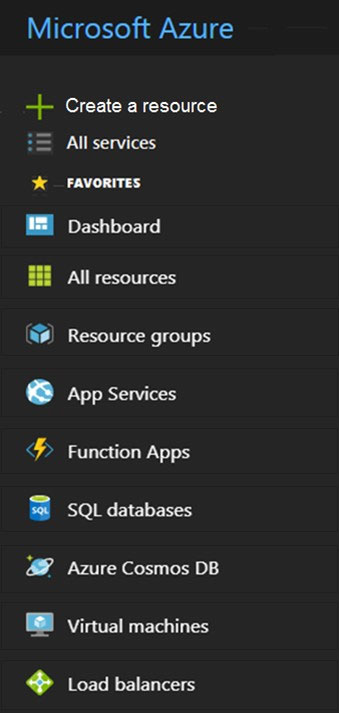
HOTSPOT - You need to request that Microsoft increase a subscription quota limit for your company. Which blade should you use from the Azure portal? To answer, select the appropriate blade in the answer area. Hot Area:

Bagian 1:

Select the correct answer(s) in the image below.

question-image

Correct selection: Use the “Help + support” (or “Support + troubleshooting”) blade to create a support request for a quota increase. Why this is correct: Subscription quota increases are processed by Microsoft through a support request workflow. In the Azure portal, you typically go to Help + support, then create a Support request, and select the issue type related to “Service and subscription limits (quotas)”. This is the standard path for requesting increases to limits like vCPU cores, networking limits, or other subscription-level quotas. Why other blades are wrong: Blades such as Virtual machines, Resource groups, SQL databases, etc., are for managing those resources, but they do not provide the subscription-level quota increase request process. Even if the quota relates to VMs, the request is still submitted through Support rather than from the VM blade.

Tes Latihan Lainnya

Practice Test #1

50 Soal·45 mnt·Lulus 700/1000

Practice Test #2

50 Soal·45 mnt·Lulus 700/1000

Practice Test #3

50 Soal·45 mnt·Lulus 700/1000

Practice Test #4

50 Soal·45 mnt·Lulus 700/1000

Practice Test #6

50 Soal·45 mnt·Lulus 700/1000

Practice Test #7

50 Soal·45 mnt·Lulus 700/1000

Practice Test #8

50 Soal·45 mnt·Lulus 700/1000

Practice Test #9

50 Soal·45 mnt·Lulus 700/1000
← Lihat Semua Soal Microsoft AZ-900

Mulai Latihan Sekarang

Unduh Cloud Pass dan mulai berlatih semua soal Microsoft AZ-900.

Get it on Google PlayDownload on the App Store
Cloud PassCloud Pass

Aplikasi Latihan Sertifikasi IT

Get it on Google PlayDownload on the App Store

Sertifikasi

AWSGCPMicrosoftCiscoCompTIADatabricks

Hukum

FAQKebijakan PrivasiSyarat dan Ketentuan

Perusahaan

KontakHapus Akun

© Hak Cipta 2026 Cloud Pass, Semua hak dilindungi.

Ingin berlatih semua soal di mana saja?

Dapatkan aplikasi

Unduh Cloud Pass — termasuk tes latihan, pelacakan progres & lainnya.