CloudPass LogoCloud Pass
AWSGoogle CloudMicrosoftCiscoCompTIADatabricks
Certifications
AWSGoogle CloudMicrosoftCiscoCompTIADatabricks
Microsoft AZ-104
Microsoft AZ-104

Practice Test #7

Simule a experiência real do exame com 50 questões e limite de tempo de 100 minutos. Pratique com respostas verificadas por IA e explicações detalhadas.

50Questões100Minutos700/1000Nota de Aprovação
Ver Questões de Prática

Powered by IA

Respostas e Explicações Verificadas por 3 IAs

Cada resposta é verificada por 3 modelos de IA líderes para garantir máxima precisão. Receba explicações detalhadas por alternativa e análise aprofundada das questões.

GPT Pro
Claude Opus
Gemini Pro
Explicações por alternativa
Análise aprofundada da questão
Precisão por consenso de 3 modelos

Questões de Prática

1
Questão 1

Note: This question is part of a series of questions that present the same scenario. Each question in the series contains a unique solution that might meet the stated goals. Some question sets might have more than one correct solution, while others might not have a correct solution. After you answer a question in this section, you will NOT be able to return to it. As a result, these questions will not appear in the review screen. You have an Azure subscription that contains 10 virtual networks. The virtual networks are hosted in separate resource groups. Another administrator plans to create several network security groups (NSGs) in the subscription. You need to ensure that when an NSG is created, it automatically blocks TCP port 8080 between the virtual networks. Solution: You assign a built-in policy definition to the subscription. Does this meet the goal?

Yes is incorrect because assigning just any built-in policy definition does not guarantee that NSGs will automatically block TCP port 8080 between the virtual networks. The requirement is too specific to assume a matching built-in policy exists. To enforce this consistently, you would typically need a custom Azure Policy definition that checks for or deploys the required NSG rule. Without that specificity, the proposed solution is insufficient.

No is correct because the solution only says to assign a built-in policy definition, and there is no indication that a built-in policy exists to automatically create or enforce an NSG rule that blocks TCP 8080 between virtual networks. Azure Policy can govern NSGs, but highly specific traffic rules like this generally require a custom policy definition. The subscription scope is appropriate for all resource groups, but the built-in-policy limitation means the stated solution does not reliably meet the requirement. Therefore, the goal is not met by the proposed solution as written.

Análise da Questão

Core concept: This question tests Azure Policy enforcement for network security groups. Azure Policy can evaluate and enforce resource configuration at creation or update time, but the key detail is whether a built-in policy definition exists that specifically ensures NSGs block TCP port 8080 between virtual networks. Why correct: The proposed solution does not meet the goal because simply assigning a built-in policy definition is not sufficient unless there is a built-in policy that enforces the exact required NSG rule. In this scenario, the requirement is very specific: whenever an NSG is created, it must automatically block TCP 8080 traffic between the virtual networks. That level of custom rule enforcement typically requires a custom Azure Policy definition, often using DeployIfNotExists or Deny logic, rather than relying on a generic built-in policy. Key features: Azure Policy can be assigned at the subscription scope, which is appropriate because the virtual networks and NSGs are spread across separate resource groups. Policy can evaluate NSGs during deployment and can deny noncompliant resources or deploy required settings depending on the policy effect. However, built-in policies cover common governance scenarios and do not always match highly specific network rule requirements such as a custom deny rule for TCP 8080 between VNets. Common misconceptions: A common mistake is assuming that any built-in policy can automatically add or enforce detailed NSG rules. Built-in policies are limited to the definitions Microsoft provides, and many specific NSG rule requirements need a custom policy. Another misconception is that assigning a policy alone guarantees remediation; the policy definition and effect must explicitly support the desired enforcement behavior. Exam tips: For AZ-104, when a question asks whether a built-in policy can enforce a very specific configuration, be skeptical unless the requirement matches a known built-in policy exactly. If the requirement involves custom ports, directions, address prefixes, or traffic patterns, a custom Azure Policy is usually needed. Also remember that subscription-level assignment is useful for cross-resource-group governance, but scope alone does not make the policy capable of enforcing the exact rule.

2
Questão 2

You have an Azure Active Directory (Azure AD) tenant named contoso.onmicrosoft.com that contains 100 user accounts. You purchase 10 Azure AD Premium P2 licenses for the tenant. You need to ensure that 10 users can use all the Azure AD Premium features. What should you do?

Correct. Azure AD Premium P2 is a per-user license, so the 10 users must have the P2 license assigned to them to use all Premium features. Assigning the license from the Licenses blade is the direct and standard way to provide entitlement. Once assigned, those users can use P2 capabilities such as Identity Protection and Privileged Identity Management, subject to configuration. This matches the requirement exactly because it ensures only the selected 10 users receive the Premium feature rights.

Incorrect. Simply adding or inviting users to a group does not grant Azure AD Premium P2 features by itself. Group membership only helps if group-based licensing is configured and the P2 license is assigned to that group, which is not stated in this option. The wording says to invite the users to a group, not to assign licenses through the group. Therefore, this action alone would not ensure the 10 users can use all Premium features.

Incorrect. Adding an enterprise application is used for application integration, single sign-on, and service principal management. It has nothing to do with assigning Azure AD Premium P2 licenses to users. Users do not gain Premium directory capabilities merely because an enterprise application exists in the tenant. This option does not address the licensing requirement in the question.

Incorrect. Directory roles determine administrative permissions within Azure AD, such as User Administrator or Global Administrator. They do not provide license entitlement for Azure AD Premium P2 features. A user can hold an admin role and still lack access rights to Premium features if no P2 license is assigned. Therefore, modifying the directory role would not satisfy the requirement.

Análise da Questão

Core concept: This question tests Azure AD (Microsoft Entra ID) licensing. Azure AD Premium features are enabled for users only when the appropriate Premium license is assigned to those users, either directly or through group-based licensing. Why correct: Because the tenant has purchased 10 Azure AD Premium P2 licenses and needs 10 users to use all Premium features, the required action is to assign those licenses to the 10 target users. Without license assignment, users in the tenant cannot legally or technically be considered entitled to use Premium P2 capabilities such as Identity Protection, Privileged Identity Management, and access reviews. Key features: - Azure AD Premium P2 is a per-user license. - Licenses can be assigned directly from Azure AD Licenses or indirectly by group-based licensing. - Only users with the assigned P2 license should use P2-only features. - Administrative roles and group membership alone do not grant Premium feature entitlement. Common misconceptions: - Adding users to groups does not by itself grant Premium features unless a license is assigned to that group. - Directory roles control permissions, not licensing. - Enterprise applications provide app integration and SSO configuration, not user license entitlement. Exam tips: For AZ-104, when a question asks how to enable Azure AD Premium features for specific users, think first about license assignment. If the option explicitly says assign a license, that is usually the correct answer unless the question specifically mentions group-based licensing.

3
Questão 3

You have an Azure subscription named Subscription1 and an on-premises deployment of Microsoft System Center Service Manager. Subscription1 contains a virtual machine named VM1. You need to ensure that an alert is set in Service Manager when the amount of available memory on VM1 is below 10 percent. What should you do first?

Create an automation runbook is not the first step for integrating Azure alerts with Service Manager. Runbooks (Azure Automation) can be used to execute remediation or custom integrations, but they require you to build and maintain the ticket-creation logic yourself (often via APIs). The question asks what to do first to ensure an alert is set in Service Manager; the standard prerequisite is the ITSM Connector integration.

Deploy a function app could be used to implement a custom webhook endpoint that receives Azure Monitor alerts and then calls Service Manager APIs. However, this is a custom solution and not the expected first step in an AZ-104 context. Microsoft provides the IT Service Management Connector specifically to integrate Azure Monitor with ITSM tools like Service Manager, making a Function App unnecessary for the baseline requirement.

Deploy the IT Service Management Connector (ITSM) is the correct first step because it establishes the integration between Azure Monitor and System Center Service Manager. Once ITSMC is configured, you can create an Azure Monitor alert rule for VM1 memory and use an action group to create a corresponding incident/alert in Service Manager. Without ITSMC, Azure Monitor cannot natively open Service Manager work items.

Create a notification is insufficient because a notification (email/SMS/push) does not create an alert/incident record inside Service Manager. Notifications are delivered to people or endpoints, but Service Manager requires an integration path to create work items. In Azure Monitor, that integration is typically implemented via an action group connected to the ITSM Connector, not by a simple notification alone.

Análise da Questão

Core concept: This question tests integrating Azure monitoring/alerting with an ITSM tool (System Center Service Manager) so that Azure alerts create incidents/alerts in Service Manager. In Azure, the typical flow is: collect metrics (Azure Monitor), create an alert rule (Metric alert), and route the alert to an ITSM system via an action group using the IT Service Management Connector (ITSMC). Why the answer is correct: The first prerequisite to get an alert “set in Service Manager” from an Azure resource is establishing the integration between Azure Monitor and Service Manager. That integration is provided by the IT Service Management Connector (ITSM). Without ITSMC configured, Azure Monitor action groups cannot create work items (incidents/alerts) in Service Manager. After ITSMC is deployed and configured, you would then create a metric alert on VM1 for “Available memory” (or the appropriate memory metric via VM insights/AMA/Log Analytics if needed) with a threshold of <10%, and attach an action group that targets the ITSM connector. Key features / best practices: - Azure Monitor metric alerts evaluate platform metrics on a schedule and trigger action groups. - Action groups can integrate with ITSM via ITSMC to create incidents in Service Manager. - From an Azure Well-Architected Framework perspective (Reliability/Operational Excellence), centralizing alert-to-ticket automation reduces MTTR and ensures consistent incident management. - Ensure the VM is emitting the required memory telemetry (often via Azure Monitor Agent + VM insights/Log Analytics for guest memory signals), then alert and route through ITSM. Common misconceptions: - Thinking you must start with an automation runbook or Function App: those can create custom ticketing workflows, but they are not the standard/required first step for Service Manager integration. - Thinking a “notification” alone is enough: notifications (email/SMS/webhook) don’t automatically create Service Manager work items without the connector. Exam tips: When the requirement explicitly says “set an alert in Service Manager” (an on-prem ITSM tool), look for the Azure Monitor-to-ITSM integration component. In Microsoft exam scenarios, ITSM Connector is the canonical first step before configuring alert rules and action groups.

4
Questão 4

HOTSPOT - You have an Azure subscription that contains the resources shown in the following table.

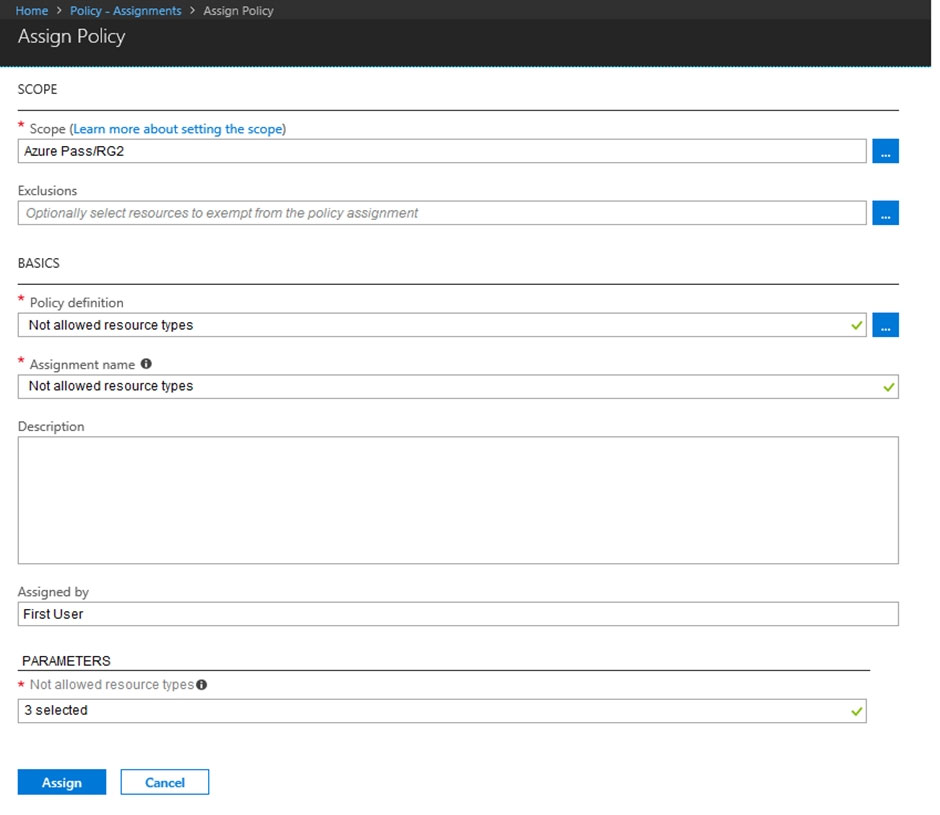
The status of VM1 is Running. You assign an Azure policy as shown in the exhibit. (Click the Exhibit tab.)

You assign the policy by using the following parameters: Microsoft.ClassicNetwork/virtualNetworks Microsoft.Network/virtualNetworks Microsoft.Compute/virtualMachines For each of the following statements, select Yes if the statement is true. Otherwise, select No. NOTE: Each correct selection is worth one point. Hot Area:

Parte 1:

VNET1 is a Virtual network in RG1.

No. The policy assignment is scoped only to RG2, so resources in RG1 are outside the assignment scope. VNET1 being a virtual network in RG1 means it is not governed by this deny policy assignment. The statement is therefore false in the context of policy impact, while options implying RG2-scoped enforcement on RG1 resources are incorrect.

Parte 2:

VNET2 is a Virtual network in RG2.

No. The policy assigned to RG2 uses the built-in 'Not allowed resource types' definition and includes Microsoft.Network/virtualNetworks. That means virtual networks are not allowed for create or update operations in RG2. Existing resources are not deleted, but for the hotspot's true/false evaluation under policy, the correct choice is No rather than Yes.

Parte 3:

VM1 is a Virtual machine in RG2.

No. The assignment at RG2 includes Microsoft.Compute/virtualMachines in the list of not allowed resource types. As a result, virtual machine resources are denied for create and update operations within RG2. Although VM1 already exists and remains running, the intended hotspot answer is No because VMs are not allowed in RG2 under this policy.

Parte 4:

Select the correct answer(s) in the image below.

question-image

Pass. The exhibit provides enough information to answer the scenario: the policy definition is 'Not allowed resource types', the assignment scope is RG2, and the denied types include classic virtual networks, ARM virtual networks, and virtual machines. From that, you can determine that only resources and write operations in RG2 are affected. Existing resources are not removed or powered off, but create, update, and move-into-scope operations for those resource types are denied.

Parte 5:

An administrator can move VNET1 to RG2

No. Moving VNET1 (a Microsoft.Network/virtualNetworks resource) from RG1 into RG2 would result in the VNet being created/updated in the target scope (RG2). Azure Policy deny assignments are evaluated on write operations at the target scope. Because RG2 has a policy assignment that denies Microsoft.Network/virtualNetworks, the move operation would be blocked. In practice, resource moves are treated as management-plane operations that must pass policy evaluation in the destination resource group. Why “Yes” would be wrong: Policy scope matters. Even though RG1 is not in scope, the destination (RG2) is in scope and denies that resource type, so the move cannot complete.

Parte 6:

The state of VM1 changed to deallocated

No. Azure Policy with “Not allowed resource types” (deny) does not change the runtime power state of existing resources. VM1 is currently Running, and assigning a deny policy does not deallocate, stop, or restart the VM. Policy is a governance control over management-plane actions (create/update/delete) and compliance reporting. It is not an automation/remediation mechanism that changes compute state unless you use other tooling (for example, Azure Automation, Logic Apps, or a DeployIfNotExists/Modify policy with remediation tasks—none of which apply here). Why “Yes” would be wrong: There is no policy effect here that triggers deallocation. Deny only blocks future VM create/update operations in RG2.

Parte 7:

An administrator can modify the address space of VNET2

No. Modifying the address space of VNET2 is an update operation on a resource of type Microsoft.Network/virtualNetworks. The policy assigned to RG2 explicitly denies Microsoft.Network/virtualNetworks. With a deny policy in place, any PUT/PATCH that updates the VNet resource (including address space changes, DNS settings, subnets changes, etc.) will be rejected at the ARM control plane for resources in RG2. Why “Yes” would be wrong: Even though VNET2 already exists, deny policies still block updates to the denied resource type. Existing resources are not removed, but they become effectively “locked” against changes that require an update operation.

5
Questão 5

You have an Azure subscription that contains an Azure Storage account. You plan to create an Azure container instance named container1 that will use a Docker image named Image1. Image1 contains a Microsoft SQL Server instance that requires persistent storage. You need to configure a storage service for Container1. What should you use?

Azure Files is correct because ACI can mount an Azure File share as a volume, providing persistent storage across container restarts and redeployments. This is ideal for stateful workloads like SQL Server that need durable storage for database files. You configure a file share in the storage account and reference it in the container group definition (share name plus storage account credentials).

Azure Blob storage is object storage accessed via HTTP/SDKs and is not a typical mounted file system volume for ACI in the way SQL Server expects for its data and log files. While blobs are durable and great for backups, archives, and unstructured data, they don’t provide the standard file share semantics needed for persistent SQL Server database storage in ACI.

Azure Queue storage is a messaging service used to store and retrieve messages between application components. It is not a storage option that can be mounted into a container as a persistent volume, and it cannot store SQL Server database files. It may be used by applications running in containers for decoupling, but it does not meet the persistent disk/file requirement.

Azure Table storage is a NoSQL key-value store for semi-structured data. It is accessed via APIs and is not mountable as a file system volume for ACI. It cannot be used to store SQL Server database data/log files in a way that SQL Server can directly read/write as a database engine storage layer.

Análise da Questão

Core concept: Azure Container Instances (ACI) are ephemeral by default, meaning container local storage is not durable across restarts/redeployments. Workloads like Microsoft SQL Server require persistent, POSIX/SMB-like file storage to keep database files (data/log) beyond the container lifecycle. The exam is testing which Azure Storage service can be mounted into ACI to provide persistent storage. Why the answer is correct: Azure Files provides fully managed SMB/NFS file shares that can be mounted into ACI as a volume. ACI supports mounting an Azure File share directly into a container, enabling SQL Server to store its database files on durable storage. This meets the requirement for persistent storage without running a VM or managing disks. In practice, you create a file share in the storage account, then reference the storage account name/key and share name in the ACI volume configuration. Key features and best practices: - ACI volume support: Azure Files is the primary persistent volume option for ACI (mount as a file share). - Durability and availability: Azure Files data is stored redundantly (LRS/ZRS/GRS options depending on region/account configuration), aligning with Azure Well-Architected Framework reliability goals. - Security: Use storage account keys (common for ACI) and restrict access via private endpoints/firewalls where feasible; consider managed identities where supported in adjacent services. - Performance considerations: Choose appropriate storage account performance tier (Standard vs Premium FileStorage) based on IOPS/latency needs; SQL Server can be sensitive to storage performance. Common misconceptions: Blob storage is persistent, but it’s object storage accessed via REST APIs and is not mounted as a traditional file system for ACI in the same way Azure Files is. Queue and Table storage are also persistent but are messaging/NoSQL services, not mountable volumes. Exam tips: For “persistent storage for ACI” questions, default to Azure Files. Remember: containers need a mounted volume for stateful data; Azure Files is the go-to managed file share. Blob/Queue/Table are accessed via application code, not used as a mounted disk/file system for SQL Server data files in ACI.

Quer praticar todas as questões em qualquer lugar?

Baixe o Cloud Pass — inclui simulados, acompanhamento de progresso e mais.

6
Questão 6

Note: This question is part of a series of questions that present the same scenario. Each question in the series contains a unique solution that might meet the stated goals. Some question sets might have more than one correct solution, while others might not have a correct solution. After you answer a question in this section, you will NOT be able to return to it. As a result, these questions will not appear in the review screen. You need to ensure that an Azure Active Directory (Azure AD) user named Admin1 is assigned the required role to enable Traffic Analytics for an Azure subscription. Solution: You assign the Network Contributor role at the subscription level to Admin1. Does this meet the goal?

Yes is correct because Network Contributor includes permissions to manage Azure networking resources that are required to enable Traffic Analytics. Traffic Analytics depends on Network Watcher and NSG flow logs, and those configurations are within the scope of the Network Contributor role. Since the role is assigned at the subscription level, Admin1 can perform the necessary actions across the subscription's network resources. This directly satisfies the requirement to assign the required role.

No is incorrect because the proposed solution is sufficient for the task described. The question asks whether assigning Network Contributor at the subscription level enables Admin1 to perform the required Traffic Analytics configuration, and it does. There is no indication that a broader role such as Contributor or Owner is necessary for this specific networking task. Therefore, rejecting the solution would be based on an overly restrictive interpretation of the required permissions.

Análise da Questão

Core concept: This question tests the permissions required to enable Traffic Analytics for an Azure subscription. Traffic Analytics is configured through Network Watcher and uses NSG flow logs with a Log Analytics workspace, so the user needs Azure RBAC permissions to manage the networking components involved. Why correct: Assigning the Network Contributor role at the subscription level to Admin1 meets the goal because Network Contributor can manage network resources such as Network Watcher, NSGs, and flow log settings that are required for Traffic Analytics. At subscription scope, the role applies broadly enough to configure the feature for the subscription's relevant resources. Key features: Network Contributor is a built-in Azure RBAC role for administering network resources without granting full subscription-wide management like Contributor or Owner. Traffic Analytics is part of Azure network monitoring and is enabled through networking resources rather than through Azure AD directory roles. Subscription-level assignment is important because it provides access across all applicable network resources in that subscription. Common misconceptions: Many candidates confuse Azure AD roles with Azure RBAC roles and assume a directory role is needed because the question mentions an Azure AD user. The identity type of the assignee does not change the fact that the permission required is an Azure RBAC role on Azure resources. Another common mistake is assuming only Contributor or Owner can enable monitoring features, when specialized roles like Network Contributor are often sufficient. Exam tips: For AZ-104, when you see Network Watcher, NSG flow logs, or Traffic Analytics, think first about network-focused RBAC roles. Always verify both the role and the scope; a correct role at too narrow a scope may fail, but subscription scope is broad enough here. Also remember that built-in roles are often designed to support exactly these operational tasks without requiring excessive privilege.

7
Questão 7

Note: This question is part of a series of questions that present the same scenario. Each question in the series contains a unique solution that might meet the stated goals. Some question sets might have more than one correct solution, while others might not have a correct solution. After you answer a question in this section, you will NOT be able to return to it. As a result, these questions will not appear in the review screen. You have an Azure subscription named Subscription1. Subscription1 contains a resource group named RG1. RG1 contains resources that were deployed by using templates. You need to view the date and time when the resources were created in RG1. Solution: From the RG1 blade, you click Automation script. Does this meet the goal?

Yes is incorrect because clicking Automation script on the RG1 blade will not show the date and time the resources were created. That feature is intended to generate a reusable deployment template based on the existing resources in the group. It does not provide original deployment timestamps or per-resource creation metadata. The correct place to investigate creation timing for template deployments is the Deployments blade in the resource group.

No is correct because the Automation script option does not display when resources were created. Automation script exports the current configuration of resources as an ARM template and supporting scripts so that you can redeploy them later. It is a configuration and deployment aid, not a historical audit view. To find creation timing for template-deployed resources in RG1, you would review the resource group's deployment history instead.

Análise da Questão

Core concept: This question tests Azure VM maintenance controls and how to proactively respond to platform maintenance. Azure may notify you that a VM is scheduled for maintenance (for example, host OS updates or hardware servicing). The relevant capabilities are found under VM Maintenance/Updates and include options like “Redeploy” (move to a new host) and, in some cases, “Self-service maintenance” controls. Why the answer is correct: Selecting “One-time update” from the VM1 Updates blade does not meet the goal of moving the VM to a different host immediately. “One-time update” is associated with applying updates/patches (guest OS updates or update management actions) and does not force a host change. To move a VM to a different host immediately, the typical action is to Redeploy the VM (which stops/deallocates and starts it on a new node) or to use maintenance controls specifically designed for platform maintenance events. Therefore, the proposed solution does not satisfy the requirement. Key features and best practices: - “Redeploy” is the common operational action to force a VM to move to a new Azure host. It results in downtime and a new host assignment, while preserving disks and configuration. - For higher availability, use Availability Sets or Availability Zones so that platform maintenance affects only a subset of instances and you can fail over at the application layer. - Azure Well-Architected Framework (Reliability) recommends designing for planned maintenance via redundancy (zones/sets) rather than relying on reactive host moves. Common misconceptions: It’s easy to confuse “Updates” (patching/Update Management) with “Maintenance” (platform host maintenance). Even though both relate to “maintenance,” only redeploy/maintenance controls impact host placement. Applying a one-time update may reduce guest OS vulnerability but won’t change the underlying host. Exam tips: For AZ-104, remember: “Redeploy” = move VM to a new host. “Restart” does not guarantee a host change. “Updates/One-time update” relates to patching, not host migration. If the question explicitly says “move to a different host immediately,” think Redeploy (or zone/availability design if asked for prevention).

8
Questão 8

HOTSPOT - You need to create an Azure Storage account that meets the following requirements: ✑ Minimizes costs ✑ Supports hot, cool, and archive blob tiers ✑ Provides fault tolerance if a disaster affects the Azure region where the account resides How should you complete the command? To answer, select the appropriate options in the answer area. NOTE: Each correct selection is worth one point. Hot Area:

Parte 1:

az storage account create -g RG1 -n storageaccount1 --kind ______

Correct answer: C (StorageV2). A StorageV2 (general-purpose v2) storage account is required to support Blob access tiers including hot, cool, and archive. It is the current recommended account type and supports the broadest set of storage features (Blob, File, Queue, Table) along with lifecycle management policies that commonly move data between tiers to optimize cost. Why the others are wrong: - A (FileStorage) is a premium-only account kind intended for Azure Files (SMB/NFS) scenarios. It does not provide the standard blob tiering model (hot/cool/archive) for Blob Storage and is not cost-minimizing. - B (Storage) refers to general-purpose v1 (GPv1). GPv1 is legacy and has feature limitations compared to StorageV2; for exam purposes, when you need modern blob tiering and best-practice capabilities, StorageV2 is the correct choice.

Parte 2:

--sku ______

Correct answer: A (Standard_GRS). Standard_GRS (Geo-Redundant Storage) replicates data asynchronously to a secondary region in the paired Azure region, providing resilience if a disaster affects the primary region. This directly satisfies the requirement for fault tolerance at the regional level. Why the others are wrong: - B (Standard_LRS) only replicates within a single region (within a datacenter/zone set depending on implementation) and does not protect against a full regional outage. - C (Standard_RAGRS) includes all GRS capabilities plus read access to the secondary region. That extra read-access feature increases cost and is not required by the prompt, so it does not “minimize costs” compared to GRS. - D (Premium_LRS) is higher cost and still only locally redundant (no cross-region disaster tolerance), failing both cost and regional DR requirements.

9
Questão 9

DRAG DROP - You onboard 10 Azure virtual machines to Azure Automation State Configuration. You need to use Azure Automation State Configuration to manage the ongoing consistency of the virtual machine configurations. Which three actions should you perform in sequence? To answer, move the appropriate actions from the list of actions to the answer area and arrange them in the correct order. NOTE: More than one order of answer choices is correct. You will receive credit for any of the correct orders you select. Select and Place:

Parte 1:

Select the correct answer(s) in the image below.

question-image

Correct sequence (one valid order): 1) Upload a configuration to Azure Automation State Configuration 2) Compile a configuration into a node configuration 3) Check the compliance status of the node Why this is correct: To enforce ongoing consistency, Azure Automation DSC needs a DSC configuration in the Automation account. After upload/import, you must compile it to generate node configurations (MOF artifacts) that nodes can apply. Once nodes apply the configuration, you verify and continuously monitor drift using node compliance status. Why others are wrong: Assigning tags to VMs and creating a management group are governance/organization actions; they don’t create/compile/apply DSC configurations and therefore don’t directly manage configuration consistency. The only actions that represent the DSC operational lifecycle in the provided list are upload, compile, and compliance checking.

10
Questão 10

HOTSPOT - You have Azure virtual machines that run Windows Server 2019 and are configured as shown in the following table.

diagram

You create a private Azure DNS zone named adatum.com. You configure the adatum.com zone to allow auto registration from VNET1. Which A records will be added to the adatum.com zone for each virtual machine? To answer, select the appropriate options in the answer area. NOTE: Each correct selection is worth one point. Hot Area:

Parte 1:

A records for VM1: ______

VM1 is in VNET1, and the private DNS zone adatum.com is linked to VNET1 with auto-registration enabled. Auto-registration in Azure Private DNS creates A records for the VM’s private IP address on its NIC within that VNet. VM1’s private IP is 10.1.0.4, so an A record (typically vm1.adatum.com) will be created pointing to 10.1.0.4. Why not public IP? Azure Private DNS zones are for private name resolution; auto-registration does not publish public IP addresses into a private zone. Public IPs are generally resolved via public DNS (Azure DNS public zones or external DNS providers), not via Private DNS. Why not none? Because the VM is in the linked VNet and meets the condition for auto-registration. The Windows Server DNS suffix (Adatum.com) is not required for Azure to register the record and does not change the fact that Azure registers based on the VNet link and private IP.

Parte 2:

A records for VM2: ______

VM2 is also in VNET1, which is linked to the private DNS zone adatum.com with auto-registration enabled. Therefore, Azure will add an A record for VM2 that maps to its private IP address, 10.1.0.5. The configured DNS suffix inside the VM (Contoso.com) is a distractor. That setting influences how the VM’s OS appends domain suffixes during name resolution and how it may register with an on-premises DNS server if configured, but it does not determine Azure Private DNS auto-registration behavior. Azure uses the private DNS zone name (adatum.com) and the VNet link to decide where to register. Why not public IP only or both? Auto-registration does not create records for public IPs in a private DNS zone. Mixing public IPs into private zones would undermine the separation of internal vs. external name resolution and is not how the feature is designed.

Outros Simulados

Practice Test #1

50 Questões·100 min·Aprovação 700/1000

Practice Test #2

50 Questões·100 min·Aprovação 700/1000

Practice Test #3

50 Questões·100 min·Aprovação 700/1000

Practice Test #4

50 Questões·100 min·Aprovação 700/1000

Practice Test #5

50 Questões·100 min·Aprovação 700/1000

Practice Test #6

50 Questões·100 min·Aprovação 700/1000

Practice Test #8

50 Questões·100 min·Aprovação 700/1000

Practice Test #9

50 Questões·100 min·Aprovação 700/1000
← Ver Todas as Questões de Microsoft AZ-104

Comece a Praticar Agora

Baixe o Cloud Pass e comece a praticar todas as questões de Microsoft AZ-104.

Get it on Google PlayDownload on the App Store
Cloud PassCloud Pass

App de Prática para Certificações de TI

Get it on Google PlayDownload on the App Store

Certificações

AWSGCPMicrosoftCiscoCompTIADatabricks

Legal

Perguntas FrequentesPolítica de PrivacidadeTermos de Serviço

Empresa

ContatoExcluir Conta

© Copyright 2026 Cloud Pass, Todos os direitos reservados.

Quer praticar todas as questões em qualquer lugar?

Baixe o app

Baixe o Cloud Pass — inclui simulados, acompanhamento de progresso e mais.