CloudPass LogoCloud Pass
AWSGoogle CloudMicrosoftCiscoCompTIADatabricks
Certifications
AWSGoogle CloudMicrosoftCiscoCompTIADatabricks
Microsoft AZ-204
Microsoft AZ-204

Practice Test #3

Simule a experiência real do exame com 50 questões e limite de tempo de 100 minutos. Pratique com respostas verificadas por IA e explicações detalhadas.

50Questões100Minutos700/1000Nota de Aprovação
Ver Questões de Prática

Powered by IA

Respostas e Explicações Verificadas por 3 IAs

Cada resposta é verificada por 3 modelos de IA líderes para garantir máxima precisão. Receba explicações detalhadas por alternativa e análise aprofundada das questões.

GPT Pro
Claude Opus
Gemini Pro
Explicações por alternativa
Análise aprofundada da questão
Precisão por consenso de 3 modelos

Questões de Prática

1
Questão 1

You need to store the user agreements. Where should you store the agreement after it is completed?

Azure Storage queue is best for persisting a lightweight work item representing the completed agreement so downstream components can process it asynchronously. It’s durable, low cost, and integrates well with Azure Functions triggers. Use it to store agreement metadata (IDs, timestamps, blob URL), not the full signed document, due to message size limits and to keep processing decoupled and scalable.

Azure Event Hubs is optimized for high-throughput event streaming and telemetry ingestion (e.g., IoT, logs). It retains events for a configured time window and is consumed via partitions/consumer groups, not competing workers processing discrete tasks. For “store a completed agreement for later processing,” Event Hubs is usually the wrong abstraction unless you’re building a streaming analytics pipeline.

Azure Service Bus topic supports publish/subscribe with multiple subscriptions and advanced messaging features (sessions, transactions, dead-lettering, duplicate detection). It can work for agreement completion events if multiple independent systems must react. However, for simply storing a completed agreement work item for later processing, it’s typically more complex and costly than needed compared to Storage queues.

Azure Event Grid topic is for routing event notifications to handlers (Functions, WebHooks, Service Bus, etc.) with push delivery and event filtering. It’s not intended as a storage mechanism for completed agreements or as a work queue. Event Grid is appropriate when you need to broadcast “agreement completed” to multiple subscribers, but you’d still store the agreement elsewhere and/or enqueue work.

Análise da Questão

Core concept: This question is testing which Azure messaging/eventing service is appropriate to persist a completed “user agreement” artifact for later processing. In AZ-204, these options map to different messaging patterns: queue-based work distribution (Storage queues), enterprise messaging (Service Bus), high-throughput telemetry streaming (Event Hubs), and event routing (Event Grid). None of these are long-term document stores like Blob Storage or Cosmos DB, so the intent is typically “store the completed agreement for asynchronous processing” rather than archival storage. Why A is correct: An Azure Storage queue is the simplest, most cost-effective way to persist a small message representing a completed agreement (for example, an agreement ID, user ID, timestamp, and a pointer/URL to where the signed document is stored). It provides durable, at-least-once delivery and decouples the web/API layer from downstream processors (Functions/WebJobs/worker services). This aligns with the Azure Well-Architected Framework reliability and performance pillars by smoothing spikes and enabling independent scaling of producers and consumers. Key features / best practices: Storage queues are highly available, support visibility timeouts, poison message handling (via dequeue count), and can be triggered by Azure Functions. Keep messages small (up to ~64 KB) and store the actual agreement document elsewhere (commonly Blob Storage) while placing only metadata/pointers in the queue. Use managed identity/SAS appropriately and consider encryption at rest (default) and private endpoints for network isolation. Common misconceptions: Event Grid and Event Hubs are often chosen because “agreement completed” sounds like an event. However, those services are for event distribution/streaming, not for durable work-item storage with competing consumers. Service Bus topics are powerful, but are typically overkill unless you need advanced enterprise features (sessions, transactions, duplicate detection, ordered delivery, multiple subscribers with independent subscriptions). Exam tips: If the scenario is “do work later” or “buffer and process asynchronously,” think Queue (Storage queue for simple/low-cost; Service Bus queue/topic for advanced enterprise needs). If it’s “notify many systems that something happened,” think Event Grid. If it’s “ingest massive streaming data,” think Event Hubs.

2
Questão 2

Note: This question is part of a series of questions that present the same scenario. Each question in the series contains a unique solution that might meet the stated goals. Some question sets might have more than one correct solution, while others might not have a correct solution. After you answer a question in this section, you will NOT be able to return to it. As a result, these questions will not appear in the review screen. You develop a software as a service (SaaS) offering to manage photographs. Users upload photos to a web service which then stores the photos in Azure Storage Blob storage. The storage account type is General-purpose V2. When photos are uploaded, they must be processed to produce and save a mobile-friendly version of the image. The process to produce a mobile-friendly version of the image must start in less than one minute. You need to design the process that starts the photo processing. Solution: Trigger the photo processing from Blob storage events. Does the solution meet the goal?

Yes. Blob storage events are intended for event-driven reactions to blob changes such as uploads, so they can start processing soon after a photo is stored. This approach is near real time and is appropriate when the requirement is to begin processing in less than one minute. It also avoids the latency and inefficiency of polling the storage account for new files.

No is incorrect because Blob storage events are specifically designed to notify downstream services quickly when blobs are created or updated. The requirement is only that the process start in less than one minute, not that the entire image transformation complete in that time. A polling or scheduled approach might fail this requirement, but an event-based trigger from Blob storage does meet it.

Análise da Questão

Core concept: This question tests whether Azure Blob storage events can be used to start downstream processing quickly after a blob is uploaded. In Azure, blob-created events are emitted in near real time, making them suitable for event-driven image processing workflows. Why correct: Triggering photo processing from Blob storage events meets the requirement because blob events are designed to notify subscribers shortly after uploads occur, typically well within one minute. This makes them appropriate for starting asynchronous processing such as generating mobile-friendly image versions. Key features: Blob storage integrates with Azure event-driven patterns so applications can react automatically when new blobs are created. This avoids polling delays and reduces unnecessary compute usage. It is a common design for image-processing pipelines in Azure. Common misconceptions: A common mistake is to choose polling mechanisms, scheduled jobs, or blob scans, which may not start processing fast enough. Another misconception is that the question requires a specific compute service; it only asks how to start the process, and blob events satisfy that need. Exam tips: When a requirement says processing must begin quickly after a storage change, prefer event-based triggers over polling. For Azure Storage blob uploads, Blob storage events are the standard near-real-time mechanism to initiate downstream work.

3
Questão 3

Note: This question is part of a series of questions that present the same scenario. Each question in the series contains a unique solution that might meet the stated goals. Some question sets might have more than one correct solution, while others might not have a correct solution. After you answer a question in this section, you will NOT be able to return to it. As a result, these questions will not appear in the review screen. You are developing an Azure solution to collect point-of-sale (POS) device data from 2,000 stores located throughout the world. A single device can produce 2 megabytes (MB) of data every 24 hours. Each store location has one to five devices that send data. You must store the device data in Azure Blob storage. Device data must be correlated based on a device identifier. Additional stores are expected to open in the future. You need to implement a solution to receive the device data. Solution: Provision an Azure Service Bus. Configure a topic to receive the device data by using a correlation filter. Does the solution meet the goal?

Answering 'Yes' is incorrect because it overestimates Service Bus as a device telemetry ingestion service. Correlation filters can help route messages to subscriptions, but they do not inherently solve device-scale ingestion requirements such as secure per-device connectivity, throttling patterns, and IoT protocol support. Additionally, the scenario’s emphasis on many stores worldwide and future growth aligns more closely with IoT Hub or Event Hubs, which are designed for high fan-in event ingestion and easy landing to Blob storage (via routing or Capture). Thus, the proposed Service Bus topic approach does not fully satisfy the intended goal.

The solution does not meet the goal because Azure Service Bus topics are not the best fit for ingesting telemetry from thousands of globally distributed devices. Although correlation filters can route messages based on a device identifier property, Service Bus lacks IoT-specific capabilities such as per-device identity, device authentication, and telemetry-optimized ingestion patterns. In Azure, IoT Hub (or Event Hubs with Capture) is typically used to receive device data at scale and then persist it to Blob storage. Therefore, using Service Bus topics with correlation filters is not the appropriate ingestion design for this scenario.

Análise da Questão

Core concept: This question tests choosing an appropriate Azure ingestion service for high-scale device telemetry that must be routed/correlated by device identifier before landing in Azure Blob storage. Why the answer is correct: Azure Service Bus topics with correlation filters are designed for enterprise messaging patterns (commands/events between applications) and subscription-based routing, not for large-scale device telemetry ingestion. While correlation filters can route messages based on properties (e.g., deviceId), Service Bus is not the recommended front door for thousands of globally distributed devices and does not natively provide device identity management, per-device connectivity patterns, or telemetry-optimized ingestion. For POS/IoT-style device data at global scale with future growth, Azure IoT Hub (or Event Hubs for pure streaming) is the typical ingestion layer, then data is persisted to Blob Storage via routing, capture, or downstream processing. Key features / configurations: - Service Bus Topics/Subscriptions: pub-sub messaging, correlation filters on message properties, sessions for ordered processing. - IoT Hub: per-device identity, device authentication, device-to-cloud telemetry, message routing to Blob/Storage endpoints. - Event Hubs: high-throughput event ingestion; Event Hubs Capture can automatically write to Azure Blob Storage/ADLS. Common misconceptions: - Assuming “correlation filter” equals “device correlation at scale”: it routes messages to subscriptions but doesn’t provide IoT device management or telemetry ingestion optimizations. - Using Service Bus as an IoT ingestion service: Service Bus is optimized for application messaging reliability and workflows, not massive device fan-in. - Believing Blob storage requirement implies Service Bus: storage is a sink; the key is choosing the right ingestion service. Exam tips: - Prefer IoT Hub when devices are involved and you need per-device identity/authentication and scalable device-to-cloud ingestion. - Prefer Event Hubs for high-throughput streaming ingestion; use Capture to land data in Blob/ADLS. - Use Service Bus for enterprise messaging (commands, workflows, decoupling services) rather than raw telemetry ingestion from devices.

4
Questão 4

Note: This question is part of a series of questions that present the same scenario. Each question in the series contains a unique solution that might meet the stated goals. Some question sets might have more than one correct solution, while others might not have a correct solution. After you answer a question in this section, you will NOT be able to return to it. As a result, these questions will not appear in the review screen. You develop Azure solutions. You must grant a virtual machine (VM) access to specific resource groups in Azure Resource Manager. You need to obtain an Azure Resource Manager access token. Solution: Use an X.509 certificate to authenticate the VM with Azure Resource Manager. Does the solution meet the goal?

Answering "Yes" is incorrect because authenticating a VM to Azure Resource Manager using an X.509 certificate is not the expected VM workload identity pattern. While certificates can be used as credentials for a service principal (app registration), that would require creating and managing an Azure AD application, installing and protecting the private key on the VM, and handling rotation/expiry. In contrast, managed identities allow the VM to obtain tokens via IMDS without storing secrets and then use RBAC assignments scoped to the required resource groups. Therefore, the certificate-based solution is not considered to meet the goal in this context.

An X.509 certificate is not the standard mechanism for an Azure VM to obtain an ARM access token in a secure, credential-free way. The recommended approach is to enable a managed identity on the VM and request an OAuth 2.0 token from the Azure Instance Metadata Service, then use Azure RBAC to grant that identity access to specific resource groups. Certificate-based authentication generally applies to Azure AD app registrations (service principals) and requires managing the certificate lifecycle and private key on the VM. Because the scenario is specifically about granting a VM access to resource groups and obtaining an ARM token, managed identity is the intended solution, so the certificate approach does not meet the goal.

Análise da Questão

Core concept: This question tests how to obtain an Azure Resource Manager (ARM) access token for a workload running on an Azure VM, and how to grant that workload scoped permissions (for example, to specific resource groups) using Azure AD identities and Azure RBAC. Why the answer is correct: Using an X.509 certificate by itself is not the recommended or intended way for an Azure VM to authenticate to ARM to obtain tokens. For VM-to-ARM access, the standard approach is to use a managed identity (system-assigned or user-assigned), which can request tokens from the Azure Instance Metadata Service (IMDS) without storing secrets/certificates on the VM. You then grant that managed identity Azure RBAC role assignments scoped to the required resource groups. Therefore, the proposed certificate-based approach does not meet the goal as stated for this scenario. Key features / configurations: - Managed identities for Azure resources (system-assigned or user-assigned) for workload identity on VMs. - Azure Instance Metadata Service (IMDS) token endpoint: http://169.254.169.254/metadata/identity/oauth2/token. - Azure RBAC role assignments scoped at the resource group level (least privilege). - Azure AD app registrations and certificate credentials are typically used for service principals, not as the primary VM workload identity pattern. Common misconceptions: - Assuming certificates are the default/required method for non-interactive authentication from Azure compute to ARM. - Confusing “service principal with certificate” (app registration credential) with “VM identity” (managed identity) and how tokens are obtained. - Overlooking that the goal includes granting access to specific resource groups, which is most cleanly done via RBAC assignments to a managed identity. Exam tips: - Prefer Managed Identity for Azure resources when an Azure VM needs to call ARM or other Azure services. - Use RBAC scope (subscription/resource group/resource) to limit permissions; assign roles to the managed identity. - Certificates are commonly used with Azure AD app registrations (service principals), but they introduce credential management on the VM. - For ARM tokens from a VM, remember IMDS is the typical token acquisition mechanism.

5
Questão 5

You are developing an e-commerce solution that uses a microservice architecture. You need to design a communication backplane for communicating transactional messages between various parts of the solution. Messages must be communicated in first-in-first-out (FIFO) order. What should you use?

Azure Storage Queue is a basic, cost-effective queue for simple asynchronous processing. It supports high scale and durability, but it is not an enterprise message broker and does not provide the same transactional messaging capabilities and strict ordering controls as Service Bus sessions. Ordering can be affected by factors like retries and visibility timeouts, so it’s not the best choice when the requirement explicitly calls for FIFO transactional messaging between microservices.

Azure Event Hubs is optimized for high-throughput event ingestion and streaming (telemetry, logs, clickstreams). It supports partitions and consumer groups, and ordering is only guaranteed within a partition, not as a transactional FIFO message queue for microservices. It also lacks typical broker features like per-message dead-letter queues, request/command semantics, and transactional receive/complete patterns expected for reliable inter-service communication.

Azure Service Bus is the correct choice for transactional, reliable messaging between microservices. It provides durable queues and topics, dead-lettering, duplicate detection, scheduled messages, and transactions. For FIFO, enable Sessions and set SessionId so messages are processed in order within that session. This is the standard Azure service for enterprise integration and microservice backplanes requiring ordered command processing.

Azure Event Grid is an event routing service for reactive architectures (publish/subscribe) with push delivery to handlers (Functions, WebHooks, Service Bus, etc.). It is designed for event notification, not transactional message processing. Delivery is at-least-once and ordering is not guaranteed, so it does not meet a strict FIFO requirement for transactional messages across microservices.

Análise da Questão

Core concept: This question tests Azure messaging services used as a communication backplane in microservices, specifically requiring transactional messaging with first-in-first-out (FIFO) delivery. In Azure, the service designed for reliable, ordered, transactional messaging between services is Azure Service Bus (queues/topics), especially when using sessions. Why the answer is correct: Azure Service Bus supports enterprise messaging patterns needed in microservice architectures: durable message storage, competing consumers, dead-lettering, duplicate detection, scheduled delivery, and—critically for this question—FIFO ordering when you use message sessions (SessionId). With sessions enabled on a queue or subscription, Service Bus guarantees ordered processing within a session and ensures that only one consumer processes a given session at a time, preserving FIFO semantics for that message stream. Service Bus also supports transactions (send/complete/defer/dead-letter in a transaction scope), which aligns with “transactional messages” requirements. Key features and best practices: Use a Service Bus Queue for point-to-point commands or a Topic/Subscription model for pub-sub events/commands. Enable Sessions to achieve FIFO ordering (per session) and design your partitioning strategy: choose a SessionId that represents the ordering boundary (for example, OrderId or CustomerId). Configure retry policies, max delivery count, and dead-letter queues for poison messages. Consider Premium tier for predictable latency and dedicated resources; Standard supports sessions too, but Premium is often recommended for critical backplanes. This aligns with Azure Well-Architected Framework reliability principles (durable messaging, backpressure, and failure isolation). Common misconceptions: Storage Queues are simpler and cheaper, but they don’t provide strict FIFO guarantees in the way Service Bus sessions do, and they lack many enterprise messaging features (transactions across operations, topics/subscriptions, advanced dead-lettering controls). Event Hubs is for high-throughput telemetry streaming, not transactional command messaging. Event Grid is for event routing with at-least-once delivery and no FIFO guarantee. Exam tips: When you see “transactional messaging,” “FIFO,” “commands,” “microservices backplane,” or “enterprise messaging,” think Azure Service Bus. If the question mentions “telemetry/streaming,” think Event Hubs; if it mentions “react to Azure resource events,” think Event Grid; if it mentions “simple queueing with basic features,” think Storage Queues.

Quer praticar todas as questões em qualquer lugar?

Baixe o Cloud Pass — inclui simulados, acompanhamento de progresso e mais.

6
Questão 6

HOTSPOT - You plan to deploy a web app to App Service on Linux. You create an App Service plan. You create and push a custom Docker image that contains the web app to Azure Container Registry. You need to access the console logs generated from inside the container in real-time. How should you complete the Azure CLI command? To answer, select the appropriate options in the answer area. NOTE: Each correct selection is worth one point. Hot Area:

Parte 1:

az webapp log ______ --name Contosoweb --resource-group ContosoDevRG

The correct verb is `config`: `az webapp log config --name Contosoweb --resource-group ContosoDevRG`. To access container console logs in real time, you must first enable/configure logging on the App Service app. The `config` subcommand is used to turn logging on and choose the destination (for example, filesystem). Why the others are wrong: - `download` is used to download existing log files as an archive; it does not enable logging. - `show` displays the current logging configuration; it does not change settings. - `tail` streams logs, but it assumes logging is already enabled/configured. For AZ-204, remember the typical flow: configure logging (`az webapp log config ...`) and then stream (`az webapp log tail ...`).

Parte 2:

______ filesystem

The correct option is `--docker-container-logging` with the value `filesystem`, i.e., `--docker-container-logging filesystem`. In App Service on Linux with a custom Docker image, “console logs generated from inside the container” generally means the container’s stdout/stderr output. App Service exposes this via Docker container logging. Setting it to `filesystem` stores the logs on the App Service file system so they can be streamed and downloaded. Why the others are wrong: - `--web-server-logging` is for HTTP access logs from the platform web server/proxy layer, not the container’s console output. - `--application-logging` is primarily for App Service application logging (historically more aligned to built-in runtimes); for custom containers, the explicit container logging flag is the exam-relevant choice. This configuration supports operational excellence by ensuring the app’s runtime output is observable.

Parte 3:

az ______ log ______ --name ContosoWeb --resource-group ContosoDevRG

The correct resource is `webapp`: `az webapp log ... --name ContosoWeb --resource-group ContosoDevRG`. Even though the image is stored in Azure Container Registry (ACR), the logs you want are produced by the running workload hosted by Azure App Service. Therefore, you manage and stream logs from the App Service web app resource using the `az webapp` command group. Why the others are wrong: - `acr` commands manage registries and images (build, import, list tags, etc.). ACR does not provide runtime console logs for containers running elsewhere. - `aks` commands manage Kubernetes clusters and workloads. This scenario explicitly uses App Service on Linux, not AKS. For exam questions, always identify where the code is running (App Service) versus where artifacts are stored (ACR). Logging/streaming targets the runtime host.

Parte 4:

az webapp log ______ --name ContosoWeb --resource-group ContosoDevRG

The correct subcommand is `tail`: `az webapp log tail --name ContosoWeb --resource-group ContosoDevRG`. `tail` streams logs in real time from the App Service app, which matches the requirement to access console logs generated inside the container “in real-time.” This is the CLI equivalent of using “Log stream” in the Azure portal. Why the others are wrong: - `config` configures logging but does not stream output. - `download` retrieves accumulated logs as a file (useful for offline analysis), not live streaming. - `show` displays the current logging configuration. In practice, you enable container logging to filesystem (`az webapp log config ... --docker-container-logging filesystem`) and then run `az webapp log tail ...` to watch stdout/stderr as the container runs, supporting rapid troubleshooting and incident response.

7
Questão 7

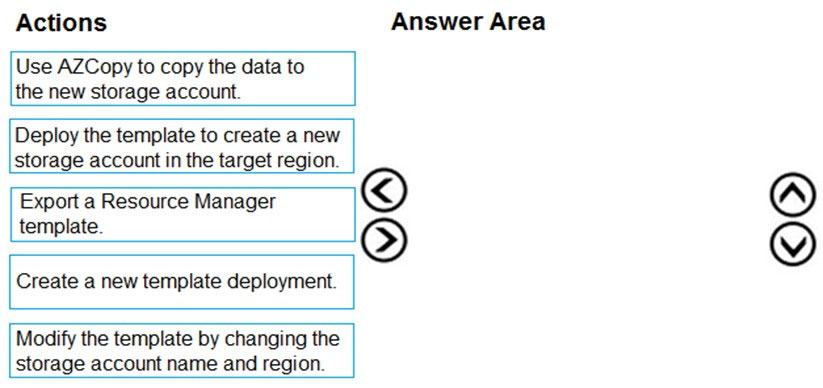
DRAG DROP - You are developing an application to use Azure Blob storage. You have configured Azure Blob storage to include change feeds. A copy of your storage account must be created in another region. Data must be copied from the current storage account to the new storage account directly between the storage servers. You need to create a copy of the storage account in another region and copy the data. In which order should you perform the actions? To answer, move all actions from the list of actions to the answer area and arrange them in the correct order. Select and Place:

Parte 1:

Select the correct answer(s) in the image below.

question-image

Answer A (Pass) is appropriate because the correct action order is determinable from the prompt and the listed actions. Correct order: 1) Export a Resource Manager template. 2) Modify the template by changing the storage account name and region. 3) Create a new template deployment. 4) Deploy the template to create a new storage account in the target region. 5) Use AzCopy to copy the data to the new storage account. Why this is correct: exporting an ARM template captures the existing storage account’s configuration so you can recreate it consistently. You must change the name (globally unique) and location (target region) before deployment. In Azure, “create a deployment” precedes “deploy,” reflecting the workflow of initiating a deployment using the modified template. Finally, AzCopy is used for service-to-service Blob copy, meeting the requirement that data is copied directly between storage servers rather than via a client machine. No other ordering satisfies both the IaC-based account creation and the server-side data copy requirement.

8
Questão 8

DRAG DROP - You are developing a microservices solution. You plan to deploy the solution to a multinode Azure Kubernetes Service (AKS) cluster. You need to deploy a solution that includes the following features: ✑ reverse proxy capabilities ✑ configurable traffic routing ✑ TLS termination with a custom certificate Which components should you use? To answer, drag the appropriate components to the correct requirements. Each component may be used once, more than once, or not at all. You may need to drag the split bar between panes or scroll to view content. NOTE: Each correct selection is worth one point. Select and Place:

Parte 1:

Deploy solution.

Yes. To deploy the solution with reverse proxy, configurable routing, and TLS termination using a custom certificate in AKS, you would deploy an Ingress Controller (commonly NGINX Ingress Controller via Helm or manifests) and define Kubernetes Ingress resources for your microservices. The Ingress rules provide host/path-based routing to multiple backend services, fulfilling the configurable traffic routing requirement. For TLS termination with a custom certificate, you create a Kubernetes TLS secret (type kubernetes.io/tls) containing your certificate and private key, then reference that secret in the Ingress spec under tls. This terminates HTTPS at the ingress layer and forwards HTTP to internal services (or re-encrypts if configured). This is the standard Kubernetes pattern for these requirements on AKS.

Parte 2:

View cluster and external IP addressing.

Yes. When you expose the Ingress Controller using a Kubernetes Service of type LoadBalancer, AKS integrates with Azure to provision an Azure Load Balancer and assign a public IP address. You can view the cluster services and the external IP by using kubectl get svc -A (or within the ingress namespace) and checking the EXTERNAL-IP field once provisioned. In Azure, you can also view the created Public IP resource and Load Balancer in the node resource group (MC_*) associated with the AKS cluster. This directly supports the requirement to view cluster and external IP addressing because the ingress entry point is represented as a service with an externally reachable IP.

Parte 3:

Implement a single, public IP endpoint that is routed to multiple microservices.

Yes. A single, public IP endpoint routed to multiple microservices is exactly what an Ingress Controller + Ingress rules provide. The public IP is attached to the LoadBalancer service that fronts the ingress controller. From that single IP (and typically a single DNS name), the ingress controller performs Layer 7 routing to different Kubernetes services based on host headers and/or URL paths (for example, /api to one service, /orders to another). This consolidates external exposure, reduces the number of public IPs and load balancers required, and aligns with best practices for controlling ingress traffic. Alternatives like exposing each service with its own LoadBalancer would not meet the “single public IP endpoint” requirement and is generally less cost-effective and harder to manage.

9
Questão 9

You develop a website. You plan to host the website in Azure. You expect the website to experience high traffic volumes after it is published. You must ensure that the website remains available and responsive while minimizing cost. You need to deploy the website. What should you do?

Incorrect. A single virtual machine cannot “automatically scale” by itself in the way App Service or VM Scale Sets do. You can resize (scale up) a VM, but that is disruptive and not the typical autoscale pattern. For high traffic, you generally need scale out (multiple instances) plus load balancing, which this option does not provide. It also increases operational overhead (patching, configuration, availability).

Incorrect. The Shared App Service tier is designed for dev/test and has significant limitations. Critically for this question, Shared tier does not support autoscale. Even if you could manually scale, Shared has constrained resources and is not intended for high-traffic production workloads. Choosing Shared would risk poor responsiveness and availability under load, violating the requirements.

Partially viable but not best. VM Scale Sets can scale out based on CPU and can handle high traffic, but you must also design the full web hosting stack: load balancer/Application Gateway, VM image management, patching, monitoring, and resiliency. That added operational complexity and management cost typically makes it less cost-effective than App Service for a standard website scenario.

Correct. App Service Standard tier supports autoscale, enabling the app to remain responsive during traffic spikes by scaling out to multiple instances and scaling back in to reduce cost. It provides built-in load balancing, managed platform operations, and production features (e.g., deployment slots). This meets the availability/responsiveness requirement while minimizing cost through elastic scaling and reduced administrative overhead.

Análise da Questão

Core concept: This question tests choosing the right Azure compute hosting model for a web app that expects high traffic, while maintaining availability/responsiveness and minimizing cost. The key services are Azure App Service (PaaS) with autoscale versus IaaS options (VMs/VM Scale Sets). Why the answer is correct: Azure App Service on the Standard tier supports autoscale (scale out/in) based on metrics like CPU, memory, or HTTP queue length. This directly addresses “high traffic after publish” by adding instances when load increases and removing them when load decreases, optimizing cost. App Service also provides built-in load balancing across instances, managed OS/runtime patching, and high availability within the App Service plan. Compared to running and managing VMs, App Service reduces operational overhead and aligns with Azure Well-Architected Framework (Operational Excellence, Reliability, and Cost Optimization). Key features and best practices: - Standard tier (and above) enables autoscale rules via Azure Monitor Autoscale. - Scale out adds more instances; scale up changes the SKU. For traffic spikes, scale out is typically the primary lever. - Built-in platform features: health monitoring, deployment slots (Standard+), and integrated load balancing. - Cost optimization: configure minimum/maximum instance counts and scale rules to avoid overprovisioning; consider scheduled scaling for predictable peaks. Common misconceptions: - “Shared tier + autoscale” sounds cheaper, but Shared does not support autoscale and has resource constraints intended for dev/test. - “A single VM with autoscale” is not a valid approach; autoscale requires multiple instances (VM Scale Sets) or a PaaS that can add instances. - VM Scale Sets can scale, but you must manage OS patching, web server configuration, and often an external load balancer/application gateway—typically higher ops cost and complexity for a standard web app. Exam tips: For AZ-204, default to App Service for web apps unless requirements force IaaS (custom OS, special networking, legacy dependencies). Remember: autoscale requires an eligible tier (Standard or higher for App Service). If the question emphasizes minimizing management overhead and cost for web hosting, App Service with autoscale is usually the best fit.

10
Questão 10
(Selecione 2)

You provide an Azure API Management managed web service to clients. The back-end web service implements HTTP Strict Transport Security (HSTS). Every request to the backend service must include a valid HTTP authorization header. You need to configure the Azure API Management instance with an authentication policy. Which two policies can you use? Each correct answer presents a complete solution. NOTE: Each correct selection is worth one point.

Basic Authentication is correct because it explicitly sends credentials in the HTTP Authorization header using the Basic scheme. In Azure API Management, the authentication-basic policy is designed for backend authentication and adds the required header on outbound requests. This directly satisfies the requirement that every request to the backend include a valid Authorization header. Although less modern than token-based approaches, it is still a complete and supported solution when the backend accepts Basic auth.

Digest Authentication is not a supported APIM authentication policy option for backend authentication in the way the question asks. Even though HTTP Digest is an Authorization-header-based scheme at the protocol level, Azure API Management does not provide a corresponding built-in authentication policy comparable to Basic Authentication or OAuth client credentials for this scenario. Therefore it is not one of the valid APIM policy answers expected by the exam. The exam focuses on actual APIM policy capabilities, not just generic HTTP authentication methods.

Certificate Authentication is incorrect because client certificates are presented during the TLS handshake, not in the HTTP Authorization header. The question explicitly requires that every request to the backend include a valid HTTP Authorization header, and mutual TLS alone does not satisfy that condition. HSTS also does not change this, because it only enforces HTTPS and says nothing about HTTP headers. Certificate-based authentication may secure the connection, but it is not a complete answer to the stated header requirement.

OAuth Client Credential Grant is correct because APIM can obtain an OAuth 2.0 access token for itself, without any user context, and then send that token in the HTTP Authorization header as a Bearer token. This is the standard service-to-service pattern for protected APIs and is commonly used with Microsoft Entra ID. It fully meets the requirement that each backend request include a valid Authorization header. In APIM, this is implemented through the authentication-managed-identity or OAuth-related policy patterns depending on the backend and identity provider.

Análise da Questão

Core concept: The question is about Azure API Management authentication policies used when APIM calls a backend that requires authentication on every request. The key requirement is that each backend request must include a valid HTTP Authorization header, which points to schemes that explicitly populate that header. Why correct: Basic Authentication and OAuth Client Credential Grant are both APIM-supported ways to send credentials in the HTTP Authorization header to the backend. Basic Authentication sends an Authorization header with a Basic credential, while OAuth Client Credential Grant obtains an access token and sends it as Authorization: Bearer <token>. Key features: Basic Authentication is simple and directly sets the Authorization header using a username and password. OAuth Client Credential Grant is the standard service-to-service OAuth 2.0 flow and is commonly used with Microsoft Entra ID or another authorization server to obtain bearer tokens for backend APIs. Common misconceptions: HSTS is unrelated to the choice of authentication policy; it only enforces HTTPS usage and does not provide identity or authorization. Certificate authentication uses mutual TLS during the TLS handshake and does not by itself create an HTTP Authorization header, so it does not meet the stated requirement. Exam tips: When a question explicitly says the backend requires an HTTP Authorization header, prefer policies that actually generate that header. Distinguish transport-layer authentication such as client certificates from application-layer authentication conveyed in HTTP headers.

Outros Simulados

Practice Test #1

50 Questões·100 min·Aprovação 700/1000

Practice Test #2

50 Questões·100 min·Aprovação 700/1000

Practice Test #4

50 Questões·100 min·Aprovação 700/1000

Practice Test #5

50 Questões·100 min·Aprovação 700/1000
← Ver Todas as Questões de Microsoft AZ-204

Comece a Praticar Agora

Baixe o Cloud Pass e comece a praticar todas as questões de Microsoft AZ-204.

Get it on Google PlayDownload on the App Store
Cloud PassCloud Pass

App de Prática para Certificações de TI

Get it on Google PlayDownload on the App Store

Certificações

AWSGCPMicrosoftCiscoCompTIADatabricks

Legal

Perguntas FrequentesPolítica de PrivacidadeTermos de Serviço

Empresa

ContatoExcluir Conta

© Copyright 2026 Cloud Pass, Todos os direitos reservados.

Quer praticar todas as questões em qualquer lugar?

Baixe o app

Baixe o Cloud Pass — inclui simulados, acompanhamento de progresso e mais.