CloudPass LogoCloud Pass
AWSGoogle CloudMicrosoftCiscoCompTIADatabricks
Certifications
AWSGoogle CloudMicrosoftCiscoCompTIADatabricks
Microsoft AZ-204
Microsoft AZ-204

Practice Test #4

Simule a experiência real do exame com 50 questões e limite de tempo de 100 minutos. Pratique com respostas verificadas por IA e explicações detalhadas.

50Questões100Minutos700/1000Nota de Aprovação
Ver Questões de Prática

Powered by IA

Respostas e Explicações Verificadas por 3 IAs

Cada resposta é verificada por 3 modelos de IA líderes para garantir máxima precisão. Receba explicações detalhadas por alternativa e análise aprofundada das questões.

GPT Pro
Claude Opus
Gemini Pro
Explicações por alternativa
Análise aprofundada da questão
Precisão por consenso de 3 modelos

Questões de Prática

1
Questão 1

Note: This question is part of a series of questions that present the same scenario. Each question in the series contains a unique solution that might meet the stated goals. Some question sets might have more than one correct solution, while others might not have a correct solution. After you answer a question in this section, you will NOT be able to return to it. As a result, these questions will not appear in the review screen. You are developing an Azure solution to collect point-of-sale (POS) device data from 2,000 stores located throughout the world. A single device can produce 2 megabytes (MB) of data every 24 hours. Each store location has one to five devices that send data. You must store the device data in Azure Blob storage. Device data must be correlated based on a device identifier. Additional stores are expected to open in the future. You need to implement a solution to receive the device data. Solution: Provision an Azure Event Grid. Configure event filtering to evaluate the device identifier. Does the solution meet the goal?

Answering 'Yes' is incorrect because it assumes Event Grid can directly receive and manage device telemetry ingestion. Event Grid can filter and route events, but it is not a device ingestion gateway and does not provide the connectivity, authentication, and ingestion semantics typically required for thousands of globally distributed devices. Additionally, filtering on a device identifier only determines routing; it does not inherently provide durable ingestion and correlation/storage organization. IoT Hub or Event Hubs are the services intended for this type of workload, with downstream persistence to Blob storage.

The solution does not meet the goal because Azure Event Grid is not designed to be the primary service to receive continuous device telemetry from thousands of devices. Event Grid is optimized for routing discrete events and triggering handlers, and it lacks core IoT ingestion capabilities such as per-device identity, device authentication, and telemetry-oriented ingestion patterns. Although Event Grid supports event filtering, filtering does not solve the requirement to reliably ingest and correlate device data at scale before storing it in Blob storage. A more appropriate approach is Azure IoT Hub (or Event Hubs) to ingest device data, then route/process it into Blob storage organized by device identifier.

Análise da Questão

Core concept: This question tests choosing the correct Azure ingestion service for device telemetry at scale and understanding the difference between Event Grid (event notification/routing) and services designed for high-throughput device-to-cloud data ingestion (IoT Hub/Event Hubs) before persisting to Blob storage. Why the answer is correct: Event Grid is primarily an event routing service for discrete events (e.g., “blob created”, “resource changed”) and is not intended to be the primary endpoint for continuous device telemetry uploads from thousands of POS devices. While Event Grid supports filtering on event metadata, it does not provide the device connectivity, ingestion semantics, or telemetry-oriented features needed to reliably receive and buffer device data streams at scale. A more appropriate pattern is to ingest device messages via Azure IoT Hub (or Event Hubs for non-IoT scenarios), then use routing/Stream Analytics/Functions to write to Blob Storage with partitioning by device identifier. Key features / configurations: - Azure Event Grid: event notification, push delivery to handlers, filtering on event subject/type/data fields, at-least-once delivery for events. - Azure IoT Hub: per-device identity, device authentication, device-to-cloud telemetry ingestion, message routing to storage/endpoints. - Azure Event Hubs: high-throughput event ingestion, partitions/consumer groups; typically paired with processors to persist to Blob. - Correlation by device identifier: use IoT Hub device ID or message properties; write to Blob paths like /deviceId=/yyyy=/mm=/dd= for efficient organization. Common misconceptions: - Assuming Event Grid is a general-purpose ingestion endpoint for arbitrary device payloads; it is mainly for routing events emitted by Azure services or custom publishers, not for direct device telemetry at scale. - Confusing “filtering” with “correlation/storage partitioning”; filtering only decides where events go, it doesn’t inherently organize or persist data by device ID. - Overlooking device management needs (identity, authentication, throttling) that IoT Hub provides. Exam tips: - Use Event Grid for reactive workflows and notifications (resource events, blob created, etc.), not for primary telemetry ingestion. - For many devices sending data: prefer IoT Hub (device identity + telemetry) or Event Hubs (stream ingestion). - If the requirement includes “correlate by device identifier,” think message properties + downstream partitioning/routing to storage. - When the destination is Blob Storage, expect an intermediate ingestion service plus a processor (Functions/Stream Analytics) or built-in routing (IoT Hub routing).

2
Questão 2

You develop Azure solutions. You must connect to a No-SQL globally-distributed database by using the .NET API. You need to create an object to configure and execute requests in the database. Which code segment should you use?

Incorrect. Container is not instantiated directly with EndpointUri and PrimaryKey in the Azure Cosmos DB .NET SDK v3+. A Container object is obtained from a CosmosClient (e.g., cosmosClient.GetContainer(databaseId, containerId)). The client handles authentication, connection management, retries, and other request pipeline behaviors, which a Container constructor does not provide in this way.

Incorrect. Database is not created by calling a constructor with EndpointUri and PrimaryKey in the Cosmos DB .NET SDK v3+. You first create a CosmosClient, then get a Database reference (e.g., cosmosClient.GetDatabase(databaseId)) or create it via CreateDatabaseIfNotExistsAsync. Credentials and endpoint configuration belong to CosmosClient, not Database.

Correct. CosmosClient is the primary .NET SDK object used to configure connectivity to Azure Cosmos DB and execute requests. It is created with the account endpoint and key (or other credentials) and is intended to be reused for the lifetime of the application. From CosmosClient you obtain Database and Container references and perform CRUD operations.

Análise da Questão

Core Concept: This question tests how to connect to Azure Cosmos DB (a globally distributed NoSQL database) using the Azure Cosmos DB .NET SDK (v3+). In this SDK, the primary entry point for configuring and executing requests is the CosmosClient object, which manages connectivity, authentication, retries, and efficient resource usage. Why the Answer is Correct: CosmosClient is the top-level client used to interact with Cosmos DB accounts. You create it with the account endpoint URI and a key (or other credential), and then use it to obtain references to Database and Container objects (e.g., GetDatabase, GetContainer). CosmosClient is designed to be long-lived and reused across the application lifetime, enabling connection management and performance optimizations. Therefore, new CosmosClient(EndpointUri, PrimaryKey) is the correct code segment to configure and execute requests. Key Features / Best Practices: - Reuse CosmosClient as a singleton (or one per app) to avoid socket exhaustion and improve performance. - Configure CosmosClientOptions for consistency, preferred regions, connection mode (Direct/Gateway), retries, and diagnostics. - Use Azure AD (DefaultAzureCredential) where possible instead of keys for improved security posture. - Cosmos DB’s global distribution and multi-region reads/writes are handled at the account level; CosmosClient can be configured with ApplicationPreferredRegions to optimize latency. These align with Azure Well-Architected Framework pillars: Performance Efficiency (reuse client, preferred regions), Reliability (retries, multi-region), and Security (AAD over keys). Common Misconceptions: Developers sometimes assume they can directly instantiate Database or Container with endpoint/key. In the Cosmos DB .NET SDK, Database and Container are logical resource references obtained from CosmosClient; they are not constructed directly with credentials. Another confusion is mixing older SDK patterns (DocumentClient) with the modern CosmosClient approach. Exam Tips: For AZ-204, remember the object model: CosmosClient (account-level) -> Database -> Container -> Items. If a question asks for the object that configures connectivity and executes requests, it’s almost always CosmosClient. Also remember the guidance: create once, reuse many times, and prefer managed identity/AAD when feasible.

3
Questão 3

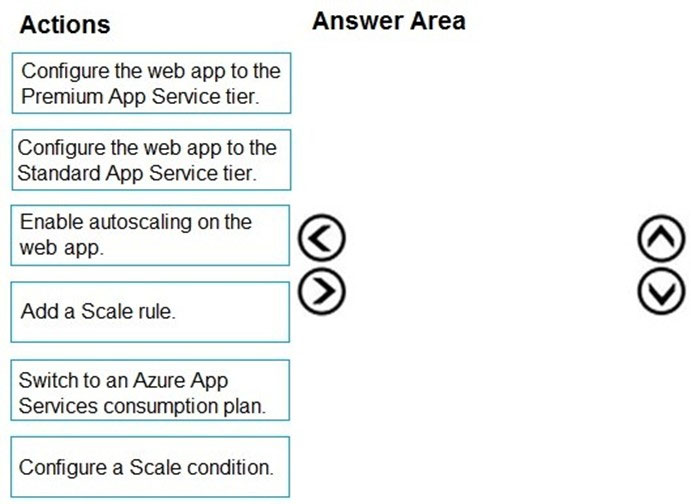
DRAG DROP - You develop a web app that uses the tier D1 app service plan by using the Web Apps feature of Microsoft Azure App Service. Spikes in traffic have caused increases in page load times. You need to ensure that the web app automatically scales when CPU load is about 85 percent and minimize costs. Which four actions should you perform in sequence? To answer, move the appropriate actions from the list of actions to the answer area and arrange them in the correct order. NOTE: More than one order of answer choices is correct. You will receive credit for any of the correct orders you select. Select and Place:

Parte 1:

Select the correct answer(s) in the image below.

question-image

Answer: A (Pass). Correct action sequence (one valid ordering): 1) Configure the web app to the Standard App Service tier. 2) Enable autoscaling on the web app (effectively on the App Service plan). 3) Configure a Scale condition. 4) Add a Scale rule. Why this is correct: D1 (Shared) does not support autoscale. Moving to Standard is the lowest-cost tier that supports autoscale, meeting the “minimize costs” requirement. After upgrading, you can enable autoscale and then define the metric-based logic. The “scale condition” is where you select the metric (CPU Percentage) and threshold context; the “scale rule” defines the action (scale out when CPU is ~85%). Why others are wrong: Premium would work but costs more than necessary. “Switch to an Azure App Services consumption plan” is not a valid App Service Web Apps plan (consumption is for Azure Functions), so it doesn’t satisfy the scenario.

4
Questão 4

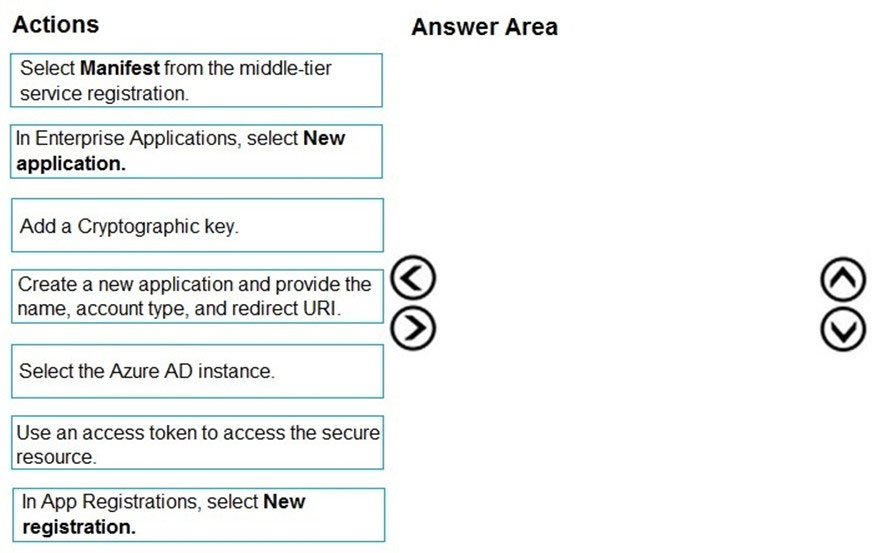
DRAG DROP - You develop a web application. You need to register the application with an active Azure Active Directory (Azure AD) tenant. Which three actions should you perform in sequence? To answer, move all actions from the list of actions to the answer area and arrange them in the correct order. Select and Place:

Parte 1:

Select the correct answer(s) in the image below.

question-image

Pass. The correct three actions in order to register the application with an active Azure AD tenant are: 1) Select the Azure AD instance. (You must be in the correct directory/tenant before creating the registration.) 2) In App Registrations, select New registration. (This is the portal entry point to create an application object.) 3) Create a new application and provide the name, account type, and redirect URI. (These are the core required inputs for a web app registration.) Why others are wrong: - Enterprise Applications > New application is primarily for adding gallery/SaaS apps or creating a service principal for an existing app; it’s not the standard flow for registering your own app. - Add a cryptographic key (certificate/secret) is optional and typically done after registration under Certificates & secrets. - Select Manifest is an advanced configuration step after registration. - Use an access token is a runtime step, not part of registration.

5
Questão 5

HOTSPOT - You are developing an Azure Web App. You configure TLS mutual authentication for the web app. You need to validate the client certificate in the web app. To answer, select the appropriate options in the answer area. NOTE: Each correct selection is worth one point. Hot Area:

Parte 1:

Client certificate location: ______

Correct answer: A. HTTP request header. In Azure App Service with client certificates (mTLS) enabled, the platform terminates TLS and forwards the client certificate to the application via an HTTP request header (commonly exposed as the X-ARR-ClientCert header). Your application reads this header and performs validation/authorization decisions. Why the others are wrong: - B. Client cookie: Cookies are client-controlled and not appropriate for conveying a TLS-authenticated identity artifact like a certificate. App Service does not place the certificate in a cookie. - C. HTTP message body: The body is application data and may not exist for GET requests; it is also not the standard mechanism for propagating TLS client identity. - D. URL query string: Query strings are easily logged, cached, and modified; they are not used by App Service for client certificate forwarding and would be insecure and impractical for large certificate payloads.

Parte 2:

Encoding type: ______

Correct answer: D. Base64. An X.509 certificate is binary data (DER). To transmit it in an HTTP header, it must be represented as ASCII-safe text. Azure App Service encodes the client certificate using Base64 in the request header value. Your web app decodes the Base64 string back into bytes and then constructs an X509Certificate2 (or similar) to validate properties such as thumbprint, issuer, expiration, and chain trust. Why the others are wrong: - A. HTML: HTML is a markup language and not an encoding used to safely transport binary certificate bytes. - B. URL: URL encoding is designed for escaping characters in URLs/query strings, not for representing arbitrary binary blobs efficiently in headers. - C. Unicode: Unicode is a character set/encoding for text, not a standard way to serialize binary certificates for HTTP headers.

Quer praticar todas as questões em qualquer lugar?

Baixe o Cloud Pass — inclui simulados, acompanhamento de progresso e mais.

6
Questão 6

Note: This question is part of a series of questions that present the same scenario. Each question in the series contains a unique solution that might meet the stated goals. Some question sets might have more than one correct solution, while others might not have a correct solution. After you answer a question in this section, you will NOT be able to return to it. As a result, these questions will not appear in the review screen. You are developing an Azure Service application that processes queue data when it receives a message from a mobile application. Messages may not be sent to the service consistently. You have the following requirements: ✑ Queue size must not grow larger than 80 gigabytes (GB). ✑ Use first-in-first-out (FIFO) ordering of messages. ✑ Minimize Azure costs. You need to implement the messaging solution. Solution: Use the .Net API to add a message to an Azure Service Bus Queue from the mobile application. Create an Azure Function App that uses an Azure Service Bus Queue trigger. Does the solution meet the goal?

Yes is correct because Azure Service Bus Queue is the Azure messaging service that best matches a FIFO-style queueing requirement in AZ-204 scenarios. A Service Bus queue can be created with a configured maximum size, and 80 GB is a supported queue size option in the Standard tier. Using an Azure Function App with a Service Bus trigger also minimizes compute cost because the function runs only when messages arrive, which is ideal when mobile messages are sent inconsistently. Together, the queue and trigger satisfy the ordering, capacity, and cost goals stated in the scenario.

No is incorrect because the proposed design does satisfy the stated requirements closely enough for the exam objective. Azure Service Bus queues do support configurable maximum queue sizes, including 80 GB, so the capacity requirement can be met. Service Bus is also the appropriate Azure queueing service when ordered delivery is required, unlike Azure Storage Queues which do not guarantee FIFO. Finally, Azure Functions provides a serverless consumption model that helps minimize cost for irregular workloads, so rejecting the solution is not justified.

Análise da Questão

Core concept: This question tests whether Azure Service Bus Queue combined with an Azure Function triggered by that queue satisfies requirements for ordered messaging, bounded queue capacity, and low-cost event-driven processing. Azure Service Bus is the Azure messaging service designed for enterprise queueing scenarios where ordering and richer broker features are required. Azure Functions complements this by running only when messages arrive, which is well suited to sporadic mobile traffic. Why correct: The solution meets the goals because Service Bus queues can be configured with a maximum size, including 80 GB in the Standard tier, and they preserve first-in-first-out retrieval semantics for queued messages. An Azure Function with a Service Bus trigger processes messages only when they exist, minimizing compute cost when traffic is inconsistent. This combination therefore addresses the capacity, ordering, and cost requirements in a practical Azure-native way. Key features: - Azure Service Bus Queue supports configurable max size values, including 80 GB. - Service Bus queues provide ordered brokered messaging appropriate for FIFO-style processing. - Azure Functions with a Service Bus trigger use serverless, event-driven execution, reducing idle compute cost. - The mobile app can send messages directly by using the .NET SDK for Service Bus. Common misconceptions: - A common mistake is assuming only Storage Queues are low cost, but they do not provide the required FIFO behavior. - Another misconception is that Service Bus cannot be size-limited; in fact, queue max size is a configurable entity property within supported quota values. - Some candidates overfocus on sessions, but for a single queue consumer pattern the exam typically treats Service Bus Queue as the FIFO-capable option compared with Storage Queue. Exam tips: - When a question requires FIFO ordering, Azure Service Bus Queue is usually preferred over Azure Storage Queue. - When message arrival is inconsistent, Azure Functions triggers are often the most cost-effective compute choice. - Watch for explicit queue size requirements; Service Bus queue entities support configured maximum sizes, which is often the deciding factor in these scenarios.

7
Questão 7

You develop an app that allows users to upload photos and videos to Azure storage. The app uses a storage REST API call to upload the media to a blob storage account named Account1. You have blob storage containers named Container1 and Container2. Uploading of videos occurs on an irregular basis. You need to copy specific blobs from Container1 to Container2 when a new video is uploaded. What should you do?

Incorrect. Put Blob is used to create or replace a blob by uploading the content in the request body. It is not a server-side copy mechanism between containers. Using Put Blob would require downloading the source blob content and re-uploading it (or having the client send it again), which is inefficient and not event-driven.

Correct. Use Event Grid to subscribe to BlobCreated events for Container1 (and optionally filter by file extension for videos). The event handler (commonly an Azure Function or Automation runbook) can call Start-AzureStorageBlobCopy / Start Copy to perform a server-side copy into Container2. This matches the requirement for irregular uploads and automatic copying on new video creation.

Incorrect. AzCopy is a command-line tool suited for bulk or ad-hoc transfers and requires an execution environment (VM, container, pipeline agent) and orchestration. It is not inherently event-driven. The Snapshot switch is for working with snapshots, not for automatically reacting to new uploads and copying selected blobs on creation.

Incorrect. Downloading to a VM and re-uploading introduces unnecessary compute, storage I/O, latency, and cost, and increases operational complexity and failure points. It also contradicts best practices when a server-side copy within Azure Storage is available. This approach is not suitable for an event-driven, scalable design.

Análise da Questão

Core concept: This question tests event-driven automation for Azure Blob Storage. When uploads happen irregularly, polling or manual copy approaches are inefficient. The right pattern is to react to storage events (BlobCreated) and trigger a serverless/action workflow to copy blobs. Why the answer is correct: Azure Event Grid can subscribe to events emitted by a storage account (for example, Microsoft.Storage.BlobCreated). When a new video blob is uploaded to Container1, Event Grid can trigger an endpoint (Azure Function, Logic App, Webhook, or Automation runbook). That handler can then initiate a server-side copy from Container1 to Container2 using the Storage SDK/REST (Copy Blob / Start Copy). Option B captures the key requirement: automatically copy when a new video is uploaded, without relying on a schedule, and without moving data through the client. Key features and best practices: Event Grid provides near real-time, push-based notifications with retry and dead-lettering options, aligning with Azure Well-Architected Framework principles (reliability and cost optimization). The copy should be done as a service-side operation (Start Copy) so data stays within Azure Storage, minimizing egress, latency, and compute. Filtering can be applied (subject begins with /blobServices/default/containers/container1/ and ends with .mp4, etc.) to ensure only videos trigger the workflow. Common misconceptions: Many assume Put Blob can “copy” blobs, but Put Blob uploads content; it does not perform an intra-storage copy. Others choose AzCopy, but it’s typically used for bulk/manual transfers and still requires a host/agent and orchestration. Downloading to a VM is the least efficient and violates best practices by adding unnecessary compute, cost, and failure points. Exam tips: For “when a blob is created” or “react to uploads,” think Event Grid + Function/Logic App. For “copy within storage,” think server-side copy (Start Copy / Copy Blob) rather than re-uploading. Also note that Event Grid is ideal for irregular events because it eliminates polling and reduces cost.

8
Questão 8

Note: This question is part of a series of questions that present the same scenario. Each question in the series contains a unique solution that might meet the stated goals. Some question sets might have more than one correct solution, while others might not have a correct solution. After you answer a question in this section, you will NOT be able to return to it. As a result, these questions will not appear in the review screen. You develop an HTTP triggered Azure Function app to process Azure Storage blob data. The app is triggered using an output binding on the blob. The app continues to time out after four minutes. The app must process the blob data. You need to ensure the app does not time out and processes the blob data. Solution: Configure the app to use an App Service hosting plan and enable the Always On setting. Does the solution meet the goal?

Yes. Azure Functions running on the Consumption plan are subject to execution timeout limits, which commonly cause failures for long-running processing. Hosting the Function App on an App Service (Dedicated) plan removes the strict Consumption execution limit and allows the app to run long enough to process the blob data. Enabling Always On is also appropriate on a Dedicated plan because it keeps the Functions host running and prevents the app from unloading during idle periods, which is important for reliable execution of triggered functions.

No is incorrect because the proposed change is a valid mitigation for timeout issues caused by the Consumption plan. Although Always On alone does not extend execution duration, the solution does not rely on Always On alone; it also changes the hosting plan to App Service, which is the critical fix. In Azure certification scenarios, moving to a Dedicated plan with Always On enabled is an accepted answer for ensuring long-running Azure Functions can complete. While Durable Functions or queue-based designs may also be good architectural choices, they are not required for this specific solution to meet the stated goal.

Análise da Questão

Core concept: This question tests Azure Functions hosting plan behavior, especially execution timeout limits and the role of Always On for non-Consumption plans. The key point is that long-running Azure Functions can time out on the Consumption plan, while an App Service (Dedicated) plan supports much longer or effectively unbounded execution when configured appropriately. In this scenario, switching to an App Service hosting plan and enabling Always On is a recognized way to support longer-running blob-processing work. A common misconception is to treat Always On as the timeout fix by itself; in reality, the hosting plan change is what removes the strict Consumption timeout limitation, and Always On is required on Dedicated plans so the Functions runtime stays active. Exam tip: when a function must run longer than Consumption allows, Dedicated or Premium plans are valid solutions, and Always On is typically expected for Dedicated-hosted Function Apps.

9
Questão 9

Note: This question is part of a series of questions that present the same scenario. Each question in the series contains a unique solution that might meet the stated goals. Some question sets might have more than one correct solution, while others might not have a correct solution. After you answer a question in this section, you will NOT be able to return to it. As a result, these questions will not appear in the review screen. You are developing a website that will run as an Azure Web App. Users will authenticate by using their Azure Active Directory (Azure AD) credentials. You plan to assign users one of the following permission levels for the website: admin, normal, and reader. A user's Azure AD group membership must be used to determine the permission level. You need to configure authorization. Solution: ✑ Create a new Azure AD application. In the application's manifest, define application roles that match the required permission levels for the application. ✑ Assign the appropriate Azure AD group to each role. In the website, use the value of the roles claim from the JWT for the user to determine permissions. Does the solution meet the goal?

Yes. The solution correctly models the website's permission levels as Azure AD application roles, which is the recommended approach for application authorization. Azure AD allows groups to be assigned to those app roles, so a user's group membership can determine which role the user receives without assigning permissions individually. After sign-in, the application can inspect the roles claim in the JWT and authorize the user as admin, normal, or reader based on the assigned app role. This satisfies the requirement to use Azure AD group membership to determine permission level while keeping the authorization logic clean and application-centric.

No is incorrect because the proposed design does meet the stated goal. The requirement is not merely to read Azure AD group membership directly in the app, but to use that membership to determine permission levels, and assigning groups to app roles accomplishes exactly that. This approach is supported by Azure AD and is commonly used to translate directory group membership into application-specific roles exposed in the token. Therefore, rejecting the solution would ignore a valid and recommended authorization pattern.

Análise da Questão

Core concept: This question tests Azure AD application authorization using app roles and Azure AD groups. The goal is to authorize users of an Azure Web App based on their Azure AD group membership, mapping those groups to permission levels such as admin, normal, and reader. Why correct: Defining application roles in the Azure AD app registration is the correct way to represent application-specific permission levels. Azure AD supports assigning security groups to app roles in the enterprise application, which allows users to inherit those roles through group membership. When users sign in, the issued token can include the app roles in the roles claim, and the web app can use that claim for authorization decisions. Key features: App roles are designed for application authorization, not just identity. Group-to-role assignment centralizes access management in Azure AD and avoids hard-coding group IDs in the application. Using the roles claim is cleaner and more scalable than directly parsing group claims, especially when permission levels are application-specific. Common misconceptions: A common mistake is to rely only on raw group claims for authorization when the requirement is really about application permission levels. Another misconception is that app roles can only be assigned directly to users; in Azure AD, groups can also be assigned to app roles for enterprise applications. Candidates may also confuse authentication with authorization, but this scenario is specifically about authorization after Azure AD sign-in. Exam tips: For AZ-204, when a question asks for application permission levels like admin or reader, app roles are usually the best fit. If the requirement says group membership must determine permissions, assigning Azure AD groups to app roles is a standard and supported pattern. Look for use of the roles claim in the token as the application-facing authorization mechanism.

10
Questão 10

Note: This question is part of a series of questions that present the same scenario. Each question in the series contains a unique solution that might meet the stated goals. Some question sets might have more than one correct solution, while others might not have a correct solution. After you answer a question in this section, you will NOT be able to return to it. As a result, these questions will not appear in the review screen. You are developing a website that will run as an Azure Web App. Users will authenticate by using their Azure Active Directory (Azure AD) credentials. You plan to assign users one of the following permission levels for the website: admin, normal, and reader. A user's Azure AD group membership must be used to determine the permission level. You need to configure authorization. Solution: ✑ Create a new Azure AD application. In the application's manifest, set value of the groupMembershipClaims option to All. ✑ In the website, use the value of the groups claim from the JWT for the user to determine permissions. Does the solution meet the goal?

Yes. Configuring the Azure AD application to emit group claims is a valid way to make Azure AD group membership available to the web app at sign-in time. By setting groupMembershipClaims to All, Azure AD can include the user's relevant group identifiers in the JWT, and the application can map those group IDs to admin, normal, or reader permissions. This satisfies the requirement that authorization be based on Azure AD group membership rather than a custom membership store. The main caveat is that the app must handle group overage scenarios for users in many groups, but the proposed approach still meets the goal.

No is incorrect because the proposed configuration is a recognized Azure AD authorization pattern. The app registration can be configured to include group claims, and the web app can evaluate the groups claim to determine the user's permission level. Although the claim contains group object IDs rather than display names, that does not prevent authorization because the app can map those IDs to roles. The existence of token size limits and possible overage handling does not make the solution invalid.

Análise da Questão

Core concept: This question tests Azure AD group claims for app authorization in an Azure Web App. The proposed solution uses Azure AD group membership to drive application roles such as admin, normal, and reader by emitting group IDs in the token. Why correct: Setting the app registration manifest property groupMembershipClaims to All causes Azure AD to include the user's security group and directory role memberships in the token when applicable, and the app can inspect the groups claim in the JWT to map users to permission levels. Key features: group claims enable authorization decisions without maintaining a separate user-role store in the app, and this is a standard pattern for Azure AD-integrated applications. Common misconceptions: group claims contain group object IDs, not friendly group names, and very large group memberships can trigger overage behavior requiring Microsoft Graph lookup. Exam tips: when a question asks to authorize users based on Azure AD group membership, enabling group claims in the app registration and reading the groups claim is a valid approach.

Outros Simulados

Practice Test #1

50 Questões·100 min·Aprovação 700/1000

Practice Test #2

50 Questões·100 min·Aprovação 700/1000

Practice Test #3

50 Questões·100 min·Aprovação 700/1000

Practice Test #5

50 Questões·100 min·Aprovação 700/1000
← Ver Todas as Questões de Microsoft AZ-204

Comece a Praticar Agora

Baixe o Cloud Pass e comece a praticar todas as questões de Microsoft AZ-204.

Get it on Google PlayDownload on the App Store
Cloud PassCloud Pass

App de Prática para Certificações de TI

Get it on Google PlayDownload on the App Store

Certificações

AWSGCPMicrosoftCiscoCompTIADatabricks

Legal

Perguntas FrequentesPolítica de PrivacidadeTermos de Serviço

Empresa

ContatoExcluir Conta

© Copyright 2026 Cloud Pass, Todos os direitos reservados.

Quer praticar todas as questões em qualquer lugar?

Baixe o app

Baixe o Cloud Pass — inclui simulados, acompanhamento de progresso e mais.