


Practice Test #1
Simulate the real exam experience with 50 questions and a 100-minute time limit. Practice with AI-verified answers and detailed explanations.
AI-Powered
Triple AI-Verified Answers & Explanations
GPT Pro, Claude Opus, and Gemini Pro cross-check every answer and explanation. See the reasoning for each option, requirement breakdowns, and solution architectures.
Practice Questions
You have an Azure web app named webapp1. You need to configure continuous deployment for webapp1 by using an Azure Repo. What should you create first?
Azure Application Insights provides application performance monitoring (APM), logging, and telemetry for web apps. While it’s a best practice for observability and can be integrated into App Service, it is not required to configure continuous deployment from Azure Repos. You can enable CI/CD without any monitoring resources, so this is not the first thing to create.
An Azure DevOps organization is the prerequisite container for Azure DevOps Services. Azure Repos lives inside an Azure DevOps project, which itself requires an organization. To configure continuous deployment from an Azure Repo to an Azure Web App, you must first have an Azure DevOps organization so you can create the project/repo and then configure pipelines or Deployment Center integration with an Azure service connection.
An Azure Storage account can be used for build artifacts, diagnostics logs, deployment packages, or application data, but it is not a prerequisite for setting up continuous deployment from Azure Repos to an App Service web app. Azure DevOps can store artifacts in its own artifact storage, and App Service deployments do not require a customer-managed storage account by default.
Azure DevTest Labs is designed to create and manage dev/test environments (often VM-based), control costs, and apply policies like auto-shutdown. It is not used to host Azure Repos or to configure App Service continuous deployment. For CI/CD to an Azure Web App using Azure Repos, DevTest Labs is unrelated and not required.
Question Analysis
Core concept: This question tests configuring continuous deployment (CI/CD) for an Azure App Service Web App using Azure Repos. Azure Repos is part of Azure DevOps Services, so the foundational prerequisite is having an Azure DevOps organization that can host the project and repo. Why the answer is correct: To set up continuous deployment from an Azure Repo to an Azure Web App, you must connect the Web App’s Deployment Center (or set up a pipeline) to a repository that lives in an Azure DevOps project. Before you can create an Azure Repo, you must first create an Azure DevOps organization (the top-level container in Azure DevOps). After the organization exists, you create a project, then an Azure Repo, and then configure a pipeline (classic release or YAML) or use Deployment Center integration to deploy to webapp1. Key features and best practices: In practice, you’ll typically: 1) Create an Azure DevOps organization and project. 2) Create/import the Azure Repo. 3) Create a service connection to Azure (often using a service principal) with least privilege (e.g., scoped to the resource group or the specific web app). 4) Configure build and release (YAML pipeline) with secure secrets in Azure Key Vault or pipeline secret variables. From an Azure Well-Architected perspective, CI/CD improves operational excellence and reliability by enabling repeatable, auditable deployments and reducing configuration drift. For AZ-500, also consider governance and access control: use RBAC, restrict who can create service connections, and enable approvals and branch policies. Common misconceptions: Application Insights is for monitoring, not a prerequisite for deployment. Storage accounts are used for artifacts, logs, or app content in some patterns, but not required to enable Azure Repos-based deployment. DevTest Labs is for managing lab environments and VM-based dev/test scenarios, not App Service CI/CD. Exam tips: When you see “Azure Repo” in a deployment context, immediately map it to “Azure DevOps Services.” The first thing you need is an Azure DevOps organization (then project/repo/pipeline). Also remember security exam angles: service connections, least privilege, and protecting pipeline secrets are frequently tested.
You have an Azure subscription that contains the virtual networks shown in the following table. Name Region Subnet VNET1 West US Subnet11 and Subnet12 VNET2 West US 2 Subnet21 VNET3 East US Subnet31 The subscription contains the virtual machines shown in the following table.
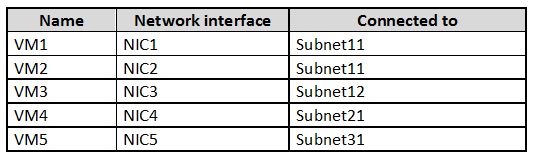
On NIC1, you configure an application security group named ASG1. On which other network interfaces can you configure ASG1?
Incorrect. NIC2 is eligible because it is in the same VNet (VNET1) as ASG1, but it is not the only eligible NIC. NIC3 is also in VNET1 (Subnet12). ASG membership is not limited to the same subnet; it can include NICs across different subnets within the same VNet.
Incorrect. NIC4 (VNET2, West US 2) and NIC5 (VNET3, East US) are in different VNets/regions. ASGs are scoped to a VNet, so you cannot add NICs from other VNets to ASG1, even if VNets are peered or in the same subscription.
Correct. NIC2 (Subnet11) and NIC3 (Subnet12) are both in VNET1, the same VNet where ASG1 is configured (via NIC1). ASGs can include NICs from any subnet within the same VNet, enabling NSG rules to target application roles across subnets.
Incorrect. While NIC2 and NIC3 are valid (same VNet), NIC4 is not. NIC4 is connected to Subnet21 in VNET2 (West US 2). ASG1 cannot include NICs from a different VNet, regardless of subscription membership or connectivity between VNets.
Question Analysis
Core concept: This question tests Application Security Groups (ASGs) in Azure, which are used with Network Security Groups (NSGs) to group VM network interfaces (NICs) by application role and then reference those groups in NSG security rules. ASGs simplify rule management compared to using IP addresses. Why the answer is correct: An ASG is scoped to a virtual network (VNet) and a region. Practically, you can only add NICs to an ASG if those NICs are in the same VNet as the ASG. In the scenario, ASG1 is configured on NIC1, which is connected to Subnet11 in VNET1 (West US). Therefore, ASG1 belongs to VNET1. The only other NICs that can be added to ASG1 are NICs attached to subnets within VNET1. NIC2 is in Subnet11 (VNET1) and NIC3 is in Subnet12 (VNET1), so both can be configured to use ASG1. NIC4 is in VNET2 (West US 2) and NIC5 is in VNET3 (East US), so they cannot be added to ASG1. Key features / best practices: - ASGs are used in NSG rules as source/destination, enabling “allow web-to-app” style rules without tracking IPs. - Design aligns with Azure Well-Architected Framework (Security + Operational Excellence): reduce rule complexity and configuration drift. - ASGs apply to NICs (not subnets directly) and are most effective when paired with consistent role-based grouping. Common misconceptions: A frequent trap is assuming ASGs can span VNets in the same subscription or be used across peered VNets/regions. Even if VNets are peered and traffic can flow, ASG membership is still limited to the VNet where the ASG exists. Exam tips: For AZ-500, remember the scoping rules: NSGs can be associated to subnets/NICs, but ASG membership is constrained to NICs within the same VNet (and region) as the ASG. When you see multiple VNets/regions, immediately eliminate NICs outside the ASG’s VNet.
You have an Azure subscription named Sub1. Sub1 contains a virtual network named VNet1 that contains one subnet named Subnet1. Subnet1 contains an Azure virtual machine named VM1 that runs Ubuntu Server 18.04. You create a service endpoint for Microsoft.Storage in Subnet1. You need to ensure that when you deploy Docker containers to VM1, the containers can access Azure Storage resources by using the service endpoint. What should you do on VM1 before you deploy the container?
Creating an application security group and a network security group does not make a container use a service endpoint. ASGs and NSGs are traffic filtering and grouping mechanisms, whereas service endpoints are a subnet-to-PaaS connectivity feature tied to the source subnet identity. Even if NSG rules allow traffic to Azure Storage, they do not change how Docker container traffic is sourced or routed from the VM. Therefore, these resources do not address the requirement to ensure the container accesses Storage by using the service endpoint.
Editing the docker-compose.yml file is the correct action because it allows you to configure the container to use the host network mode before deployment. With host networking, the container shares VM1's network namespace, so outbound traffic to Azure Storage is sent through the VM's NIC in Subnet1 where the Microsoft.Storage service endpoint is enabled. That means Azure sees the traffic as originating from the subnet that has the service endpoint, which is the requirement for storage account network rules based on service endpoints. This is the practical Docker-level change needed before deploying the container in this scenario.
Installing the container network interface plug-in is not the required step for standard Docker containers running directly on an Ubuntu VM in this exam scenario. CNI is commonly associated with container orchestrators and advanced networking integrations, but Docker itself typically uses its own networking model and can be configured through compose settings such as host networking. The question asks what to do on VM1 before deploying the container so it can use the subnet's service endpoint, and the relevant action is to configure the container's network mode, not to add a CNI plug-in. As a result, this option is not the best answer for the stated requirement.
Question Analysis
Core concept: Azure service endpoints apply to traffic originating from a subnet in a virtual network. A Docker container on a Linux VM will only benefit from that subnet-level identity if its outbound traffic uses the VM's network stack in a way Azure recognizes as coming from the VM's NIC in Subnet1. Why correct: configuring the container to use the host network ensures the container's traffic exits through VM1's network interface, allowing access to Azure Storage through the Microsoft.Storage service endpoint enabled on Subnet1. Key features: service endpoints are configured on subnets, Docker bridge networking uses NAT and an internal container network, and host networking makes the container share the VM's network namespace. Common misconceptions: NSGs and ASGs do not make service endpoints work, and installing CNI is associated with orchestrators like Kubernetes rather than ordinary Docker-on-VM deployments. Exam tips: when a question asks how containers on a VM can use a subnet-based Azure networking feature, think about making container traffic use the host network rather than adding Azure control-plane objects.
You have 15 Azure virtual machines in a resource group named RG1. All the virtual machines run identical applications. You need to prevent unauthorized applications and malware from running on the virtual machines. What should you do?
Azure Policy is a governance tool that evaluates and enforces Azure resource properties (e.g., allowed SKUs, required tags, deny public IPs, deploy extensions). It does not directly control which executables/processes can run inside the guest OS. While you could use Policy to deploy security agents or configurations, the option as stated does not meet the requirement to prevent unauthorized applications and malware execution on the VMs.
Adaptive application controls in Microsoft Defender for Cloud is designed to control application execution on VMs by creating and enforcing allowlists (commonly via AppLocker on Windows). It learns normal application behavior for groups of similar machines and recommends rules to block unknown or unauthorized applications, which helps prevent malware and unapproved software from running. This directly matches the requirement.
Azure AD Identity Protection focuses on detecting and remediating identity-based risks such as leaked credentials, atypical travel, and risky sign-ins. It helps secure user authentication and access decisions (Conditional Access), but it does not provide application allowlisting or in-guest execution prevention on virtual machines. Therefore it does not address stopping unauthorized applications/malware from running on the VMs.
A resource lock (ReadOnly or CanNotDelete) prevents accidental or unauthorized management-plane changes to Azure resources, such as deleting a VM or modifying a resource group. It does not affect what runs inside the VM operating system and cannot block malware or unauthorized applications from executing. It’s useful for protecting resources from deletion, not for workload execution control.
Question Analysis
Core concept: This question tests workload protection for Azure VMs using Microsoft Defender for Cloud (formerly Azure Security Center). Specifically, it targets application allowlisting to stop unauthorized software and malware from executing. Why the answer is correct: Adaptive application controls in Defender for Cloud learns the known-good process and application behavior on a set of similar VMs (like the 15 identical VMs in RG1) and recommends allow rules (based on Windows AppLocker for Windows VMs). Once enforced, only approved applications are allowed to run, significantly reducing the attack surface and blocking many malware and “living off the land” style executions. This directly meets the requirement to prevent unauthorized applications and malware from running. Key features / how it works: - Uses machine learning and observed telemetry to build an allowlist baseline per VM group/workload. - Produces recommended rules and can be configured to enforce them (typically via AppLocker policies on Windows). - Integrates into Defender for Cloud recommendations and security posture management. - Aligns with Azure Well-Architected Framework (Security pillar): reduce attack surface, implement least privilege for execution, and continuously improve posture. Common misconceptions: - Azure Policy can enforce configuration and governance (e.g., require extensions, enforce Defender plans, deny public IPs), but it does not natively prevent arbitrary executables from running inside the guest OS. - Azure AD Identity Protection addresses risky sign-ins and user identity risk, not application execution control on VMs. - Resource locks protect Azure resource management operations (delete/modify) but do nothing for in-guest malware execution. Exam tips: For AZ-500, when you see “prevent unauthorized applications from running” on VMs, think allowlisting technologies: Defender for Cloud Adaptive Application Controls (or AppLocker/WDAC concepts). When you see “govern resource configuration,” think Azure Policy. When you see “protect from deletion,” think locks. When you see “risky sign-ins,” think Identity Protection. Note: Adaptive application controls require Defender for Cloud and appropriate plan/coverage for servers; enforcement is typically on Windows via AppLocker and is best suited for standardized workloads like the identical VMs described.
You have an Azure Active Directory (Azure AD) tenant named Contoso.com and an Azure Kubernetes Service (AKS) cluster AKS1. You discover that AKS1 cannot be accessed by using accounts from Contoso.com. You need to ensure AKS1 can be accessed by using accounts from Contoso.com. The solution must minimize administrative effort. What should you do first?
Recreating AKS1 is a heavy-handed action and should not be the first step when a tenant-level prerequisite may be the real blocker. The question explicitly asks for the action that minimizes administrative effort, and rebuilding a cluster introduces unnecessary operational overhead, migration work, and potential downtime. In this scenario, Azure AD configuration should be checked before considering cluster recreation. Therefore, recreating the cluster is not the best first action.
Upgrading the Kubernetes version affects the AKS control plane and node software versions, but it does not address Azure AD tenant prerequisites or authentication configuration issues. A version upgrade will not enable Contoso.com accounts to access the cluster if the underlying Azure AD integration requirements are not met. It also adds operational change without targeting the root cause described in the question. For that reason, it is not the appropriate first step.
Azure AD Premium P2 provides advanced identity governance and protection features such as Privileged Identity Management and Identity Protection. Those capabilities are not required to allow AKS authentication with Azure AD accounts in standard integration scenarios. Purchasing or enabling P2 would increase cost and complexity without directly resolving the access issue. As a result, it does not minimize administrative effort and is not the correct answer.
Configuring the Azure AD User settings is the correct first step because AKS Azure AD integration in classic exam scenarios depends on Azure AD application registration permissions. If users are blocked from registering applications, the integration process can fail or users may be unable to authenticate as expected with Contoso.com accounts. Changing this tenant setting is a lightweight administrative action that directly addresses the identity prerequisite. It also aligns with the requirement to minimize administrative effort because it avoids rebuilding or significantly modifying the AKS cluster.
Question Analysis
Core concept: This question focuses on Azure Kubernetes Service (AKS) integration with Azure Active Directory (Azure AD) for user authentication. In classic AKS Azure AD integration scenarios commonly tested on AZ-500, users need permission in Azure AD to register applications because AKS creates or relies on Azure AD applications during the integration process. If AKS1 cannot be accessed by using accounts from Contoso.com, the first step is to ensure the Azure AD tenant settings allow the required app registration behavior. Why correct: Configuring Azure AD User settings is the least disruptive and lowest-effort first action because it addresses a common prerequisite for enabling or completing AKS Azure AD integration without rebuilding the cluster. Specifically, allowing users to register applications can be necessary when setting up Azure AD authentication for AKS. This directly supports access by Contoso.com accounts while avoiding unnecessary cluster recreation. Key features: - AKS can integrate with Azure AD so users authenticate with organizational identities. - Azure AD tenant User settings control whether non-admin users can register applications. - Proper Azure AD configuration is often a prerequisite before enabling or troubleshooting AKS Azure AD authentication. - Minimizing administrative effort favors changing tenant settings over rebuilding infrastructure. Common misconceptions: - Recreating an AKS cluster is not the first step unless there is no supported configuration path and no simpler prerequisite to address. - Upgrading Kubernetes versions does not solve Azure AD tenant authentication prerequisites. - Azure AD Premium P2 is not required for standard AKS authentication integration. Exam tips: When an Azure service depends on Azure AD integration, check tenant prerequisites first, especially app registration permissions and consent-related settings. On Microsoft exams, answers that solve the issue with the least operational disruption are usually preferred. Always distinguish between identity prerequisites in Azure AD and infrastructure lifecycle actions like recreating a resource.
Keep your exam routine moving
Get timed mock exams, AI explanations, focused review, and learning insights.
You have an Azure subscription that contains four Azure SQL managed instances. You need to evaluate the vulnerability of the managed instances to SQL injection attacks. What should you do first?
Creating an Azure Sentinel workspace sets up a SIEM/SOAR platform for log analytics, correlation, and incident response. While Sentinel can ingest Defender for Cloud alerts and SQL logs to help detect and investigate potential SQL injection activity, it does not perform the initial vulnerability evaluation of Azure SQL Managed Instance. Typically you enable Defender for SQL/VA first, then integrate alerts into Sentinel.
Enabling Advanced Data Security (legacy term) activates Microsoft Defender for SQL capabilities such as Vulnerability Assessment and threat detection for Azure SQL resources, including Managed Instance. This is the correct first step to evaluate exposure to attacks like SQL injection by scanning for misconfigurations and enabling detection/alerts for suspicious query patterns and anomalous activities. It directly addresses security posture assessment.
The SQL Health Check solution in Azure Monitor is oriented toward monitoring and operational insights (availability, performance, configuration health) rather than security vulnerability assessment for SQL injection. It may help identify performance anomalies, but it is not designed to evaluate injection risk or provide security recommendations/alerts comparable to Defender for SQL Vulnerability Assessment and threat detection.
Creating an Azure Advanced Threat Protection (ATP) instance is not applicable to Azure SQL Managed Instance vulnerability evaluation. Azure ATP (now Microsoft Defender for Identity) focuses on detecting suspicious activities related to Active Directory identities (primarily on-premises). SQL threat protection is provided by Microsoft Defender for SQL (formerly SQL ATP) via Defender for Cloud, not by deploying an Azure ATP instance.
Question Analysis
Core concept: This question tests knowledge of Microsoft Defender for SQL (formerly SQL Advanced Threat Protection) and vulnerability assessment capabilities for Azure SQL, including Azure SQL Managed Instance. SQL injection is an application-layer attack, but from an Azure security exam perspective you evaluate exposure and misconfigurations using Defender for Cloud’s database protections: Vulnerability Assessment (VA) and threat detection. Why the answer is correct: To evaluate vulnerability to SQL injection attacks, the first step is to enable Advanced Data Security (the legacy name used in many exam items for enabling Defender for SQL features such as Vulnerability Assessment and Advanced Threat Protection/threat detection). Once enabled, you can run vulnerability assessments, review security recommendations (e.g., excessive permissions, missing patches/configurations, weak authentication), and enable alerts for suspicious database activities that may indicate SQL injection attempts (e.g., anomalous queries, suspicious logins). This aligns with the Azure Well-Architected Framework Security pillar: continuously assess and improve security posture and enable detection. Key features / best practices: - Vulnerability Assessment scans for common SQL security misconfigurations and risky settings and provides remediation guidance. - Threat detection (Defender for SQL) generates alerts for suspicious activities and integrates with Defender for Cloud and optionally Microsoft Sentinel. - Centralized posture management: Defender for Cloud can manage multiple managed instances across the subscription. - Best practice: enable Defender plans at the subscription level (or resource level where applicable), configure alert recipients, and integrate with SIEM (Sentinel) after protections are enabled. Common misconceptions: - Sentinel is for SIEM/SOAR and correlation; it does not itself perform vulnerability assessment of SQL Managed Instance. You typically enable Defender for SQL first, then forward alerts/logs to Sentinel. - Azure Monitor “SQL Health Check” focuses on operational health/performance, not injection vulnerability. - Creating an “Azure ATP instance” is unrelated; Azure ATP (now Microsoft Defender for Identity) targets on-prem AD identity signals, not SQL injection. Exam tips: - For Azure SQL (including Managed Instance), vulnerability assessment and SQL threat detection are delivered through Microsoft Defender for Cloud/Defender for SQL (often referenced as Advanced Data Security in older wording). - If the question asks to “evaluate vulnerability” or “assess configuration,” think Vulnerability Assessment/Defender for Cloud recommendations. If it asks to “correlate and respond across sources,” think Sentinel. - Remember naming changes: Advanced Data Security/SQL ATP -> Microsoft Defender for SQL under Defender for Cloud.
HOTSPOT - You are evaluating the security of VM1, VM2, and VM3 in Sub2. For each of the following statements, select Yes if the statement is true. Otherwise, select No. NOTE: Each correct selection is worth one point. Hot Area:
From the Internet, you can connect to the web server on VM1 by using HTTP.
Yes. VM1 can be reached from the Internet over HTTP because it has an Internet-facing entry point and an effective inbound allow path for TCP/80. In Azure, that typically means VM1 either has a public IP assigned to its NIC (or is behind a public Load Balancer/App Gateway) and the applicable NSG (NIC-level and/or subnet-level) includes an inbound rule permitting TCP port 80 from Internet (or from Any) to the VM. This explicit allow is required because the default NSG rules do not allow inbound from Internet; without a custom allow rule, inbound HTTP would be denied. Since the question asks specifically about connecting to the web server using HTTP, the key is that TCP/80 is permitted end-to-end. Any other rules (for example, allowing only HTTPS/443) would not satisfy HTTP access.
From the Internet, you can connect to the web server on VM2 by using HTTP.
No. VM2 cannot be reached from the Internet over HTTP because it does not have an effective Internet-to-VM inbound path for TCP/80. The most common reasons (and the ones typically tested in AZ-500) are: VM2 has no public IP and is not published through a public Load Balancer/Application Gateway, and/or the NSG effective rules do not include an inbound allow for TCP/80 from Internet. Even if VM2 runs a web server internally, without a public endpoint and an NSG rule allowing inbound HTTP, Internet clients cannot initiate a connection. Also note that default NSG rules only allow inbound from within the virtual network and from the Azure Load Balancer, not from Internet. Therefore, absent an explicit allow and a public entry point, HTTP from the Internet will fail.
From the Internet, you can connect to the web server on VM3 by using HTTP.
No. VM3 cannot be reached from the Internet over HTTP because it is not exposed for inbound TCP/80 from Internet based on the effective connectivity controls. As with VM2, Internet reachability requires both (1) an Internet-facing IP (directly on the VM NIC or indirectly via a public load-balancing/publishing service) and (2) an NSG rule that allows inbound TCP/80 from Internet at a higher priority than any deny. If VM3 is only on a private subnet, has no public IP, or is protected by an NSG that lacks an allow rule for port 80 (or includes a deny that takes precedence), then HTTP connections from the Internet cannot be established. This aligns with secure networking best practices: keep backend VMs private and publish only through controlled ingress (WAF/App Gateway/Front Door) when needed.
You have an Azure subscription. You create an Azure web app named Contoso1812 that uses an S1 App Service plan.
You plan to - create a CNAME DNS record for www.contoso.com that points to Contoso1812. You need to ensure that users can access Contoso1812 by using the https://www.contoso.com URL. Which two actions should you perform? Each correct answer presents part of the solution. NOTE: Each correct selection is worth one point.
System-assigned managed identity enables the web app to authenticate to Azure services (for example, Key Vault, Azure SQL, Storage) without storing secrets. It does not configure custom domains or TLS/SSL. While managed identity can be used to retrieve certificates from Key Vault in some architectures, simply turning it on does not make https://www.contoso.com work.
Adding a hostname (custom domain) to the web app is required so App Service will accept requests for www.contoso.com and so Azure can validate you control the domain (typically via CNAME/TXT validation). Without adding the hostname, the CNAME alone is not enough to reliably serve the site on that host header.
Scaling out increases the number of instances to handle more load and improve availability. It does not enable custom domain mapping or HTTPS. Even with many instances, users still cannot access https://www.contoso.com unless the hostname is added and a certificate is bound.
Deployment slots provide staging/production environments and enable swap-based deployments with reduced downtime. They are unrelated to configuring a custom domain or enabling HTTPS for that domain. Slots can have their own hostnames, but they do not solve the requirement to serve https://www.contoso.com.
Scaling up changes the App Service plan tier/size to gain features or more resources. Because the app is already on S1 (Standard), it already supports custom domains and SSL bindings. Scaling up is not required to enable https://www.contoso.com in this scenario.
Uploading a PFX file provides the SSL/TLS certificate to App Service so you can create an SSL binding for the custom hostname (www.contoso.com), enabling HTTPS. This is a standard approach when you have a certificate from a public CA. After upload, you bind it to the hostname using SNI SSL to complete HTTPS configuration.
Question Analysis
Core concept: This question tests securing a custom domain on Azure App Service with HTTPS. For an App Service web app to serve traffic on https://www.contoso.com, Azure must (1) recognize www.contoso.com as a valid host header for the app and (2) have an SSL/TLS certificate bound to that hostname. Why the answer is correct: After creating the CNAME record (www.contoso.com -> contoso1812.azurewebsites.net), you must add the custom hostname to the web app (B). This validates domain ownership (via CNAME/TXT validation) and configures App Service to accept requests for that host header; otherwise, requests to www.contoso.com won’t route correctly to the app. Next, to enable HTTPS for that custom hostname, you need a certificate available in the app and then bind it to the hostname. From the options, uploading a PFX file (F) is the action that provides the certificate to App Service so you can create an SNI-based SSL binding for www.contoso.com. The app is already on an S1 plan, which supports custom domains and TLS/SSL bindings. Key features / configuration notes: - App Service custom domains require adding the hostname in “Custom domains” and completing validation. - HTTPS requires an SSL certificate and an SSL binding (SNI SSL is typical). Uploading a PFX is a common method; alternatives include App Service Managed Certificate (for some scenarios) or Azure Key Vault integration, but those are not offered in the options. - S1 supports TLS/SSL and SNI. IP-based SSL is generally reserved for higher tiers/legacy needs. Common misconceptions: - Scaling up/out (C/E) affects performance and capacity, not domain/HTTPS enablement. - Managed identity (A) is for accessing Azure resources securely (Key Vault, Storage, etc.), not for enabling HTTPS. - Deployment slots (D) help with safe deployments and testing, not custom domain HTTPS. Exam tips: For App Service + custom domain + HTTPS questions, think in this order: DNS record -> add/verify hostname in App Service -> provide certificate (PFX/Key Vault/managed cert) -> bind certificate to hostname. Also remember which tiers support custom domains and SSL (Basic and above; S1 is sufficient).
HOTSPOT - You have the hierarchy of Azure resources shown in the following exhibit.
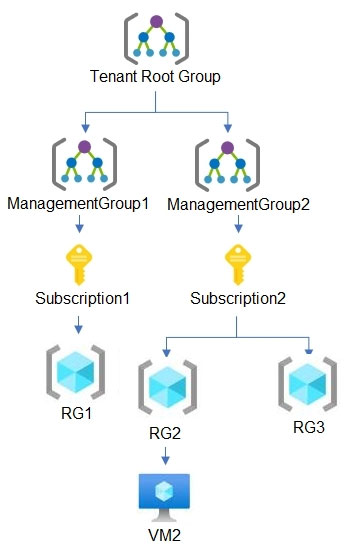
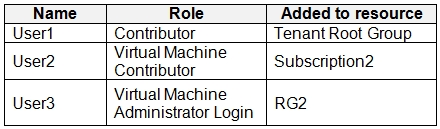
RG1, RG2, and RG3 are resource groups. RG2 contains a virtual machine named VM2. You assign role-based access control (RBAC) roles to the users shown in the following table.
For each of the following statements, select Yes if the statement is true. Otherwise, select No. NOTE: Each correct selection is worth one point. Hot Area:
User1 can deploy virtual machines to RG1.
Yes. User1 is assigned the Contributor role at the Tenant Root Group scope. RBAC assignments at the tenant root management group inherit to all child management groups, subscriptions, resource groups, and resources in the tenant. RG1 is under Subscription1, which is under ManagementGroup1, which is under the Tenant Root Group; therefore User1 has Contributor permissions on RG1. Contributor includes Microsoft.Compute/virtualMachines/write and related permissions needed to deploy (create) virtual machines in RG1. There is no indication of any deny assignment or policy that would block VM creation, so from an RBAC perspective User1 can deploy VMs to RG1.
User2 can delete VM2.
Yes. User2 is assigned the Virtual Machine Contributor role at the Subscription2 scope. VM2 is in RG2, and RG2 is within Subscription2, so the role assignment applies to VM2 via inheritance. Virtual Machine Contributor allows managing virtual machines, including deleting them (it includes actions such as Microsoft.Compute/virtualMachines/delete). While this role does not grant full control over related resources like VNets or storage accounts, deleting an existing VM resource itself is within scope of the role. Therefore, User2 can delete VM2 (assuming no resource locks or deny assignments are present, which are not mentioned).
User3 can reset the password of the built-in Administrator account of VM2.
No. User3 is assigned Virtual Machine Administrator Login at the RG2 scope. This role is intended for OS-level access: it allows the user to log in to the VM as an administrator using Azure AD-based login (when the VM is configured for AAD login and the OS supports it). It is not a management-plane role for changing Azure resource configuration. Resetting the password of the built-in local Administrator account is typically done via management-plane operations (for example, using the VMAccess extension/Reset password feature), which requires permissions like Microsoft.Compute/virtualMachines/extensions/write and related compute actions. Virtual Machine Administrator Login does not include those management permissions, so User3 cannot reset the built-in Administrator password through Azure.
HOTSPOT - You have the Azure virtual networks shown in the following table.

You have the Azure virtual machines shown in the following table.
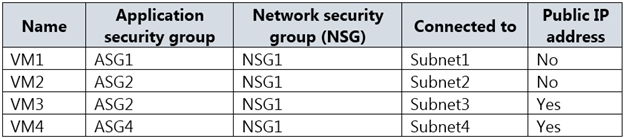
The firewalls on all the virtual machines allow ping traffic. NSG1 is configured as shown in the following exhibit.
Inbound security rules -
Outbound security rules - Priority Name Port Protocol Source Destination Action 65000 AllowVnetOutBound Any Any VirtualNetwork VirtualNetwork Allow 65001 AllowInternetOutBound Any Any Any Internet Allow 65500 DenyAllOutBound Any Any Any Any Deny For each of the following statements, select Yes if the statement is true. Otherwise, select No. NOTE: Each correct selection is worth one point. Hot Area:
Allow_RDP has a port of 3389 and action Allow.
Yes. In the inbound rules exhibit for NSG1, the custom rule named Allow_RDP is configured to allow Remote Desktop traffic on port 3389. That means its action is Allow and its destination port is 3389. This is distinct from the default inbound rules, which do not open RDP from the internet by themselves.
Rule1 has a source ASG1 and action Allow.
Yes. The inbound rules shown for NSG1 include Rule1 with source set to ASG1 and action set to Allow. NSG rules can use Application Security Groups as source or destination objects, so this is a valid configuration. Therefore the statement matches the exhibit and should be marked Yes.
Rule2 has a source ASG2 and action Allow.
Yes. The exhibit includes Rule2 as a custom inbound NSG rule, and it uses ASG2 as the source with an Allow action. This means traffic originating from VMs in ASG2 is explicitly permitted by that rule, subject to the other rule fields such as destination and port. Since the statement matches the rule definition, the correct answer is Yes.
Rule3 has a source ASG4 and action Allow.
No. Based on the inbound rules exhibit, Rule3 is not defined as having source ASG4 with action Allow. The custom rules shown identify specific ASG-based sources, and this statement does not match the actual Rule3 configuration. Therefore the statement should be marked No.
Rule4 has an action Deny.
Yes. The inbound rules exhibit includes Rule4 and its action is Deny. Custom deny rules in an NSG take precedence over lower-priority default rules and can block traffic even when a broader default allow might otherwise apply. Because the statement matches the rule definition, the correct answer is Yes.
AllowVnetInBound has source and destination VirtualNetwork and action Allow.
Yes. AllowVnetInBound is a default inbound NSG rule with Source set to VirtualNetwork, Destination set to VirtualNetwork, and Action set to Allow. The question asks about the rule definition itself, and that definition is standard for every NSG. Other inbound rules with higher priority can override its effect for specific traffic, but they do not change the default rule's configured properties.
AllowAzureLoadBalancer has source AzureLoadBalancer and action Allow.
Yes. Another default inbound NSG rule is AllowAzureLoadBalancerInBound. It allows traffic where Source = AzureLoadBalancer and Action = Allow (destination is typically Any within the scope). This default rule supports Azure Load Balancer health probes and related platform traffic. It is present by default in every NSG unless replaced by custom rules with higher priority (lower number). The exhibit doesn’t show inbound rules, but the question is asking whether the default rule has that source and action, which is correct.
DenyAllInBound has an action Deny.
Yes. The default inbound NSG rule DenyAllInBound has Action = Deny. This rule is evaluated after AllowVNetInBound and AllowAzureLoadBalancerInBound, and it blocks all other inbound traffic (including from Internet) unless a higher-priority custom allow rule exists. This is the key reason why simply having a public IP on a VM does not automatically make management ports reachable: you must explicitly allow them in the NSG (and also ensure the OS firewall allows it). Therefore, the statement about DenyAllInBound being a deny rule is true.
VM1 can ping VM3 successfully.
Yes. VM1 and VM3 are in peered virtual networks, so there is network reachability between Subnet1 and Subnet3. The VM firewalls allow ICMP, and the inbound NSG rules shown permit the relevant traffic path rather than blocking it. Therefore VM1 can successfully ping VM3; this is not determined solely by the default rules because custom inbound rules must also be considered.
VM2 can ping VM4 successfully.
No. VM2 is in Subnet2 of VNET2. VM4 is in Subnet4 of VNET4. VNET4 has no peering configured (Peered network = None). Without VNet peering, VPN gateway, ExpressRoute, or other routing connectivity, there is no network path between VNET2 and VNET4. NSG rules cannot create connectivity; they only allow/deny traffic that already has a route. Even though VM4 has a public IP, VM2 cannot reach VM4’s private IP due to lack of routing, and reaching VM4’s public IP would be “Internet” traffic and would require VM4 to respond appropriately; additionally, inbound to VM4 from Internet is denied by default (DenyAllInBound). Thus, VM2 cannot ping VM4 successfully.
VM3 can be accessed by using Remote Desktop from the internet.
No. VM3 has a public IP address, but inbound access from the internet is blocked by default by the NSG inbound rule DenyAllInBound unless there is an explicit inbound allow rule for TCP/3389 (RDP) from Internet (or a specific source IP range). The exhibit only shows outbound rules, and there is no shown inbound rule such as Allow_RDP. Therefore, RDP from the internet to VM3 will be denied at the NSG. This aligns with security best practices (Azure Well-Architected Framework): avoid exposing RDP/SSH directly; use Azure Bastion, Just-In-Time VM access (Defender for Cloud), or restrict to known admin IPs via NSG.

Start Practicing Now
Download Cloud Pass and start practicing all Microsoft AZ-500 exam questions.

