


Practice Test #3
Simulate the real exam experience with 50 questions and a 45-minute time limit. Practice with AI-verified answers and detailed explanations.
AI-Powered
Triple AI-Verified Answers & Explanations
GPT Pro, Claude Opus, and Gemini Pro cross-check every answer and explanation. See the reasoning for each option, requirement breakdowns, and solution architectures.
Practice Questions
HOTSPOT - For each of the following statements, select Yes if the statement is true. Otherwise, select No. NOTE: Each correct selection is worth one point. Hot Area:
A platform as a service (PaaS) solution that hosts web apps in Azure provides full control of the operating systems that host applications.
No. In a PaaS web hosting solution such as Azure App Service, you do not get full control of the operating systems that host your applications. Microsoft manages the underlying OS, including patching, updates, and much of the host configuration. Your control is focused on the application layer: deploying code, configuring app settings, connection strings, certificates (within platform constraints), and selecting supported runtimes/stacks. “Full control of the OS” is a hallmark of Infrastructure as a Service (IaaS), where you run Azure Virtual Machines and can configure the OS, install agents, change system settings, and manage patching (unless you use additional managed services). PaaS intentionally limits OS-level access to reduce operational overhead and improve security and reliability through standardized, provider-managed hosting.
A platform as a service (PaaS) solution that hosts web apps in Azure provides the ability to scale the platform automatically.
Yes. A PaaS solution that hosts web apps in Azure typically provides the ability to scale automatically. In Azure App Service, you can scale out (increase instance count) and, depending on the plan, scale up (move to a higher tier with more CPU/RAM/features). Autoscale rules can be configured to react to metrics such as CPU percentage, memory, HTTP queue length, or schedules. This is a key PaaS benefit: the platform provides built-in elasticity without you having to design and manage VM scale sets, load balancers, or OS images yourself. From an exam perspective, “automatic scaling” aligns strongly with PaaS characteristics and supports the Azure Well-Architected Framework pillars of Performance Efficiency and Reliability by enabling responsive capacity management.
A platform as a service (PaaS) solution that hosts web apps in Azure provides professional development services to continuously add features to custom applications.
No. A PaaS web hosting platform does not provide “professional development services to continuously add features to custom applications.” PaaS provides the hosting environment and platform capabilities (runtime, scaling, deployment features, monitoring hooks), but it does not supply human-led development services. Continuous feature delivery is typically achieved through DevOps practices and tooling such as Azure DevOps or GitHub (repos, pipelines, CI/CD), plus application lifecycle management processes and development teams. While Azure offers services that support development (e.g., Azure DevOps, GitHub Actions, Application Insights), those are tools and platforms—not professional services that automatically add features to your custom app. Therefore, the statement is not a characteristic of PaaS hosting.
HOTSPOT - Several support engineers plan to manage Azure by using the computers shown in the following table: Name Operating system Computer1 Windows 10 Computer2 Ubuntu Computer3 MacOS Mojave You need to identify which Azure management tools can be used from each computer. What should you identify for each computer? To answer, select the appropriate options in the answer area. NOTE: Each correct selection is worth one point. Hot Area:
Computer1:
Computer1 runs Windows 10. The Azure portal is accessible from any modern web browser on Windows, so it is supported. Azure CLI is supported on Windows (install via MSI, winget, or other package methods) and is also available through Azure Cloud Shell. Azure PowerShell is supported on Windows (Windows PowerShell 5.1 and PowerShell 7+), and the Az PowerShell module is the standard for managing Azure resources. Why others are wrong: A, B, and C each omit at least one tool that is available on Windows. Since Windows supports portal, CLI, and PowerShell, the most complete and correct option is D.
Computer2:
Computer2 runs Ubuntu (Linux). The Azure portal works in a browser on Ubuntu, so it is supported. Azure CLI is natively cross-platform and commonly installed on Ubuntu via Microsoft’s apt repository; it’s also available in Cloud Shell. Azure PowerShell is also supported on Linux by installing PowerShell 7+ and then installing the Az module (Install-Module Az). This is a key AZ-900 point: Azure PowerShell is not limited to Windows anymore. Why others are wrong: A omits Azure PowerShell even though it’s supported on Ubuntu. B omits Azure CLI. C omits the portal. Therefore, D is correct.
Computer3:
Computer3 runs macOS Mojave. The Azure portal is browser-based and works on macOS. Azure CLI supports macOS and can be installed via Homebrew (common approach) or other installers; Cloud Shell is also an option. Azure PowerShell is supported on macOS by installing PowerShell 7+ (pwsh) and then the Az module. From an exam perspective, Microsoft positions all three tools as usable across Windows, Linux, and macOS to enable consistent management and automation. Why others are wrong: A and B each exclude one of the supported tools, and C excludes the portal. Since macOS can use portal, CLI, and PowerShell, D is the only fully correct choice.
Your company has several business units. Each business unit requires 20 different Azure resources for daily operation. All the business units require the same type of Azure resources. You need to recommend a solution to automate the creation of the Azure resources. What should you include in the recommendations?
Azure Resource Manager (ARM) templates are the correct choice because they automate and standardize deployment of multiple Azure resources as code. You can define the 20 required resources once and redeploy them for each business unit using parameters (names, regions, SKUs, tags). ARM templates provide repeatable, idempotent deployments and integrate with CI/CD, supporting consistent environments and operational excellence.
Virtual machine scale sets are designed to deploy and automatically scale a set of identical VMs for high availability and elasticity. They do not automate provisioning of a broader collection of different Azure resources (for example VNets, storage accounts, Key Vault, databases) as a single standardized environment. Scale sets address compute scaling, not full environment creation for multiple business units.
Azure API Management is a service for publishing, securing, transforming, and monitoring APIs. It helps manage API gateways and developer access, but it is not an infrastructure provisioning tool. While APIM can be deployed via IaC, the service itself does not automate creating a standardized set of 20 Azure resources for each business unit.
Management groups provide a hierarchy above subscriptions to organize them and apply governance controls (Azure Policy, RBAC) across many subscriptions. They are excellent for consistent governance at scale, but they do not deploy resources. You would commonly use management groups alongside ARM templates: management groups for governance, templates for automated resource creation.
Question Analysis
Core Concept: This question tests Infrastructure as Code (IaC) and Azure governance/management capabilities used to deploy consistent environments at scale. In Azure, the primary native IaC mechanism is Azure Resource Manager (ARM), which deploys resources declaratively using templates. Why the Answer is Correct: Because each business unit needs the same set of 20 Azure resources, you want a repeatable, automated, and consistent deployment method. Azure Resource Manager templates let you define the desired state of multiple resources (networks, storage, VMs, databases, etc.) in JSON and deploy them as a single unit (a deployment). You can parameterize templates (for example, business unit name, region, SKU, tags) so each unit gets the same architecture with unit-specific values. This aligns with Azure Well-Architected Framework principles such as Operational Excellence (automation, repeatability) and Reliability (consistent, validated deployments). Key Features / Best Practices: ARM templates support parameters, variables, outputs, and modularization (linked templates or template specs). They integrate with CI/CD pipelines (Azure DevOps/GitHub Actions) and enable idempotent deployments (re-running a template converges to the declared state). You can also enforce standards using Azure Policy and apply RBAC at the resource group/subscription scope, while templates ensure the resources are created consistently. Common Misconceptions: VM scale sets automate scaling of virtual machines only, not the creation of a full set of diverse resources. API Management is for publishing and securing APIs, not provisioning infrastructure. Management groups help organize subscriptions and apply governance (policy/RBAC) at scale, but they do not deploy resources. Exam Tips: When you see “automate creation of Azure resources,” “same resources repeatedly,” or “standardized deployments,” think ARM templates (or Bicep, which compiles to ARM). If the question is about organizing subscriptions or applying policy across many subscriptions, think management groups. If it’s about scaling compute instances, think VM scale sets.
Your company plans to automate the deployment of servers to Azure. Your manager is concerned that you may expose administrative credentials during the deployment. You need to recommend an Azure solution that encrypts the administrative credentials during the deployment. What should you include in the recommendation?
Azure Key Vault is designed to store and manage secrets (passwords, tokens), cryptographic keys, and certificates securely. In automated deployments, templates and pipelines can reference Key Vault secrets so credentials aren’t placed in code or parameters in plain text. Access can be controlled via Entra ID, RBAC/access policies, and managed identities, supporting least privilege and auditability.
Azure Information Protection (AIP) is designed for classifying, labeling, and protecting documents and emails (for example, applying sensitivity labels and enforcing rights management). It is not intended for storing deployment credentials or providing secure secret retrieval for infrastructure automation. While it helps protect data, it does not solve the problem of securely injecting admin credentials into an automated server deployment.
Azure Security Center (now part of Microsoft Defender for Cloud) focuses on security posture management, recommendations, and threat protection for Azure and hybrid workloads. It can alert on misconfigurations and vulnerabilities, but it does not provide a mechanism to store and encrypt administrative credentials for use during deployments. It complements Key Vault but does not replace secret management.
Azure Multi-Factor Authentication (MFA) strengthens user sign-in by requiring additional verification factors. It is valuable for interactive access to the Azure portal and administrative accounts, but it does not encrypt or store deployment credentials, nor does it help non-interactive automation securely retrieve secrets. Automated deployments typically use service principals or managed identities rather than MFA-based interactive authentication.
Question Analysis
Core concept: This question tests secure secret management during automated deployments in Azure. When deploying servers (VMs) via ARM templates, Bicep, Terraform, or CI/CD pipelines, you often need administrative credentials (passwords, SSH keys, tokens). Best practice is to avoid embedding secrets in templates, scripts, or pipeline variables in plain text. Why the answer is correct: Azure Key Vault is Azure’s dedicated service for securely storing and controlling access to secrets, keys, and certificates. During deployment, you can reference Key Vault secrets so that administrative credentials are retrieved securely at runtime rather than being exposed in source control, logs, or deployment parameters. ARM templates and Bicep support Key Vault references for parameters (for example, using a Key Vault secret URI), enabling the platform to resolve the secret securely. This aligns with the Azure Well-Architected Framework (Security pillar): protect sensitive data, use centralized secret storage, and enforce least privilege. Key features and best practices: - Secrets management: store VM admin passwords, SSH private keys (or better, store SSH public keys and avoid passwords), and other sensitive values. - Access control: integrate with Microsoft Entra ID (Azure AD) and use RBAC or Key Vault access policies to restrict who/what can read secrets. - Managed identities: allow deployment automation (Azure DevOps, GitHub Actions runners in Azure, or Azure services) to access Key Vault without hardcoding credentials. - Auditing and governance: Key Vault logging via Azure Monitor/diagnostic settings helps track secret access. - Encryption: secrets are encrypted at rest and protected by Azure-managed keys or customer-managed keys (CMK) depending on requirements. Common misconceptions: People may think MFA or Defender for Cloud “protects credentials,” but those services address authentication hardening and security posture management, not secret storage and secure injection into deployments. Azure Information Protection focuses on classifying and protecting documents/emails, not deployment-time secret handling. Exam tips: For AZ-900, whenever the scenario involves storing passwords, connection strings, certificates, or encryption keys securely—especially for automation—choose Azure Key Vault. If the question mentions “encrypt credentials during deployment” or “avoid exposing secrets in templates/pipelines,” Key Vault is the canonical answer.
You plan to store 20 TB of data in Azure. The data will be accessed infrequently and visualized by using Microsoft Power BI. You need to recommend a storage solution for the data. Which two solutions should you recommend? Each correct answer presents a complete solution. NOTE: Each correct selection is worth one point.
Azure Data Lake (via ADLS Gen2) is ideal for storing very large volumes of structured or unstructured data at low cost. It supports infrequent access patterns through cool/archive tiers and lifecycle management. It integrates with analytics services and can serve as the raw data repository feeding Power BI through curated datasets or via Synapse/Databricks.
Azure Cosmos DB is a globally distributed NoSQL database optimized for low-latency, high-throughput operational workloads. While it can store large amounts of data, it is generally not the most cost-effective choice for 20 TB of infrequently accessed data intended primarily for BI visualization. Power BI scenarios typically use analytical stores/warehouses instead.
Azure SQL Data Warehouse (Azure Synapse Analytics dedicated SQL pool) is designed for large-scale analytical workloads and integrates strongly with Power BI. It uses MPP architecture and columnar storage to deliver fast query performance for reporting and dashboards. It is a common choice when you need a relational analytical model over TB-scale data.
Azure SQL Database is a managed relational database primarily suited for OLTP and smaller-to-moderate analytical workloads. For 20 TB and BI-style querying, it can be less optimal and potentially more expensive or harder to scale than a dedicated data warehouse solution. Power BI can connect, but it’s not the typical TB-scale warehouse choice.
Azure Database for PostgreSQL is a managed open-source relational database service typically used for transactional applications and general-purpose relational workloads. While it can support reporting, it is not purpose-built for large-scale data warehousing at 20 TB for Power BI. A lake/warehouse pattern is usually more appropriate for this scenario.
Question Analysis
Core concept: This question tests choosing an Azure data storage/analytics service based on data volume (20 TB), access pattern (infrequent), and consumption tool (Power BI). In Azure fundamentals terms, it’s about selecting the right data platform: data lake storage for large-scale files and a data warehouse for analytical querying and BI. Why the answer is correct: Azure Data Lake (implemented on Azure Data Lake Storage Gen2) is designed for very large datasets (TBs to PBs) stored as files/objects with low-cost tiers and lifecycle management—ideal when data is accessed infrequently. It’s commonly used as the landing zone for raw/semi-structured data (CSV, JSON, Parquet) and supports big data analytics. Azure SQL Data Warehouse (now branded as Azure Synapse Analytics dedicated SQL pool) is purpose-built for enterprise analytics at scale. Power BI integrates well with it for semantic modeling and fast interactive dashboards. For 20 TB of analytical data, a dedicated SQL pool can provide columnar storage, MPP (massively parallel processing), and performance suitable for BI workloads. Key features / best practices: - Data Lake Storage Gen2: hierarchical namespace, ACLs, integration with Azure AD, and lifecycle policies to move data to cool/archive tiers to optimize cost (Well-Architected: Cost Optimization). - Synapse dedicated SQL pool: scalable compute (DWUs), separation of storage/compute, columnstore indexes, and strong Power BI connectivity for reporting (Well-Architected: Performance Efficiency and Reliability). - Common architecture: store raw data in Data Lake, curate/transform, then load modeled data into the data warehouse for BI. Common misconceptions: Cosmos DB is highly scalable but optimized for low-latency operational NoSQL workloads, not infrequent-access analytics at 20 TB for BI. Azure SQL Database is a single relational database service and can become costly/less suitable at very large analytical scales compared to a dedicated warehouse. PostgreSQL is for OLTP relational workloads, not a large-scale BI warehouse. Exam tips: For AZ-900, map requirements to service categories: “large-scale files + infrequent access” points to Data Lake/Storage tiers; “Power BI analytics at scale” points to a data warehouse (Synapse). When you see TB-scale analytics, prefer warehouse/lake patterns over OLTP databases.
Keep your exam routine moving
Get timed mock exams, AI explanations, focused review, and learning insights.
Your company plans to deploy several web servers and several database servers to Azure. You need to recommend an Azure solution to limit the types of connections from the web servers to the database servers. What should you include in the recommendation?
Network security groups (NSGs) are Azure’s primary mechanism to filter network traffic to and from Azure resources in a VNet. NSGs contain prioritized inbound and outbound security rules that allow or deny traffic based on source/destination IP, port, and protocol. Applying an NSG to the database subnet/NIC can restrict web-to-database connectivity to only required ports (e.g., SQL) and block all other connection types.
Azure Service Bus is a managed messaging service (queues, topics/subscriptions) used for decoupling applications and integrating systems asynchronously. It does not control or filter network connections between VMs/subnets. While it can reduce the need for direct connections by using messaging patterns, it is not a network security control and would not be the correct solution for limiting connection types at the network layer.
A local network gateway represents your on-premises VPN device and its address space in Azure, typically used with a VPN gateway to create site-to-site or point-to-site connectivity. It is not used to filter traffic between Azure web and database servers. Even in hybrid scenarios, you would still use NSGs (or Azure Firewall) to control allowed ports and protocols within Azure.
A route filter is used with Azure ExpressRoute to control which BGP routes are advertised/received for specific Microsoft peering services (e.g., limiting access to certain Azure public services). It affects route propagation, not port/protocol-level access between subnets/VMs. It cannot enforce “only allow TCP 1433 from web tier to database tier,” so it is not appropriate for limiting connection types.
Question Analysis
Core concept: This question tests how to control and restrict network traffic between Azure resources at the network layer. In Azure, the primary built-in feature for filtering inbound and outbound traffic to/from subnets and network interfaces is a Network Security Group (NSG), which functions like a stateful packet filter. Why the answer is correct: To limit the types of connections from web servers to database servers (for example, allow only TCP 1433 to SQL, block RDP/SSH, restrict to specific source subnets), you use NSG security rules. You can associate an NSG to the subnet containing the database servers and/or to the NICs of the database VMs. Then you create inbound rules that only permit the required ports and protocols from the web tier’s subnet (or specific IP ranges) and deny everything else. This supports the Azure Well-Architected Framework security pillar by enforcing network segmentation and least privilege. Key features and best practices: NSGs are stateful (return traffic is automatically allowed), support priority-ordered allow/deny rules, and can use service tags and application security groups (ASGs) to simplify management (e.g., put all web VMs in an ASG and reference that ASG as the source in rules). A common design is a hub-and-spoke or tiered VNet with separate subnets for web and data, with NSGs applied at each tier boundary. You can also enable NSG flow logs for visibility and troubleshooting. Common misconceptions: Some candidates confuse messaging services (Service Bus) with network security, or think routing features (route filters) control ports/protocols. Routing determines where traffic goes, not whether a given TCP/UDP connection is permitted. Exam tips: When you see “limit types of connections,” “allow/deny ports,” “control inbound/outbound traffic,” or “segment tiers,” think NSG (and sometimes Azure Firewall for centralized L7/L4 inspection). For AZ-900, NSG is the expected foundational answer for VM/subnet traffic filtering within a VNet.
What can Azure Information Protection encrypt?
Incorrect. Encrypting network traffic is typically handled by transport/security services such as TLS/SSL, VPN Gateway (IPsec/IKE), Azure ExpressRoute with encryption options, or application-level HTTPS. Azure Information Protection does not provide network-layer encryption; it focuses on protecting the data content (files/emails) with persistent encryption and usage rights.
Correct. Azure Information Protection can encrypt documents and email messages by applying sensitivity labels that use Azure Rights Management to encrypt content and enforce access/usage restrictions. The protection persists with the file or email wherever it goes, supporting governance, compliance, and secure collaboration inside and outside the organization.
Incorrect. An Azure Storage account is encrypted using Storage Service Encryption (SSE) with Microsoft-managed keys by default, or customer-managed keys in Azure Key Vault for additional control. While AIP-protected files can be stored in a storage account, AIP does not encrypt the storage account resource itself.
Incorrect. Azure SQL Database encryption is provided by features like Transparent Data Encryption (TDE) for data at rest and Always Encrypted for protecting sensitive columns end-to-end. AIP is not used to encrypt an Azure SQL database; it is designed for information protection of documents and emails.
Question Analysis
Core Concept: Azure Information Protection (AIP) is a data classification, labeling, and protection capability (now largely delivered through Microsoft Purview Information Protection and Azure Rights Management) designed to protect information itself—especially files and emails—by applying labels and enforcing encryption and usage rights. Why the Answer is Correct: AIP can encrypt documents and email messages by applying protection that travels with the content. When a user applies a sensitivity label configured for encryption, AIP uses Rights Management (Azure RMS) to encrypt the file or message and enforce access controls (who can open it) and usage restrictions (read-only, no print, no forward, expiration, offline access). This is “data-at-rest and data-in-use” protection at the content level, not at the network or infrastructure resource level. Key Features / How it Works: - Sensitivity labels: classify data (Public, Confidential, Highly Confidential) and optionally apply encryption. - Rights enforcement: restrict actions like copy, print, forward, and set expiration. - Persistent protection: encryption remains even if the file leaves the organization (e.g., emailed externally or copied to a USB drive), aligning with governance and compliance goals. - Integration: works with Microsoft 365 apps (Word, Excel, PowerPoint, Outlook) and can be applied manually or automatically based on conditions. Common Misconceptions: Many learners confuse AIP with network encryption (TLS/VPN) or storage/database encryption (Storage Service Encryption, TDE). Those technologies protect transport or a specific Azure resource. AIP protects the content itself and is part of information governance. Exam Tips: For AZ-900, map services to what they protect: - AIP/Purview Information Protection = documents/emails (content-level encryption + rights). - Network traffic encryption = TLS, VPN Gateway, ExpressRoute encryption (not AIP). - Storage account encryption = SSE with Microsoft-managed or customer-managed keys. - SQL encryption = TDE, Always Encrypted. If the question mentions “documents and email,” think AIP.
HOTSPOT -
Actual exam format: select the correct Azure portal icon in the image.
You need to manage Azure by using Azure Cloud Shell. Which Azure portal icon should you select?
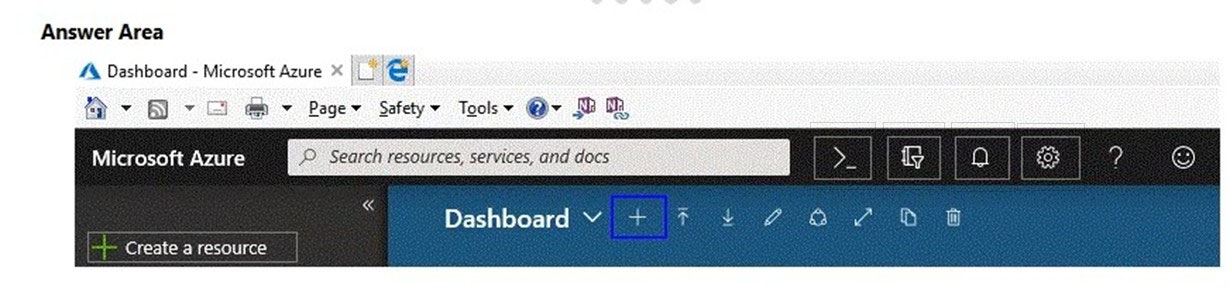
In this app, choose the option that identifies the correct icon.
Cloud Shell is launched from the terminal-style >_ icon. It is the portal shortcut for command-line management in the browser.
Settings opens portal preferences and configuration, not the command shell.
Notifications shows portal alerts and activity messages.
Help opens help and support resources, not Cloud Shell.
Question Analysis
The correct icon is the Azure Cloud Shell icon, commonly shown as a terminal prompt such as >_ in the Azure portal header. Cloud Shell opens a browser-based shell where you can run Azure CLI or Azure PowerShell commands against your subscription.
Related Services
Key Learning Points
- Cloud Shell is the portal-based command-line environment for Azure CLI and Azure PowerShell.
This question requires that you evaluate the underlined text to determine if it is correct.
You can create an Azure support request from support.microsoft.com.
Instructions: Review the underlined text. If it makes the statement correct, select No change is needed. If the statement is incorrect, select the answer choice that makes the statement correct.
No change is needed is incorrect because the original statement says that you can create an Azure support request from support.microsoft.com, which is not the standard Azure support request location tested in AZ-900. Azure support requests are created through the Azure portal so they can be linked to the proper subscription and permissions. While Microsoft has general support websites, they are not the expected answer for Azure support ticket creation in this exam context. Therefore, the statement needs to be changed.
The Azure portal is the correct place to create an Azure support request. In Azure, users typically open a support ticket from Help + support, where the request is associated with the correct subscription, billing account, and service context. This workflow also enforces Azure RBAC and support plan eligibility, which are essential for creating and managing support cases. For AZ-900 exam purposes, the Azure portal is the expected and canonical answer.
The Knowledge Center is not used to create Azure support requests. It is a self-service resource for articles, troubleshooting guidance, and documentation rather than a ticketing interface tied to Azure subscriptions. It does not provide the normal Azure support request workflow with service selection, severity, and subscription scoping. Therefore, this option would make the statement incorrect.
The Security & Compliance admin center is related to Microsoft 365 compliance and security administration, not Azure subscription support. It is designed for managing compliance policies, security settings, and related Microsoft 365 workloads rather than opening Azure service requests. Azure support cases require Azure-specific subscription context and are handled in the Azure portal. Therefore, this option is incorrect.
Question Analysis
Core concept: This question tests the correct location for creating an Azure support request. In Azure fundamentals, support requests for Azure subscriptions and services are created through the Azure portal under Help + support. Why correct: The Azure portal is the standard and expected interface for opening and managing Azure support requests because it is tied directly to subscriptions, billing scopes, and role-based access. Key features: Azure support requests require the appropriate subscription context, support plan, and permissions such as Owner, Contributor, or Support Request Contributor, all of which are managed in the Azure portal. Common misconceptions: Learners often confuse general Microsoft support websites or documentation portals with the actual Azure ticket creation workflow. Exam tips: On AZ-900, when asked where to create an Azure support request, choose the Azure portal unless the question explicitly refers to another product-specific support center.
Which task can you perform by using Azure Advisor?
Incorrect. Integrating on-premises Active Directory with Azure AD (Microsoft Entra ID) is done using identity services and tools such as Azure AD Connect (or cloud sync), federation (AD FS), and related identity configuration. Azure Advisor does not perform directory integration; it only analyzes existing Azure resources and provides optimization recommendations.
Incorrect. Estimating the costs of an Azure solution is typically done with the Azure Pricing Calculator (pre-deployment estimates) and the Total Cost of Ownership (TCO) Calculator (compare on-prem vs Azure). Azure Advisor focuses on optimizing costs for resources you already run in Azure by recommending actions like resizing or shutting down underutilized resources.
Correct. Azure Advisor provides Security recommendations that help you validate and improve your Azure environment against best practices. It identifies configuration and posture improvements (for example, strengthening security controls and reducing exposure) and guides remediation. This aligns with governance and the Azure Well-Architected Framework’s Security pillar.
Incorrect. Evaluating which on-premises resources can be migrated to Azure is the purpose of Azure Migrate, which discovers, assesses, and helps plan migrations (servers, databases, apps). Azure Advisor does not inventory on-premises environments or perform migration readiness assessments; it targets optimization of existing Azure deployments.
Question Analysis
Core Concept: Azure Advisor is a personalized cloud consultant that analyzes your Azure resource configuration and usage telemetry, then provides recommendations across key categories: Reliability, Security, Cost, Operational Excellence, and Performance. It is part of Azure management and governance because it helps you continuously improve your environment against best practices. Why the Answer is Correct: Option C is correct because Azure Advisor includes Security recommendations that help you confirm (and improve) whether your Azure subscription and resources follow security best practices. Advisor surfaces issues such as missing network security controls, overly permissive access, lack of encryption or secure configurations, and other posture-related improvements. While Microsoft Defender for Cloud is the primary service for advanced security posture management, Advisor acts as an accessible, centralized recommendation engine and includes security guidance that aligns with best practices. Key Features: Advisor recommendations are prioritized and actionable, often linking directly to the configuration blade to remediate. Recommendations can be filtered by subscription, resource group, category, and impact. You can also configure suppression/dismissal for recommendations that are not applicable. Advisor integrates with Azure Well-Architected Framework principles—especially Security and Operational Excellence—by encouraging least privilege, secure networking, and improved governance hygiene. Common Misconceptions: Many learners confuse Advisor with Azure Pricing Calculator (cost estimation before deployment) and with Azure Migrate (assessment and migration planning). Others assume security best-practice validation is only done by Defender for Cloud; however, Advisor does provide security recommendations (though Defender for Cloud is deeper and more comprehensive). Exam Tips: For AZ-900, remember these quick mappings: - Azure Advisor = recommendations to optimize deployed Azure resources (cost, security, reliability, performance, operational excellence). - Pricing Calculator = estimate costs before you deploy. - Azure Migrate = assess/migrate on-premises workloads. - Azure AD/Entra ID tools = identity integration, not Advisor. When the question mentions “best practices” and “recommendations” for an existing subscription/resources, think Azure Advisor.
Other Practice Tests
Practice Test #1
Practice Test #2
Practice Test #4
Practice Test #5
Practice Test #6
Practice Test #7
Practice Test #8
Practice Test #9

Start Practicing Now
Download Cloud Pass and start practicing all Microsoft AZ-900 exam questions.

