CloudPass LogoCloud Pass
AWSGoogle CloudMicrosoftCiscoCompTIADatabricks
Certifications
AWSGoogle CloudMicrosoftCiscoCompTIADatabricks
Microsoft AZ-104
Microsoft AZ-104

Practice Test #2

Simulez l'expérience réelle de l'examen avec 50 questions et une limite de temps de 100 minutes. Entraînez-vous avec des réponses vérifiées par IA et des explications détaillées.

50Questions100Minutes700/1000Score de réussite
Parcourir les questions d'entraînement

Propulsé par l'IA

Réponses et explications vérifiées par triple IA

Chaque réponse est vérifiée par 3 modèles d'IA de pointe pour garantir une précision maximale. Obtenez des explications détaillées par option et une analyse approfondie des questions.

GPT Pro
Claude Opus
Gemini Pro
Explications par option
Analyse approfondie des questions
Précision par consensus de 3 modèles

Questions d'entraînement

1
Question 1

Your on-premises network contains an SMB share named Share1. You have an Azure subscription that contains the following resources: ✑ A web app named webapp1 ✑ A virtual network named VNET1 You need to ensure that webapp1 can connect to Share1. What should you deploy?

Azure Application Gateway is a Layer 7 (HTTP/HTTPS) load balancer and reverse proxy, often used with Web Application Firewall (WAF). It helps publish and protect web endpoints and route web traffic to backends. It does not provide general network connectivity to on-premises resources over SMB, nor does it create a VPN tunnel. Therefore it won’t enable webapp1 to access an on-prem SMB share.

Azure AD Application Proxy is designed to provide secure remote access to on-premises web applications (HTTP/HTTPS) by placing a connector on-prem and using Azure AD for pre-authentication. It is not intended for file share access or SMB protocol forwarding. Since Share1 is an SMB share, Application Proxy cannot provide the required network path or protocol support for webapp1 to connect to it.

An Azure Virtual Network Gateway enables hybrid connectivity such as Site-to-Site VPN between an Azure VNet (VNET1) and an on-premises network. This is the correct building block to extend your network so Azure workloads can reach on-prem IPs, including an SMB share like Share1. Combined with App Service VNet Integration, webapp1 can route traffic into VNET1 and across the VPN tunnel to access Share1.

Analyse de la question

Core concept: This question tests hybrid connectivity from an Azure App Service (webapp1) to an on-premises SMB file share. App Service is a PaaS offering that doesn’t sit directly on your on-prem network, so you must provide a secure network path from Azure to on-premises. In AZ-104, this typically maps to site-to-site VPN (or ExpressRoute) connectivity using a Virtual Network Gateway. Why the answer is correct: To allow webapp1 to reach an on-prem SMB share (Share1), you need network-level connectivity between Azure (VNET1) and the on-prem network. Deploying an Azure Virtual Network Gateway enables a Site-to-Site VPN connection from VNET1 to your on-premises VPN device. Then, webapp1 can use VNet Integration to route outbound traffic into VNET1 and across the VPN tunnel to reach Share1 over SMB (TCP 445), assuming routing, DNS, and firewall rules allow it. Key features / configuration notes: - Deploy a Virtual Network Gateway in VNET1 and configure a Local Network Gateway representing on-prem address spaces. - Establish a Site-to-Site IPsec/IKE VPN to your on-prem VPN device. - Configure App Service VNet Integration for webapp1 (regional VNet integration) so the app can send traffic into VNET1. - Ensure name resolution for Share1 (private DNS, custom DNS servers, or Azure DNS Private Resolver) and allow SMB (445) through on-prem firewalls. - From an Azure Well-Architected Framework perspective, this improves Security (private connectivity), Reliability (stable tunnel with proper SKU), and Operational Excellence (centralized network control). Common misconceptions: - Application Gateway is for HTTP/HTTPS load balancing and WAF, not for enabling SMB connectivity to on-prem. - Azure AD Application Proxy publishes internal web apps to external users via HTTP/HTTPS, not SMB shares. Exam tips: When you see “Azure resource needs to connect to on-prem network,” think “VPN Gateway/ExpressRoute.” When you see “publish internal web app externally,” think “AAD App Proxy.” When you see “HTTP(S) reverse proxy/WAF,” think “Application Gateway.”

2
Question 2

Note: This question is part of a series of questions that present the same scenario. Each question in the series contains a unique solution that might meet the stated goals. Some question sets might have more than one correct solution, while others might not have a correct solution. After you answer a question in this section, you will NOT be able to return to it. As a result, these questions will not appear in the review screen. You have an Azure subscription named Subscription1. Subscription1 contains a resource group named RG1. RG1 contains resources that were deployed by using templates. You need to view the date and time when the resources were created in RG1. Solution: From the Subscriptions blade, you select the subscription, and then click Programmatic deployment. Does this meet the goal?

Yes is incorrect because Programmatic deployment from the Subscriptions blade is not the appropriate, direct method to view the date/time resources were created in a specific resource group. Creation timing for template-based deployments is best obtained from the resource group’s deployment history (RG1 -> Deployments) or from the Activity log filtered to RG1.

No is correct because the Programmatic deployment blade under a subscription does not display the date and time when resources in RG1 were created. That blade is intended to help you deploy resources through templates, PowerShell, CLI, or SDKs, not to review historical deployment timestamps. To determine when template-deployed resources were created, you should look at RG1's Deployments blade or review the Activity log for create operations. Therefore, the proposed navigation path does not meet the stated goal.

Analyse de la question

Core concept: This question tests Azure VM maintenance controls and how to proactively respond to platform maintenance. Azure may notify you that a VM is scheduled for maintenance (for example, host OS updates or hardware servicing). The relevant capabilities are found under VM Maintenance/Updates and include options like “Redeploy” (move to a new host) and, in some cases, “Self-service maintenance” controls. Why the answer is correct: Selecting “One-time update” from the VM1 Updates blade does not meet the goal of moving the VM to a different host immediately. “One-time update” is associated with applying updates/patches (guest OS updates or update management actions) and does not force a host change. To move a VM to a different host immediately, the typical action is to Redeploy the VM (which stops/deallocates and starts it on a new node) or to use maintenance controls specifically designed for platform maintenance events. Therefore, the proposed solution does not satisfy the requirement. Key features and best practices: - “Redeploy” is the common operational action to force a VM to move to a new Azure host. It results in downtime and a new host assignment, while preserving disks and configuration. - For higher availability, use Availability Sets or Availability Zones so that platform maintenance affects only a subset of instances and you can fail over at the application layer. - Azure Well-Architected Framework (Reliability) recommends designing for planned maintenance via redundancy (zones/sets) rather than relying on reactive host moves. Common misconceptions: It’s easy to confuse “Updates” (patching/Update Management) with “Maintenance” (platform host maintenance). Even though both relate to “maintenance,” only redeploy/maintenance controls impact host placement. Applying a one-time update may reduce guest OS vulnerability but won’t change the underlying host. Exam tips: For AZ-104, remember: “Redeploy” = move VM to a new host. “Restart” does not guarantee a host change. “Updates/One-time update” relates to patching, not host migration. If the question explicitly says “move to a different host immediately,” think Redeploy (or zone/availability design if asked for prevention).

3
Question 3

You need to deploy an Azure virtual machine scale set that contains five instances as quickly as possible. What should you do?

Incorrect. Deploying five standalone virtual machines does not create a virtual machine scale set at all, so it fails the core requirement of the question. Adjusting Availability Zones on each VM only adds more configuration work and does nothing to provide scale set orchestration, centralized management, or simplified scaling behavior. This approach is slower operationally because each VM must be created and managed individually. It also lacks the consistency and automation benefits that VMSS is specifically designed to provide.

Incorrect. Deploying five separate virtual machines and modifying their size settings still does not result in a virtual machine scale set. VM size affects compute capacity, not deployment model, so changing size has no bearing on whether the instances are managed as a scale set or how quickly the overall solution can be deployed. This option introduces unnecessary per-VM administration and misses the requirement for a single scalable resource. It is therefore both technically mismatched and less efficient than using VMSS.

Correct. Deploying one virtual machine scale set in VM (virtual machines) orchestration mode lets Azure provision the required five instances through a single resource definition instead of requiring five separate VM deployments. This orchestration mode maps to the flexible VMSS model, which is the newer and more broadly recommended deployment approach for many Azure scenarios. It supports efficient provisioning and centralized management while still meeting the requirement to deploy a scale set quickly. Because the question asks for the fastest way to deploy a VM scale set with five instances, this is the best fit among the available options.

Incorrect. ScaleSetVM orchestration mode refers to the classic uniform VMSS model, which is not the best answer here given the available choices and current Azure orchestration guidance. While it does create a scale set, the exam distinction typically favors VM orchestration mode for faster and more flexible deployment of multiple VM instances under one scale set resource. Uniform mode is more restrictive because instances are treated more identically and follow the classic scale set model. Since the question asks for the quickest deployment approach and includes VM orchestration mode as an option, D is not the best answer.

Analyse de la question

Core concept: This question tests Azure Virtual Machine Scale Sets (VMSS) orchestration modes. Azure supports two orchestration modes for scale sets: Uniform and Flexible. In some exam wording, these appear as ScaleSetVM orchestration mode and VM (virtual machines) orchestration mode respectively. Flexible/VM orchestration mode is designed to provide faster and more versatile deployment of VM instances, especially when you want to create and manage standard Azure VMs under a scale set umbrella. Why correct: To deploy five instances as quickly as possible, you should create one virtual machine scale set using VM (virtual machines) orchestration mode. This mode supports rapid provisioning of standard Azure VMs and is the recommended choice in newer Azure guidance for many general-purpose VMSS deployments. It allows you to deploy and manage multiple VMs through a single scale set resource while benefiting from simpler instance handling and broader feature compatibility. Key features: - VM orchestration mode corresponds to the more flexible VMSS model and supports standard IaaS VM behaviors. - It is optimized for scenarios where you want scale set management without the stricter constraints of classic uniform orchestration. - A single VMSS deployment is still much faster and easier to manage than deploying five separate virtual machines manually. Common misconceptions: - ScaleSetVM orchestration mode is often assumed to be the default best answer because it sounds like the native scale set option, but Azure exams increasingly align with the newer flexible orchestration model. - Deploying five standalone VMs does not satisfy the requirement to deploy a virtual machine scale set. - Changing VM size or availability zone settings does not address the need for fast, centralized deployment of five instances. Exam tips: - On AZ-104, when asked about the fastest way to deploy multiple VM instances in a scale set, prefer a single VMSS over separate VMs. - Be alert to orchestration mode terminology: VM often maps to Flexible, while ScaleSetVM maps to Uniform. - If the question emphasizes speed and modern VMSS deployment patterns, VM orchestration mode is typically the better answer.

4
Question 4

Your company has three offices. The offices are located in Miami, Los Angeles, and New York. Each office contains datacenter. You have an Azure subscription that contains resources in the East US and West US Azure regions. Each region contains a virtual network. The virtual networks are peered. You need to connect the datacenters to the subscription. The solution must minimize network latency between the datacenters. What should you create?

Incorrect. Azure Application Gateway is a Layer 7 (HTTP/HTTPS) load balancer and can provide WAF capabilities, but it does not connect on-premises networks to Azure VNets. The On-premises data gateway is used for securely accessing on-premises data sources from Microsoft cloud services (Power BI, Power Apps, Logic Apps), not for site-to-site network connectivity or latency-optimized WAN design.

Correct. Create one Virtual WAN and three Virtual Hubs (typically in regions closest to Miami/New York and Los Angeles—e.g., East US and West US, plus an additional hub region if needed). Each datacenter connects to the nearest hub using S2S VPN or ExpressRoute, minimizing latency. Virtual WAN provides managed routing and inter-hub connectivity over Microsoft’s backbone and simplifies multi-site connectivity at scale.

Incorrect. The typical and recommended architecture is one Virtual WAN with multiple Virtual Hubs. Creating three separate Virtual WANs fragments management and routing domains and does not inherently minimize latency. It can also complicate interconnectivity between sites and Azure networks because you lose the centralized, global transit benefits that a single vWAN provides.

Incorrect. On-premises data gateways are not networking components; they enable application-level data connectivity for specific Microsoft services. Azure Application Gateway is for web traffic management and does not provide site-to-site VPN/ExpressRoute connectivity. This option does not address connecting datacenters to VNets nor optimizing network latency between geographically distributed sites.

Analyse de la question

Core concept: This question tests Azure Virtual WAN (vWAN) and Virtual Hubs as a scalable, Microsoft-managed hub-and-spoke connectivity service for connecting multiple branch/datacenter sites to Azure with optimized routing and lower latency. Why the answer is correct: You have three on-premises datacenters (Miami, Los Angeles, New York) and Azure resources in East US and West US, each with a VNet (already peered). To minimize latency, each datacenter should connect to the closest Azure entry point/region. Azure Virtual WAN provides a global transit architecture where you deploy one Virtual WAN resource and then deploy multiple Virtual Hubs in different Azure regions. Each on-premises site connects (via Site-to-Site VPN or ExpressRoute) to the nearest virtual hub, reducing round-trip time and avoiding hairpinning through a single gateway/region. The hubs then provide managed inter-hub connectivity over the Microsoft backbone, and you connect your VNets to the hubs. Key features / best practices: - One Virtual WAN per architecture, multiple regional Virtual Hubs. - Each hub can host VPN/ER gateways and route traffic between on-prem sites and VNets. - Built-in any-to-any connectivity and optimized routing across hubs. - Aligns with Azure Well-Architected Framework (Performance Efficiency and Reliability): regional hubs reduce latency; managed routing improves operational consistency. - Practical note: while your VNets are currently peered, in vWAN designs you typically connect VNets to the hub(s) instead of relying on VNet peering for global transit. Common misconceptions: - Application Gateway is for HTTP(S) load balancing/WAF, not for private WAN connectivity. - On-premises data gateway is for Power BI/Power Platform data access, not network connectivity. - Creating multiple Virtual WANs is usually unnecessary and complicates routing/management; the standard pattern is one vWAN with multiple hubs. Exam tips: When you see “multiple branches/datacenters” + “minimize latency” + “connect to Azure regions,” think Virtual WAN with multiple regional virtual hubs. Remember: Virtual WAN is the container; Virtual Hubs are regional and host the gateways.

5
Question 5

You have an Azure web app named webapp1. You have a virtual network named VNET1 and an Azure virtual machine named VM1 that hosts a MySQL database. VM1 connects to VNET1. You need to ensure that webapp1 can access the data hosted on VM1. What should you do?

An internal load balancer provides private, inbound load balancing for resources inside a VNet (typically for VMs/VMSS). It does not enable an Azure App Service web app to route outbound traffic into a VNet. Even if you placed MySQL behind an ILB, webapp1 still wouldn’t have private network connectivity to reach that ILB address unless the web app is integrated with the VNet.

VNet peering connects two VNets so resources in each can communicate privately. However, webapp1 is not deployed into a customer VNet by default; it’s a multi-tenant App Service. Peering VNET1 to another VNet doesn’t help unless webapp1 is already integrated to that other VNet (or hosted in an ASE). Peering alone doesn’t provide App Service-to-VNet connectivity.

Connecting webapp1 to VNET1 using App Service VNet Integration is the correct solution. It enables the web app to make outbound calls to private IPs in VNET1, such as VM1 hosting MySQL. You typically integrate to a dedicated subnet, then ensure NSG rules, route tables, and VM/MySQL firewall settings allow TCP 3306 from that subnet. This keeps database access private and controlled.

Azure Application Gateway is a Layer 7 (HTTP/HTTPS) reverse proxy and load balancer for inbound web traffic. It’s used to publish web apps/services securely (WAF, SSL offload, path-based routing). It is not designed to provide outbound connectivity from an App Service to a VM-hosted MySQL database, and it doesn’t proxy MySQL traffic (non-HTTP) in this context.

Analyse de la question

Core concept: This question tests Azure App Service networking—specifically how an Azure Web App (App Service) can privately reach resources inside an Azure virtual network. The relevant feature is App Service VNet Integration ( hookup from the web app to a VNet/subnet) so the web app can send outbound traffic to private IPs in the VNet. Why the answer is correct: VM1 (MySQL on an Azure VM) is connected to VNET1, so it has a private IP reachable within that VNet. By default, webapp1 runs in a multi-tenant App Service environment and cannot route to private VNet addresses. Enabling VNet Integration for webapp1 and integrating it with VNET1 (a dedicated subnet) allows webapp1 to initiate outbound connections to VM1’s private IP/port (e.g., TCP 3306). This is the standard, exam-expected method to allow an App Service to access a VM-hosted database privately. Key features / configuration notes: - Use App Service “VNet Integration” (Regional VNet Integration). It requires a dedicated subnet in VNET1 (no other resource types in that subnet). - Ensure NSGs/UDRs allow traffic from the integration subnet to VM1 on the MySQL port. - Ensure VM1’s OS firewall and MySQL bind settings allow connections from the web app’s integration subnet. - This aligns with Azure Well-Architected Framework security principles by keeping traffic on private IP space and minimizing public exposure. Common misconceptions: - Load balancers and Application Gateway are for inbound traffic distribution (HTTP/HTTPS) and do not solve the web app’s need for outbound private connectivity to a database. - VNet peering only helps if the web app were already integrated to a VNet; peering alone doesn’t give App Service a path into VNET1. Exam tips: When you see “Web App needs to access VM/DB in VNet,” think “App Service VNet Integration” for outbound access. If the requirement were “access the web app privately from the VNet,” then you’d think “Private Endpoint” (or ILB ASE in older patterns), but that’s a different direction of traffic.

Envie de vous entraîner partout ?

Téléchargez Cloud Pass — inclut des tests d'entraînement, le suivi de progression et plus encore.

6
Question 6

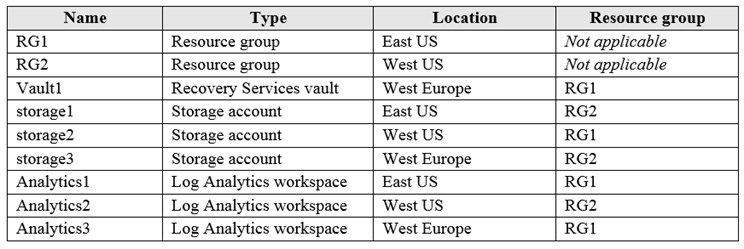
HOTSPOT - You have an Azure subscription named Subscription1 that contains the resources shown in the following table:
diagram

You plan to configure Azure Backup reports for Vault1. You are configuring the Diagnostics settings for the AzureBackupReports log. Which storage accounts and which Log Analytics workspaces can you use for the Azure Backup reports of Vault1? To answer, select the appropriate options in the answer area. NOTE: Each correct selection is worth one point. Hot Area:

Partie 1 :

Storage accounts: ______

Correct answer: D (storage1, storage2, and storage3). When configuring a diagnostic setting for a Recovery Services vault (AzureBackupReports category), you can archive the logs to a Storage account. For this destination, the storage account does not need to be in the same region as the vault; it only needs to be a valid Storage account you have permission to write to (same tenant and appropriate RBAC). In the table, storage1 is in East US, storage2 is in West US, and storage3 is in West Europe. All are valid Storage accounts and can be selected as the diagnostic destination. Why the others are wrong: - A, B, and C each incorrectly restrict you to a single storage account based on region or resource group. Resource group location does not constrain diagnostic settings, and cross-region storage destinations are supported for archiving platform logs in this context.

Partie 2 :

Log Analytics workspaces: ______

Correct answer: C (Analytics3 only). For Azure Backup Reports via diagnostic settings on Vault1, the Log Analytics workspace must be in the same region as the Recovery Services vault. Vault1 is located in West Europe. Of the available workspaces, Analytics1 is in East US, Analytics2 is in West US, and Analytics3 is in West Europe. Therefore, only Analytics3 satisfies the same-region requirement. Why the others are wrong: - A (Analytics1 only) and B (Analytics2 only) are in different regions than the vault, so they cannot be used for this log category. - D (all three) is incorrect because cross-region Log Analytics ingestion for this specific vault diagnostic log category is not supported; the workspace must match the vault’s region to meet the service’s supported configuration and data residency constraints.

7
Question 7

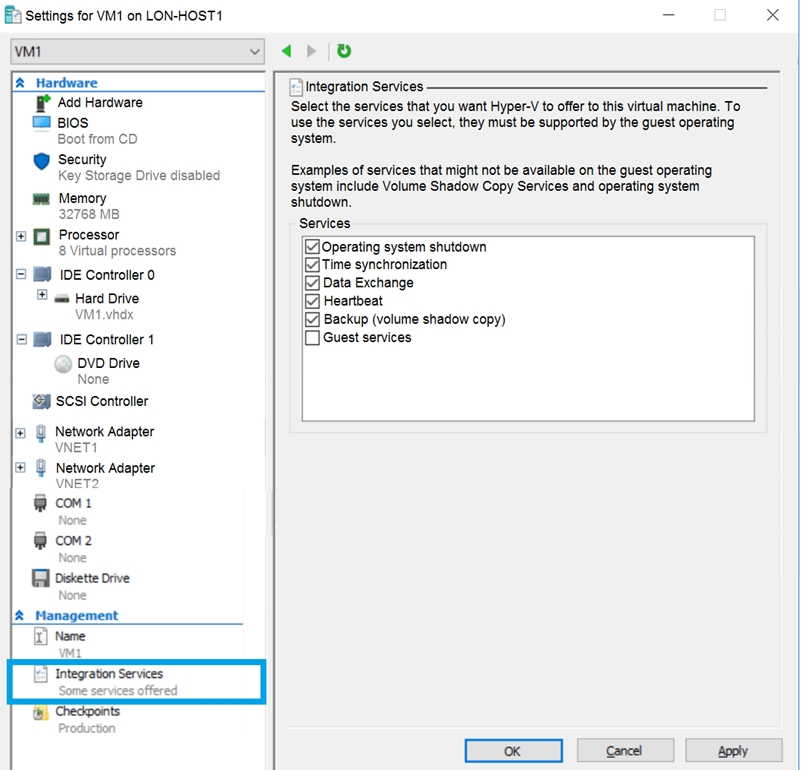
You have an Azure subscription. You have an on-premises virtual machine named VM1. The settings for VM1 are shown in the exhibit. (Click the Exhibit tab.)

You need to ensure that you can use the disks attached to VM1 as a template for Azure virtual machines. What should you modify on VM1?

Partie 1 :

Select the correct answer(s) in the image below.

question-image

The correct choice is the option corresponding to enabling Guest services in Hyper-V Integration Services. The exhibit is focused on the Integration Services settings, and Guest services is the only relevant setting shown as disabled. Changing the disk format to VHD is not something indicated by this exhibit, so the current explanation is based on information not presented in the image. Other listed integration services such as time synchronization, heartbeat, and backup are unrelated to preparing the VM disks for use as an Azure VM template.

8
Question 8

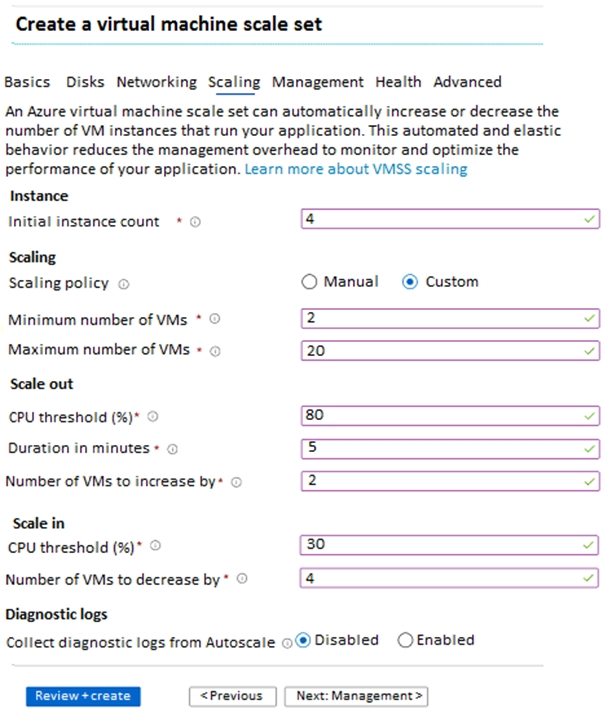
HOTSPOT - You create a virtual machine scale set named Scale1. Scale1 is configured as shown in the following exhibit.

Use the drop-down menus to select the answer choice that completes each statement based on the information presented in the graphic. NOTE: Each correct selection is worth one point. Hot Area:

Partie 1 :

Select the correct answer(s) in the image below.

question-image

This item does not represent an actual exam choice about Azure behavior; it is only a placeholder indicating the image is available. No technical determination is required for this sub-question, so it should not be explained as a self-assessment gate. The meaningful technical answers are in the subsequent hotspot statements based on the VMSS autoscale settings shown in the exhibit.

Partie 2 :

If Scale1 is utilized at 85 percent for six minutes after it is deployed, Scale1 will be running ______.

Scale1 starts with 4 instances. The exhibit shows a scale-out rule of average CPU greater than 80% for 5 minutes, increasing the instance count by 2; at 85% CPU for 6 minutes, that rule is satisfied, so the scale set grows to 6 instances. The configured cooldown prevents repeated immediate scale actions, so only one increase is applied in this scenario. The result remains within the minimum of 2 and maximum of 20, so 6 virtual machines is correct.

Partie 3 :

If Scale1 is first utilized at 25 percent for six minutes after it is deployed, and then utilized at 50 percent for six minutes, Scale1 will be running ______.

Scale1 starts with 4 instances. During the first 6 minutes at 25% CPU, the scale-in rule is met because CPU is below the 30% threshold, so the scale set attempts to decrease by 4; however, autoscale cannot go below the configured minimum, so it scales in only to 2 instances. After that action, the cooldown period applies, and the next 6-minute period at 50% CPU does not meet either autoscale threshold anyway. Because 50% is neither above 80% nor below 30%, no additional scaling occurs, leaving Scale1 at 2 virtual machines.

9
Question 9

HOTSPOT - You plan to create an Azure Storage account in the Azure region of East US 2. You need to create a storage account that meets the following requirements: ✑ Replicates synchronously. ✑ Remains available if a single data center in the region fails. How should you configure the storage account? To answer, select the appropriate options in the answer area. NOTE: Each correct selection is worth one point. Hot Area:

Partie 1 :

Replication: ______

Correct answer: D (Zone-redundant storage - ZRS). ZRS replicates data synchronously across three Azure Availability Zones within the same region. Because zones are separate datacenters with independent power, cooling, and networking, ZRS is designed to keep the storage account available even if one datacenter/zone fails. This directly matches the requirement to “remain available if a single data center in the region fails,” while also meeting “replicates synchronously.” Why the others are wrong: - B (LRS) is synchronous but keeps replicas within a single datacenter; a datacenter outage makes the account unavailable. - A (GRS) and C (RA-GRS) replicate to a secondary region asynchronously, so they do not meet the synchronous replication requirement. They are primarily for regional disaster recovery, not single-datacenter failure within the primary region.

Partie 2 :

Account type: ______

Correct answer: C (StorageV2 - general purpose v2). StorageV2 is the recommended account type for almost all new Azure Storage deployments. It supports the widest range of storage services and features (including modern blob capabilities, lifecycle management, and many security and performance features) and is the default choice in most real-world architectures and exam scenarios unless a question explicitly requires a legacy type. Why the others are wrong: - A (Blob storage) is a specialized/legacy account type focused on blobs and is generally not the default recommendation for new accounts. - B (Storage - general purpose v1) is legacy and lacks some newer capabilities and optimizations. For AZ-104, when no constraint forces GPv1, choose StorageV2 as the best-practice option.

10
Question 10

HOTSPOT - You have an Azure File sync group that has the endpoints shown in the following table.

Cloud tiering is enabled for Endpoint3. You add a file named File1 to Endpoint1 and a file named File2 to Endpoint2. On which endpoints will File1 and File2 be available within 24 hours of adding the files? To answer, select the appropriate options in the answer area. NOTE: Each correct selection is worth one point. Hot Area:

Partie 1 :

Endpoint1 is a Cloud endpoint.

Endpoint1 is the cloud endpoint. In Azure File Sync terminology, a cloud endpoint is an Azure Files share (an SMB/NFS file share hosted in an Azure Storage account). Each sync group has exactly one cloud endpoint, which acts as the authoritative cloud copy and the hub for synchronization. This matters because changes from any server endpoint are first uploaded to the cloud endpoint and then distributed to the other server endpoints. If Endpoint1 is where you “add a file” directly in Azure (for example, via the Azure portal, Storage Explorer, or SMB access to the Azure file share), you are writing to the cloud endpoint. Why not “No”: a server endpoint is always a path on a registered Windows Server with the Azure File Sync agent installed; it is not an Azure file share. Therefore, Endpoint1 being the cloud endpoint aligns with Azure File Sync architecture.

Partie 2 :

Endpoint2 is a Server endpoint.

Endpoint2 is a server endpoint. A server endpoint represents a specific folder path on a Windows Server (or Windows Server VM) that is registered to the Storage Sync Service and joined to the sync group. Server endpoints participate in multi-master sync, meaning they can both upload changes to the cloud endpoint and download changes from it. This classification is important for the later file-availability questions: if File2 is created on Endpoint2 (a server endpoint), Azure File Sync will detect the change via the agent, upload the file to the cloud endpoint (Endpoint1), and then synchronize it to other server endpoints in the same sync group. Why not “No”: if Endpoint2 were not a server endpoint, it would have to be either the cloud endpoint (but there is only one cloud endpoint per sync group and Endpoint1 already fills that role) or not part of the sync group, which contradicts the scenario stating it is an endpoint in the sync group.

Partie 3 :

Endpoint3 is a Server endpoint.

Endpoint3 is also a server endpoint. The prompt states that cloud tiering is enabled for Endpoint3, and cloud tiering is a feature that is configured on a server endpoint (not on the cloud endpoint). Tiering allows Endpoint3 to keep frequently accessed files cached locally while “tiering” colder files to Azure Files, leaving placeholders locally. This is a key exam clue: if tiering is enabled for an endpoint, that endpoint must be a server endpoint with the Azure File Sync agent managing local storage and recall behavior. Why not “No”: Azure Files (the cloud endpoint) does not have a per-endpoint cloud tiering setting in Azure File Sync; tiering is specifically about managing local disk capacity on Windows Servers. Therefore Endpoint3 must be a server endpoint.

Partie 4 :

File1: ______

File1 is added to Endpoint1 (the cloud endpoint/Azure file share). Azure File Sync will synchronize changes from the cloud endpoint down to all server endpoints in the sync group (Endpoint2 and Endpoint3). Therefore, within 24 hours, File1 will be available on Endpoint1, Endpoint2, and Endpoint3. Cloud tiering on Endpoint3 does not stop the file from being available there. With tiering enabled, Endpoint3 may store File1 as a tiered file (a placeholder) if the tiering policy decides it should not keep full contents locally. However, the file will still appear in the namespace and can be recalled when accessed. Why other options are wrong: - Endpoint1 only: ignores cloud-to-server sync. - Endpoint3 only: ignores that the file originates in the cloud endpoint and should sync to all servers. - Endpoint2 and Endpoint3 only: ignores that the file remains in the cloud endpoint as well.

Partie 5 :

File2: ______

File2 is added to Endpoint2 (a server endpoint). Azure File Sync is multi-master across server endpoints: changes created on Endpoint2 are uploaded to the cloud endpoint (Endpoint1) and then synchronized to the other server endpoint (Endpoint3). Therefore, within 24 hours, File2 will be available on Endpoint1, Endpoint2, and Endpoint3. Again, cloud tiering on Endpoint3 affects only local storage behavior. File2 will appear on Endpoint3; it may be fully cached or tiered (placeholder) depending on available space and the tiering policy, but it is still considered available in the endpoint’s namespace. Why other options are wrong: - Endpoint1 only: ignores that the originating server endpoint retains the file and that other servers sync. - Endpoint3 only: ignores upload to cloud and retention on Endpoint2. - Endpoint2 and Endpoint3 only: ignores that the cloud endpoint always receives the uploaded data and becomes the central copy.

Autres tests d'entraînement

Practice Test #1

50 Questions·100 min·Réussite 700/1000

Practice Test #3

50 Questions·100 min·Réussite 700/1000

Practice Test #4

50 Questions·100 min·Réussite 700/1000

Practice Test #5

50 Questions·100 min·Réussite 700/1000

Practice Test #6

50 Questions·100 min·Réussite 700/1000

Practice Test #7

50 Questions·100 min·Réussite 700/1000

Practice Test #8

50 Questions·100 min·Réussite 700/1000

Practice Test #9

50 Questions·100 min·Réussite 700/1000
← Voir toutes les questions Microsoft AZ-104

Commencer à s'entraîner

Téléchargez Cloud Pass et commencez à vous entraîner sur toutes les questions Microsoft AZ-104.

Get it on Google PlayDownload on the App Store
Cloud PassCloud Pass

Application d'entraînement aux certifications IT

Get it on Google PlayDownload on the App Store

Certifications

AWSGCPMicrosoftCiscoCompTIADatabricks

Mentions légales

FAQPolitique de confidentialitéConditions d'utilisation

Entreprise

ContactSupprimer le compte

© Copyright 2026 Cloud Pass, Tous droits réservés.

Envie de vous entraîner partout ?

Obtenir l'application

Téléchargez Cloud Pass — inclut des tests d'entraînement, le suivi de progression et plus encore.