CloudPass LogoCloud Pass
AWSGoogle CloudMicrosoftCiscoCompTIADatabricks
Certifications
AWSGoogle CloudMicrosoftCiscoCompTIADatabricks
Microsoft AZ-104
Microsoft AZ-104

Practice Test #9

Simulez l'expérience réelle de l'examen avec 50 questions et une limite de temps de 100 minutes. Entraînez-vous avec des réponses vérifiées par IA et des explications détaillées.

50Questions100Minutes700/1000Score de réussite
Parcourir les questions d'entraînement

Propulsé par l'IA

Réponses et explications vérifiées par triple IA

Chaque réponse est vérifiée par 3 modèles d'IA de pointe pour garantir une précision maximale. Obtenez des explications détaillées par option et une analyse approfondie des questions.

GPT Pro
Claude Opus
Gemini Pro
Explications par option
Analyse approfondie des questions
Précision par consensus de 3 modèles

Questions d'entraînement

1
Question 1

You have a deployment template named Template1 that is used to deploy 10 Azure web apps. You need to identify what to deploy before you deploy Template1. The solution must minimize Azure costs. What should you identify?

Five Application Gateways are not required to deploy web apps. Application Gateway is a Layer 7 load balancer/WAF used for advanced routing, TLS termination, and protection. It adds significant cost and complexity and is only justified for specific requirements (WAF, path-based routing, private access via ILB, etc.). It is not a prerequisite for App Service deployment.

One App Service plan is the required foundational resource to host the 10 web apps and is the most cost-effective option when apps can share the same region/OS and scaling boundary. App Service pricing is primarily per plan (SKU and instance count), so multiple apps on one plan typically do not multiply compute costs, making this the best cost-minimizing prerequisite.

Ten App Service plans would allow isolation and independent scaling per app, but it is usually the most expensive approach because each plan provisions and bills its own compute resources. This is only appropriate when apps require different SKUs, regions, OS types, or strict isolation. For cost minimization, it is generally incorrect.

Azure Traffic Manager provides DNS-based global routing and failover across endpoints/regions. It is not required to deploy web apps and does not replace the need for an App Service plan. It’s used when you have multi-region deployments or need performance/failover routing, which is beyond the prerequisite for deploying 10 web apps.

One Application Gateway can front-end one or more web apps for Layer 7 routing and WAF, but it is optional and not required before deploying App Service apps. It also introduces additional cost. Unless the scenario explicitly requires WAF, private ingress, or advanced routing, identifying/deploying an Application Gateway is not the correct prerequisite.

Analyse de la question

Core concept: Azure Web Apps (App Service apps) must run in an App Service plan, which defines the underlying compute resources (region, OS, pricing tier, scale units). The web app itself is a logical container for your code and configuration, but it cannot be created without an App Service plan. Why the answer is correct: To deploy 10 Azure web apps using an ARM/Bicep template, you must ensure an App Service plan exists (or is created by the template). If the question asks what to identify/deploy before deploying Template1, and the goal is to minimize Azure costs, the best approach is to use a single App Service plan and place all 10 web apps into that plan (assuming they share the same region and OS requirements). Multiple apps can share the same plan and therefore share the same compute instances, which is typically far cheaper than provisioning separate plans. Key features and best practices: An App Service plan is the billing and scaling boundary for App Service. Costs are primarily driven by the plan’s SKU (Free/Shared/Basic/Standard/Premium/Isolated) and instance count, not by the number of apps. Hosting multiple low-to-moderate traffic apps on one appropriately sized plan is a common cost-optimization pattern aligned with the Azure Well-Architected Framework (Cost Optimization pillar). You can still scale out/in the plan to meet aggregate demand. Common misconceptions: Load-balancing services like Azure Application Gateway or Traffic Manager are not prerequisites to deploy web apps. They are optional components for routing, WAF, TLS offload, multi-region failover, etc. Also, many assume each web app needs its own plan; that’s only necessary when apps require isolation, different SKUs, different regions, different OS (Windows vs Linux), or independent scaling. Exam tips: For AZ-104, remember: Web App requires an App Service plan. To minimize cost, consolidate apps into fewer plans when requirements allow. Separate plans increase cost because each plan provisions its own compute. Gateways/Traffic Manager are architecture choices, not deployment prerequisites for basic web app creation.

2
Question 2

You plan to move a distributed on-premises app named App1 to an Azure subscription. After the planned move, App1 will be hosted on several Azure virtual machines. You need to ensure that App1 always runs on at least eight virtual machines during planned Azure maintenance. What should you create?

A virtual machine scale set with 10 instances is the correct choice because VM scale sets are intended to host and manage multiple identical virtual machines for distributed applications. During planned Azure maintenance, only one update domain is affected at a time, so the design goal is to ensure enough instances remain outside that domain. In the standard exam context, 10 instances in a scale set are sufficient to keep at least eight running during planned maintenance. This option also matches the requirement to run the application on several Azure virtual machines using a single scalable resource.

This availability set configuration is not suitable because it has only one update domain. Update domains are what protect against planned maintenance, and with only one update domain, all VMs in the availability set could be affected at the same time during maintenance. Although three fault domains improve resilience to hardware or rack failures, they do not solve the planned maintenance requirement. Therefore, this option does not ensure that at least eight VMs remain running during planned Azure maintenance.

This availability set option is also inappropriate because it has only one fault domain, which provides no meaningful protection from underlying hardware failures. While 10 update domains would help spread planned maintenance impact, the single fault domain makes the design weak for overall availability. More importantly, the question is asking for a resource to host several Azure VMs for an application, and a VM scale set is the more appropriate and modern construct for this scenario. This option is therefore not the best answer among the choices provided.

A virtual machine scale set with 12 instances would also provide enough capacity, but it is not the best answer because it exceeds what is required. Certification questions typically expect the minimum solution that satisfies the stated requirement. Since 10 instances are sufficient to maintain at least eight running during planned maintenance, choosing 12 adds unnecessary capacity and cost. Therefore, D is not the optimal answer.

Analyse de la question

Core concept: This question is about maintaining application availability during planned Azure maintenance, which is handled through update domains. During planned maintenance, Azure updates only one update domain at a time, so only the virtual machines in that domain are rebooted or made temporarily unavailable. To guarantee that at least eight VMs remain running, you must choose a deployment model and instance count that tolerate the temporary loss of one update domain. Why correct: A virtual machine scale set is the best fit because it is designed to run and manage multiple identical VMs and distribute them across update domains for maintenance events. With 10 VM instances, the loss of one update domain still leaves at least eight instances available in the standard exam scenario. This satisfies the requirement while using the minimum sufficient capacity among the options. Key features: VM scale sets provide centralized management, scaling, and high availability for groups of VMs. They are commonly used for distributed applications that need consistent instance deployment and resilience during maintenance. They also integrate with load balancers and health probes so traffic can continue flowing to healthy instances. Common misconceptions: Some candidates overcompensate and choose more instances than necessary, but exam questions typically expect the minimum option that satisfies the requirement. Availability sets help with planned maintenance too, but the provided availability set options are poorly configured for this scenario, especially those with only one update domain or one fault domain. The question asks what to create, and VM scale set is the most appropriate Azure resource for several identical VMs. Exam tips: For planned maintenance, think update domains first. If the question asks for a fleet of similar VMs, VM scale set is often the preferred answer over individually managed VMs in an availability set. When multiple counts are offered, choose the smallest one that still meets the availability requirement under one update domain being unavailable.

3
Question 3

Note: This question is part of a series of questions that present the same scenario. Each question in the series contains a unique solution that might meet the stated goals. Some question sets might have more than one correct solution, while others might not have a correct solution. After you answer a question in this section, you will NOT be able to return to it. As a result, these questions will not appear in the review screen. You have an Azure virtual machine named VM1. VM1 was deployed by using a custom Azure Resource Manager template named ARM1.json. You receive a notification that VM1 will be affected by maintenance. You need to move VM1 to a different host immediately. Solution: From the Overview blade, you move the virtual machine to a different subscription. Does this meet the goal?

Yes is incorrect because changing the subscription of a VM is not a host-migration operation. Although the VM resource may be reassigned to a different subscription for management purposes, Azure does not use that action to immediately relocate the VM to different underlying hardware. The correct action for an immediate host move in response to maintenance is Redeploy. Treating subscription movement as equivalent to host movement confuses management-plane changes with infrastructure-plane behavior.

No is correct because moving a virtual machine to a different subscription does not force Azure to place that VM on a new physical host. A subscription move is an administrative change that affects ownership, organization, and billing scope rather than compute placement. The requirement is specifically to move VM1 to a different host immediately, and the Azure action designed for that is Redeploy. Therefore, the proposed solution does not satisfy the stated goal.

Analyse de la question

Core concept: This question tests how to respond to Azure platform maintenance notifications for a virtual machine. When Azure indicates that a VM will be affected by maintenance and you need to move it to a different host immediately, the relevant action is to redeploy the VM, which places it on a new Azure host. Administrative actions such as moving a VM to another subscription do not serve as a host-migration mechanism. Why the answer is correct: The proposed solution does not meet the goal. Moving a VM to a different subscription from the Overview blade changes the resource's subscription ownership and billing context, but it does not immediately move the VM to a different physical host. To force Azure to place the VM on a new host, you use the Redeploy operation. Key features: - Redeploy moves the VM to a new host and is the standard self-service action for host-related issues. - Subscription moves are management-plane operations, not compute-placement operations. - Planned maintenance scenarios are best handled with availability features such as Availability Sets or Availability Zones when possible. Common misconceptions: A common mistake is assuming that any major administrative change to a VM, such as moving resource groups or subscriptions, also changes the underlying host. In Azure, host placement is controlled by compute operations like redeploy, not by governance or billing changes. Exam tips: For AZ-104, if the requirement says 'move to a different host immediately,' think of Redeploy. Do not confuse management-scope changes, such as moving subscriptions, with infrastructure actions that affect physical host placement.

4
Question 4

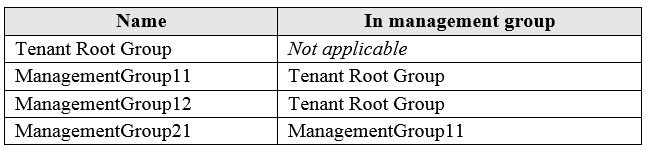
HOTSPOT - You have the Azure management groups shown in the following table:
diagram

You add Azure subscriptions to the management groups as shown in the following table:

diagram

You create the Azure policies shown in the following table: Name Parameter Scope Not allowed resource types virtualNetworks Tenant Root Group Allowed resource types virtualNetworks ManagementGroup12 For each of the following statements, select Yes if the statement is true. Otherwise, select No. NOTE: Each correct selection is worth one point. Hot Area:

Partie 1 :

You can create a virtual network in Subscription1.

Subscription1 is in ManagementGroup21, which is under ManagementGroup11, which is under Tenant Root Group. Therefore, Subscription1 inherits policies assigned at Tenant Root Group. The policy “Not allowed resource types” with parameter virtualNetworks is assigned at Tenant Root Group. That means creating Microsoft.Network/virtualNetworks is denied everywhere in the tenant unless an exemption is configured (none is mentioned). The “Allowed resource types” policy is scoped to ManagementGroup12 only, so it does not apply to Subscription1 (which is under ManagementGroup11). Even if it did apply, multiple policies are evaluated together and any deny would still block the deployment. Therefore, you cannot create a virtual network in Subscription1 because the Tenant Root Group policy explicitly denies virtualNetworks.

Partie 2 :

You can create a virtual machine in Subscription2.

Subscription2 is in ManagementGroup12, so it inherits policies from both Tenant Root Group and ManagementGroup12. The Tenant Root Group policy blocks only Microsoft.Network/virtualNetworks, but the ManagementGroup12 'Allowed resource types' policy allows only virtualNetworks and denies all other resource types. Because a virtual machine is Microsoft.Compute/virtualMachines, it is not in the allowed list and the deployment is denied. Therefore, the statement is false, so the correct answer is No.

Partie 3 :

You can add Subscription1 to ManagementGroup11.

A subscription can belong to only one management group at a time, but it can be moved (re-parented) from one management group to another, assuming you have sufficient permissions (typically Management Group Contributor/Owner at the destination scope and appropriate permissions at the current scope). Subscription1 is currently in ManagementGroup21. ManagementGroup21 is a child of ManagementGroup11. Adding (moving) Subscription1 to ManagementGroup11 is allowed: it would simply change the subscription’s parent management group from ManagementGroup21 to ManagementGroup11. This is a governance operation and does not violate any structural rule of management groups. After the move, Subscription1 would still inherit Tenant Root Group policies and would inherit any policies assigned to ManagementGroup11 (and no longer inherit those assigned specifically to ManagementGroup21). Therefore, you can add Subscription1 to ManagementGroup11 (i.e., move it there).

5
Question 5

You have an Azure subscription named AZPT1 that contains the resources shown in the following table:

You create a new Azure subscription named AZPT2. You need to identify which resources can be moved to AZPT2. Which resources should you identify?

Partie 1 :

storage1 - Azure Storage account

Yes. An Azure Storage account (ARM-based) generally supports moving across subscriptions, provided the destination subscription is in the same Azure AD tenant and the move operation doesn’t violate constraints (for example, resource locks must be removed, and policies may block the move). Storage accounts are not inherently “pinned” to a subscription the way some governance/security resources are. Why not No: The common blockers for storage moves are usually external dependencies (apps using access keys/connection strings, private endpoints, or network rules) rather than an Azure platform limitation on moving the storage account itself. From an exam standpoint, storage accounts are considered movable resources across subscriptions using Azure Resource Manager move.

Partie 2 :

VNET1 - Virtual network

Yes. An Azure virtual network (VNet) can be moved to another subscription (same tenant) using a resource move. This is a supported ARM scenario. Important dependency note (exam-relevant): if the VNet has dependent resources (subnets with NICs, private endpoints, gateways, peerings, etc.), you may need to move dependent resources together or remove/recreate certain configurations (for example, VNet peerings often need to be re-established after moves). But the question asks which resources can be moved, and VNets are in the “supported to move” category. Why not No: VNets are not like Recovery Services vaults; they are standard ARM networking resources and are commonly moved during subscription reorganizations.

Partie 3 :

VM1 - Azure virtual machine

Yes. An Azure virtual machine (VM) can be moved to another subscription, but you must move the VM together with its dependent resources (at minimum: NIC(s) and managed disks; often also public IPs, NSGs, and load balancer associations depending on the design). The move is an ARM metadata operation; it doesn’t “recreate” the VM, but dependencies must remain consistent. Why not No: VMs are a standard supported resource type for cross-subscription moves. The typical exam trap is forgetting that you can’t move only the VM object while leaving its disks behind; however, the VM resource itself is movable when handled correctly with its dependencies.

Partie 4 :

VM1Managed - Managed disk for VM1

Yes. Managed disks support moving across subscriptions. In fact, when moving a VM, its managed disks are commonly moved as part of the same move operation to keep the VM’s storage dependencies intact. Why not No: Managed disks are ARM resources and are not restricted like vaults or certain identity/governance resources. The main considerations are dependency integrity (the disk is attached to a VM) and ensuring you move related resources together. If you attempted to move the disk alone while leaving the VM behind, you would break the VM configuration; but the disk resource type itself is supported for moves, and in practice it should be moved with VM1.

Partie 5 :

RVAULT1 - Recovery Services vault for the site recovery of VM1

No. A Recovery Services vault used for Site Recovery (ASR) is typically not movable across subscriptions, especially when it contains Site Recovery configuration/protected items (replication metadata, fabrics, protection containers, replicated items). Microsoft’s move restrictions for Recovery Services vaults are a frequent AZ-104 exam point: vaults with backup items or ASR replication are not supported for resource moves. Why not Yes: Moving the vault would risk breaking the reliability chain and the recovery metadata required for failover/failback operations. The supported approach is usually to disable replication/stop protection for the VM, clean up vault contents, and then reconfigure in the target subscription (or create a new vault in AZPT2 and re-protect workloads).

Envie de vous entraîner partout ?

Téléchargez Cloud Pass — inclut des tests d'entraînement, le suivi de progression et plus encore.

6
Question 6

Your company has an Azure subscription named Subscription1. The company also has two on-premises servers named Server1 and Server2 that run Windows Server 2016. Server1 is configured as a DNS server that has a primary DNS zone named adatum.com. Adatum.com contains 1,000 DNS records. You manage Server1 and Subscription1 from Server2. Server2 has the following tools installed: ✑ The DNS Manager console ✑ Azure PowerShell ✑ Azure CLI 2.0 You need to move the adatum.com zone to an Azure DNS zone in Subscription1. The solution must minimize administrative effort. What should you use?

Azure CLI is not the best answer for this AZ-104 scenario because the exam expects the Azure PowerShell import workflow for DNS zone migration. While CLI can manage Azure DNS resources, it is not the commonly referenced tool for importing a Windows DNS zone file into Azure DNS in Microsoft exam content. Choosing CLI here relies on an assumed import capability rather than the standard cmdlet-based migration path. Therefore, it is less aligned with the expected minimal-effort solution in this question.

Azure PowerShell is the correct choice because it provides a purpose-built way to import DNS records from a zone file into Azure DNS. In this scenario, the existing adatum.com zone on Server1 can be exported and then imported into an Azure DNS zone by using Import-AzDnsServerZone. Since Azure PowerShell is already installed on Server2, this approach minimizes manual work and aligns directly with the requirement to reduce administrative effort. It is also the standard exam-oriented method for bulk DNS migration into Azure DNS.

The Azure portal would require manually creating or copying a very large number of DNS records, which is inefficient for a zone containing 1,000 entries. Manual entry increases the chance of mistakes such as incorrect TTL values, missing records, or wrong MX and SRV settings. The portal is appropriate for small changes or verification after migration, but not for bulk movement of an entire zone. Therefore, it does not minimize administrative effort.

The DNS Manager console can administer the on-premises Windows DNS server and may help export or review the existing zone, but it cannot migrate the zone directly into Azure DNS. Azure DNS is a separate cloud service that must be managed through Azure tools such as PowerShell, CLI, ARM, or the portal. Using DNS Manager alone would leave the Azure-side creation and population of records undone. As a result, it is not sufficient to complete the migration with minimal effort.

Analyse de la question

Core concept: This question is about migrating an existing DNS zone hosted on Windows Server DNS to Azure DNS while minimizing administrative effort. The key is to avoid manually recreating 1,000 records and instead use a bulk import method that can read a DNS zone file and create the Azure DNS record sets automatically. In Azure, the exam-aligned tool for importing a DNS zone file into Azure DNS is Azure PowerShell. Why correct: Azure PowerShell provides the Import-AzDnsServerZone cmdlet, which is specifically designed to import a DNS zone file into an Azure DNS zone. Because Server2 already has Azure PowerShell installed and is used to manage both the on-premises DNS server and the Azure subscription, it is the most efficient and direct option. This minimizes administrative effort by allowing bulk migration rather than manual recreation of records. Key features: PowerShell supports automation, repeatability, and direct integration with Azure DNS management. A typical process is to export the Windows DNS zone to a standard zone file, create the Azure DNS zone, and then import the records with Import-AzDnsServerZone. This approach is much faster and less error-prone than entering records one by one. Common misconceptions: Azure CLI is often assumed to be interchangeable with PowerShell for all Azure tasks, but for this exam scenario the recognized bulk-import capability for DNS zone migration is associated with Azure PowerShell. The DNS Manager console can manage and export Windows DNS zones, but it cannot migrate them directly into Azure DNS. The Azure portal is useful for small-scale DNS administration, not for importing a large zone with 1,000 records. Exam tips: On AZ-104, when a question mentions a large number of DNS records and asks to minimize administrative effort, look for a bulk import or automation-based solution rather than manual configuration. Also distinguish between tools that manage on-premises DNS and tools that can create resources in Azure DNS. PowerShell cmdlets for Azure DNS are a common exam focus in these migration scenarios.

7
Question 7

You have an Azure policy as shown in the following exhibit:

  • SCOPE

  • Scope (Learn more about setting the scope) Subscription 1 Exclusions Subscription 1/ContosoRG1

  • BASICS

  • Policy definition Not allowed resource types

  • Assignment name Not allowed resource types Assignment ID /subscriptions/5eb8d0b6-ce3b-4ce0-a631-9f5321bedabb/providers/Microsoft.Authorization/policyAssignments/0e6fb866bf854f54accae2a9 Description

Assigned by admin1@contoso.com

  • PARAMETERS Not allowed resource types Microsoft.Sql/servers

What is the effect of the policy?

This option is incorrect because the exclusion prevents the policy from applying to ContosoRG1. If there were no exclusions, then the deny policy would block Azure SQL server creation everywhere in Subscription 1. Since one resource group is excluded, creation is still possible there. Therefore the policy does not prevent creation anywhere in the entire subscription.

This option is correct because the policy assignment is scoped to Subscription 1 and denies the resource type Microsoft.Sql/servers. However, ContosoRG1 is listed under Exclusions, which means the policy is not enforced for resources created in that resource group. As a result, Azure SQL servers are blocked in the rest of the subscription but can still be created in ContosoRG1. This is the standard Azure Policy behavior for a deny assignment with a notScopes exclusion.

This option is incorrect because it reverses the meaning of an exclusion. Excluding ContosoRG1 means the policy does not apply in that resource group, so resources of the denied type are not blocked there by this assignment. The deny effect applies to the rest of Subscription 1 instead. Therefore ContosoRG1 is the allowed exception, not the only blocked location.

This option is incorrect because the deny policy still applies to all non-excluded resource groups in Subscription 1. The exclusion does not remove the policy from the whole subscription; it only removes enforcement for ContosoRG1. Therefore Azure SQL servers cannot be created in every resource group within the subscription. They can only be created in the excluded resource group, assuming no other restrictions exist.

Analyse de la question

Core concept: This question tests Azure Policy scope and exclusions. A policy assignment applies to all resources within its scope (management group/subscription/resource group) except any explicitly excluded scopes. The built-in policy definition “Not allowed resource types” uses a deny effect to block creation (and sometimes updates) of specified resource types. Why the answer is correct: The policy is assigned at the Subscription 1 scope, which would normally deny creation of the specified resource type (Microsoft.Sql/servers) across the entire subscription. However, there is an exclusion for Subscription 1/ContosoRG1. Exclusions (also called “notScopes”) mean the policy assignment does not apply to that resource group. Therefore: - In all resource groups in Subscription 1 except ContosoRG1, creating Microsoft.Sql/servers is denied. - In ContosoRG1, the policy is not evaluated, so Azure SQL logical servers can be created (assuming no other policies block them). Given the answer choices, the only option consistent with “allowed in ContosoRG1 and denied elsewhere” is that you can create Azure SQL servers in ContosoRG1 only. Key features and best practices: - Policy scope determines where enforcement occurs; exclusions carve out exceptions. - “Not allowed resource types” is commonly used for governance to prevent unsupported/expensive services. - From an Azure Well-Architected Framework governance perspective, use exclusions sparingly and document them, because they create compliance gaps. Common misconceptions: Many assume a subscription-level assignment always blocks everywhere. Exclusions override that assumption. Another confusion is mixing up “excluded scope” with “excluded resource types”—here the excluded item is a resource group scope, not a type. Exam tips: Always read the assignment scope and the exclusions. If a resource group is excluded, the policy does not apply there. For deny policies, think “blocked everywhere in scope except excluded scopes.”

8
Question 8

You have an Azure subscription named Subscription1. You deploy a Linux virtual machine named VM1 to Subscription1. You need to monitor the metrics and the logs of VM1. What should you use?

Azure HDInsight is a managed big data analytics service (Hadoop, Spark, Kafka, etc.). It is used to process and analyze large datasets, not to collect VM guest metrics and logs. While you could theoretically ingest logs into a big data platform, that is not the intended or efficient solution for monitoring a single Linux VM in Azure, and it’s not aligned with AZ-104 monitoring objectives.

Linux Diagnostic Extension (LAD) 3.0 is the correct choice because it enables collection of Linux guest OS telemetry, including performance metrics and syslog. As a VM extension, it installs/configures diagnostics on VM1 so that monitoring systems (commonly Azure Monitor/Log Analytics) can receive and store the data for querying, alerting, and visualization. This directly satisfies the requirement to monitor both metrics and logs.

The AzurePerformanceDiagnostics extension is primarily aimed at performance troubleshooting and diagnostics scenarios (capturing performance data for analysis), not comprehensive, continuous monitoring of both logs and metrics as a standard operational practice. It may help investigate issues, but it is not the typical exam answer for enabling ongoing Linux VM log (syslog) collection plus metrics collection.

Azure Analysis Services is a PaaS semantic modeling/OLAP service used to build enterprise BI models (tabular models) for reporting tools like Power BI. It does not collect or monitor VM metrics and logs. It’s an analytics layer for business data, not an infrastructure monitoring solution for Azure virtual machines.

Analyse de la question

Core concept: This question tests Azure VM monitoring for a Linux VM—specifically how to collect guest OS metrics and logs. In Azure, platform metrics (CPU, disk, network at the host level) are available automatically, but guest-level telemetry (syslog, performance counters inside Linux) requires an agent/extension. For AZ-104, the common pattern is: install a diagnostics/monitoring agent (extension) and send data to a Log Analytics workspace / Azure Monitor. Why the answer is correct: Linux Diagnostic Extension (LAD) 3.0 is designed to collect and ship Linux guest OS diagnostic data, including performance metrics (CPU, memory, disk, network from within the OS) and logs (notably syslog). It can route this telemetry to Azure Monitor backends (commonly Log Analytics via the Azure Monitor agent ecosystem, and historically to Azure Storage/Event Hubs depending on configuration). Using LAD enables you to monitor both metrics and logs from VM1, which is exactly what the requirement states. Key features / configuration notes: - Collects Linux performance counters and syslog events from the VM guest. - Deployed as a VM extension, so it’s managed through the VM resource. - Typically paired with Azure Monitor / Log Analytics for querying (KQL), alerting, and dashboards. - Aligns with Azure Well-Architected Framework (Operational Excellence): centralized observability, alerting, and troubleshooting. Common misconceptions: - Many assume “Azure Monitor” is the direct answer, but it’s not listed. The exam often expects the enabling component on the VM (an agent/extension) when the question explicitly mentions monitoring VM logs/metrics. - Confusing performance troubleshooting extensions (like AzurePerformanceDiagnostics) with ongoing monitoring. Performance diagnostics is more for targeted troubleshooting rather than continuous log + metric collection. Exam tips: - For Linux VM guest logs (syslog) and guest metrics, think: diagnostics/monitoring agent/extension (LAD/AMA) + Log Analytics. - If the question asks for “metrics and logs” from inside the VM, platform metrics alone are insufficient. - Know the difference between data collection (agent/extension) and analysis/visualization (Azure Monitor, Log Analytics, Workbooks, alerts).

9
Question 9

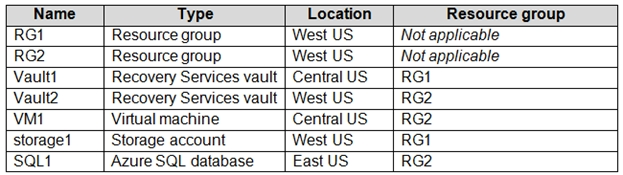
HOTSPOT - You have an Azure subscription named Subscription1 that contains the resources shown in the following table.
diagram

In storage1, you create a blob container named blob1 and a file share named share1. Which resources can be backed up to Vault1 and Vault2? To answer, select the appropriate options in the answer area. NOTE: Each correct selection is worth one point. Hot Area:

Partie 1 :

Can use Vault1 for backups: ______

Vault1 is a Recovery Services vault located in Central US. Azure VM backup requires the vault to be in the same region as the VM. VM1 is in Central US, so VM1 can be backed up to Vault1. share1 (Azure Files) is in storage1, which is in West US, so it cannot be protected by a Central US vault. blob1 (Blob container) isn’t backed up using a Recovery Services vault. SQL1 is an Azure SQL Database (PaaS) in East US and is not protected by Recovery Services vault; it uses built-in backups/LTR instead. Therefore, only VM1 qualifies for Vault1, making option A correct and all options including share1/blob1/SQL1 incorrect.

Partie 2 :

Can use Vault2 for backups: ______

Vault2 is a Recovery Services vault located in West US. Azure Files share backup (share-level, not storage-account-level) is supported by Recovery Services vault and must be in the same region as the storage account. storage1 is in West US, so share1 (in storage1) can be backed up to Vault2. VM1 is in Central US, so it cannot be backed up to a West US vault. blob1 (blob container) is not protected by Recovery Services vault. “storage1 only” is incorrect because Azure Backup protects Azure Files shares, not the entire storage account as a single protected item. SQL1 (East US) also cannot be backed up to Recovery Services vault. Hence, only share1 is valid: option B.

10
Question 10

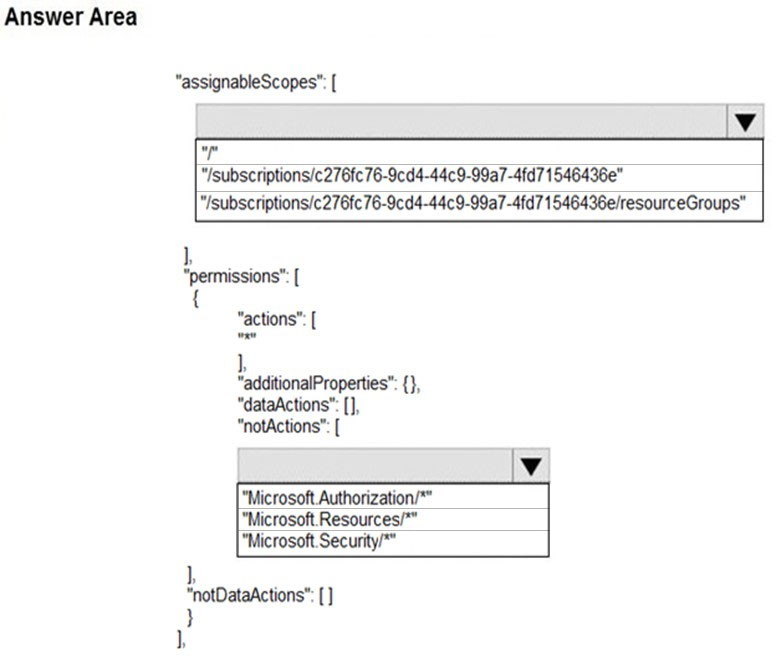
HOTSPOT - You have an Azure subscription named Subscription1 that has a subscription ID of c276fc76-9cd4-44c9-99a7-4fd71546436e. You need to create a custom RBAC role named CR1 that meets the following requirements: ✑ Can be assigned only to the resource groups in Subscription1 ✑ Prevents the management of the access permissions for the resource groups ✑ Allows the viewing, creating, modifying, and deleting of resources within the resource groups What should you specify in the assignable scopes and the permission elements of the definition of CR1? To answer, select the appropriate options in the answer area. NOTE: Each correct selection is worth one point. Hot Area:

Partie 1 :

Select the correct answer(s) in the image below.

question-image

Pass. The correct configuration is: 1) assignableScopes: "/subscriptions/c276fc76-9cd4-44c9-99a7-4fd71546436e" - This ensures the custom role can only be assigned within Subscription1 (at resource groups or below). Choosing "/" would allow assignment anywhere (too broad). Choosing "/subscriptions/.../resourceGroups" is not the correct scope format for RBAC; you must specify a valid scope such as a subscription or a specific resource group ID. 2) permissions: - actions: ["*"] to allow viewing/creating/modifying/deleting resources. - notActions: ["Microsoft.Authorization/*"] to prevent managing access permissions (role assignments/definitions) at the resource group scope. Other notActions options like Microsoft.Resources/* would block resource management itself, and Microsoft.Security/* is unrelated to RBAC access management.

Autres tests d'entraînement

Practice Test #1

50 Questions·100 min·Réussite 700/1000

Practice Test #2

50 Questions·100 min·Réussite 700/1000

Practice Test #3

50 Questions·100 min·Réussite 700/1000

Practice Test #4

50 Questions·100 min·Réussite 700/1000

Practice Test #5

50 Questions·100 min·Réussite 700/1000

Practice Test #6

50 Questions·100 min·Réussite 700/1000

Practice Test #7

50 Questions·100 min·Réussite 700/1000

Practice Test #8

50 Questions·100 min·Réussite 700/1000
← Voir toutes les questions Microsoft AZ-104

Commencer à s'entraîner

Téléchargez Cloud Pass et commencez à vous entraîner sur toutes les questions Microsoft AZ-104.

Get it on Google PlayDownload on the App Store
Cloud PassCloud Pass

Application d'entraînement aux certifications IT

Get it on Google PlayDownload on the App Store

Certifications

AWSGCPMicrosoftCiscoCompTIADatabricks

Mentions légales

FAQPolitique de confidentialitéConditions d'utilisation

Entreprise

ContactSupprimer le compte

© Copyright 2026 Cloud Pass, Tous droits réservés.

Envie de vous entraîner partout ?

Obtenir l'application

Téléchargez Cloud Pass — inclut des tests d'entraînement, le suivi de progression et plus encore.