CloudPass LogoCloud Pass
AWSGoogle CloudMicrosoftCiscoCompTIADatabricks
Certifications
AWSGoogle CloudMicrosoftCiscoCompTIADatabricks
Microsoft SC-300
Microsoft SC-300

Practice Test #1

Simulate the real exam experience with 50 questions and a 100-minute time limit. Practice with AI-verified answers and detailed explanations.

50Questions100Minutes700/1000Passing Score
Browse Practice Questions

AI-Powered

Triple AI-Verified Answers & Explanations

Every answer is cross-verified by 3 leading AI models to ensure maximum accuracy. Get detailed per-option explanations and in-depth question analysis.

GPT Pro
Claude Opus
Gemini Pro
Per-option explanations
In-depth question analysis
3-model consensus accuracy

Practice Questions

1
Question 1

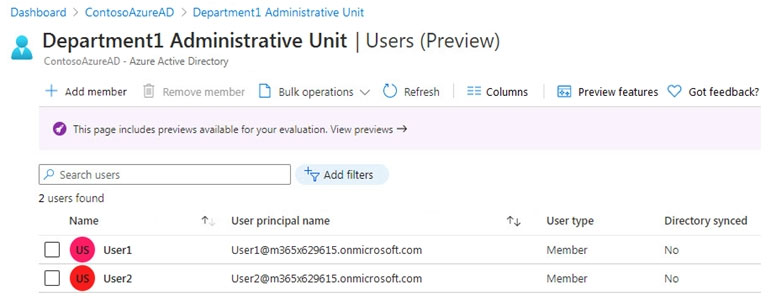
HOTSPOT - You have an Azure Active Directory (Azure AD) tenant that contains a group named Group3 and an administrative unit named Department1. Department1 has the users shown in the Users exhibit. (Click the Users tab.)
diagram

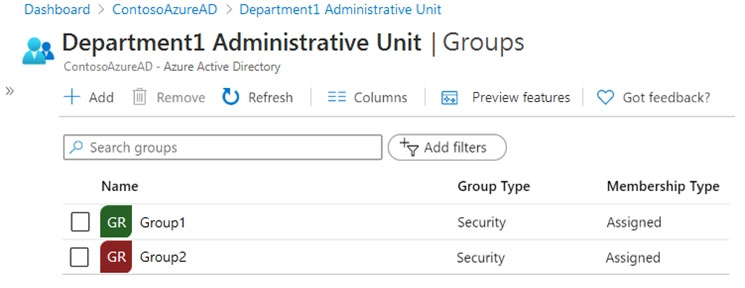
Department1 has the groups shown in the Groups exhibit. (Click the Groups tab.)

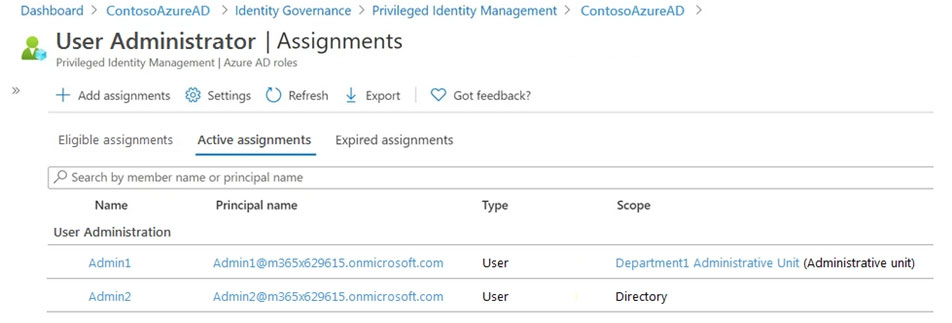
Department1 has the user administrator assignments shown in the Assignments exhibit. (Click the Assignments tab.)
diagram

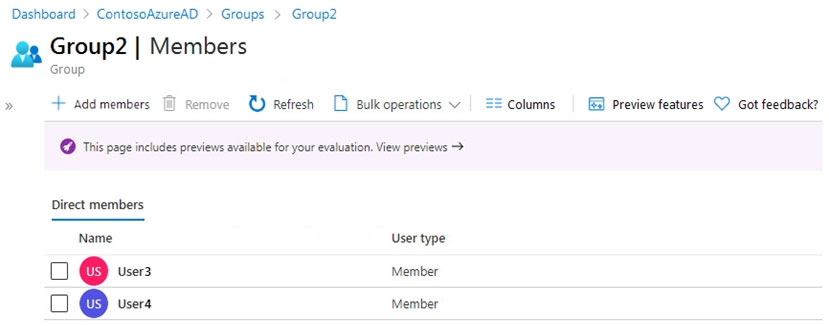
The members of Group2 are shown in the Group2 exhibit. (Click the Group2 tab.)

For each of the following statements, select Yes if the statement is true. Otherwise, select No. NOTE: Each correct selection is worth one point. Hot Area:

Part 1:

Select the correct answer(s) in the image below.

question-image

The Groups exhibit shows that Department1 contains Group1 and Group2. This matters because an administrative unit-scoped User Administrator can manage groups that are members of that administrative unit. The image is not asking a meta Pass/Fail question in the original exam context; it is simply supporting evidence for the later statements. Therefore, the current treatment as a meta-check is incorrect.

Part 2:

Select the correct answer(s) in the image below.

question-image

The Group2 exhibit shows that User3 and User4 are direct members of Group2. This is important because membership in a group that belongs to an administrative unit does not automatically make those users members of the administrative unit itself. The image is supporting context for evaluating Admin1's scope, not a separate Pass/Fail knowledge check. Therefore, the current treatment as a meta-check is incorrect.

Part 3:

Admin1 can reset the passwords of User3 and User4.

Admin1 has the User Administrator role scoped only to the Department1 administrative unit. Department1 contains User1 and User2 as users, but User3 and User4 appear only as members of Group2 and are not shown as members of the administrative unit. Administrative unit membership is separate from group membership, so being inside Group2 does not place User3 or User4 in Department1. Therefore, Admin1 cannot reset the passwords of User3 and User4, so the correct answer is No.

Part 4:

Admin1 can add User1 to Group 2.

Admin1 is a User Administrator scoped to Department1, and Group2 is a group contained in that administrative unit. A User Administrator scoped to an administrative unit can manage the groups within that unit, including updating membership for those groups. User1 is also in Department1, so both the target group and the user being added are within the administrative unit's scope. Therefore, Admin1 can add User1 to Group2, so the correct answer is Yes.

Part 5:

Admin 2 can reset the password of User1.

Admin2 has the User Administrator role with Directory scope, which applies across the entire Azure AD tenant. Directory-scoped assignments are not limited by administrative unit boundaries. Since User1 is a normal user in the tenant and there is no indication of a protected privileged role, Admin2 can reset User1's password. Therefore, the correct answer is Yes.

2
Question 2

You have a Microsoft 365 tenant. The Sign-ins activity report shows that an external contractor signed in to the Exchange admin center. You need to review access to the Exchange admin center at the end of each month and block sign-ins if required. What should you create?

An access package that targets users outside your directory is used in entitlement management to let external users request and receive access to resources. Although access packages can include expiration and review capabilities, they are not the most direct tool for reviewing an already-detected admin access path on a monthly basis. The question asks specifically for a recurring review and the ability to block access if needed, which is more directly handled by an access review. This option focuses on provisioning workflow rather than the review mechanism itself.

An access package that targets users in your directory is intended for internal users, so it does not fit the scenario of an external contractor. It also emphasizes access request and assignment lifecycle rather than periodic validation of existing privileged access. Because the user in question is external, this option is mismatched on both user scope and primary purpose. Therefore it is not the best answer.

A group-based access review targeting guest users is the best choice because it supports recurring reviews of external users who are members of a group that grants access. In Microsoft Entra ID Governance, you can configure the review to run monthly and have reviewers confirm whether each guest still needs access. If the reviewer denies access or the user does not respond, the results can be automatically applied to remove the guest from the group. Once removed from the group, the contractor loses the permissions that allowed access to the Exchange admin center.

An application-based access review targets access to an enterprise application, but the Exchange admin center is typically accessed through administrative role assignments rather than standard app assignment. Reviewing the application object would not reliably govern the actual privileged access path if the contractor's permissions come from a role or group. In this scenario, the safer and more exam-aligned choice is to review the guest's membership in the group that grants the access. Therefore this option is less appropriate than a group-based access review.

Question Analysis

Core concept: This question tests Microsoft Entra ID Governance access reviews and how to periodically validate privileged access for external users. When an external contractor has access to an admin experience such as the Exchange admin center, the practical governance control is to review the membership that grants that access and remove the user if access is no longer appropriate. Why correct: A group-based access review that targets guest users lets you review guest membership in the group that grants the contractor access, schedule the review monthly, and automatically remove users who are denied or do not respond. Removing the guest from that group blocks continued access if the group is what grants the administrative permissions. This directly satisfies the requirement to review access at the end of each month and block sign-ins if required. Key features: - Access reviews can be recurring on a monthly schedule. - Reviews can target guest users specifically. - Auto-apply results can remove users from the reviewed group after denial or no response. - Group-based reviews are commonly used when privileged access is granted through security groups or role-assignable groups. - This supports least privilege and periodic revalidation of external access. Common misconceptions: It is easy to confuse access reviews with access packages. Access packages are mainly for requesting and provisioning access, not for directly reviewing an existing admin center access path. It is also a common mistake to assume admin center access should be reviewed as application access, but Microsoft 365 admin access is usually controlled by roles or groups rather than ordinary enterprise app assignment. Exam tips: - If the requirement is periodic validation, think access reviews. - If the access is granted through membership, choose group-based access review. - Use access packages when the scenario is about requesting and provisioning access. - Be cautious with application-based reviews for Microsoft admin portals unless the question clearly states app assignment is the access mechanism.

3
Question 3

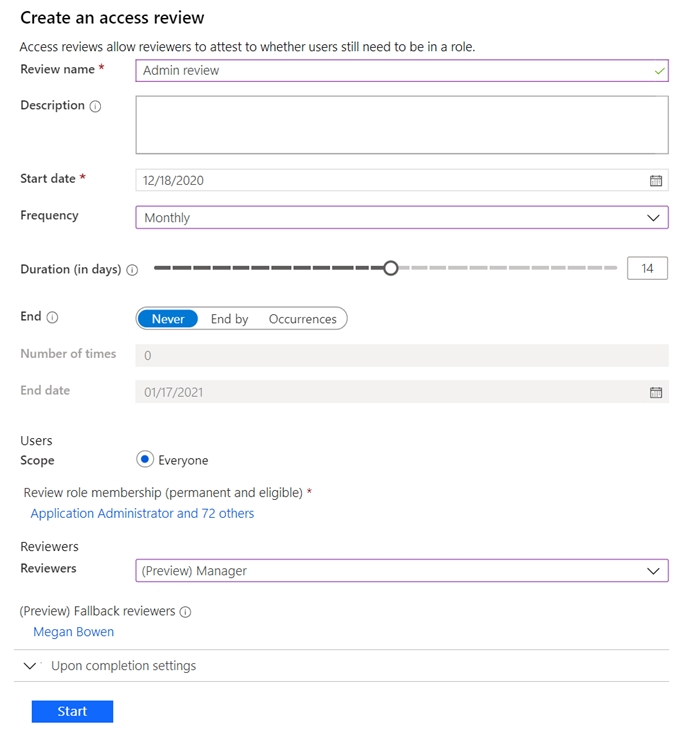
Note: This question is part of a series of questions that present the same scenario. Each question in the series contains a unique solution that might meet the stated goals. Some question sets might have more than one correct solution, while others might not have a correct solution. After you answer a question in this section, you will NOT be able to return to it. As a result, these questions will not appear in the review screen. You have a Microsoft 365 tenant. You have 100 IT administrators who are organized into 10 departments. You create the access review shown in the exhibit. (Click the Exhibit tab.)

You discover that all access review requests are received by Megan Bowen. You need to ensure that the manager of each department receives the access reviews of their respective department. Solution: You modify the properties of the IT administrator user accounts. Does this meet the goal?

Part 1:

Select the correct answer(s) in the image below.

question-image

Pass. Modifying the properties of the IT administrator user accounts can meet the goal because the access review is configured to use “(Preview) Manager” as the reviewer. That setting relies on each reviewed user having the Manager attribute populated in Microsoft Entra ID. If the Manager field is missing for users, Entra ID cannot determine who should review and will send the request to the configured fallback reviewer (Megan Bowen), which matches the observed behavior. To ensure each department manager receives the reviews for their department, you must set each IT admin’s Manager to the correct department manager (or ensure it is correctly synchronized from on-premises AD if hybrid). Once managers are correctly assigned, review requests will be routed to those managers and only users without a manager will go to the fallback reviewer. The alternative (not chosen here) would be changing the review configuration to use specific reviewers per group, but the proposed solution directly addresses the dependency of the “Manager” reviewer type.

4
Question 4

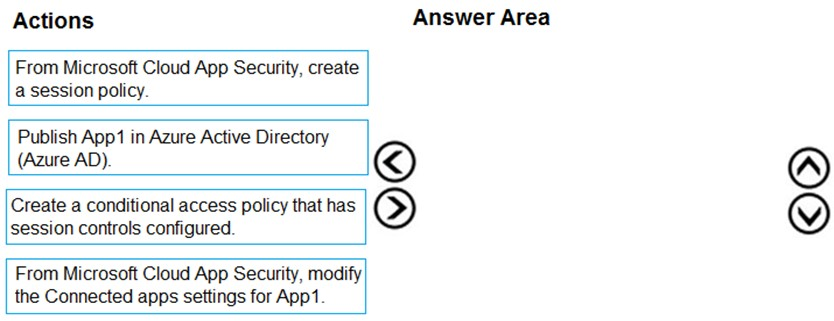
DRAG DROP - You have a Microsoft 365 E5 tenant. You purchase a cloud app named App1. You need to enable real-time session-level monitoring of App1 by using Microsoft Cloud App Security. In which order should you perform the actions? To answer, move the appropriate actions from the list of actions to the answer area and arrange them in the correct order. Select and Place:

Part 1:

Select the correct answer(s) in the image below.

question-image

Pass. The correct action order to enable real-time session-level monitoring with Microsoft Cloud App Security (Defender for Cloud Apps) is: 1) Publish App1 in Azure Active Directory (Azure AD) (so it’s an enterprise app integrated with Entra ID for SSO/Conditional Access targeting). 2) From Microsoft Cloud App Security, modify the Connected apps settings for App1 (configure/onboard the app for Conditional Access App Control/reverse proxy so sessions can be monitored). 3) From Microsoft Cloud App Security, create a session policy (defines the real-time monitoring/controls such as monitor-only, block download, protect downloads, etc.). 4) Create a conditional access policy that has session controls configured (set “Use Conditional Access App Control” to route sessions through the proxy and enforce the session policy). Why others are wrong if ordered differently: creating the Conditional Access policy before the app is published/onboarded can’t correctly target or proxy the app; creating session policy without enabling proxy routing won’t enforce in real time.

5
Question 5

Your network contains an Active Directory forest named contoso.com that is linked to an Azure Active Directory (Azure AD) tenant named contoso.com by using Azure AD Connect. You need to prevent the synchronization of users who have the extensionAttribute15 attribute set to NoSync. What should you do in Azure AD Connect?

Incorrect. An inbound synchronization rule for the Windows Azure Active Directory (Microsoft Entra ID) connector affects how objects from Azure AD flow into the metaverse (Azure AD -> metaverse). It does not control which on-prem AD users are imported and staged for export. Since extensionAttribute15 is sourced from on-prem AD, filtering must be applied on the AD DS connector inbound path.

Incorrect. A Full Import run profile only re-reads objects from a connected directory into the connector space. It does not define filtering criteria. Even if you run Full Import/Full Sync after making changes, the run profile itself is not the mechanism to prevent synchronization; the mechanism is a synchronization rule (scoping/filtering).

Correct. Creating an inbound synchronization rule for the Active Directory Domain Services connector is the standard way to implement attribute-based filtering for objects originating in on-prem AD. You can scope the rule so that users with extensionAttribute15 set to "NoSync" are excluded from being projected/joined into the metaverse, preventing them from ever being exported to Azure AD.

Incorrect. An Export run profile only pushes pending changes from the connector space to the connected directory (for example, metaverse -> Azure AD via the Azure AD connector). It does not decide which objects are in scope for synchronization. If the user is already in the metaverse/connector space, export will attempt to send changes; filtering must be done via synchronization rules, not export configuration.

Question Analysis

Core concept: This question tests Azure AD Connect synchronization filtering using custom synchronization rules in the Azure AD Connect sync engine (Microsoft Entra Connect). Attribute-based filtering is implemented by modifying the metaverse join/projection flow through inbound rules from the on-premises Active Directory connector. Why the answer is correct: The requirement is to prevent synchronization of users when extensionAttribute15 equals "NoSync" in on-premises AD. Because extensionAttribute15 is an AD attribute, the correct place to evaluate it is on the inbound path from Active Directory Domain Services (AD DS) into the metaverse. You create (or clone and customize) an inbound synchronization rule for the AD DS connector that sets a scoping filter (or a transformation that results in the object not being projected/joined) so that objects with extensionAttribute15=NoSync are excluded from synchronization. This ensures those users never enter the metaverse and therefore are not exported to Microsoft Entra ID (Azure AD). Key features and best practices: - Use the Synchronization Rules Editor to create a custom inbound rule (typically by cloning the default “In from AD - User Join”/“In from AD - User Common” pattern) and add a scoping filter: extensionAttribute15 EQUAL NoSync, then configure the rule so those objects are not included (commonly by scoping the rule to include only objects where extensionAttribute15 is NOT NoSync, or by using precedence so the exclusion logic wins). - Keep custom rules separate from default rules (clone rather than edit defaults) to preserve upgradeability. - After changing rules, run a Full Synchronization (Full Import + Full Sync) to ensure the new scoping is applied consistently. Common misconceptions: Many assume filtering should be done on the Azure AD connector because the target is Azure AD. However, inbound rules on the Azure AD connector control how Azure AD objects flow into the metaverse (used mainly in writeback or hybrid scenarios), not how AD objects are selected for export. Run profiles (Full Import/Export) control processing steps, not filtering logic. Exam tips: - If the attribute used for filtering is in on-prem AD, think “AD DS connector inbound rule.” - Use sync rules for inclusion/exclusion; use run profiles only to execute imports/syncs/exports. - Remember rule direction: AD DS inbound = AD to metaverse; Azure AD outbound = metaverse to Azure AD.

Want to practice all questions on the go?

Download Cloud Pass — includes practice tests, progress tracking & more.

6
Question 6

You need to track application access assignments by using Identity Governance. The solution must meet the delegation requirements. What should you do first?

Modifying User consent settings affects whether end users can grant an application permissions to access their data (OAuth scopes) without admin involvement. This is about permission consent, not about assigning users to an enterprise application and tracking those assignments through governance workflows. It does not establish delegated management boundaries or provide access package-based tracking.

Creating a catalog is the correct first step in Entitlement Management when you need delegation. Catalogs define an administrative boundary where catalog owners can add resources (like enterprise applications) and manage access packages. This enables tracking and governance of access assignments with approvals, expirations, and reviews, without requiring global administrators for day-to-day operations.

Creating a program is not the correct first step for this task. To govern and track access assignments in Microsoft Entra entitlement management, you begin by creating a catalog because the catalog is the container that supports delegated administration and resource organization. Only after a catalog exists can you add the enterprise application as a resource and build access packages and policies around it.

Admin consent request settings control how users request admin approval for application permissions (consent) when they can’t consent themselves. This is unrelated to entitlement management’s access assignment tracking and delegation model. It won’t help you delegate who manages access packages or provide lifecycle controls like expiration and access reviews for app assignments.

Question Analysis

Core concept: This question is about Microsoft Entra ID Identity Governance, specifically Entitlement Management, which is used to manage and track access assignments to applications, groups, and SharePoint sites through access packages. Delegation requirements typically mean different people (catalog owners, access package managers, approvers) can manage access without being global admins. Why the answer is correct: To track application access assignments using Identity Governance (Entitlement Management), you must place resources (such as enterprise applications) into a container that can be delegated and managed. The first foundational step is to create a catalog. A catalog is the boundary for delegation: you assign catalog owners who can add resources and create/manage access packages within that catalog. Without a catalog, you can’t properly scope ownership and delegate management of the resources and access packages. Key features and best practices: - Catalogs enable delegated administration by allowing non-admin users to manage resources and access packages within a defined scope. - After creating the catalog, you add the enterprise application as a resource, then create an access package, define policies (who can request, approval, expiration), and use access reviews for ongoing governance. - This aligns with Azure Well-Architected Framework security principles: least privilege, centralized governance, and auditable access lifecycle (request, approval, assignment, review, removal). Common misconceptions: Many candidates confuse “tracking access assignments” with “consent” settings. User/admin consent settings control how OAuth permissions are granted to apps, not how users are assigned to apps over time with governance workflows. Consent is about permissions to the app; entitlement management is about access lifecycle and delegation. Exam tips: If you see “Identity Governance,” “delegation,” “track assignments,” “access packages,” or “Entitlement Management,” think: Catalog -> add resources -> access package -> policies/approvals/reviews. Consent settings (user/admin consent) are typically tested under application registration and enterprise app permission governance, not entitlement management delegation.

7
Question 7

DRAG DROP - You have a Microsoft 365 E5 subscription that contains three users named User1, User2, and User3. You need to configure the users as shown in the following table.

Which portal should you use to configure each user? To answer, drag the appropriate portals to the correct users. Each portal may be used once, more than once, or not at all. You may need to drag the split bar between panes or scroll to view content. NOTE: Each correct selection is worth one point. Select and Place:

Part 1:

User1: User administrator role

Yes. The “User administrator” role is a Microsoft Entra ID (Azure AD) built-in directory role. It grants permissions to manage users and groups (for example, create and delete users, reset passwords for non-admin users, manage group membership), depending on tenant settings and role scope. In the scenario, User1 must be configured with the User administrator role, so the correct selection is Yes. This is not an Exchange, Purview, or Intune RBAC role; it is specifically a directory role used for identity administration. On the exam, keywords like “administrator role” for users/groups typically indicate Entra directory roles unless the question explicitly says “role group” (Exchange) or “compliance role” (Purview) or “Intune role” (Endpoint Manager).

Part 2:

User1: Device Administrators role

Yes. “Device Administrators” is a Microsoft Entra ID (Azure AD) directory role (often seen as “Azure AD Joined Device Local Administrator” capability). Members can be granted local administrator rights on Azure AD-joined devices, depending on device settings. Because the requirement states User1 needs the Device Administrators role, the correct answer is Yes. This is not an Intune RBAC role; Intune RBAC controls management actions inside Intune, whereas “Device Administrators” is a directory role controlling device-level local admin assignment behavior for Azure AD-joined devices. For SC-300, recognize that device-related directory roles still live in Entra ID, not in Exchange or Purview.

Part 3:

User1: Identity Governance Administrator role

Yes. “Identity Governance Administrator” is a Microsoft Entra ID (Azure AD) built-in role used to manage identity governance features such as entitlement management, access reviews, and lifecycle workflows (depending on licensing and feature availability). Since User1 must be configured with the Identity Governance Administrator role, the correct selection is Yes. This is not a Purview compliance role; despite the word “governance,” identity governance is an Entra capability (access packages, access reviews) and is administered through Entra admin experiences. On the exam, “Identity Governance” strongly signals Entra ID rather than Microsoft Purview.

Part 4:

User2: Records Management role

Yes. “Records Management” is a Microsoft Purview (Microsoft 365 compliance) role used for managing records management features such as retention labels, record declaration, and disposition reviews (depending on configuration). Because User2 must be configured with the Records Management role, the correct answer is Yes. This is not an Entra directory role and not an Exchange role group. In exam terms, anything involving retention, records, eDiscovery, audit, or compliance policies is typically assigned in the Microsoft 365 compliance (Purview) portal using compliance role groups/permissions.

Part 5:

User2: Quarantine Administrator role group

Yes. “Quarantine Administrator” is an Exchange Online/EOP-related role group that allows managing quarantined messages (view, release, report). In Microsoft 365, quarantine is part of email security operations tied to Exchange Online Protection/Defender for Office 365. Therefore, if User2 must have the Quarantine Administrator role group, the correct selection is Yes. This is not a Purview records/compliance permission and not an Entra directory role. The key exam clue is the phrase “role group” and the term “Quarantine,” which is administered under Exchange/security mail flow controls rather than Entra ID.

Part 6:

User3: Endpoint Security Manager role

Yes. “Endpoint Security Manager” is an Intune (Microsoft Endpoint Manager) RBAC role. It is used to manage endpoint security features within Intune, such as security baselines, endpoint security policies (AV, firewall, disk encryption), and related configurations. Because User3 must be configured with the Endpoint Security Manager role, the correct answer is Yes. This is not an Entra directory role (those are tenant-wide identity roles) and not an Exchange/Purview role. On SC-300, remember that Intune RBAC roles are assigned in the Endpoint Manager admin center, and they control actions within Intune’s management plane.

Part 7:

User3: Intune Role Administrator role

Yes. “Intune Role Administrator” is an Intune RBAC role that allows managing Intune roles and assignments (RBAC administration) within Microsoft Endpoint Manager. Since User3 must be configured with the Intune Role Administrator role, the correct selection is Yes. This is distinct from Entra roles like Privileged Role Administrator; Intune Role Administrator is scoped to Intune RBAC. The exam pattern: if the role name explicitly contains “Intune,” it is managed in the Microsoft Endpoint Manager admin center, not in Entra admin center.

Part 8:

User1: ______

User1 should be configured in the Azure Active Directory admin center (Microsoft Entra admin center). User1’s required roles—User administrator, Device Administrators, and Identity Governance Administrator—are all Microsoft Entra ID (Azure AD) directory roles. Directory roles are assigned and managed in the Entra/Azure AD portal under Roles and administrators (or via Privileged Identity Management if eligible/just-in-time is used). Exchange admin center is for Exchange role groups, Microsoft 365 compliance center is for Purview compliance permissions, and Endpoint Manager is for Intune RBAC. Therefore, the correct portal for User1 is the Azure Active Directory admin center.

Part 9:

User2: ______

User2 is mapped to the Microsoft 365 compliance center because the Records Management role is a Microsoft Purview compliance role assigned there. However, Quarantine Administrator is an Exchange Online/EOP role group and would normally be assigned in the Exchange admin center. Since this drag-and-drop requires one portal per user, the expected answer is the compliance center for User2 based on the Records Management requirement. The other options are not appropriate overall: Azure AD is for Entra directory roles, Endpoint Manager is for Intune RBAC, and SharePoint admin center is unrelated.

Part 10:

User3: ______

User3 should be configured in the Microsoft Endpoint Manager admin center. Both required roles—Endpoint Security Manager and Intune Role Administrator—are Intune RBAC roles. Intune RBAC roles are created/assigned and scoped (to groups, scope tags, and role assignments) in the Endpoint Manager admin center (Intune admin center). These permissions govern what the user can do inside Intune (device configuration, endpoint security policies, RBAC management). They are not assigned in the Azure AD admin center (unless you are assigning Entra directory roles) and are unrelated to Exchange or Purview. Therefore, the correct portal for User3 is Microsoft Endpoint Manager admin center.

8
Question 8

You have an Azure Active Directory (Azure AD) tenant named contoso.com. You implement entitlement management to provide resource access to users at a company named Fabrikam, Inc. Fabrikam uses a domain named fabrikam.com. Fabrikam users must be removed automatically from the tenant when access is no longer required. You need to configure the following settings: ✑ Block external user from signing in to this directory: No ✑ Remove external user: Yes ✑ Number of days before removing external user from this directory: 90 What should you configure on the Identity Governance blade?

Access packages are used to bundle resources such as groups, applications, and SharePoint sites, and to define assignment policies like requestors, approvals, and expiration. They control who can request access and for how long that access package assignment lasts, but they do not host the tenant-wide external user lifecycle settings listed in the question. The options to block an external user from signing in, remove the external user from the directory, and specify the number of days before removal are not configured per access package. Therefore, Access packages is not the correct blade for these settings.

Entitlement management settings is the correct location because these are tenant-level controls for the lifecycle of external users managed through entitlement management. The specific settings in the prompt—whether to block sign-in, whether to remove the external user, and how many days to wait before removal—are configured in the entitlement management settings area, not on individual resources. This allows Azure AD to automatically clean up guest accounts after their last access package assignment ends, which directly satisfies the requirement to remove Fabrikam users when access is no longer needed. On the exam, when you see external user lifecycle settings tied to entitlement management, think of the settings page rather than package-level configuration.

Terms of use is intended for presenting legal or compliance notices that users must accept before gaining access to resources. It is commonly integrated with Conditional Access to enforce acceptance, but it has nothing to do with guest account deprovisioning or directory cleanup. The settings in the question are specifically about what happens to external users after access is no longer required, which is outside the scope of Terms of use. For that reason, this option is incorrect.

Access reviews settings are used to govern periodic reviews of user access to groups, applications, and privileged roles. They can help determine whether access should be retained or removed, but they do not expose the exact entitlement management guest lifecycle settings named in the prompt. In particular, the controls for blocking external sign-in, removing the external user object, and setting a delayed removal period are part of entitlement management settings, not access review settings. Access reviews may complement entitlement management, but they are not the place to configure this requirement.

Question Analysis

Core concept: This question tests Microsoft Entra ID (Azure AD) Identity Governance, specifically Entitlement Management controls for external (B2B) users and how to automatically remove them from the tenant when they no longer need access. The settings listed (block sign-in, remove external user, and removal delay in days) are tenant-level Entitlement Management lifecycle controls. Why the answer is correct: The three required settings are configured in the Identity Governance > Entitlement management > Settings area (often referred to as “Entitlement management settings”). This is where you define what happens to external users after their last access package assignment ends, including whether they can still sign in and whether they should be automatically removed from the directory after a specified number of days. To meet the requirement, you set: - Block external user from signing in to this directory: No - Remove external user: Yes - Number of days before removing external user from this directory: 90 These settings ensure Fabrikam guest accounts are cleaned up automatically after access is no longer required, supporting least privilege and reducing lingering guest risk. Key features and best practices: - Entitlement Management provides time-bound access via access packages and can enforce expiration and assignment policies. - The “Remove external user” setting is a governance control that helps prevent “guest account sprawl.” - Aligns with Azure Well-Architected Framework security pillar: reduce attack surface, enforce lifecycle management, and automate deprovisioning. - In real-world scenarios, organizations commonly choose a grace period (like 30/60/90 days) to accommodate re-requests without immediate re-invitation overhead. Common misconceptions: Many assume this is configured per access package, but these specific toggles (block sign-in and remove external user with a day count) are not per-package settings; they are Entitlement Management tenant settings that apply to external users governed by entitlement management. Exam tips: - If you see “Remove external user” and “Number of days before removing external user,” think Entitlement management settings (tenant-level), not access reviews. - Access reviews can remove group/app access, but do not directly represent this specific configuration UI. - Terms of use is about user acceptance, not lifecycle removal. (Reference: Microsoft Entra ID Identity Governance documentation for Entitlement management settings and external user lifecycle behavior.)

9
Question 9

Note: This question is part of a series of questions that present the same scenario. Each question in the series contains a unique solution that might meet the stated goals. Some question sets might have more than one correct solution, while others might not have a correct solution. After you answer a question in this section, you will NOT be able to return to it. As a result, these questions will not appear in the review screen. You use Azure Monitor to analyze Azure Active Directory (Azure AD) activity logs. You receive more than 100 email alerts each day for failed Azure AD user sign-in attempts. You need to ensure that a new security administrator receives the alerts instead of you. Solution: From Azure AD, you modify the Diagnostics settings. Does this meet the goal?

Yes is incorrect because Diagnostics settings do not manage Azure Monitor notification recipients. They are used to export Microsoft Entra logs to monitoring or storage destinations and have no role in changing who receives alert emails. To send failed sign-in alerts to a new security administrator, the correct place to make the change is the Azure Monitor action group or alert rule configuration.

No: Adding the GitHub app connector does not enable monitoring of OAuth authentication/consent requests. OAuth requests are best monitored through identity provider signals (Microsoft Entra ID and/or Google Workspace) and OAuth app governance features that track consent grants, permissions, and token issuance. The GitHub connector focuses on GitHub-side events and does not satisfy the stated monitoring requirement by itself.

Question Analysis

Core concept: Microsoft Defender for Cloud Apps (MDCA) app connectors provide visibility and control over activities in connected SaaS apps. Monitoring OAuth authentication requests specifically relates to discovering and governing OAuth-based access (OAuth apps) and the consent/authorization flows that grant tokens to third-party apps. Why the answer is correct: Adding the GitHub app connector from the Microsoft 365 Defender portal does not meet the goal of monitoring OAuth authentication requests. The GitHub connector is designed to ingest GitHub audit/activity data (for example, repository and organization events) into MDCA for governance and threat detection. It does not provide the OAuth app governance signals needed to monitor OAuth consent and token grants that occur in Microsoft Entra ID (Azure AD) or Google Workspace. To monitor OAuth authentication/consent requests, you typically use OAuth app governance capabilities that integrate with Microsoft Entra ID (and, where supported, Google Workspace) to detect and control OAuth apps, risky permissions, and anomalous consent behavior. Key features and best practices: - For Microsoft identities, configure MDCA/Defender for Cloud Apps integration with Microsoft Entra ID (and enable relevant logs) to gain visibility into OAuth apps, permissions, and consent events. - Use OAuth app governance (where available) to assess app publisher verification, permission risk, and to remediate by disabling apps or revoking consent. - Align with Azure Well-Architected Framework (Security pillar): apply least privilege to OAuth permissions, continuously monitor consent, and implement governance controls (admin consent workflows, publisher verification, and conditional access where applicable). Common misconceptions: It’s easy to assume “any app connector” enables OAuth monitoring. In reality, connectors are scoped to the SaaS app’s telemetry. GitHub connector visibility is about GitHub events, not identity-provider OAuth consent flows. OAuth authentication requests are primarily observed at the identity provider (Entra ID/Google) rather than within GitHub’s connector data. Exam tips: For SC-300, distinguish between (1) SaaS activity monitoring via MDCA connectors and (2) OAuth app/consent governance via Entra ID and OAuth app governance. If the question mentions “OAuth authentication/consent requests,” think identity provider integration and OAuth app governance—not a generic SaaS connector like GitHub.

10
Question 10

You have an Azure Active Directory (Azure AD) tenant that: contains a user named User1. You need to ensure that User1 can create new catalogs and add1 resources to the catalogs they own. What should you do?

Incorrect. The Groups administrator role allows management of groups (create/update/delete groups, manage memberships) but does not control Entitlement Management catalog creation. Catalog creation is governed by Entitlement management settings under Identity Governance. Even with Groups administrator, User1 might still be blocked from creating catalogs if tenant settings restrict it.

Incorrect. Service support administrator is a support-oriented role and is unrelated to Identity Governance/Entitlement Management capabilities. It does not grant permissions to create catalogs or manage catalog resources. This option is a distractor that tests whether you can distinguish directory support roles from governance feature permissions.

Correct. In Identity Governance > Entitlement management settings, you configure who can create catalogs and related controls that affect whether catalog owners can add resources. This is the appropriate place to enable User1 (or a group containing User1) to create catalogs and manage resources within catalogs they own, aligning with tenant-wide governance settings.

Incorrect. Modifying roles and administrators for the General catalog affects permissions within that single existing catalog only. It does not grant the ability to create new catalogs. Also, the requirement includes creating new catalogs, which is controlled by Entitlement management settings at the tenant level, not by roles scoped to one catalog.

Question Analysis

Core concept: This question tests Microsoft Entra ID (Azure AD) Identity Governance, specifically Entitlement Management catalogs and the tenant-wide settings that control who can create catalogs and manage resources within catalogs they own. Catalogs are containers for access packages and their resources (groups, apps, SharePoint sites, etc.). Why the answer is correct: To ensure User1 can create new catalogs and add resources to catalogs they own, you must enable/allow catalog creation for non-admin users (or a specific set of users) in Entitlement Management settings. This is done in the Identity Governance (Entitlement management) settings, where you configure who is allowed to create catalogs and whether catalog owners can add resources. These are tenant-level controls; without them, even if a user is a catalog owner, they may be blocked from creating catalogs or adding resources depending on the configured restrictions. Key features and best practices: - Entitlement management settings include “Who can create catalogs” (e.g., admins only vs. all users vs. selected users/groups) and related governance controls. - Catalog owners can manage their catalogs, but their capabilities are bounded by tenant settings and resource-specific permissions (e.g., to add an Azure AD group as a resource, they must have rights to that group or be allowed to request it). - From an Azure Well-Architected Framework perspective (Security and Governance pillars), limiting catalog creation to approved users/groups reduces sprawl and ensures consistent access governance. Common misconceptions: - Assigning Azure AD admin roles (like Groups administrator) does not directly grant Entitlement Management catalog creation rights; those roles govern directory objects, not entitlement management policy. - Modifying roles on the “General” catalog only affects that specific catalog and won’t enable User1 to create new catalogs. Exam tips: - For Entitlement Management, remember the split between (1) tenant-wide Entitlement management settings and (2) per-catalog roles (catalog owner/reader) and per-access-package policies. - If the requirement mentions “create new catalogs,” think tenant settings first. If it mentions “manage a specific catalog,” think catalog roles. - SC-300 commonly tests where to configure Identity Governance features: Identity Governance blade, not Azure AD directory roles.

Other Practice Tests

Practice Test #2

50 Questions·100 min·Pass 700/1000

Practice Test #3

50 Questions·100 min·Pass 700/1000
← View All Microsoft SC-300 Questions

Start Practicing Now

Download Cloud Pass and start practicing all Microsoft SC-300 exam questions.

Get it on Google PlayDownload on the App Store
Cloud PassCloud Pass

IT Certification Practice App

Get it on Google PlayDownload on the App Store

Certifications

AWSGCPMicrosoftCiscoCompTIADatabricks

Legal

FAQPrivacy PolicyTerms of Service

Company

ContactDelete Account

© Copyright 2026 Cloud Pass, All rights reserved.

Want to practice all questions on the go?

Get the app

Download Cloud Pass — includes practice tests, progress tracking & more.