


Practice Test #3
Simulate the real exam experience with 50 questions and a 100-minute time limit. Practice with AI-verified answers and detailed explanations.
AI-Powered
Triple AI-Verified Answers & Explanations
GPT Pro, Claude Opus, and Gemini Pro cross-check every answer and explanation. See the reasoning for each option, requirement breakdowns, and solution architectures.
Practice Questions
You have an Azure Active Directory (Azure AD) tenant named contoso.com. You plan to bulk invite Azure AD business-to-business (B2B) collaboration users. Which two parameters must you include when you create the bulk invite? Each correct answer presents part of the solution. NOTE: Each correct selection is worth one point.
You have a Microsoft 365 tenant. All users have mobile phones and laptops. The users frequently work from remote locations that do not have Wi-Fi access or mobile phone connectivity. While working from the remote locations, the users connect their laptop to a wired network that has internet access. You plan to implement multi-factor authentication (MFA). Which MFA authentication method can the users use from the remote location?
Your company has a Microsoft 365 tenant. The company has a call center that contains 300 users. In the call center, the users share desktop computers and might use a different computer every day. The call center computers are NOT configured for biometric identification. The users are prohibited from having a mobile phone in the call center. You need to require multi-factor authentication (MFA) for the call center users when they access Microsoft 365 services. What should you include in the solution?
Your company recently implemented Azure Active Directory (Azure AD) Privileged Identity Management (PIM). While you review the roles in PIM, you discover that all 15 users in the IT department at the company have permanent security administrator rights. You need to ensure that the IT department users only have access to the Security administrator role when required. What should you configure for the Security administrator role assignment?
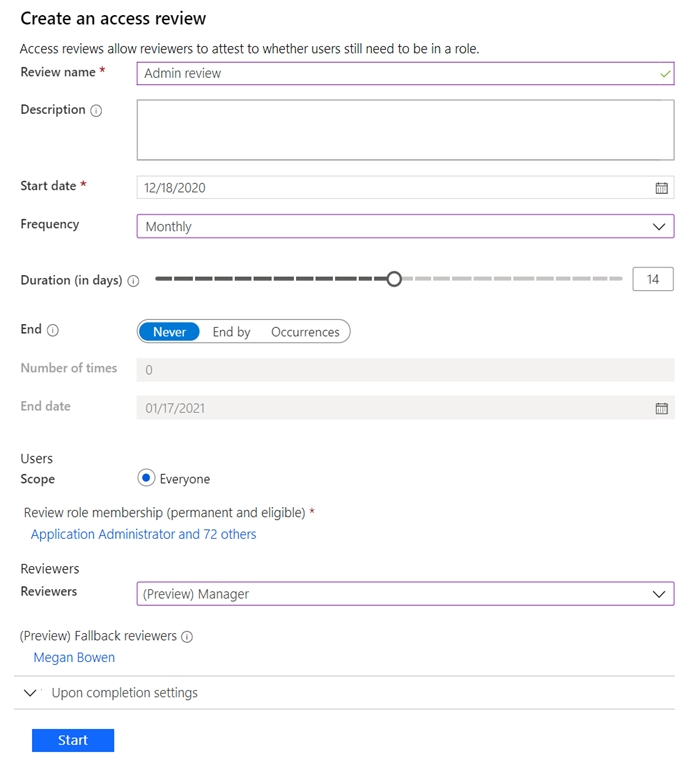
Note: This question is part of a series of questions that present the same scenario. Each question in the series contains a unique solution that might meet the stated goals. Some question sets might have more than one correct solution, while others might not have a correct solution. After you answer a question in this section, you will NOT be able to return to it. As a result, these questions will not appear in the review screen. You have a Microsoft 365 tenant. You have 100 IT administrators who are organized into 10 departments. You create the access review shown in the exhibit. (Click the Exhibit tab.)
You discover that all access review requests are received by Megan Bowen. You need to ensure that the manager of each department receives the access reviews of their respective department. Solution: You set Reviewers to Member (self). Does this meet the goal?
Exhibit:
Does this solution meet the goal?
Keep your exam routine moving
Get timed mock exams, AI explanations, focused review, and learning insights.
You have an Azure Active Directory (Azure AD) tenant that contains the groups shown in the following table.
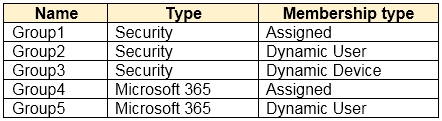
For which groups can you create an access review?
HOTSPOT - You need to meet the technical requirements for the probability that user identities were compromised. What should the users do first, and what should you configure? To answer, select the appropriate options in the answer area. NOTE: Each correct selection is worth one point. Hot Area:
The users must first: ______
You must configure: ______
You have an Azure Active Directory (Azure AD) tenant. You create an enterprise application collection named HR Apps that has the following settings: ✑ Applications: App1, App2, App3 ✑ Owners: Admin1 ✑ Users and groups: HRUsers All three apps have the following Properties settings: ✑ Enabled for users to sign in: Yes ✑ User assignment required: Yes
Visible to users: Yes -
Users report that when they go to the My Apps portal, they only see App1 and App2. You need to ensure that the users can also see App3. What should you do from App3?
The Azure AD licenses must be assigned to the Users group.
The device settings of contoso.com must be configured to allow only the Members group to join devices.
The Users group must be assigned the Cloud device administrator role.
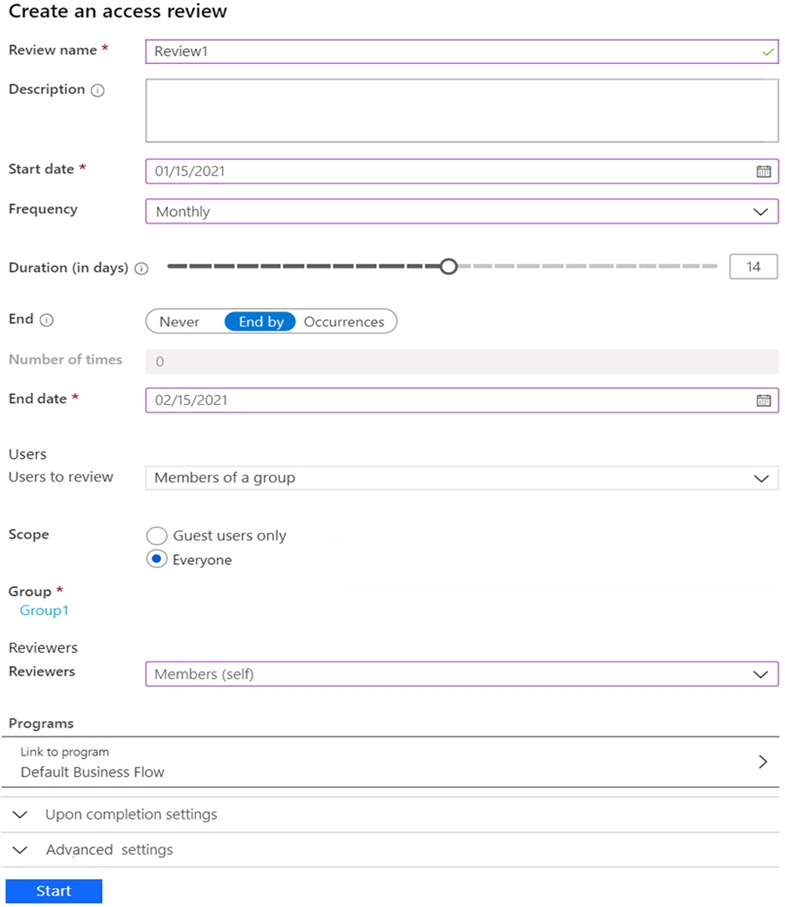
HOTSPOT - You have an Azure Active Directory (Azure AD) tenant that contains the following group: ✑ Name: Group1 ✑ Members: User1, User2 ✑ Owner: User3 On January 15, 2021, you create an access review as shown in the exhibit. (Click the Exhibit tab.)
Users answer the Review1 question as shown in the following table.
For each of the following statements, select Yes if the statement is true. Otherwise, select No. NOTE: Each correct selection is worth one point. Hot Area:
Exhibit:
User1: Do you still need access to Group1?
User2: Do you still need access to Group1?
On February 5, 2021, User1 can answer the Review1 question again.
On January 25, 2021, User2 can answer the Review1 question again.
On January 22, 2021, User3 can answer the Review1 question.
You have an Azure Active Directory (Azure AD) tenant that contains the objects shown in the following table.
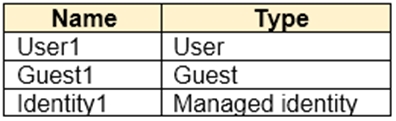
Which objects can you add as eligible in Azure AD Privileged Identity Management (PIM) for an Azure AD role?

Start Practicing Now
Download Cloud Pass and start practicing all Microsoft SC-300 exam questions.

