


Practice Test #1
50問と120分の制限時間で実際の試験をシミュレーションしましょう。AI検証済み解答と詳細な解説で学習できます。
AI搭載
3重AI検証済み解答&解説
すべての解答は3つの主要AIモデルで交差検証され、最高の精度を保証します。選択肢ごとの詳細な解説と深い問題分析を提供します。
練習問題
A regional logistics company on Google Cloud needs to process live telemetry from delivery vans (8,000–12,000 events/second with sub-5-second aggregation windows) while also running hourly batch reconciliations of daily manifests; they have no existing analytics codebase and want a fully managed service that supports both batch and streaming with minimal operations overhead. Which technology should they use?
Google Cloud Dataproc provides managed Hadoop/Spark clusters and is strong for batch ETL and existing Spark streaming jobs. However, it still requires cluster management (node sizing, upgrades, autoscaling policies) and is not the lowest-ops choice. With no existing analytics codebase, adopting Spark plus cluster operations is heavier than using Dataflow’s serverless model for both streaming windowed aggregations and batch reconciliations.
Google Cloud Dataflow is the best fit: a fully managed, serverless service for Apache Beam that supports both streaming and batch with one programming model. It natively handles event-time windowing, triggers, and late data—ideal for sub-5-second aggregations at 8k–12k events/sec. Autoscaling and managed execution minimize operational overhead, and it integrates cleanly with Pub/Sub, BigQuery, Bigtable, and Cloud Storage.
GKE with Cloud Bigtable can be used to build a custom streaming pipeline (e.g., microservices consuming Pub/Sub and writing to Bigtable). Bigtable is excellent for high-throughput, low-latency key-value access, but it is not a stream processing engine. This option increases operational complexity (cluster management, scaling, deployments, observability) and requires building windowed aggregation logic yourself, conflicting with the “fully managed/minimal ops” requirement.
Compute Engine with BigQuery implies running custom processing on VMs and loading results into BigQuery. BigQuery is a managed analytics warehouse and supports streaming inserts, but it does not replace a streaming processing engine for sub-5-second windowed aggregations. Using Compute Engine adds significant operational overhead (VM management, scaling, fault tolerance) and is not the recommended managed approach compared to Dataflow for unified batch and streaming pipelines.
問題分析
Core Concept: This question tests selecting a fully managed data processing service that supports both streaming (low-latency, continuous) and batch (scheduled/periodic) pipelines with minimal operational overhead. In Google Cloud, the canonical choice is Dataflow (Apache Beam managed service). Why the Answer is Correct: The company must ingest 8,000–12,000 events/second and compute sub-5-second aggregations. Dataflow is designed for exactly this: high-throughput streaming with windowing (tumbling/sliding/session windows), triggers, and watermarks to handle out-of-order telemetry. The same service can run hourly batch reconciliations using the same Beam programming model, which is important because they have no existing analytics codebase and want a unified approach rather than maintaining separate systems. Key Features / Best Practices: Dataflow is serverless and autoscaling, reducing ops overhead (no cluster sizing, patching, or capacity planning). For streaming, use Pub/Sub as the ingestion layer and implement fixed windows (e.g., 5 seconds) with appropriate triggers (early/on-time/late) and allowed lateness. Dataflow Streaming Engine can improve performance and reduce worker resource usage for stateful/windowed pipelines. For batch reconciliations, schedule Dataflow batch jobs via Cloud Scheduler/Workflows or orchestrate with Composer if needed. Outputs commonly land in BigQuery for analytics, Bigtable for low-latency lookups, or Cloud Storage for archival. Common Misconceptions: Dataproc is “managed,” but it is still a cluster you operate (lifecycle, sizing, upgrades) and is better when you already have Spark/Hadoop jobs. GKE + Bigtable can handle streaming architectures, but it increases operational burden and requires building/operating custom stream processors. Compute Engine + BigQuery is not a streaming processing service; VMs would host custom code and add significant ops. Exam Tips: When you see “streaming + batch,” “windowing,” “sub-second to seconds latency,” and “fully managed/minimal ops,” think Dataflow. Dataproc is for lift-and-shift Spark/Hadoop; GKE is for custom platforms; Compute Engine is lowest-level and rarely the best answer for managed analytics pipelines. Align with Google Cloud Architecture Framework principles: operational excellence (serverless), performance efficiency (autoscaling), and reliability (managed service).
Your fintech company runs a payment authorization microservice as a Kubernetes Deployment with 12 replicas in a regional GKE Autopilot cluster in us-central1. During rolling updates (maxUnavailable=0, maxSurge=2), production-only configuration mistakes have intermittently caused 5xx errors at ~1,500 RPS because new Pods begin receiving traffic before the bad settings cause runtime failures. You need a platform-level preventive control so that only healthy Pods receive traffic during the rollout and faulty versions do not trigger outages. What should you do?
Correct. Readiness probes are the Kubernetes-native mechanism that determines whether a Pod is added to a Service's endpoints and can receive traffic. During a rolling update, this prevents newly created Pods from serving requests until they have fully initialized and passed health validation. In this scenario, a readiness probe can catch bad production-only configuration before the Pod is considered available, which prevents 5xx errors from the faulty version. Liveness probes may also be useful for self-healing, but the essential preventive control here is readiness.
Incorrect. Managed instance group (MIG) health checks apply to Compute Engine VM-based workloads behind load balancers, not to Kubernetes Pods in a GKE Autopilot cluster. In GKE, Pod health and traffic eligibility are controlled by Kubernetes readiness/liveness probes and (optionally) load balancer integrations, not MIG health checks.
Incorrect. A scheduled task that checks availability is a reactive, external mechanism and typically runs at coarse intervals. It cannot reliably gate traffic at the moment new Pods come online during a rolling update, nor does it integrate with Kubernetes endpoint readiness to automatically exclude unhealthy Pods from receiving requests.
Incorrect. Uptime alerts in Cloud Monitoring detect outages and notify operators after symptoms appear. They do not prevent traffic from reaching newly started Pods, and they do not influence Kubernetes readiness or rollout behavior. Alerts are important for operations, but they are not a preventive rollout control.
問題分析
Core concept: This question tests Kubernetes rollout safety in GKE Autopilot and how to ensure only healthy Pods receive traffic during a Deployment update. The key mechanism is the readiness probe, which controls whether a Pod is added to Service endpoints and therefore eligible to receive requests. Why the answer is correct: With maxUnavailable=0 and maxSurge=2, Kubernetes creates new Pods before removing old ones. If a new Pod is marked Ready too early, it can immediately receive production traffic and cause errors. A properly designed readiness probe verifies that the application has fully initialized and can safely serve requests, including validating configuration and dependency availability. Until the readiness probe succeeds, the Pod is excluded from Service load balancing, which prevents faulty versions from receiving traffic during the rollout. Key features: - Readiness probe: determines whether a Pod should receive traffic through a Service. - startupProbe: useful when startup is slow, so readiness/liveness checks do not fail prematurely. - Liveness probe: helps restart a hung or dead container after it is running, but it is not the primary traffic-gating control. - Meaningful health endpoints should validate real serving readiness, not just that the process has started. Common misconceptions: External monitoring, scheduled checks, and alerts are reactive controls. They can detect failures after impact begins, but they do not integrate with Kubernetes endpoint readiness to prevent traffic from reaching bad Pods during rollout. MIG health checks are also not the mechanism used to control Pod readiness in GKE. Exam tips: When a GKE or Kubernetes question asks how to ensure only healthy Pods receive traffic, the best answer is readiness probes. If the scenario mentions rollout safety, endpoint membership, or preventing bad versions from serving requests, think readiness first; liveness is for restart behavior, not traffic gating.
You operate a healthcare data processing environment on Google Cloud. All Compute Engine VMs run in VPC 'med-analytics-vpc' on subnet 'proc-subnet' (10.24.0.0/20), and an organization policy prohibits any VM from having an external (public) IP. A firewall rule denies ingress tcp:22 from 0.0.0.0/0, and there is no Cloud VPN or Cloud Interconnect to your office network (198.51.100.0/24). You must initiate an SSH session to a specific VM named 'etl-node-03' in us-central1-a for an urgent diagnosis, without assigning any public IPs or opening new inbound internet access. What should you do?
Cloud NAT provides outbound (egress) NAT for instances without external IPs so they can reach the internet. It does not create an inbound endpoint you can SSH to, and you cannot “SSH to the Cloud NAT IP” to reach a VM. NAT is not a reverse proxy or port forwarder. This option confuses outbound connectivity with inbound administrative access.
An external TCP Proxy Load Balancer would expose a public IP and accept inbound connections on port 22, effectively creating new inbound internet access. It also adds unnecessary complexity and is not a recommended pattern for SSH. Additionally, it conflicts with the requirement to avoid opening new inbound access and undermines least-privilege security posture.
IAP TCP forwarding is designed for exactly this scenario: SSH/RDP to VMs that have no external IPs and no VPN connectivity. You authenticate with IAM, then tunnel through IAP using gcloud. The only network change is a targeted firewall rule allowing tcp:22 from 35.235.240.0/20 to the VM (via tag/service account). This preserves a private VM posture and provides auditability.
A bastion host with an external IP introduces a new public ingress path, which violates the requirement to avoid opening new inbound internet access. It may also be blocked by the organization policy prohibiting any VM from having an external IP. Even if allowed, bastions increase operational overhead (patching, hardening, key management) compared to IAP’s managed, identity-centric approach.
問題分析
Core concept: This question tests secure administrative access to private Compute Engine VMs without external IPs or inbound internet exposure. The key service is Identity-Aware Proxy (IAP) TCP forwarding (IAP tunneling), which provides authenticated, authorized access to VM ports (like SSH/22) through Google’s edge, aligning with least privilege and zero-trust principles. Why the answer is correct: You cannot SSH directly because the org policy blocks external IPs and there is no VPN/Interconnect from the office network. You also must not open new inbound internet access. IAP TCP forwarding solves this by letting an admin initiate an SSH session using gcloud with --tunnel-through-iap. The VM remains without a public IP; the connection is established outbound from Google’s infrastructure to the VM over the VPC. The only firewall change required is to allow ingress to tcp:22 from the IAP TCP forwarding IP range (35.235.240.0/20) to the target VM (typically via network tag or service account targeting). Access is controlled by IAM (IAP-secured Tunnel User) and can be audited. Key features / configurations: - Enable IAP for the project (and ensure the VM has connectivity to required Google APIs, typically via Private Google Access on the subnet or appropriate egress). - Grant roles/iap.tunnelResourceAccessor (IAP-secured Tunnel User) to the operator. - Add a narrow firewall rule: allow tcp:22 from 35.235.240.0/20 to the VM (tagged) or its service account. - Use: gcloud compute ssh etl-node-03 --zone us-central1-a --tunnel-through-iap. This approach matches Google Cloud Architecture Framework security guidance: minimize exposure, use centralized identity, and maintain auditability. Common misconceptions: - Cloud NAT (option A) is for outbound internet egress only; it does not accept inbound SSH connections. - Load balancers (option B) and bastion hosts with external IPs (option D) introduce new public entry points, violating the requirement to avoid opening inbound internet access and conflicting with the org policy intent. Exam tips: When you see “no external IPs,” “no VPN,” and “need SSH,” the default best-practice answer is IAP TCP forwarding. Remember the required firewall source range (35.235.240.0/20) and the IAM role requirement. Also distinguish inbound access methods (IAP) from outbound egress tools (Cloud NAT).
Your media analytics team runs a custom regression test harness that executes Linux-native binaries and shell scripts to validate a new codec pipeline; the full suite currently takes about 6 hours on 4 on-premises servers (24 vCPUs total) and must be reduced to under 45 minutes by parallelizing runs without rewriting the tests, with each test job needing a standard Linux VM, a custom startup script, and access to a 50-GB artifact set in Cloud Storage, and the lab triggers 10–20 full runs per workday with peak concurrency of up to 800 short-lived workers during business hours while preferring pay-as-you-go and minimal operational overhead. Which Google Cloud infrastructure should you recommend?
Unmanaged instance groups with a Network Load Balancer are primarily for distributing inbound network traffic to VMs. They don’t provide built-in autoscaling, autohealing, or declarative instance templates, which increases operational overhead for creating/tearing down up to 800 workers. A load balancer also doesn’t solve batch scheduling; the workload is job-driven, not request-driven. You’d end up scripting your own fleet management, which conflicts with “minimal operational overhead.”
Managed instance groups are the best fit: define an instance template (Linux VM + startup script + IAM) and autoscale the group to match demand. Autoscaling can be driven by CPU, but for test harness workers, queue depth (Pub/Sub/Cloud Tasks/custom metric) is usually the correct signal. MIGs also provide autohealing and rolling updates, reducing ops. This supports rapid scale-out to hundreds of short-lived workers and pay-as-you-go cost control.
Dataproc is designed for managed Hadoop/Spark clusters and data processing frameworks. The question explicitly says the harness runs Linux-native binaries and shell scripts and must be parallelized without rewriting tests. Moving to Dataproc would either require packaging tests as Spark/Hadoop jobs or running them awkwardly on cluster nodes, adding complexity and cost (cluster lifecycle, YARN/Spark overhead) without clear benefit for simple VM-based workers.
App Engine is a PaaS for web applications with specific runtimes and request-driven execution. It is not intended for running arbitrary Linux binaries and long-running shell scripts with large local artifacts. While Cloud Logging helps observability, it doesn’t address the core need: rapidly scaling a fleet of ephemeral Linux VMs to run batch jobs. App Engine scaling semantics and sandbox constraints make it a poor match for this workload.
問題分析
Core concept: This question tests choosing the right compute orchestration for bursty, short-lived, Linux VM-based batch workloads that must scale to hundreds of workers with minimal ops. The key services are Compute Engine Managed Instance Groups (MIGs), autoscaling, and automated instance initialization (startup scripts) with artifacts in Cloud Storage. Why the answer is correct: A regional MIG with autoscaling best matches “no test rewrites,” “standard Linux VM,” “custom startup script,” “50-GB artifact set in Cloud Storage,” and “peak concurrency up to 800 short-lived workers.” MIGs provide a VM template (machine type, boot disk image, service account/IAM, metadata startup script) and can scale out/in automatically to meet demand. This enables parallel execution to reduce wall-clock time from 6 hours to <45 minutes by running many tests concurrently. It also aligns with pay-as-you-go: instances exist only while needed, and autoscaling reduces idle cost. Key features / configurations / best practices: Use an instance template with a startup script that pulls the 50-GB artifacts from Cloud Storage (ideally from a regional bucket near the MIG) and runs a single test job, then shuts down. Drive autoscaling from a queue depth metric (e.g., Pub/Sub subscription backlog, Cloud Tasks queue size, or a custom Cloud Monitoring metric) rather than CPU alone, because test runners may be I/O-bound and CPU is not a reliable proxy for “work remaining.” Use preemptible/Spot VMs if tests can tolerate retries to reduce cost. Consider regional MIGs for higher availability and faster capacity acquisition across zones. Ensure quotas (vCPU, instances, API rate limits) are increased to support 800 concurrent VMs. Common misconceptions: Unmanaged instance groups plus a load balancer are for serving traffic, not batch worker fleets, and they lack autoscaling and self-healing. Dataproc is optimized for Spark/Hadoop jobs and would require adapting the harness. App Engine is for HTTP-based application code, not arbitrary Linux binaries. Exam tips: When you see “many identical short-lived workers,” “startup scripts,” “burst to hundreds,” and “minimal ops,” think MIG + autoscaling + queue-driven scaling. Load balancers are for request distribution; batch parallelism typically uses queues and autoscaled worker pools.
Your media company is building a new production environment on Google Cloud in a single VPC named media-prod with a subnet in us-central1 and will connect it to your data center using HA Cloud VPN with Cloud Router (dynamic routing); your on-premises RFC1918 address space is 10.20.0.0/16 and 172.18.0.0/16, and during a 6-month coexistence period every on-prem host must be reachable from Google Cloud and every Google Cloud workload must be reachable from on-prem without using NAT; you will also deploy a GKE cluster using alias IPs that requires two secondary ranges for Pods and Services; how should you plan the Google Cloud IP ranges to avoid reachability problems over the VPN during the migration?
Incorrect. Assigning 10.20.0.0/16 to the Google Cloud subnet overlaps with an on-premises range. With HA VPN + Cloud Router (BGP), both sides would have routes to 10.20.0.0/16, causing ambiguous routing and likely blackholing or asymmetric paths. Mirroring on-prem addressing only works if you are not connected simultaneously or if you use NAT, which is explicitly disallowed.
Incorrect. Even though it adds a non-overlapping secondary range for GKE, it still uses 10.20.0.0/16 as the primary subnet range in Google Cloud, which overlaps with on-prem. That overlap will break reachability during coexistence when routes are exchanged dynamically. The requirement is end-to-end reachability without NAT, which requires all routed prefixes to be unique across the hybrid boundary.
Correct. It uses only non-overlapping ranges for the VPC primary subnet and both GKE secondary ranges (Pods and Services). This ensures deterministic routing over HA VPN with Cloud Router because BGP advertisements won’t conflict with on-prem RFC1918 ranges (10.20.0.0/16 and 172.18.0.0/16). It satisfies the coexistence requirement and aligns with best-practice IP planning for hybrid networks and GKE VPC-native clusters.
Incorrect. Reusing 10.20.0.0/16 as a GKE secondary range still creates an overlap with on-prem. GKE Pod/Service CIDRs are part of the VPC’s IP space and can be advertised/learned across the VPN, leading to conflicting routes. “Policy routing” is not a robust or standard solution for overlapping private ranges across BGP domains and undermines HA and operational simplicity during migration.
問題分析
Core Concept: This question tests hybrid networking IP planning with HA Cloud VPN + Cloud Router (dynamic routing/BGP) and GKE VPC-native (alias IP) clusters. The key concept is that with dynamic routing and a no-NAT requirement, all routed prefixes on both sides must be unique (non-overlapping) to avoid ambiguous routing and broken reachability. Why the Answer is Correct: During the 6-month coexistence period, every on-prem host must be reachable from Google Cloud and every Google Cloud workload must be reachable from on-prem “without using NAT.” With HA VPN + Cloud Router, routes are exchanged via BGP. If any Google Cloud subnet primary range or GKE secondary range overlaps with on-prem RFC1918 ranges (10.20.0.0/16 or 172.18.0.0/16), both sides will have competing routes for the same destination space. That creates asymmetric routing, blackholing, or traffic staying local instead of traversing the VPN. Therefore, you must allocate entirely non-overlapping CIDR blocks in Google Cloud for the VPC subnet and for both GKE secondary ranges (Pods and Services). Option C does exactly that. Key Features / Best Practices: - Cloud Router advertises VPC subnet primary ranges and (when configured/needed) relevant secondary ranges; on-prem routers learn these via BGP. Overlaps break deterministic routing. - GKE VPC-native requires two secondary ranges: one for Pod IPs and one for Service ClusterIPs. These are real IPs used in the network and must be routable across the hybrid link if on-prem needs to reach them. - Google Cloud Architecture Framework (Network and Security pillars): plan IP addressing early, avoid overlaps, and design for clear routing domains. - Practical planning: reserve sufficiently large, non-overlapping blocks (often separate /16s or larger aggregates) to accommodate growth and additional clusters/subnets. Common Misconceptions: A and B seem attractive because reusing on-prem ranges can “simplify cutover,” but that only works if you use NAT or if the environments are never simultaneously connected. Here, coexistence plus no NAT makes overlap unacceptable. D assumes “policy routing” can solve it; in practice, overlapping RFC1918 across BGP domains is brittle and not a supported best-practice for HA VPN/Cloud Router route exchange. Exam Tips: When you see: (1) hybrid connectivity, (2) dynamic routing/BGP, and (3) explicit “no NAT,” immediately choose “non-overlapping CIDRs everywhere,” including GKE secondary ranges. Also remember GKE alias IPs consume VPC secondary ranges that participate in routing and must be planned like any other subnet range.
外出先でもすべての問題を解きたいですか?
Cloud Passをダウンロード — 模擬試験、学習進捗の追跡などを提供します。
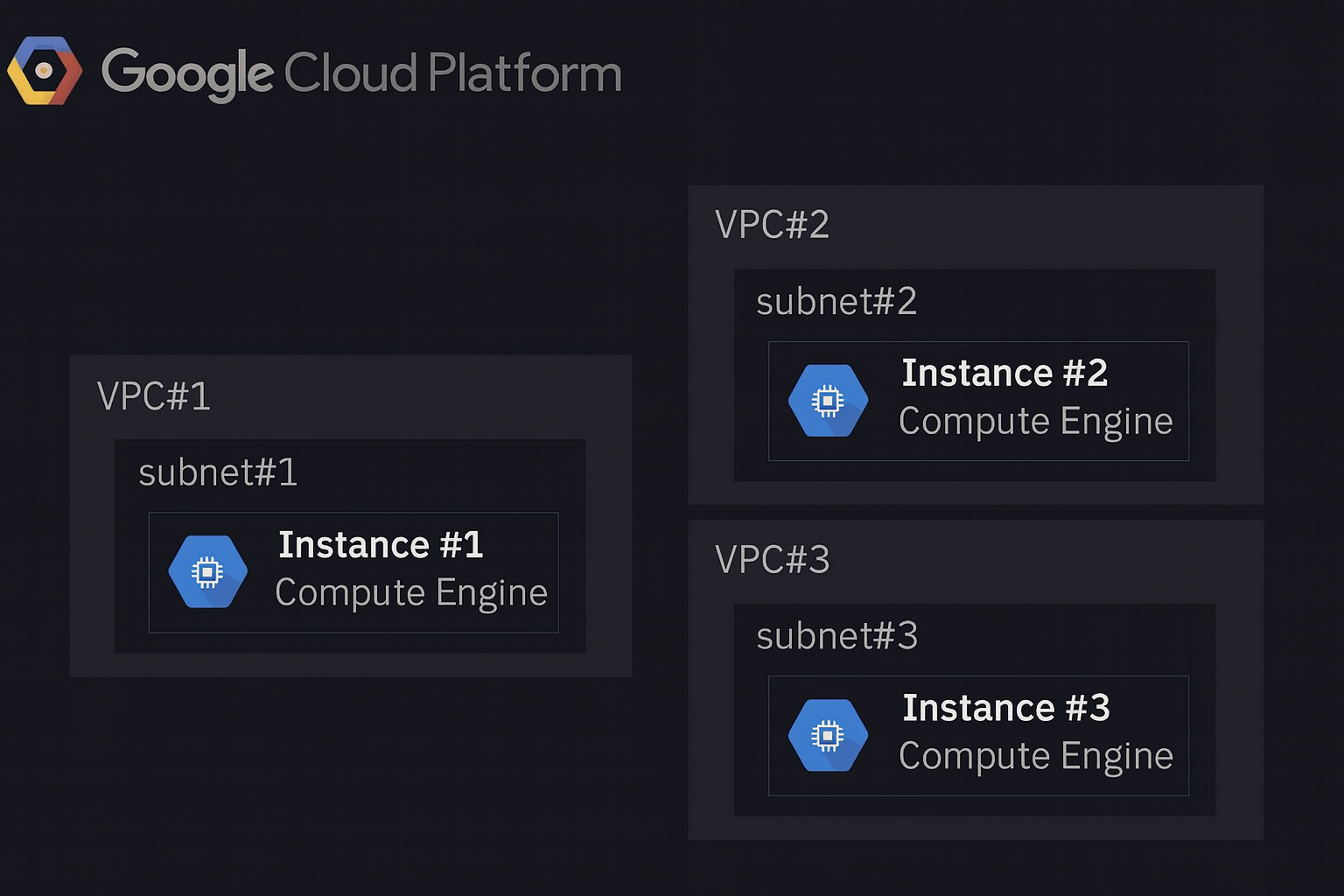
Refer to the dark-mode network diagram shown below: your company has three separate VPCs in Google Cloud, each containing one Compute Engine instance. Subnets do not overlap and must remain isolated. Instance #1 is a special case and must communicate directly with Instance #2 and Instance #3 using internal IP addresses. What should you do?
Cloud Router does not magically make VPCs reachable. It is a control-plane component used to exchange routes dynamically over Cloud VPN or Cloud Interconnect (BGP). Without an underlying connectivity mechanism (VPN/Interconnect/peering), advertising routes from subnet #2/#3 to subnet #1 does not create data-plane connectivity. Also, even with VPN/Interconnect, this would be network-level connectivity, not the “only Instance #1” scoped access requested.
Correct. A multi-NIC Compute Engine instance can attach to multiple VPC networks, giving Instance #1 internal IPs in VPC #1, VPC #2, and VPC #3 simultaneously. This enables direct internal-IP communication from Instance #1 to Instance #2 and Instance #3 while keeping the VPCs isolated from each other (no VPC-to-VPC routing). You then adjust firewall rules in VPC #2 and VPC #3 to allow traffic from Instance #1’s internal IPs.
Two Cloud VPN tunnels would establish VPC #1-to-#2 and VPC #1-to-#3 network connectivity. That violates the requirement that subnets/VPCs must remain isolated, because VPN routing typically enables any permitted resources in VPC #1 to reach VPC #2/#3 (subject to routes and firewall). It also adds operational complexity (HA VPN, Cloud Router/BGP, monitoring) and recurring costs, which is unnecessary for a single-instance requirement.
VPC Network Peering is a network-to-network connectivity feature. Peering VPC #1 with VPC #2 and VPC #1 with VPC #3 would allow resources in VPC #1 (not just Instance #1) to reach resources in VPC #2 and VPC #3 using internal IPs (subject to firewall). This breaks the “must remain isolated” constraint and expands the blast radius. Peering is appropriate when you want broad private connectivity between VPCs, not a single VM exception.
問題分析
Core concept: This question tests VPC isolation and the connectivity patterns available between separate VPC networks: VPC Network Peering, Cloud VPN/Interconnect, and multi-NIC Compute Engine instances. The key requirement is unusual: only Instance #1 must directly reach instances in two other isolated VPCs using internal IPs, while the VPCs/subnets must remain isolated from each other. Why the answer is correct: Adding additional NICs to Instance #1 (one NIC in VPC #2/subnet #2 and one NIC in VPC #3/subnet #3) is the only option that enables Instance #1 to have native, internal-IP presence in each VPC without creating any network-to-network connectivity between the VPCs. With multiple NICs, Instance #1 becomes a dual-/tri-homed host: it can send traffic out the interface that belongs to the destination VPC and reach Instance #2 and Instance #3 via their internal IPs. This preserves the isolation requirement because VPC #2 and VPC #3 are not connected to each other (and VPC #1 is not connected to them at the network layer); only the single VM participates in multiple networks. Key features / configurations: - Compute Engine supports multiple network interfaces (NICs) on a VM (subject to machine type limits). - Each NIC attaches to exactly one VPC network and one subnet, receiving an internal IP from that subnet. - You must update VPC firewall rules in VPC #2 and VPC #3 to allow ingress from Instance #1’s internal IPs (and optionally in VPC #1 depending on return paths). - Ensure OS routing/source-based routing is correct (the guest OS must send traffic to each destination via the correct NIC). Avoid enabling IP forwarding unless intentionally building a router/NVA. Common misconceptions: - Peering (option D) seems simple, but it creates VPC-to-VPC connectivity, violating “must remain isolated,” and it would also allow broader reachability than required. - Cloud VPN (option C) similarly connects networks (and adds cost/ops overhead) rather than limiting connectivity to a single VM. - Cloud Router (option A) is used with BGP for dynamic route exchange for VPN/Interconnect; it does not, by itself, connect isolated VPCs. Exam tips: When you see “only one VM needs access” plus “networks must remain isolated,” think “multi-NIC VM” rather than peering/VPN. Peering/VPN are network-level constructs that generally expand reachability beyond a single instance and require careful justification against isolation requirements.
You are deploying a Cloud Run microservice that persists customer profiles in Cloud Datastore; at startup, the service must preload 50 top-level Profile entities whose numeric IDs are provided by a configuration file, and all entities are root entities with no ancestors; you want to minimize Cloud Datastore operational overhead (number of RPCs and index usage) and reduce retrieval latency; what should you do?
Correct. Constructing Keys for the 50 known numeric IDs and issuing a single batch lookup (Lookup/getAll) minimizes RPC count and latency. Key-based lookups bypass query execution and index scans, reducing Datastore operational overhead. This is the recommended pattern when you already know the entity identifiers and need fast, predictable reads (e.g., startup preloading in Cloud Run).
Incorrect. Separate get operations perform 50 independent RPCs (or at least many more than necessary), increasing cold-start time and tail latency and consuming more Datastore API quota/overhead. While each get is still a key lookup (so it avoids indexes), the question explicitly asks to minimize RPCs and retrieval latency, which batch lookup addresses better.
Incorrect. Building a query to filter by IDs is not the optimal Datastore pattern. Queries rely on indexes and query execution, which adds overhead compared to direct key lookups. Datastore does not support a simple, efficient “ID IN (…)” query equivalent for arbitrary sets of keys in the same way as SQL; even if emulated, it would increase index usage and latency.
Incorrect. One query per entity is the worst of both worlds: it increases RPC count (50 queries) and forces index-based query execution for each entity. This maximizes operational overhead and latency, directly conflicting with the requirement to minimize RPCs and index usage. If you know the IDs, queries are unnecessary; use key lookups instead.
問題分析
Core concept: This question tests the most efficient way to retrieve a known set of entities from Cloud Datastore (Firestore in Datastore mode) when you already have their keys. In Datastore, key-based lookups are the lowest-overhead read path: they avoid query planning, avoid index scans, and can be issued as a single Lookup RPC. Why the answer is correct: Because the service has a configuration file containing 50 numeric IDs for top-level (root) Profile entities, you can deterministically construct the full keys (kind + numeric ID, and project/namespace as applicable). Datastore provides a batch lookup (Lookup API / client library getAll) that accepts multiple keys in one request. This minimizes operational overhead by reducing the number of RPCs from 50 separate reads to (typically) 1 RPC, and it reduces latency by avoiding per-entity round trips and letting the backend fetch entities efficiently. Since entities are root entities with no ancestors, there is no need for ancestor queries or transactional semantics. Key features / best practices: Key-based lookups do not require indexes and do not consume query index resources. Queries (even simple ones) rely on indexes and can introduce additional overhead and latency. Batch lookups are a standard performance pattern for startup warmups and cache preloading. In Cloud Run, reducing startup-time network calls is important for cold-start performance and for controlling downstream load. Also, using a single Lookup request helps with quota efficiency (fewer API calls) and simplifies retry behavior. Common misconceptions: It can be tempting to “filter by ID” using a query, but Datastore queries cannot efficiently filter on the entity key in the same way as a relational IN clause, and queries inherently use indexes and can return results with more overhead than direct key gets. Another misconception is that 50 gets are “small enough”; however, the question explicitly prioritizes minimizing RPCs and latency. Exam tips: When you know exact entity keys, prefer Lookup/get by key (and batch it). Use queries when you need to search by properties, ordering, or ranges. Remember: queries imply index usage; key lookups do not. For Cloud Run and other serverless runtimes, minimizing network round trips during initialization is a common architecture-framework performance optimization.
You operate a latency-sensitive order-matching microservice on Google Kubernetes Engine in us-central1 with a Deployment named matcher-deploy (4 replicas with readinessProbes) exposed internally via a ClusterIP Service named matcher-svc behind an Internal HTTP(S) Load Balancer; you must roll out a new container image gcr.io/acme/matcher:v2 with minimal disruption (no more than 1 pod unavailable at any time) and without recreating the Service or changing the node pool; what should you do?
kubectl set image updates the Deployment’s Pod template and triggers a controlled rolling update. With readinessProbes, new Pods won’t receive traffic until Ready, and the Service/ILB remain unchanged. To guarantee “no more than 1 unavailable,” ensure the Deployment strategy uses RollingUpdate with maxUnavailable=1 (and optionally maxSurge=1). This is the standard, least disruptive way to roll out a new container image on GKE.
Updating the managed instance group for the node pool is an infrastructure rollout (nodes/OS/Kubernetes version), not an application rollout. It does not directly change the container image used by matcher-deploy. It can also cause multiple Pods to be evicted simultaneously during node upgrades unless carefully drained and budgeted, increasing disruption risk. The requirement explicitly says not to change the node pool.
Deleting and recreating the Deployment causes unnecessary disruption: all existing Pods are terminated, and new Pods are created from scratch, which can violate the “no more than 1 pod unavailable” constraint. Even if the Service remains, there will be a period with reduced or zero ready endpoints depending on startup time and readiness. Best practice is to update/apply the Deployment, not delete it.
Services do not reference container images; they select Pods via labels and provide stable networking (ClusterIP) and load balancing. Deleting and recreating the Service can change the ClusterIP (unless explicitly preserved) and can disrupt the Internal HTTP(S) Load Balancer/NEG associations, causing avoidable downtime. Application versioning belongs in the Deployment/Pod template, not the Service.
問題分析
Core Concept: This question tests Kubernetes workload rollout mechanics on GKE—specifically how Deployments perform rolling updates while maintaining availability behind a stable Service and Internal HTTP(S) Load Balancer. It also implicitly tests understanding of readinessProbes, maxUnavailable/maxSurge, and the separation of concerns between Pods/Deployments and Services. Why the Answer is Correct: Using kubectl set image on the Deployment updates the Pod template (spec.image) and triggers a Deployment-managed rolling update. With 4 replicas and readinessProbes, Kubernetes will create new Pods with the v2 image and only send traffic to them once they become Ready. The Service (matcher-svc) remains unchanged, so its virtual IP and the Internal HTTP(S) Load Balancer backend remain stable—meeting the requirement to avoid recreating the Service. To ensure “no more than 1 pod unavailable at any time,” you rely on (or set) the Deployment strategy RollingUpdate with maxUnavailable=1 (and optionally maxSurge=1). This aligns with the Google Cloud Architecture Framework’s reliability principle: controlled change with minimized user impact. Key Features / Best Practices: - Deployment rolling updates: declarative desired state; Kubernetes orchestrates replacement. - readinessProbes: prevent routing to Pods until they are ready, crucial for latency-sensitive services. - RollingUpdate parameters: maxUnavailable enforces availability; maxSurge controls temporary extra capacity (consider cluster capacity/quota). - Service stability: ClusterIP Service abstracts Pods; load balancer targets the Service/NEGs depending on setup, so you don’t touch it. Common Misconceptions: - Updating node pools/MIGs (option B) changes infrastructure, not the application image; it’s slower and riskier for disruption. - Deleting and recreating Deployments/Services (options C/D) causes avoidable downtime, IP/endpoint churn, and breaks the “minimal disruption” requirement. Exam Tips: For GKE, application rollouts are done at the Deployment level (update image/tag, apply manifests). Use readiness/liveness probes plus RollingUpdate settings to meet SLOs. Avoid deleting/recreating Services for routine releases; Services are stable networking primitives. Also remember capacity: maxSurge may require spare resources, so choose values that fit cluster limits.
You are designing an ingestion layer for a cross-continent payment event stream that feeds a reconciliation microservice requiring strict per-merchant FIFO ordering and exactly-once delivery; traffic arrives from 7 regions, spikes to 80,000 events per second, and must be processed end-to-end within 1.5 seconds while using only managed GCP services and avoiding custom brokers. Which products should you deploy to ensure guaranteed-once FIFO delivery and meet the scalability and latency requirements?
Cloud Pub/Sub is an excellent managed ingestion service and can scale to very high throughput with low latency. However, its delivery model is at-least-once, and Pub/Sub alone does not provide end-to-end exactly-once delivery to an application. Ordering can be improved with ordering keys, but strict per-merchant FIFO plus exactly-once processing typically requires a processing layer to enforce sequencing and deduplicate.
Cloud Pub/Sub to Cloud Dataflow is the strongest option because Pub/Sub handles globally distributed, bursty ingestion and Dataflow adds the stream-processing layer needed for keyed ordering and deduplication logic. In Dataflow, you can key records by merchant ID, preserve ordered handling per key, and use state or sequence validation to manage retries and out-of-order arrivals. Dataflow also scales horizontally and is designed for low-latency streaming workloads, making it suitable for 80,000 events per second. However, the exact-once claim should be understood as exactly-once processing semantics within the pipeline or with supported sinks, not an unconditional guarantee for any external microservice endpoint.
Cloud Logging is not an event-stream ingestion and processing platform for high-volume payment events. It is optimized for log collection, retention, and analysis, not for strict FIFO ordering, exactly-once delivery, or sub-second stream processing at 80,000 events/sec. Using Logging as an intermediary would add latency, cost, and complexity without providing the required delivery and ordering guarantees.
Cloud SQL is a relational database, not a high-throughput streaming ingestion layer. Writing 80,000 events/sec directly into Cloud SQL would likely hit connection, write throughput, and scaling limits, and it would not inherently provide per-merchant FIFO processing semantics for a downstream microservice. It also risks increased latency and operational constraints compared to a purpose-built streaming pipeline.
問題分析
Core concept: This question is about choosing a fully managed GCP ingestion and stream-processing design for very high-throughput global events that need per-merchant ordered handling and practical exactly-once processing semantics. The best fit among the options is Cloud Pub/Sub for durable, low-latency global ingestion combined with Cloud Dataflow for scalable stream processing keyed by merchant. Why correct: Pub/Sub can absorb traffic from multiple regions at very high scale with low operational overhead, while Dataflow can process the stream in parallel and maintain per-key state. By using merchant ID as the key, the pipeline can preserve ordered handling per merchant and perform deduplication or sequence checks before forwarding results. This is the only option listed that can realistically satisfy the throughput and latency goals using managed services, though true end-to-end exactly-once to an external microservice still depends on the downstream sink or consumer being idempotent or transaction-aware. Key features: - Cloud Pub/Sub provides globally distributed, managed event ingestion with high throughput and low latency. - Cloud Dataflow supports streaming pipelines with per-key state, timers, checkpointing, autoscaling, and ordered processing patterns. - Pub/Sub ordering keys can help preserve publish order for a given merchant key, while Dataflow can enforce per-merchant sequencing logic and deduplicate retries. - Dataflow is designed for large-scale streaming workloads and can meet low-latency targets when properly tuned. Common misconceptions: A common mistake is to assume Pub/Sub alone guarantees exactly-once delivery and universal FIFO semantics; in practice, Pub/Sub is fundamentally designed around durable messaging and at-least-once delivery, with ordering only within an ordering key. Another misconception is that Dataflow automatically guarantees end-to-end exactly-once delivery to any downstream microservice; exactly-once is strongest within the pipeline and for supported sinks, while external side effects still require idempotency or transactional design. Exam tips: On the PCA exam, when you see global ingestion plus very high throughput, think Pub/Sub. When you also see per-key ordering, stateful stream logic, deduplication, and low-latency processing, add Dataflow. Be careful with wording like 'guaranteed-once delivery'—in many architectures, the managed services can provide exactly-once processing semantics in the pipeline, but end-to-end guarantees depend on the destination behavior.
A nonprofit Earth-observation collective distributes high-resolution satellite imagery bundles for public download (each file 500 MB–3 GB, ~9 TB total), and their audience spans more than 45 countries across 6 continents; they need to minimize download latency for all users and adhere to Google-recommended practices while keeping operations simple. How should they store the files?
Correct. A Multi-Regional Cloud Storage bucket is intended for content accessed by users across broad geographies, providing geo-redundant storage and typically better average read latency than a single regional bucket. It also keeps operations simple: one bucket, one namespace, one set of IAM/policies, and no custom replication or synchronization to manage for global distribution.
Incorrect. Cloud Storage buckets are not zonal resources, so “one bucket per zone” is not a valid or recommended design pattern. Even if interpreted as “one per region,” a single regional location would increase latency for users far from that region and does not meet the requirement to minimize latency for a global audience while following Google-recommended practices.
Incorrect. This option is doubly problematic: it relies on a zonal bucket concept that doesn’t apply to Cloud Storage, and it adds significant operational complexity (multiple buckets, coordination of releases, duplicated IAM/policies, and potential for inconsistent content). While multi-region distribution can reduce latency, Google-recommended practice for simplicity is to use multi-regional storage (and optionally CDN), not many regional buckets.
Incorrect. Creating multiple multi-regional buckets (one per multi-region such as US/EU/ASIA) increases operational overhead and complicates publishing and access management. It can also fragment the dataset and require users to choose the “right” bucket. If the goal is simplicity with broad global access, a single multi-regional bucket is the best fit among the options.
問題分析
Core Concept: This question tests Cloud Storage location strategy for globally distributed content: choosing between regional vs multi-regional buckets to optimize user download latency while keeping operations simple. It also implicitly aligns with Google Cloud Architecture Framework principles around performance optimization, reliability, and operational excellence. Why the Answer is Correct: A Multi-Regional Cloud Storage bucket is designed for serving content to users spread across large geographies with low latency and high availability. With an audience in 45+ countries across 6 continents, placing the data in a single region would create consistently higher latency for users far from that region. A multi-regional bucket stores data redundantly across multiple regions within a broad geography (for example, US, EU, or ASIA), improving read performance and resilience without requiring the team to manage multiple buckets or replication workflows. This matches the requirement to minimize download latency “for all users” as much as possible while keeping operations simple. Key Features / Best Practices: Multi-regional buckets provide geo-redundancy and strong durability, and they reduce operational overhead compared to managing per-region buckets and replication. For public downloads, Cloud Storage also integrates well with Cloud CDN (typically via an external HTTP(S) load balancer) to further reduce latency and offload origin reads; however, the question focuses specifically on storage placement, and multi-regional is the Google-recommended default for widely distributed access patterns when simplicity matters. Common Misconceptions: A common trap is thinking “more buckets in more places” always equals better latency. In practice, multiple buckets introduce complexity: object synchronization, consistency of releases, access control duplication, and operational risk. Another misconception is “one bucket per zone”—Cloud Storage buckets are not zonal resources; they are regional, dual-region, or multi-regional. Exam Tips: When you see “global users + public downloads + keep it simple,” default to Multi-Regional Cloud Storage (or Dual-Region/Multi-Region depending on the choices). If the question instead emphasized data residency, strict regional compliance, or write locality, then Regional (or Dual-Region) plus CDN/replication might be preferred. Also remember: Cloud Storage is not zonal, so any option referencing “per zone buckets” is a red flag.
合格体験記(10)
学習期間: 1 month
Many of the scenario patterns I saw on Cloud Pass showed up in the actual PCA exam. The explanations were detailed, which helped strengthen my weak areas. I’ll definitely use this app again for other GCP exams.
学習期間: 1 month
실제 시험 문제하고 유사했던게 15개 이상 나온거 같아요! 굿굿
学習期間: 1 month
앱 너무 좋네요
学習期間: 2 weeks
These questions forced me to deeply understand GCP networking, IAM, storage trade-offs, and high-availability design. After a month of consistent practice, I finally passed my PCA exam. Amazing app!
学習期間: 1 month
I passed on the first try. The practice questions were tough but very close to the real exam. The explanations helped me understand why each answer was correct. Highly recommended.

今すぐ学習を始める
Cloud Passをダウンロードして、すべてのGoogle Professional Cloud Architect練習問題を利用しましょう。

