


Practice Test #4
50問と100分の制限時間で実際の試験をシミュレーションしましょう。AI検証済み解答と詳細な解説で学習できます。
AI搭載
3重AI検証済み解答&解説
すべての解答は3つの主要AIモデルで交差検証され、最高の精度を保証します。選択肢ごとの詳細な解説と深い問題分析を提供します。
練習問題
Note: This question is part of a series of questions that present the same scenario. Each question in the series contains a unique solution that might meet the stated goals. Some question sets might have more than one correct solution, while others might not have a correct solution. After you answer a question in this section, you will NOT be able to return to it. As a result, these questions will not appear in the review screen. You have a hybrid configuration of Azure Active Directory (Azure AD). You have an Azure HDInsight cluster on a virtual network. You plan to allow users to authenticate to the cluster by using their on-premises Active Directory credentials. You need to configure the environment to support the planned authentication. Solution: You deploy Azure Active Directory Domain Services (Azure AD DS) to the Azure subscription. Does this meet the goal?
Yes is correct because Azure AD DS provides a managed AD DS-compatible domain in Azure that supports LDAP and Kerberos, which are commonly required for HDInsight Enterprise Security Package (ESP) authentication. In a hybrid setup, users synchronized from on-premises AD to Azure AD can be surfaced in Azure AD DS, enabling them to authenticate using their existing on-premises credentials. By deploying Azure AD DS into the subscription and integrating the HDInsight cluster (domain join, DNS configuration), the environment can support domain-based authentication without deploying and managing domain controller VMs.
No is incorrect because the requirement is to allow authentication using on-premises Active Directory credentials, which implies domain-based authentication mechanisms (for example, Kerberos/LDAP) rather than Azure AD-only sign-in. Azure AD DS is specifically designed to provide those AD DS protocols as a managed service in Azure and is a supported approach for enabling HDInsight ESP domain integration. While there are alternative implementations (such as deploying AD DS domain controllers on Azure VMs), the proposed solution can meet the goal, so answering No would wrongly assume Azure AD DS cannot satisfy the requirement.
問題分析
Core concept: This question tests how to enable domain-based (on-premises AD) authentication for an Azure HDInsight cluster deployed into a virtual network, in a hybrid identity environment. Why the answer is correct: HDInsight supports Enterprise Security Package (ESP) scenarios where cluster authentication/authorization is integrated with a domain (Kerberos/LDAP) so users can sign in using domain credentials. Deploying Azure Active Directory Domain Services (Azure AD DS) provides a managed domain in Azure that is compatible with traditional AD DS protocols (LDAP/Kerberos/NTLM) and can be joined to from resources in an Azure VNet. In a hybrid Azure AD setup, user identities synchronized from on-premises AD to Azure AD can be made available in Azure AD DS, allowing those users to authenticate to the HDInsight cluster using their existing on-premises credentials (same username/password as synchronized). Therefore, deploying Azure AD DS is a valid way to meet the requirement of authenticating to HDInsight using on-premises AD credentials. Key features / configurations: - Azure AD DS provides managed domain services: LDAP, Kerberos, NTLM, Group Policy, and domain join. - Deploy Azure AD DS into the same (or peered) VNet as the HDInsight cluster and configure VNet DNS to point to the Azure AD DS domain controller IPs. - Use HDInsight Enterprise Security Package (ESP) and domain-join the cluster to the Azure AD DS managed domain. - Ensure Azure AD Connect is syncing users (and typically password hash sync) so credentials work consistently. Common misconceptions: - Confusing Azure AD (cloud identity) with AD DS (domain services). Azure AD alone does not provide Kerberos/LDAP domain join required for many HDInsight ESP integrations. - Assuming you must deploy full IaaS domain controllers in Azure; Azure AD DS can satisfy the domain requirement as a managed service. - Thinking pass-through authentication is required; for Azure AD DS, password hash synchronization is commonly used to enable sign-in with the same password. Exam tips: - If a service needs LDAP/Kerberos/domain join in Azure, consider Azure AD DS (managed) or AD DS on VMs. - For HDInsight with domain-based auth, look for “Enterprise Security Package (ESP)” + domain integration. - Remember to update VNet DNS settings when introducing Azure AD DS so domain join and lookups work.
You have an Azure SQL database. You implement Always Encrypted. You need to ensure that application developers can retrieve and decrypt data in the database. Which two pieces of information should you provide to the developers? Each correct answer presents part of the solution. NOTE: Each correct selection is worth one point.
A stored access policy is used with Azure Storage to control shared access signatures for blobs, files, queues, or tables. It has no role in Azure SQL Database Always Encrypted. Always Encrypted relies on SQL key metadata and external key stores such as Azure Key Vault, not Storage access policies. Therefore, this option is unrelated to decrypting SQL data.
A shared access signature grants delegated access to Azure Storage resources and is not used by Azure SQL Database Always Encrypted. Decryption of Always Encrypted data depends on the CEK and CMK hierarchy, not on Storage tokens. Even if Azure Key Vault is involved, access is managed through identity and key permissions rather than SAS. This makes SAS irrelevant in this scenario.
The Column Encryption Key is the key that directly encrypts the data in Always Encrypted columns. The client driver needs the CEK metadata from the database so it knows which encrypted CEK to use for a given column and can decrypt the data after unwrapping that CEK. Although the CEK is stored encrypted in the database, it is still one of the essential pieces of information involved in the decryption process. Without the CEK definition and metadata, the client cannot determine how to decrypt the protected column values.
User credentials allow a developer or application to authenticate to Azure SQL Database, but they are not one of the two specific pieces of Always Encrypted information needed for decryption. The question is focused on the encryption architecture, which depends on the CEK and CMK. Authentication alone does not enable decryption unless the client also has the necessary key metadata and access to the CMK. Therefore, credentials are necessary operationally but not the intended answer here.
The Column Master Key is required because it protects, or wraps, the Column Encryption Key. The client driver uses the CMK from an external trusted key store, such as Azure Key Vault, to unwrap the encrypted CEK retrieved from the database. Once the CEK is unwrapped, the driver can decrypt the column data locally. This makes the CMK a fundamental requirement for any application that must read plaintext from Always Encrypted columns.
問題分析
Core concept: Always Encrypted uses a two-level key hierarchy to protect sensitive data in Azure SQL Database. The Column Encryption Key (CEK) encrypts the actual column data, and the Column Master Key (CMK) protects the CEK. The client application driver uses metadata about both keys to retrieve encrypted values and decrypt them locally. Why correct: To decrypt Always Encrypted data, developers need information about the CMK and the CEK. The CMK identifies the trusted key store location and key used to protect CEKs, while the CEK metadata tells the client driver which encrypted CEK applies to the column data. Together, these allow the driver to unwrap the CEK and decrypt the column values on the client side. Key features: Always Encrypted performs encryption and decryption in the client driver, not in the database engine. The database stores encrypted column values and encrypted CEKs, along with metadata describing which keys are used. The CMK is stored externally, often in Azure Key Vault or a certificate store, while the CEK is defined in the database and referenced by encrypted columns. Common misconceptions: A frequent mistake is assuming normal database user credentials are one of the required pieces of Always Encrypted information. Credentials may be needed to connect to the database, but they are not part of the Always Encrypted keying information the question is targeting. Another misconception is confusing Azure Storage concepts like SAS or stored access policies with SQL encryption features. Exam tips: For Always Encrypted questions, focus on the key hierarchy: CMK protects CEK, and CEK protects the data. If asked what is needed for decryption, think about both levels of key metadata rather than generic authentication details. Storage access mechanisms such as SAS are unrelated unless the question explicitly mentions Azure Storage.
DRAG DROP - You have an Azure subscription that contains 100 virtual machines. Azure Diagnostics is enabled on all the virtual machines. You are planning the monitoring of Azure services in the subscription. You need to retrieve the following details: ✑ Identify the user who deleted a virtual machine three weeks ago. ✑ Query the security events of a virtual machine that runs Windows Server 2016. What should you use in Azure Monitor? To answer, drag the appropriate configuration settings to the correct details. Each configuration setting may be used once, more than once, or not at all. You may need to drag the split bar between panes or scroll to view content. NOTE: Each correct selection is worth one point. Select and Place:
Identify the user who deleted a virtual machine three weeks ago: ______
Correct: Activity log. VM deletion is an Azure Resource Manager (control-plane) operation. The Activity log records subscription-level events for create/update/delete actions and includes the initiating identity (caller), which allows you to identify the user who deleted the VM three weeks ago (assuming the event is still within the retention window or exported to a workspace/storage for longer retention). Why others are wrong: - Logs: Azure Monitor Logs (Log Analytics) is primarily for querying telemetry and logs sent to a workspace (guest OS logs, application logs, diagnostics). It is not the primary authoritative record for ARM delete operations unless you explicitly export Activity log to a workspace. - Metrics: metrics are numeric time-series (CPU, disk, etc.) and do not capture “who deleted a VM.” - Service Health: provides information about Azure platform incidents and maintenance, not user-initiated resource deletions.
Query the security events of a virtual machine that runs Windows Server 2016: ______
Correct: Logs. Querying “security events” from a Windows Server 2016 VM means querying Windows Security Event Log entries (for example, Event ID 4624/4625 logons, audit events). These are guest OS logs and are queried in Azure Monitor using Logs (Log Analytics) with KQL, provided the VM is configured to send Security events to a Log Analytics workspace (via Azure Monitor Agent or legacy agent + data collection rules/settings). Why others are wrong: - Activity log: captures Azure management operations (ARM) such as VM start/stop/delete, not in-guest Windows Security events. - Metrics: cannot provide detailed security event records; it only provides aggregated numeric measurements. - Service Health: unrelated to VM guest security events; it reports Azure service incidents/advisories/maintenance.
You need to meet the technical requirements for VNetwork1. What should you do first?
Creating a new subnet is only appropriate when requirements explicitly call for additional segmentation, address space separation, or dedicated subnets for services (e.g., AzureFirewallSubnet, GatewaySubnet). It does not inherently improve security posture unless paired with routing/NSGs/firewalls. If the issue is that an existing subnet lacks an NSG, adding a new subnet is unnecessary and doesn’t meet the immediate control requirement.
Removing NSGs from Subnet11 and Subnet13 reduces network segmentation and violates least-privilege principles. NSGs are commonly required to restrict inbound/outbound flows and to control east-west traffic. This option might seem appealing if someone assumes NSGs are causing connectivity issues, but the prompt is about meeting technical requirements for VNetwork1, which typically implies adding/enforcing controls, not removing them.
Associating an NSG to Subnet12 ensures consistent subnet-level traffic filtering across VNetwork1. This is the correct first step when a subnet is unprotected or when requirements specify controlling traffic to resources in that subnet. It aligns with best practices to apply NSGs at the subnet boundary for baseline protection and to implement segmentation, while allowing more granular rules via ASGs or NIC-level NSGs if needed.
Configuring DDoS protection for VNetwork1 (typically DDoS Network Protection Standard) helps mitigate large-scale volumetric and protocol attacks and provides enhanced telemetry and cost protection. However, it does not control which ports/protocols are allowed between subnets or from the internet. If the requirement is about subnet security rules or restricting traffic, DDoS protection is not the first or primary control to implement.
問題分析
Core concept: This question tests Azure network security controls at the subnet level, specifically Network Security Groups (NSGs). In Azure, NSGs are the primary Layer 4 (TCP/UDP) stateful filtering mechanism used to control inbound and outbound traffic to subnets and NICs. A common security baseline requirement is that every subnet hosting workloads must be protected by an NSG (or equivalent control such as Azure Firewall in a hub-and-spoke design), aligning with the Azure Well-Architected Framework (Security pillar: implement network segmentation and least privilege). Why the answer is correct: To meet technical requirements for VNetwork1, the most likely gap is that one subnet (Subnet12) is missing an NSG association while others (Subnet11 and Subnet13) already have NSGs. The first action should be to associate an NSG to Subnet12 so that traffic to/from resources in that subnet can be explicitly allowed/denied. Without an NSG, the subnet relies only on default system routes and any upstream controls; in many exam scenarios, that fails a stated requirement such as “all subnets must be protected by an NSG” or “restrict traffic between subnets.” Associating an NSG is the minimal, direct change that enforces policy at the correct scope. Key features / best practices: NSGs provide default rules plus custom rules with priorities, service tags, and application security groups (ASGs) for scalable rule management. Subnet-level NSGs apply to all NICs in the subnet (in addition to any NIC-level NSG). For exam readiness, remember: NSGs are stateful, evaluated by priority, and can be used to segment east-west traffic between subnets. Common misconceptions: Removing NSGs (option B) weakens security and rarely satisfies “meet requirements.” Creating a new subnet (option A) doesn’t address missing enforcement unless requirements explicitly call for additional segmentation. DDoS protection (option D) is valuable for availability but does not replace NSG-based traffic filtering; it mitigates volumetric attacks rather than enforcing access rules. Exam tips: When you see “meet technical requirements for a VNet/subnet” and options include NSG association, first ensure each required subnet has the correct NSG applied. DDoS Standard is chosen when requirements mention attack mitigation, telemetry, and SLA credits—not basic subnet traffic control.
DRAG DROP - You have an Azure subscription named Sub1 that contains an Azure Log Analytics workspace named LAW1. You have 500 Azure virtual machines that run Windows Server 2016 and are enrolled in LAW1. You plan to add the System Update Assessment solution to LAW1. You need to ensure that System Update Assessment-related logs are uploaded to LAW1 from 100 of the virtual machines only. Which three actions should you perform in sequence? To answer, move the appropriate actions from the list of actions to the answer area and arrange them in the correct order. Select and Place:
Exhibit:
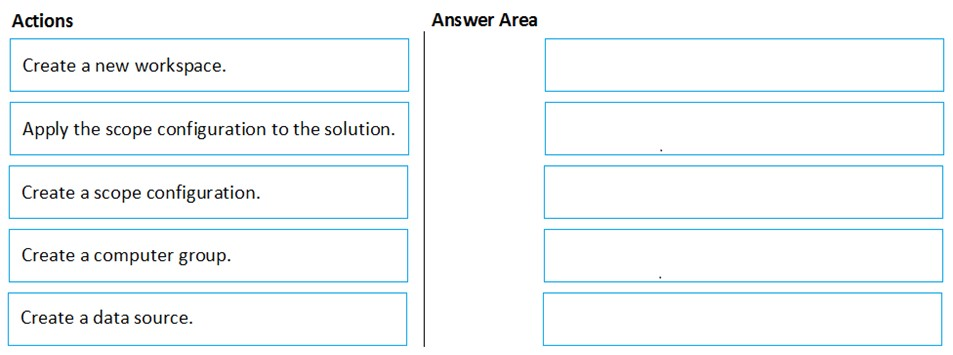
Which sequence limits System Update Assessment data collection to the target 100 VMs?
A computer group defines the target machines. A scope configuration references that group, and the solution uses the scope configuration to limit which machines upload System Update Assessment data.
外出先でもすべての問題を解きたいですか?
Cloud Passをダウンロード — 模擬試験、学習進捗の追跡などを提供します。
You have an Azure subscription named Sub1 that contains the virtual machines shown in the following table.
| Name | Resource group |
|---|---|
| VM1 | RG1 |
| VM2 | RG2 |
| VM3 | RG1 |
| VM4 | RG2 |
You need to ensure that the virtual machines in RG1 have the Remote Desktop port closed until an authorized user requests access. What should you configure?
Azure AD Privileged Identity Management (PIM) provides just-in-time elevation for privileged roles in Azure AD and Azure RBAC, such as Global Administrator or Owner. It helps control who can activate administrative permissions and for how long, but it does not manage inbound network access to a VM. Even if a user activates a privileged role through PIM, TCP 3389 would still need to be controlled separately through networking rules. Therefore, PIM addresses identity governance rather than temporary opening and closing of the RDP port.
An application security group (ASG) is used to logically group virtual machine NICs so that NSG rules can target those groups more easily. This simplifies rule administration, especially when multiple VMs need the same network policy, but it does not provide request-based or time-limited access. If RDP were allowed through an NSG rule referencing an ASG, that access would remain in place until an administrator changed the rule. As a result, ASGs help organize security rules but do not meet the requirement to keep RDP closed until an authorized user requests access.
Azure AD Conditional Access evaluates sign-in conditions for Azure AD-authenticated applications and services, such as requiring MFA, compliant devices, or trusted locations. It is focused on authentication and authorization decisions at the identity layer, not on controlling inbound traffic to a VM's network port. Remote Desktop exposure on TCP 3389 is governed by NSGs, Azure Firewall, or similar network controls, not Conditional Access policies. Therefore, Conditional Access cannot ensure that the RDP port remains closed until a user requests temporary access.
Just-in-time (JIT) VM access is the Azure feature specifically designed to reduce exposure of management ports such as RDP (3389) and SSH (22). It keeps those ports closed by default and allows an authorized user to request temporary access for a defined duration and, optionally, only from a specific source IP address or range. In Azure, JIT is typically configured through Microsoft Defender for Cloud and implemented by modifying NSG or Azure Firewall rules on demand. This directly satisfies the requirement that the virtual machines in RG1 have Remote Desktop closed until access is explicitly requested.
問題分析
Core concept: This question tests controlling management-plane access to Azure VMs (RDP/SSH) by keeping inbound management ports closed by default and opening them only when needed. In Azure, the purpose-built capability for this is Just-In-Time (JIT) VM access, delivered through Microsoft Defender for Cloud and enforced via NSG rules (or Azure Firewall) on the VM’s network path. Why the answer is correct: You must ensure VMs in RG1 have the Remote Desktop port (TCP 3389) closed until an authorized user requests access. JIT VM access does exactly that: it removes/blocks persistent inbound access to management ports and, upon an approved request, temporarily opens the port for a specific source IP range and a limited time window. After the time expires, the rule is automatically reverted, restoring the closed posture. This aligns with least privilege and reduces exposure to brute-force attacks and internet scanning. Key features / configuration points: - Enabled per VM (or at scale) and can be scoped to VMs in RG1. - Controls ports like 3389 (RDP) and 22 (SSH), with configurable allowed ports, source IPs, and maximum request duration. - Uses NSG rule automation (or firewall rules) to open access only when requested. - Integrates with Azure RBAC: only users with appropriate permissions can request JIT access. - Supports auditing of requests and access events, improving security operations and compliance. Common misconceptions: - PIM and Conditional Access govern identity and access to Azure resources/apps, not inbound network ports to VMs. - Application Security Groups help simplify NSG targeting, but they don’t provide time-bound, on-demand port opening. Exam tips: If the requirement mentions “close RDP/SSH until requested,” “temporary access,” or “reduce attack surface for management ports,” the expected answer is JIT VM access (Defender for Cloud). Map it to Azure Well-Architected Framework Security pillar: minimize exposure, enforce least privilege, and enable auditing.
Your company has an Azure Active Directory (Azure AD) tenant named contoso.com. You plan to create several security alerts by using Azure Monitor. You need to prepare the Azure subscription for the alerts. What should you create first?
An Azure Storage account is commonly used as a diagnostic destination for archiving logs cheaply or meeting long-term retention requirements. However, Azure Monitor alert rules (especially log query alerts) do not require a storage account to exist. Storage is optional for retention/archival and is not the primary prerequisite to create security alerts in Azure Monitor.
A Log Analytics workspace is the foundational component for Azure Monitor Logs. Most security-focused Azure Monitor alerts are scheduled query (log) alerts that run KQL queries against Log Analytics data. Creating the workspace first enables you to ingest Azure AD logs, Activity Logs, and resource diagnostics, then build alert rules on top of that centralized telemetry.
An Azure Event Hub is used to stream logs/events to external systems (for example, a third-party SIEM) or for near-real-time event processing. While it can be a diagnostic destination, Azure Monitor alerting does not require Event Hubs. It’s an integration/streaming choice, not the first step to prepare an Azure subscription for Azure Monitor security alerts.
An Azure Automation account is used for runbooks, update management (legacy), and automation tasks. It can be invoked by an alert action (via webhook/logic app) to remediate issues, but it is not required to create Azure Monitor alerts. You typically create automation only after alerts exist and you’ve defined response workflows.
問題分析
Core concept: Azure Monitor alerts are rule-based notifications that evaluate signals (metrics, logs, activity log, resource health, etc.). For security alerts that rely on log queries (KQL), Azure Monitor uses Log Analytics as the data platform. Many AZ-500 scenarios implicitly mean “scheduled query” (log) alerts, which require a Log Analytics workspace. Why the answer is correct: To create several security alerts using Azure Monitor, you typically collect and centralize security-relevant telemetry (Azure Activity logs, Azure AD sign-in/audit logs, resource diagnostic logs, VM security events, etc.) into a Log Analytics workspace. Azure Monitor log alerts (Scheduled query rules) run KQL queries against a workspace (or against a supported resource that is connected to a workspace). Without a workspace, you can still create metric alerts, but you cannot build the common security-focused log-based detections that query sign-ins, audit events, and diagnostic logs. Therefore, the first prerequisite to “prepare the subscription” for these alerts is creating a Log Analytics workspace. Key features / best practices: - Centralized log ingestion and retention: configure retention based on compliance needs and cost (Well-Architected: Cost Optimization + Security). - Enable diagnostic settings on key resources (Azure AD logs, subscription Activity Log, Key Vault, NSGs, firewalls, etc.) to send logs to the workspace. - Use Azure Monitor alert rules with action groups (email/SMS/ITSM/webhook) once data is flowing. - Consider workspace region alignment, RBAC (Log Analytics Reader/Contributor), and data access controls. Common misconceptions: - Storage accounts are used for archival/long-term retention via diagnostic settings, but they are not required to create Azure Monitor alerts. - Event Hubs are for streaming logs to SIEMs or external tools; not required for Azure Monitor alerting. - Automation accounts can run runbooks as a response, but they are not a prerequisite for creating alerts. Exam tips: If the question mentions “Azure Monitor alerts” and “security alerts” without specifying “metric alerts,” assume log-based detections and think “Log Analytics workspace first.” Also remember the typical flow: create workspace -> send logs/diagnostics to workspace -> create alert rules -> attach action groups/automation for response.
You have an Azure Active Directory (Azure AD) tenant named contoso.com that contains a user named User1. You plan to publish several apps in the tenant. You need to ensure that User1 can grant admin consent for the published apps. Which two possible user roles can you assign to User1 to achieve this goal? Each correct answer presents a complete solution. NOTE: Each correct selection is worth one point.
Security administrator primarily manages security-related features (security policies, alerts, identity protection configurations, and some Conditional Access-related tasks depending on scope). This role is not intended for application lifecycle management and typically does not include the ability to grant tenant-wide admin consent for application permissions. It’s a common distractor because it sounds broadly privileged, but it’s not the correct capability for app consent.
Cloud application administrator can manage all aspects of enterprise applications, including configuring and managing app access and consent. This role is commonly used to manage SaaS apps and service principals in the tenant and can grant admin consent on behalf of the organization. It aligns with least-privilege for app management compared to Global Administrator, making it a correct choice for enabling admin consent.
Application administrator can manage app registrations and enterprise applications and is one of the standard roles that can grant admin consent for app permissions. This role is designed for application management tasks (registration, configuration, permissions/consent operations) without granting full directory-wide administrative power. It is a correct role assignment to allow User1 to grant admin consent for published apps.
User administrator can create and manage users and groups and handle some access-related tasks (like password resets and user properties). However, it does not provide the necessary permissions to manage application consent at the tenant level. It may appear plausible because it’s an administrative role, but it’s focused on identity objects rather than application permission governance.
Application developer (or similar developer-focused permissions) typically allows creating and managing app registrations depending on tenant settings (for example, whether users can register applications). However, it does not grant the authority to provide tenant-wide admin consent for permissions. Developers can request permissions, but an admin role is required to approve/grant admin consent for the organization.
問題分析
Core concept: This question tests Microsoft Entra ID (Azure AD) app consent and administrative consent. “Admin consent” is required when an application requests permissions that need tenant-wide approval (application permissions) or when users are not allowed to consent to certain delegated permissions. Granting admin consent is a privileged operation governed by Entra ID directory roles. Why the answer is correct: User1 must be able to grant admin consent for published apps. The built-in roles that can grant tenant-wide admin consent to application permissions are Application Administrator and Cloud Application Administrator. Both roles are designed to manage app registrations/enterprise applications and can perform consent-related actions, including granting admin consent on behalf of the organization (subject to tenant settings and any role restrictions). Key features / configurations / best practices: - Admin consent is typically performed from Enterprise applications (service principals) or App registrations, using “Grant admin consent for <tenant>”. - Least privilege (Azure Well-Architected Framework: Security pillar): prefer Application Administrator or Cloud Application Administrator over Global Administrator to reduce blast radius. - Be aware of tenant-wide “User consent settings” and “Admin consent workflow” (Entra ID). Even with these roles, governance controls (like admin consent workflow, Conditional Access, and Privileged Identity Management) can influence how/when consent is granted. - Use PIM to make these roles eligible and time-bound, and audit consent grants via logs. Common misconceptions: - Security Administrator sounds powerful but focuses on security policies, alerts, and security-related configurations; it does not inherently grant app admin-consent rights. - User Administrator manages users/groups and some access settings, but not app consent. - Application Developer can create app registrations (depending on settings) but cannot grant tenant-wide admin consent. Exam tips: For AZ-500, remember: admin consent is an identity governance and application management capability. The roles most directly tied to managing enterprise apps and app registrations (Application Administrator / Cloud Application Administrator) are the go-to answers. If Global Administrator were an option, it would also work, but exams often expect the least-privileged roles that satisfy the requirement.
Your network contains an on-premises Active Directory domain named adatum.com that syncs to Azure Active Directory (Azure AD). Azure AD Connect is installed on a domain member server named Server1. You need to ensure that a domain administrator for the adatum.com domain can modify the synchronization options. The solution must use the principle of least privilege. Which Azure AD role should you assign to the domain administrator?
Security administrator is designed for managing security settings, alerts, and security-related policies across the tenant. It does not provide the permissions needed to reconfigure Azure AD Connect synchronization options or directory synchronization behavior. Although synchronization has security implications, this role's scope is not intended for hybrid identity synchronization administration. Therefore, it is not an appropriate role for this task.
Global administrator certainly has enough permissions to modify Azure AD Connect synchronization options, but it violates the principle of least privilege in this question. Because a lower-privileged role from the options can perform the required task, assigning Global administrator would grant unnecessary tenant-wide authority. On Microsoft exams, if a less-privileged valid role is available, it is usually the correct choice. Therefore, Global administrator is not the best answer here.
User administrator is the least-privileged Azure AD role listed that can be used for Azure AD Connect synchronization option changes. In Azure AD Connect scenarios, Microsoft commonly permits either Global administrator or User administrator credentials for configuration tasks, so when the exam asks for least privilege, User administrator is preferred. This role is sufficient for relevant directory-level user and synchronization-related configuration interactions without granting full tenant control. Choosing it aligns with the requirement to minimize privilege while still enabling the administrator to modify sync options.
問題分析
Core concept: This question focuses on the Azure AD permissions required to modify Azure AD Connect synchronization options. Azure AD Connect is installed on-premises, but certain configuration changes require Azure AD credentials with sufficient directory permissions during the wizard or reconfiguration process. Why correct: Among the listed roles, User administrator is the least-privileged role that can be used to modify synchronization options in Azure AD Connect. Microsoft documentation for Azure AD Connect configuration tasks commonly allows either Global administrator or User administrator credentials for certain synchronization configuration changes, making User administrator the better choice when the requirement explicitly states least privilege. Key features: - Azure AD Connect configuration often requires both local administrative rights on the server and an Azure AD role for tenant-side changes. - Global administrator is broader than necessary and should be avoided when a lower-privilege role can complete the task. - Security administrator is focused on security policy and monitoring, not directory synchronization configuration. Common misconceptions: - Many candidates assume Azure AD Connect always requires Global administrator for every change. While Global administrator is sufficient, it is not always the least-privileged option. - Security administrator sounds relevant because synchronization affects identity security, but it does not manage Azure AD Connect sync settings. - User administrator is sometimes overlooked because the task is tenant-related, but it is the least-privileged valid choice in this option set. Exam tips: - When a question emphasizes least privilege, avoid Global administrator unless no lower role can perform the task. - Distinguish between roles that manage users, roles that manage security posture, and roles that manage the entire tenant. - In Azure AD Connect questions, carefully separate what requires local server admin rights from what requires Azure AD directory permissions.
You have an Azure subscription that contains two virtual machines named VM1 and VM2 that run Windows Server 2019. You are implementing Update Management in Azure Automation. You plan to create a new update deployment named Update1. You need to ensure that Update1 meets the following requirements: ✑ Automatically applies updates to VM1 and VM2. ✑ Automatically adds any new Windows Server 2019 virtual machines to Update1. What should you include in Update1?
A security group with Assigned membership is static and requires manual administration whenever new virtual machines are added. That directly conflicts with the requirement to automatically add any new Windows Server 2019 virtual machines. In addition, Azure Automation Update Management does not use Azure AD security groups as the deployment targeting mechanism. Therefore this option fails both functionally and architecturally.
A security group with Dynamic Device membership can automatically update membership in Azure AD, but Azure Automation Update Management does not target update deployments through Azure AD device groups. Even if the group correctly contains the VMs, the deployment scope would not be driven from that group. This is a common confusion between identity grouping and operational targeting. As a result, it would not be the correct configuration for Update1.
'Dynamic group query' is not the actual construct used when defining Azure Automation Update Management deployment scope in this scenario. The dynamic behavior is achieved through a Log Analytics saved search backed by a Kusto query, not by selecting a separate 'dynamic group query' object. While the wording sounds plausible, it is imprecise for the service feature being tested. On Microsoft exams, the expected answer for this type of dynamic inclusion in Update Management is the KQL query option.
A Kusto Query Language query is used in Log Analytics to build a saved search that can dynamically scope an Azure Automation Update Management deployment. By querying for Windows Server 2019 machines, the deployment can include VM1 and VM2 immediately and also include any future Windows Server 2019 VMs after they are onboarded. This satisfies both the current targeting requirement and the automatic inclusion requirement without manual updates. It aligns with how classic Update Management integrates with Log Analytics for machine grouping and deployment targeting.
問題分析
Core concept: Azure Automation Update Management can target update deployments by using Azure, non-Azure, or saved searches in the connected Log Analytics workspace. To automatically include existing and future machines that match criteria such as operating system version, you use a query-backed scope rather than static selection. Why correct: A Kusto Query Language (KQL) query can define a saved search that returns all Windows Server 2019 machines enrolled in Update Management. That saved search is evaluated when the deployment runs, so VM1 and VM2 are included now and newly added Windows Server 2019 VMs are included automatically once onboarded. Key features: KQL-based saved searches in Log Analytics allow dynamic scoping by machine properties, including OS details and update management inventory. This avoids manual maintenance and supports consistent patching across changing server fleets. It is the native query mechanism behind dynamic targeting in classic Azure Automation Update Management. Common misconceptions: Azure AD security groups, whether assigned or dynamic, are not used to scope Azure Automation Update Management deployments. Another common mistake is thinking 'dynamic group query' is a separate supported deployment object; in practice, the dynamic scope is implemented through a Log Analytics saved search using KQL. Exam tips: When a question asks to automatically include future VMs in Update Management, look for query-based targeting rather than static machine lists or Azure AD groups. In Azure exam wording, saved searches and KQL are often the expected answer for dynamic inclusion scenarios in Azure Automation Update Management.

今すぐ学習を始める
Cloud Passをダウンロードして、すべてのMicrosoft AZ-500練習問題を利用しましょう。

