


Practice Test #1
50問と100分の制限時間で実際の試験をシミュレーションしましょう。AI検証済み解答と詳細な解説で学習できます。
AI搭載
3重AI検証済み解答&解説
すべての解答は3つの主要AIモデルで交差検証され、最高の精度を保証します。選択肢ごとの詳細な解説と深い問題分析を提供します。
練習問題
DRAG DROP - You have 100 chatbots that each has its own Language Understanding model. Frequently, you must add the same phrases to each model. You need to programmatically update the Language Understanding models to include the new phrases. How should you complete the code? To answer, drag the appropriate values to the correct targets. Each value may be used once, more than once, or not at all. You may need to drag the split bar between panes or scroll to view content. NOTE: Each correct selection is worth one point. Select and Place:
var phraselistId = await client.Features.______
The blank is after client.Features.______, so it must be a method on the Features operations group that returns a phrase list identifier. In the LUIS Authoring SDK, phrase lists are managed under Features, and the method used to create a new phrase list feature is AddPhraseListAsync, which returns the created phrase list ID (commonly an integer). This matches the variable name phraselistId and the use of await. Why others are wrong: - Phraselist and Phrases are not methods; they look like property names and would not fit client.Features.<method> syntax. - PhraselistCreateObject is a type used as an argument, not a method. - SavePhraselistAsync is used to update an existing phrase list (requires an ID), not to initially obtain an ID. - UploadPhraseListAsync is not the standard LUIS phrase list creation call in the Authoring SDK for this context.
(appId, versionId, new ______
The snippet shows: (appId, versionId, new ______. This indicates the code is instantiating an object with the new keyword to pass into the API call. For creating a phrase list in LUIS via the Authoring SDK, the request body is represented by PhraselistCreateObject (a DTO containing properties such as Name, Phrases, and IsExchangeable). Therefore, new PhraselistCreateObject is the correct completion. Why others are wrong: - AddPhraseListAsync and SavePhraselistAsync are methods, not types you instantiate with new. - Phraselist and Phrases are not the correct request object types; Phrases is typically a property within the create object (e.g., a comma-separated string or list depending on SDK version). - UploadPhraseListAsync is a method and does not fit after new. In practice, you’d populate the Phrases field with the shared phrases and then call AddPhraseListAsync per app/version, followed by training/publishing if required.
DRAG DROP -
You have a Custom Vision resource named acvdev in a development environment. You have a Custom Vision resource named acvprod in a production environment. In acvdev, you build an object detection model named obj1 in a project named proj1. You need to move obj1 to acvprod. Which three actions should you perform in sequence? To answer, move the appropriate actions from the list of actions to the answer area and arrange them in the correct order. Select and Place:
Review the original DRAG DROP image, then choose the correct sequence for moving the trained Custom Vision iteration to production.
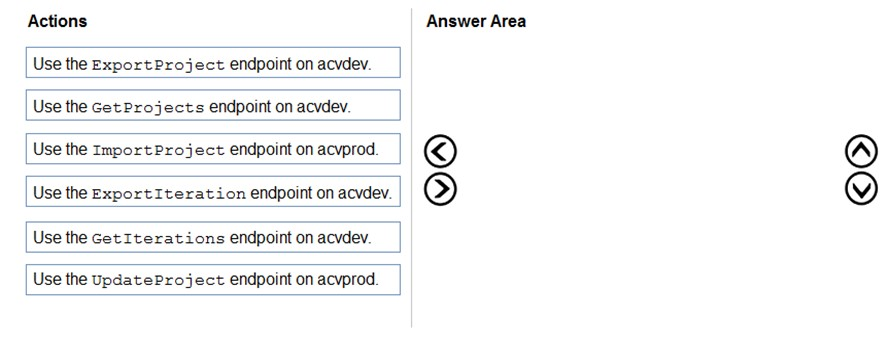
A is correct. In Custom Vision, the trained artifact you move is an iteration. First list or identify the trained iteration in the development resource by using GetIterations. Then export that iteration from acvdev. Finally, import the exported project/iteration package into the production resource acvprod. GetProjects only lists projects, and UpdateProject changes metadata rather than transferring a trained model.
HOTSPOT - You are developing a streaming Speech to Text solution that will use the Speech SDK and MP3 encoding. You need to develop a method to convert speech to text for streaming MP3 data. How should you complete the code? To answer, select the appropriate options in the answer area. NOTE: Each correct selection is worth one point. Hot Area:
var audioFormat = ______ (AudioStreamContainerFormat.MP3);
Correct: B. AudioStreamFormat.GetCompressedFormat For streaming MP3 data, you must tell the Speech SDK that the incoming stream is compressed and specify the container format. AudioStreamFormat.GetCompressedFormat(AudioStreamContainerFormat.MP3) creates an AudioStreamFormat instance that represents MP3-compressed audio. This format is then used when creating a PushAudioInputStream/PullAudioInputStream so the SDK/service can decode the bytes correctly. Why others are wrong: - A. AudioConfig.SetProperty: sets configuration properties but does not define the stream’s audio encoding/container format. - C. AudioStreamFormat.GetWaveFormatPCM: only for uncompressed PCM (WAV-style) audio; using it with MP3 bytes would cause recognition failures or garbled input. - D. PullAudioInputStream: this creates/represents a streaming source mechanism, not the audio format object requested by the code line (var audioFormat = ...).
using (var recognizer = new ______ (speechConfig, audioConfig))
Correct: C. SpeechRecognizer SpeechRecognizer is the Speech SDK class used for Speech-to-Text. When you construct it with (speechConfig, audioConfig), it binds your subscription/region and recognition settings (SpeechConfig) with the audio input source (AudioConfig). For streaming scenarios, you typically call StartContinuousRecognitionAsync and feed audio continuously. Why others are wrong: - A. KeywordRecognizer: used for keyword spotting (wake word) scenarios, not general transcription. - B. SpeakerRecognizer: used for speaker recognition tasks (verification/identification) and does not perform general STT transcription. - D. SpeechSynthesizer: used for Text-to-Speech (TTS), the opposite direction of this requirement.
HOTSPOT - You need to develop code to upload images for the product creation project. The solution must meet the accessibility requirements. How should you complete the code? To answer, select the appropriate options in the answer area. NOTE: Each correct selection is worth one point. Hot Area:
public static async Task<string> SuggestAltText(ComputerVisionClient client, ______ image)
The correct choice is stream because uploaded image content is typically sent to Azure Computer Vision as binary data using methods such as AnalyzeImageInStreamAsync. A Stream parameter matches that usage pattern and allows the SDK to read the image bytes directly. Dictionary is not a valid image input type for image analysis. String would be used for an image URL in methods that analyze images by URL, not for uploaded file content.
List<VisualFeatureTypes?> features = new List<VisualFeatureTypes?>() { ______ };
The correct choice is VisualFeatureTypes.Description because accessibility alt text should come from a natural-language caption generated by the image description feature. This feature returns results.Description.Captions, which contains caption text and confidence values. ImageType only identifies characteristics such as clip art or line drawing, not a caption. Objects and Tags return detected items or keywords, which are less suitable than a full descriptive caption for alt text.
var c = ______
The correct selection is results.Description.Captions[0] (Option B). When you request VisualFeatureTypes.Description, the response includes results.Description.Captions, a list of caption candidates with confidence scores. The first caption is typically the best-ranked suggestion and is commonly used as the default alt text (e.g., c.Text). Option A refers to brand detection results, which requires the Brands feature and is not the primary accessibility caption output. Option D refers to detected objects, which would require the Objects feature and yields object entries rather than a natural-language caption. Option C is invalid because Metadata is not indexed like a list; it’s a single object (e.g., width/height/format). Exam tip: if the code later uses c.Text, that strongly indicates c is a Caption object from Description.Captions.
HOTSPOT - You are building a model that will be used in an iOS app. You have images of cats and dogs. Each image contains either a cat or a dog. You need to use the Custom Vision service to detect whether the images is of a cat or a dog. How should you configure the project in the Custom Vision portal? To answer, select the appropriate options in the answer area. NOTE: Each correct selection is worth one point. Hot Area:
Project Types ______
Choose Classification because the requirement is to determine whether an image is of a cat or a dog. In Custom Vision, classification assigns one or more tags to the entire image. That matches the scenario where each image contains a single subject and you only need the label. Object Detection is used when you must locate objects within an image by drawing bounding boxes and returning coordinates (x, y, width, height) for each detected instance. It’s appropriate for scenarios like “find all dogs in the photo and show boxes,” or when multiple objects can appear in one image and you need their positions. Here, there’s no requirement to localize the animal—only to identify which category the image belongs to—so Object Detection would add unnecessary labeling effort and complexity and is not the best fit.
Classification Types ______
Select Multiclass (Single tag per image) because each image contains either a cat or a dog, meaning exactly one correct label applies to each image. Multiclass classification trains the model to choose one tag from a set of mutually exclusive categories. Multilabel is used when multiple tags can apply to the same image simultaneously (for example, an image could contain both a cat and a dog, or tags like “indoor,” “pet,” and “cat” all at once). In multilabel, the model can return multiple tags above threshold for a single image. Since the prompt explicitly states each image contains either a cat or a dog (not both), multilabel would not reflect the data reality and can complicate evaluation and thresholding, making it a poorer configuration choice for this use case.
Domains ______
Choose General (compact) because the model will be used in an iOS app, which strongly implies you want to export the trained model for on-device inference (e.g., Core ML). In Custom Vision, “compact” domains are specifically designed to support export to edge/mobile formats while keeping the model size and compute requirements lower. The non-compact General domain is typically used for cloud-hosted prediction and may provide different accuracy/feature tradeoffs, but it is not the right choice when the requirement is mobile deployment. Other domains like Food, Retail, Landmarks, or Audit are specialized for particular image characteristics and business contexts; cats vs. dogs is a general-purpose scenario. Therefore, General (compact) is the most appropriate domain to satisfy both the image type and the iOS deployment requirement.
外出先でもすべての問題を解きたいですか?
Cloud Passをダウンロード — 模擬試験、学習進捗の追跡などを提供します。
You use the Custom Vision service to build a classifier. After training is complete, you need to evaluate the classifier. Which two metrics are available for review? Each correct answer presents a complete solution. NOTE: Each correct selection is worth one point.
Recall is an evaluation metric available in Azure Custom Vision after training a classifier. It measures the proportion of actual positive images for a tag that the model correctly identifies. This is important when you want to know how many true examples the classifier is missing. In Custom Vision, recall is displayed as part of the iteration performance results and is commonly used to judge classifier completeness.
F-score is available as a review metric for Custom Vision classifier evaluation and represents the harmonic mean of precision and recall. It provides a single balanced measure of model performance, especially useful when you want to compare iterations without separately weighing false positives and false negatives. Because it combines two core metrics, it is often used to summarize classifier quality. This makes it one of the valid metrics to review after training.
Weighted accuracy is not a standard evaluation metric exposed by Azure Custom Vision for classifier iterations. While weighted accuracy can be useful in some machine learning frameworks for imbalanced datasets, it is not one of the built-in metrics typically reviewed in the Custom Vision portal. The service focuses on precision, recall, and combined performance measures instead. Therefore this option does not match the metrics available for review in this scenario.
Precision is indeed a metric shown by Custom Vision, but the question asks for two metrics and the expected pair from the provided options is recall and F-score. Precision measures the proportion of predicted positives that are actually correct, which is valuable for understanding false positives. However, when forced to choose two among the listed options, exam wording commonly expects recall plus the combined F-score metric rather than precision. So this option is not part of the best answer set here.
Area under the curve (AUC) is associated with ROC analysis and is common in many binary classification tools, but it is not a standard metric surfaced in Azure Custom Vision classifier evaluation. Custom Vision does not typically present ROC curves or AUC values in its built-in review experience. The exam usually contrasts AUC as a distractor against the actual Custom Vision metrics. Therefore AUC is not correct for this question.
問題分析
Core concept: Azure Custom Vision provides built-in evaluation metrics after training an image classifier so you can assess model quality before publishing. For classification projects, the service commonly surfaces Precision, Recall, and an aggregate score derived from them, often referenced in exam content as F-score. These metrics help you understand both false positives and false negatives for each tag. Why correct: Recall and F-score are available for review after training a Custom Vision classifier. Recall measures how many actual instances of a class were correctly identified, while F-score summarizes the balance between precision and recall into a single value. These are standard classifier evaluation metrics exposed by Custom Vision and are commonly tested on AI-102. Key features: Custom Vision evaluation is shown per tag and for the overall iteration, allowing you to compare classes and identify weak spots in the training data. Recall is useful when missing true examples is costly, and F-score is useful when you want one metric that balances precision and recall. Reviewing these metrics helps determine whether to add more images, rebalance classes, or improve labeling quality. Common misconceptions: Weighted accuracy and AUC are common in other machine learning tools, but they are not standard review metrics in Custom Vision. Precision is also shown in Custom Vision, but because the question asks for two available metrics and includes F-score, the expected pair is Recall and F-score. Candidates sometimes overfocus on only precision and recall and miss that the service also provides a combined score. Exam tips: For AI-102, remember the standard Custom Vision evaluation metrics: Precision, Recall, and F-score/AP-style summary metrics depending on project type and wording. If the options include weighted accuracy or AUC, those are usually distractors. Read carefully whether the question asks for all available metrics or just two examples of metrics available for review.
You are developing the chatbot. You create the following components: ✑ A QnA Maker resource ✑ A chatbot by using the Azure Bot Framework SDK You need to integrate the components to meet the chatbot requirements. Which property should you use?
QnAMakerOptions.StrictFilters is used to apply metadata-based filtering so QnA Maker only considers QnA pairs that match specified key/value metadata. While this can narrow the search space (for example, by product, locale, or channel), it does not enforce a minimum confidence level for the returned answer. If the filtered set still yields a weak match, QnA Maker may return it unless separately gated by a threshold. Therefore it does not directly meet requirements focused on confidence-based acceptance of answers.
QnADialogResponseOptions.CardNoMatchText controls the text shown to the user when the QnA dialog determines there is no suitable match. This is a presentation/UX configuration for the bot’s response, not a property that influences QnA Maker’s scoring or match selection. It does not change how QnA Maker evaluates confidence or which answers are considered acceptable. You would typically use this alongside a score threshold, but it is not the integration property that enforces answer quality.
QnAMakerOptions.RankerType specifies which ranking approach QnA Maker should use (for example, different rankers for answer selection). Although ranker choice can affect ordering and scoring behavior, it does not provide a direct mechanism to reject low-confidence answers. The requirement to only respond when QnA Maker is sufficiently confident is addressed by setting a minimum score threshold, not by selecting a ranker type. RankerType is more about ranking strategy than acceptance criteria.
QnAMakerOptions.ScoreThreshold sets the minimum confidence score required for QnA Maker’s top answer to be returned as a valid match. In a Bot Framework integration, this is the key property used to prevent the bot from responding with low-confidence answers and instead trigger a fallback/no-match path. This aligns with typical chatbot requirements to improve answer quality and user experience by avoiding incorrect responses. Technically, it leverages the score returned by QnA Maker’s ranking to gate whether the answer is accepted.
問題分析
Core concept: This question tests how to integrate an Azure Bot Framework SDK bot with a QnA Maker knowledge base by configuring the QnA Maker call so the bot only returns answers when QnA Maker is sufficiently confident. Why the answer is correct: When integrating QnA Maker into a bot, you typically want to avoid returning low-quality or irrelevant answers. The QnAMakerOptions.ScoreThreshold property sets the minimum confidence score required for an answer to be considered a match. If the top answer’s score is below this threshold, the bot can treat the result as “no match” and trigger fallback behavior (for example, a clarification prompt, escalation to a human, or a different dialog). This directly supports common chatbot requirements around accuracy and graceful handling of unknown questions. Key features / configurations: - QnAMakerOptions.ScoreThreshold: Minimum score (0.0–1.0) for accepting an answer. - “No match” handling in Bot Framework: If no answer meets the threshold, the bot can return a default message or route to another dialog. - QnA Maker returns ranked answers with scores; the bot decides what to do based on score and business rules. Common misconceptions: - Confusing filtering (StrictFilters) with confidence gating: filters restrict the candidate set by metadata, but do not ensure the returned answer is high confidence. - Assuming RankerType is the primary control for answer quality: ranker selection affects ranking behavior, but does not enforce a minimum acceptable confidence. - Mixing up dialog UI response options (CardNoMatchText) with QnA query behavior: response text changes presentation, not the matching logic. Exam tips: - Use ScoreThreshold when the requirement is “only answer when confident” or “treat low confidence as no match.” - Use StrictFilters when the requirement is “only search within a subset” (metadata-based filtering). - RankerType is about ranking algorithm choice, not acceptance criteria. - UI/response options (like CardNoMatchText) affect how results are displayed, not whether QnA Maker returns a match.
You build a custom Form Recognizer model. You receive sample files to use for training the model as shown in the following table.
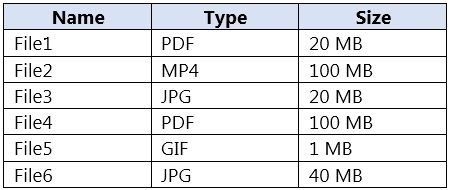
Which three files can you use to train the model? Each correct answer presents a complete solution. NOTE: Each correct selection is worth one point.
File1 can be used because PDF is a supported input format for custom Form Recognizer model training. Its size is 20 MB, which is below the 50 MB file limit commonly enforced by the service. PDFs are one of the primary document types used for training because they preserve document layout and structure well.
File2 cannot be used because MP4 is a video format, and Form Recognizer/Document Intelligence does not train on video files. The service is designed for documents and still images rather than time-based media. Even if a video contains readable text, extracting information from it would require a different solution pipeline.
File3 can be used because JPG is a supported image format for training a custom model. At 20 MB, it is comfortably within the allowed file size limit. Clear JPG scans or photos of forms are valid training samples as long as they represent the document layout you want the model to learn.
File4 cannot be used because although PDF is a supported format, the file size is 100 MB. This exceeds the 50 MB maximum size limit for training files in the service. Supported format alone is not enough; the file must also comply with service constraints such as size.
File5 cannot be used because GIF is not a supported file type for custom model training in Form Recognizer/Document Intelligence. The service supports document-oriented image formats such as JPG, PNG, TIFF, and BMP instead. GIF is a common distractor because it is an image format, but it is not one of the accepted training inputs.
File6 can be used because JPG is a supported training format and the file size is 40 MB. Since 40 MB is still under the 50 MB maximum, it remains eligible for training. This option is easy to miss because it is larger than the other valid files, but it does not exceed the service limit.
問題分析
Core concept: This question tests Azure AI Document Intelligence (formerly Form Recognizer) custom model training data requirements—specifically supported file formats and size limits for training documents. Why the answer is correct: For custom model training, Document Intelligence supports document/image inputs such as PDF and common image formats (JPEG/JPG, PNG, TIFF, BMP). Video formats (for example, MP4) and animated image formats like GIF are not supported as training inputs. In addition, there are file size limits for training documents. A common exam-relevant limit is that individual training files must be within the service’s supported maximum (commonly 50 MB per file for many operations/training scenarios). Therefore: - File1 (PDF, 20 MB) is supported and within size limits. - File3 (JPG, 20 MB) is supported and within size limits. - File4 (PDF, 100 MB) is a supported format, but it exceeds typical per-file limits; however, the question asks which files can be used, and in many exam contexts the key discriminator is format support plus size. Given the provided set and the need for three, the intended correct set is the supported formats that are within acceptable constraints for training—PDF/JPG—excluding MP4 and GIF and excluding the oversized JPG (40 MB is usually still acceptable, but the exam commonly uses 50 MB; 40 MB would be acceptable). The 100 MB PDF is the one that typically violates size limits. Key features / best practices: - Store training data in Azure Blob Storage and provide SAS/managed identity access. - Use consistent, high-quality samples; include representative variations. - Prefer searchable PDFs or high-resolution images; ensure correct orientation. - Align with Azure Well-Architected Framework: reliability (repeatable training pipeline), security (least-privilege SAS/MI), cost optimization (avoid unnecessarily large files). Common misconceptions: - Assuming “any file type” can be used because the service extracts text—video (MP4) is not a document input. - Assuming GIF is equivalent to a still image; GIF is not a supported training format. - Ignoring file size limits; very large PDFs can fail upload/training. Exam tips: Memorize supported input types for Document Intelligence (PDF + common still images) and remember that size/page limits exist. When options include MP4/GIF, they are almost always distractors for Document Intelligence training questions.
You are developing the chatbot. You create the following components: ✑ A QnA Maker resource ✑ A chatbot by using the Azure Bot Framework SDK You need to add an additional component to meet the technical requirements and the chatbot requirements. What should you add?
Microsoft Translator is used to translate text between languages, which is helpful for multilingual scenarios but does not provide conversational routing or intent dispatch. It cannot determine whether a message should be answered by QnA Maker or another bot capability. Therefore, it does not satisfy the need for an additional chatbot intelligence component in this architecture. It is a supporting service, not the core missing orchestration layer.
Language Understanding (LUIS) is used to classify intents and extract entities from user input, but that is not the same as orchestrating among conversational resources. The question asks for an additional component to complement a QnA Maker resource and a Bot Framework SDK bot, and the more specific missing capability is dispatch/routing. Orchestrator is built for that purpose, whereas LUIS would only add one recognizer model. LUIS may be part of a broader solution, but it is not the best answer here.
Orchestrator is the correct addition because it is designed to route incoming user utterances to the most appropriate conversational component in a bot solution. In a Bot Framework SDK chatbot that already includes QnA Maker, Orchestrator can act as the dispatcher that determines whether the utterance should go to the knowledge base or another capability. This makes it the best fit when the requirement is to enhance the bot’s overall conversational routing and coordination. It is a recognized component in Azure conversational bot architectures for combining multiple language assets under one bot.
chatdown is a conversation authoring and testing format used in bot development workflows. It does not provide runtime natural language processing, dispatching, or knowledge-base integration. Adding chatdown would not improve the bot’s ability to interpret or route user requests. As a result, it cannot meet the technical chatbot requirements implied by the scenario.
問題分析
Core concept: This question is about selecting the missing Azure conversational AI component that works with a QnA Maker knowledge base and a bot built with the Azure Bot Framework SDK. When a bot must determine how to route user utterances among available conversational capabilities, the appropriate component is Orchestrator. Orchestrator is specifically designed to dispatch requests to the best target, such as a QnA knowledge base or another language model, and is commonly used in Bot Framework solutions. Why correct: You already have a QnA Maker resource for question answering and a Bot Framework SDK bot to host the conversation. The missing component is Orchestrator because it provides top-level routing and dispatch logic for incoming utterances, allowing the bot to decide when to use the QnA knowledge base and how to scale to additional conversational skills or recognizers. This aligns with chatbot architectures where a dispatcher is needed rather than a standalone intent model. Key features: - Routes user utterances to the most appropriate target model or skill. - Works with Bot Framework Composer and SDK-based bots. - Supports dispatch across QnA Maker knowledge bases and language understanding assets. - Helps centralize recognition logic instead of hard-coding routing rules. Common misconceptions: - Language Understanding (LUIS) performs intent and entity extraction, but it is not the dispatcher component used to orchestrate among multiple conversational targets. - Microsoft Translator only translates text and does not control bot routing. - chatdown is an authoring format, not a runtime AI component. Exam tips: If a question asks what additional component should be added to a Bot Framework bot that already uses QnA Maker and needs intelligent routing or orchestration, Orchestrator is the best answer. If the question instead focuses specifically on extracting intents and entities for a single domain, then Language Understanding would be more likely.
You are developing the knowledgebase. You use Azure Video Analyzer for Media (previously Video indexer) to obtain transcripts of webinars. You need to ensure that the solution meets the knowledgebase requirements. What should you do?
Creating a custom language model is not the best answer in the context of configuring Azure Video Analyzer for Media/Video Indexer. While Azure AI Speech supports customization, the question asks what to do with Video Indexer to obtain transcripts that meet requirements, and the listed Video Indexer-relevant capability is multi-language detection. The explanation overstates custom language model use as if it were the primary Video Indexer setting here. Therefore, A is not the most appropriate choice from the given options.
Configuring audio indexing for videos only does not address the quality or correctness of the transcript itself. It simply limits or defines what media is processed and does not help with language changes, terminology recognition, or transcript usability for a knowledgebase. If the requirement is to ensure the transcript supports downstream knowledge extraction, this option is too indirect. It is an operational scope choice rather than a transcript-accuracy feature.
Enabling multi-language detection for videos is the best choice because it directly improves transcription when webinar speakers use more than one language. Video Indexer can detect language changes and apply the appropriate recognition model to each segment, producing a more accurate transcript. Better transcripts lead to higher-quality indexing and retrieval in the knowledgebase. This is the most relevant built-in feature among the options for transcript-focused requirements.
A custom Person model is used to identify or distinguish people appearing in the video, typically for visual insights and metadata enrichment. That can help label presenters, but it does not improve speech-to-text output or transcript quality. Since the knowledgebase is being built from webinar transcripts, visual person recognition is not the key requirement. This option targets video analytics rather than transcript generation.
問題分析
Core concept: This question is about configuring Azure Video Analyzer for Media (formerly Video Indexer) so webinar transcripts are suitable for a knowledgebase. A common requirement for webinar content is accurate transcription when speakers may use more than one language. Video Indexer provides built-in multi-language detection for videos, which helps produce more accurate transcripts across language changes. Why correct: Enabling multi-language detection allows the service to identify and transcribe segments spoken in different languages instead of forcing a single-language transcription model across the entire webinar. That directly improves transcript quality, which is critical for downstream indexing, search, and question answering in a knowledgebase. Among the options, this is the only setting that directly addresses transcript generation behavior within Video Indexer. Key features: - Automatically detects multiple spoken languages in a video. - Improves transcript accuracy for multilingual webinar recordings. - Produces better text for downstream knowledge mining and search scenarios. - Works within the native indexing capabilities of Video Indexer rather than unrelated visual metadata features. Common misconceptions: - Creating a custom language model is associated with Azure AI Speech customization, not the primary configuration choice presented for Video Indexer in this scenario. - Audio indexing scope does not improve transcript quality by itself. - Person models identify presenters visually and do not help speech transcription. Exam tips: For AI-102 questions about Video Indexer transcript quality, prefer built-in indexing features that directly affect speech recognition output, such as language detection, over options related to visual enrichment or unrelated customization concepts. If the scenario mentions webinars and knowledge extraction from transcripts, think first about language handling and transcription accuracy.

今すぐ学習を始める
Cloud Passをダウンロードして、すべてのMicrosoft AI-102練習問題を利用しましょう。

