CloudPass LogoCloud Pass
AWSGoogle CloudMicrosoftCiscoCompTIADatabricks
Certifications
AWSGoogle CloudMicrosoftCiscoCompTIADatabricks
Microsoft AI-102
Microsoft AI-102

Practice Test #3

50問と100分の制限時間で実際の試験をシミュレーションしましょう。AI検証済み解答と詳細な解説で学習できます。

50問題100分700/1000合格点
練習問題を見る

AI搭載

3重AI検証済み解答&解説

すべての解答は3つの主要AIモデルで交差検証され、最高の精度を保証します。選択肢ごとの詳細な解説と深い問題分析を提供します。

GPT Pro
Claude Opus
Gemini Pro
選択肢ごとの解説
深い問題分析
3モデル合意の精度

練習問題

1
問題 1

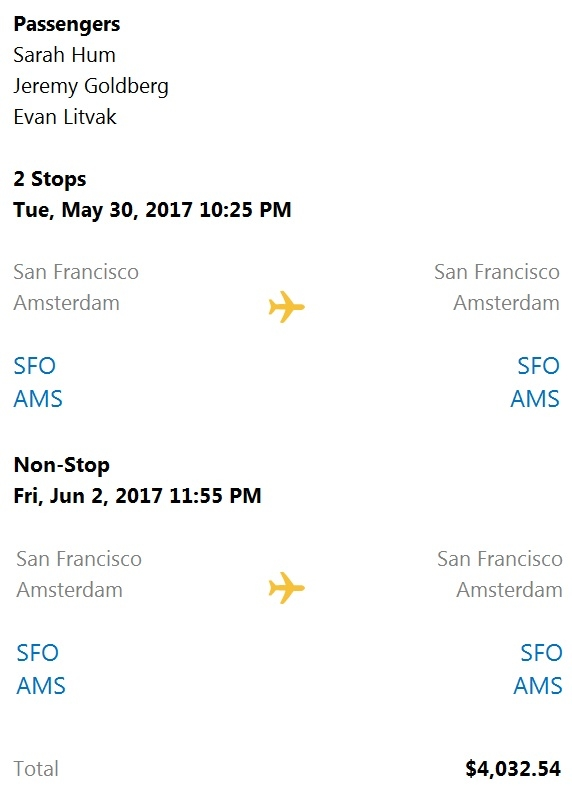
HOTSPOT - You are building a chatbot that will provide information to users as shown in the following exhibit.
diagram

Use the drop-down menus to select the answer choice that completes each statement based on the information presented in the graphic. NOTE: Each correct selection is worth one point. Hot Area:

パート1:

The chatbot is showing ______.

Correct answer: A (an Adaptive Card). The exhibit shows a complex, structured layout: multiple headings (Passengers, Stops), repeated itinerary blocks, aligned left/right columns (SFO/AMS on both sides), and careful spacing. This is typical of Adaptive Cards, which allow flexible composition using containers and column sets. Why not Hero Card (B): A Hero Card has a fixed schema (title, subtitle, text, one large image, and buttons). It is not designed for multi-column, repeated structured sections like an itinerary. Why not Thumbnail Card (C): A Thumbnail Card is similar to a Hero Card but with a smaller thumbnail image; it still uses a fixed layout and doesn’t support the kind of grid/column formatting shown. In exam terms: whenever you see “form-like” or “UI-like” structured content, especially with columns or repeated sections, choose Adaptive Card.

パート2:

The card includes ______.

Correct answer: B (an image). The card clearly includes an airplane icon in the middle of each flight segment. That is an image element rendered within the card. Why not action set (A): An ActionSet would typically manifest as buttons (e.g., “Select”, “View details”, “Book”), which are not visible in the exhibit. While Adaptive Cards can include actions, the screenshot doesn’t show any. Why not image group (C): An image group (often represented by ImageSet in Adaptive Cards) is a collection of multiple images displayed together (e.g., a row of thumbnails/avatars). The exhibit shows a single airplane icon per segment, not a grouped set. Why not media (D): “Media” in Adaptive Cards refers to embedded audio/video playback. The exhibit shows a static icon, not playable media.

2
問題 2

A customer uses Azure Cognitive Search. The customer plans to enable a server-side encryption and use customer-managed keys (CMK) stored in Azure. What are three implications of the planned change? Each correct answer presents a complete solution. NOTE: Each correct selection is worth one point.

Incorrect. Azure documentation for Azure Cognitive Search CMK does not identify index size increase as a standard implication of enabling customer-managed keys. Encryption metadata and key wrapping are service-level implementation details, but the exam objective does not treat this as a guaranteed or documented user-visible change in index size. Therefore this option is not a reliable implication to select.

Incorrect. While any security feature can introduce some operational overhead in theory, Azure Cognitive Search CMK is not documented as causing query times to increase as a standard implication. Query execution is not typically framed in the product guidance as becoming slower simply because CMK is enabled. On certification exams, this would be an unsupported assumption rather than a documented effect.

Incorrect. A self-signed X.509 certificate is not required to enable customer-managed keys in Azure Cognitive Search. The supported model uses a key stored in Azure Key Vault, accessed by the search service through managed identity or configured credentials. Certificates are unrelated to the normal CMK setup for this service.

Incorrect. Enabling CMK does not decrease index size. Encryption is a security control, not a compression mechanism, and there is no documented behavior in Azure Cognitive Search that CMK reduces storage footprint. This option is the opposite of what some might guess, but it is still unsupported.

Incorrect. Customer-managed keys do not improve query performance. CMK is intended for compliance, governance, and control over encryption keys, not for accelerating search operations. There is no documented basis to expect query times to decrease after enabling CMK.

Correct. Azure Cognitive Search stores and uses customer-managed encryption keys through Azure Key Vault. The search service must be granted access to the key so it can wrap and unwrap the internal encryption keys used to protect service data at rest. This is the core platform dependency for enabling CMK in Azure Cognitive Search and is the only clearly supported implication among the listed options.

問題分析

Core concept: Azure Cognitive Search supports customer-managed keys (CMK) for additional encryption at rest of indexes, synonym maps, indexers, data sources, skillsets, and knowledge stores. To use CMK, the encryption keys must be stored in Azure Key Vault and the search service must be configured to access them, typically through managed identity and appropriate permissions. Key features include stronger compliance control, customer ownership of key lifecycle, and integration with Azure Key Vault for rotation and auditing. A common misconception is that CMK materially changes index size or directly slows query execution in a way that is treated as a fixed exam implication; those are not the standard documented effects tested for Azure Cognitive Search. Exam tip: when you see CMK in Azure Cognitive Search, immediately think Azure Key Vault requirement, identity/permissions configuration, and operational dependency on the key store rather than storage or query-performance changes.

3
問題 3

HOTSPOT - You have a Computer Vision resource named contoso1 that is hosted in the West US Azure region. You need to use contoso1 to make a different size of a product photo by using the smart cropping feature. How should you complete the API URL? To answer, select the appropriate options in the answer area. NOTE: Each correct selection is worth one point. Hot Area:

パート1:

curl -H "Ocp-Apim-Subscription-Key: xxx" / -o "sample.png" -H "Content-Type: application/json" / "______" /vision/v3.1/

Correct host: "https://contoso1.cognitiveservices.azure.com". When you create a Computer Vision resource named contoso1, Azure provides a resource-specific endpoint in the form https://<resource-name>.cognitiveservices.azure.com. This is the recommended and most common endpoint format in current Azure Cognitive Services/Azure AI services. Why not A: https://api.projectoxford.ai is an old, legacy endpoint from early Project Oxford days and is not used for modern Azure Cognitive Services resources. Why not C: https://westus.api.cognitive.microsoft.com is the older regional endpoint style. While it can work in some contexts, the question explicitly gives the resource name contoso1 and asks to use that resource, which points to using the resource endpoint rather than a generic regional endpoint.

パート2:

/vision/v3.1/______?width=100&height=100&smartCropping=true" /

Correct operation: generateThumbnail. The Computer Vision operation that creates a resized image is the thumbnail generation API, and smart cropping is enabled by adding smartCropping=true along with width and height. Therefore the path segment after /vision/v3.1/ should be generateThumbnail, producing a URL like /vision/v3.1/generateThumbnail?width=100&height=100&smartCropping=true. Why not detect: detect is used for object detection (returning bounding boxes and labels), not for producing a new image. Why not areaOfInterest: areaOfInterest returns coordinates for the region likely to be important in an image; it does not itself generate the cropped/resized output image. Smart cropping for output images is specifically part of generateThumbnail.

4
問題 4

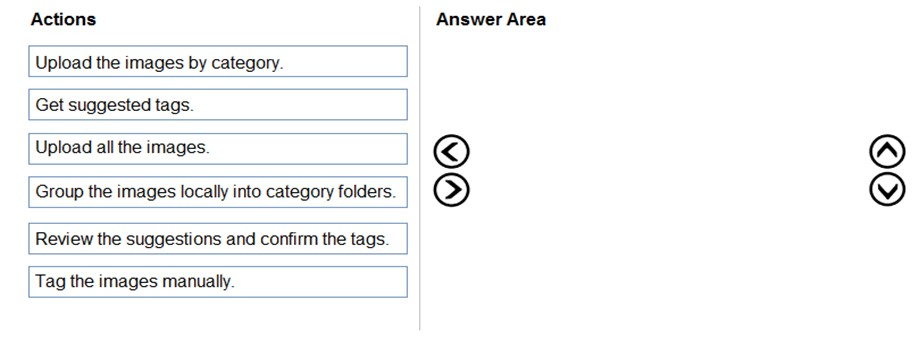
DRAG DROP - You train a Custom Vision model used in a mobile app. You receive 1,000 new images that do not have any associated data. You need to use the images to retrain the model. The solution must minimize how long it takes to retrain the model. Which three actions should you perform in the Custom Vision portal? To answer, move the appropriate actions from the list of actions to the answer area and arrange them in the correct order. Select and Place:

パート1:

Select the correct answer(s) in the image below.

question-image

Pass. The correct ordered actions in the Custom Vision portal to minimize the time to retrain with 1,000 unlabeled images are: 1) Upload all the images. 2) Get suggested tags. 3) Review the suggestions and confirm the tags. This is the quickest approach because it minimizes manual labeling effort by using Custom Vision’s suggested tags (often called smart labeling) based on the existing trained model. After bulk upload, the portal can propose tags for the new images; you then validate/correct them, which is significantly faster than tagging each image from scratch. Why the other options are less suitable: “Upload the images by category” and “Group the images locally into category folders” assume you already know the correct category for each image, which contradicts “no associated data.” “Tag the images manually” is valid but slowest for 1,000 images and does not meet the requirement to minimize retraining time (end-to-end).

5
問題 5
(2つ選択)

You plan to provision a QnA Maker service in a new resource group named RG1. In RG1, you create an App Service plan named AP1. Which two Azure resources are automatically created in RG1 when you provision the QnA Maker service? Each correct answer presents part of the solution. NOTE: Each correct selection is worth one point.

Language Understanding, also known as LUIS, is a separate Azure AI service used for intent detection and entity extraction. It can be integrated with bots that also use QnA Maker, but it is not automatically provisioned when you create a QnA Maker service. The two expected dependent resources are not NLP intent services. Therefore, this option is incorrect.

Azure SQL Database is not part of the standard set of resources created for QnA Maker. QnA Maker does not use a relational database as its primary retrieval engine; instead, it depends on Azure Cognitive Search. While an application could separately use SQL for custom metadata or logging, that would be a design choice outside QnA Maker provisioning. Therefore, this option is incorrect.

Azure Storage is automatically created as part of QnA Maker provisioning to support the service's underlying data and artifacts. QnA Maker uses supporting storage for operational content rather than relying on a relational database. On exam questions about legacy QnA Maker dependencies, Storage is one of the expected automatically provisioned resources. This makes it a correct choice alongside the search resource.

Azure Cognitive Search is automatically created because QnA Maker relies on search indexes to store and retrieve question-and-answer pairs efficiently. The service is fundamentally retrieval-based, so indexing and ranking are core runtime functions. Each knowledge base is backed by searchable content that Cognitive Search can query quickly. This dependency is one of the most important architectural facts to remember for AI-102.

Azure App Service is a tempting choice because QnA Maker exposes a web endpoint, and the scenario mentions an App Service plan named AP1. However, for this exam item, the automatically created resources expected are Azure Cognitive Search and Azure Storage. The App Service plan is hosting-related context, but it is not one of the two answers the question is targeting. Therefore, this option should not be selected.

問題分析

Core concept: This question tests the supporting Azure resources that are automatically deployed when you create a QnA Maker service. In the classic QnA Maker architecture, Azure provisions dependent resources used for indexing and storing service data. The correct resources are Azure Cognitive Search and Azure Storage. Why correct: Azure Cognitive Search is required because QnA Maker is a retrieval-based service that indexes question-and-answer pairs and searches them at runtime. Azure Storage is also created to hold supporting data used by the service. Although an App Service plan is involved in hosting, the exam distinction is that the automatically created companion resources in the resource group are Search and Storage. Key features: Cognitive Search provides indexing, ranking, and fast lookup of knowledge base content. Azure Storage supports persistence for service artifacts and operational data. QnA Maker depends on these managed Azure resources behind the scenes when the service is provisioned. Common misconceptions: Many candidates choose Azure App Service because QnA Maker exposes an HTTP endpoint, but the presence of an App Service plan in the scenario does not mean App Service is one of the two expected automatically created answers. Language Understanding is a separate service, and Azure SQL Database is not part of standard QnA Maker provisioning. Exam tips: For AI-102 questions about legacy QnA Maker provisioning, remember the dependency pattern centered on Search plus Storage. Be careful not to confuse an existing App Service plan with the list of automatically created resources the exam expects.

外出先でもすべての問題を解きたいですか?

Cloud Passをダウンロード — 模擬試験、学習進捗の追跡などを提供します。

6
問題 6

Note: This question is part of a series of questions that present the same scenario. Each question in the series contains a unique solution that might meet the stated goals. Some question sets might have more than one correct solution, while others might not have a correct solution. After you answer a question in this section, you will NOT be able to return to it. As a result, these questions will not appear in the review screen. You create a web app named app1 that runs on an Azure virtual machine named vm1. Vm1 is on an Azure virtual network named vnet1. You plan to create a new Azure Cognitive Search service named service1. You need to ensure that app1 can connect directly to service1 without routing traffic over the public internet. Solution: You deploy service1 and a public endpoint, and you configure an IP firewall rule. Does this meet the goal?

Yes is incorrect because an IP firewall rule does not provide private connectivity to Azure Cognitive Search. It only narrows access to approved public source IP addresses, which is an access-control measure rather than a private-networking feature. Since the service is still reached through its public endpoint, the traffic path does not meet the requirement to avoid the public internet. To meet the goal, the design should use a private endpoint and appropriate private DNS configuration.

No is correct because a public endpoint with an IP firewall rule still exposes Azure Cognitive Search over its public interface. The firewall only restricts which source IP addresses can connect, but the traffic is still destined for a public endpoint rather than a private IP in the virtual network. The requirement explicitly says app1 must connect without routing traffic over the public internet, which typically requires Azure Private Link with a private endpoint. With a private endpoint, vm1 would resolve the search service to a private address and communicate over the Azure backbone instead of the public internet.

問題分析

Core concept: This question tests how to evaluate and tune safety/content filtering for a generative AI chatbot that uses Azure OpenAI (AI1) and Azure AI Content Safety (CS1). In AI-102 terms, it’s about selecting the correct tooling/workflow to run test prompts and optimize filter configurations. Why the answer is correct: Using Content Safety Studio’s “Safety metaprompt” feature is not the appropriate method to run systematic tests on sample questions for optimizing content filter configurations. Content Safety Studio is used to explore and evaluate Content Safety capabilities (text/image moderation, severity thresholds, testing), but “Safety metaprompt” is not the primary feature for batch-style testing and tuning of content filters for a chatbot’s input/output pipeline. For optimizing content filter configurations, you typically use Content Safety Studio’s testing experiences (for text/image) and/or programmatic evaluation by sending representative prompts and responses through the Content Safety APIs, adjusting category thresholds (hate, sexual, violence, self-harm) and actions (block, allow, review) based on results. Key features and best practices: - Use Content Safety Studio to test text moderation with configurable severity thresholds and to review detections across categories. - For repeatable optimization, run a test harness that submits a curated dataset of sample user inputs and model outputs to CS1 via API, capturing scores/severity and iterating thresholds. - Align with Azure Well-Architected Framework (Reliability/Operational Excellence): automate evaluations, version your safety configs, and monitor false positives/negatives. - In Azure OpenAI, distinguish between model-side content filtering and external moderation (CS1). Ensure you test both user input and model output paths. Common misconceptions: It’s easy to assume any “metaprompt” or “safety prompt” feature is meant for testing filters. However, filter optimization is about measuring moderation outcomes against a dataset and tuning thresholds/actions, not about a prompt template feature. Exam tips: When you see “optimize content filter configurations” and “run tests on sample questions,” think: Content Safety Studio testing tools and/or automated API-based evaluation pipelines—not prompt engineering features. Also remember that Content Safety is the dedicated service for moderation scoring; OpenAI prompt techniques don’t replace threshold tuning and measurable test runs.

7
問題 7
(3つ選択)

You are developing the smart e-commerce project. You need to implement autocompletion as part of the Cognitive Search solution. Which three actions should you perform? Each correct answer presents part of the solution. NOTE: Each correct selection is worth one point.

This is required because Azure AI Search autocomplete is invoked through the autocomplete endpoint, not the standard search endpoint. The request must specify the suggesterName so the service knows which suggester definition to use. Without referencing the suggester, the service cannot apply the configured source fields for type-ahead behavior.

This is required because autocomplete depends on a suggester defined in the index. A single suggester can include multiple source fields, which is the correct way to support autocomplete across the three product name variants. Creating one suggester over all relevant fields is simpler and is the standard Azure AI Search design.

This is incorrect because the search endpoint performs full-text search, not autocomplete. Even if searchFields is specified, the behavior is still standard search and does not provide the dedicated type-ahead experience expected from autocomplete. Azure AI Search has a separate autocomplete API specifically for this purpose.

This is incorrect because Azure AI Search does not require one suggester per field. A single suggester can reference multiple source fields, which is exactly how autocomplete is commonly implemented across related text fields. Multiple suggesters would add unnecessary complexity unless there were distinct suggestion scenarios.

This is the expected analyzer-related choice because searchAnalyzer controls how query text is analyzed at search time. For autocomplete, the user's partial input must be processed appropriately when matching against indexed terms from the suggester fields. Using the proper search-time analyzer for the product name variants helps ensure the entered prefixes are interpreted correctly.

This is not the best answer here because analyzer sets the index-time analyzer, while the question is focused on implementing autocomplete behavior rather than rebuilding tokenization strategy. In Azure AI Search exam questions, the expected configuration for handling user-entered text in autocomplete scenarios is typically searchAnalyzer. Although analyzer can matter in broader index design, it is not the required action being tested here.

問題分析

Core concept: Azure AI Search autocomplete requires a suggester on the index and client requests to the autocomplete endpoint that reference that suggester. In addition, fields used for type-ahead should be configured with appropriate analysis behavior so query text is processed correctly against indexed terms. Why correct: you must define a suggester over the relevant product name fields, call the autocomplete API with the suggester name, and configure the search-time analyzer behavior for those fields. Key features: a single suggester can span multiple fields, autocomplete uses a dedicated endpoint rather than the general search endpoint, and analyzer settings affect how user input is interpreted. Common misconceptions: many candidates confuse autocomplete with full-text search, or assume a separate suggester is needed per field, or think any analyzer property is always required specifically for autocomplete. Exam tips: when you see Azure AI Search autocomplete, look for the pattern of suggester + autocomplete endpoint + appropriate analyzer/search analyzer configuration, and avoid options that describe ordinary search queries.

8
問題 8

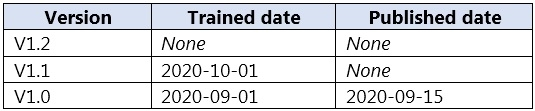
DRAG DROP - You plan to use a Language Understanding application named app1 that is deployed to a container. App1 was developed by using a Language Understanding authoring resource named lu1. App1 has the versions shown in the following table.
diagram

You need to create a container that uses the latest deployable version of app1. Which three actions should you perform in sequence? To answer, move the appropriate actions from the list of actions to the answer area and arrange them in the correct order. Select and Place:

パート1:

Run a container that has version set as an environment variable.

Running a LUIS container with the version set as an environment variable is not how LUIS containers select a model. The container does not dynamically pull a specific LUIS app version from the authoring resource based on an environment variable. Instead, the container loads a model package that you provide (exported artifact). Environment variables are used for container configuration (for example, billing endpoint, API key, EULA acceptance, logging), but not for selecting a LUIS app version from the service. Version selection happens before runtime: you choose the version in the LUIS portal (or via APIs), export that version for containers, and then mount it into the container. Therefore, this action is not part of the correct sequence to ensure the container uses the latest deployable version.

パート2:

Export the model by using the Export as JSON option.

Exporting the model using “Export as JSON” is not the correct export format for deploying to a LUIS container. The JSON export is primarily for moving the LUIS app definition (intents, entities, utterances, settings) between environments or for source control, and it is typically used for re-importing into LUIS authoring. For containers, Microsoft provides a specific export option that packages the trained model in a container-consumable format (GZIP). The container expects the exported model artifact, not the authoring JSON schema. So while JSON export can be useful for DevOps workflows, it will not directly enable the container to run predictions with that model. Hence, it is not one of the required actions.

パート3:

Select v1.1 of app1.

Selecting v1.1 is required because it is the latest version that is deployable for a container. The table shows v1.2 has no trained date, meaning it has not been trained and therefore cannot be exported as a runnable model artifact. v1.0 is trained and published, but it is older than v1.1. For LUIS containers, “published date” is not the gating factor; training is. Publishing is relevant for the hosted LUIS prediction endpoint in Azure, but container deployment relies on exporting a trained version. Therefore, to create a container that uses the latest deployable version, you must choose v1.1 (newest trained version) before exporting for containers.

パート4:

Run a container and mount the model file.

Running the container and mounting the model file is a required step for LUIS container deployment. The LUIS container does not automatically retrieve models from the LUIS service at runtime; it loads the model from the filesystem inside the container. The standard pattern is: - Export the trained LUIS app version for containers (GZIP). - Place the exported package on the host. - Start the container with a volume mount (for example, -v hostPath:containerPath) so the container can access the model package. This approach supports repeatable deployments and aligns with best practices: treat the model as a versioned artifact, enabling rollback and consistent promotion across environments (dev/test/prod).

パート5:

Select v1.0 of app1.

Selecting v1.0 is not correct because the requirement is to use the latest deployable version. Although v1.0 is trained and published, it is older than v1.1. In container scenarios, publishing is not required; training is the key prerequisite. Since v1.1 is trained more recently (2020-10-01) and v1.2 is not trained, v1.1 is the newest version that can be exported and deployed to a container. Choosing v1.0 would result in deploying an older model than necessary, failing the “latest deployable version” requirement. Therefore, v1.0 should not be selected.

パート6:

Export the model by using the Export for containers (GZIP) option.

Exporting the model using “Export for containers (GZIP)” is the correct export action for deploying LUIS to a container. This option produces the container-compatible model package that includes the trained artifacts needed by the runtime. The container expects this packaged model format; it is different from the “Export as JSON” option, which exports the app definition for authoring/import scenarios rather than a runtime-ready model. In the correct sequence, after selecting the latest trained version (v1.1), you export that version using the container export option (GZIP). This ensures the artifact you mount into the container matches the intended version and is usable by the container to serve predictions.

パート7:

Select v1.2 of app1.

Selecting v1.2 is not correct because it is not deployable: the table shows no trained date and no published date. A LUIS version must be trained to produce a model that can be exported for runtime use (including containers). Without training, there is no trained model artifact to export. Even if v1.2 is the numerically latest version, it does not meet the deployability requirement. The question specifically asks for the “latest deployable version,” which implies the newest version that can actually be deployed. Therefore, you should not select v1.2; you should select v1.1 instead, then export for containers and mount the model when running the container.

9
問題 9

You have receipts that are accessible from a URL. You need to extract data from the receipts by using Form Recognizer and the SDK. The solution must use a prebuilt model. Which client and method should you use?

Incorrect. FormRecognizerClient is the correct client for running analysis, but StartRecognizeContentFromUri is the wrong method for this scenario. That method performs general content or layout extraction, which focuses on text, tables, and document structure rather than the receipt-specific schema produced by the prebuilt receipt model. Since the question explicitly requires a prebuilt model for receipts, a generic content-recognition method does not fully meet the requirement. On the exam, when a document type like receipt is named explicitly, you should prefer the corresponding prebuilt method.

Incorrect. FormTrainingClient is intended for creating, managing, and training custom models rather than running inference with prebuilt models. In addition, StartRecognizeContentFromUri is not the receipt-specific prebuilt method, so this option is wrong on two levels: wrong client and wrong method. A training client would be appropriate only if the scenario involved building a custom model from labeled or unlabeled forms. Because the task is to extract receipt data using a prebuilt model, this option does not fit the SDK usage pattern.

Correct. FormRecognizerClient is the client used for analysis and inference operations in the Form Recognizer SDK, including calling prebuilt models. Because the requirement is to use a prebuilt receipt model, you need the receipt-specific recognition method rather than a generic layout or content method. StartRecognizeReceiptsFromUri is designed to analyze a receipt located at a URL and return structured receipt fields such as merchant name, transaction date, totals, taxes, and line items. This directly satisfies both constraints in the question: using the SDK and using a prebuilt model against a URI-based document.

Incorrect. StartRecognizeReceiptsFromUri is the correct receipt-specific method name for analyzing receipts from a URL, but it is paired with the wrong client. FormTrainingClient is not used to invoke prebuilt receipt analysis; it is used for custom model lifecycle operations such as training and management. For prebuilt extraction tasks, the SDK uses FormRecognizerClient because the operation is inference, not training. This makes the option incorrect even though the method name itself appears relevant.

問題分析

Core concept: This question tests Azure Form Recognizer (Azure AI Document Intelligence) SDK usage for extracting structured data from receipts using a prebuilt model, with the input being a document accessible via a URL (URI). It also tests choosing the correct client type: recognition (inference) vs training. Why the answer is correct: To use a prebuilt model (such as the prebuilt receipt model), you perform analysis/inference, not training. In the legacy Form Recognizer SDK, inference operations are performed with FormRecognizerClient. For receipts specifically, the SDK provides a dedicated method StartRecognizeReceiptsFromUri to analyze a receipt located at a publicly accessible URL (or a SAS URL). This matches both requirements: (1) prebuilt receipt model and (2) input from a URI. Key features and best practices: - Prebuilt models (receipt, invoice, ID document, business card, etc.) require no training and are optimized for common document types. - URI-based methods require the service to fetch the document. Ensure the URL is reachable by Azure (public or time-limited SAS). Private network endpoints without proper access will fail. - The StartRecognize* pattern is long-running operation (LRO) because analysis can take time; you typically await the operation and then iterate results. - From an Azure Well-Architected perspective: use managed identity/Key Vault for secrets, apply least privilege, and consider resiliency (retry policies) and cost (prebuilt model pricing per page). Common misconceptions: - “Content” methods (recognize content/layout) extract text and structure but do not apply the receipt-specific schema (merchant name, total, tax, line items). They won’t meet “extract data from receipts” in the sense of receipt fields. - FormTrainingClient is for building and managing custom models (training, model management). It is not used to run prebuilt receipt analysis. Exam tips: - Map the task: prebuilt model => FormRecognizerClient (analysis) + the prebuilt-specific method (Receipts/Invoices/BusinessCards/IdDocuments). - If the input is a URL, pick the FromUri method; if it’s a stream/file, pick the corresponding method without FromUri. - Training client appears only when the question mentions custom models, labeled data, or model training/management.

10
問題 10

DRAG DROP - You plan to use containerized versions of the Anomaly Detector API on local devices for testing and in on-premises datacenters. You need to ensure that the containerized deployments meet the following requirements: ✑ Prevent billing and API information from being stored in the command-line histories of the devices that run the container. ✑ Control access to the container images by using Azure role-based access control (Azure RBAC). Which four actions should you perform in sequence? To answer, move the appropriate actions from the list of actions to the answer area and arrange them in the correct order. NOTE: More than one order of answer choices is correct. You will receive credit for any of the correct orders you select. Select and Place:

パート1:

Create a custom Dockerfile.

Create a custom Dockerfile is not required for the stated requirements. The goal is not to modify the Anomaly Detector container image (for example, adding packages, changing entrypoints, or baking configuration into the image). Instead, you need to (1) prevent billing/API information from being typed into interactive command lines (handled operationally via a script or environment file/secret mechanism) and (2) control access to the image using Azure RBAC (handled by storing the image in Azure Container Registry). A custom Dockerfile could even be counterproductive if it tempts you to bake secrets into the image layers, which is a security anti-pattern. The Microsoft-provided container image should be used as-is, then re-tagged and pushed to ACR. Therefore, the correct answer is No.

パート2:

Pull the Anomaly Detector container image.

You must pull the Anomaly Detector container image as a prerequisite to re-hosting it in your own registry. The requirement to control access via Azure RBAC implies using Azure Container Registry (ACR). To push an image into ACR, you first need the image locally (or in a pipeline) so you can tag it with the ACR login server name and then push it. In practice, you pull the Microsoft-provided image from the source registry (commonly Microsoft Container Registry, depending on the product documentation), then re-tag it (e.g., myregistry.azurecr.io/anomalydetector:tag) and push it to ACR. Without pulling the image, you cannot perform the subsequent push step. Therefore, Yes is correct.

パート3:

Distribute a docker run script.

Distributing a docker run script (or an equivalent standardized launch mechanism) directly addresses the requirement to prevent billing and API information from being stored in command-line histories. If operators manually run a command like docker run -e Eula=accept -e Billing=... -e ApiKey=..., those values can be captured in shell history, terminal logging, or process auditing. By distributing a script, you can centralize how the container is started and reduce or eliminate interactive typing of secrets. In real deployments, this script often reads values from a protected location (environment variables set outside the shell history, an env-file, a secret store, or a secure configuration management tool). While the exam item specifically lists “Distribute a docker run script,” the intent is to avoid exposing secrets on the command line. Therefore, Yes is correct.

パート4:

Push the image to an Azure container registry.

Pushing the image to an Azure container registry is required to meet the Azure RBAC access-control requirement. ACR integrates with Azure Active Directory and supports Azure role assignments such as AcrPull (for consumers) and AcrPush (for publishers). This allows you to control which users/devices/identities can pull the Anomaly Detector container image, aligning with least privilege and centralized governance. Once the image is in ACR, on-prem devices can authenticate (for example, using an AAD principal, service principal, or other supported mechanism) and pull the image only if they have the appropriate role assignment. This is the key differentiator versus public registries. Therefore, Yes is correct.

パート5:

Build the image.

Building the image is not necessary for these requirements. You are not asked to customize the container image; you are asked to control access to it and to avoid exposing billing/API details in command history. Those are solved by re-hosting the existing image in ACR (no build required) and distributing a standardized run script (or similar) to avoid typing secrets. A “build” step would only be needed if you created a custom Dockerfile or otherwise modified the image. Since the recommended approach is to pull the vendor-provided image and then re-tag/push it to ACR, building is an unnecessary action and adds complexity and risk (e.g., accidental inclusion of secrets or drift from the supported image). Therefore, No is correct.

パート6:

Push the image to Docker Hub.

Pushing the image to Docker Hub does not satisfy the requirement to control access using Azure RBAC. Docker Hub has its own authentication/authorization model and does not integrate with Azure role assignments (AcrPull/AcrPush) or Azure AD in the same way ACR does. The question explicitly requires Azure RBAC for controlling access to the container images, which points to Azure Container Registry. Additionally, Docker Hub is often public by default and, even with private repositories, it would not meet the “use Azure RBAC” requirement. For exam purposes, the correct registry choice is ACR. Therefore, No is correct.

他の模擬試験

Practice Test #1

50 問題·100分·合格 700/1000

Practice Test #2

50 問題·100分·合格 700/1000
← すべてのMicrosoft AI-102問題を見る

今すぐ学習を始める

Cloud Passをダウンロードして、すべてのMicrosoft AI-102練習問題を利用しましょう。

Get it on Google PlayDownload on the App Store
Cloud PassCloud Pass

IT認定試験問題演習アプリ

Get it on Google PlayDownload on the App Store

認定資格

AWSGCPMicrosoftCiscoCompTIADatabricks

法務

FAQプライバシーポリシー利用規約

会社

お問い合わせアカウント削除

© Copyright 2026 Cloud Pass, All rights reserved.

外出先でもすべての問題を解きたいですか?

アプリを入手

Cloud Passをダウンロード — 模擬試験、学習進捗の追跡などを提供します。