CloudPass LogoCloud Pass
AWSGoogle CloudMicrosoftCiscoCompTIADatabricks
Certifications
AWSGoogle CloudMicrosoftCiscoCompTIADatabricks
Microsoft AZ-104
Microsoft AZ-104

Practice Test #4

Simulate the real exam experience with 50 questions and a 100-minute time limit. Practice with AI-verified answers and detailed explanations.

50Questions100Minutes700/1000Passing Score
Browse Practice Questions

AI-Powered

Triple AI-Verified Answers & Explanations

Every answer is cross-verified by 3 leading AI models to ensure maximum accuracy. Get detailed per-option explanations and in-depth question analysis.

GPT Pro
Claude Opus
Gemini Pro
Per-option explanations
In-depth question analysis
3-model consensus accuracy

Practice Questions

1
Question 1
(Select 2)

You have an Azure subscription that contains a policy-based virtual network gateway named GW1 and a virtual network named VNet1. You need to ensure that you can configure a point-to-site connection from an on-premises computer to VNet1. Which two actions should you perform? Each correct answer presents part of the solution. NOTE: Each correct selection is worth one point.

Incorrect. Service endpoints are used to provide optimized private access from a VNet to Azure PaaS services such as Storage or SQL Database. They do not create VPN connectivity and have no role in enabling point-to-site access from an on-premises computer. This option is unrelated to virtual network gateway type or P2S requirements.

Incorrect. Resetting a virtual network gateway can help recover from transient operational issues, but it does not alter the gateway architecture or supported features. A reset will not convert a policy-based gateway into a route-based gateway and therefore will not make P2S possible. The problem here is a design limitation, not a temporary fault.

Correct. Point-to-site VPN in Azure requires a route-based virtual network gateway because P2S relies on dynamic routing capabilities that policy-based gateways do not provide. Creating a route-based gateway is therefore a mandatory step before any P2S configuration can be applied. This is the supported gateway type for client VPN connections from individual on-premises devices into an Azure virtual network.

Incorrect. Adding a connection to GW1 is not the required step for enabling point-to-site on a policy-based gateway. P2S is configured directly on a supported route-based virtual network gateway using client address pools and authentication settings, not by simply adding a connection object to an unsupported gateway. Since GW1 cannot support P2S at all, this action would not solve the problem.

Correct. GW1 is currently policy-based, and Azure does not allow changing an existing policy-based gateway to route-based directly. To deploy the required route-based gateway, you must first delete the unsupported existing gateway. This is a standard replacement scenario in Azure networking and is often tested as a prerequisite for enabling P2S.

Incorrect. Azure virtual networks use private IP address spaces, and adding public IP address space to a VNet is neither required nor appropriate for point-to-site VPN. P2S requires a VPN client address pool and a public IP resource associated with the gateway deployment, not public address ranges assigned to the VNet itself. This option reflects a misunderstanding of Azure VNet addressing.

Question Analysis

Core concept: Azure point-to-site (P2S) VPN connections are supported only on route-based virtual network gateways. A policy-based gateway cannot be used for P2S, and Azure does not support converting a policy-based gateway to route-based in place. Why correct: Because GW1 is policy-based, it must be deleted and replaced with a new route-based virtual network gateway before P2S can be configured. Key features: Route-based gateways support P2S, site-to-site, and VNet-to-VNet scenarios, while policy-based gateways are more limited and do not support P2S. Common misconceptions: Creating a connection object is not what enables P2S on an unsupported gateway type, and service endpoints or VNet address changes are unrelated to VPN gateway capabilities. Exam tips: When a question mentions P2S and a policy-based gateway, immediately think delete and recreate the gateway as route-based.

2
Question 2

You recently created a new Azure subscription that contains a user named Admin1. Admin1 attempts to deploy an Azure Marketplace resource by using an Azure Resource Manager template. Admin1 deploys the template by using Azure PowerShell and receives the following error message: User failed validation to purchase resources. Error message: Legal terms have not been accepted for this item on this subscription. To accept legal terms, please go to the Azure portal (http://go.microsoft.com/fwlink/?LinkId=534873) and configure programmatic deployment for the Marketplace item or create it there for the first time.` You need to ensure that Admin1 can deploy the Marketplace resource successfully. What should you do?

Set-AzApiManagementSubscription manages subscriptions within Azure API Management (APIM) for API consumers. It is unrelated to Azure Marketplace purchases or legal terms acceptance. This cmdlet won’t affect ARM template deployments of Marketplace resources and does not address the subscription-level Marketplace terms requirement indicated by the error.

Registering the Microsoft.Marketplace resource provider can be required for some Marketplace-related operations, but the error message is specifically about unaccepted legal terms, not provider registration. If provider registration were the issue, you would typically see errors about an unregistered namespace/provider. Registering the provider alone will not accept publisher terms.

Set-AzMarketplaceTerms is used to accept the legal terms for a specific Marketplace offer/plan in a subscription, enabling programmatic deployments (ARM/PowerShell/CLI). This directly resolves the stated validation failure. Typically you run Get-AzMarketplaceTerms to view the terms and then Set-AzMarketplaceTerms -Accept to record acceptance for that subscription.

Assigning the Billing administrator role changes who can manage billing, invoices, and some purchase-related settings, but it does not automatically accept Marketplace legal terms for a specific offer/plan. The deployment failure is due to missing acceptance, not lack of billing permissions. Even with billing rights, you still must accept the terms explicitly.

Question Analysis

Core concept: This question tests Azure Marketplace image/legal terms acceptance for programmatic deployments (ARM/Bicep/PowerShell/CLI). Many Marketplace offers require accepting publisher legal terms on a per-subscription basis before you can deploy them via automation. This is a governance and deployment prerequisite, not a compute or RBAC issue. Why the answer is correct: The error explicitly states that “Legal terms have not been accepted for this item on this subscription” and instructs to “configure programmatic deployment for the Marketplace item or create it there for the first time.” In Azure PowerShell, the correct way to accept Marketplace terms is to retrieve the terms (Get-AzMarketplaceTerms) and then accept them using Set-AzMarketplaceTerms (typically with -Accept). Once accepted, ARM template deployments that reference that Marketplace offer can proceed successfully. Key features / how it works: Marketplace offers (VM images, managed applications, some SaaS) can require legal acceptance. Acceptance is stored at the subscription level for a specific publisher/offer/plan combination. For automation, you must accept terms programmatically (PowerShell/CLI/REST) or deploy once through the portal (which prompts for acceptance). This aligns with Azure Well-Architected Framework governance principles: ensure prerequisites and compliance requirements are met before automated deployments. Common misconceptions: A common mistake is assuming the issue is a missing resource provider registration (Microsoft.Marketplace) or insufficient RBAC/billing permissions. While provider registration can block deployments, the error message would indicate provider registration issues, not legal terms. Similarly, assigning Billing administrator doesn’t automatically accept legal terms; it only changes who can manage billing. Exam tips: When you see “Legal terms have not been accepted” for Marketplace deployments, think “accept Marketplace terms” (Set-AzMarketplaceTerms / az vm image terms accept). Also remember acceptance is per subscription and per plan; changing the plan in the template may require accepting terms again. Reference: Azure Marketplace programmatic deployment and terms acceptance (Get/Set-AzMarketplaceTerms) in Microsoft documentation.

3
Question 3

Note: This question is part of a series of questions that present the same scenario. Each question in the series contains a unique solution that might meet the stated goals. Some question sets might have more than one correct solution, while others might not have a correct solution. After you answer a question in this section, you will NOT be able to return to it. As a result, these questions will not appear in the review screen. You have an Azure subscription that contains 10 virtual networks. The virtual networks are hosted in separate resource groups. Another administrator plans to create several network security groups (NSGs) in the subscription. You need to ensure that when an NSG is created, it automatically blocks TCP port 8080 between the virtual networks. Solution: From the Resource providers blade, you unregister the Microsoft.ClassicNetwork provider. Does this meet the goal?

Yes is incorrect because unregistering Microsoft.ClassicNetwork only affects the legacy classic networking resource provider and does not enforce security rules on newly created NSGs. It will not create a deny rule for TCP port 8080, nor will it control traffic between ARM-based virtual networks. The requirement is about automatic configuration of NSGs at creation time, which requires governance or deployment tooling. As a result, answering Yes would incorrectly assume provider registration can enforce NSG behavior.

No is correct because unregistering the Microsoft.ClassicNetwork provider does not configure NSGs or inject deny rules into them. NSGs in current Azure environments are ARM resources under Microsoft.Network, so the classic provider is unrelated to the requirement. To automatically block TCP port 8080 between virtual networks, you would need a mechanism that evaluates or deploys NSG rules, such as Azure Policy or automation. Therefore, the proposed action does not meet the stated goal.

Question Analysis

Core concept: This question tests Azure VM maintenance controls and how to proactively respond to platform maintenance. Azure may notify you that a VM is scheduled for maintenance (for example, host OS updates or hardware servicing). The relevant capabilities are found under VM Maintenance/Updates and include options like “Redeploy” (move to a new host) and, in some cases, “Self-service maintenance” controls. Why the answer is correct: Selecting “One-time update” from the VM1 Updates blade does not meet the goal of moving the VM to a different host immediately. “One-time update” is associated with applying updates/patches (guest OS updates or update management actions) and does not force a host change. To move a VM to a different host immediately, the typical action is to Redeploy the VM (which stops/deallocates and starts it on a new node) or to use maintenance controls specifically designed for platform maintenance events. Therefore, the proposed solution does not satisfy the requirement. Key features and best practices: - “Redeploy” is the common operational action to force a VM to move to a new Azure host. It results in downtime and a new host assignment, while preserving disks and configuration. - For higher availability, use Availability Sets or Availability Zones so that platform maintenance affects only a subset of instances and you can fail over at the application layer. - Azure Well-Architected Framework (Reliability) recommends designing for planned maintenance via redundancy (zones/sets) rather than relying on reactive host moves. Common misconceptions: It’s easy to confuse “Updates” (patching/Update Management) with “Maintenance” (platform host maintenance). Even though both relate to “maintenance,” only redeploy/maintenance controls impact host placement. Applying a one-time update may reduce guest OS vulnerability but won’t change the underlying host. Exam tips: For AZ-104, remember: “Redeploy” = move VM to a new host. “Restart” does not guarantee a host change. “Updates/One-time update” relates to patching, not host migration. If the question explicitly says “move to a different host immediately,” think Redeploy (or zone/availability design if asked for prevention).

4
Question 4

You have an Azure subscription named Subscription1 that contains two Azure virtual networks named VNet1 and VNet2. VNet1 contains a VPN gateway named VPNGW1 that uses static routing. There is a site-to-site VPN connection between your on-premises network and VNet1. On a computer named Client1 that runs Windows 10, you configure a point-to-site VPN connection to VNet1. You configure virtual network peering between VNet1 and VNet2. You verify that you can connect to VNet2 from the on-premises network. Client1 is unable to connect to VNet2. You need to ensure that you can connect Client1 to VNet2. What should you do?

Downloading and reinstalling the VPN client configuration package updates the route information that the point-to-site client receives. After VNet peering is configured, the client may still only have routes for VNet1 until the package is refreshed, so traffic to VNet2 is not sent through the VPN tunnel. Because on-premises can already reach VNet2, the peering and gateway path are working at the Azure side. The remaining issue is the client-side route set, which is corrected by reinstalling the updated VPN package.

Allow gateway transit is used on the VNet that contains the gateway so that a peered VNet can use that gateway as a remote gateway. That setting is relevant for gateway sharing between VNets, especially for site-to-site or ExpressRoute scenarios, but it does not by itself update the route table on an already installed P2S client. In this question, the client can connect to VNet1 and the peering already allows Azure-side connectivity, so the problem is not solved solely by enabling gateway transit. The client still needs refreshed route information to know that VNet2 should be reached over the VPN tunnel.

Selecting Allow gateway transit on VNet2 is incorrect because VNet2 does not contain the VPN gateway. In Azure peering, the VNet with the gateway exposes it using Allow gateway transit, while the peered VNet consumes it using Use remote gateways. Even if gateway-sharing settings were relevant, this specific option is applied on the wrong side. Therefore it would not resolve Client1's inability to reach VNet2.

BGP is used for dynamic route exchange with compatible VPN devices and gateways, but the gateway in the scenario uses static routing. More importantly, the issue described is not a lack of dynamic route exchange between Azure and on-premises, since on-premises already reaches VNet2 successfully. The failure is specific to the point-to-site client not having updated reachability information for the peered VNet. Enabling BGP would not be the required or direct fix here.

Question Analysis

Core concept: Point-to-site VPN clients use a client configuration package that contains the routes pushed to the client for reachable address spaces. When you add or change connectivity such as virtual network peering, the P2S client may need an updated VPN package so the new peered VNet prefixes are included on the client. Why correct: Client1 can already connect to VNet1, and on-premises can reach VNet2, which shows the peering itself is functioning. The missing piece is that the P2S client does not yet have the route information for VNet2, so reinstalling the VPN client package updates the client-side routes. Key features: P2S route distribution is client-profile based, peering can extend reachability, and route updates often require regenerating/downloading the VPN client package. Common misconceptions: Many confuse gateway transit settings used for gateway sharing between VNets with the separate requirement to refresh P2S client routes after topology changes. Exam tips: If a P2S client cannot reach newly peered address spaces but the VNets themselves can communicate, think first about updating the downloaded VPN client package.

5
Question 5

Your company has a main office in London that contains 100 client computers. Three years ago, you migrated to Azure Active Directory (Azure AD). The company's security policy states that all personal devices and corporate-owned devices must be registered or joined to Azure AD. A remote user named User1 is unable to join a personal device to Azure AD from a home network. You verify that User1 was able to join devices to Azure AD in the past. You need to ensure that User1 can join the device to Azure AD. What should you do?

Incorrect. The User administrator role manages user objects and some user settings, but it is not required for (and does not specifically enable) a standard user to join/register devices. Granting admin roles to fix a device-join issue breaks least privilege and is not the intended control for device join limits.

Correct. If User1 has reached the per-user device quota, Azure AD will block additional joins/registrations. Increasing “Maximum number of devices per user” (or alternatively removing old/stale device objects for User1) resolves the issue while keeping governance centralized in Device settings. This matches the symptom: worked before, fails now for a specific user.

Incorrect. Azure AD join/registration is performed over the internet to Microsoft Entra ID endpoints and does not require a point-to-site VPN to Azure. A VPN might be relevant for accessing internal resources or for certain hybrid identity workflows, but it is not a prerequisite for joining a personal device to Azure AD from home.

Incorrect. “Users may join devices to Azure AD” is a broad tenant setting (often All or Selected). If this were misconfigured, it would typically affect many users or would have prevented User1 from joining devices previously. The scenario points to a user-specific limitation rather than a tenant-wide join permission issue.

Question Analysis

Core concept: This question tests Azure AD (Microsoft Entra ID) device identity management—specifically the controls that govern who can join/register devices and how many devices a user can join. In Azure AD, users can Azure AD join (typically corporate-owned) or register (workplace join for BYOD) devices. Administrators can restrict device join/registration through Device settings, including a per-user device quota. Why the answer is correct: User1 could join devices in the past but cannot now. A common cause is that the user has reached the “Maximum number of devices per user” limit. When the quota is exceeded, Azure AD blocks additional device joins/registrations for that user, regardless of whether they are on the corporate network or at home. Increasing this limit (or cleaning up stale device objects) restores the ability for User1 to join the personal device. Key features / configurations: In Entra admin center: Identity > Devices > Device settings. The relevant control is “Maximum number of devices per user.” Default is often 50, but organizations sometimes lower it for security/asset control. Best practice is to set an appropriate limit and periodically remove stale devices (or use device cleanup rules) to reduce risk and administrative overhead. This aligns with Azure Well-Architected Framework security principles: maintain least privilege and strong governance over identities and device lifecycle. Common misconceptions: - “Users may join devices to Azure AD” is a tenant-wide gate. If it were disabled or restricted, User1 likely would not have been able to join devices previously (or many users would be impacted), making it less consistent with the scenario. - Assigning User administrator does not grant device-join capability and violates least privilege. - A VPN is not required for Azure AD join/registration; these are internet-based cloud operations. Exam tips: When a single user suddenly can’t join a device but previously could, think quotas and per-user limits first. When nobody can join, think tenant-wide device settings or conditional access/device restrictions. Also remember that Azure AD join does not require line-of-sight to on-prem AD or a corporate network unless you’re doing hybrid join scenarios (not stated here).

Want to practice all questions on the go?

Download Cloud Pass — includes practice tests, progress tracking & more.

6
Question 6

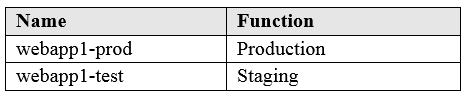
You have an Azure web app named App1. App1 has the deployment slots shown in the following table:
diagram

In webapp1-test, you test several changes to App1. You back up App1. You swap webapp1-test for webapp1-prod and discover that App1 is experiencing performance issues. You need to revert to the previous version of App1 as quickly as possible. What should you do?

Redeploying App1 can restore a previous version if you have the artifacts and pipeline ready, but it is typically slower than a slot swap rollback. It may involve build/release steps, approvals, and potential configuration drift. In exam scenarios emphasizing “as quickly as possible” after a slot swap, redeploy is usually not the best choice.

Swapping the slots again is the fastest rollback. The original production version is now in the staging slot (webapp1-test) after the first swap. A second swap returns production traffic to that prior version with minimal downtime. This is the primary operational benefit of deployment slots: quick, low-risk release and rapid rollback.

Cloning App1 creates a copy of the web app (optionally including configuration and deployment slots), which is useful for creating a new environment or duplicating settings. It does not provide the quickest path to revert production to the previous version after a bad swap, and it introduces additional resources and time.

Restoring a backup can revert site content to a point in time, but it is not the quickest rollback mechanism after a slot swap. Backup/restore operations can take longer, may overwrite current content, and are intended more for recovery scenarios (accidental deletion/corruption) than for immediate deployment rollback.

Question Analysis

Core concept: This question tests Azure App Service deployment slots and swap behavior. Deployment slots (Production, Staging, etc.) let you run two versions of the same app side-by-side and switch traffic between them with a slot swap. This supports safe releases and fast rollback. Why the answer is correct: After swapping webapp1-test into webapp1-prod, the “previous version” of the production app is not lost—it is now sitting in the other slot (webapp1-test). The fastest way to revert is to perform another slot swap, which effectively rolls back by sending production traffic back to the prior build/config state. A swap is typically a seconds-to-minutes operation and is designed specifically for rapid rollback. Key features and best practices: - Slot swap exchanges the content (and some settings) between slots. You can also use “swap with preview” to warm up the target slot and validate before completing the swap. - “Slot settings” (settings marked as slot-specific) do not move during swap, which helps keep environment-specific configuration (e.g., test vs prod connection strings) stable. - This aligns with Azure Well-Architected Framework operational excellence: use safe deployment practices, minimize downtime, and enable quick recovery. Common misconceptions: - Backups are for disaster recovery and point-in-time restore, not the quickest rollback for a bad deployment. Restoring a backup can take longer and may overwrite content/state in ways you don’t intend. - Redeploying can be slower and may require rebuilding artifacts or re-running pipelines. Exam tips: For App Service, if a new deployment causes issues immediately after a slot swap, the quickest rollback is almost always “swap back.” Use backups for data loss/corruption scenarios or when you need to restore to a specific point in time, not for rapid release rollback.

7
Question 7

You have an Azure subscription named Subscription1 that is used by several departments at your company. Subscription1 contains the resources in the following table: Name Type storage1 Storage account RG1 Resource group container1 Blob container share1 File share Another administrator deploys a virtual machine named VM1 and an Azure Storage account named storage2 by using a single Azure Resource Manager template. You need to view the template used for the deployment. From which blade can you view the template that was used for the deployment?

VM1 is a resource created by the ARM template, but the VM blade is not the primary place to retrieve the full template used for the deployment. While you can see some configuration and sometimes related deployment details, the authoritative ARM deployment record (template, parameters, operations) is tracked at the deployment scope, typically the resource group, under Deployments.

RG1 is the correct answer because ARM template details are accessed from the deployment scope through the Deployments blade, and in portal-based exam scenarios this is typically a resource group. From the resource group, you can open the deployment record and view the template, parameters, and deployment operations. Although the question does not explicitly state that the deployment occurred in RG1, RG1 is the only resource group option provided, so it is the intended blade. This matches how Azure surfaces ARM deployment history for most resource deployments in AZ-104 questions.

storage2 is also a resource created by the template, but like VM1, its resource blade is not the standard location to view the complete ARM template that performed the deployment. The deployment history and the template/parameter payload are stored and viewed at the deployment scope (usually the resource group) via the Deployments blade.

container1 is a blob container (a storage data-plane resource). It is not the typical scope for ARM template deployment history, and it won’t provide the ARM deployment record for VM1 and storage2. Even when storage containers are created via ARM, the deployment record is still accessed from the deployment scope (resource group or subscription) under Deployments.

Question Analysis

Core concept: Azure Resource Manager (ARM) template deployments are viewed from the deployment scope, most commonly a resource group. The deployment record stores the template, parameters, and deployment operations, and you access it from the Deployments blade at that scope. Why correct: When resources such as a virtual machine and a storage account are deployed together by a single ARM template, the template is not viewed from an individual resource like the VM or storage account. Instead, you open the resource group that contains those deployed resources and then review the deployment entry under Deployments to see the template. Given the available options, RG1 is the only resource group blade listed, so it is the intended answer. Key features: - Resource group > Deployments shows deployment history, template, parameters, and operation details. - Individual resource blades do not serve as the authoritative location for the original ARM template. - ARM deployments can occur at other scopes, such as subscription, but that is not represented in the answer choices. Common misconceptions: - Users often think the template can be viewed directly from the VM or storage account because those resources were created by it. - Data-plane objects such as blob containers are not where ARM deployment history is reviewed. - The key is to identify the deployment scope, not merely one of the deployed resources. Exam tips: For AZ-104, if asked where to view the template used for a deployment, think of the Deployments blade at the deployment scope. If a resource group is the only scope-related option provided, that is typically the correct choice.

8
Question 8

You download an Azure Resource Manager template based on an existing virtual machine. The template will be used to deploy 100 virtual machines. You need to modify the template to reference an administrative password. You must prevent the password from being stored in plain text. What should you create to store the password?

Correct. Azure Key Vault is designed to securely store secrets like administrative passwords and allows ARM templates to reference those secrets at deployment time. An access policy (or RBAC) grants the deployment identity permission to retrieve the secret (e.g., Secrets: Get). This prevents hardcoding or storing the password in plain text in the template or parameter files and supports auditing and rotation.

Incorrect. An Azure Storage account is not a secrets management service. While you can restrict access using SAS, access keys, or RBAC, storing a password in a blob/file would still be storing it as data and typically requires you to manage encryption, access patterns, and rotation yourself. ARM templates natively integrate with Key Vault for secret references; storage is not the best-practice solution.

Incorrect. A Recovery Services vault and backup policy are used for backup/restore and disaster recovery for workloads (Azure Backup, Azure Site Recovery). They do not provide secret storage or secure retrieval mechanisms for ARM template parameters. This option confuses data protection/backup with credential and secret management.

Incorrect. Azure AD Identity Protection focuses on detecting and remediating identity risks (risky sign-ins, compromised accounts). Azure Policy enforces governance rules on resources. Neither service is intended to store secrets like VM admin passwords or provide ARM template secret references. They are governance and security posture tools, not secret storage.

Question Analysis

Core concept: This question tests secure secret handling in Azure Resource Manager (ARM) templates when deploying compute resources at scale. ARM templates are declarative JSON files, and embedding credentials directly (even as parameters) risks exposure via source control, template exports, deployment history, or logs. Why the answer is correct: Azure Key Vault is Azure’s purpose-built service for storing and controlling access to secrets (passwords, keys, certificates). In an ARM template, you can reference a Key Vault secret using a parameter with a Key Vault reference (or use a linked template/secure parameter pattern). This prevents the password from being stored in plain text in the template file. An access policy (or Azure RBAC permissions, depending on vault configuration) grants the deployment identity (user, service principal, or managed identity) permission to read the secret at deployment time. Key features and best practices: - Secret storage: Key Vault stores secrets encrypted at rest and supports versioning and rotation. - Access control: Use least privilege via Key Vault access policies or RBAC (e.g., “Get” permission for secrets). For ARM deployments, ensure the deploying principal can read the secret. - Secure parameters: ARM supports the “secureString” parameter type, but that only prevents echoing in outputs; it does not solve the problem of where the value is stored if you hardcode it or commit parameter files. Key Vault is the recommended secure external store. - Well-Architected Framework alignment: This supports the Security pillar (protect secrets, least privilege, centralized secret management) and Operational Excellence (repeatable deployments without manual password handling). Common misconceptions: - “secureString is enough”: It helps mask values during deployment, but if you store the value in a parameter file or template, it can still be exposed. Key Vault avoids storing the secret in the template. - “Storage account with policies”: Storage is not a secret management system; access policies don’t provide secret-specific controls, auditing, or rotation. Exam tips: For ARM/Bicep deployments needing passwords, connection strings, or keys, the go-to answer is almost always Azure Key Vault. Remember: use Key Vault references and grant the deployment identity permission to read secrets. This is especially important when scaling deployments (e.g., 100 VMs) to keep credentials centralized and manageable.

9
Question 9

HOTSPOT - You have an Azure subscription that contains the resource groups shown in the following table.

diagram

RG1 contains the resources shown in the following table.

VM1 is running and connects to NIC1 and Disk1. NIC1 connects to VNET1. RG2 contains a public IP address named IP2 that is in the East US location. IP2 is not assigned to a virtual machine. For each of the following statements, select Yes if the statement is true. Otherwise, select No. NOTE: Each correct selection is worth one point. Hot Area:

Part 1:

storage1 is a Storage account located in West US.

No. A resource group's location only determines where the resource group's metadata is stored; it does not determine the location of resources inside the group. Because the scenario does not explicitly state the location of storage1, you cannot conclude that storage1 is in West US just because it is in RG1. Therefore the statement is false, while move-related statements must be evaluated based on resource support rather than resource group region.

Part 2:

VNet1 is a Virtual network located in West US.

No. The location of a virtual network is its own property and is not inherited from the resource group. The scenario never states that VNet1 is in West US, so the statement cannot be confirmed as true. Although NICs and VMs must align regionally with the VNet they use, that still does not let you infer the VNet's region from the resource group's location alone.

Part 3:

NIC1 is a Network interface located in West US.

No. A network interface has its own Azure region and does not inherit the region of its resource group. While a NIC must be in the same region as the virtual network/subnet and VM it is associated with, the scenario does not explicitly provide those resource locations. Since RG1 being in West US is not enough to prove NIC1 is in West US, the statement is false.

Part 4:

Disk1 is a Disk located in West US.

No. Managed disks are regional resources, but their region is not determined by the resource group's location. Even though an attached managed disk must be in the same region as its VM, the scenario never explicitly states VM1's region. Therefore you cannot assert that Disk1 is in West US, so the statement is false.

Part 5:

VM1 is a Virtual machine located in West US.

No. Virtual machines have their own location property, and that property is independent of the resource group's location. The fact that VM1 is in RG1 does not mean VM1 is in West US, because Azure allows resources in a resource group to exist in different regions. Since the scenario does not explicitly state VM1's region, the statement is false.

Part 6:

You can move storage1 to RG2.

Yes. You can move a storage account between resource groups within the same subscription. This is a common Azure Resource Manager operation used for reorganizing resources for governance, billing, or lifecycle management. Important constraints: the move does not change the storage account’s location (it would remain West US), and you must ensure there are no move-blocking locks or policies. Also, some resources have dependencies that must be moved together, but storage accounts are generally move-supported. So, moving storage1 to RG2 is allowed (assuming same subscription and no locks), and only the resource group assignment changes.

Part 7:

You can move NIC1 to RG2.

No. NIC1 is attached to VM1 (VM1 “connects to NIC1”). A NIC that is in use by a VM is a dependent resource and typically cannot be moved on its own to another resource group while still attached. In Azure, when you move resources, you must include all required dependent resources in the same move operation. For a VM, that commonly includes the VM resource, its NIC(s), and sometimes other dependencies. Attempting to move only NIC1 to RG2 would fail because VM1 would still reference it. Therefore, you cannot move NIC1 to RG2 by itself in this scenario. The correct approach would be to move VM1 and its dependent resources together (or detach the NIC if the platform and configuration allow, which is not implied here).

Part 8:

If you move IP2 to RG1, the location of IP2 will change.

No. Moving a resource between resource groups does not change the resource’s location/region. The location property is set at creation time for regional resources like Public IP addresses. IP2 is explicitly stated to be in East US and is currently in RG2. If you move IP2 to RG1, only the resource group changes; IP2 remains an East US public IP. This is a key AZ-104 concept: resource group is a management container, not a mechanism to redeploy resources into a different region. To change a resource’s region, you generally must recreate it in the target region (or use a service-specific migration method), not simply move it to a different resource group.

10
Question 10

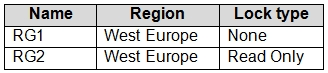
HOTSPOT - You have Azure subscriptions named Subscription1 and Subscription2. Subscription1 has following resource groups:
diagram

RG1 includes a web app named App1 in the West Europe location. Subscription2 contains the following resource groups: Name Region Lock type RG3 East Europe Delete RG4 Central US none For each of the following statements, select Yes if the statement is true. Otherwise, select No. NOTE: Each correct selection is worth one point. Hot Area:

Part 1:

App1 can be moved to RG2

App1 cannot be moved to RG2 because RG2 has a ReadOnly management lock applied at the resource group scope. A ReadOnly lock means you can view resources but cannot perform operations that modify the resource group’s contents, including adding resources to the group or moving resources into it. The move operation is treated as a write action (it changes the resource’s resourceGroup property and updates ARM metadata), so it is blocked. The fact that RG2 is in West Europe (same as App1) does not help; resource group location does not restrict which regions its resources can be in, and moving between RGs does not change the resource’s region anyway. The lock is the deciding factor.

Part 2:

App1 can be moved to RG3

App1 can be moved to RG3. RG3 has a Delete (CanNotDelete) lock, which prevents deletion of the resource group or resources within it, but it does not prevent updates or write operations such as moving a resource into the group. Therefore, the lock type does not block the move. Although RG3 is in a different region (East Europe), that is not a blocker because resource group location is not a placement constraint for resources, and moving a Web App between resource groups does not change the Web App’s region (App1 would remain in West Europe). The main assumption for cross-subscription moves is that Subscription1 and Subscription2 are in the same Azure AD tenant and you have sufficient permissions; the question typically assumes these prerequisites are met unless stated otherwise.

Part 3:

App1 can be moved to RG4

App1 can be moved to RG4 because RG4 has no management lock, so there is no governance control preventing write operations like a resource move. As with RG3, the fact that RG4 is shown as Central US does not prevent placing a West Europe resource in that resource group; the resource group’s region is not a constraint on resource regions, and the move does not relocate the Web App to Central US. This is a cross-subscription move (Subscription1 to Subscription2). For AZ-104, remember the typical prerequisites: both subscriptions must be under the same Azure AD tenant, you must have appropriate RBAC permissions on source and target scopes, and the resource type must support moves. App Service Web Apps support resource group and subscription moves under normal conditions.

Other Practice Tests

Practice Test #1

50 Questions·100 min·Pass 700/1000

Practice Test #2

50 Questions·100 min·Pass 700/1000

Practice Test #3

50 Questions·100 min·Pass 700/1000

Practice Test #5

50 Questions·100 min·Pass 700/1000

Practice Test #6

50 Questions·100 min·Pass 700/1000

Practice Test #7

50 Questions·100 min·Pass 700/1000

Practice Test #8

50 Questions·100 min·Pass 700/1000

Practice Test #9

50 Questions·100 min·Pass 700/1000
← View All Microsoft AZ-104 Questions

Start Practicing Now

Download Cloud Pass and start practicing all Microsoft AZ-104 exam questions.

Get it on Google PlayDownload on the App Store
Cloud PassCloud Pass

IT Certification Practice App

Get it on Google PlayDownload on the App Store

Certifications

AWSGCPMicrosoftCiscoCompTIADatabricks

Legal

FAQPrivacy PolicyTerms of Service

Company

ContactDelete Account

© Copyright 2026 Cloud Pass, All rights reserved.

Want to practice all questions on the go?

Get the app

Download Cloud Pass — includes practice tests, progress tracking & more.