CloudPass LogoCloud Pass
AWSGoogle CloudMicrosoftCiscoCompTIADatabricks
Certifications
AWSGoogle CloudMicrosoftCiscoCompTIADatabricks
PL-300: Microsoft Power BI Data Analyst

Practice Test #1

50개 문제와 100분 시간 제한으로 실제 시험을 시뮬레이션하세요. AI 검증 답안과 상세 해설로 학습하세요.

50문제100분700/1000합격 점수
기출 문제 보기

AI 기반

3중 AI 검증 답안 및 해설

모든 답안은 3개의 최고 AI 모델로 교차 검증하여 최고의 정확도를 보장합니다. 선택지별 상세 해설과 심층 문제 분석을 제공합니다.

GPT Pro
Claude Opus
Gemini Pro
선택지별 상세 해설
심층 문제 분석
3개 모델 합의 정확도

기출 문제

1
문제 1

You have a Microsoft SharePoint Online site that contains several document libraries. One of the document libraries contains manufacturing reports saved as Microsoft Excel files. All the manufacturing reports have the same data structure. You need to use Power BI Desktop to load only the manufacturing reports to a table for analysis. What should you do?

2
문제 2

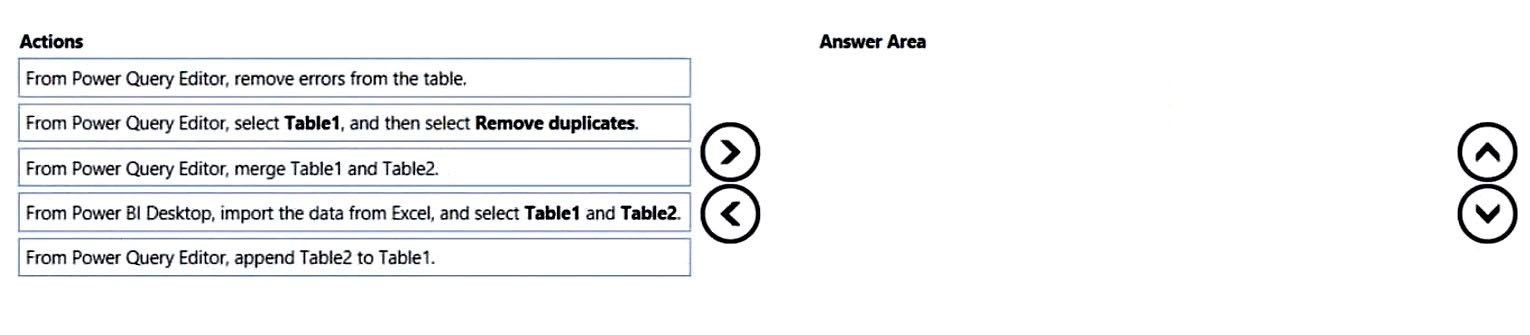
DRAG DROP - You have a Microsoft Excel workbook that contains two sheets named Sheet1 and Sheet2. Sheet1 contains the following table named Table1. Products abc def ghi jkl mno Sheet2 contains the following table named Table2. Products abc xyz tuv mno pqr stu You need to use Power Query Editor to combine the products from Table1 and Table2 into the following table that has one column containing no duplicate values. Products abc xyz tuv mno pqr stu def ghi jkl Which three actions should you perform in sequence? To answer, move the appropriate actions from the list of actions to the answer area and arrange them in the correct order. Select and Place:

파트 1:

Select the correct answer(s) in the image below.

question-image

To create one Products column from both tables, you must first load both Excel tables into Power Query. Next, use Append because append stacks rows from tables with the same schema; Merge is incorrect because it performs a join and is used to add columns based on matching keys. After appending, remove duplicates on the combined query so repeated values such as abc and mno appear only once. Removing errors is irrelevant because the scenario does not mention any errors, and removing duplicates before appending would not eliminate duplicates that exist across both tables.

3
문제 3

You have a project management app that is fully hosted in Microsoft Teams. The app was developed by using Microsoft Power Apps. You need to create a Power BI report that connects to the project management app. Which connector should you select?

4
문제 4

HOTSPOT - You are creating a Microsoft Power BI imported data model to perform basket analysis. The goal of the analysis is to identify which products are usually bought together in the same transaction across and within sales territories. You import a fact table named Sales as shown in the exhibit. (Click the Exhibit tab.) SalesRowID | ProductKey | OrderDateKey | OrderDate | CustomerKey | SalesTerritoryKey | SalesOrderNumber | SalesOrderLineNumber | OrderQuantity | LineTotal | TaxAmt | Freight | LastModified | AuditID 1 | 310 | 20101229 | 2010-12-29 00:00:00.000 | 21768 | 6 | SO43697 | 1 | 1 | 3578.27 | 286.2616 | 89.4568 | 2011-01-10 00:00:00.000 | 127 2 | 346 | 20101229 | 2010-12-29 00:00:00.000 | 28389 | 7 | SO43698 | 1 | 1 | 3399.99 | 271.9992 | 84.9998 | 2011-01-10 00:00:00.000 | 127 3 | 346 | 20101229 | 2010-12-29 00:00:00.000 | 25863 | 1 | SO43699 | 1 | 1 | 3399.99 | 271.9992 | 84.9992 | 2011-01-10 00:00:00.000 | 127 4 | 336 | 20101229 | 2010-12-29 00:00:00.000 | 14501 | 4 | SO43700 | 1 | 1 | 699.0982 | 55.9279 | 17.4775 | 2011-01-10 00:00:00.000 | 127 5 | 346 | 20101229 | 2010-12-29 00:00:00.000 | 11003 | 9 | SO43701 | 1 | 1 | 3399.99 | 271.9992 | 84.9998 | 2011-01-10 00:00:00.000 | 127 6 | 311 | 20101230 | 2010-12-30 00:00:00.000 | 27645 | 4 | SO43702 | 1 | 1 | 3578.27 | 286.2616 | 89.4568 | 2011-01-11 00:00:00.000 | 127 7 | 310 | 20101230 | 2010-12-30 00:00:00.000 | 16624 | 9 | SO43703 | 1 | 1 | 3578.27 | 286.2616 | 89.4568 | 2011-01-11 00:00:00.000 | 127 The related dimension tables are imported into the model. Sales contains the data shown in the following table. Column name Data type Description SalesRowID Integer ID of the row from the source system, which represents a unique combination of SalesOrderNumber and SalesOrderLineNumber ProductKey Integer Surrogate key that relates to the product dimension OrderDateKey Integer Surrogate key that relates to the date dimension and is in the YYYYMMDD format OrderDate Datetime Date and time an order was processed CustomerKey Integer Surrogate key that relates to the customer dimension SalesTerritoryKey Integer Surrogate key that relates to the sales territory dimension SalesOrderNumber Text Unique identifier of an order SalesOrderLineNumber Integer Unique identifier of a line within an order OrderQuantity Integer Quantity of the product ordered LineTotal Decimal Total sales amount of a line before tax TaxAmt Decimal Amount of tax charged for the items on a specified line within an order Freight Decimal Amount of freight charged for the items on a specified line within an order LastModified Datetime The date and time that a row was last modified in the source system AuditID Integer The ID of the data load process that last updated a row You are evaluating how to optimize the model. For each of the following statements, select Yes if the statement is true. Otherwise, select No. NOTE: Each correct selection is worth one point. Hot Area:

파트 1:

The SalesRowID and AuditID columns can be removed from the model without impeding the analysis goals.

Yes. SalesRowID and AuditID are technical/operational columns that do not help identify products bought together. Basket analysis requires grouping lines into a transaction (SalesOrderNumber) and identifying the products in that transaction (ProductKey), then optionally slicing by territory/date/customer. SalesRowID is a source-system row identifier (unique combination of SalesOrderNumber and SalesOrderLineNumber). Since SalesOrderNumber and SalesOrderLineNumber already exist, SalesRowID is redundant for analysis and not needed for relationships. AuditID tracks the ETL/load process that last updated the row; it is useful for data engineering troubleshooting but not for analytical grouping, filtering, or measures related to co-purchase behavior. Removing both columns reduces model size and can improve refresh/query performance without impeding the stated analysis goals.

파트 2:

Both the OrderDateKey and OrderDate columns are necessary to perform the basket analysis.

No. Both OrderDateKey and OrderDate are not necessary for basket analysis. In a star schema, OrderDateKey is typically used to relate the Sales fact table to a Date dimension (which then provides year/quarter/month/day attributes for slicing). For basket analysis across time, that relationship is sufficient. The OrderDate (datetime) column is often redundant if you already have a proper Date dimension and do not need time-of-day granularity. Basket analysis is usually performed at the transaction level (SalesOrderNumber) and may be filtered by date, but that can be done via the Date dimension using OrderDateKey. You would keep OrderDate only if you specifically need the timestamp (hours/minutes) or if you lack a Date dimension/relationship. Given the prompt states related dimension tables are imported, OrderDateKey alone is enough.

파트 3:

The TaxAmt column must retain the current number of decimal places to perform the basket analysis.

No. TaxAmt does not need to retain the current number of decimal places to perform basket analysis. Basket analysis primarily evaluates which products co-occur in the same order; it relies on transaction identifiers and product identifiers, and sometimes quantities. Tax amount precision is not part of determining whether two products were bought together. Even if you were to include value-based metrics (e.g., total basket value), you could typically round currency values to a sensible precision (often 2 decimal places) without changing the co-occurrence results. In many basket-analysis models, TaxAmt is not required at all and could be removed to optimize the model. Therefore, retaining the exact current decimal precision is not a requirement for achieving the stated analysis goal.

5
문제 5

You have a collection of reports for the HR department of your company. The datasets use row-level security (RLS). The company has multiple sales regions. Each sales region has an HR manager. You need to ensure that the HR managers can interact with the data from their region only. The HR managers must be prevented from changing the layout of the reports. How should you provision access to the reports for the HR managers?

이동 중에도 모든 문제를 풀고 싶으신가요?

Cloud Pass를 다운로드하세요 — 모의고사, 학습 진도 추적 등을 제공합니다.

6
문제 6

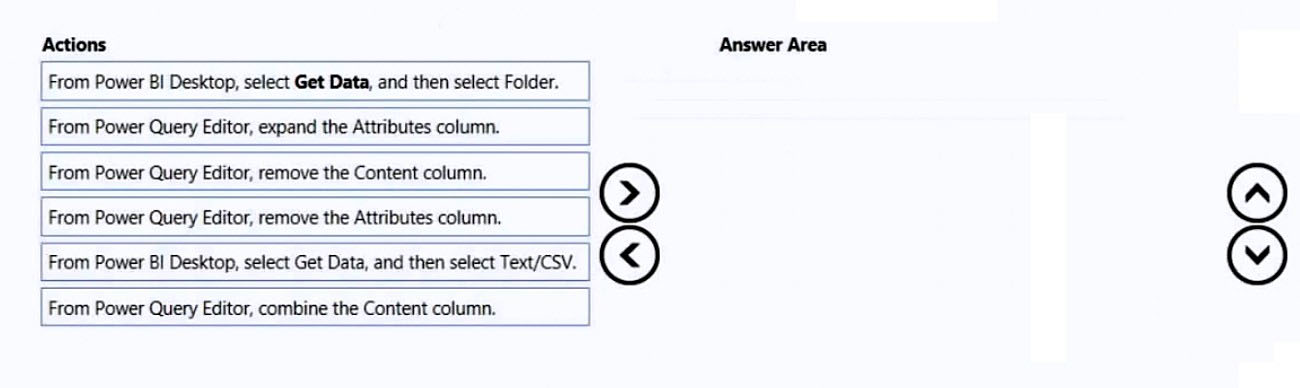
DRAG DROP - You have a folder that contains 100 CSV files. You need to make the file metadata available as a single dataset by using Power BI. The solution must NOT store the data of the CSV files. Which three actions should you perform in sequence. To answer, move the appropriate actions from the list of actions to the answer area and arrange them in the correct order. Select and Place:

파트 1:

Select the correct answer(s) in the image below.

question-image

Answer A (Pass) is appropriate because the correct sequence of actions is clear from Power BI Folder connector behavior. Correct sequence (three actions): 1) From Power BI Desktop, select Get Data, and then select Folder. 2) From Power Query Editor, remove the Content column. 3) From Power Query Editor, expand the Attributes column. Why: The Folder connector produces a file listing; Content is the binary file payload. Removing Content ensures the dataset does not ingest/store CSV data. Expanding Attributes exposes additional metadata (for example, size, hidden, read-only flags) as columns, creating a single metadata dataset across all 100 files. Why others are wrong: Get Data > Text/CSV would connect to a single CSV, not a folder. Combining the Content column would read and append the CSV contents, violating the “must NOT store the data” requirement. Removing Attributes would discard useful metadata rather than exposing it.

7
문제 7

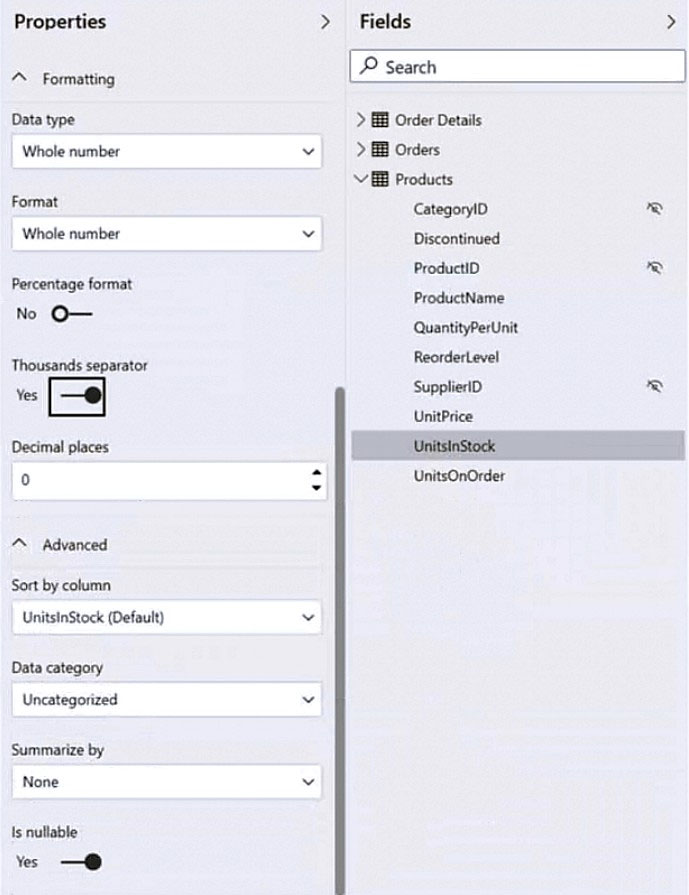
HOTSPOT - You have a column named UnitsInStock as shown in the following exhibit.
diagram

UnitsInStock has 75 non-null values, of which 51 are unique. Use the drop-down menus to select the answer choice that completes each statement based on the information presented in the graphic. NOTE: Each correct selection is worth one point. Hot Area:

파트 1:

When a table visual is created in a report and UnitsInStock is added to the values, there will be ______ in the table.

Correct answer: D (75 rows). Because UnitsInStock has “Summarize by” set to None (Don’t summarize), adding it to a table visual will display the detail-level values rather than an aggregation. With no other grouping fields in the visual, Power BI will list the column’s values per underlying row in the model. The prompt states there are 75 non-null values, so the table will show 75 rows (nulls would not appear as separate numeric values in this context). Why the others are wrong: - A (0 rows): There is data, so the visual will render rows. - B (1 row): You’d typically get 1 row only if the field were aggregated (e.g., Sum) and it was the only field in the visual. - C (51 rows): 51 is the count of unique values, but a table visual does not automatically de-duplicate a non-aggregated column; it shows row-level records, not distinct values, unless you explicitly use a distinct-count/summary approach.

파트 2:

Changing the Summarize by setting of the UnitsInStock column, and then adding the column to a table visual, will ______ the number of rows in the table visual.

Correct answer: B (reduce). Changing the column’s “Summarize by” setting from None to an aggregation (such as Sum, Average, Min, Max, Count) changes the default behavior when the field is added to a visual. If you then add UnitsInStock (by itself) to a table visual, Power BI will return a single aggregated value for the current filter context, which typically results in 1 row instead of many detail rows. Therefore, the number of rows is reduced. Why the others are wrong: - A (maintain): The row count would only be maintained if the field remained non-summarized or if additional grouping columns were added that force detail rows. - C (increase): Aggregation collapses detail into fewer results; it does not create more rows. Even if you used a grouping field, aggregation generally reduces granularity compared to showing raw rows.

8
문제 8

You have a Power BI report for the marketing department. The report reports on web traffic to a blog and contains data from the following tables. Table name Source Description Column name Posts Blog RSS feed An XML representation of all the blog posts from • Publish Date your company’s website • URL • Title • Full Text • Summary Traffic Website logs Activity data from your company’s entire website • DateTime • URL Visited • IP Address • Browser Agent • Referring URL There is a one-to-many relationship from Posts to Traffic that uses the URL and URL Visited columns. The report contains the visuals shown in the following table.

The dataset takes a long time to refresh. You need to modify Posts and Traffic queries to reduce load times. Which two actions will reduce the load times? Each correct answer presents part of the solution. NOTE: Each correct selection is worth one point.

파트 1:

Top 10 blog posts of all time uses Posts[Title] and Traffic[DateTime] with no filter.

No. This visual uses Posts[Title] and Traffic[DateTime] with no filter, and it is explicitly “Top 10 blog posts of all time.” To support this, the model must be able to count/aggregate traffic across the full history of Traffic for blog posts. If you applied a query-level DateTime filter (for example, last 7/30/90 days) to reduce refresh time, you would change the meaning of “all time” and the visual would become incorrect. However, you can still reduce load time by filtering Traffic to only blog-related rows (URL Visited contains “blog”), because the visual is about blog posts, not the entire website. That filter keeps the “all time” requirement intact while reducing rows. So the correct response to whether you can apply a time-based reduction for this visual is No.

파트 2:

Top 10 blog posts from the last seven days uses Posts[Title] and Traffic[DateTime] with Traffic[DateTime] is in the last 7 days filter.

No. Although this single visual is filtered to the last seven days, modifying the shared Traffic query to keep only the last seven days would break other visuals that require all-time traffic data. Query changes must preserve the requirements of the whole report, not just one visual. Therefore, a global DateTime filter is not an appropriate refresh optimization in this scenario.

파트 3:

Blog visits over time uses Traffic[DateTime] and Traffic[URL Visited] with Traffic[URL Visited] contains 'blog' filter.

Yes. This visual is “Blog visits over time” and includes a filter Traffic[URL Visited] contains “blog.” Since the report is for the marketing department and focuses on blog traffic, pushing this filter into the Traffic query is a classic refresh optimization: it reduces the number of rows imported from website logs (which are usually very large) and reduces the work needed for relationship matching and compression. From an exam perspective, this is one of the most defensible query changes because it does not change the meaning of any blog-only visual; it simply removes non-blog website traffic that the report does not analyze. It also tends to preserve query folding when the source is a database or log store that can filter server-side.

파트 4:

Top 10 external referrals to the blog of all time uses Traffic[Referring URL] with Traffic[URL Visited] contains 'blog' and Traffic[Referring URL] does not start with '/' filter.

Yes. This visual only analyzes visits to blog pages that came from external referrers, as indicated by URL Visited contains 'blog' and Referring URL does not start with '/'. Applying these filters in Power Query reduces the number of rows loaded and can improve refresh performance without changing the meaning of this visual. The other visuals shown do not require non-blog traffic or internal referrals, so removing those rows is a valid optimization for this report scenario.

9
문제 9

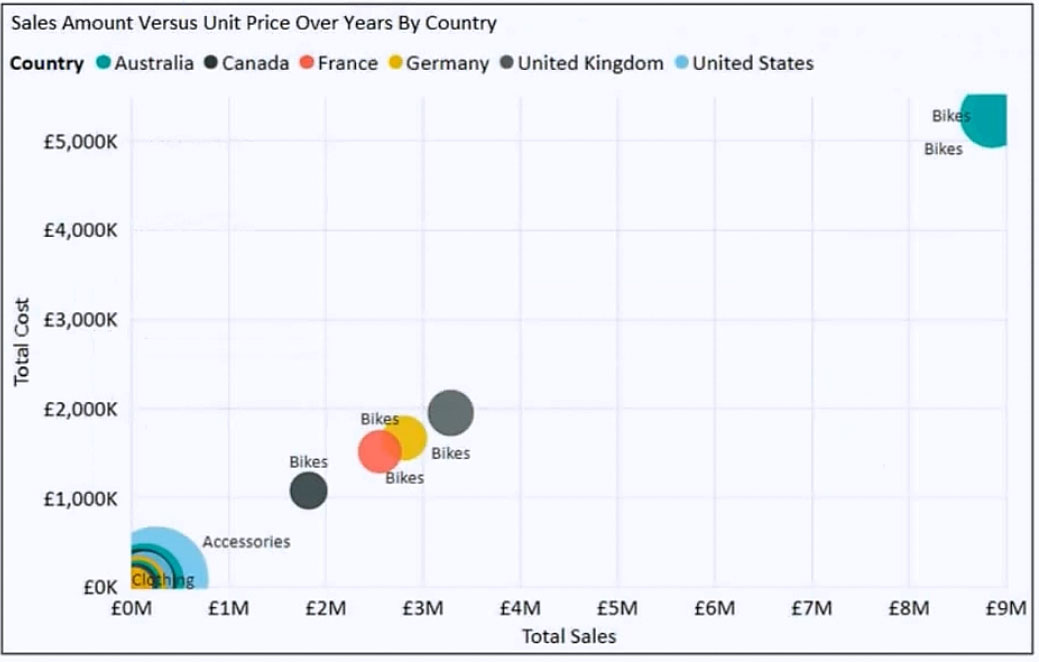
You have the visual shown in the exhibit. (Click the Exhibit tab.)
diagram

You need to show the relationship between Total Cost and Total Sales over time. What should you do?

10
문제 10

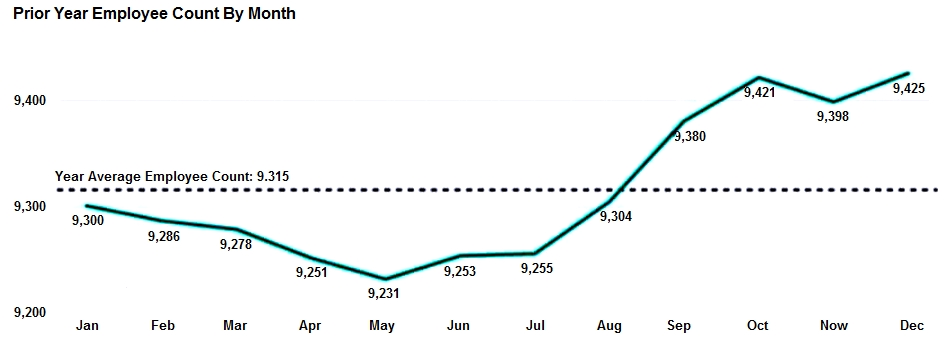
HOTSPOT - You are creating a line chart in a Power BI report as shown in the following exhibit.
diagram

Use the drop-down menus to select the answer choice that completes each statement based on the information presented in the graphic. NOTE: Each correct selection is worth one point. Hot Area:

파트 1:

The dashed line representing the Year Average Employee Count was created by using ______.

The dashed line labeled “Year Average Employee Count” is created using an average reference line from the Analytics pane. In Power BI line charts, reference lines can be configured as Average, Median, Min, Max, Constant, etc., and they commonly render as a horizontal dashed line with an optional label showing the computed value. This matches the exhibit: a single horizontal dashed line spanning the chart with an average value. Why others are wrong: - A (trend line): a trend line typically slopes (linear regression) and is used to show direction over time, not a constant horizontal average. - B (secondary axis): a secondary axis is used when plotting measures with different scales; it doesn’t inherently create an average line. - D (two measures in the Values bucket): adding a second measure would plot another series (another line) that varies by month, not a constant dashed average across all months unless you specifically engineered a constant measure; the standard feature for this is the Analytics reference line.

파트 2:

To enable users to drill down to weeks or days, add the Weeks and Days field to the ______ bucket.

To enable drill down to weeks or days, you add the Weeks and Days fields to the Axis bucket (X-axis) to form a hierarchy. Power BI drill-down works by having multiple categorical levels on the axis; users can then use Drill Down/Expand controls to navigate from Month to Week to Day within the same visual. Why others are wrong: - B (Values): Values contains measures (what is being aggregated and plotted), not the categorical levels used for drill navigation. - C (Legend): Legend splits the measure into multiple series (e.g., by department), but it does not create drill levels. - D (Secondary values): this is not the standard mechanism for drill-down; drill-down is driven by axis hierarchies (or sometimes by using the built-in Date hierarchy), not by secondary value wells.

다른 모의고사

Practice Test #2

50 문제·100분·합격 700/1000

Practice Test #3

50 문제·100분·합격 700/1000

Practice Test #4

50 문제·100분·합격 700/1000

Practice Test #5

50 문제·100분·합격 700/1000
← 모든 PL-300: Microsoft Power BI Data Analyst 문제 보기

지금 학습 시작하기

Cloud Pass를 다운로드하고 모든 PL-300: Microsoft Power BI Data Analyst 기출 문제를 풀어보세요.

Get it on Google PlayDownload on the App Store
Cloud PassCloud Pass

IT 자격증 문제풀이 앱

Get it on Google PlayDownload on the App Store

자격증

AWSGCPMicrosoftCiscoCompTIADatabricks

법률

FAQ개인정보 처리방침서비스 약관

회사

문의하기계정 삭제

© Copyright 2026 Cloud Pass, All rights reserved.

이동 중에도 모든 문제를 풀고 싶으신가요?

앱 받기

Cloud Pass를 다운로드하세요 — 모의고사, 학습 진도 추적 등을 제공합니다.