CloudPass LogoCloud Pass
AWSGoogle CloudMicrosoftCiscoCompTIADatabricks
Certifications
AWSGoogle CloudMicrosoftCiscoCompTIADatabricks
PL-300: Microsoft Power BI Data Analyst

Practice Test #2

50개 문제와 100분 시간 제한으로 실제 시험을 시뮬레이션하세요. AI 검증 답안과 상세 해설로 학습하세요.

50문제100분700/1000합격 점수
기출 문제 보기

AI 기반

3중 AI 검증 답안 및 해설

모든 답안은 3개의 최고 AI 모델로 교차 검증하여 최고의 정확도를 보장합니다. 선택지별 상세 해설과 심층 문제 분석을 제공합니다.

GPT Pro
Claude Opus
Gemini Pro
선택지별 상세 해설
심층 문제 분석
3개 모델 합의 정확도

기출 문제

1
문제 1

HOTSPOT - You have a Power BI model that contains a table named Sales and a related date table. Sales contains a measure named Total Sales. You need to create a measure that calculates the total sales from the equivalent month of the previous year. How should you complete the calculation? To answer, select the appropriate options in the answer area. NOTE: Each correct selection is worth one point. Hot Area:

파트 1:

Sales Previous Year = ______

The correct function to start this measure is CALCULATE because you need to re-calculate an existing measure ([Total Sales]) under a modified filter context (the prior-year dates). CALCULATE is the core DAX function for context transition and filter manipulation, which is exactly what time intelligence requires. Why the others are wrong: - EVALUATE is used in DAX queries (for example, in DAX Studio or SSMS) to return a table result; it is not used to define measures in Power BI. - SUM aggregates a column directly (for example, SUM(Sales[Amount])). Since you already have a measure [Total Sales], you should reuse it rather than re-summing a column. - SUMX is an iterator that evaluates an expression row-by-row over a table. It’s useful for calculated row logic, but it’s unnecessary and less efficient for a simple prior-year version of an existing measure.

파트 2:

[Total Sales], ______(

SAMEPERIODLASTYEAR is the best match for “equivalent month of the previous year.” When the current filter context is a month (for example, March 2025), SAMEPERIODLASTYEAR returns the set of dates for March 2024, preserving the shape of the current period and shifting it back one year. Why the others are wrong: - DATESMTD returns dates from the start of the month to the current date in context (month-to-date), not the same month last year. - PARALLELPERIOD can shift periods (for example, -1 year), but the exam typically expects SAMEPERIODLASTYEAR for standard prior-year comparisons, and it’s more explicit for this scenario. - TOTALMTD is a wrapper that calculates a month-to-date total, which is not requested here (you want total sales for the equivalent month, not MTD).

파트 3:

You should pass the date column from the Date table into SAMEPERIODLASTYEAR, which is `Date`[Date]. Time intelligence functions require a column of type Date (or DateTime) from a proper date table to generate the correct set of shifted dates. Why the others are wrong: - [Date] is ambiguous because it doesn’t specify the table. In DAX, especially in models with multiple tables, you should fully qualify columns to avoid ambiguity and ensure the function uses the date dimension. - `Date`[Month] is not appropriate because it is typically a text or numeric month attribute and does not uniquely identify days. SAMEPERIODLASTYEAR operates on a contiguous set of daily dates; using a month column would break the required granularity and can produce incorrect or invalid results. Putting it together, the intended measure pattern is: Sales Previous Year = CALCULATE([Total Sales], SAMEPERIODLASTYEAR(`Date`[Date]))

2
문제 2

Note: This question is part of a series of questions that present the same scenario. Each question in the series contains a unique solution that might meet the stated goals. Some question sets might have more than one correct solution, while others might not have a correct solution. After you answer a question in this section, you will NOT be able to return to it. As a result, these questions will not appear in the review screen. You are modeling data by using Microsoft Power BI. Part of the data model is a large Microsoft SQL Server table named Order that has more than 100 million records. During the development process, you need to import a sample of the data from the Order table. Solution: From Power Query Editor, you import the table and then add a filter step to the query. Does this meet the goal?

3
문제 3

DRAG DROP - You are using existing reports to build a dashboard that will be viewed frequently in portrait mode on mobile phones. You need to build the dashboard. Which four actions should you perform in sequence? To answer, move the appropriate actions from the list of actions to the answer area and arrange them in the correct order. Select and Place:

파트 1:

Pin items from the reports to the dashboard.

Yes. A dashboard in Power BI is composed of tiles, and those tiles typically come from existing report visuals (or live pages) that you pin in the Power BI service. Since the requirement is to use existing reports to build a dashboard, pinning is the foundational step that actually creates the dashboard content. Without pinning items, there is nothing to arrange in the dashboard (including in the mobile layout). Why not No: If you skip pinning, you would only be editing an empty dashboard or not have a dashboard at all. Even if a dashboard already exists, you still need to pin the specific visuals you want users to see frequently on mobile. Pinning is therefore required to meet the scenario’s goal of building a mobile-consumable dashboard from existing reports.

파트 2:

Open the dashboard.

Yes. After pinning items (which creates/populates the dashboard), you must open the dashboard to access its settings and edit experiences, including the Mobile view. The mobile layout editor is accessed from within the dashboard in the Power BI service. Why not No: You cannot edit a dashboard’s mobile view without being in the context of that dashboard. While you can pin directly from a report visual and choose an existing/new dashboard, the step of opening the dashboard is necessary to proceed to mobile-specific layout editing and to validate the final portrait phone experience.

파트 3:

Create a phone layout for the existing reports.

No. Creating a phone layout for existing reports is a report-level optimization done in Power BI Desktop (View > Mobile layout). That feature controls how report pages render in the Power BI mobile app, not how a dashboard’s tiles are arranged on a phone. Why not Yes: The question is specifically about building a dashboard from existing reports and having that dashboard viewed frequently on mobile phones in portrait mode. For dashboards, the correct feature is editing the dashboard Mobile view in the Power BI service. Report phone layout could still be useful if users also open the underlying reports on mobile, but it is not required to build and optimize the dashboard itself, so it is not part of the necessary sequence.

파트 4:

Edit the Dashboard mobile view.

Yes. To optimize a dashboard for portrait mode on mobile phones, you use the dashboard’s Mobile view editor in the Power BI service. This provides a dedicated canvas representing a phone screen where you choose which pinned tiles appear and how they are arranged for mobile consumption. Why not No: If you only rely on the default dashboard layout, the mobile experience may be suboptimal (tiny tiles, poor ordering, excessive scrolling). The requirement explicitly calls out frequent viewing on mobile in portrait mode, which strongly implies you should tailor the Mobile view to prioritize key KPIs and improve usability.

파트 5:

Rearrange, resize, or remove items from the mobile layout.

Yes. After entering the dashboard Mobile view editor, you must rearrange, resize, or remove items to create an effective portrait phone layout. This is the step where you implement the actual mobile-first design: placing the most important KPIs at the top, resizing tiles for readability, and removing nonessential visuals to reduce scrolling. Why not No: Simply opening Mobile view without adjusting the layout does not meet the requirement to build a dashboard that is optimized for frequent mobile viewing. The exam expects you to recognize that mobile optimization is an explicit design activity, not an automatic outcome of pinning tiles.

4
문제 4

You have an Azure SQL database that contains sales transactions. The database is updated frequently. You need to generate reports from the data to detect fraudulent transactions. The data must be visible within five minutes of an update. How should you configure the data connection?

5
문제 5

In Power BI Desktop, you are creating visualizations in a report based on an imported dataset. You need to allow Power BI users to export the summarized data used to create the visualizations but prevent the users from exporting the underlying data. What should you do?

이동 중에도 모든 문제를 풀고 싶으신가요?

Cloud Pass를 다운로드하세요 — 모의고사, 학습 진도 추적 등을 제공합니다.

6
문제 6

You build a report to analyze customer transactions from a database that contains the tables shown in the following table. Table name Column name Customer CustomerID (primary key) Name State Email Transaction TransactionID (primary key) CustomerID (foreign key) Date Amount You import the tables. Which relationship should you use to link the tables?

7
문제 7
(2개 선택)

You are creating a sales report in Power BI for the NorthWest region sales territory of your company. Data will come from a view in a Microsoft SQL Server database. A sample of the data is shown in the following table: ID ProductKey OrderDate ShipDate CustomerKey SalesTerritoryRegion SalesOrderNumber SalesOrderLineNumber OrderQuantity UnitPrice SalesAmount TaxAmount Freight 1 310 2010-12-29 2011-01-05 21768 Canada SO43697 1 1 3578.27 3578.27 286.2616 89.4568 2 346 2010-12-29 2011-01-05 27365 France SO43698 1 1 3399.99 3399.99 271.9992 84.9998 3 346 2010-12-29 2011-01-05 76537 NorthWest SO43699 1 1 3399.99 3399.99 271.9992 84.9998 4 336 2010-12-30 2011-01-06 34256 SouthWest SO43700 1 1 699.0992 699.0982 55.9279 17.4775 5 346 2010-12-30 2011-01-06 34253 Australia SO43701 1 1 3399.99 3399.99 271.9992 84.9998 6 311 2010-12-30 2011-01-06 12543 SouthWest SO43702 1 1 3578.27 3578.27 286.2616 89.4568 7 310 2010-12-30 2011-01-06 76545 Australia SO43703 1 1 3578.27 3578.27 286.2616 89.4568 The report will facilitate the following analysis: ✑ The count of orders and the sum of total sales by Order Date ✑ The count of customers who placed an order ✑ The average quantity per order You need to reduce data refresh times and report query times. Which two actions should you perform? Each correct answer presents part of the solution. NOTE: Each correct selection is worth one point.

8
문제 8

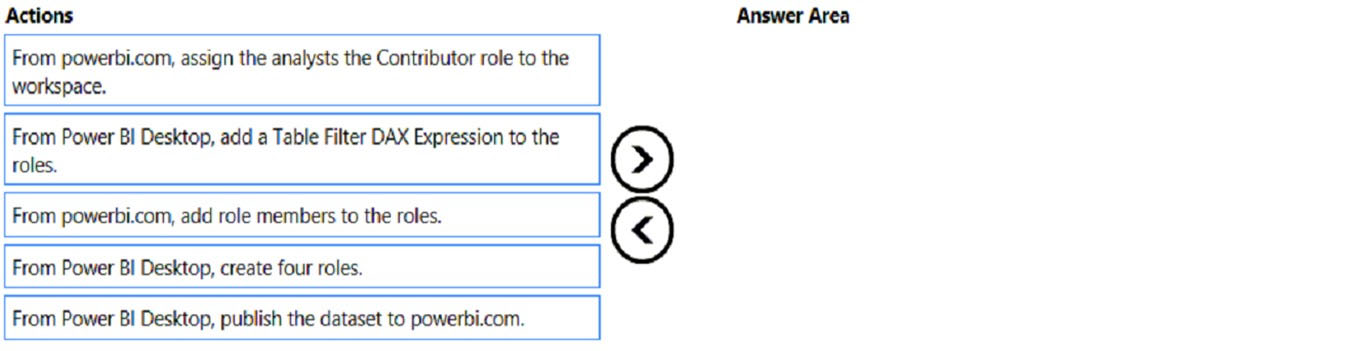
DRAG DROP - Once the profit and loss dataset is created, which four actions should you perform in sequence to ensure that the business unit analysts see the appropriate profit and loss data? To answer, move the appropriate actions from the list of actions to the answer area and arrange them in the correct order. Select and Place:

파트 1:

Select the correct answer(s) in the image below.

question-image

Answer: A (Pass). Correct sequence of actions to ensure analysts see appropriate P&L data via RLS is: 1) From Power BI Desktop, create four roles. 2) From Power BI Desktop, add a Table Filter DAX Expression to the roles. 3) From Power BI Desktop, publish the dataset to powerbi.com. 4) From powerbi.com, add role members to the roles. Why this is correct: RLS roles and their DAX filters must be authored in Desktop as part of the dataset definition. Publishing moves the secured dataset to the service. Only after publishing can you assign users/groups to those roles in the Power BI service so enforcement occurs at query time. Why the Contributor workspace role option is wrong: workspace permissions govern authoring/management, not row-level data visibility. Also, Contributors/Members can potentially bypass RLS in the workspace, which is the opposite of “ensure appropriate data visibility.”

9
문제 9

HOTSPOT - You need to design the data model and the relationships for the Customer Details worksheet and the Orders table by using Power BI. The solution must meet the report requirements. For each of the following statements, select Yes if the statement is true. Otherwise, select No. NOTE: Each correct selection is worth one point. Hot Area:

파트 1:

A relationship must be created between the CustomerID column in the Customer Details worksheet and the CustomerID column in the Orders table.

Yes. To meet typical report requirements such as showing “Top Customers” based on order metrics, Power BI must be able to filter and aggregate Orders by customer attributes stored in the Customer Details worksheet. The standard approach is a one-to-many relationship: Customer Details[CustomerID] (dimension, unique) -> Orders[CustomerID] (fact, repeating). Without this relationship, customer-level fields (like Customer Name or Region from Customer Details) will not correctly filter the Orders table, leading to incorrect totals or requiring complex DAX (e.g., TREATAS) to simulate relationships. In exam scenarios, when you have a Customer table and an Orders table, the expected modeling step is to relate them on CustomerID to form a star schema. This improves model clarity, reduces ambiguity, and supports efficient filter propagation from dimension to fact.

파트 2:

The Data Type of the columns in the relationship between the Customer Details worksheet and the Orders table must be set to Text.

No. The columns used in a relationship must have the same data type, but they do not specifically have to be Text. The correct choice depends on the nature of CustomerID in the source data. If CustomerID is numeric and has no leading zeros, Whole Number is typically preferred for performance and storage efficiency. If CustomerID can contain letters, hyphens, or leading zeros that must be preserved (e.g., “000123”), then Text is appropriate. Power BI will not allow a relationship between mismatched data types (e.g., Text to Whole Number) without conversion, but the requirement is consistency, not Text. Therefore, stating that the data type “must be set to Text” is too prescriptive and not universally true.

파트 3:

The Region field used to filter the Top Customers report must come from the Orders table.

No. The Region field used to filter a “Top Customers” report should come from the Customer Details (dimension) table, not from the Orders (fact) table. Region is a descriptive attribute of the customer and is typically stable compared to transactional data. Storing Region in Orders would duplicate the value across many rows, increasing model size and risking inconsistencies (e.g., if a customer’s region changes or if historical orders contain different region values). Using Region from the Customer dimension aligns with star schema best practices: dimensions provide slicers/filters; facts provide measures. With the CustomerID relationship in place, filtering by Customer Details[Region] will correctly filter Orders and produce accurate “Top Customers” results.

10
문제 10

You have a Power BI report hosted on powerbi.com that displays expenses by department for department managers. The report contains a line chart that shows expenses by month. You need to enable users to choose between viewing the report as a line chart or a column chart. The solution must minimize development and maintenance effort. What should you do?

다른 모의고사

Practice Test #1

50 문제·100분·합격 700/1000

Practice Test #3

50 문제·100분·합격 700/1000

Practice Test #4

50 문제·100분·합격 700/1000

Practice Test #5

50 문제·100분·합격 700/1000
← 모든 PL-300: Microsoft Power BI Data Analyst 문제 보기

지금 학습 시작하기

Cloud Pass를 다운로드하고 모든 PL-300: Microsoft Power BI Data Analyst 기출 문제를 풀어보세요.

Get it on Google PlayDownload on the App Store
Cloud PassCloud Pass

IT 자격증 문제풀이 앱

Get it on Google PlayDownload on the App Store

자격증

AWSGCPMicrosoftCiscoCompTIADatabricks

법률

FAQ개인정보 처리방침서비스 약관

회사

문의하기계정 삭제

© Copyright 2026 Cloud Pass, All rights reserved.

이동 중에도 모든 문제를 풀고 싶으신가요?

앱 받기

Cloud Pass를 다운로드하세요 — 모의고사, 학습 진도 추적 등을 제공합니다.